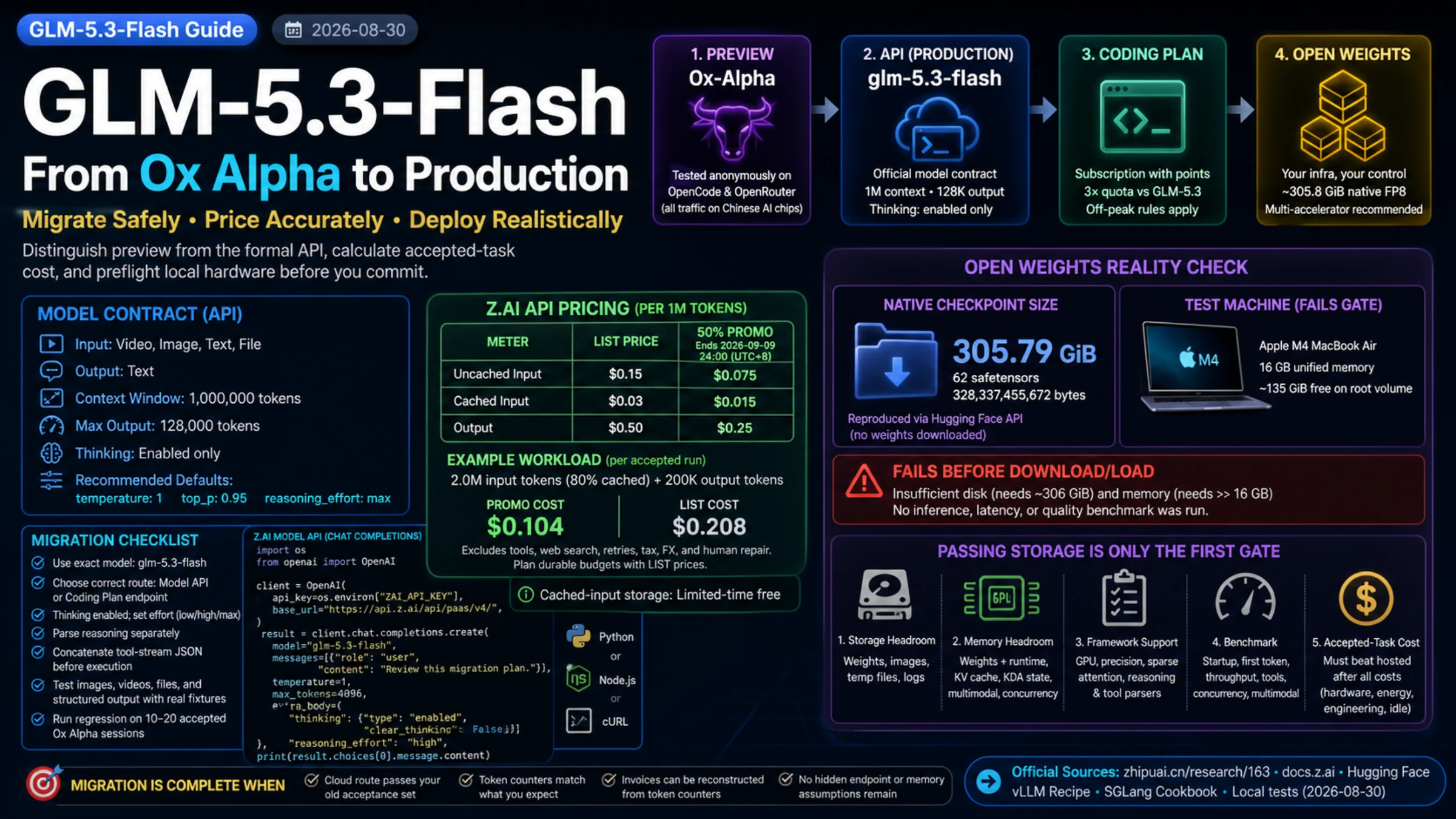
Ox Alpha has a formal identity now. Zhipu AI says in its August 26 launch announcement that GLM-5.3-Flash was tested anonymously as Ox-Alpha on OpenCode and OpenRouter before release. The production model code is glm-5.3-flash.
That is enough to preserve your Ox Alpha results as an evaluation baseline. It is not enough to assume that a preview URL, provider-side cache, price, rate limit, or response event was renamed in place. Check the released API’s configuration and behavior before moving traffic.
There are also three different products behind the same model name:
| Route | What you buy or operate | The number that matters first |
|---|---|---|
| Z.AI Model API | Metered hosted inference | Input, cached input, and output tokens |
| GLM Coding Plan | A subscription with points and supported coding tools | Quota consumption, including off-peak rules |
| Open weights | Your own serving stack | Weight storage, accelerator memory, cache, concurrency, and operations |
The official claim that Flash offers three times the usable Coding Plan quota does not mean its API is “three times cheaper.” Likewise, 18B activated parameters does not mean the open model fits in 18 GB.
Make the migration observable before moving traffic
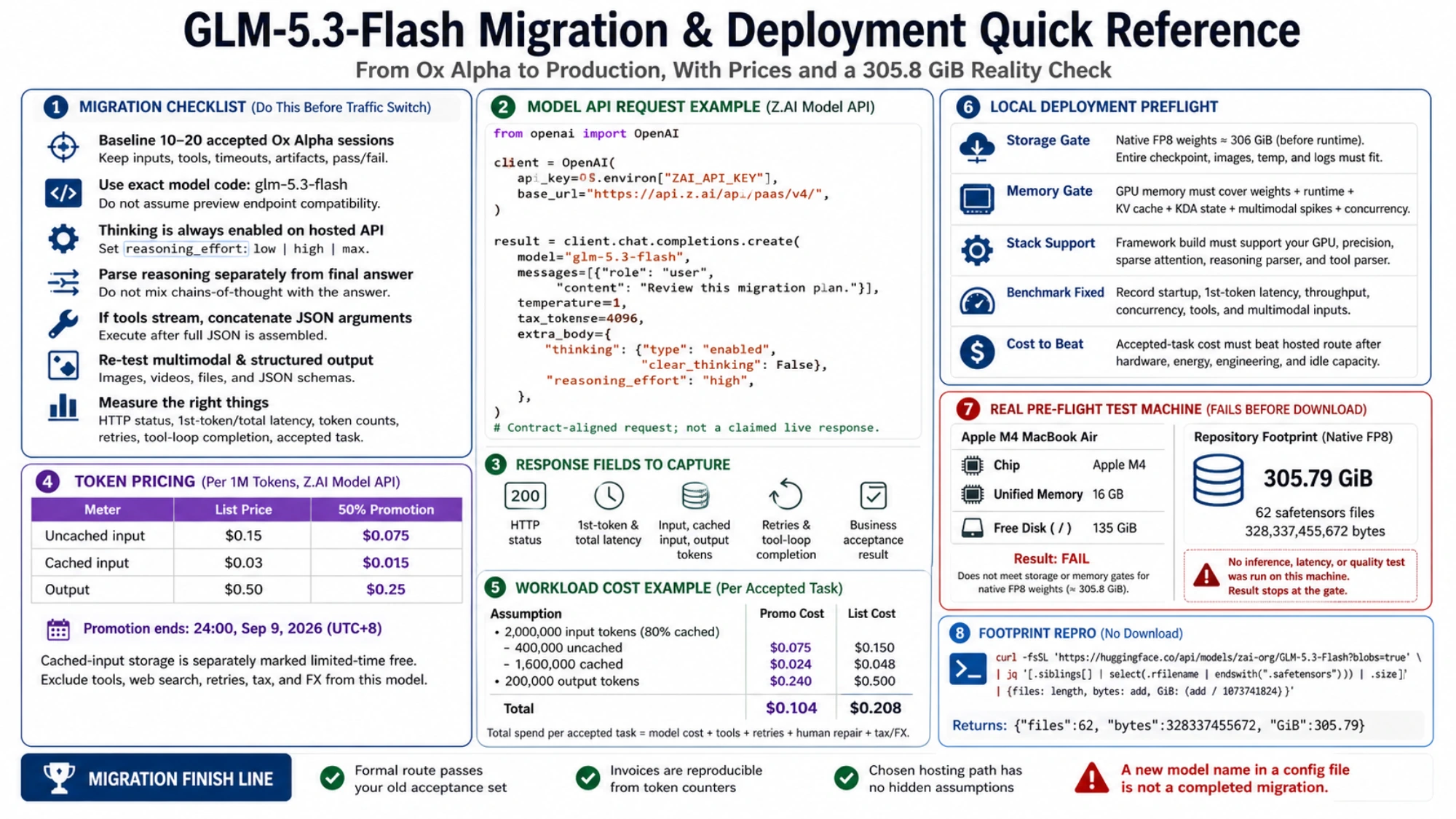
Start with a representative set of accepted Ox Alpha sessions from your own workload. Keep the input, tool permissions, timeout, maximum turns, artifacts, and pass/fail decision. Do not keep only the final prose: tool arguments, partial streams, and retry behavior often expose the real incompatibility.
Build the formal path alongside the old one:
- use the exact
glm-5.3-flashmodel code; - select either the metered Model API or the dedicated Coding Plan endpoint rather than mixing credentials and base URLs;
- send thinking as enabled and choose
low,high, ormaxdeliberately; - parse reasoning content separately from the final answer;
- when tools stream, concatenate their JSON arguments before execution;
- validate images, videos, files, and structured output with the same fixtures your product actually uses.
The official model page specifies video, image, text, and file input with text output, a 1M-token context window, and up to 128K output tokens. On the hosted API, thinking cannot be disabled. The recommended defaults are temperature: 1, top_p: 0.95, and reasoning_effort: max; simpler work should still be measured before lowering effort becomes a production default.
For the general metered API, Z.AI documents https://api.z.ai/api/paas/v4 as the base URL. This Python request uses the OpenAI client while retaining the GLM-specific thinking fields:
import os
from openai import OpenAI

client = OpenAI(
    api_key=os.environ["ZAI_API_KEY"],
    base_url="https://api.z.ai/api/paas/v4/",
)

result = client.chat.completions.create(
    model="glm-5.3-flash",
    messages=[{
        "role": "user",
        "content": "Review this deployment plan: migrate 5% of read-only traffic to a new model, compare error rates for one day, and roll back if errors increase. Identify missing acceptance checks and the first improvement."
    }],
    temperature=1,
    top_p=0.95,
    max_tokens=4096,
    extra_body={
        "thinking": {"type": "enabled", "clear_thinking": False},
        "reasoning_effort": "max",
    },
)
print(result.choices[0].message.content)
This example follows the documentation and uses the recommended maximum reasoning effort. It is not a live API test. The 4,096-token output budget is a small starting limit, so inspect the finish reason and increase it if the request runs out of output space. When you run it, capture the HTTP status, first-token and total latency, all three token counters, retries, tool-loop completion, and the business acceptance result. A 200 response alone does not complete a migration.
Price a workload, not a model name
As of September 12, 2026, Z.AI's pricing page lists these standard USD rates per million tokens:
| Token category | Current price per million tokens |
|---|---|
| Uncached input | $0.15 |
| Cached input | $0.03 |
| Output | $0.50 |
The earlier 50% promotion ended on September 9, 2026 and is no longer listed as the current price. Cached-input storage is still described as limited-time free; confirm its terms when budgeting ongoing work.
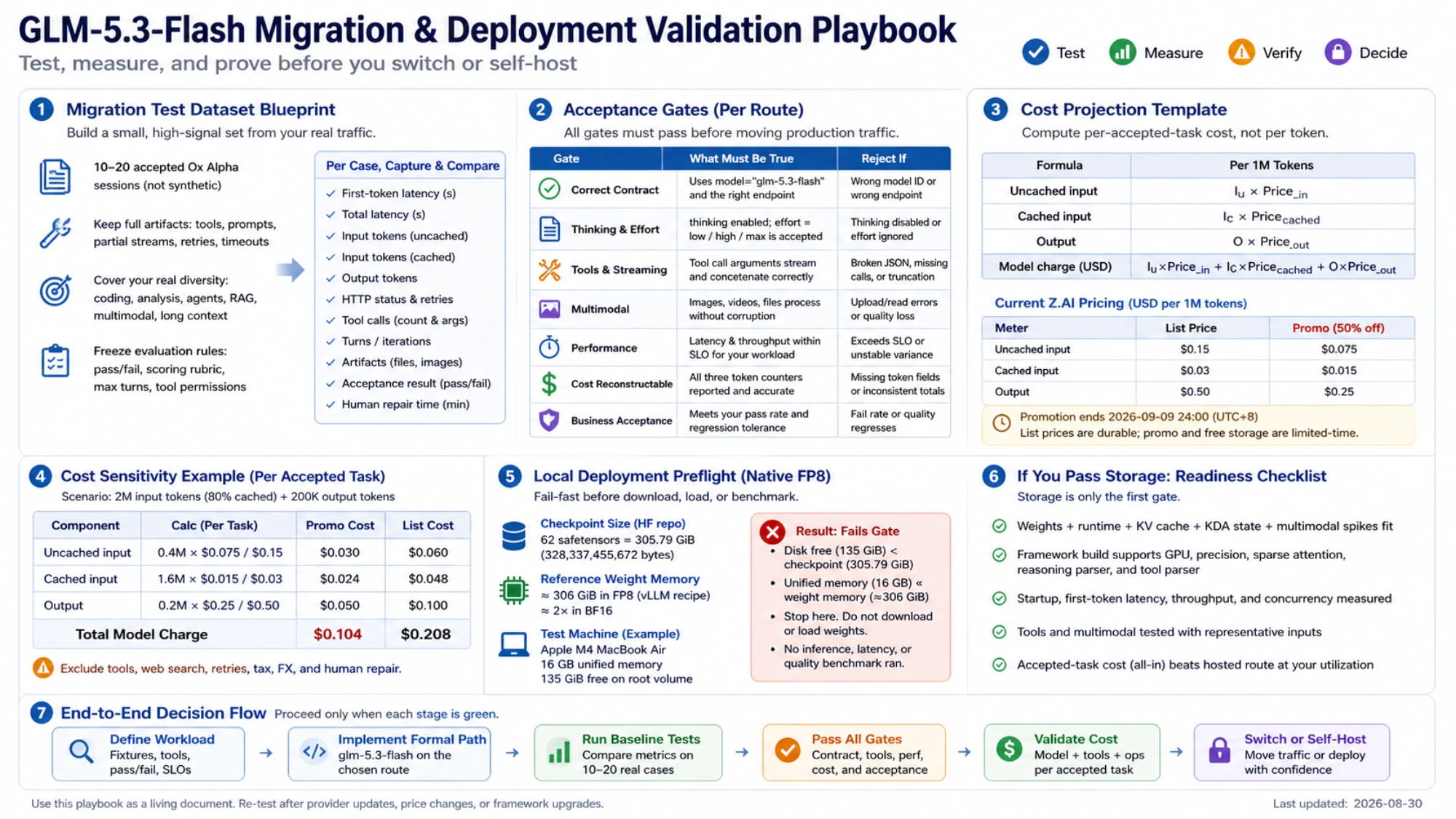
For an illustrative calculation, suppose one accepted run consumes 2 million total input tokens, 80% cached, and 200,000 output tokens. The model charge is:
0.4 × $0.15 + 1.6 × $0.03 + 0.2 × $0.50 = $0.208
Cached tokens are part of the input total: the 0.4 million uncached and 1.6 million cached tokens are separate billing categories, not two charges applied to the same tokens.
That still excludes paid tools, web search, retries, tax, exchange rates, and human repair. The operational comparison should be total spend divided by accepted tasks. A lower token rate can lose if the route creates more failed tool loops or manual fixes.
Check storage and memory before downloading the native weights
GLM-5.3-Flash is a 320B-total, 18B-active mixture-of-experts model. The active count describes per-token computation; storage must still account for the whole checkpoint.
The official Hugging Face repository is MIT licensed. The official vLLM recipe describes native FP8 weight memory as approximately 306 GiB before runtime and KV-cache overhead; it says BF16 needs roughly twice the weight memory.
You can inspect the current checkpoint file sizes without downloading the weights:
curl -fsSL \
  'https://huggingface.co/api/models/zai-org/GLM-5.3-Flash?blobs=true' |
jq '[.siblings[]
  | select(.rfilename | endswith(".safetensors"))
  | .size]
  | {files: length, bytes: add, GiB: (add / 1073741824)}'
Compare that result with available disk space and the memory required by the serving recipe. A 16 GB unified-memory laptop cannot hold a native FP8 checkpoint of roughly 306 GiB in memory. If the current checkpoint does not fit on disk either, stop before downloading it. This is a capacity comparison, not a throughput test or a claim that inference ran on a particular machine.
This does not prove that every community quantization is impossible on every Mac. No third-party quantization was downloaded or validated, so it would be misleading to attach the official model's quality or support promise to one.
Passing storage is only the first gate
The model card lists SGLang, vLLM, TokenSpeed, Transformers, KTransformers, and Unsloth. Their hardware coverage and maturity differ. The current vLLM recipe begins with accelerator deployments such as FP8 tensor parallelism across four GB200 GPUs. The SGLang cookbook separates KV memory from a KDA state pool and documents different cache/backend combinations for Blackwell, H100/H200, and AMD paths—some of them explicitly unverified.
Before calling a server “deployed,” require all of the following:
- The complete checkpoint, container images, temporary files, and logs fit with headroom.
- Accelerator memory covers weights plus runtime, KV cache, KDA state, multimodal encoder spikes, and intended concurrency.
- The exact framework build supports the chosen GPU, precision, sparse attention, reasoning parser, and tool parser.
- A fixed benchmark records startup, first-token latency, throughput, concurrency, tools, and representative multimodal inputs.
- The accepted-task cost beats the hosted route after hardware, energy, engineering, and idle capacity are included.
Check one further difference between hosted and local use. Hosted Z.AI says thinking cannot be disabled. Some local serving recipes expose chat-template controls that can change thinking behavior. A local template feature does not imply that the hosted API accepts the same option.
Use the Model API first when the goal is to establish quality, migration risk, and real workload cost quickly. Consider self-hosting after data-control requirements or sustained utilization justify a multi-accelerator system. If the decision expands to another provider, the English GLM-5.3 versus DeepSeek V4 Pro guide handles that separate comparison.
The migration is complete when the formal route passes your old acceptance set, invoices can be reconstructed from token counters, and the chosen hosting path has no hidden endpoint or memory assumption—not when a configuration file merely contains the new model name.