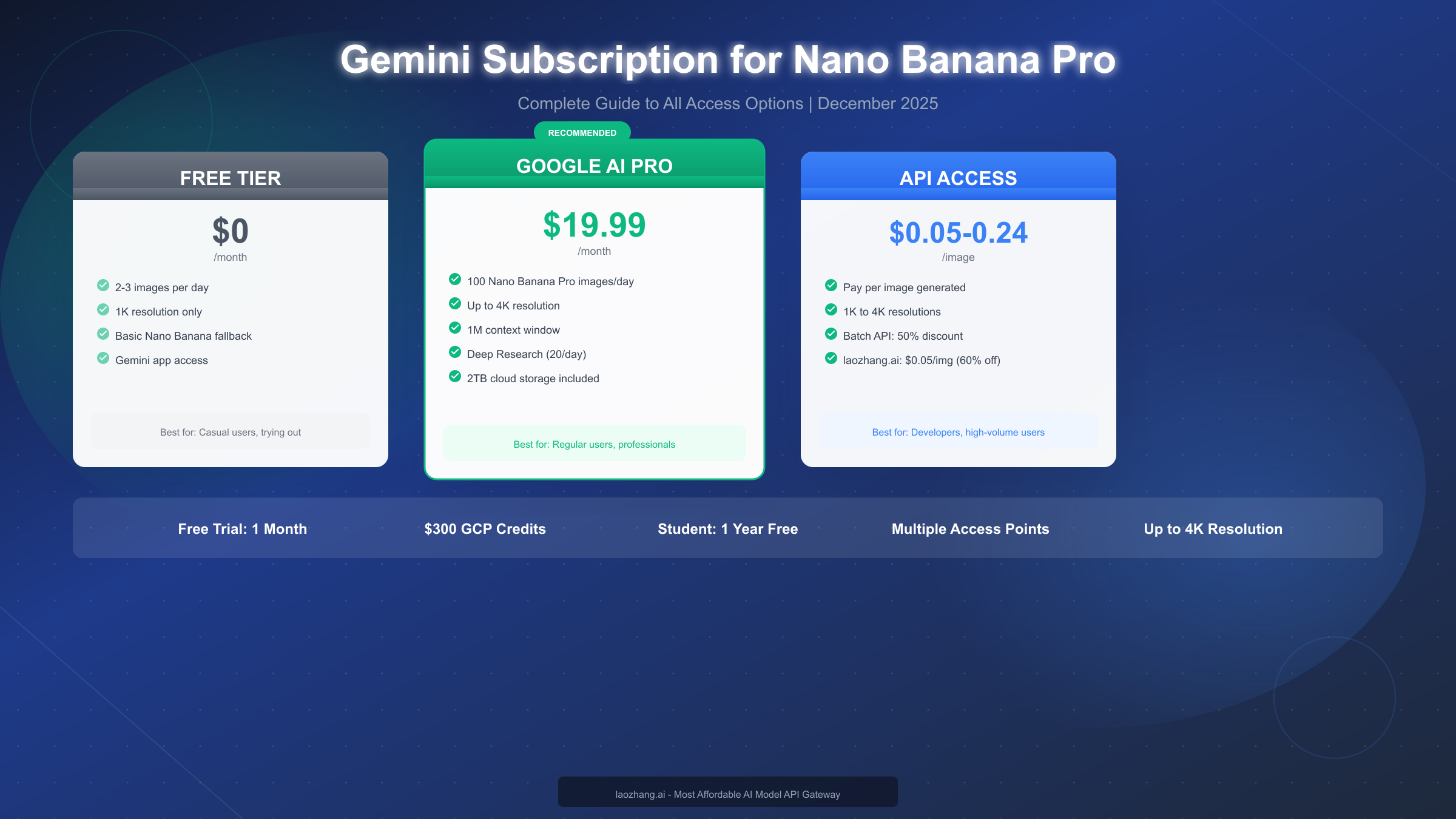
Google's Nano Banana Pro (officially Gemini 3 Pro Image) represents the most advanced AI image generation model available today, but accessing it requires understanding the various subscription tiers and access methods available in December 2025. Whether you're a casual user wanting to try AI image generation, a professional needing high-volume access, or a developer building applications, there's an access path that fits your needs and budget. This guide covers everything from free tier access to enterprise API integration, including cost-saving strategies that can reduce your expenses by over 60%.
Understanding Nano Banana Pro Subscription Options
Choosing the right access method for Nano Banana Pro depends on three key factors: how many images you need to generate daily, what resolution quality you require, and whether you need programmatic API access or prefer using the Gemini app interface. The subscription landscape has evolved significantly since Google's announcement at I/O 2025, with new tiers and pricing structures that can be confusing without a clear breakdown.
Consumer App Access vs. API Access
The most fundamental decision is whether you need consumer app access through the Gemini application or developer API access for building applications. Consumer access through Google AI subscriptions provides a user-friendly interface with preset options and daily quotas, while API access offers programmatic control but requires technical implementation. Many users start with consumer access to evaluate the technology before transitioning to API access for production applications.
Free Tier Limitations
Free users can access Nano Banana Pro through the Gemini app, but with significant restrictions. As of December 2025, Google has limited free tier users to approximately 2-3 images per day at standard resolution (1K), down from the initial 100-image daily limit due to overwhelming demand. Once you reach your free quota, the system automatically falls back to the original Nano Banana model (Gemini 2.5 Flash Image), which produces lower quality results.
Paid Subscription Benefits
Paid subscriptions remove most limitations and provide access to premium features. Google AI Pro subscribers receive 100 Nano Banana Pro generations daily at resolutions up to 4K, while Ultra subscribers get 1,000 images daily plus additional features like extended Deep Research access and video generation capabilities. The key differentiator is that paid subscriptions maintain consistent access to the Nano Banana Pro model without degradation to lesser models.
If you're interested in what you can create with Nano Banana Pro once you have access, our guide on how to clone any image style with Nano Banana Pro demonstrates the model's impressive style transfer capabilities.
Complete Pricing Comparison (December 2025)
Understanding the full pricing landscape requires examining all access methods, from consumer subscriptions to API pricing and third-party alternatives. The table below consolidates current pricing as of December 2025, though note that Google has adjusted limits multiple times due to demand fluctuations.
| Access Method | Monthly Cost | Daily Image Limit | Max Resolution | Best For |
|---|---|---|---|---|
| Free Tier | $0 | 2-3 images | 1K | Trying out |
| Google AI Pro | $19.99 | 100 images | 4K | Regular users |
| Google AI Ultra | $249.99 | 1,000 images | 4K | Power users |
| Official API (Standard) | $0.134/image | Rate limited | 2K | Developers |
| Official API (4K) | $0.24/image | Rate limited | 4K | Quality focus |
| Batch API | $0.067/image | Higher latency | 2K | Bulk processing |
| laozhang.ai | $0.05/image | Unlimited | 4K | Cost-conscious developers |
Understanding API Pricing Components
The official Google API pricing includes multiple components beyond the base image generation cost. Text prompts incur separate charges at $2.00 per million input tokens, while the model's "thinking" output costs $12.00 per million tokens. In practice, these additional costs add approximately $0.01-0.03 per generation depending on prompt complexity. The base image prices listed above represent the primary cost component.
Batch API Discount
For applications where real-time generation isn't required, Google's Batch API offers 50% savings. Batch processing queues requests and delivers results within hours rather than seconds, making it ideal for content libraries, marketing materials, or any use case where generation can happen asynchronously. At $0.067 per standard image, batch processing significantly reduces costs for high-volume applications.
Family Sharing Considerations
Google AI Pro and Ultra subscriptions support family sharing with up to 5 members. When sharing a $19.99 Pro subscription among family members, the effective per-person cost drops to approximately $4 per month—making it extremely cost-effective for households with multiple users interested in AI image generation.
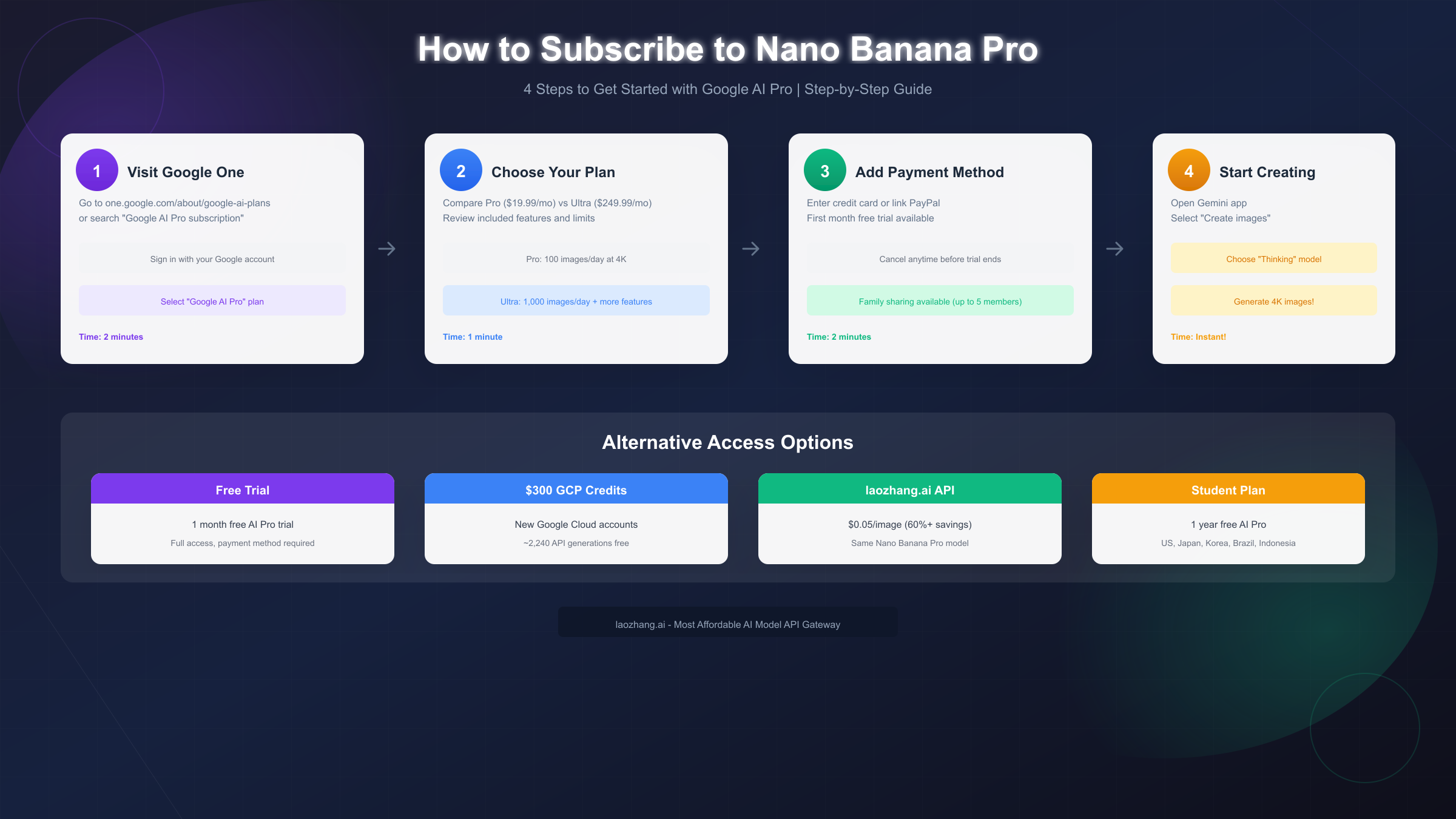
How to Subscribe to Google AI Pro (Step-by-Step)
The subscription process for Google AI Pro is straightforward but involves several steps that aren't immediately obvious. This section walks through the complete process from start to finish, including common pitfalls to avoid.
Step 1: Access the Subscription Page
Navigate to one.google.com/about/google-ai-plans or search "Google AI Pro subscription" in your browser. Sign in with your Google account—this will be the account that receives the subscription benefits. If you have multiple Google accounts, ensure you're signed into the one you want to use for AI image generation.
Step 2: Review Plan Options
You'll see three options: the free tier (which you already have), Google AI Pro at $19.99 per month, and Google AI Ultra at $249.99 per month. Take time to review the feature comparison, paying particular attention to daily limits and included features. Most users find that Pro provides sufficient access, but Ultra makes sense for professional content creators or teams.
Step 3: Start Free Trial (If Available)
Google currently offers a one-month free trial for Google AI Pro. Click "Start free trial" rather than "Subscribe" to take advantage of this offer. You'll need to add a payment method, but you won't be charged until the trial period ends. Set a calendar reminder for one day before the trial expires to decide whether to continue.
Step 4: Add Payment Information
Enter your credit card details or link PayPal. Google accepts most major credit cards and debit cards. The payment information is required even for free trials, as your subscription automatically renews unless you cancel before the trial ends. You can cancel at any time through your Google account settings without penalty.
Step 5: Confirm and Access
After confirmation, your subscription activates immediately. Open the Gemini app (gemini.google.com on desktop or the mobile app) to begin using Nano Banana Pro. Select "Create images" and ensure the "Thinking" model is enabled in settings to use Nano Banana Pro rather than the standard Nano Banana model.
Important: Regional Availability
Google AI Pro is available in most countries, but some regions have restrictions. If you encounter availability issues, check Google's support documentation for your region. Some users in restricted regions use VPN services during signup, though this may violate terms of service.
Which Option Saves You the Most Money?
Cost optimization depends heavily on your usage patterns. Let's analyze three common user profiles to determine the most economical access method for each.
Casual User (10-30 images/month)
For users generating a small number of images monthly, the free tier often suffices despite its limitations. With 2-3 images daily, you can generate 60-90 images monthly at no cost. The trade-off is lower resolution (1K) and the frustration of hitting limits during creative sessions. If you find yourself frequently hitting limits, the Pro subscription's value becomes clear.
Regular User (100-500 images/month)
Regular users face a choice between Pro subscription and API access. At 300 images monthly, Pro subscription costs $19.99 (about $0.067/image) while official API access costs approximately $40.20 (at $0.134/image). The Pro subscription clearly wins for this usage level while also providing a better user experience through the Gemini app interface.
High-Volume User (1,000+ images/month)
High-volume users benefit most from API alternatives. At 2,000 images monthly, official API costs approximately $268 at standard resolution. Using laozhang.ai at $0.05 per image, the same volume costs just $100—a savings of over 60%. For developers generating thousands of images monthly, third-party APIs represent substantial cost savings.
For comprehensive comparisons of API options, see our guide on best platforms for unlimited Nano Banana Pro access which analyzes reliability, pricing, and feature parity across providers.
Cost Calculator Example
Consider a content marketing team generating 500 images monthly:
- Google AI Pro: $19.99/month (fixed, includes 3,000 images)
- Official API: $67.00/month (500 × $0.134)
- laozhang.ai: $25.00/month (500 × $0.05)
The Pro subscription offers the best value until you need API integration for automation. Once programmatic access becomes necessary, laozhang.ai provides significant savings over official API pricing while maintaining access to the same Nano Banana Pro model.
API Access Guide for Developers
Developers building applications with Nano Banana Pro have several integration options. This section provides production-ready code examples for both official Google API and cost-effective alternatives.
Official Google AI Studio Setup
Google AI Studio provides the most straightforward API access. First, obtain an API key from aistudio.google.com. Create a new project and generate an API key with image generation permissions. Store this key securely as an environment variable.
import os
import google.generativeai as genai
from PIL import Image
import io
import base64

# Configure API
genai.configure(api_key=os.environ.get("GEMINI_API_KEY"))

# Initialize model
model = genai.GenerativeModel("gemini-3-pro-image-preview")

def generate_image(prompt: str, resolution: str = "2K") -> Image.Image:
    """
    Generate image using Nano Banana Pro via official API.

    Args:
        prompt: Text description of desired image
        resolution: "1K", "2K", or "4K"

    Returns:
        PIL Image object
    """
    try:
        response = model.generate_content(
            prompt,
            generation_config={
                "response_mime_type": "image/png",
                "image_resolution": resolution
            }
        )

        # Extract image from response
        image_data = base64.b64decode(response.parts[0].inline_data.data)
        return Image.open(io.BytesIO(image_data))

    except Exception as e:
        print(f"Generation failed: {e}")
        raise

# Example usage
image = generate_image("A serene mountain lake at sunset, photorealistic")
image.save("output.png")
Cost-Effective Alternative: laozhang.ai Integration
For production applications where cost optimization matters, laozhang.ai provides a drop-in replacement API that maintains full Nano Banana Pro quality while reducing costs by over 60%. The integration requires only changing the base URL and API key.
import os
import requests
import base64
from PIL import Image
import io

class NanoBananaProClient:
    """
    Cost-effective Nano Banana Pro API client using laozhang.ai.

    Pricing: $0.05/image (vs $0.134 official)
    Documentation: https://docs.laozhang.ai/
    """

    def __init__(self, api_key: str = None):
        self.api_key = api_key or os.environ.get("LAOZHANG_API_KEY")
        self.base_url = "https://api.laozhang.ai/v1"

    def generate(self, prompt: str, resolution: str = "2K",
                 style: str = None, retry_count: int = 3) -> Image.Image:
        """
        Generate image with automatic retry and error handling.

        Args:
            prompt: Text description
            resolution: "1K", "2K", or "4K"
            style: Optional style modifier
            retry_count: Number of retries on failure

        Returns:
            PIL Image object
        """
        full_prompt = f"{style}: {prompt}" if style else prompt

        for attempt in range(retry_count):
            try:
                response = requests.post(
                    f"{self.base_url}/images/generations",
                    headers={
                        "Authorization": f"Bearer {self.api_key}",
                        "Content-Type": "application/json"
                    },
                    json={
                        "model": "gemini-3-pro-image",
                        "prompt": full_prompt,
                        "resolution": resolution,
                        "n": 1
                    },
                    timeout=60
                )
                response.raise_for_status()

                data = response.json()
                image_data = base64.b64decode(data["data"][0]["b64_json"])
                return Image.open(io.BytesIO(image_data))

            except requests.exceptions.RequestException as e:
                if attempt < retry_count - 1:
                    print(f"Attempt {attempt + 1} failed, retrying...")
                    continue
                raise RuntimeError(f"Generation failed after {retry_count} attempts: {e}")

# Usage example
client = NanoBananaProClient()
image = client.generate(
    prompt="A cyberpunk cityscape with neon lights",
    resolution="4K",
    style="cinematic photography"
)
image.save("cyberpunk_city.png")
print("Generation cost: $0.05")
For detailed API pricing comparisons, our cheapest API options for Gemini 3 Pro Image guide provides additional cost optimization strategies.
Rate Limiting and Best Practices
Both official and third-party APIs implement rate limiting. For production applications, implement exponential backoff retry logic and consider caching generated images to avoid regenerating identical requests. The code example above includes basic retry logic, but production systems should implement more sophisticated request queuing for high-volume applications.
Maximizing Free Access to Nano Banana Pro
Budget-conscious users can access Nano Banana Pro without paying by strategically combining multiple free options. While no single free method provides unlimited access, combining them creates substantial free capacity.
Free Tier Daily Limit Optimization
The Gemini app's free tier resets at midnight UTC. Plan your image generation sessions around this reset time to maximize your daily allocation. If you need 5-6 images in a single day, generate some before midnight and the rest after the reset. Understanding when Gemini image limits reset helps you plan generation sessions effectively.
Google Cloud $300 Credit Strategy
New Google Cloud Platform accounts receive $300 in free credits applicable to API usage. At $0.134 per image, this translates to approximately 2,240 free generations—enough for several months of moderate usage. Create a GCP account at cloud.google.com, enable the Vertex AI API, and use the Gemini 3 Pro Image model through Vertex AI rather than AI Studio to apply these credits.
Student Plan Enrollment
Students aged 18 and older in the US, Japan, Indonesia, Korea, and Brazil can receive one year of free Google AI Pro access. This includes full Nano Banana Pro capabilities with 100 images daily. Verify your student status through Google's verification process, which typically requires a .edu email address or enrollment documentation.
Free Trial Optimization
Google's one-month free trial of AI Pro provides full access during the trial period. Set a calendar reminder for the last day of your trial to decide whether to continue. If you only need intensive access temporarily (for a project or event), time your free trial to coincide with your highest-usage period.
Combining Free Options
A strategic approach combines multiple free options:
- Start with the Gemini app free tier (2-3 images/day)
- Use Google Cloud $300 credits for API access when needed
- Activate the AI Pro free trial during a high-usage period
- Apply for student access if eligible
This combination can provide 6+ months of substantial free access before any payment is required.
Troubleshooting Common Issues
Users frequently encounter issues when accessing Nano Banana Pro. This section addresses the most common problems and their solutions.
"Daily limit reached" Error Before Expected
Google dynamically adjusts limits based on system load. During peak demand periods, even paid subscribers may experience temporary throttling. The displayed "100 images/day" represents a maximum, not a guarantee. If you consistently need your full allocation, generate images during off-peak hours (typically early morning US time) when demand is lower.
Image Quality Lower Than Expected
If generated images appear lower quality than samples you've seen, verify you're using the correct model. In the Gemini app, ensure "Thinking mode" is enabled in settings—without this, you may be using the standard Nano Banana model rather than Nano Banana Pro. For API users, confirm you're calling the "gemini-3-pro-image-preview" endpoint rather than the flash variant.
API Authentication Errors
Authentication failures typically result from API key issues. Verify your key has image generation permissions enabled in Google AI Studio settings. Keys created before certain dates may require regeneration to include newer model access. If using environment variables, ensure no trailing whitespace was copied with your key.
Subscription Not Activating
Subscription changes can take up to 15 minutes to propagate across Google's systems. If your subscription shows as active in Google One settings but features aren't available in the Gemini app, sign out and sign back in. Clear browser cache for gemini.google.com if problems persist.
Regional Access Restrictions
Some features may be unavailable in certain regions due to regulatory requirements. If you encounter "not available in your region" errors, check Google's official availability documentation. Note that using VPNs to circumvent regional restrictions may violate terms of service and result in account suspension.
API Rate Limiting (429 Errors)
Rate limit errors indicate you're sending requests too quickly. Implement exponential backoff in your code: wait 1 second after the first 429, 2 seconds after the second, 4 seconds after the third, and so on. For sustained high-volume needs, consider Google's Provisioned Throughput options or third-party alternatives with higher rate limits.
FAQ and Getting Started
What's the difference between Nano Banana and Nano Banana Pro?
Nano Banana (Gemini 2.5 Flash Image) is Google's faster, more economical model with maximum 1K resolution. Nano Banana Pro (Gemini 3 Pro Image) offers superior quality, up to 4K resolution, better text rendering, and more sophisticated scene understanding. Free tier users automatically fall back to Nano Banana after exhausting their Pro allocation.
Can I use Nano Banana Pro for commercial projects?
Yes, both consumer subscriptions and API access permit commercial usage. Generated images belong to the user, though they include invisible SynthID watermarks for provenance tracking. Review Google's terms of service for specific commercial use restrictions.
How does family sharing work?
Google AI Pro and Ultra subscriptions can be shared with up to 5 family members through Google Family. Each member receives their own daily allocation—the limits don't pool. At $19.99 split among 5 members, this represents exceptional value at approximately $4 per person monthly.
Is API access faster than the Gemini app?
API requests typically complete in 5-15 seconds, similar to the Gemini app. The primary advantage of API access is programmatic control and integration capabilities rather than speed. Batch API is slower (hours rather than seconds) but significantly cheaper.
What resolution should I use?
Use the minimum resolution that meets your needs. 1K (1024×1024) suffices for social media and web use. 2K provides good quality for presentations and documents. 4K is necessary only for print materials or large-format displays. Higher resolution costs more through API pricing.
Getting Started Checklist
Use this checklist to begin your Nano Banana Pro journey:
- Decide: Consumer app access or API integration?
- If consumer: Start free trial at one.google.com/about/google-ai-plans
- If API: Create Google AI Studio account at aistudio.google.com
- Generate API key with image permissions
- Test with a simple prompt to verify access
- For cost optimization, consider laozhang.ai at https://docs.laozhang.ai/
- Implement retry logic for production applications
- Monitor usage to optimize cost efficiency
For the most cost-effective API access while maintaining full Nano Banana Pro quality, laozhang.ai provides aggregated access to multiple AI models including Nano Banana Pro at significantly reduced rates. The platform offers the same model capabilities at $0.05 per image—over 60% savings compared to official pricing—making it ideal for developers and businesses building production applications.


