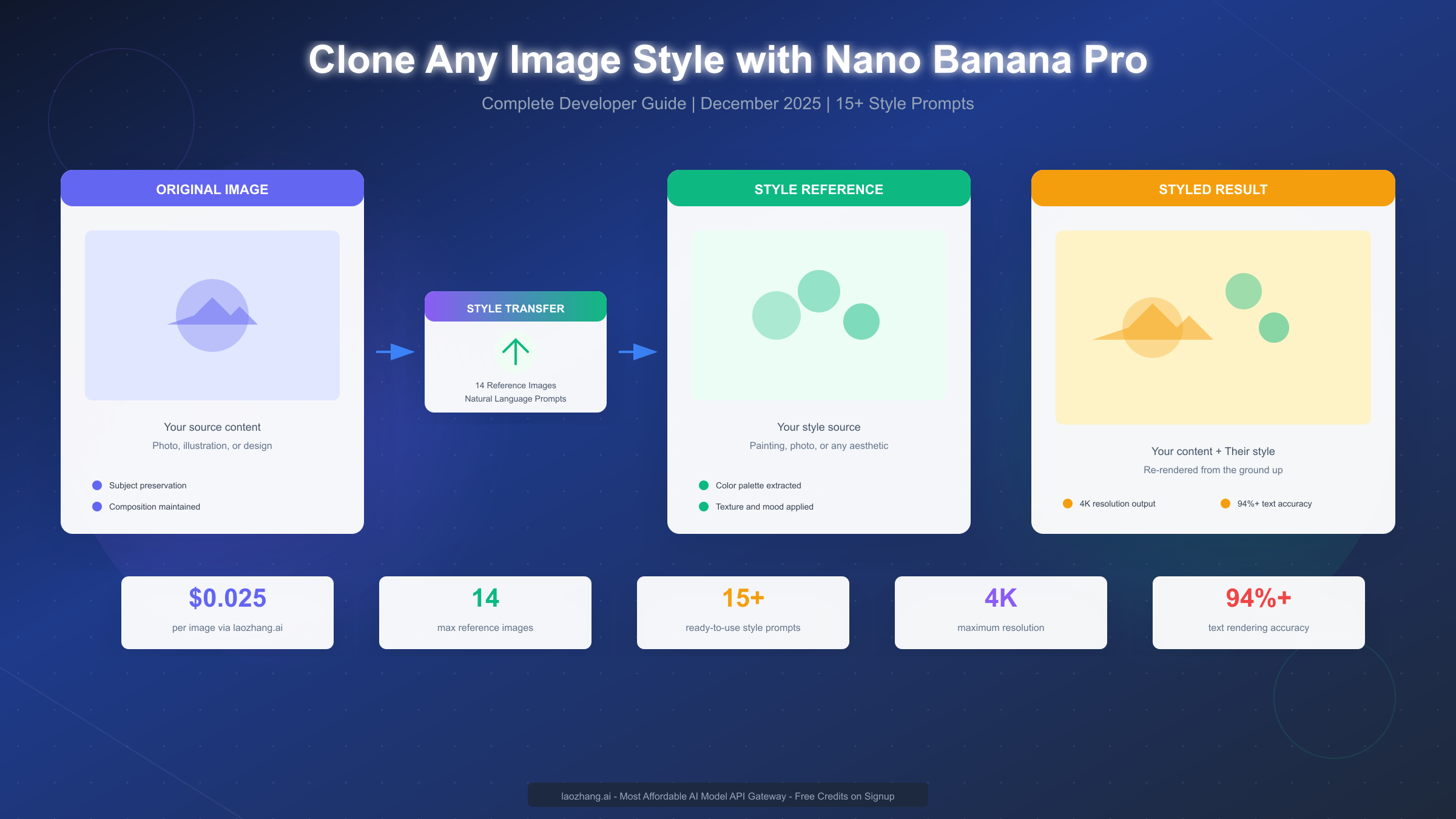
Nano Banana Pro, Google's latest Gemini 3 Pro Image model launched in November 2025, enables developers to clone any artistic style through its revolutionary style transfer capabilities. Unlike traditional filters that simply overlay effects, Nano Banana Pro re-renders your content from the ground up using the physics of your style reference—preserving subject identity while completely transforming the visual aesthetic. This December 2025 guide provides complete Python code with production-ready error handling, 15+ ready-to-use style prompts organized by category, and cost-effective API access through laozhang.ai at $0.025 per image—exactly 50% less than Google's official $0.05 pricing.
Understanding Style Cloning in Nano Banana Pro
Style cloning—technically called style transfer—represents one of the most powerful capabilities in Nano Banana Pro's toolkit. According to Google's official documentation (ai.google.dev/gemini-api/docs/image-generation), the model accepts up to 14 reference images and uses advanced reasoning to understand not just what you want, but why you want it. This "Thinking" process, enabled by default in the Pro model, allows Nano Banana Pro to reason through complex multi-image compositions before generating results.
What Makes Nano Banana Pro Different from Traditional Style Transfer? Traditional style transfer tools apply mathematical transformations to overlay one image's visual characteristics onto another. The results often look filtered or artificial because the underlying structure remains unchanged. Nano Banana Pro takes a fundamentally different approach—it completely re-renders your subject using the visual physics of your style reference. When you ask it to apply a watercolor style, it doesn't add a watercolor texture on top; it repaints your scene as if a watercolor artist created it from scratch.
The Technical Foundation enables this through multimodal understanding. The model processes your content image to understand composition, subject matter, lighting conditions, and spatial relationships. Simultaneously, it analyzes your style reference to extract color palette, texture patterns, brushwork characteristics, lighting mood, and artistic conventions. The generation process then synthesizes these understanding into a new image that maintains content integrity while adopting stylistic characteristics. According to Max Woolf's technical review (minimaxir.com/2025/12/nano-banana-pro/), the infamous "Make me into Studio Ghibli" test that failed on the base Nano Banana model now works correctly in Pro, demonstrating genuine style understanding rather than surface-level pattern matching.
Supported Style Transfer Types include global and local transformations. Global style transfer applies the aesthetic across your entire image—turning a photograph into a complete oil painting, for instance. Local style transfer allows selective application, such as transforming only the background into an impressionist style while keeping your subject photorealistic. This selective capability opens possibilities for creative compositions that weren't practical with earlier models.
Quick Start: Your First Style Transfer in 5 Minutes
Getting started with style cloning requires minimal setup. This quick-start guide assumes you have Python 3.10+ installed and will walk you through generating your first styled image in under five minutes.
Step 1: Install the Google GenAI SDK by running the following command in your terminal. The SDK provides a clean interface to all Gemini models including Nano Banana Pro.
pip install google-genai pillowStep 2: Set up your API credentials by obtaining a key from Google AI Studio (aistudio.google.com). Create an environment variable to store your key securely—never hardcode API keys in your scripts.
export GOOGLE_API_KEY="your-api-key-here"Step 3: Run your first style transfer using this minimal Python script. This example takes a content image and a style reference to generate a styled result.
from google import genai
from google.genai import types
import base64
import os

# Initialize client
client = genai.Client(api_key=os.environ.get("GOOGLE_API_KEY"))

# Load your images
def load_image(path):
    with open(path, "rb") as f:
        return base64.b64encode(f.read()).decode()

content_image = load_image("my_photo.jpg")
style_image = load_image("style_reference.jpg")

# Generate styled image
response = client.models.generate_content(
    model="gemini-3-pro-image-preview",
    contents=[
        {"inline_data": {"mime_type": "image/jpeg", "data": content_image}},
        {"inline_data": {"mime_type": "image/jpeg", "data": style_image}},
        {"text": "Apply the artistic style from the second image to the content of the first image, preserving the subject while adopting the color palette, texture, and visual mood."}
    ],
    config=types.GenerateContentConfig(
        response_modalities=["IMAGE"],
    )
)

# Save result
for part in response.candidates[0].content.parts:
    if part.inline_data:
        with open("styled_result.png", "wb") as f:
            f.write(base64.b64decode(part.inline_data.data))
        print("Styled image saved to styled_result.png")
Understanding the Output is straightforward. The model returns image data encoded in base64 format within the response. The script extracts this data and saves it as a PNG file. Your first styled image should appear within seconds, demonstrating the core style transfer capability you'll build upon throughout this guide.
Style Transfer Prompt Library: 15+ Ready-to-Use Styles
The effectiveness of style cloning depends heavily on prompt quality. This library provides tested prompts for popular styles, organized by category. Each prompt includes specific style anchors—medium, texture, lighting, and mood descriptors—that consistently produce high-quality results.
| Style Category | Style Name | Prompt Template | Difficulty |
|---|---|---|---|
| Anime | Studio Ghibli | "Transform into Studio Ghibli anime style with soft watercolor backgrounds, warm natural lighting, detailed environmental art, and the characteristic Miyazaki aesthetic of wonder and nature" | Easy |
| Anime | Modern Anime | "Apply modern anime style with clean line art, vibrant cel-shading, dramatic lighting effects, and the polished aesthetic of contemporary Japanese animation" | Easy |
| Painting | Oil Painting | "Render as a classical oil painting with visible brushstrokes, rich impasto texture, chiaroscuro lighting, warm color palette, and the depth characteristic of old masters" | Medium |
| Painting | Watercolor | "Transform into delicate watercolor painting with soft color bleeding, white paper showing through, loose brushwork, and the luminous transparency of wet-on-wet technique" | Easy |
| Painting | Impressionist | "Apply impressionist style with broken brushstrokes, vibrant unmixed colors, emphasis on natural light, and the fleeting atmospheric quality of Monet or Renoir" | Medium |
| Digital | Concept Art | "Render as professional concept art with dramatic composition, cinematic lighting, detailed environmental storytelling, and the polished finish of AAA game production" | Medium |
| Digital | Pixar 3D | "Transform into Pixar animation style with soft subsurface scattering, expressive character design, warm color grading, and the heartwarming aesthetic of modern 3D animation" | Medium |
| Video Game | GTA V | "Apply GTA V video game aesthetic with bold cinematic colors, dramatic shadows, urban grittiness, exaggerated saturation, and the stylized realism of Rockstar's visual identity" | Easy |
| Video Game | Cyberpunk | "Transform into cyberpunk aesthetic with neon lighting, rain-slicked surfaces, holographic elements, high contrast shadows, and the dystopian urban atmosphere of Blade Runner" | Medium |
| Photography | Film Grain | "Apply vintage film photography look with warm analog tones, subtle grain texture, slightly lifted blacks, and the nostalgic quality of 35mm Kodak Portra" | Easy |
| Photography | Cinematic | "Render with cinematic photography style using anamorphic lens characteristics, 2.39:1 composition feel, dramatic lighting, and Hollywood color grading" | Medium |
| Traditional | Charcoal Drawing | "Transform into charcoal drawing with dramatic tonal contrast, textured paper surface, soft blending, bold strokes, and the raw expressive quality of fine art sketching" | Easy |
| Traditional | Pencil Sketch | "Apply detailed pencil sketch style with careful cross-hatching, subtle gradients, clean linework, and the technical precision of architectural illustration" | Medium |
| Pop Culture | Pop Art | "Transform into Pop Art style with bold primary colors, Ben-Day dots, high contrast outlines, commercial aesthetic, and the iconic look of Warhol and Lichtenstein" | Easy |
| Retro | 80s Synthwave | "Apply 80s synthwave aesthetic with neon pink and cyan, grid horizons, chrome reflections, sunset gradients, and the retro-futuristic vibe of Miami Vice" | Easy |
Using These Prompts Effectively requires understanding that Nano Banana Pro responds best to descriptive rather than prescriptive language. Instead of commanding "make it look like Ghibli," describe the visual characteristics: soft watercolor backgrounds, warm lighting, environmental detail. The model uses its reasoning capabilities to understand and apply these descriptors appropriately.
Combining Styles is possible by referencing multiple aesthetic elements. For example: "Apply the color palette of Studio Ghibli with the dramatic lighting of concept art, maintaining watercolor texture while adding cinematic composition." The model processes these compound requests through its Thinking mode to produce coherent results.
Complete API Implementation Guide with Python
Production applications require robust error handling, retry logic, and proper resource management. This section provides complete, copy-ready code that handles real-world scenarios including rate limiting, network failures, and malformed responses.
Production-Ready Style Transfer Function with comprehensive error handling:
import os
import time
import base64
import logging
from typing import Optional, List
from google import genai
from google.genai import types
from tenacity import retry, stop_after_attempt, wait_exponential

# Configure logging
logging.basicConfig(level=logging.INFO)
logger = logging.getLogger(__name__)

class NanoBananaStyleTransfer:
    """Production-ready style transfer using Nano Banana Pro."""

    def __init__(self, api_key: Optional[str] = None, base_url: Optional[str] = None):
        """
        Initialize the style transfer client.

        Args:
            api_key: Google API key or laozhang.ai key
            base_url: Optional custom endpoint (for laozhang.ai)
        """
        self.api_key = api_key or os.environ.get("GOOGLE_API_KEY")
        if not self.api_key:
            raise ValueError("API key required. Set GOOGLE_API_KEY or pass api_key parameter.")

        # Use laozhang.ai endpoint for 50% cost savings
        if base_url:
            self.client = genai.Client(api_key=self.api_key, base_url=base_url)
        else:
            self.client = genai.Client(api_key=self.api_key)

        self.model = "gemini-3-pro-image-preview"

    def _load_image(self, path: str) -> str:
        """Load and encode image to base64."""
        try:
            with open(path, "rb") as f:
                return base64.b64encode(f.read()).decode()
        except FileNotFoundError:
            raise ValueError(f"Image not found: {path}")
        except Exception as e:
            raise ValueError(f"Error loading image {path}: {e}")

    @retry(stop=stop_after_attempt(3), wait=wait_exponential(min=1, max=10))
    def transfer_style(
        self,
        content_path: str,
        style_path: str,
        prompt: str,
        output_path: str = "output.png",
        resolution: str = "1K"
    ) -> str:
        """
        Apply style transfer with automatic retry on failure.

        Args:
            content_path: Path to content image
            style_path: Path to style reference image
            prompt: Style transfer prompt
            output_path: Where to save the result
            resolution: Output resolution (1K, 2K, or 4K)

        Returns:
            Path to saved output image
        """
        logger.info(f"Starting style transfer: {content_path} + {style_path}")

        # Load images
        content_data = self._load_image(content_path)
        style_data = self._load_image(style_path)

        # Build request
        contents = [
            {"inline_data": {"mime_type": "image/jpeg", "data": content_data}},
            {"inline_data": {"mime_type": "image/jpeg", "data": style_data}},
            {"text": prompt}
        ]

        config = types.GenerateContentConfig(
            response_modalities=["IMAGE"],
            image_config={"image_size": resolution}
        )

        try:
            response = self.client.models.generate_content(
                model=self.model,
                contents=contents,
                config=config
            )

            # Extract and save image
            for part in response.candidates[0].content.parts:
                if hasattr(part, 'inline_data') and part.inline_data:
                    with open(output_path, "wb") as f:
                        f.write(base64.b64decode(part.inline_data.data))
                    logger.info(f"Style transfer complete: {output_path}")
                    return output_path

            raise ValueError("No image in response")

        except Exception as e:
            logger.error(f"Style transfer failed: {e}")
            raise

# Usage example
if __name__ == "__main__":
    # Standard Google API
    transfer = NanoBananaStyleTransfer()

    # Or use laozhang.ai for 50% savings
    # transfer = NanoBananaStyleTransfer(
    #     api_key="your-laozhang-key",
    #     base_url="https://api.laozhang.ai/v1"
    # )

    result = transfer.transfer_style(
        content_path="photo.jpg",
        style_path="ghibli_reference.jpg",
        prompt="Apply Studio Ghibli anime style with soft watercolor backgrounds, warm natural lighting, and the characteristic Miyazaki aesthetic",
        output_path="ghibli_result.png",
        resolution="2K"
    )
    print(f"Result saved to: {result}")
Key Implementation Details ensure reliability in production. The @retry decorator automatically retries failed requests with exponential backoff, handling transient network issues gracefully. The class structure allows easy switching between Google's official API and cost-effective alternatives like laozhang.ai by simply changing the base URL.
Multi-Reference Style Transfer extends the basic pattern to support up to 14 reference images. This enables complex compositions where you specify different images for style, pose, character reference, and background elements.
def multi_reference_transfer(
    self,
    images: List[tuple],  # List of (path, role) tuples
    prompt: str,
    output_path: str = "output.png"
) -> str:
    """
    Style transfer with multiple reference images.

    Args:
        images: List of (image_path, role) tuples
                Roles: "content", "style", "pose", "character", "background"
        prompt: Detailed prompt specifying how to use each reference
        output_path: Where to save result
    """
    contents = []
    role_descriptions = []

    for idx, (path, role) in enumerate(images):
        data = self._load_image(path)
        contents.append({"inline_data": {"mime_type": "image/jpeg", "data": data}})
        role_descriptions.append(f"Image {idx + 1}: {role}")

    # Build comprehensive prompt
    full_prompt = f"{'. '.join(role_descriptions)}. {prompt}"
    contents.append({"text": full_prompt})

    # Continue with generation...
Cost Analysis and API Access Options
Understanding pricing helps optimize your style transfer workflow. This section compares official Google pricing with alternative access methods, demonstrating how to reduce costs by 50% without sacrificing capability.
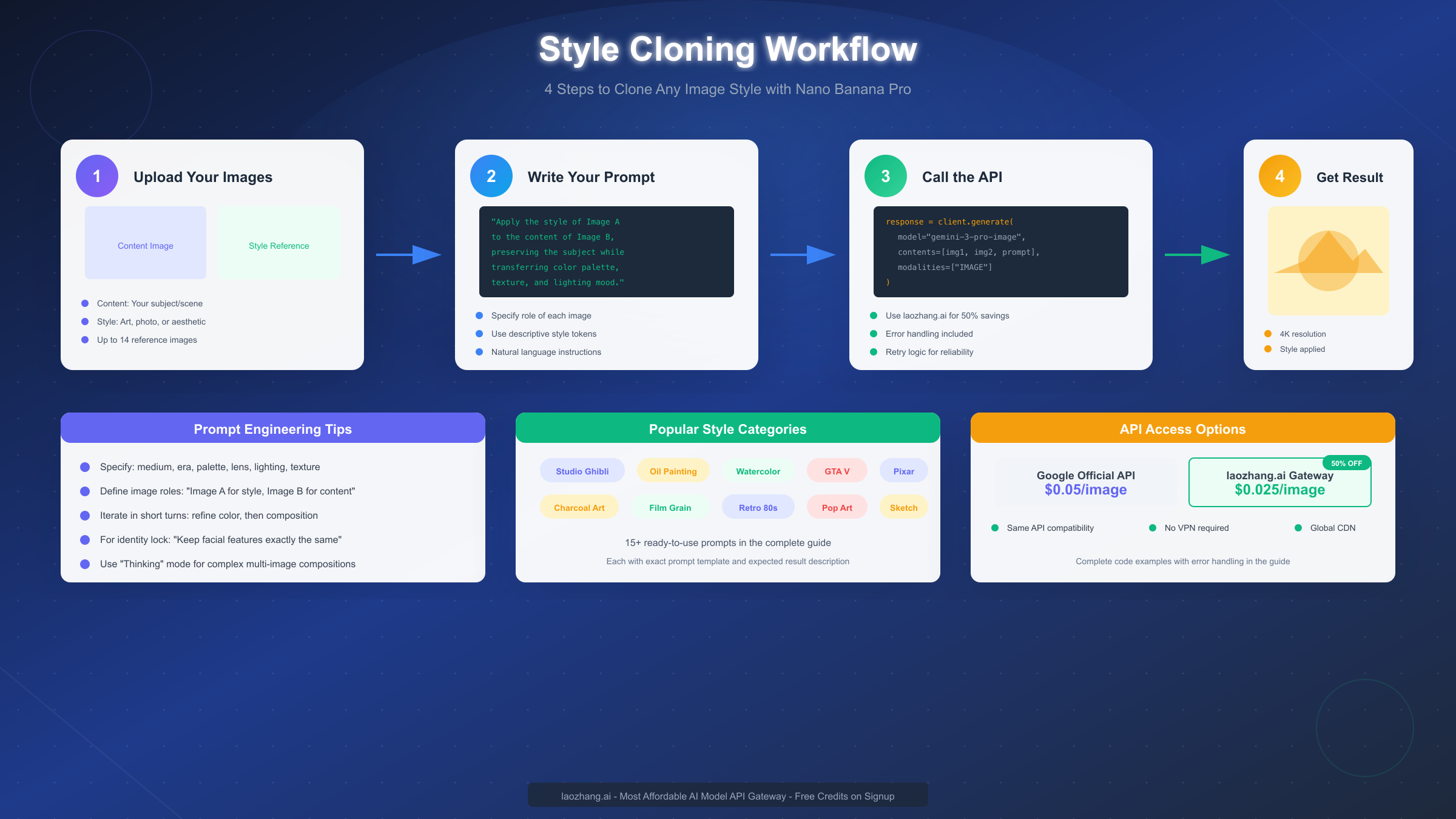
| Provider | Nano Banana Pro Price | Nano Banana Standard | Notes |
|---|---|---|---|
| Google Official | $0.05/image | $0.039/image | Direct API access |
| laozhang.ai | $0.025/image | $0.025/image | 50% savings, same API |
| Replicate | ~$0.05/image | ~$0.04/image | Pay-per-second billing |
Monthly Cost Estimation by Usage Level helps budget your projects:
- Light Usage (1,000 images/month): Google $50, laozhang.ai $25
- Medium Usage (10,000 images/month): Google $500, laozhang.ai $250
- Heavy Usage (100,000 images/month): Google $5,000, laozhang.ai $2,500
Why laozhang.ai Offers Compelling Value extends beyond simple cost savings. The service provides API-compatible endpoints that require zero code changes—simply swap the base URL and API key. For developers requiring global access without VPN complications, laozhang.ai's infrastructure routes requests efficiently regardless of geographic location. The pricing structure eliminates the per-resolution premium that Google charges, meaning 4K outputs cost the same as 1K outputs at $0.025 per image. For production workloads, this predictable pricing simplifies budgeting and removes the temptation to compromise on output quality for cost reasons.
Setting Up laozhang.ai Access requires minimal changes to existing code. Register at laozhang.ai to receive API credentials and free initial credits for testing. The endpoint follows OpenAI-compatible formatting, making integration straightforward for developers familiar with that ecosystem.
# Switch from Google to laozhang.ai
client = genai.Client(
    api_key="your-laozhang-api-key",
    base_url="https://api.laozhang.ai/v1"
)
# All other code remains identical
Documentation for laozhang.ai integration is available at https://docs.laozhang.ai/, including rate limits, supported models, and authentication details.
Advanced Multi-Reference Techniques
Nano Banana Pro's ability to process up to 14 reference images unlocks sophisticated creative workflows. This section explains how to leverage multiple references effectively for professional-quality results.
Understanding Reference Roles helps the model process your intent correctly. When using multiple images, explicitly state each image's purpose in your prompt. The model recognizes several role categories: content (your subject), style (aesthetic reference), pose (body position), character (face/identity preservation), and background (environmental context).
Identity Locking for Consistent Characters maintains facial features across multiple generations. When creating content series featuring the same character, include 3-5 reference photos of the person and explicitly instruct: "Keep the person's facial features exactly the same as shown in Images 1-5." This technique proves essential for storyboards, comics, and marketing materials requiring character consistency.
Style Composition from Multiple Sources allows blending aesthetic elements. You might combine the color palette from one artist with the texture treatment from another and the lighting approach from a third. The key is specificity—don't just reference "the style" but specify exactly which elements to extract from each source: "Use the color palette from Image 2, the brushwork texture from Image 3, and the dramatic lighting approach from Image 4."
Practical Multi-Reference Workflow for a typical project:
-
Prepare your references: Organize images by role. Name them descriptively (content_main.jpg, style_ghibli.jpg, character_face1.jpg).
-
Write a role-assignment prompt: Begin with clear role statements: "Image 1 provides the main content and composition. Image 2 is the style reference for color and texture. Images 3-5 show the character whose face should remain consistent."
-
Add specific instructions: After roles, describe the desired outcome: "Render Image 1's scene in Image 2's watercolor style while maintaining the exact facial features shown in Images 3-5."
-
Iterate on results: Multi-reference compositions often require 2-3 attempts. Refine your prompt based on what the model emphasizes or overlooks in each attempt.
Common Multi-Reference Pitfalls include overloading with too many conflicting references and providing ambiguous role assignments. The model performs best with clear hierarchies—one primary style source, one main content image, and supporting references that don't conflict with the primary sources.
Troubleshooting Common Issues
Style transfer doesn't always succeed on the first attempt. This section addresses frequent problems and their solutions, helping you diagnose and fix issues efficiently.
Problem: Style Not Applying Correctly manifests as output that looks barely different from the input. This typically results from prompts that are too vague or style references that lack distinctive characteristics. Solution: Strengthen your prompt with specific style anchors. Instead of "apply watercolor style," specify "apply watercolor painting style with visible wet-on-wet bleeding, paper texture showing through, soft edges, and luminous color washes characteristic of Turner's landscapes."
Problem: Subject Identity Lost occurs when the model transforms your content so thoroughly that the original subject becomes unrecognizable. Solution: Add preservation instructions to your prompt: "Maintain the exact composition, subject positioning, and proportions from the content image while applying only the color treatment and texture from the style reference." For faces, explicitly state: "Preserve all facial features exactly as shown."
Problem: Inconsistent Results Across Batches frustrates production workflows. The model includes inherent randomness, producing variations even with identical inputs. Solution: For consistency, use the same seed value across requests (when supported by the API), run multiple generations and select the best, or use multiple reference images of the same subject to reinforce identity.
Problem: API Rate Limiting interrupts high-volume workflows. Solution: Implement exponential backoff in your code (as shown in the production example above), batch requests with delays between them, or upgrade to a higher tier. Through laozhang.ai, rate limits are typically more generous for equivalent pricing, and their dedicated support can assist with limit increases for production workloads.
Problem: Poor Text Rendering in Styled Images happens when text in your content image becomes illegible after style transfer. Despite Nano Banana Pro's 94%+ text accuracy for generation, style transfer can distort existing text. Solution: Generate text-free styled backgrounds, then composite text separately, or use the model to regenerate the text in the styled context with explicit text content in your prompt.
Problem: Artifacts and Visual Glitches occasionally appear, especially in complex multi-image compositions. Solution: Simplify your request by reducing reference images or breaking the task into stages. Generate a styled background first, then composite subjects separately. Report persistent artifacts to Google's feedback channels—the model continues improving through user reports.
Best Practices and Pro Tips
Experienced practitioners develop workflows that consistently produce superior results. These best practices, gathered from professional usage and community experimentation, help you achieve expert-level quality.
Anchor Styles with Concrete Descriptors rather than abstract labels. "Impressionist style" is less effective than "broken brushstrokes of unmixed pure color, emphasis on changing light quality, loose forms suggesting rather than defining shapes, the visual approach of Monet's water lily series." The model's reasoning capabilities interpret detailed descriptions more accurately than generic style names.
Iterate in Short Turns rather than attempting everything at once. First establish the overall style, then refine color, then adjust composition, then fine-tune details. Each iteration builds on the previous result, giving you control over the evolution of your image. This approach also helps diagnose where issues arise if results deviate from expectations.
Match Reference Quality to Output Goals because the model extracts characteristics from whatever you provide. A low-resolution or poorly-lit style reference limits what the model can extract. For professional results, use high-quality reference images with clear style characteristics. When possible, use multiple examples of the same style to reinforce the aesthetic you want.
Leverage Thinking Mode for complex compositions by structuring prompts that encourage reasoning. Phrase requests as problems to solve: "Given that Image 1 contains a portrait and Image 2 shows Van Gogh's Starry Night, determine how to apply Van Gogh's swirling brushwork and color intensity to the portrait while maintaining facial recognition." This problem-solving framing engages the model's reasoning capabilities.
Consider Cost-Performance Tradeoffs by using the standard Nano Banana model for testing and iteration, then switching to Pro for final high-quality generations. Through laozhang.ai, both models cost $0.025 per image, eliminating this tradeoff and allowing Pro-quality output throughout your workflow.
Document Successful Prompts because you'll want to reproduce results. Maintain a prompt library with examples of inputs and outputs for each style. This documentation becomes invaluable for team collaboration and for building on past successes.
FAQ and Getting Started
Q: What's the maximum number of reference images I can use? Nano Banana Pro accepts up to 14 reference images, with 6 processed at high fidelity. For most style transfer tasks, 2-3 well-chosen references produce optimal results. Using more references works best when each serves a distinct, non-conflicting role.
Q: How long does style transfer take per image? Generation typically completes in 5-15 seconds for standard requests. Complex multi-reference compositions or 4K resolution outputs may take 20-30 seconds. The Thinking mode adds processing time but improves results for sophisticated prompts.
Q: Can I use style transfer commercially? Yes, generated images can be used commercially according to Google's terms of service. All outputs include a SynthID watermark for provenance tracking, but this doesn't restrict usage. Always verify current terms at Google's documentation.
Q: What image formats are supported? Input images can be JPEG, PNG, GIF, or WebP. The API returns PNG format by default. For best results, use high-quality JPEG inputs at 1080p or higher resolution.
Q: How do I reduce costs for high-volume usage? Use laozhang.ai's API gateway at $0.025 per image—50% less than Google's official pricing with identical capabilities. For testing, use the standard Nano Banana model before upgrading to Pro for final outputs. Batch similar requests to maximize efficiency.
Q: Is there a free tier for testing? Google AI Studio provides limited free credits for experimentation. Through laozhang.ai, new accounts receive complimentary credits upon registration, sufficient for testing your implementation before committing to production volumes.
Getting Started Today requires only three steps: obtain an API key from Google AI Studio or laozhang.ai, install the Python SDK with pip install google-genai, and run the quick-start code from this guide. Within minutes, you'll generate your first styled image and understand the workflow for building more sophisticated applications.
For comprehensive API documentation, implementation examples, and developer support, visit https://docs.laozhang.ai/. The platform provides detailed guides for all supported models including Nano Banana Pro, with active community support for troubleshooting and optimization.