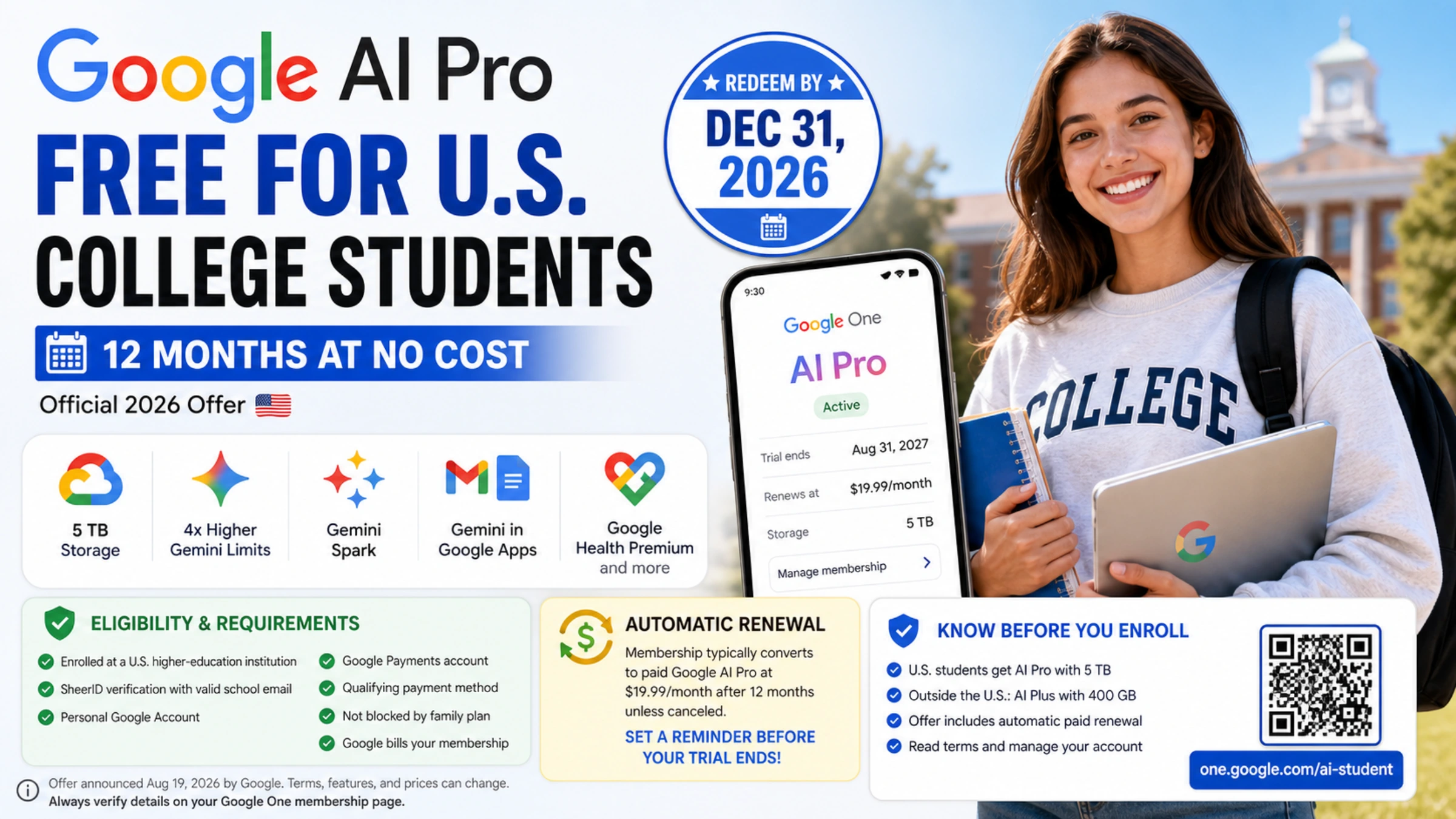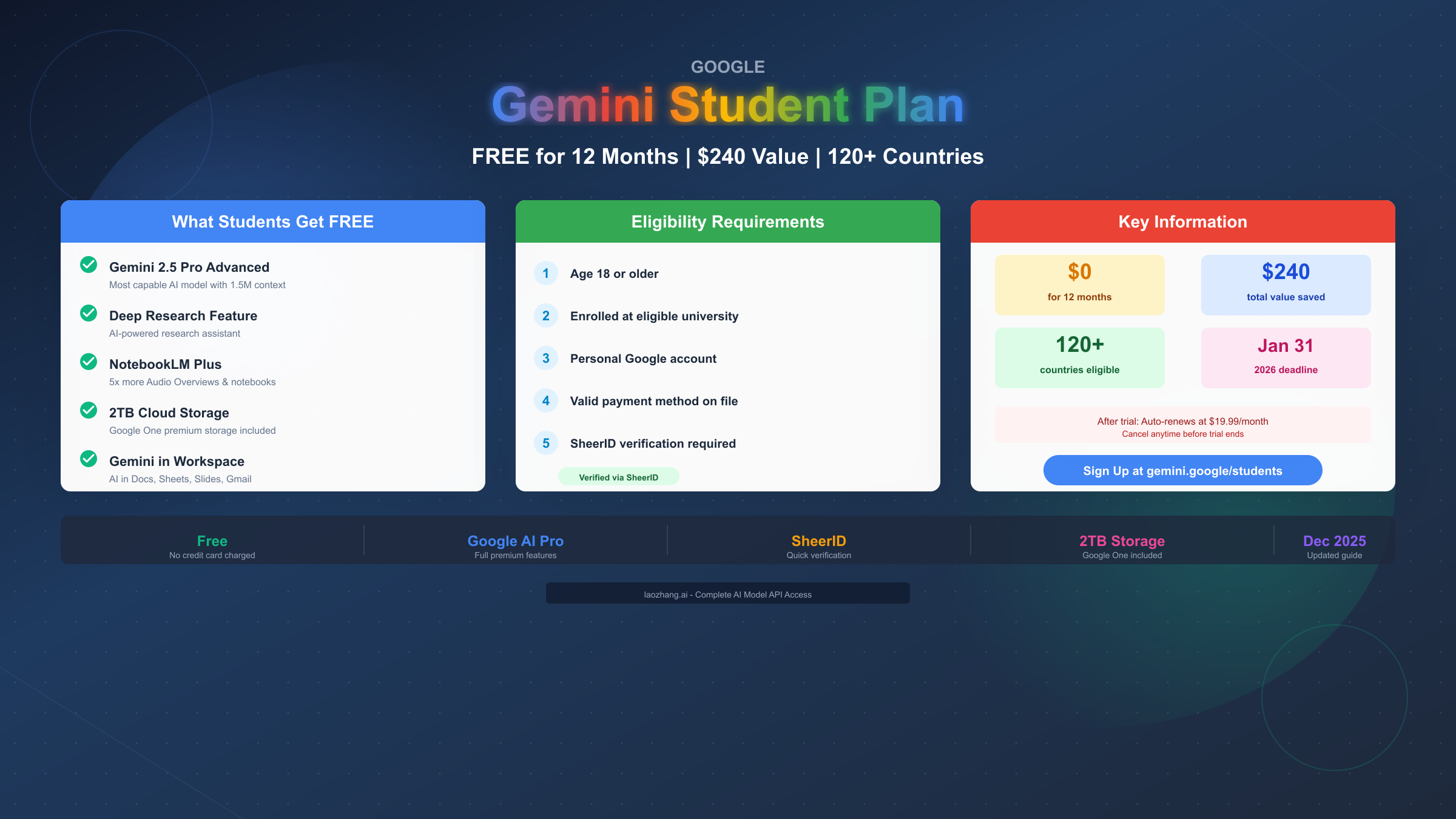
Google offers a free 12-month Gemini Advanced plan for eligible university students through their Google AI Pro student trial program. This offer, valued at approximately $240, includes full access to Gemini 2.5 Pro, Deep Research, NotebookLM Plus, and 2TB cloud storage. Students in over 120 countries can claim this offer by verifying enrollment through SheerID using a personal Google account. The deadline to sign up is January 31, 2026, and after the trial period, the subscription auto-renews at $19.99/month unless cancelled.
What is the Gemini Student Plan?
The Gemini Student Plan, officially called the "Google AI Pro student trial," represents one of the most generous educational technology offers available in 2025. Unlike typical student discounts that offer 10-20% off, Google provides complete free access to their premium AI services for a full 12 months, saving students approximately $240 in subscription fees.
This program launched in the United States in April 2025 and has since expanded to over 120 countries across North America, Europe, Asia, Africa, and the Middle East. The expansion demonstrates Google's commitment to making advanced AI accessible to students worldwide, recognizing that AI literacy is becoming essential for academic and professional success across all disciplines.
The naming of this program has caused some confusion among students. Originally called "Google One AI Premium," the service was rebranded to "Google AI Pro" in late 2025. Both names refer to the same subscription tier that includes Gemini Advanced, and the student trial provides identical benefits regardless of which name you encounter during the signup process.
What makes this offer particularly valuable is its comprehensiveness. Students don't receive a stripped-down version of Gemini—they get the full premium experience including Gemini 2.5 Pro (Google's most capable public AI model), Deep Research for comprehensive literature reviews, NotebookLM Plus with enhanced study tools, video generation through Veo 2, and 2TB of Google One cloud storage. For students already using Google Docs, Sheets, or Gmail, the Gemini integration brings AI assistance directly into their existing workflow.
The program requires verification through SheerID, a third-party service that Google uses to confirm student enrollment status. While this adds an extra step to the signup process, it ensures the offer reaches its intended audience of actively enrolled university students rather than being exploited by non-students.
| Feature | Regular Price | Student Price |
|---|---|---|
| Gemini Advanced | $19.99/month | FREE (12 months) |
| 2TB Storage | Included | FREE |
| NotebookLM Plus | Included | FREE |
| Deep Research | Included | FREE |
| Total Annual Value | $239.88 | $0 |
Country Availability: Complete Regional Guide
Understanding which countries support the Gemini Student Plan is crucial before attempting to sign up. Google has rolled out the program in phases, with different regions receiving access at different times. As of December 2025, the program is available in over 120 countries, though eligibility and deadline dates vary by region.
North America received the earliest access, with the United States and Canada launching in April 2025. Students in these regions have the longest track record with the program, and Google has refined the verification process based on feedback from these initial users.
Asia-Pacific saw significant expansion in mid-2025. Japan, South Korea, Indonesia, and India were among the first Asian countries to receive access. The program has since expanded to include Malaysia, Singapore, Philippines, Thailand, Vietnam, and many other countries in the region.
Europe gained widespread access by late 2025. Major markets including the United Kingdom, Germany, France, Spain, Italy, Netherlands, and most other EU countries now support the student trial. However, note that the UK deadline was November 3, 2025, meaning UK students who missed this deadline can only access a 1-month trial rather than the full 12 months.
Middle East and Africa received focused attention starting in September 2025. Countries including Egypt, Saudi Arabia, UAE, South Africa, Nigeria, Kenya, Ghana, Rwanda, and Zimbabwe now offer the full 12-month student trial.
Latin America has seen gradual expansion with Brazil and Mexico among the confirmed supported countries. Students in other Latin American countries should check the official signup page to verify current availability.
| Region | Countries | Launch Date | Deadline |
|---|---|---|---|
| North America | USA, Canada | April 2025 | Jan 31, 2026 |
| Asia | Japan, Korea, Indonesia, India | May-Aug 2025 | Jan 31, 2026 |
| Europe | UK, Germany, France, Spain, Italy | Oct-Dec 2025 | Varies* |
| Middle East | Egypt, Saudi Arabia, UAE | Sept 2025 | Jan 31, 2026 |
| Africa | Nigeria, Kenya, South Africa, Ghana | Oct 2025 | Jan 31, 2026 |
| Latin America | Brazil, Mexico | Aug-Oct 2025 | Jan 31, 2026 |
*Note: UK deadline was November 3, 2025. Other European countries generally have the January 31, 2026 deadline.
Countries NOT currently supported include mainland China, Russia, and several countries with restricted Google services. Students in these regions may need to explore alternative AI tools or consider API-based access through services like free Gemini 2.5 Pro API options.
Eligibility Requirements: Who Qualifies?
Before investing time in the signup process, students should verify they meet all eligibility requirements. Google has established specific criteria that must be satisfied to access the free trial, and failing to meet even one requirement will result in denial.
Age Requirement: Students must be 18 years or older. This is a hard requirement with no exceptions. High school students, even those who have been accepted to university, cannot access the student trial until they turn 18 and begin their university enrollment. This age restriction aligns with Google's terms of service and various privacy regulations.
Enrollment Status: You must be actively enrolled at an eligible higher education institution. This includes universities, colleges, and community colleges recognized by SheerID's database. Part-time enrollment typically qualifies, as does enrollment in graduate programs, professional programs, or continuing education courses that grant college credit.
Institution Eligibility: Your school must be in SheerID's database of recognized institutions. This includes most accredited universities worldwide, but some newer institutions, vocational schools, or coding bootcamps may not qualify. If your school doesn't appear during verification, you can still attempt manual verification with documentation.
Account Requirements: You must have a personal Google account (like a @gmail.com address). Critically, Google Workspace for Education accounts—the school-provided accounts with your university's domain—do NOT qualify for this offer. The trial must be activated using a personal Gmail account, which is then verified against your student status.
Payment Method: A valid payment method must be added to your Google account. Google accepts most credit cards, debit cards, and in some regions, PayPal. You will NOT be charged during the 12-month trial period, but the payment method is required for automatic renewal after the trial ends.
Who Does NOT Qualify:
- High school students (even if accepted to university)
- Students under 18 years old
- Coding bootcamp participants (in most cases)
- Alumni or recently graduated students
- Students using only Workspace for Education accounts
- Individuals not currently enrolled (gap year students)
International Students: If you're an international student studying at a university in an eligible country, you qualify based on your enrollment status, not your citizenship. A Chinese national studying at a US university would be eligible through the US program, for example.
Step-by-Step Signup Guide
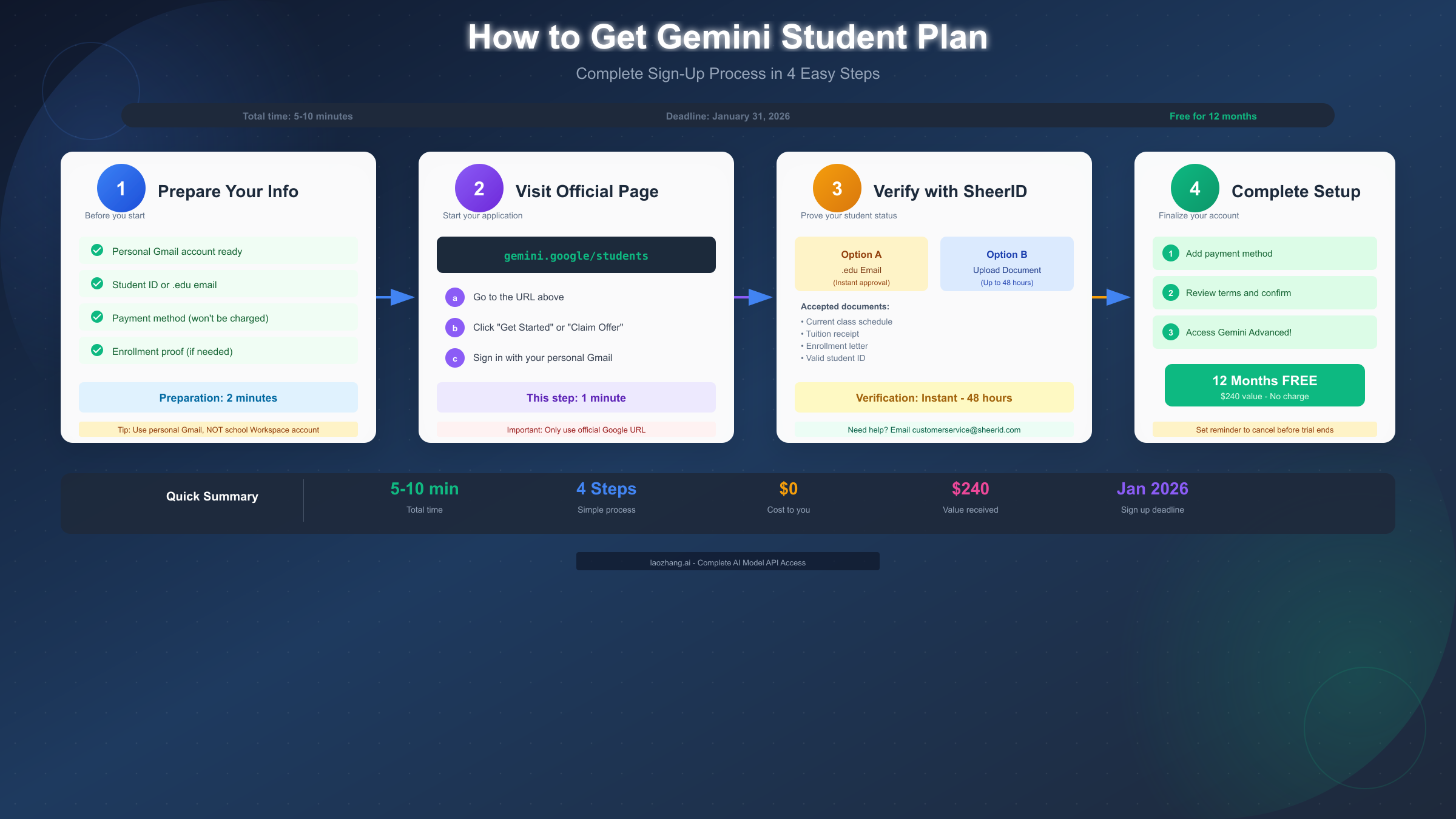
The signup process for the Gemini Student Plan takes approximately 5-10 minutes for most students, though verification times can vary depending on your institution and documentation. Follow these steps carefully to ensure successful activation.
Step 1: Prepare and Visit Official Page
Before starting the signup process, gather your personal Gmail account credentials, student ID card with current enrollment date, access to your .edu email (if available), a credit or debit card for payment method, and your current class schedule or enrollment verification as backup documentation.
Navigate directly to gemini.google/students in your web browser. This is the official landing page for the student offer. Avoid third-party links or promotional pages that might redirect you elsewhere.
On this page, you'll see an overview of what's included in the offer and a prominent "Get Started" or "Claim Your Offer" button. Click this button to begin the activation process.
You'll be prompted to sign into your Google account. Use your personal Gmail account, not your school-provided Google Workspace account. If you're currently signed into a Workspace account, sign out first or use a different browser/incognito window.
This is a common mistake that causes activation failures. The student discount must be applied to a personal account, which is then verified through SheerID.
Step 2: SheerID Verification
After signing in, you'll be directed to the SheerID verification portal. This is Google's partner service that confirms your student status. You have two primary verification options:
Option A: Instant Verification (Recommended) If your university issues .edu email addresses and SheerID recognizes your institution, you can verify instantly by:
- Selecting your institution from the dropdown
- Entering your .edu email address
- Clicking the verification link sent to that email
This method typically completes within seconds to minutes.
Option B: Document Upload If instant verification isn't available or fails, you can upload documentation:
- Select "Verify another way" or similar option
- Upload one of the following documents:
- Current class schedule showing your name and dates
- Tuition receipt from current semester
- Official enrollment verification letter
- Valid student ID with current date
- Wait for manual review (up to 48 hours)
Step 3: Payment and Confirmation
Once your student status is verified, you'll be prompted to add a payment method. Navigate to your Google account's payment settings and add a credit card, debit card, or PayPal account. This payment method will NOT be charged during your 12-month trial—it's required only because the subscription auto-renews after the trial period. You can cancel at any time before the trial ends to avoid charges.
Review the terms of the offer carefully before confirming. Key points to note:
- Free access for 12 months
- Auto-renewal at $19.99/month after trial
- Cancel anytime before trial ends
- All premium features included
Click "Start Free Trial" or "Confirm" to activate your subscription. After confirmation, your Google AI Pro subscription is immediately active. You can access Gemini Advanced by visiting gemini.google.com, opening the Gemini app on mobile, using the Gemini sidebar in Gmail, Docs, Sheets, or Slides, or accessing NotebookLM Plus at notebooklm.google.com.
Setting Up Reminders: Once activated, set a calendar reminder for approximately 2 weeks before your trial ends. This gives you time to decide whether to continue with the paid subscription, cancel before charges begin, or explore alternative options. The trial end date will be exactly 12 months from your activation date.
SheerID Verification Troubleshooting
SheerID verification is where most students encounter difficulties. Understanding common issues and their solutions can save significant time and frustration during the signup process.
"Institution Not Found" Error
If your school doesn't appear in SheerID's dropdown menu:
- Try different variations of your school's name (abbreviations, full name, location-specific names)
- Check if your institution has recently changed names or merged with another school
- Use the document upload option instead of instant verification
- Contact your registrar's office to confirm your school's official name in educational databases
"Verification Failed" Error
When instant verification fails despite having a valid .edu email:
- Check that you entered your email correctly (no typos)
- Verify the verification email didn't go to spam
- Try using a different browser or clearing cache
- Wait 15 minutes and try again (sometimes there are temporary issues)
- Fall back to document upload if instant fails repeatedly
Document Rejected
If your uploaded documents are rejected:
- Ensure documents are dated within the current academic year
- Your name must match your Google account name exactly
- Documents older than 90 days may be rejected
- PDF or high-resolution images work best
- Ensure all text is clearly legible
"Country Not Supported" Error
If you receive this error despite being in a supported country:
- Disable any VPN services you might be using
- Clear your browser cookies and cache
- Try accessing from a different network
- Verify your Google account's country settings match your physical location
Verification Taking Too Long
Manual document review can take up to 48 hours. If you've waited longer:
- Check your email (including spam) for status updates
- Contact SheerID support at customerservice@sheerid.com
- Try the verification process again from the beginning
- Ensure your document meets all requirements
For persistent issues, SheerID's help center provides additional troubleshooting resources, and their support team typically responds within 24 business hours.
Features and Value Breakdown
Understanding exactly what you're getting with the Gemini Student Plan helps you maximize the $240 value during your free year. Each feature serves specific academic purposes that can significantly enhance your studying and research capabilities.
Gemini 2.5 Pro Access
The flagship feature is unlimited access to Gemini 2.5 Pro, Google's most capable public AI model. This model features a 1.5 million token context window—equivalent to approximately 1,500 pages of text. For students, this means you can:
- Upload entire textbooks or research papers for analysis
- Have conversations that reference multiple documents simultaneously
- Work on complex coding projects with full context retention
- Analyze lengthy datasets or transcripts in a single session
The multimodal capabilities allow you to work with text, images, code, and even generate videos. You can upload lecture slides, diagrams, or handwritten notes and have Gemini help you understand and organize the content.
Deep Research
Deep Research is an AI-powered research assistant that can conduct comprehensive literature reviews on your behalf. When you provide a research topic:
- Gemini searches across multiple sources
- Synthesizes information from various perspectives
- Generates a detailed research report with citations
- Identifies gaps in current research
- Suggests related topics for further exploration
For students writing papers or conducting research, this feature can save hours of initial literature review work. However, always verify the citations and information—AI-generated research should be a starting point, not a final source.
NotebookLM Plus
NotebookLM Plus provides 5x the capabilities of the free version, making it an exceptional study tool. Key features include:
- Audio Overviews: Convert your study materials into podcast-style audio summaries that you can listen to during commute or exercise
- Visual Mind Maps: Automatically generate mind maps from your uploaded materials
- Source Integration: Upload up to 50 sources per notebook (PDFs, Google Docs, web links, YouTube videos)
- Study Guides: Generate comprehensive study guides from your course materials
- Q&A Generation: Create practice questions and flashcards automatically
Students who integrate NotebookLM into their study routine report significant improvements in retention and understanding of complex topics.
2TB Google One Storage
The included 2TB of cloud storage provides ample space for:
- Backing up research materials and project files
- Storing high-resolution photos and videos
- Syncing documents across devices
- Sharing large files with classmates or professors
This storage is shared across Google Drive, Gmail, and Google Photos, giving you flexibility in how you use the space.
Gemini in Workspace
For students already using Google Workspace applications, Gemini integration brings AI assistance directly into your workflow:
- Gmail: AI-generated email drafts, summaries of long email threads, suggested responses
- Google Docs: Writing assistance, grammar checking, tone adjustment, research integration
- Google Sheets: Formula suggestions, data analysis, chart generation
- Google Slides: Presentation creation assistance, image generation, speaker notes
These integrations eliminate the need to switch between applications when you need AI assistance, streamlining your workflow significantly. For developers exploring API options, the Gemini API pricing guide provides details on extended capabilities.
Video Generation with Veo 2
The inclusion of Veo 2 video generation allows students to create short video clips from text descriptions. While not yet as mature as the text features, this can be useful for:
- Creating visual aids for presentations
- Generating explainer videos for study groups
- Visualizing concepts that are difficult to explain in text
Gemini vs ChatGPT Plus for Students
Students often wonder whether they should pursue the Gemini Student Plan or look for alternatives like ChatGPT Plus. This comparison helps you understand which platform better suits your needs.
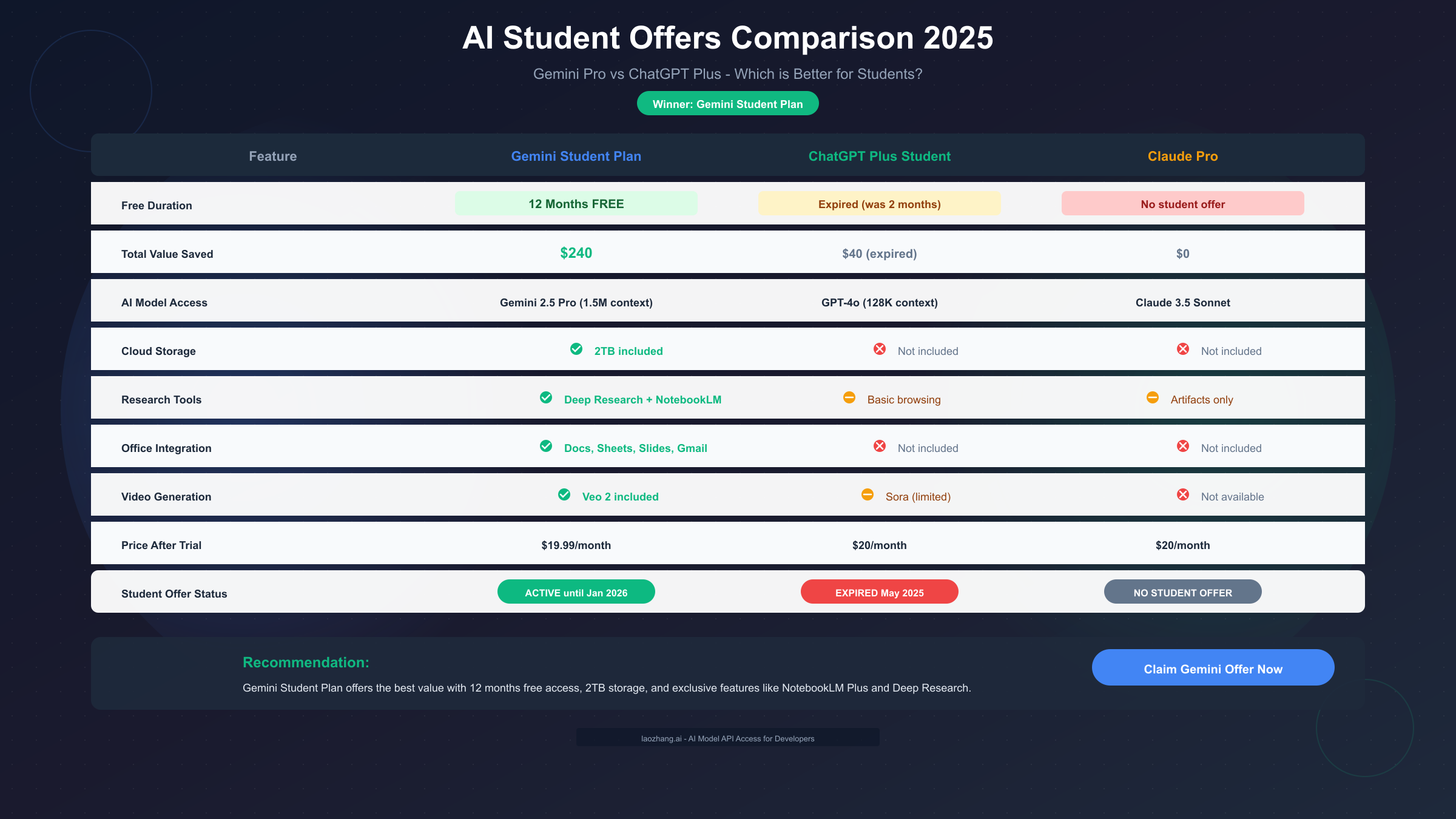
Student Offer Comparison
The most significant difference is in the student offers themselves. Gemini provides 12 months of free access, while ChatGPT Plus's student discount (which offered 2 months free) expired in May 2025. As of December 2025, there is no active ChatGPT Plus student discount.
| Aspect | Gemini Student Plan | ChatGPT Plus |
|---|---|---|
| Student Offer | 12 months FREE | Expired (was 2 months) |
| Total Value | $240 | $40 (no longer available) |
| Current Status | Active until Jan 2026 | No student offer |
| Regular Price | $19.99/month | $20/month |
Feature Comparison
Beyond pricing, the platforms differ in their capabilities:
Gemini Advantages:
- Larger context window (1.5M vs 128K tokens)
- Integrated cloud storage (2TB included)
- NotebookLM Plus study tools
- Deep Research feature
- Native Google Workspace integration
- Video generation (Veo 2)
ChatGPT Plus Advantages:
- More refined conversational abilities
- Sora video generation (when available)
- Strong custom GPT ecosystem
- Better third-party integrations
- More established user community
Use Case Recommendations
Choose Gemini if you:
- Are already invested in Google's ecosystem (Gmail, Drive, Docs)
- Need to analyze very long documents
- Want integrated study tools (NotebookLM)
- Prefer a no-cost option while in school
- Need cloud storage bundled with AI
Consider ChatGPT Plus if you:
- Need specific custom GPTs for your field
- Prefer more natural conversational interactions
- Require specific third-party integrations
- Are willing to pay $20/month
For most students, the Gemini Student Plan is the clear winner simply due to the free access. You can always subscribe to ChatGPT Plus later if you find you need its specific features. For students needing API access to multiple models, services like laozhang.ai provide cost-effective unified access to both Gemini and ChatGPT APIs.
After the Trial: What Happens Next
Understanding what happens when your 12-month trial ends helps you plan ahead and avoid unexpected charges. Google has specific procedures for trial expiration that every student should know.
Automatic Renewal
By default, your subscription will automatically renew at $19.99/month when the trial ends. This charge will be applied to the payment method you provided during signup. If you don't want to continue paying:
- Cancel at least 1 day before your trial ends
- Set a calendar reminder for 1-2 weeks before expiration
- You'll retain access until the trial period officially ends
How to Cancel
To cancel before being charged:
- Go to one.google.com/settings
- Click on "Manage membership"
- Select "Cancel membership"
- Follow the confirmation prompts
- You'll receive an email confirming cancellation
After cancellation, you'll retain access until your current billing period (the trial) ends. Your data in Google Drive remains, but you'll lose access to:
- Gemini Advanced features
- NotebookLM Plus (reverts to free version)
- Storage over 15GB (you'll need to reduce storage or pay for Google One storage separately)
Re-verification for Extended Access
Students in select countries (US, UK, Japan, Indonesia, Brazil) who activated the trial early may be eligible to re-verify and receive an additional 12 months of free access. To check:
- Visit the original student offer page
- If prompted to re-verify, follow the SheerID process again
- You must still be an active student to qualify
- This effectively extends your free access to 24 months total
Budget Alternatives After Trial
If you can't afford the $19.99/month subscription after your trial:
Free Options:
- Gemini Free tier (limited features, still useful)
- ChatGPT Free (GPT-3.5)
- Claude Free tier
- Microsoft Copilot Free
Budget API Options: For students who need more advanced access than free tiers provide but can't afford full subscriptions, API-based access can be more economical for light usage. Services like laozhang.ai offer pay-as-you-go access to multiple AI models including Gemini, which can be more cost-effective than monthly subscriptions for occasional use.
Student Budgeting Tips:
- Use the free trial period to determine your actual usage patterns
- Try the free tiers of multiple services after your trial
- Consider if your university provides AI access through institutional licenses
- Check if you qualify for other student discounts that may offset costs
Frequently Asked Questions
Can high school students get the Gemini Student Plan?
No, high school students are not eligible for the Google AI Pro student trial. The offer is specifically for students enrolled in higher education institutions (universities, colleges, community colleges). High school students who have been accepted to university but haven't yet enrolled also don't qualify. The minimum age requirement is 18 years old.
What happens if I graduate during my free trial?
Your free trial continues until the full 12-month period ends, regardless of your graduation status. Once you've activated the offer, Google doesn't revoke access mid-trial. However, you won't be able to re-verify for extended access if you're no longer a student when the extension option becomes available.
Can I use my university Google Workspace account?
No, you cannot activate the student trial using a Google Workspace for Education account (your school-provided Google account). You must use a personal Google account (@gmail.com or similar). Your personal account is then verified against your student status through SheerID, but the subscription lives on your personal account.
What documents does SheerID accept for verification?
SheerID accepts several types of documentation proving current enrollment: current class schedule with your name and dates, tuition receipt or payment confirmation, official enrollment verification letter, student ID card with current academic year, or any official document showing active enrollment status. Documents must be dated within the current academic year or within 90 days of your verification attempt.
Is the offer available to part-time students?
Yes, part-time students at eligible institutions can access the Gemini Student Plan. SheerID verifies enrollment status, not the number of credits you're taking. As long as you're actively enrolled, part-time status shouldn't affect your eligibility.
Can I share my account with friends?
While there's no technical block preventing sharing your login credentials, this violates Google's terms of service. The student trial is intended for individual use. Each eligible student should activate their own offer. Sharing accounts risks termination of your subscription and potentially other consequences with your Google account.
What's the difference between Gemini Pro and Gemini Advanced?
"Gemini Pro" refers to the AI model itself, while "Gemini Advanced" refers to the subscription tier that provides enhanced access to that model. The student trial grants "Google AI Pro" access (formerly Google One AI Premium), which includes Gemini Advanced with all premium features. Free users access a more limited version of Gemini.
Why was my verification rejected?
Common reasons for verification rejection include: documents older than 90 days, name mismatch between documents and Google account, illegible document quality, institution not recognized by SheerID, documents not showing current enrollment, or using a Workspace account instead of personal account. Try re-submitting with updated documents, ensure your name matches exactly, and use high-quality scans or photos.
Can international students in the US get the offer?
Yes, international students studying at US institutions are eligible based on their enrollment status, not citizenship. If you're enrolled at an accredited US university and can verify through SheerID, you qualify regardless of your country of origin.
Summary
The Google Gemini Student Plan represents an exceptional opportunity for university students to access premium AI tools at no cost. With 12 months of free access worth approximately $240, comprehensive features including Gemini 2.5 Pro, Deep Research, NotebookLM Plus, and 2TB storage, and availability in over 120 countries, this offer is well worth pursuing for any eligible student.
The key steps to claim your free access:
- Verify you meet eligibility requirements (18+, enrolled, personal Google account)
- Visit gemini.google/students before January 31, 2026
- Complete SheerID verification with your .edu email or documentation
- Add a payment method (you won't be charged during the trial)
- Start using Gemini Advanced immediately
Remember to set a calendar reminder before your trial ends to decide whether to continue, cancel, or explore alternatives. The free trial period is your opportunity to thoroughly evaluate whether premium AI tools significantly enhance your academic work.
For students who want to explore AI capabilities beyond single-platform subscriptions, or who need to continue access after their trial without committing to $19.99/month, API-based services like laozhang.ai offer flexible, pay-as-you-go access to multiple AI models including Gemini, ChatGPT, and Claude at competitive rates.
Take advantage of this generous offer while it lasts—the January 31, 2026 deadline will arrive sooner than you think.