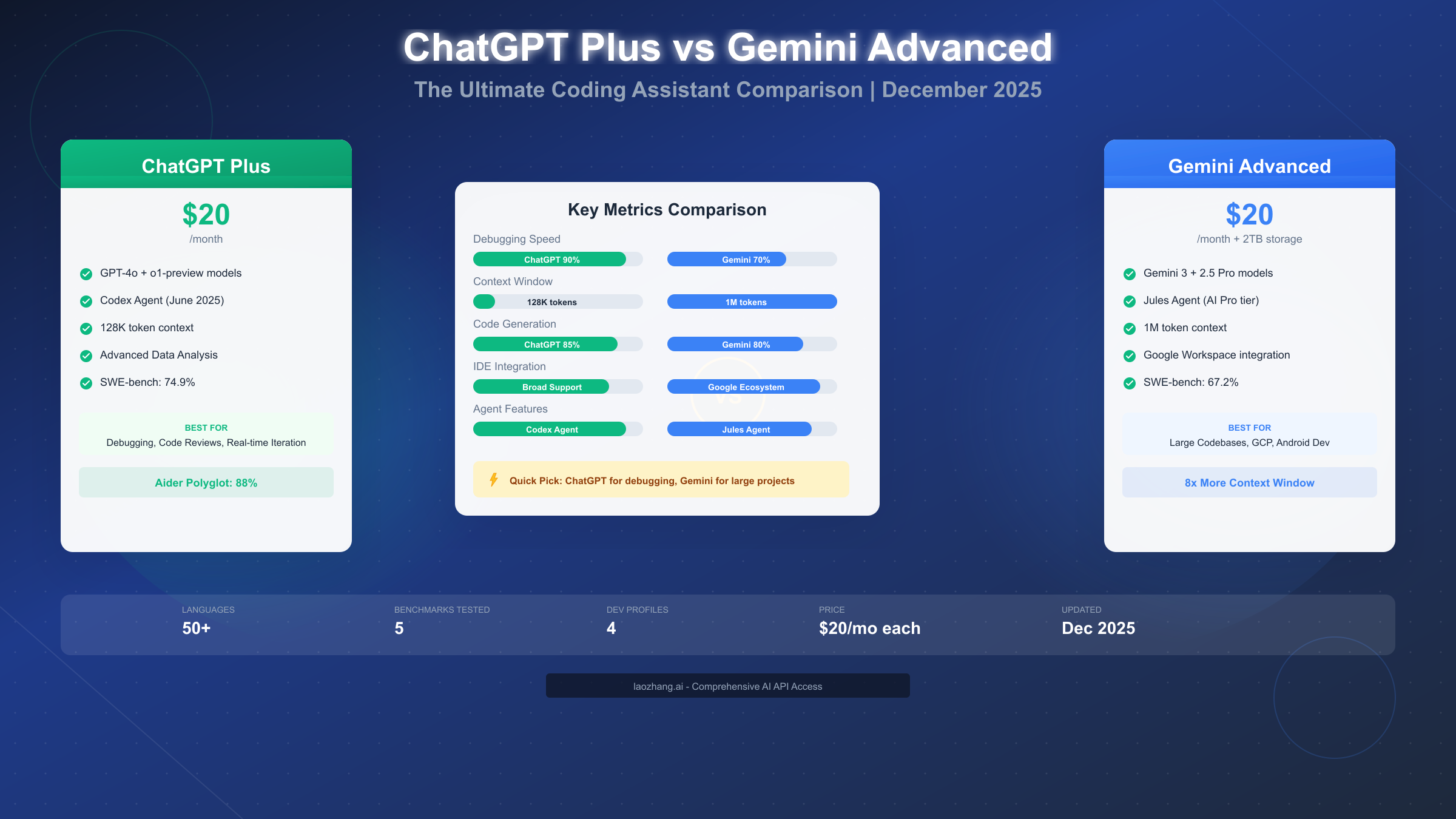
Both ChatGPT Plus and Gemini Advanced cost $20 per month and deliver powerful AI coding assistance, but they excel in fundamentally different areas. As of December 2025, ChatGPT Plus leads in debugging and code explanation with its Codex agent scoring 74.9% on SWE-bench Verified, while Gemini Advanced offers a massive 1 million token context window that can analyze entire codebases in a single prompt. ChatGPT Plus wins 4 out of 5 major coding benchmarks, but Gemini's 8x larger context window and native Google ecosystem integration make it the better choice for large-scale projects. Your optimal choice depends on your specific workflow, project scale, and development environment.
TL;DR: Quick Verdict for Busy Developers
If you need a quick answer before diving into details, here's the bottom line based on extensive testing and official benchmark data.
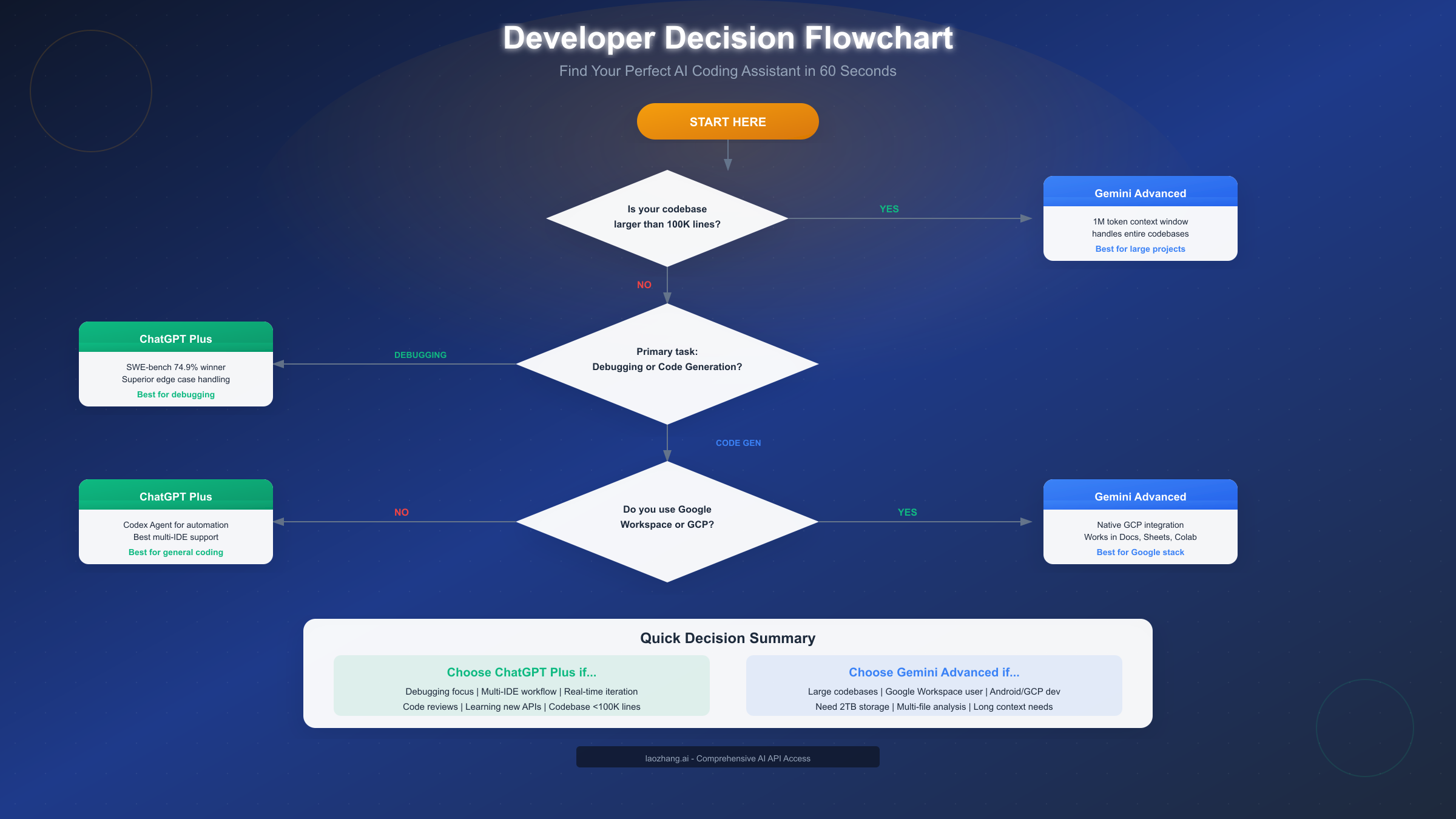
Choose ChatGPT Plus if you:
- Focus primarily on debugging and code reviews
- Work with multiple programming languages and frameworks
- Want the best edge-case handling and error detection
- Need real-time iteration with conversational explanations
- Use diverse IDEs beyond the Google ecosystem
- Have codebases under 100,000 lines
Choose Gemini Advanced if you:
- Work with large monorepos or enterprise codebases
- Are heavily invested in Google Workspace (Docs, Sheets, Colab)
- Develop for Android or Google Cloud Platform
- Need to analyze extensive documentation alongside code
- Want the 2TB Google Drive storage included with subscription
- Require multi-file context analysis in single prompts
The reality is that both tools justify their $20 monthly cost for professional developers. The question isn't which is "better" in absolute terms—it's which better fits your specific development workflow and project requirements.
Feature-by-Feature Comparison Table
Before diving into detailed analysis, here's a comprehensive feature matrix comparing both platforms as of December 2025.
| Feature | ChatGPT Plus | Gemini Advanced |
|---|---|---|
| Monthly Price | $20 | $20 (includes Google One) |
| Base Models | GPT-4o, o1-preview | Gemini 3, 2.5 Pro |
| Coding Agent | Codex (June 2025) | Jules (AI Pro tier) |
| Context Window | 128,000 tokens | 1,000,000 tokens |
| SWE-bench Score | 74.9% | 67.2% |
| Aider Polyglot | 88% | 82.2% |
| Code Execution | Python sandbox | Limited |
| IDE Integration | Broad (VS Code, JetBrains+) | Google-focused |
| Storage Included | None | 2TB Google Drive |
| Workspace Integration | Third-party plugins | Native (Docs, Sheets, Gmail) |
| Mobile Apps | iOS, Android | iOS, Android |
| Voice Input | Yes | Yes |
| Image Understanding | Yes (GPT-4o) | Yes (multimodal) |
The table reveals an interesting pattern: ChatGPT Plus excels in pure coding metrics, while Gemini Advanced offers broader value through ecosystem integration and context capacity. Let's explore what these differences mean for your daily development work.
2025 Benchmark Showdown: Real Performance Data
Understanding benchmark performance helps set realistic expectations for each tool's coding capabilities. These scores come from official sources and independent testing as of December 2025.
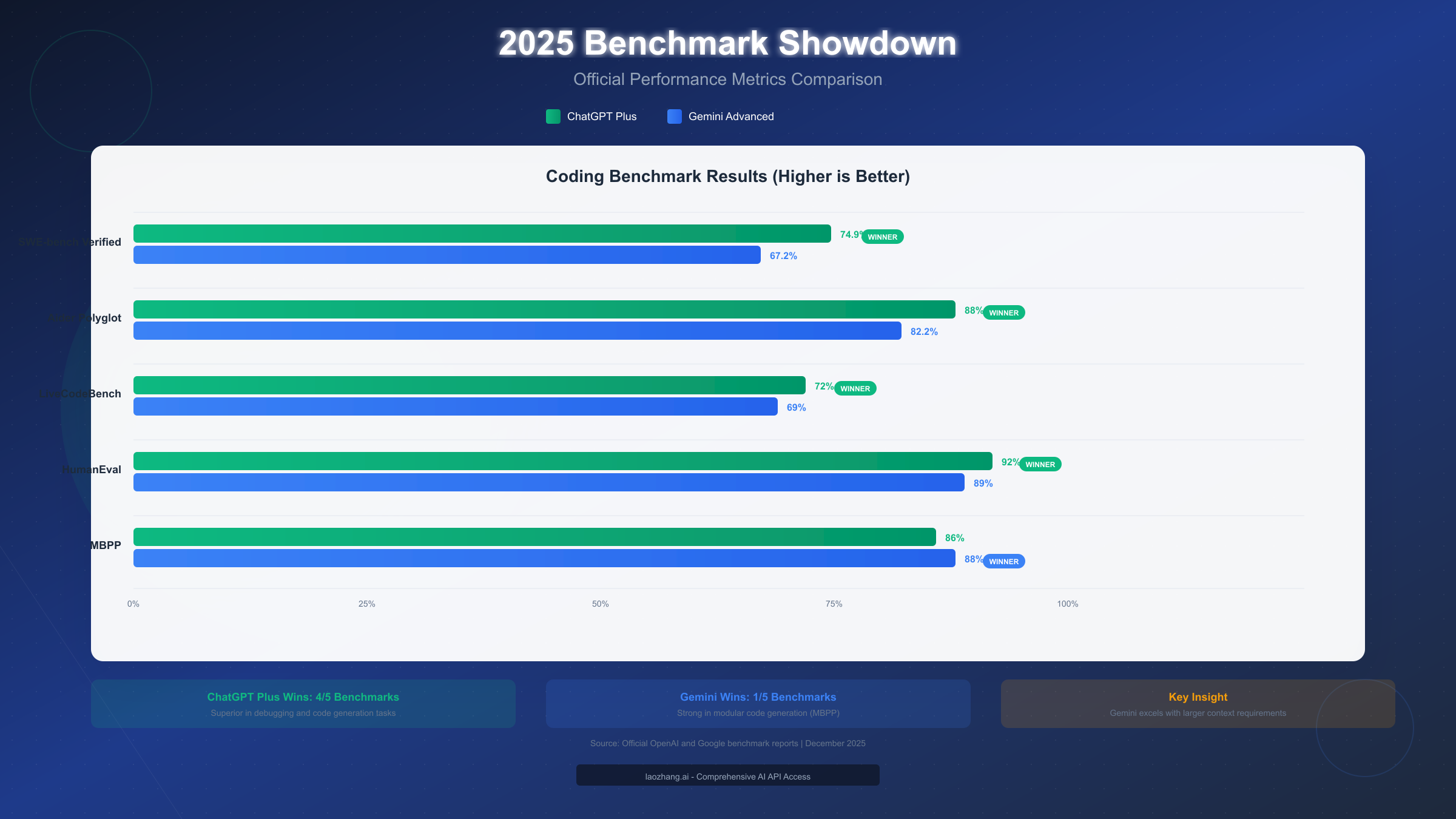
SWE-bench Verified, the gold standard for evaluating real-world software engineering tasks, shows ChatGPT Plus with a clear advantage at 74.9% compared to Gemini Advanced's 67.2%. This benchmark tests the ability to resolve actual GitHub issues from popular repositories, making it highly relevant for day-to-day development work. The 7.7 percentage point gap represents meaningful differences in problem-solving capability, particularly for complex debugging scenarios.
Aider Polyglot measures performance across multiple programming languages in realistic coding scenarios. ChatGPT Plus scores 88% versus Gemini's 82.2%, indicating superior multi-language versatility. This matters significantly if you regularly switch between Python, JavaScript, Go, or other languages throughout your workday.
LiveCodeBench focuses on code generation quality and correctness. ChatGPT Plus edges out at 72% compared to Gemini's 69%, though both scores indicate reliable code generation capabilities. The practical difference here is less pronounced than other benchmarks.
HumanEval, which tests Python code generation specifically, shows ChatGPT Plus at 92% versus Gemini's 89%. Both scores are excellent, but ChatGPT's slight edge aligns with its overall stronger performance in debugging and code quality metrics.
Interestingly, MBPP (Mostly Basic Python Programming) is the one benchmark where Gemini Advanced slightly outperforms at 88% versus ChatGPT's 86%. This benchmark emphasizes modular, well-structured code generation—suggesting Gemini may produce cleaner initial code structures in some scenarios.
The benchmark narrative is clear: ChatGPT Plus consistently outperforms in tasks requiring deep reasoning about code behavior, edge cases, and debugging. However, raw benchmark scores don't capture everything. Gemini's advantages in context window and integration don't show up in these numbers but significantly impact real-world productivity for certain workflows.
Agent Showdown: Codex vs Jules
The most significant development in AI coding assistance during 2025 has been the introduction of autonomous coding agents. Both platforms now offer agent capabilities, but they differ substantially in approach and functionality.
ChatGPT's Codex Agent, released in June 2025, represents OpenAI's vision of an autonomous software engineering assistant. Built on codex-1 (an o3 variant optimized for coding), Codex operates in isolated cloud sandbox environments preloaded with your repository context. The agent can independently write features, answer codebase questions, fix bugs, and even propose pull requests for human review.
What makes Codex particularly powerful is its approach to task execution. When you assign a task, Codex spins up a sandboxed environment, clones your repository, and works through the problem iteratively. It can run tests, observe failures, modify code, and retry until the task succeeds or it determines human intervention is needed. For ChatGPT Plus subscribers, Codex access comes included, though with usage limits that haven't been publicly quantified.
The practical experience with Codex reveals both strengths and limitations. For well-defined tasks like "add input validation to the user registration form" or "fix the race condition in the payment processing module," Codex often delivers working solutions that need minimal human review. However, for tasks requiring broader architectural decisions or deep domain knowledge, it still requires significant guidance.
Google's Jules Agent takes a different approach, positioning itself as an asynchronous coding companion rather than an autonomous developer. Available to Google AI Pro subscribers at 5x the limits of free users (and 20x for AI Ultra subscribers), Jules focuses on augmenting human developers rather than replacing their decision-making.
Jules integrates deeply with Google's development infrastructure. In Google Colab, Jules can analyze entire notebooks, suggest optimizations, and even restructure code for better performance. Within the Gemini CLI, Jules handles complex terminal operations, executing multi-step commands and managing development workflows. The key differentiator is Jules' access to Gemini's 1 million token context window, allowing it to maintain awareness of entire large codebases during assistance.
For developers building within the Google ecosystem, particularly those working with Android development or Google Cloud Platform services, Jules' native integration provides workflow advantages that ChatGPT's plugins cannot fully replicate. The agent understands GCP service configurations, Firebase rules, and Android-specific patterns at a level that requires less explicit prompting.
The choice between Codex and Jules often comes down to your preferred working style. If you want an agent that can take a task and run with it semi-autonomously, Codex's sandboxed execution model fits better. If you prefer an always-available assistant that enhances your existing workflow without taking over, Jules' integration-focused approach may feel more natural.
For developers who need high-volume API access to these models beyond the subscription limits, platforms like laozhang.ai provide aggregated access with consistent pricing matching official rates, allowing for more extensive agent utilization in production workflows without account restrictions.
Context Window Deep Dive: When Size Actually Matters
The context window difference between these platforms is stark: ChatGPT Plus offers 128,000 tokens while Gemini Advanced provides 1,000,000 tokens—an 8x multiplier. But what does this mean in practical terms?
Token-to-code translation helps visualize the difference. A typical line of code averages around 5-10 tokens depending on language verbosity. ChatGPT's 128K context can hold approximately 12,000-25,000 lines of code, while Gemini's 1M context accommodates roughly 100,000-200,000 lines. For reference, the entire React framework source code is approximately 100,000 lines, meaning Gemini can theoretically hold it in a single context while ChatGPT cannot.
When does context window matter? Not every development task benefits from massive context. For routine tasks like debugging a specific function, writing unit tests, or generating boilerplate code, even ChatGPT's 128K context is more than sufficient. The real advantage of Gemini's larger context emerges in specific scenarios.
First, large codebase analysis becomes possible without chunking. If you need to ask questions about relationships between components across a large monorepo, Gemini can hold the relevant files simultaneously. With ChatGPT, you'd need to strategically select which files to include or use retrieval augmentation.
Second, multi-file refactoring benefits significantly. When renaming a core interface or changing a fundamental pattern, Gemini can see all affected files at once, reducing the chance of inconsistent changes. ChatGPT requires more careful orchestration of context.
Third, documentation alongside code becomes feasible. Including comprehensive API documentation, design specs, and implementation code in a single context allows Gemini to provide more informed suggestions that align with intended architecture.
Practical workarounds for ChatGPT's smaller window exist and work well for many developers. The most effective approach is selective context inclusion—providing only the most relevant files and excerpts rather than entire codebases. ChatGPT's Advanced Data Analysis can also execute Python code to help analyze larger codebases programmatically, working around direct context limitations.
Another strategy involves using ChatGPT's memory feature (available for Plus subscribers) to maintain awareness of project structure across conversations. While not equivalent to true context window expansion, this helps maintain continuity for longer-term projects.
The context window gap matters most for developers working with large enterprise codebases, those who frequently need whole-project analysis, or anyone doing extensive multi-file refactoring. For most other scenarios, the difference is less impactful than benchmark performance differences.
Programming Language Comparison
Both tools support major programming languages, but their relative strengths vary by language and use case.
Python Development represents the strongest overlap between both platforms. ChatGPT Plus has a slight edge in debugging Python code, particularly for complex edge cases involving type coercion, exception handling, and asynchronous patterns. The built-in code execution through Advanced Data Analysis allows testing Python snippets directly within the conversation—a capability Gemini lacks for arbitrary code.
For data science workflows specifically, Gemini's integration with Google Colab and native understanding of notebook patterns provides workflow advantages. If your Python work centers on machine learning pipelines in Google's ecosystem, Gemini feels more natural.
JavaScript and TypeScript development shows ChatGPT Plus performing better on React and Vue.js patterns, with more reliable component generation and better understanding of modern framework conventions. ChatGPT's explanations of TypeScript type system intricacies are generally more thorough and accurate.
Gemini Advanced handles Angular development well, likely due to Google's ownership of the framework. For Angular-specific questions, particularly around RxJS patterns and dependency injection, Gemini often provides more contextually accurate responses.
Systems Programming in Go and Rust reveals interesting differences. ChatGPT Plus handles Rust's ownership model and borrow checker scenarios more reliably, producing code that compiles on first attempt more consistently. For Go development, both platforms perform similarly, though ChatGPT's explanations of Go idioms tend to be more detailed.
Mobile Development presents the clearest differentiation. For Android development in Kotlin or Java, Gemini Advanced's native understanding of Android SDK, Gradle configurations, and Google Play services gives it a meaningful advantage. ChatGPT can handle Android development competently, but requires more explicit context about Android-specific patterns.
For iOS development in Swift, ChatGPT Plus holds the edge. The model demonstrates better understanding of SwiftUI patterns, Combine framework usage, and Apple's Human Interface Guidelines. If you're building exclusively for Apple platforms, ChatGPT is the more reliable choice.
Database and SQL work favors ChatGPT Plus for complex query optimization and explaining execution plans. For BigQuery specifically, Gemini's native integration provides better autocomplete and query suggestions within the Google Cloud Console.
Which One Fits Your Developer Profile?
Rather than abstract recommendations, let's map specific developer profiles to optimal tool choices.
The Full-Stack Web Developer working across multiple frameworks and languages generally benefits more from ChatGPT Plus. The consistent performance across JavaScript, Python, and various databases, combined with stronger debugging capabilities, aligns with the diverse demands of full-stack work. Unless you're specifically building on Google Cloud Platform with heavy Firebase usage, ChatGPT's versatility serves better.
The Data Scientist or ML Engineer has a more nuanced choice. If your workflow centers on Google Colab, BigQuery, and Vertex AI, Gemini Advanced integrates more naturally with your existing tools. The ability to analyze entire notebooks and datasets within context provides workflow efficiencies. However, if you work primarily in Jupyter locally or use AWS/Azure ML services, ChatGPT Plus's superior code execution and debugging may matter more.
The Mobile Developer should choose based on target platform. Android developers clearly benefit from Gemini Advanced's deep understanding of Google's ecosystem, Android SDK patterns, and Material Design guidelines. iOS developers should choose ChatGPT Plus for better SwiftUI understanding and Apple platform expertise.
The DevOps Engineer handling infrastructure-as-code, CI/CD pipelines, and cloud configurations finds ChatGPT Plus more versatile across multi-cloud environments. However, GCP-focused DevOps work benefits from Gemini's native understanding of Google Cloud services, Terraform configurations for GCP, and Kubernetes Engine specifics.
The Enterprise Developer working with large legacy codebases often finds Gemini Advanced's context window essential. The ability to load extensive legacy code, outdated documentation, and related configuration files into a single context enables understanding of systems that would require multiple ChatGPT conversations to fully grasp.
The Learning Developer exploring new languages or frameworks typically benefits more from ChatGPT Plus. The model's explanatory capabilities, ability to walk through concepts with analogies, and patience with follow-up questions make it more effective for educational purposes. Gemini tends toward more direct answers that assume existing knowledge.
Pricing and Value Breakdown
Both subscriptions cost $20 per month, but the value proposition differs significantly.
ChatGPT Plus provides access to GPT-4o and o1-preview models, the Codex agent, Advanced Data Analysis with code execution, DALL-E 3 image generation, and plugin ecosystem access. The subscription focuses purely on AI capabilities without bundled services.
Gemini Advanced (marketed as Google AI Pro) includes Gemini 3 and 2.5 Pro models, the Jules agent, native Workspace integration, and significantly—2TB of Google Drive storage and Google One membership benefits. The cloud storage alone would cost $9.99/month separately, making Gemini's effective AI cost closer to $10.
For developers already paying for Google One storage, Gemini Advanced represents exceptional value by bundling AI capabilities with existing storage needs. If you don't need the storage, the value comparison is more even.
API Access Considerations matter for developers building applications. ChatGPT Plus subscription doesn't include API credits—API access requires separate payment through OpenAI's platform. Similarly, Gemini Advanced subscription provides generous quotas for personal use but doesn't include Vertex AI API credits for production applications.
For teams needing high-volume API access beyond personal subscription limits, third-party aggregators like laozhang.ai offer unified access to both OpenAI and Google models at competitive rates (approximately 84% of official pricing with volume bonuses), without per-account restrictions that can limit production usage. Full documentation available at https://docs.laozhang.ai/.
Team and Enterprise Plans exist for both platforms. OpenAI's ChatGPT Team starts at $25/user/month with enhanced privacy and admin controls. Google offers Gemini for Workspace at various tiers integrated with business Google Workspace subscriptions.
Final Verdict: Making Your Choice
After comprehensive analysis across benchmarks, agent capabilities, context windows, and language-specific performance, the decision framework becomes clear.
ChatGPT Plus emerges as the stronger choice for most individual developers based on superior benchmark performance, better debugging capabilities, and broader language support. If you're uncertain about your specific needs or want a general-purpose AI coding assistant, ChatGPT Plus delivers more consistent value.
Gemini Advanced becomes the better choice under specific conditions: you work with large codebases exceeding 100K lines, you're deeply integrated into Google's ecosystem, you develop primarily for Android, or you value the included 2TB storage. In these scenarios, Gemini's unique strengths outweigh ChatGPT's benchmark advantages.
For many developers, the optimal approach might be leveraging both tools strategically—using ChatGPT Plus for debugging, code reviews, and real-time development assistance while turning to Gemini for large-codebase analysis and Google-specific workflows. The $40/month combined cost may justify itself for productivity gains.
If you're currently using neither, start with a clear assessment of your primary development environment and typical project scale. For those wanting to experiment before committing, ChatGPT offers a capable free tier to test basic capabilities, while Google provides limited Gemini access through its free tier—both help validate which tool's interaction style suits your preferences. You can also explore our guide on ChatGPT free trial options to maximize your evaluation period.
The AI coding assistant landscape continues evolving rapidly. Both OpenAI and Google are shipping significant updates monthly, so today's comparison may shift as new capabilities emerge. What remains constant is that either tool, used effectively, can meaningfully accelerate your development productivity—the key is choosing the one that aligns with your specific workflow and committing to learning its strengths.
This comparison reflects capabilities as of December 2025. Both platforms receive frequent updates; verify current features through official documentation before purchasing decisions.