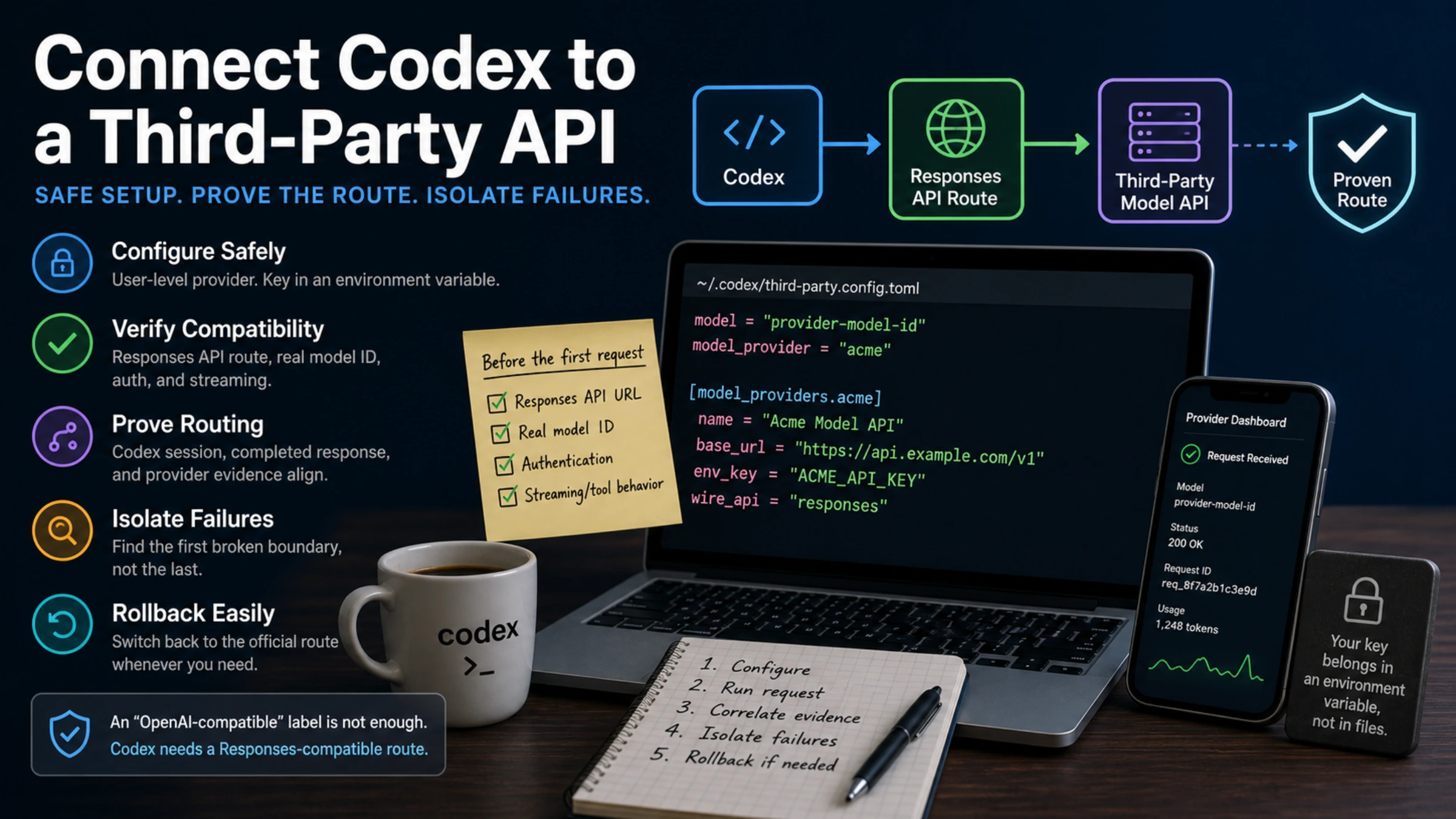
A third-party key is only one part of a working Codex route. Codex also needs an endpoint that implements the Responses API, a model identifier that exists on that provider, an authentication scheme the provider accepts, and a stream that Codex can parse to completion.
That distinction catches the most expensive setup mistake early. A service may accurately describe its Chat Completions endpoint as “OpenAI-compatible” while offering no compatible Responses endpoint. Appending /responses to its URL does not create the missing protocol. Confirm the contract in the provider's first-party documentation before editing Codex.
This changes the model backend used by local Codex clients. It does not add an external tool. MCP servers connect Codex to tools and data; the Codex App Server lets another product drive the Codex harness. Neither is a substitute for a custom model provider.
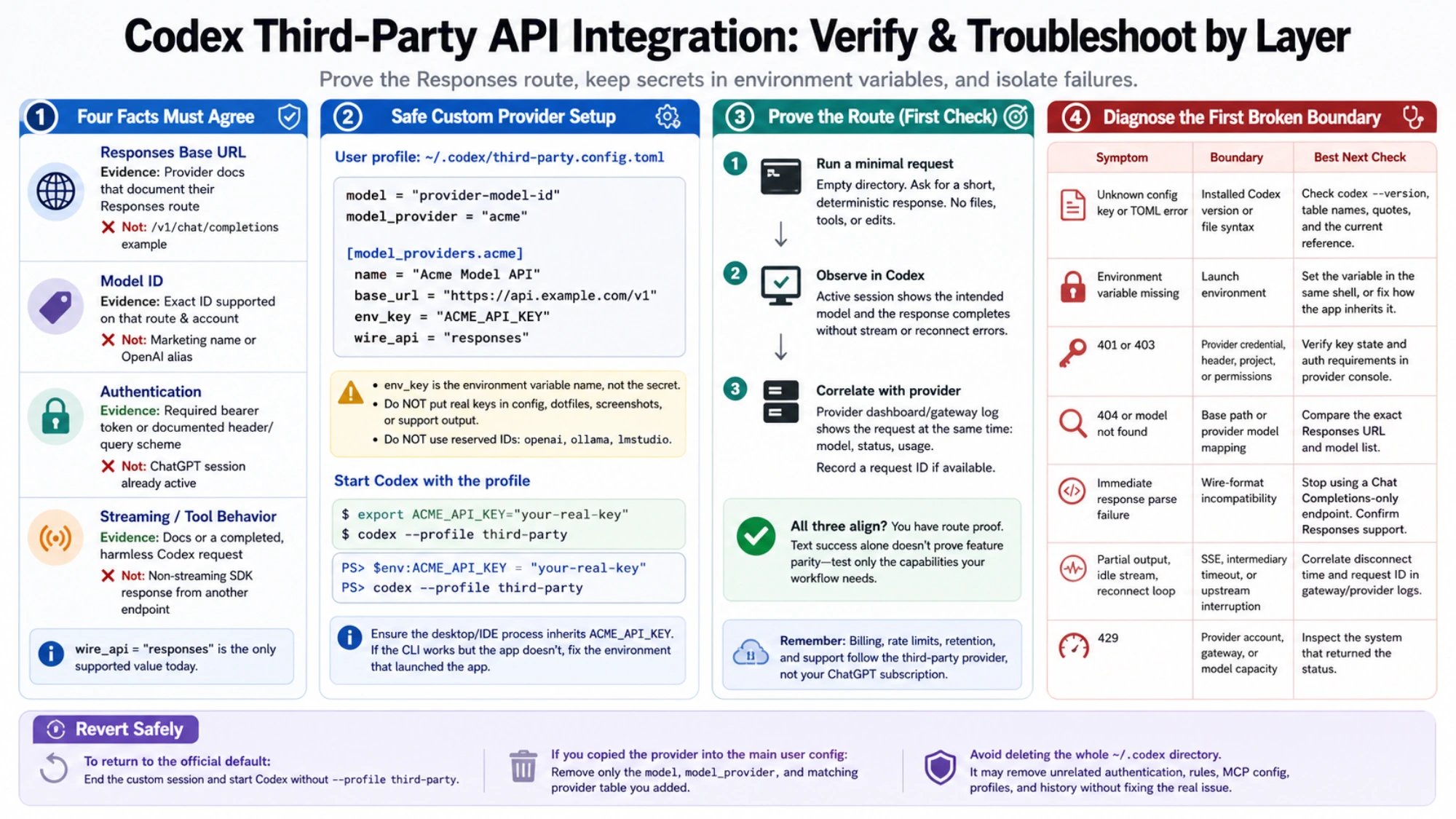
Four facts must agree before the first request
Collect these values from the provider's current documentation, not from a copied configuration block:
| Required fact | What counts as evidence | What does not |
|---|---|---|
| Responses base URL | A provider page that explicitly documents its Responses route | A working /v1/chat/completions example |
| Model ID | The exact ID supported on that route and account | A marketing model name or an OpenAI model alias |
| Authentication | The required bearer token or documented header/query scheme | A ChatGPT session already active in Codex |
| Streaming/tool behavior | Provider documentation or a completed harmless Codex request | A non-streaming SDK response from another endpoint |
OpenAI's current Codex configuration reference lists responses as the only supported wire_api value. This is why protocol evidence comes before price, benchmark claims, or a switcher UI: without the wire contract, Codex cannot reliably interpret the model response.
Keep the official route intact with a profile
Provider and authentication settings are machine-local. Codex ignores model_provider and model_providers when they appear in a repository's .codex/config.toml; put them in the user-level configuration or a user profile beside it. The current advanced configuration guide documents both custom providers and standalone profile files.
For a reversible test, create ~/.codex/third-party.config.toml:
model = "provider-model-id"
model_provider = "acme"

[model_providers.acme]
name = "Acme Model API"
base_url = "https://api.example.com/v1"
env_key = "ACME_API_KEY"
wire_api = "responses"
Replace the example URL and model ID with the provider's exact values. The name acme is a local identifier; it must match in model_provider and [model_providers.acme]. Do not use openai, ollama, or lmstudio for a custom definition because those IDs are reserved.
Start Codex with the profile only when you want this route:
export ACME_API_KEY="your-real-key"
codex --profile third-party
For a current PowerShell session:
$env:ACME_API_KEY = "your-real-key"
codex --profile third-party
env_key is the environment variable's name, not the secret. OpenAI's reference discourages putting a literal token in experimental_bearer_token. Avoid committing the key to a dotfiles repository, a project .env.example, support output, or screenshots.
A desktop or IDE process may not inherit a variable exported in an unrelated terminal. If the CLI sees the key but the desktop client does not, investigate the environment of the process that launched the client before changing the endpoint. When a provider requires a nonstandard header or query parameter, use only its documented env_http_headers, http_headers, or query_params shape. Do not improvise an authentication header from another vendor's sample.
A model label is not route proof
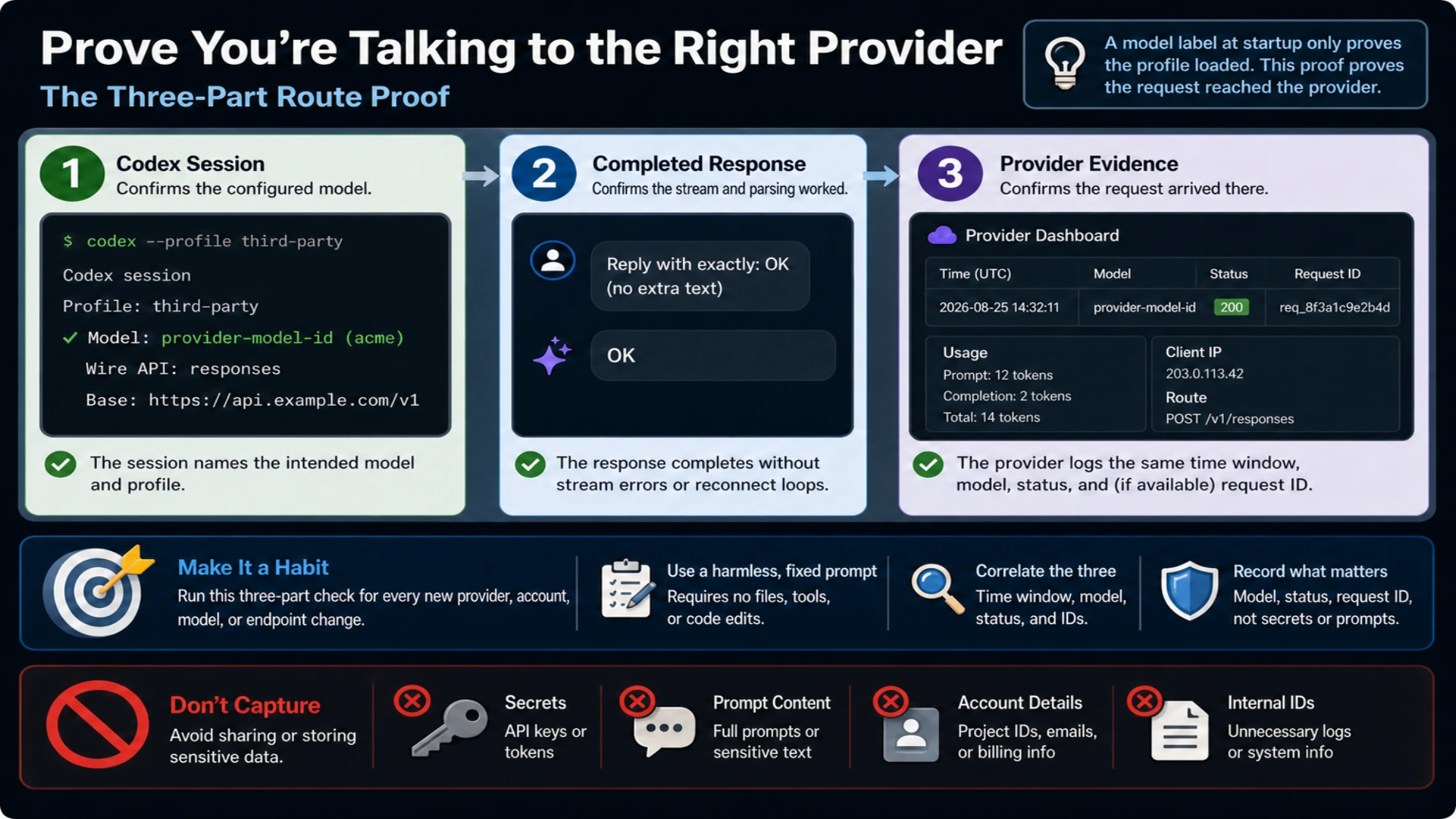
Seeing the configured model at startup proves that Codex loaded the profile. It does not prove which server received the request. Run the first check in an empty directory and ask for a fixed, short response that requires no file reads, tools, or code edits. Then correlate three observations:
- the active Codex session names the intended model;
- the response completes without a stream parse or reconnect failure;
- the provider dashboard or gateway log records a request at the same time, with the intended model, status, and usage.
Record a request ID when the provider exposes one. Do not record the secret or unnecessary prompt content. This correlation catches stale sessions, an unexpected profile, a provider-side model alias, and a proxy that rewrites the route.
Provider-specific instructions remain useful when their scope is clear. DeepSeek's current first-party Codex integration page says its API natively supports Responses and documents its own model setup. That is evidence for the DeepSeek route, not for a different gateway that happens to advertise OpenAI compatibility.
Diagnose the first broken boundary
Changing the key, URL, and model at once destroys the evidence you need. Keep the smallest configuration and react to the first observable failure:
| Symptom | Boundary that owns it | Best next check |
|---|---|---|
| Unknown config key or TOML error | Installed Codex version or file syntax | Check codex --version, table names, quotes, and the current reference |
| Environment variable missing | Launch environment | Set the variable in the same shell, or fix how the desktop/IDE process receives it |
| 401 or 403 | Provider credential, header, project, or account permission | Verify key state and auth requirements in the provider console |
| 404 or model not found | Base path or provider model mapping | Compare the exact Responses URL and model list |
| Immediate response parse failure | Wire-format incompatibility | Stop using a Chat Completions-only endpoint and ask the provider for Responses support |
| Partial output, idle stream, reconnect loop | SSE, intermediary timeout, or upstream interruption | Correlate disconnect time and request ID in gateway/provider logs |
| 429 | Provider account, gateway, or model capacity | Inspect the system that returned the status; a remaining ChatGPT allowance proves nothing here |
Use the dedicated Codex 429 diagnostic when rate limiting is the confirmed symptom, or the Codex timeout guide when the request stalls. If values appear to be ignored, the Codex config.toml boundary guide explains configuration ownership and precedence.
Text success does not establish feature parity
After a plain response succeeds, test only the capabilities your workflow needs. A custom provider's standalone web search support defaults to false. Setting a capability flag still requires a compatible provider endpoint, model, runtime, and policy. The same caution applies to image input, reasoning summaries, WebSocket transport, tool calls, plugins, and cloud-dependent features.
The billing and data contract moves with the request. OpenAI's Codex authentication guide already separates ChatGPT sign-in from OpenAI API-key billing. A third-party provider adds its own account balance, rate limits, retention rules, logs, regional availability, and support ownership. A ChatGPT subscription cannot authorize or fund that independent route.
Keep the profile if the provider is occasional. To return to the official default, end the custom session and start Codex without --profile third-party. If you copied the provider into the main user config, remove only the model, model_provider, and matching provider table you added. Deleting the whole ~/.codex directory can remove unrelated authentication, rules, MCP configuration, profiles, and history without fixing the actual compatibility problem.