A long Claude Code job can fail even when the model makes good decisions. A request reaches its deadline. A Bash command keeps running after its tool call returns. The terminal closes. A permission prompt waits overnight. Or the conversation resumes successfully while the process you expected to be alive is long gone.
The first recovery question is not “should I retry?” It is “which clock expired, and what side effects may already exist?” A safe long-running workflow separates request lifetime, command lifetime, conversation history, file rollback, and durable project state. Only then can you choose whether to retry, resume, rewind, respawn, or move the work to a different runner.
Two timeouts can describe different failures
Claude Code's current error reference gives API requests a default API_TIMEOUT_MS of 600000 milliseconds, or ten minutes. The separate environment-variable reference gives Bash tool calls a default BASH_DEFAULT_TIMEOUT_MS of 120000 milliseconds and a default maximum of 600000 milliseconds. These clocks answer different questions:
- A request timeout means Claude Code did not receive the model response before the request deadline.
- A Bash timeout means a tool invocation reached its waiting limit. It does not automatically describe the model request or every child process the command started.
- A job deadline is your own operational limit: the point where continuing is no longer worth the time, money, or risk.
The official error guidance says a request timeout can result from load or a very large response. Splitting the work is often safer than raising the deadline. Raise API_TIMEOUT_MS only when a known slow network or proxy is the bottleneck; a larger number does not create a checkpoint, make a command idempotent, or tell you what finished.
Claude Code also retries server errors, overload, request timeouts, temporary 429 throttles, and dropped connections up to ten times by default with exponential backoff. The spinner shows the attempt countdown. If Claude Code finally displays the error, those built-in retries have already been exhausted. Adding an unbounded shell loop around the same operation can multiply cost and side effects without improving recovery.
“Long-running” describes several different jobs
Before starting Claude Code, classify the work by the failure you cannot accept:
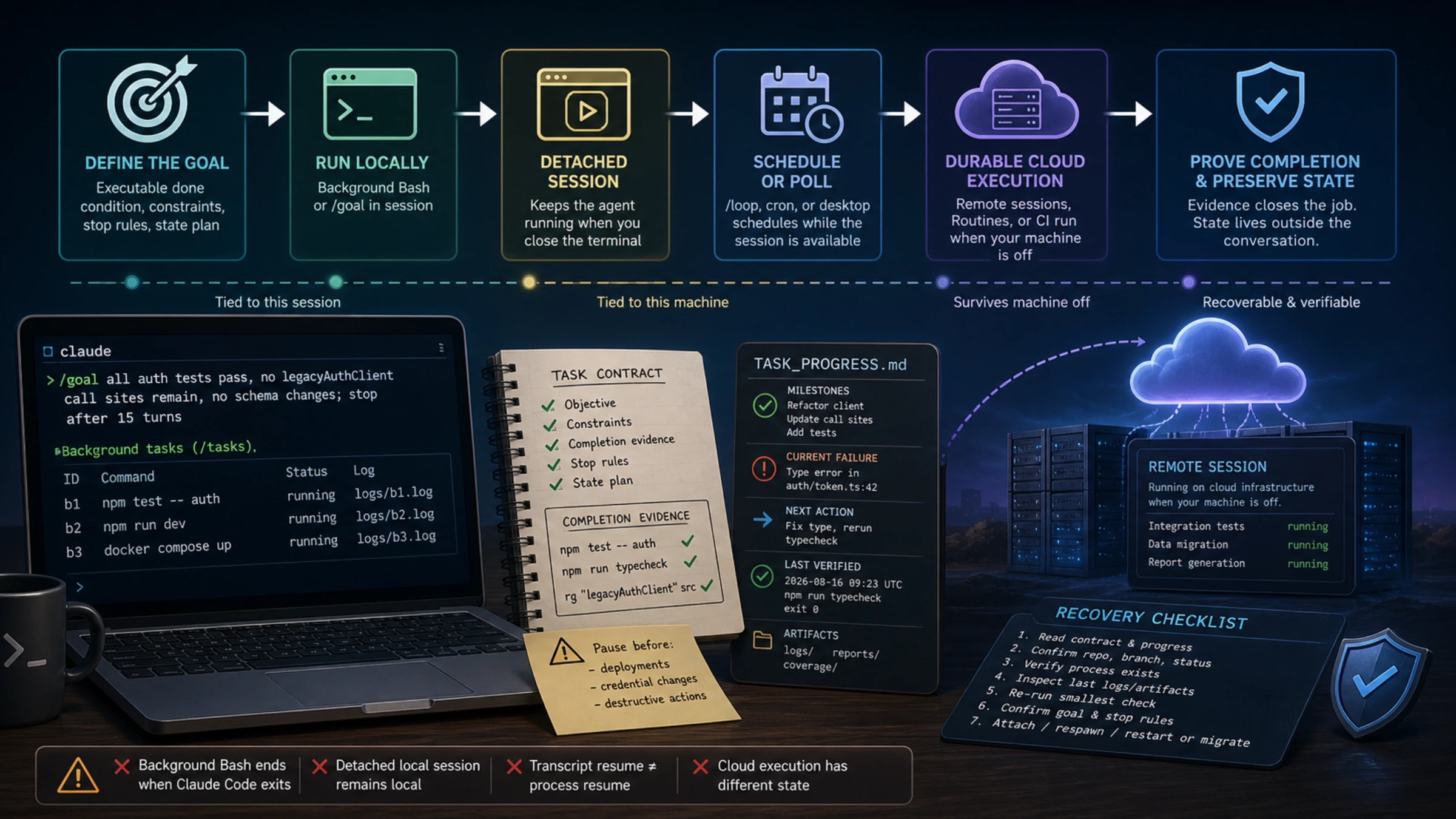
| What you need | Start with | What it does not guarantee |
|---|---|---|
| Claude should keep taking turns until a measurable condition holds | /goal | It does not keep your machine or session alive |
| A build, test, server, or shell process should stop blocking the conversation | Background Bash, Ctrl+B, /tasks | The process is cleaned up when Claude Code exits |
| A local Claude session should detach from one terminal | Background sessions in agent view | The local computer, network, usage, and permissions still matter |
| You want to pick up the same conversation later | --continue, --resume | Transcript continuity is not process continuity |
| Claude should poll or repeat work while this session stays available | /loop or cron tools | Session-scoped schedules are not durable automation |
| Work must continue with the local computer off | Remote sessions, Routines, or CI | A cloud checkout may not have local files or uncommitted changes |
This table prevents the most expensive category error: treating “background” as a promise that work survives every exit. Anthropic’s interactive mode documentation says background Bash commands are automatically cleaned up when Claude Code exits. They are asynchronous, not durable.
Give the task an executable definition of done
Long tasks tend to stop at plausible intermediate states. “Migrate the module” leaves the agent to decide whether changing call sites, compiling, running tests, updating docs, or handling compatibility completes the job. A stronger contract gives Claude something it can demonstrate and gives you a bounded failure state.
Objective:
- Migrate the auth client to the new async API.

Completion evidence:
- npm test -- auth exits 0.
- npm run typecheck exits 0.
- rg "legacyAuthClient" src returns no call sites.

Constraints:
- Do not change the database schema or public response shape.
- Do not modify files outside packages/auth and its tests.

Stop and report:
- after 15 turns or 2 hours;
- before any deployment, credential change, purchase, or destructive action;
- when the same blocker survives three materially different attempts.

Persistent state:
- update TASK_PROGRESS.md after each verified milestone;
- record commands run, current failure, files changed, and next action.
The commands are examples, not a universal template. The important properties are observable success, explicit exclusions, a budget, and a state artifact that another session can read.
For work that should continue across agent turns, Anthropic’s /goal documentation provides a native loop around a completion condition:
/goal all auth tests and type checks pass, no legacyAuthClient call sites remain,
and no database schema file changes; stop after 15 turns if this is not achieved
After each turn, a separate small model evaluates the condition against evidence surfaced in the conversation. A “not yet” decision starts another turn. That separation is useful, but it has a hard boundary: the evaluator does not run commands or inspect the repository independently. Claude must run the decisive checks and include their results in the transcript.
An active goal is restored when the same session is resumed with --continue or --resume, although its timer, turn count, and token baseline reset. That makes it resumable across sittings. It does not mean work continued during the gap.
Use background Bash when the conversation should stay responsive
Background Bash is ideal for a process that takes time but does not need to own the whole session: a test suite, development server, build, container command, or infrastructure plan. Ask Claude to run it in the background or press Ctrl+B while the Bash tool is active. In tmux, press Ctrl+B twice because the first key sequence belongs to tmux.
Claude Code returns a background task ID and writes output to a file it can read later. /tasks—also available as /bashes—lets you inspect, attach to, or stop current background work. This creates a useful two-lane session: the expensive command progresses while Claude investigates another issue or edits the next small piece.
Two limits should shape the command:
- exiting Claude Code cleans up the background process;
- output above 5GB terminates it, according to the current interactive-mode contract.
For verbose jobs, redirect structured output to a bounded log, rotate it, or let a real process manager own the service. For a server that must outlive Claude Code, do not keep adding shell detachment tricks and hoping the lifecycle changed. Move to a background session, a system service, or a remote runner whose persistence you can name and observe.
Detach the agent session when the terminal is the weak link
Agent view adds a different kind of background work. Anthropic’s agent view guide says a background session is a Claude Code process parented to a per-user supervisor rather than to your terminal. You can manage these sessions from a unified view or the shell:
claude agents
claude attach <id>
claude logs <id>
claude stop <id>
claude respawn <id>
Detaching solves “I need to close or reuse this terminal while the local agent keeps working.” An active session, one waiting for input, or one with a terminal attached keeps its process running. After a finished session sits unattached for roughly an hour, the supervisor may stop its process; its transcript and state remain on disk, and attaching or replying starts a fresh process from that state.
This is stronger than background Bash for terminal independence, but it is still local. Sleep, shutdown, lost network access, usage exhaustion, failed authentication, or a denied permission can stop progress. A detached session needs the same completion proof and state discipline as an attached one.
Schedule by the lifetime you actually need
/loop is useful when the next turn should start after an interval rather than immediately after the last turn. The scheduled tasks documentation gives examples such as polling a deployment, watching a PR, checking a long build, or running a maintenance prompt while the session stays open.
/loop 10m check whether the integration job finished; if it failed, read the
latest failing step and report the smallest actionable blocker
Session scheduling has intentional limits. Recurring tasks expire after seven days. They fire between turns, so a due task waits if Claude is busy. Missed intervals are not replayed one by one. Resuming a conversation can restore an unexpired schedule, but background Bash and monitor tasks are never restored on resume.
Choose a different runner when those limits conflict with the job:
- Desktop scheduled tasks run on your machine and can access local files, but the machine must be on.
- Remote sessions run on Anthropic cloud infrastructure and continue when the app closes or the computer shuts down, according to the Claude Code Desktop guide.
- Routines create autonomous cloud Claude Code sessions on a schedule, API call, or supported event. The Routines documentation emphasizes that each run produces a session you can inspect; a completed run is not proof that the prompt’s task succeeded.
- CI fits repository events and scheduled checks that should live next to code, credentials policy, logs, and review gates.
Remote durability changes the context. A cloud session usually works from a configured repository checkout, not the uncommitted files on your laptop. Before moving a job, make the required branch, environment, secrets, services, and artifacts explicit. Never assume that “same repository” means “same runtime state.”
Use checkpoints for local undo, not as a transaction log
Claude Code creates a checkpoint for each user prompt and keeps checkpoints with a resumable session. Press Esc twice or run /rewind to restore code, restore the conversation, restore both, or summarize part of the context. The current checkpointing guide describes this as quick session-level recovery.
The boundary matters more than the convenience. Rewind tracks edits made through Claude's file-editing tools. It does not undo files changed by Bash commands, manual edits, external programs, or unrelated concurrent sessions. It is not a database rollback and does not replace Git. Before using rewind on a mixed workflow, inspect git diff, generated files, migrations, and external systems separately.
A useful checkpoint for a long task therefore has two layers:
- Claude Code's prompt checkpoint for local conversation and direct edits.
- A durable project checkpoint that records completed units, verification evidence, and irreversible or external side effects.
The second layer can be a small Markdown or JSON ledger in the repository, a CI artifact, or another store your workflow already trusts. Keep it reviewable and update it only after the corresponding verification passes.
Preserve state outside the conversation
Claude Code continuously saves CLI conversations, and the session management guide documents claude --continue, claude --resume, named sessions, and the /resume picker. Those controls are valuable, but a transcript is a record of reasoning—not the only place your project state should live.
For substantial work, preserve four kinds of evidence:
- Intent: the objective, constraints, ownership boundary, and stop rule.
- Progress: completed milestones, files changed, the current failure, and the next action.
- Verification: exact commands, exit codes, summaries, and artifacts that prove the current state.
- Recovery: the branch or worktree, environment assumptions, session name or ID, and how to restart an external process.
Anthropic’s research note on long-running Claude for scientific computing illustrates this with a progress file, test oracle, clear agent rules, Git checkpoints, and an orchestration loop. That HPC setup is an example rather than a universal product requirement. The reusable lesson is that model context should not be the only copy of progress.
Git can make milestones recoverable, but commits and pushes are consequential actions. Decide their policy before the unattended period. In a sensitive repository, a safer rule may be “commit only on a task branch after tests pass; never push.” In another workflow, CI visibility may require a push. The agent should not invent that authority after you leave.
Parallel work needs a similar ownership decision. Isolate lanes with worktrees and non-overlapping file sets whenever possible. Agent orchestration can increase throughput, but it also multiplies permission, context, merge, and cost failure modes. If the job genuinely needs multiple Claude workers, the separate Claude Code Agent Teams guide covers that decision; it does not replace a completion contract for each lane.
Reduce interruptions without deleting the safety boundary
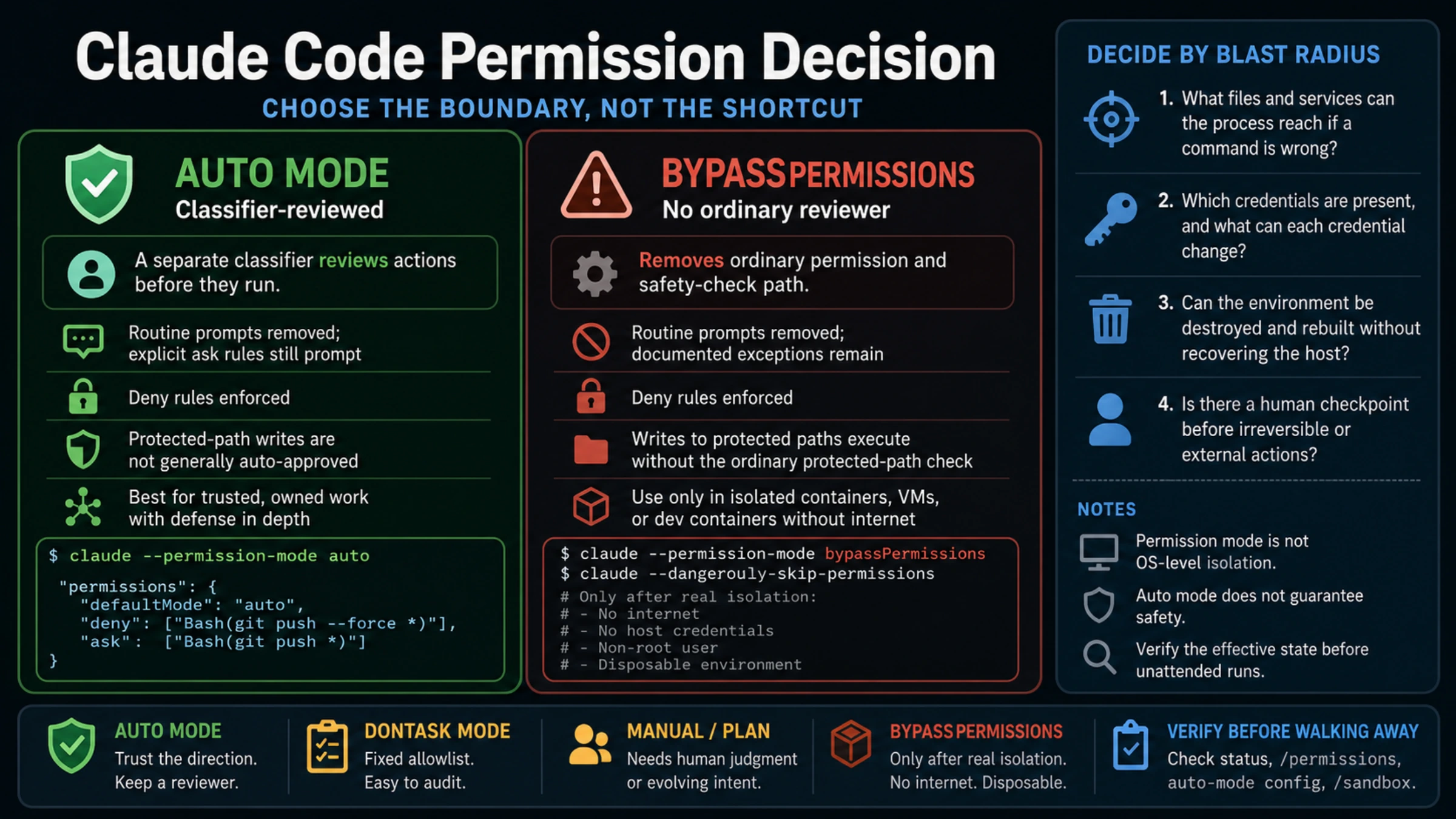
Permission prompts are a common reason an overnight task silently waits. The answer is a deliberate permission model, not blanket approval. Anthropic’s permission modes guide separates several operating postures:
acceptEditsallows reads, edits, and common file operations while retaining prompts for broader actions;dontAskruns only pre-approved tools, which can fit locked-down scripts and CI;- Auto mode removes prompts while a separate classifier evaluates actions, but it is a research preview with changing version, plan, model, provider, and admin requirements;
bypassPermissionsskips the permission layer and is intended for isolated containers or VMs, not an ordinary developer laptop.
An unattended task should receive less ambient authority, not more. Use a dedicated worktree or container, minimal credentials, narrow network access, branch protection, bounded spend, and explicit “pause before” actions. Prompt injection, a wrong repository assumption, or an accidental deployment becomes more expensive when nobody is watching.
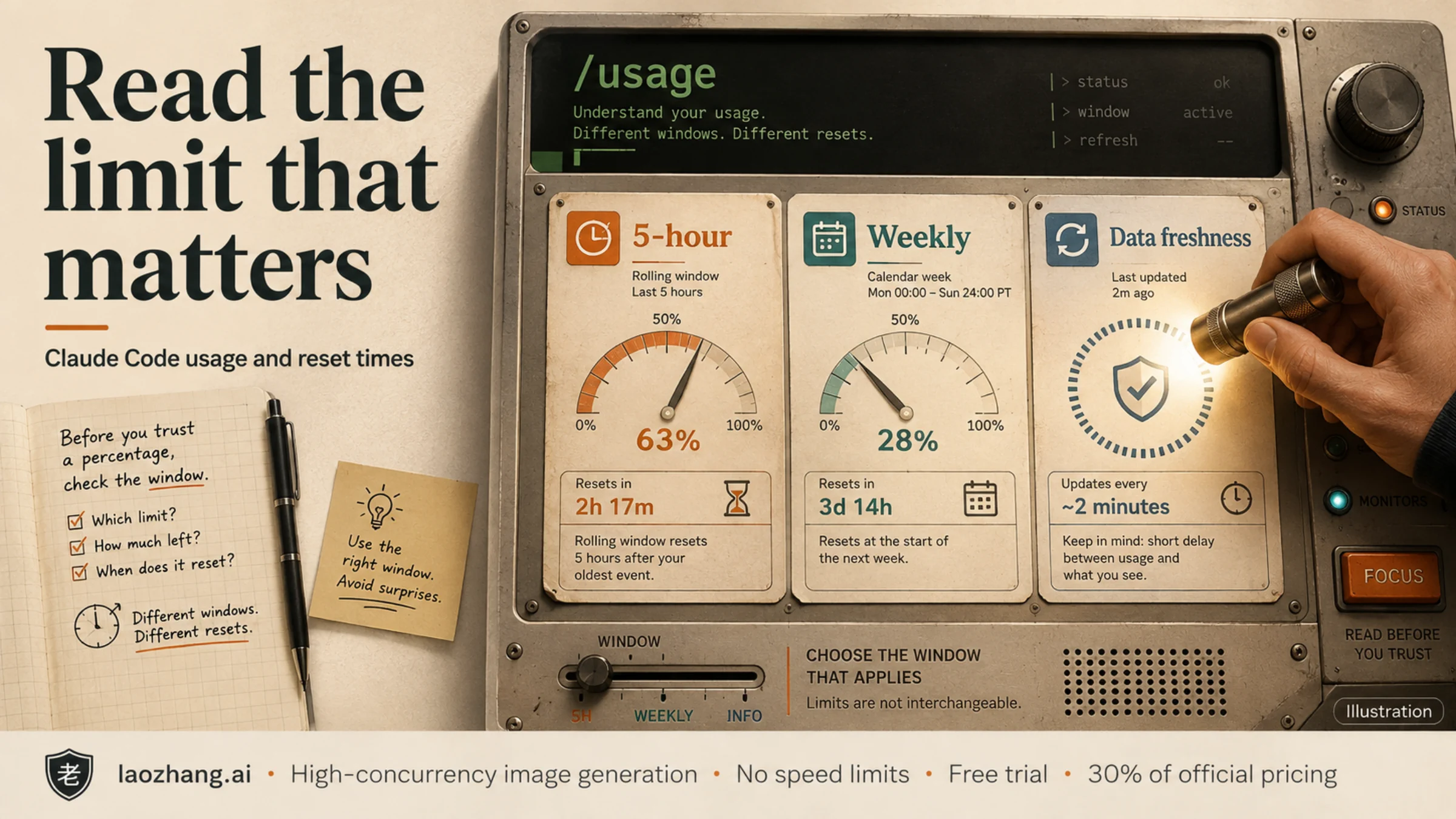
Limits can interrupt a correct workflow too. Before the long run, define what Claude should write to the progress file when usage becomes unavailable. If a limit is already blocking the session, preserve state first and then use the Claude Code limit recovery guide to separate subscription quota, API billing, model caps, context pressure, and service failures.
Retry only after reconciling what already happened
An API error tells you that the response failed, not that every attempted action was rolled back. Before replaying a unit of work, compare expected state with reality:
- Is the intended file change already present?
- Did the test, build, or migration produce an artifact or log?
- Is the process still running under the expected owner?
- Did an external API receive the request?
- Does the progress ledger mark the unit complete only after verification?
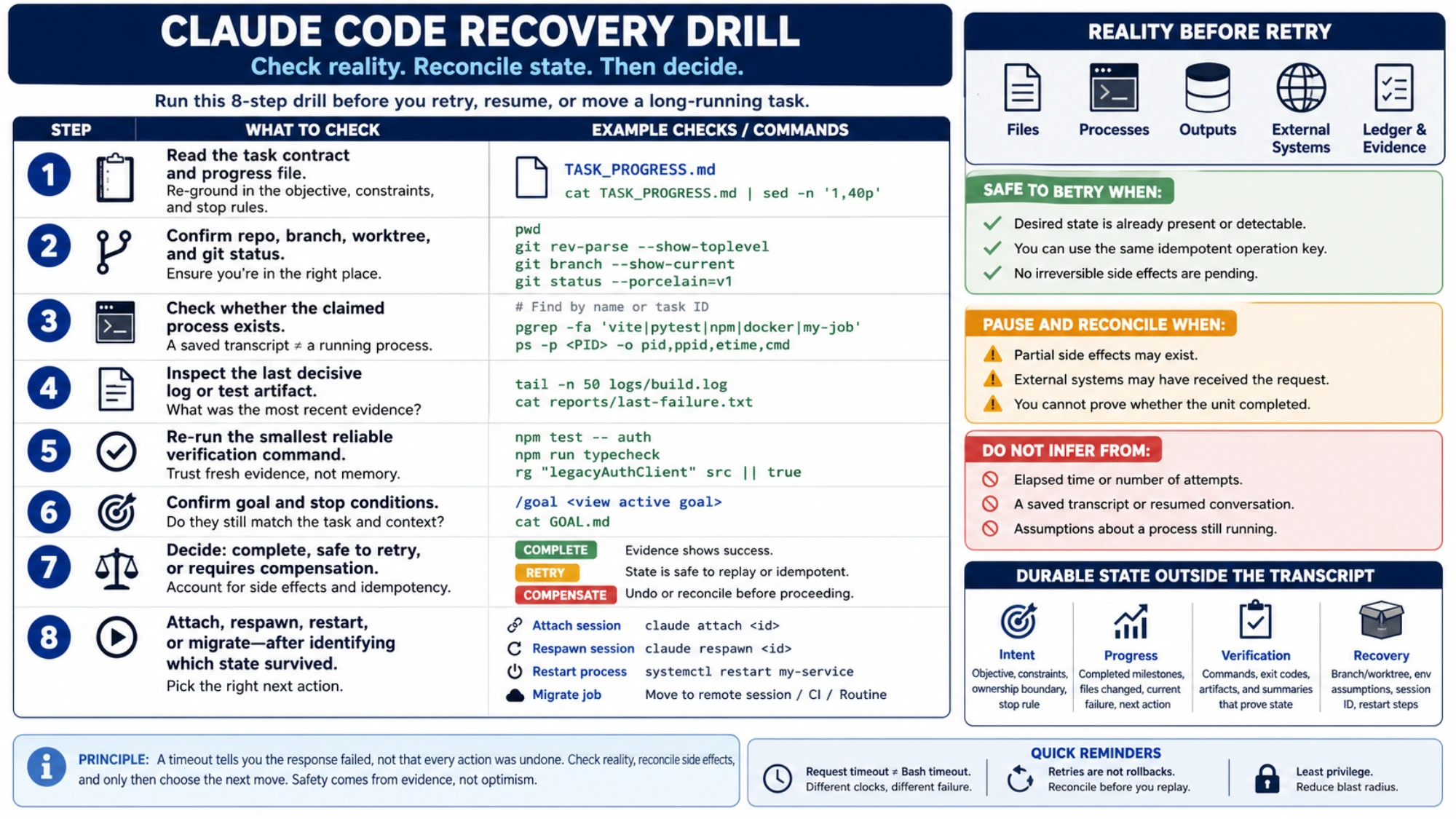
Prefer idempotent units: a unit should either detect that its desired state already exists or use a stable operation key that prevents duplication. When that is impossible, record enough evidence to choose between verify, compensate, and retry. “Try again” is safe only after that decision.
Claude Code exposes StopFailure hooks when a turn ends because of an API error. The hooks reference says their output and exit code are ignored, so they are suitable for logging or alerts, not for automatically resuming the failed turn. A custom recovery loop still needs a retry budget and reconciliation rule.
Recover by checking reality, not by typing “continue”
When you return to a stopped or resumed job, run a small recovery drill:
- Read the task contract and progress file.
- Confirm the current repository, branch, worktree, and
git status. - Check whether the claimed process exists; do not infer process life from a saved transcript.
- Inspect the last decisive log or test artifact.
- Re-run the smallest reliable verification command.
- Confirm that the goal and stop conditions still match the task.
- Decide whether the interrupted unit is already complete, safe to retry, or requires compensation.
- Attach, respawn, restart, or migrate the job only after identifying which state survived.
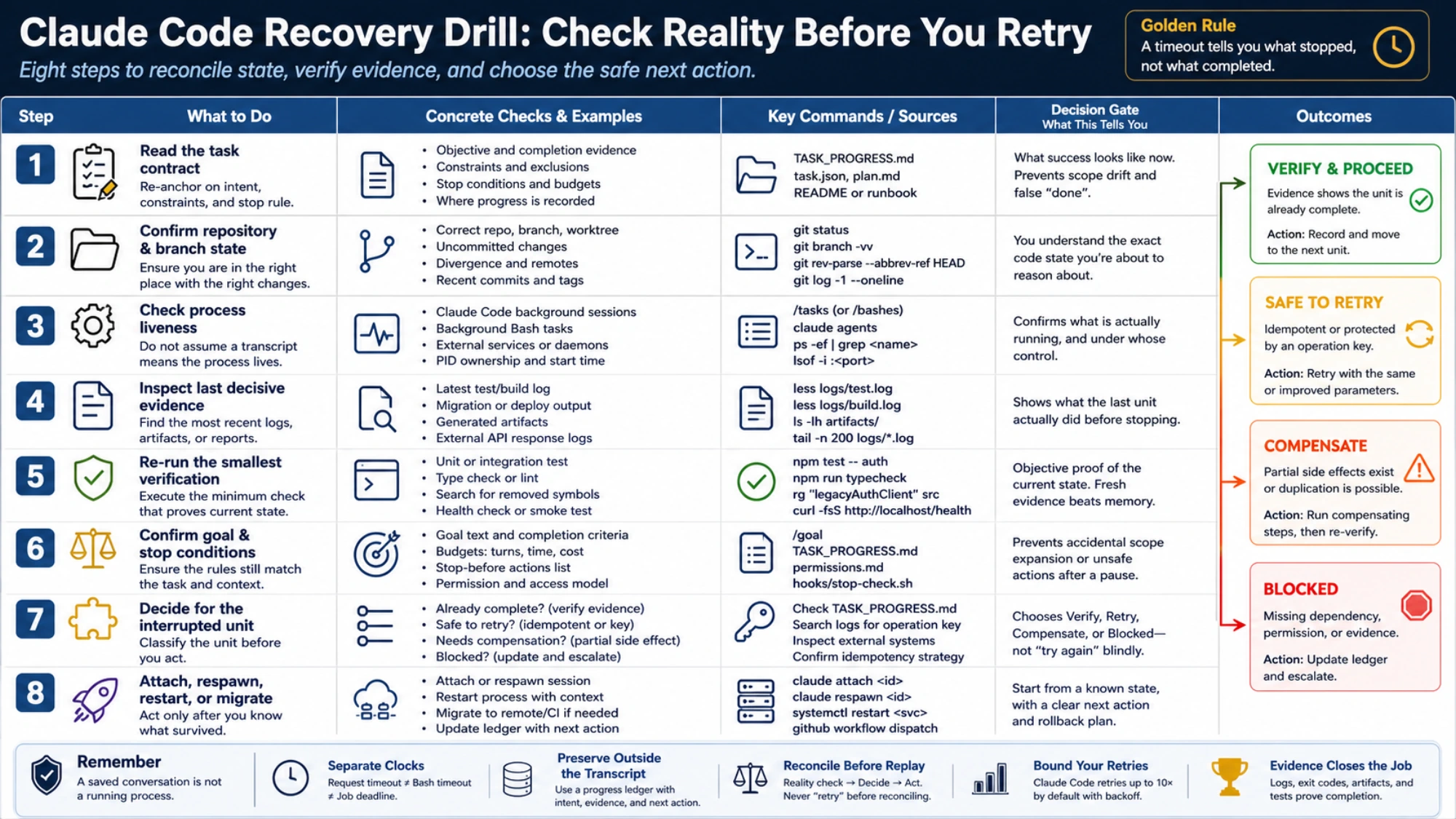
Elapsed time is not a success metric. A reliable long-running task has three traceable answers: which runtime owns the work now, where durable state lives, and which evidence closes the job. When those answers remain available, a terminal crash or session restart becomes a controlled recovery—not a request for Claude to guess what “continue” means.