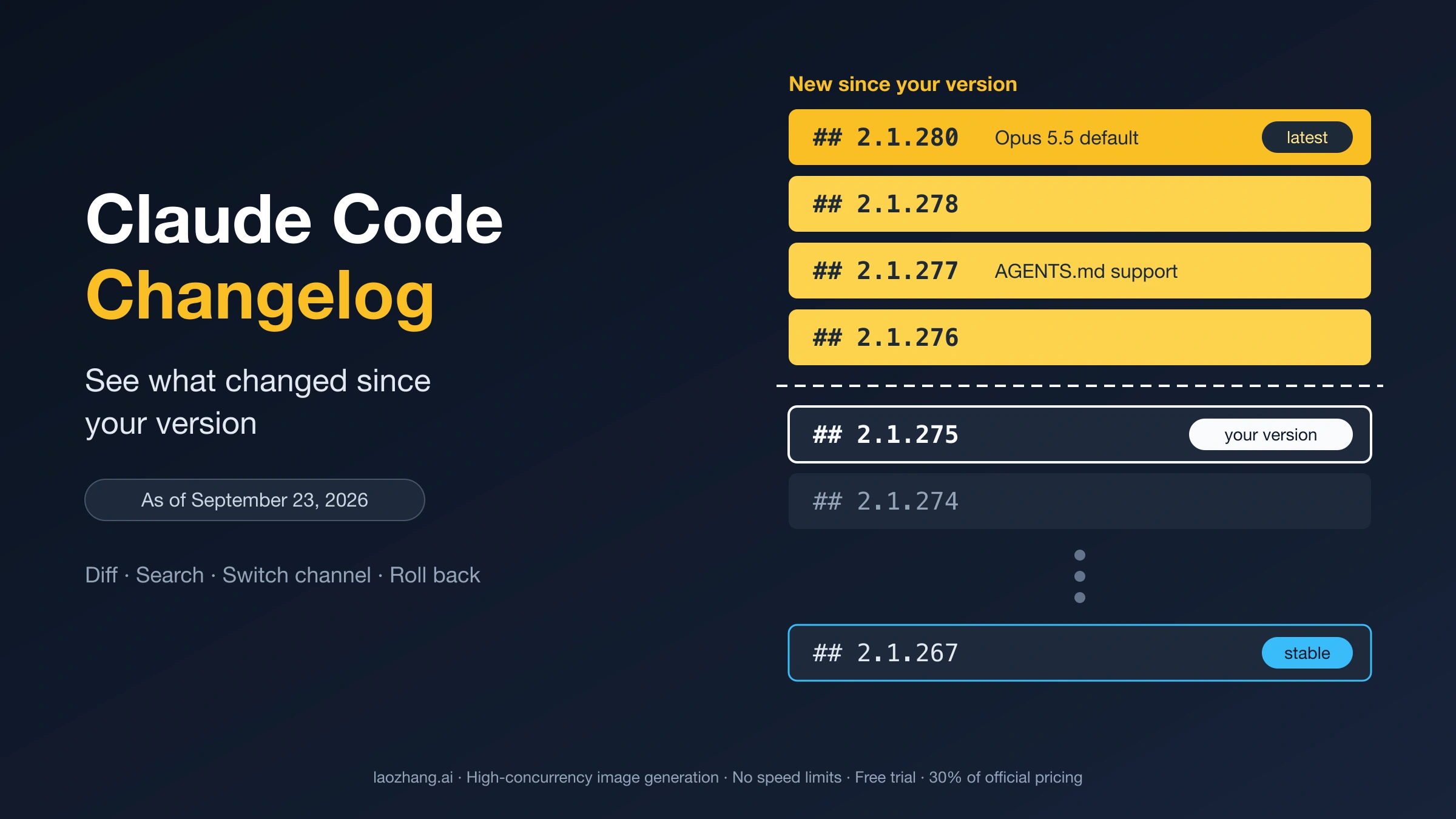
The official record is the Claude Code changelog, generated from CHANGELOG.md in the anthropics/claude-code repository. It lists every release, newest first. Run claude --version, and everything above your version number is what you haven't seen yet. The command further down prints exactly that slice, so you don't have to scroll through the whole file.
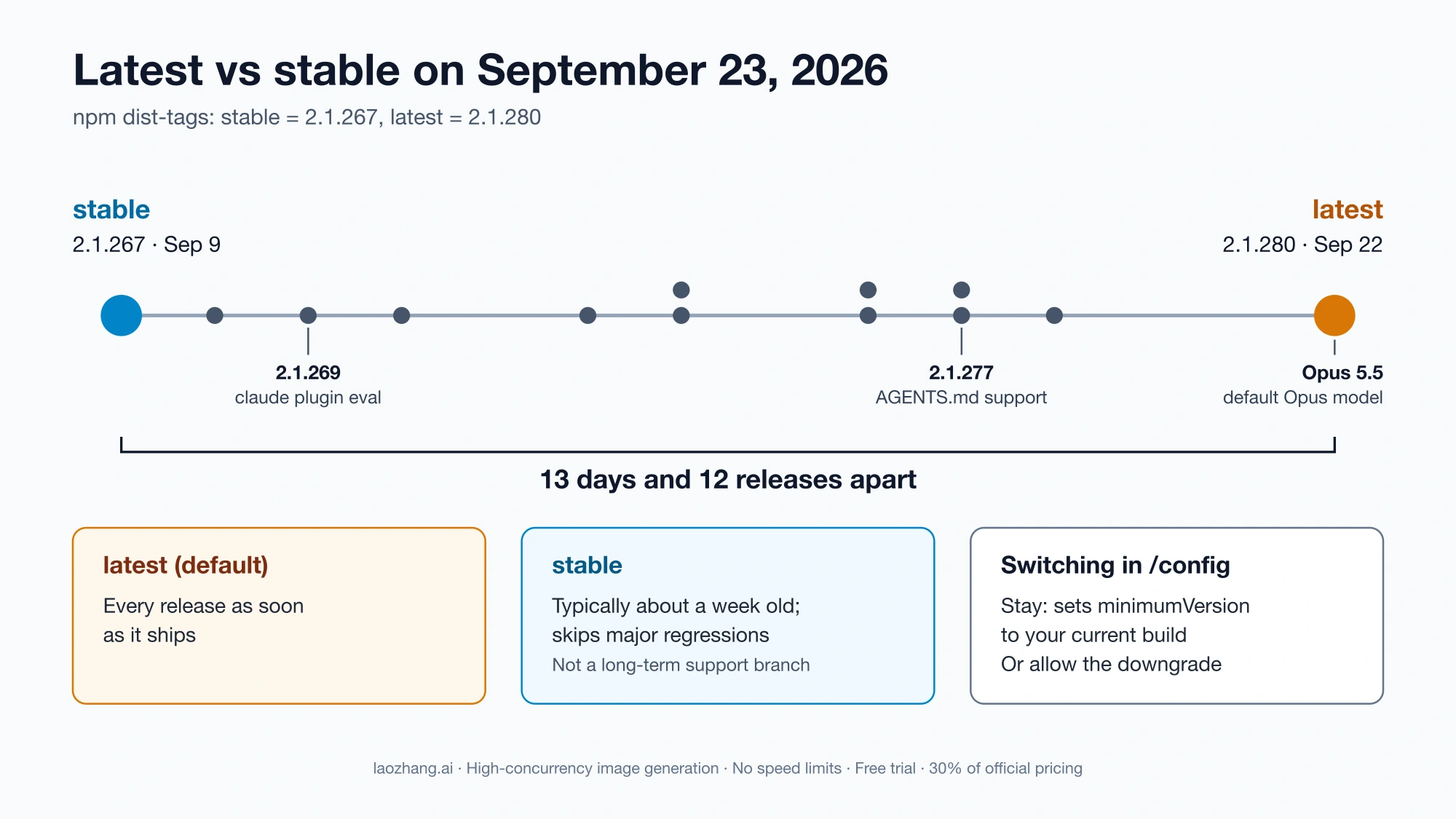
As of September 23, 2026, the newest release is 2.1.280 (September 22), which made Opus 5.5 the default Opus model. The stable channel was on 2.1.267 (September 9), 12 releases behind. Which of the two you run depends on your install method and one setting, both covered below.
Which official Claude Code record answers which question
Anthropic publishes several release-note pages, and each one answers a different question. Picking the right one saves you from reading a 400-entry file when a weekly summary would do, or the reverse.
| Your question | Where to look | What you get |
|---|---|---|
| What changed in each version, including small fixes? | Changelog or the raw CHANGELOG.md | Every bullet, by version, dated without a time zone |
| What were the notable features this week? | What's new | A weekly digest with demos, tagged with a version range (Week 37, September 7–11, 2026, covers v2.1.263–v2.1.269) |
| Can I read the notes without leaving the terminal? | /release-notes in a session | A version picker; the notes appear in your transcript but don't enter the conversation Claude sees |
| Which version am I on? | claude --version, or /status in a session | For example 2.1.89 (Claude Code); /status also shows model, account, and connectivity |
| Is a newer version waiting on my channel? | /doctor in a session; claude doctor in the terminal | /doctor checks your release channel; claude doctor shows the last update attempt |
| When exactly was a version published? | GitHub Releases | A UTC timestamp per version (v2.1.280: 2026-09-22T16:38:14Z) and an Atom feed |
| Did the API or a model change? | Claude Platform release notes | API changes; it points back to CHANGELOG.md for Claude Code |
| Was a model removed from the Claude apps? | Help Center release notes | Changes to the Claude apps, including model pickers in Claude and Claude Code |
Because the changelog shows dates only and GitHub shows UTC times, the two can disagree by one day for the same release. The version number is the reliable key.
What's new is deliberately selective. It says itself that every bug fix and minor improvement lives in the changelog, so a behavior change you noticed may never appear in the digest.
What the changelog looks like before you search it
A few properties of the file change how you should read it:
- It's long. As of September 23, 2026, it held 402 version entries, from 0.2.21 (April 2, 2025) to 2.1.280 (September 22, 2026). Milestones: 1.0.0 on May 22, 2025; 2.0.0 on September 29, 2025; 2.1.0 on January 7, 2026. The raw Markdown is about 764 KB.
- Releases are frequent and uneven. There were 226 dated entries in 2026 through September 22, between 20 and 28 per full month. One release can hold a single bullet (2.1.270, 2.1.272, 2.1.276) or 114 (2.1.280).
- Version numbers skip. Inside the 2.1.x range, 57 numbers have no entry. Three recent gaps, 2.1.262, 2.1.264, and 2.1.279, return 404 on both npm and GitHub Releases, so they were never published. If your version seems "missing," compare it with the nearest listed number instead of assuming the file is incomplete.
- Some fixes name the release that broke things. Bullets such as "Fixed … (regression in 2.1.269)" tell you which version introduced a bug. 2.1.269 fixed kitty and WezTerm key handling marked as a regression in 2.1.247; 2.1.270 and 2.1.275 each fixed an issue marked as a regression in 2.1.269. Not every regression gets a label, so no label doesn't mean no regression.
List everything that changed since your version
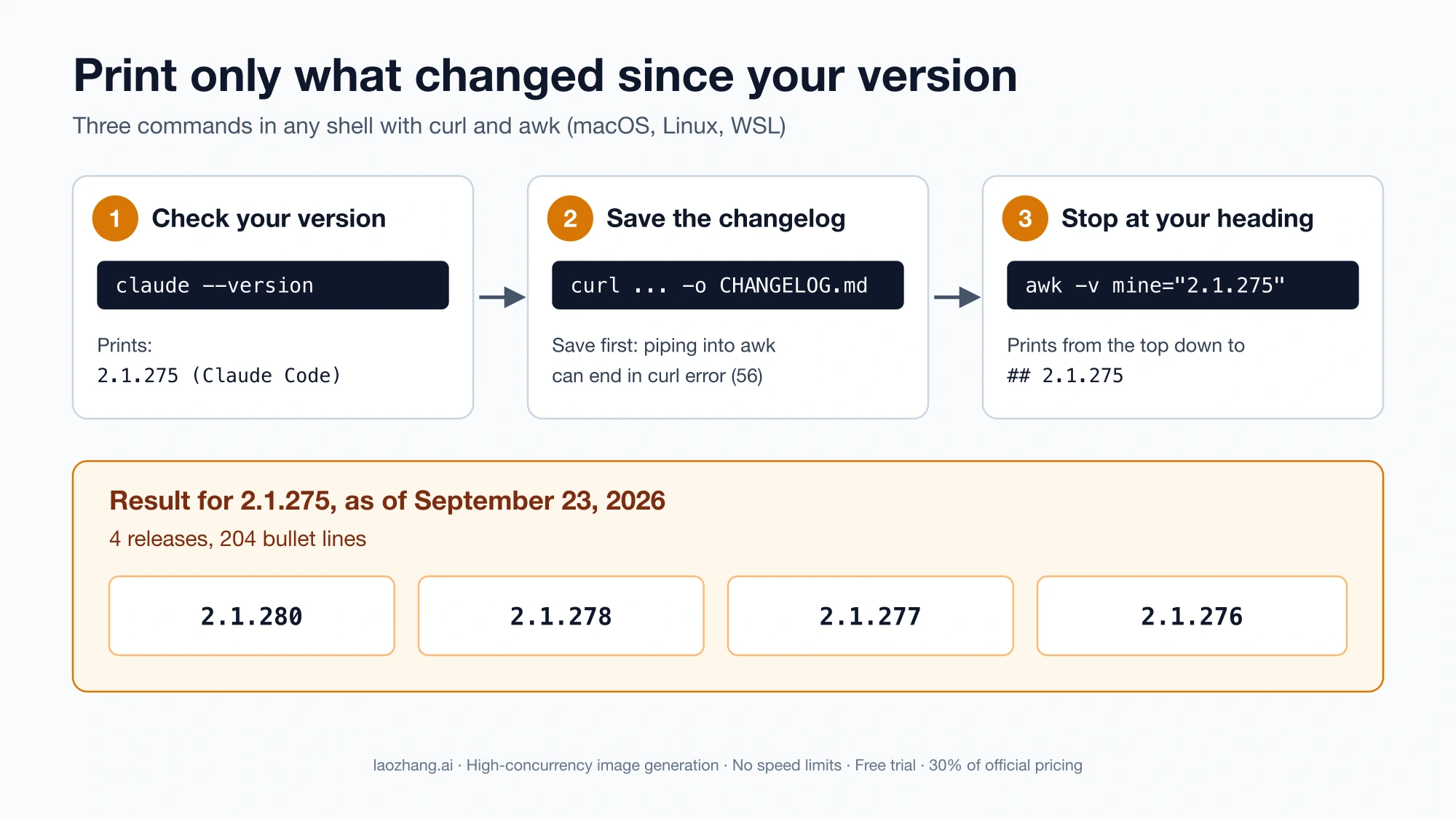
This works in any shell with curl and awk: macOS, Linux, or WSL on Windows. Replace 2.1.275 with the number claude --version prints, without the (Claude Code) suffix.
claude --version
# 2.1.275 (Claude Code)

curl -fsSL https://raw.githubusercontent.com/anthropics/claude-code/main/CHANGELOG.md -o CHANGELOG.md

awk -v mine="2.1.275" '/^## /{ if ($2==mine) exit } {print}' CHANGELOG.md
The awk line prints from the top of the file and stops at the heading ## 2.1.275. As of September 23, 2026, a user on 2.1.275 gets four releases (2.1.280, 2.1.278, 2.1.277, 2.1.276) with 204 bullet lines between them.
Three details keep it from failing:
- Save the file first. Piping
curlstraight into a command that stops reading early printscurl: (56) Failure writing output. Downloading toCHANGELOG.mdavoids that. - Use the exact version string. If the number doesn't match a heading,
awknever hits the stop condition and prints the entire file. To avoid typos, let the shell fill it in:mine=$(claude --version | awk '{print $1}'), then pass-v mine="$mine". - Headings must stay
## 2.1.x. That is the raw file's current format. If Anthropic changes it, the pattern stops matching and you'll get the whole file again.
Add | grep -c '^- ' to the end of the awk command to count the bullets instead of reading them.
Find the release that changed a behavior
When something works differently, search for a word you'd expect in the fix or feature. This version of the search prints the release number in front of every hit, which plain grep -n doesn't:
awk -v kw="agents.md" '/^## /{v=$2} index(tolower($0), tolower(kw)) {print v ": " $0}' CHANGELOG.mdIt returns 2.1.277: - Added AGENTS.md support: in a project with no CLAUDE.md, Claude Code reads AGENTS.md instead; …. The match is a plain, case-insensitive substring, so dots and slashes in the keyword are safe. Search for the setting, command, or error text you see, such as effort, /model, bedrock, or auto mode.
Two searches are worth keeping handy:
kw="regression in"lists fixes labeled with the release that introduced the bug. It also matches "a regression introduced in 2.1.255", the other wording the file uses. If your version sits between the "regression in" number and the fixing release, you're in the affected window.kw="removed"answers "was this command dropped?" For example, 2.1.92 removed/vim(Editor mode moved to/config), and 2.1.277 removed the deprecated TaskOutput tool.
Here's a concrete case. After 2.1.280, a new model can start at a different effort level than you expect. Searching effort shows why: an effort level saved before /effort became per-model no longer applies to newly released models such as Opus 5.5, and they start at their default until you pick a level. For model details beyond Claude Code, see Claude Opus 5.5: API Price, Model ID, and Migration Checks.
Major Claude Code changes in 2026 by version
These are the entries most likely to change how a session behaves. Model availability also depends on your plan and provider.
| Version (date) | Change |
|---|---|
| 2.1.197 (June 30) | Sonnet 5 becomes the default model, with native 1M context |
| 2.1.198 (July 1) | Subagents run in the background by default; Claude in Chrome is generally available; the npm package now requires Node.js 22+ |
| 2.1.219 (July 24) | Opus 5 (claude-opus-5) becomes the default Opus model |
| 2.1.220–2.1.224 (August 3–7) | Auto mode announced as the default permission mode for new sessions on Pro, Max, and Team plans starting August 14 |
| 2.1.224 (August 7) | Self-hosted environments via claude self-hosted-runner for Team and Enterprise |
| 2.1.257 (September 1) | Fable 5.1 (claude-fable-5-1) becomes the default Fable model: 1M context, $10/$50 per Mtok, $0.25 cache reads |
| 2.1.269 (September 11) | claude plugin eval for testing plugins against cases and a no-plugin baseline |
| 2.1.277 (September 18) | Reads AGENTS.md when a project has no CLAUDE.md (not yet on Bedrock, Vertex, or Foundry) |
| 2.1.280 (September 22) | Opus 5.5 (claude-opus-5-5) becomes the default Opus model: 1M context, $4/$20 per Mtok, $0.20 cache reads; old saved effort levels stop applying to new models |
If the auto mode change affected your team, Claude Code Auto Mode vs Bypass Permissions: Choose the Boundary, Not the Shortcut covers how to choose between the two modes. For the Fable pricing and API differences, see Claude Fable 5.1: API Pricing, Changes, and Migration Guide.
How to update Claude Code for your install method
Whether you already have the newest release depends mostly on how you installed Claude Code:
| Install method | Updates itself? | Update now | Channel is set by |
|---|---|---|---|
| Native installer | Yes: checks at startup and periodically, installs in the background, applies on next start | claude update | autoUpdatesChannel (/config → Auto-update channel) |
| npm global | Yes, when the npm global directory is writable | npm install -g @anthropic-ai/claude-code@latest | autoUpdatesChannel |
| Homebrew | No, unless you opt in | brew upgrade claude-code or brew upgrade claude-code@latest | Cask name: claude-code = stable, claude-code@latest = latest |
| WinGet | No, unless you opt in | winget upgrade Anthropic.ClaudeCode | No channel choice: one package, Anthropic.ClaudeCode. As of September 23, 2026, its newest version was 2.1.268, which was neither stable nor latest |
| apt | No | sudo apt update && sudo apt upgrade claude-code | Repository URL (stable or latest) |
| dnf | No | sudo dnf upgrade claude-code | baseurl (stable or latest) |
| apk | No | apk update && apk upgrade claude-code | Repository line (stable or latest) |
Notes that change the outcome:
claude updateapplies an update immediately and respects your channel. Success printsSuccessfully updated from <old version> to version <new version>; otherwise you seeClaude Code is up to date (<version>), orClaude is up to date!on Homebrew, WinGet, and apk installs.- On npm, avoid
npm update -g. It respects the semver range from your original install and may not move you to the newest release. Since v2.1.198 the package requires Node.js 22 or later. Older Node prints anEBADENGINEwarning but still installs, because the package ships the same native binary as the standalone installer. - Setting
CLAUDE_CODE_PACKAGE_MANAGER_AUTO_UPDATE=1lets Claude Code run the Homebrew or WinGet upgrade for you. On WinGet the upgrade can fail while Claude Code is running, because Windows locks the executable. - Claude Code may announce an update before Homebrew, WinGet, or your Linux repository has it. If the upgrade finds nothing, wait and try again later.
The full list of install and update options is in the setup documentation.
Latest or stable: which release channel to run
autoUpdatesChannel has two values. "latest" is the default and delivers each release as soon as it ships. "stable" uses a version that is typically about one week old and skips releases with major regressions (release channel docs).
"About one week" is the typical gap, not a promise. On September 23, 2026, npm's stable tag pointed to 2.1.267 (September 9) and latest to 2.1.280 (September 22), a gap of 13 days and 12 published releases. You can check the current pair yourself:
npm view @anthropic-ai/claude-code dist-tagsThe native installer reads its versions from two pointer URLs. On September 23, 2026, https://downloads.claude.ai/claude-code-releases/stable returned 2.1.267 and https://downloads.claude.ai/claude-code-releases/latest returned 2.1.280, matching the npm tags exactly. You can query the native stable pointer directly:
curl -fsSL https://downloads.claude.ai/claude-code-releases/stableAnthropic's installer script uses these endpoints, but the docs don't describe them. They show what the channel pointed to when you checked, and they could change without notice.
How to decide:
- Stay on latest if you want new models and features the day they ship. On September 23, 2026, Opus 5.5 had arrived in 2.1.280, a release stable didn't have yet.
- Move to stable if a broken release costs you more than a week's delay, for example on a team where everyone should run the same, already-tested build. The apt
stablerepository shows the effect. Its versions go from 2.1.236 (released August 19) straight to 2.1.267 (released September 9). The macOS 12 launch failure introduced in 2.1.255 and fixed in 2.1.258 therefore never reached apt stable users. Those are release dates, not promotion dates, and a 21-day jump shows that "about one week" isn't fixed. Native stable most likely followed the same versions, but only the apt history is visible. - Remember what stable is. It is not a long-term support branch. It is an older release from the same line that keeps moving forward.
- Enforce one channel for an organization with managed settings, which users can't override.
To switch, open /config → Auto-update channel, or add this to settings.json:
{
  "autoUpdatesChannel": "stable"
}
Switching from latest to stable in /config asks whether to stay on your current version or allow a downgrade. Staying sets minimumVersion to your current version, so you remain on the newer build until stable catches up. Switching back to latest clears that floor. On Homebrew, switch casks instead; on apt, dnf, or apk, switch the repository URL.
Set a floor, stop updates, or roll back
Four settings sound alike but do different things:
| Goal | Use | What it does |
|---|---|---|
| Never go below a version | minimumVersion in settings.json | A floor: auto-updates and claude update refuse anything lower. It doesn't cap upgrades |
| Keep a version range across an organization | Managed requiredMinimumVersion / requiredMaximumVersion | Claude Code refuses to start outside the range, and updates respect the maximum |
| Stop background updates only | "DISABLE_AUTOUPDATER": "1" under env | Stops the background check; claude update and claude install still work |
| Block every update path | DISABLE_UPDATES | Blocks automatic and manual updates, for teams that distribute their own builds |
"Pin a minimum version" in the docs means the floor, not a frozen version. Setting minimumVersion to 2.1.267 keeps you at 2.1.267 or newer. It doesn't keep you from moving to 2.1.280. The pin a minimum version section has the details.
Roll back a native or npm install
- Find the last good version. Use the regression search above, or take the current stable build from
npm view @anthropic-ai/claude-code dist-tagsor the stable pointer URL. - Install it. On a native install, the documented command is
claude install 2.1.267, which accepts a version number,stable, orlatest(CLI reference). The installer script takes the same argument. On macOS, Linux, or WSL, usecurl -fsSL https://claude.ai/install.sh | bash -s 2.1.267. In PowerShell, use& ([scriptblock]::Create((irm https://claude.ai/install.ps1 ))) 2.1.267. On npm, runnpm install -g @anthropic-ai/claude-code@2.1.267, which is standard npm version syntax. - Stop the updater from moving you forward again. Add
"DISABLE_AUTOUPDATER": "1"to theenvblock ofsettings.json. The docs don't say whether an older install survives the next background update on the latest channel. User reports in GitHub issue #91309 say it doesn't. There, the auto-updater had moved macOS 12 machines to 2.1.257, which wouldn't launch. The reporter rolled back to 2.1.252 and set the variable, because "otherwise the next background update quietly reinstalls the broken build." A second user confirmed the fix. These are two reports on one OS, not an Anthropic statement. - Confirm the result.
claude --versionshould print2.1.267 (Claude Code), and inclaude doctorthe Auto-updates line should readdisabled (set by env: DISABLE_AUTOUPDATER). - Undo it later. When the changelog shows a fix for your problem, remove
DISABLE_AUTOUPDATERand runclaude update. In the macOS 12 case, 2.1.258 carried the fix, and the reporter then removed both the pinned version and the variable.
If you also use the Claude Desktop app on macOS, it bundles its own copy of Claude Code under ~/Library/Application Support/Claude/claude-code/<version>/, which updates separately. Issue #92401 reports that DISABLE_AUTOUPDATER and version pinning through install.sh affect only the standalone CLI.
If you only want to stay a week behind rather than freeze, claude install stable or bash -s stable switches you to the stable channel and makes it your auto-update default.
Roll back with Homebrew, WinGet, apt, dnf, or apk
Package-manager installs don't auto-update by default, so an older version stays put once it's installed. What you can install depends on which older builds each source keeps. As of September 23, 2026:
| Install method | Older versions available | How to get one |
|---|---|---|
| Homebrew | Only two casks: claude-code (stable, 2.1.267) and claude-code@latest (2.1.280). There's no cask for an arbitrary version | Move from claude-code@latest to the claude-code cask |
| WinGet | The Anthropic.ClaudeCode manifests keep many past versions (2.1.252, 2.1.267, and 2.1.268, for example). The newest was 2.1.268 | winget install Anthropic.ClaudeCode --version 2.1.267 |
| apt | The stable repo listed 54 versions (2.1.108 to 2.1.267), and latest listed 134 | sudo apt install claude-code=2.1.267-1, then sudo apt-mark hold claude-code |
| dnf | The stable repo's newest build was 2.1.267 | sudo dnf install claude-code-2.1.267 |
| apk | The stable repo listed 54 versions | apk add claude-code=2.1.267-r1 |
The commands in the right-hand column use each package manager's standard syntax, not steps from Anthropic's documentation, and they haven't been tested on Windows or Linux hosts. Try one machine before rolling them out. WinGet manifests are generated by an automated tool in the community winget-pkgs repository, so a version appears there only after that update runs. That's why WinGet can match neither channel on a given day. Version strings keep the package suffix: -1 on apt, -r1 on apk. If you hold a package on apt, release it with sudo apt-mark unhold claude-code once the fix ships.
FAQ
Does Claude Code update itself?
Native installs do: Claude Code checks at startup and periodically, installs in the background, and switches to the new version the next time you start it. npm installs also update, as long as the npm global directory is writable. Homebrew, WinGet, apt, dnf, and apk installs don't update by default, so run the command for your install method from the table above.
Where can I read the release notes inside Claude Code?
Type /release-notes. Pick one version or show all of them. The notes appear in your terminal transcript without being added to what Claude reads, so they don't use up your context.
Are Claude Code commands deprecated or removed?
Some are, and the changelog records it. /vim was removed in 2.1.92, and the deprecated TaskOutput tool was removed in 2.1.277. Search the changelog for removed or deprecated to check a specific command or setting.
How do I get notified when a new Claude Code version ships?
Subscribe to the GitHub Releases Atom feed at https://github.com/anthropics/claude-code/releases.atom, or follow What's new for a weekly summary. @ClaudeCodeLog on X is an unofficial bot that also posts feature-flag and prompt changes. Before you rely on any third-party changelog page, compare its newest version with the official changelog, since copies can stop updating.
Why does the changelog skip version numbers?
Some numbers are never published. 2.1.262, 2.1.264, and 2.1.279 don't exist on npm or GitHub Releases, so a jump from 2.1.278 to 2.1.280 doesn't mean a missing entry.