Claude Fable 5.1 (claude-fable-5-1) has been generally available since September 1, 2026, on every paid Claude plan, with no access approval needed (Anthropic announcement, Help Center). When Claude Code still won't give it to you, start with two checks:
- Run
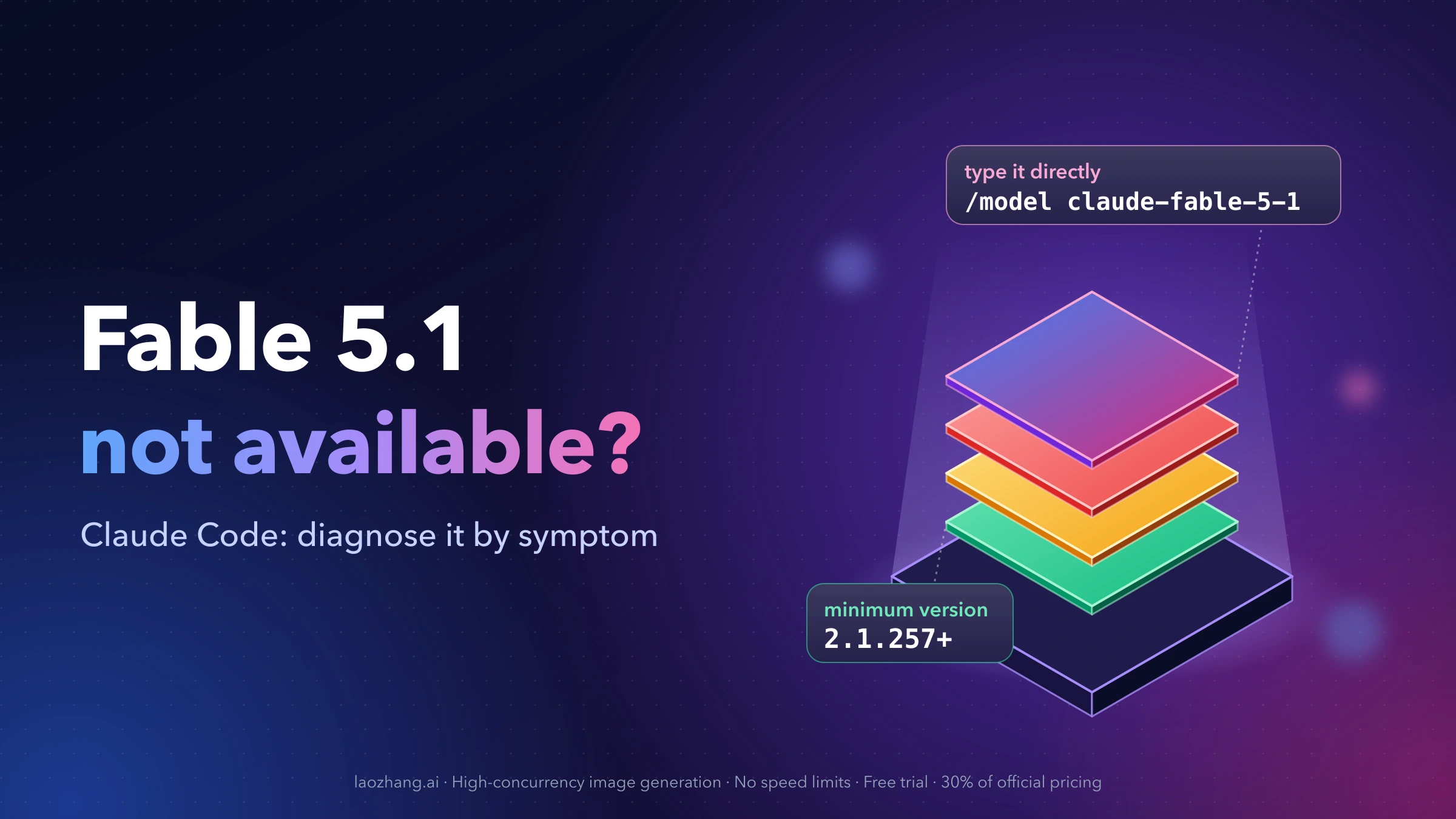
claude --version. If it prints anything below 2.1.257, runclaude updateand start a fresh session. The Claude Code docs list 2.1.257 as the minimum. - On a current build, skip the picker and type
/model claude-fable-5-1. The picker only lists Fable once the server reports it for your organization. Typing the model checks with the server directly (What's New, week 36).
If the typed command is accepted, you have access and only the list is wrong. If it's rejected, the message usually names the cause. On Pro and standard Team seats, a Fable row marked Requires usage credits isn't a missing model. Those seats pay for Fable separately.
Some causes can't be fixed on your machine: an organization restriction, zero data retention, a provider or gateway that doesn't serve the model, or an ineligible account. For those, the last section explains when to stop and which model to use meanwhile.
Match what you see to the cause
Find the row that matches your screen. The sections below explain each fix in detail.
| What you see | Most likely cause | What to do |
|---|---|---|
API Error: 400 Claude Code 2.1.xxx does not support this model; version 2.1.yyy or newer is required | Your client is older than the server's minimum for Fable 5.1 | Update, then start a new session |
... is older than the minimum version required by your organization's policy | Your organization enforces a minimum version | Update before continuing |
| Only a "Fable" row described as Fable 5, or no Fable row at all | An old client, or a picker that lags what your account can use | Check the version, then type /model claude-fable-5-1 |
| "Requires usage credits" on the Fable row, or a consent prompt before a request | Your plan or seat bills Fable to usage credits | Add credits or stay on another model |
| A grayed-out Fable row with a note | Your organization can't use Fable, for example under zero data retention | Ask your admin; nothing local changes this |
Model 'claude-fable-5-1' is restricted by your organization's settings. | An Enterprise admin disabled the model, or a managed allowlist excludes it | Ask your admin |
A "not found" error after /model claude-fable-5.1 | A typo. The ID uses hyphens, not a dot | Use claude-fable-5-1 |
Model "..." is not a recognized model id. | The Desktop app, Remote Control, or the Agent SDK sent a display name or short ID, such as Fable 5.1 or fable-5-1 | Use the alias fable or the full ID claude-fable-5-1 |
There's an issue with the selected model (claude-fable-5-1) | The provider or gateway doesn't serve it, or the ID is wrong for your provider | Check the provider's ID and catalog |
| "Update to use this model" on a Remote Control session | A stale remote-control process, or a server-side gate on that surface | Restart the service; use a local session |
| You upgraded your plan but nothing changed | Your stored login still reflects the old plan | Run /logout, then /login |
| You selected Fable, but replies come from Opus or it switches mid-session | A different problem: fallback or limits | See the usage limits guide linked at the end |
Which Claude Code version Fable 5.1 needs
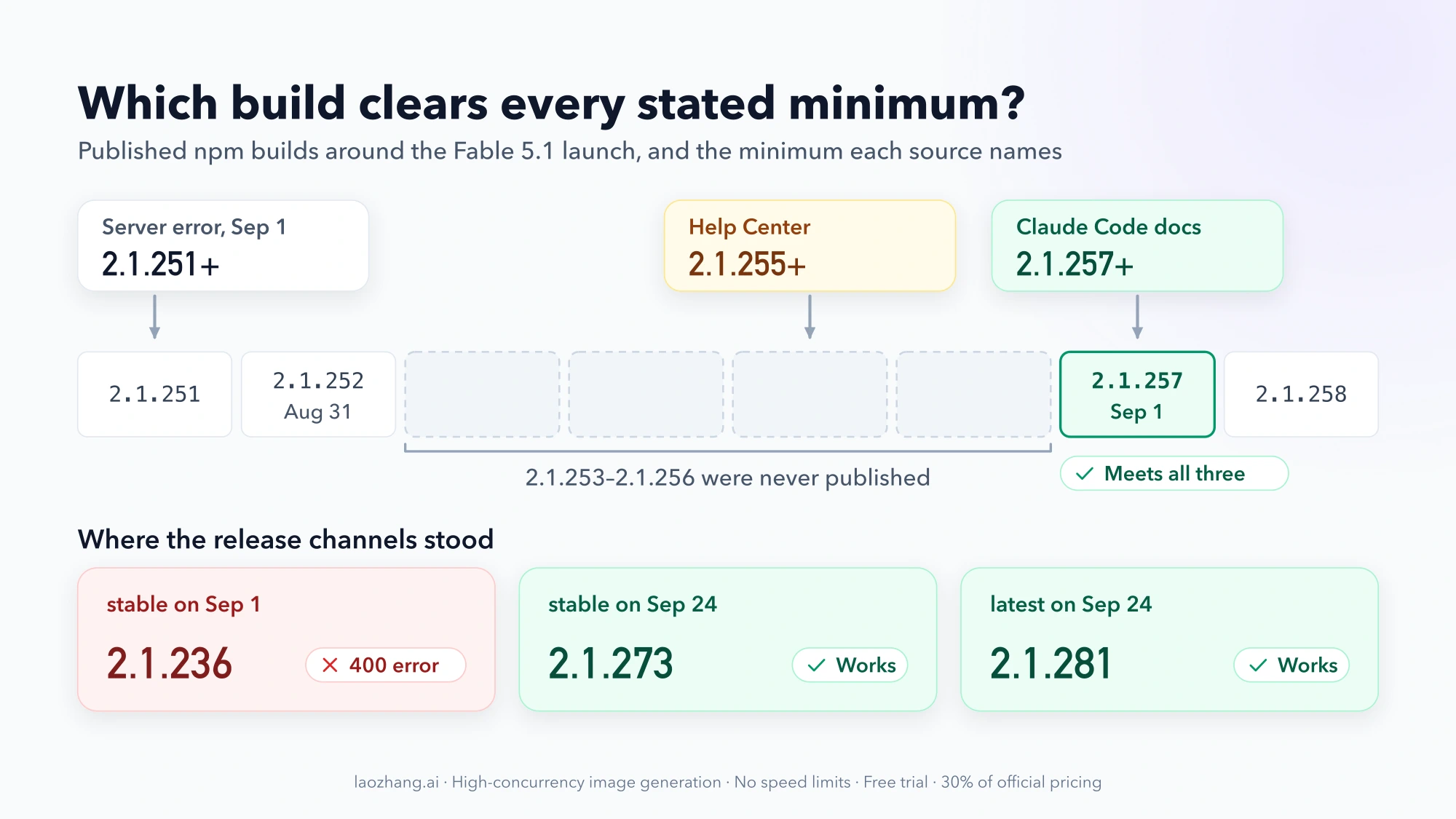
Anthropic's own pages disagree about the minimum. The Help Center says 2.1.255. The model configuration docs and the week 36 release notes say 2.1.257. On launch day, the server's own error told one user that "version 2.1.251 or newer is required" (GitHub issue #91345).
The conflict matters less than it looks, because of which builds exist. The npm version history goes from 2.1.252 (August 31) straight to 2.1.257 (September 1). Versions 2.1.253 through 2.1.256 were never published. So 2.1.257 is the first installable build that meets every number Anthropic has stated. Treat it as your floor. If you do get the 400 error, the minimum it quotes is the one the server enforced for that request.
The release channel explains why many people hit this at launch. On September 1, the stable channel was still on 2.1.236, so anyone on stable got the 400 until the channel moved. As of September 24, 2026, stable is on 2.1.273 and latest is on 2.1.281. Both are new enough.
Update and confirm the new build is running
How you update depends on how you installed Claude Code (setup docs):
| Install method | Update command | Updates itself? |
|---|---|---|
| Native installer | claude update | Yes, in the background; applies at next start |
| Homebrew | brew upgrade claude-code (stable) or brew upgrade claude-code@latest | No |
| WinGet | winget upgrade Anthropic.ClaudeCode | No |
| apt, dnf, apk | Your package manager's upgrade command | No |
| Claude desktop app | Update the app | Follows the app |
An installed update isn't a running update. Updates take effect the next time Claude Code starts, so quit every open session, including IDE extension panels. Then confirm:
claude --version   # should print 2.1.257 or later
claude doctor      # shows the running build and the last update attempt
If claude --version still prints the old number, your shell may be running an older binary. One reporter on issue #91345 had to clear the shell's command cache with hash -r, then open a new login shell, before the new build ran. The Homebrew claude-code cask tracks the stable channel, which usually runs about a week behind latest. If you need a new model on launch day, claude-code@latest gets it sooner. For release channels, version floors, and rollback, see Claude Code Changelog: See What Changed Since Your Version.
Check whether the picker or your access is the problem
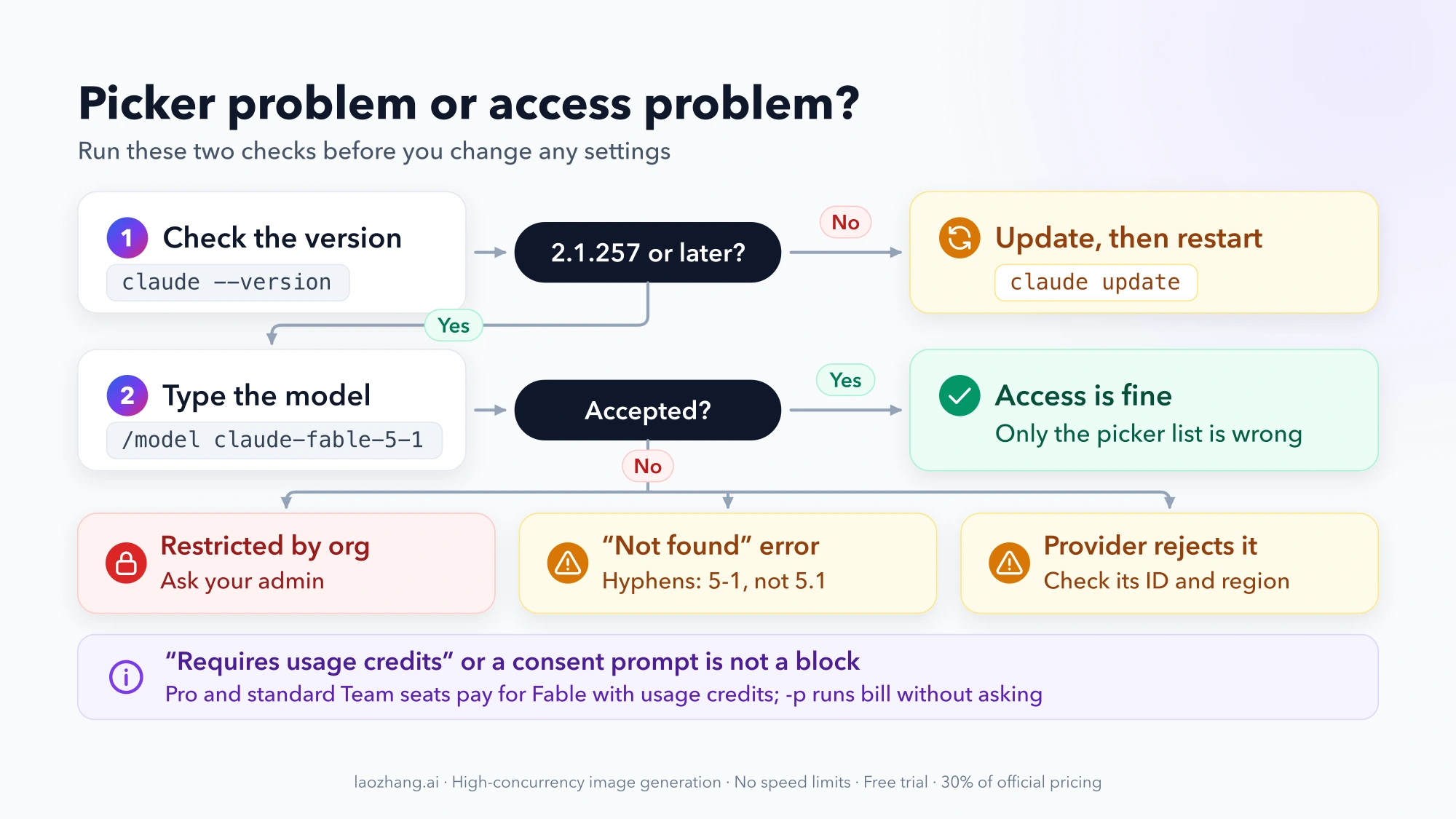
The /model picker and your actual access can disagree. On the Anthropic API, the picker lists Fable only after the server reports it available for your organization. A typed /model command asks the server directly. Start with the typed command:
/model claude-fable-5-1On 2.1.257 and later, /model fable also selects Fable 5.1. The exception is Claude apps gateway sessions, where fable still means Fable 5 (docs). Typing a model name works like pressing Enter in the picker: it switches the model and saves it as your default for new sessions. Run /status to see the current model and account.
To prove the account can reach the model outside the interactive picker, run a one-line headless request:
claude --model claude-fable-5-1 -p "Reply with exactly: OK" --output-format jsonRead the modelUsage field in the output. If it lists claude-fable-5-1, that model answered. The docs recommend modelUsage for this, because JSON output suppresses the usual warnings about model remapping.
This test costs money on some plans. In -p mode Claude Code never shows the usage-credits consent prompt. On Pro and standard Team seats, it bills the request to usage credits without asking. The request is tiny, but it isn't free.
How to read the result:
- The typed command works, but the picker still shows only Fable 5 or no Fable row. Your access is fine and the list is wrong. Several open GitHub reports describe this on Max accounts entitled to 5.1: #91852 (setup-token auth, 2.1.259–2.1.276) and #94638 (personal Max 5x, OAuth, 2.1.273). In #91852, restarting the CLI didn't change the picker. Anthropic hasn't explained the cause or announced a fix. Selecting the model by typing it is the working path.
- The typed command fails. Read the error. The next two sections cover credits, organization rules, IDs, and providers.
Don't hand-edit ~/.claude.json to fix the picker. Some reporters point to cache fields in that file, but those are client internals. No official guidance says editing them is safe or effective.
There is also a mirror case on Enterprise (#91885). The organization allowed Fable 5 but restricted 5.1, and the picker showed no Fable row at all. In that report, /model claude-fable-5 still worked, and /model fable switched to Fable 5 with a notice.
"Requires usage credits" means Fable is there but billed separately
The row is visible; it just isn't covered by your plan's included usage. Per the Help Center:
| Plan or seat | How Fable 5 and 5.1 are billed |
|---|---|
| Free | Not available |
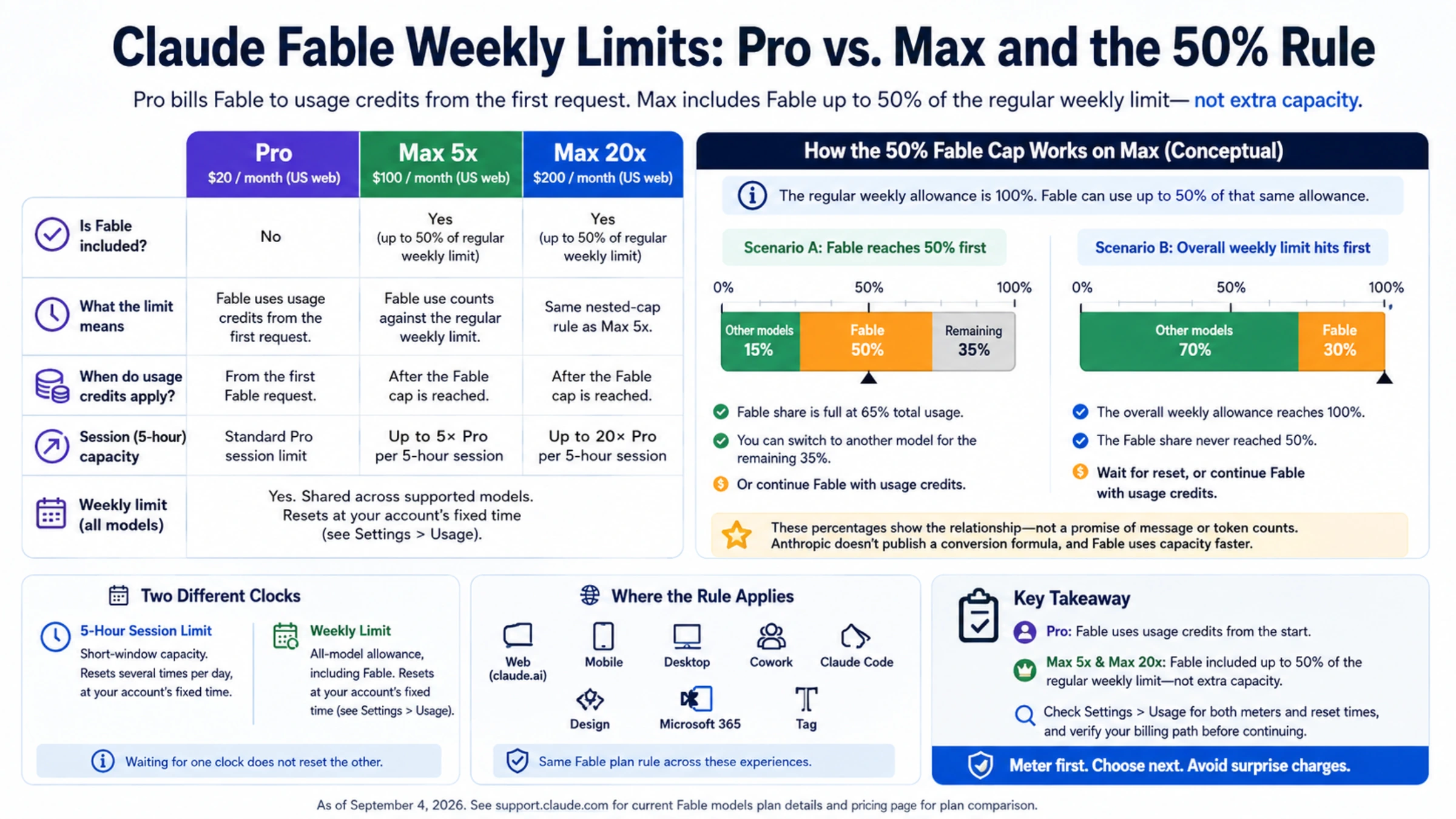
| Pro, standard Team seats | Pay-as-you-go usage credits from the first request |
| Standard seats on seat-based Enterprise | Usage credits, only if the organization has enabled them |
| Max, premium Team seats, premium seat-based Enterprise seats | Included, up to 50% of the weekly usage limit |
| Usage-based Enterprise, Claude API | Standard API rates |
There is no promotional credit for Fable 5.1.
What Claude Code does on a credits-billed seat (docs):
- The picker shows Requires usage credits on the Fable row.
- Interactive sessions ask for consent before the first Fable request bills credits. Enterprise members billed through their organization don't see this prompt.
- If you dismiss the prompt in the picker, you keep your current model. If you dismiss it mid-session, the turn continues on your default model. That looks like "Fable didn't take," but it was a billing choice.
- In
-pmode and through the Agent SDK, there's no prompt; credits are billed without asking. - In Remote Control, background, and agent-team sessions, an unanswered prompt expires after
dialogExpiry(five minutes by default). The turn then ends without sending the request.
If you upgraded to Max on claude.ai and Claude Code still behaves like Pro, run /logout and then /login. The stored token reflects the plan you had when you signed in (errors reference). Before upgrading just for Fable, compare the plans in Claude Pro vs. Max Usage Limits: The Weekly Cap Still Applies.
When your organization or provider blocks it
Your organization restricted the model
On Claude Enterprise, admins can disable models in the claude.ai admin console, for the whole organization or per custom role. A restricted model disappears from /model. Typing it returns:
Model 'claude-fable-5-1' is restricted by your organization's settings. Run /model to choose a different model.Setting it through --model, ANTHROPIC_MODEL, or the model setting doesn't error. Claude Code swaps in an allowed model and shows a notice. Admin changes reach new requests within about a minute. The picker updates at the next session start (docs).
A managed availableModels allowlist works the same way. Your own user or project settings can't extend it. For admins, one detail matters here: the entry claude-fable-5 permits both Fable 5 and Fable 5.1, while claude-fable-5-1 permits only 5.1.
Organizations with zero data retention (ZDR) are a separate case. Fable 5 and 5.1 are Covered Models that require data retention by default. Under ZDR they are absent from /model or shown grayed out, and the server rejects requests regardless of client settings (ZDR docs). Only your admin and Anthropic account team can change that.
The ID is misspelled
The model ID is claude-fable-5-1, with hyphens. A dotted claude-fable-5.1 still passes Claude Code's local check, because any name that starts with claude- does. Typed as /model claude-fable-5.1, it is then checked with a small API request, so expect a "not found" error. Set through --model, ANTHROPIC_MODEL, or the model setting, it fails on the first request with There's an issue with the selected model.
The is not a recognized model id error covers a different case: a string that is neither an alias nor a claude- name, such as the display name Fable 5.1 or the short ID fable-5-1, set by the Desktop app, Remote Control, or the Agent SDK. One Linux desktop beta user saw the app send short IDs such as fable-5-1, which the CLI rejected (#95263).
Bedrock, Google Cloud, Microsoft Foundry, and gateways
On third-party providers, the model must be enabled in your provider account and region. Claude Code's built-in aliases can also lag the newest release there. Pin Fable 5.1 with the provider's ID (models overview, pinning docs):
| Provider | Fable 5.1 ID |
|---|---|
| Claude API | claude-fable-5-1 |
| Amazon Bedrock | anthropic.claude-fable-5-1 |
| Google Cloud | claude-fable-5-1 |
| Microsoft Foundry | claude-fable-5-1 |
| Claude Platform on AWS | claude-fable-5-1 |
export ANTHROPIC_DEFAULT_FABLE_MODEL='anthropic.claude-fable-5-1' # Bedrock exampleA new model can reach the Anthropic API before a provider or region offers it. If you get There's an issue with the selected model after pinning, check your provider's model catalog for your region. Keep the previous version pinned until 5.1 shows up there.
For LLM gateways:
- A gateway that isn't configured to serve
claude-fable-5-1rejects it. Only the gateway operator can add it. - If the gateway does serve it, select it with
/model claude-fable-5-1. CLAUDE_CODE_ENABLE_GATEWAY_MODEL_DISCOVERY=1fills the picker from the gateway's/v1/modelslist.ANTHROPIC_BASE_URLchanges where requests go, not which model answers them.
Settings that pull you back to another model
Sometimes you pick Fable 5.1, and the next session starts on something else. Claude Code resolves the model in this order: /model during a session, then --model, then ANTHROPIC_MODEL, then the model setting, then ANTHROPIC_DEFAULT_MODEL (docs). Watch for these:
- A
modelvalue in project or managed settings, orANTHROPIC_MODELin your shell, reapplies at every launch. When project or managed settings set the model, the startup header names the file. - On first run of 2.1.257 or later, Claude Code changes a saved
claude-fable-5in your user settings tofable. It leaves the same value in project, local, or managed settings alone, so those keep you on Fable 5. - Sessions resumed with
--resumeor--continuekeep the model they were saved with. - An admin-set organization default can override your choice at each launch.
Remote Control and the Desktop app
A long-running claude remote-control server keeps spawning sessions on the version it started with, even after the CLI updates. In issue #95263, a server started on 2.1.235 rejected Fable 5.1 as "Unsupported model" until the service was restarted.
The same report found a second layer. With every client current, Remote Control pickers on desktop, web, and mobile still showed "Update to use this model". The underlying error was "model is not selectable for this organization". On the same machine, a local session could use /model claude-fable-5-1. That points to a server-side gate on Remote Control, not your version. It's one detailed report, not an acknowledged issue.
If this matches what you see, restart the remote-control service, and use a local session for Fable 5.1 meanwhile. To use Fable in Cowork, you need the latest version of Claude Desktop.
When to stop and keep working on another model
Stop troubleshooting locally when:
- The error says your organization restricts the model, or the row is grayed out under ZDR. Send your admin the exact message.
- Your provider or gateway doesn't list Fable 5.1 for your account or region.
- Your account isn't eligible. Fable requires a paid plan, and Claude accounts are available only in the countries on Anthropic's supported regions list.
- The typed command works but the picker is wrong. There's nothing more to fix; keep typing the ID.
Meanwhile you have two solid fallbacks. Fable 5 stays available as a legacy model (/model claude-fable-5, v2.1.170 or later). Opus 5.5 is available through /model opus on v2.1.280 or later. To decide which fits your work, see Claude Opus 5.5 vs Fable 5.1: Which Should You Run?.
If Fable 5.1 does get selected but then gets replaced, refused, or billed unexpectedly, that's a different problem. Safety classifier flags, mostly in cybersecurity and biology, trigger automatic fallback to Opus. Open reports also describe Max accounts wrongly asked for usage credits (#92576). Claude Fable 5.1 Usage Limits: Weekly Allowance, Extra Usage, and Model Switching covers fallback, weekly caps, and credits. For the model's API price and migration changes, see Claude Fable 5.1: API Pricing, Changes, and Migration Guide.
FAQ
Does /model fable select Fable 5.1 or Fable 5?
On Claude Code 2.1.257 or later, connected to the Anthropic API, fable selects Fable 5.1. Before 2.1.257 it selected Fable 5. In Claude apps gateway sessions it still selects Fable 5, so use /model claude-fable-5-1 there. To pick Fable 5 on purpose, type /model claude-fable-5.
Is Fable 5.1 available on the Free plan?
No. Fable 5 and 5.1 are only on paid plans: Pro, Max, Team, and Enterprise. On Pro, it also needs usage credits.
I'm on the stable channel. Do I need to switch to latest?
Not anymore. As of September 24, 2026, the stable channel is on 2.1.273, above the 2.1.257 floor. At launch, stable was on 2.1.236 and couldn't use Fable 5.1. Stable users with Homebrew or package-manager installs still need to run the upgrade themselves.