If permission prompts are breaking your flow, start with Auto mode plus explicit deny and ask rules. Add the Bash sandbox when commands should be confined to a workspace and a small network allowlist. Treat bypassPermissions as an execution mode for an already isolated, disposable environment—not as the next convenience setting on a developer laptop.
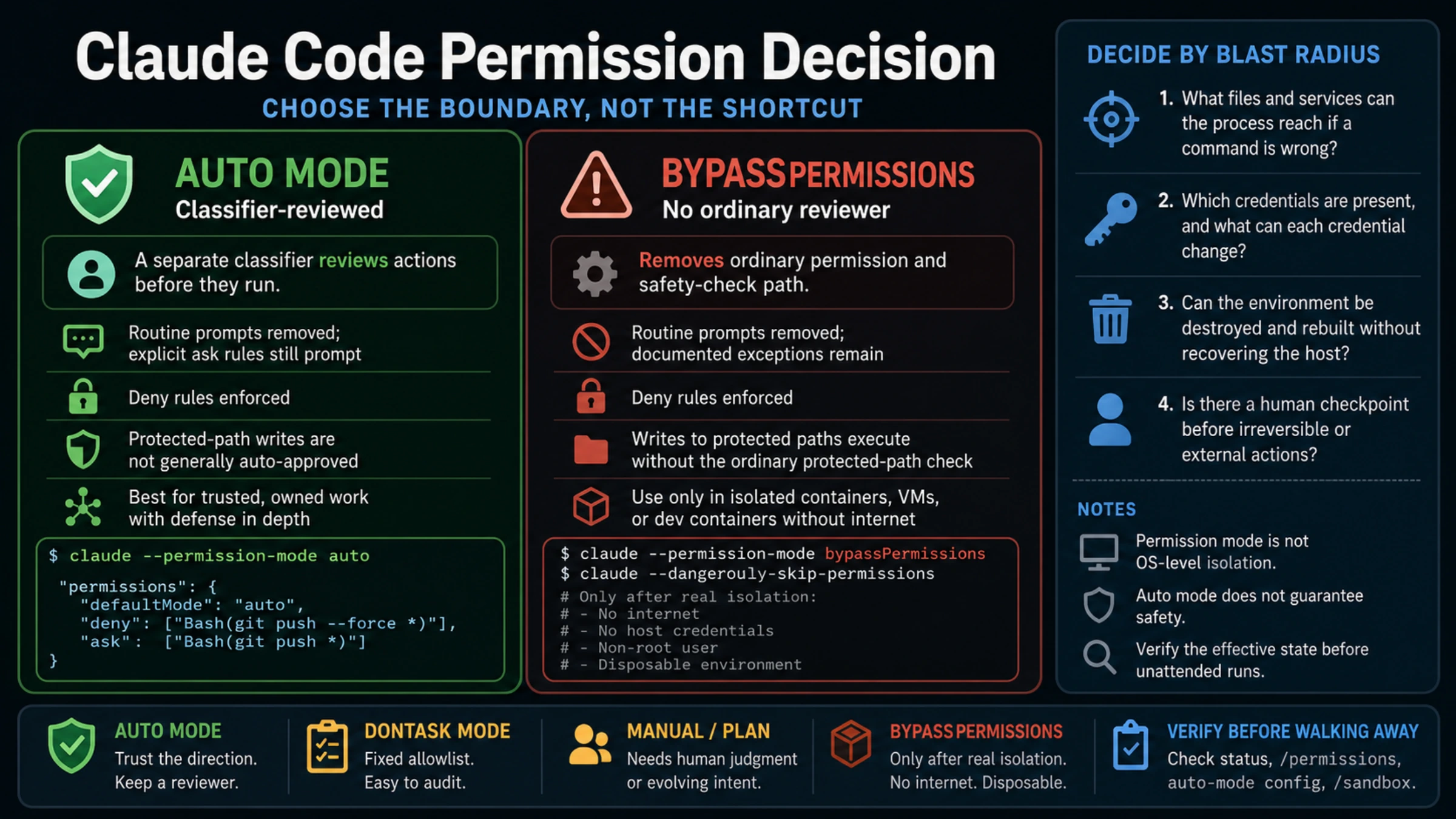
That recommendation follows from one difference: Auto mode replaces routine human approvals with a separate classifier; bypassPermissions removes the ordinary permission and safety-check path. Both feel hands-off. Only one still has an action reviewer.
The same quiet terminal can hide two different control models
Anthropic's current permission mode contract describes Auto mode as execution without routine prompts while a separate classifier reviews actions before they run. The classifier can block actions that exceed the request, reach infrastructure it does not recognize, look destructive, or appear driven by hostile content Claude read. Explicit ask rules still produce a prompt, and deny rules apply before the classifier.
bypassPermissions does something more radical. It disables ordinary permission prompts and safety checks so tool calls execute immediately, including writes to protected paths. These two launch forms are equivalent:
claude --permission-mode bypassPermissions
claude --dangerously-skip-permissions
“Bypass” still does not mean every invariant in Claude Code disappears. Explicit ask rules, organization-required connector prompts, tools that require user interaction, critical-path rm/rmdir removals, and cross-session messaging safeguards retain documented handling. Deny rules also continue to block in every mode. Those exceptions make the contract more precise, but they do not make bypass safe: Anthropic says the mode offers no protection against prompt injection or unintended actions.
| Question | Auto mode | bypassPermissions |
|---|---|---|
| Who reviews ordinary actions? | A separate classifier | No ordinary reviewer |
| Routine prompts | Removed; explicit ask rules still prompt | Removed; documented product exceptions remain |
| Deterministic deny rules | Enforced | Enforced |
| Protected-path writes | Not generally auto-approved | Execute without the ordinary protected-path check |
| Intended environment | Work whose direction you trust, with defense in depth | Isolated container, VM, or dev container without internet access |
| OS-level isolation | Not provided by the mode | Not provided by the mode |
Auto mode also does not guarantee safety. Its classifier makes contextual judgments and can have false negatives as well as false positives. A permission decision is not a code review, an access-control audit, or proof that the final diff is correct.
Make the choice from the blast radius
Task duration is a poor permission policy. An overnight test suite may need less authority than a five-minute production migration. Instead, ask four questions:
- What files and services can the process reach if a command is wrong?
- Which credentials are present, and what can each credential change?
- Can the environment be destroyed and rebuilt without recovering the host?
- Is there a human checkpoint before irreversible or external actions?
For a normal repository you own and review, Auto mode is usually the useful middle ground. It removes most approval fatigue while retaining a contextual reviewer. Pair it with least-privilege credentials, a narrow network boundary, and rules that make your non-negotiable stops deterministic.
For unfamiliar code, secrets, customer data, production infrastructure, or a task whose intent is still evolving, use Manual or Plan mode. A classifier cannot infer every business or compliance boundary from a broad prompt.
For CI with a small, fixed command set, dontAsk may be a better match. It executes only tools you pre-approved and denies the rest. That contract is easier to audit than a contextual classifier when the intended command surface is already known.
Use bypassPermissions only after external isolation is the real security boundary. Anthropic's documented starting point is a container, VM, or dev container without internet access. Run as a non-root user, mount only the working copy and an output directory, exclude host credentials, and make the environment disposable. On Linux and macOS, Claude Code refuses this mode under root or sudo outside a recognized sandbox; that check is a guardrail, not a substitute for isolation.
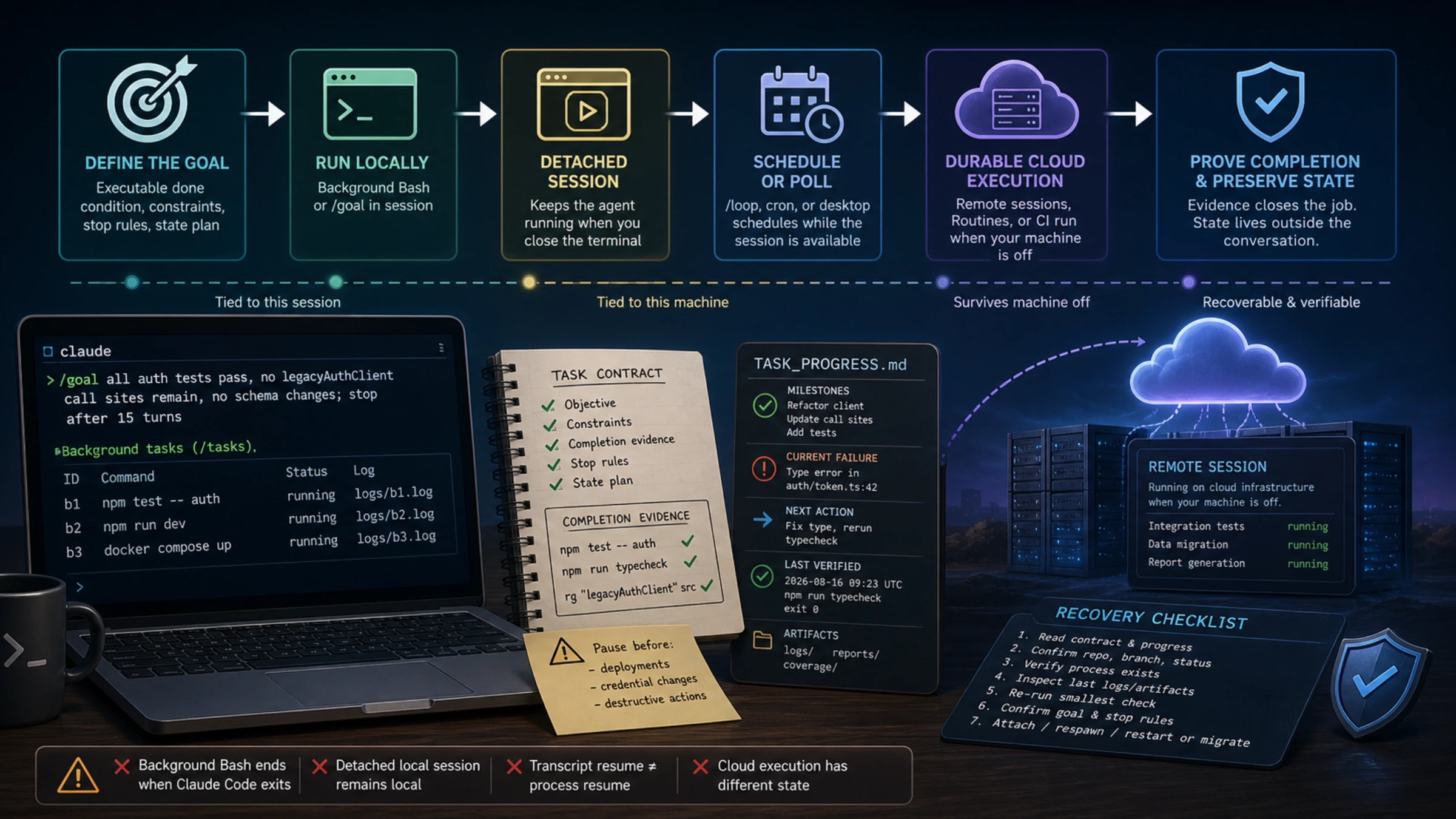
If the problem you are solving is whether a process survives terminal exit, sleep, or a resumed conversation, permission choice is only one piece. The separate Claude Code long-task guide covers runtimes, durable state, completion evidence, and recovery.
Configure Auto mode where the setting can actually take effect
Start one terminal session explicitly:
claude --permission-mode autoFor a personal terminal default, put permissions.defaultMode in ~/.claude/settings.json:
{
  "permissions": {
    "defaultMode": "auto",
    "deny": [
      "Bash(git push --force *)",
      "Bash(terraform destroy *)"
    ],
    "ask": [
      "Bash(git push *)",
      "Bash(terraform apply *)"
    ]
  },
  "sandbox": {
    "enabled": true,
    "allowUnsandboxedCommands": false,
    "failIfUnavailable": true
  }
}
Do not rely on defaultMode: "auto" in a repository's .claude/settings.json or .claude/settings.local.json. Under the current contract, terminal sessions ignore that project-level Auto default so a checked-out repository cannot silently turn the mode on for itself. Other permission values have different scope rules, and VS Code has its own starting-mode controls, so verify the surface you actually use.
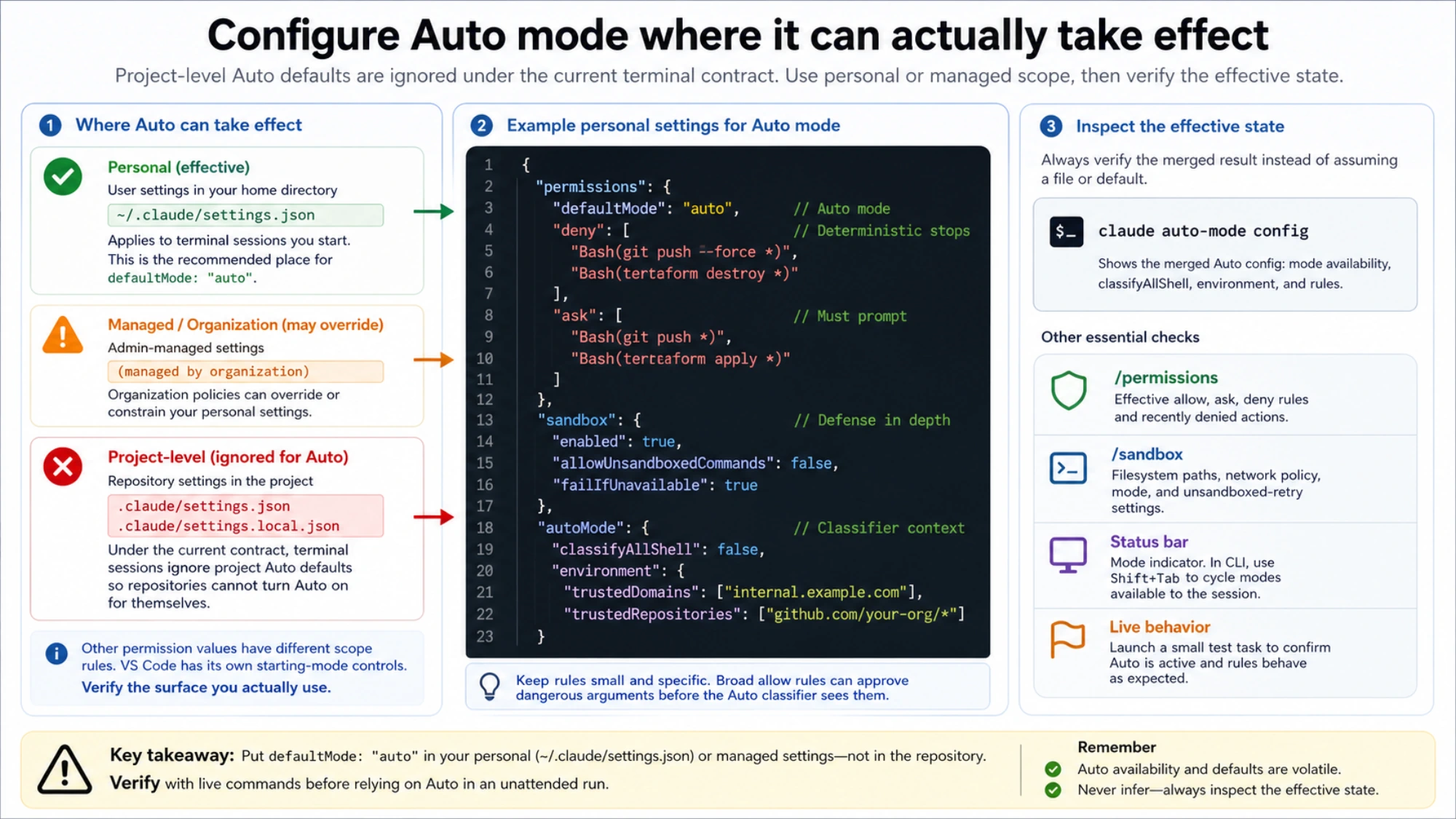
The example rules are deliberately small. Adapt them to your tools and targets using the official permission rule syntax. A broad allow rule can accidentally approve dangerous arguments before the Auto classifier sees them. If you need every shell command classified, the current Auto mode configuration supports autoMode.classifyAllShell, with a latency tradeoff.
For organization context, autoMode.environment can name trusted repositories, internal domains, buckets, package registries, and sensitive remote targets. Inspect the merged result instead of reading one file and assuming precedence:
claude auto-mode configUse managed permissions.deny for actions that must never run. Classifier hard_deny rules add useful semantic boundaries, but the deterministic permission rule runs earlier and cannot be reinterpreted as user intent.
Permission review and command isolation are independent layers
Auto mode answers whether a classifier approves an action. The Bash sandbox answers which files and network destinations a Bash command and its child processes can reach after approval. Combining them is stronger than treating either as a complete security system.
The built-in sandbox runs on macOS, Linux, and WSL2; native Windows needs WSL2. A practical fail-closed setup should:
- keep writes inside the repository and session temp directory;
- allow only required network domains;
- deny or mask cloud credentials, SSH material, and high-privilege tokens;
- set
allowUnsandboxedCommandstofalseso a sandbox violation cannot retry on the host; - set
failIfUnavailabletotruewhen missing isolation must stop the job.
The Bash sandbox covers Bash and its children, not every Claude Code tool. A fully unattended bypass run therefore still needs a container or VM as the final boundary. The permission mode decides who approves; the isolation layer decides what an approved action can damage.
Verify the effective state before walking away
Auto availability and the built-in starting mode currently vary with Claude Code version, plan, model, provider, feature flags, organization settings, and interface. Never infer the active mode from an old default or a launch script alone.
Check four live signals:
- the mode indicator in the status bar; in the CLI,
Shift+Tabcycles modes available to the session; /permissionsfor effective allow, ask, deny, and recently denied actions;claude auto-mode configfor the classifier's merged environment and rules;/sandboxfor filesystem, network, mode, and unsandboxed-retry settings.
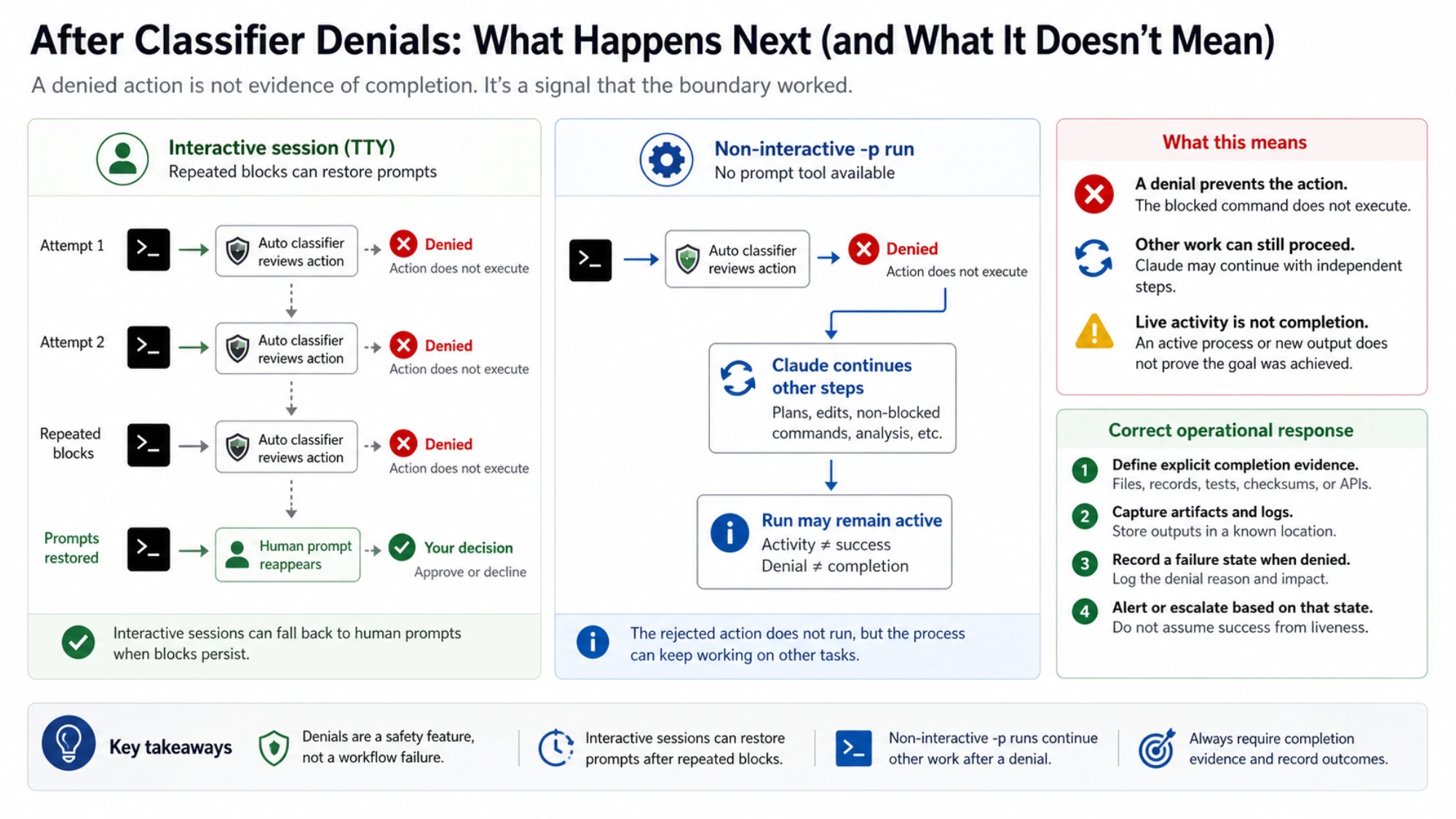
When Auto mode blocks repeatedly, an interactive session can fall back to human prompts. In a non-interactive -p run without a permission prompt tool, the rejected action does not run, but Claude may continue with other work. That means “the process is still active” is not completion evidence. Give unattended work an observable success condition and a failure artifact.
Choose Auto mode when you trust the direction but still want an action reviewer. Choose dontAsk when a fixed allowlist is the contract. Choose Manual or Plan when the work needs human judgment. Consider bypassPermissions only when the host, internet, credentials, and persistence are already outside the agent's reach. Fewer prompts are a workflow feature; bounded authority is the safety property.