
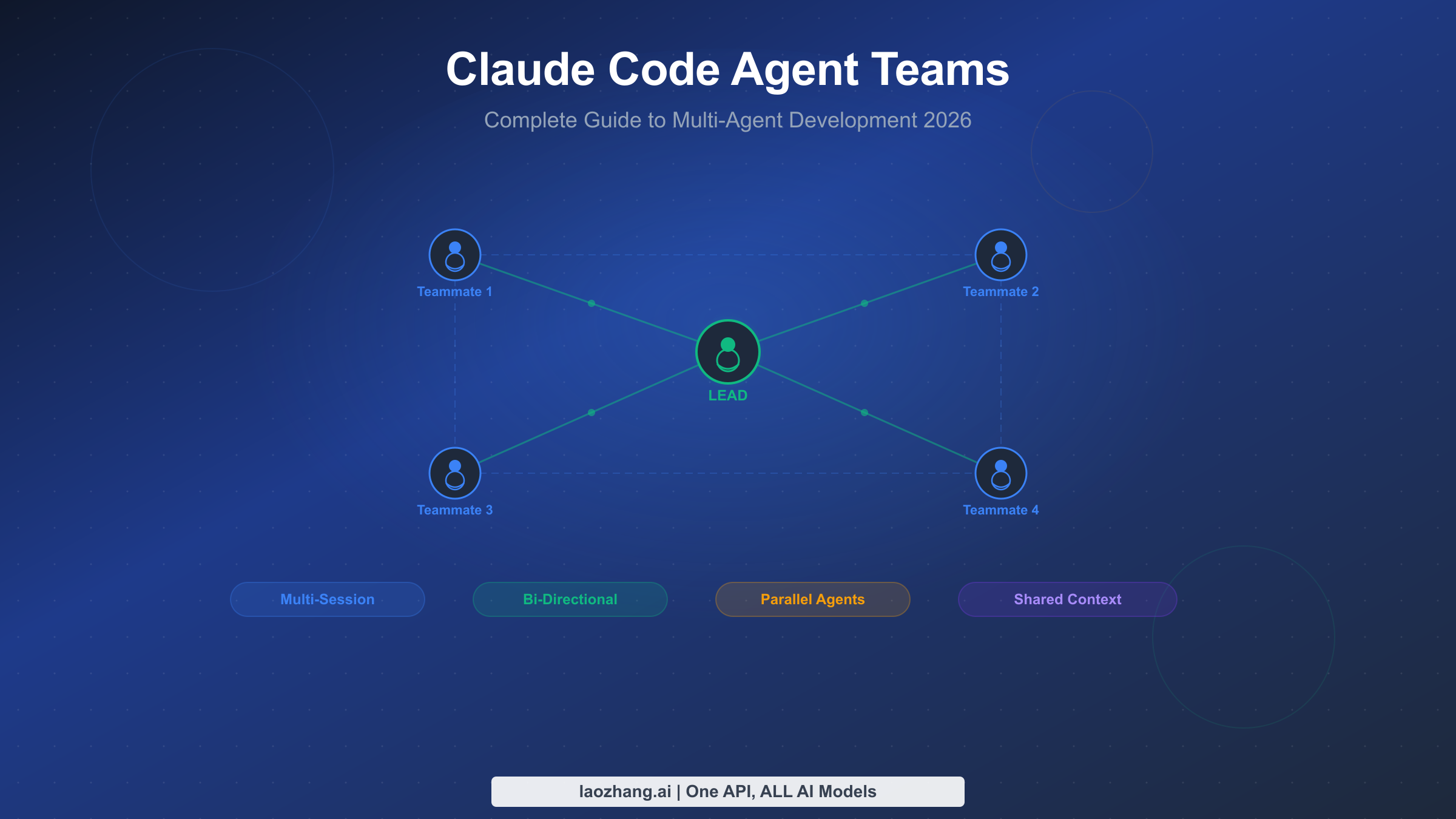
Claude Code Agent Teams transform the single-threaded Claude Code experience into a coordinated multi-agent system where independent Claude instances communicate, share tasks, and work in parallel on your codebase. Shipped as an experimental feature in February 2026, agent teams represent a fundamental shift in how developers interact with AI coding assistants — moving from one conversation at a time to orchestrating entire development squads. This guide walks you through everything you need to build effective agent teams, from initial setup to production-ready patterns.
TL;DR
Agent Teams let you spawn multiple Claude Code sessions that work together on a shared project. One session acts as the team lead that coordinates work, while teammates execute tasks independently in their own context windows. Unlike subagents (which run inside a single session and can only report back to their parent), teammates can message each other directly, share discoveries mid-task, and coordinate without the lead acting as intermediary. Enable them by setting CLAUDE_CODE_EXPERIMENTAL_AGENT_TEAMS=true in your environment or settings.json, and you need Claude Code v2.1.32 or later. Anthropic demonstrated the power of this approach by using 16 parallel agents to build a 100,000-line C compiler capable of compiling the Linux kernel — at a cost of approximately $20,000 across 2,000 sessions (as documented in Anthropic's engineering blog, February 2026).
What Are Claude Code Agent Teams? (And How They Differ from Subagents)
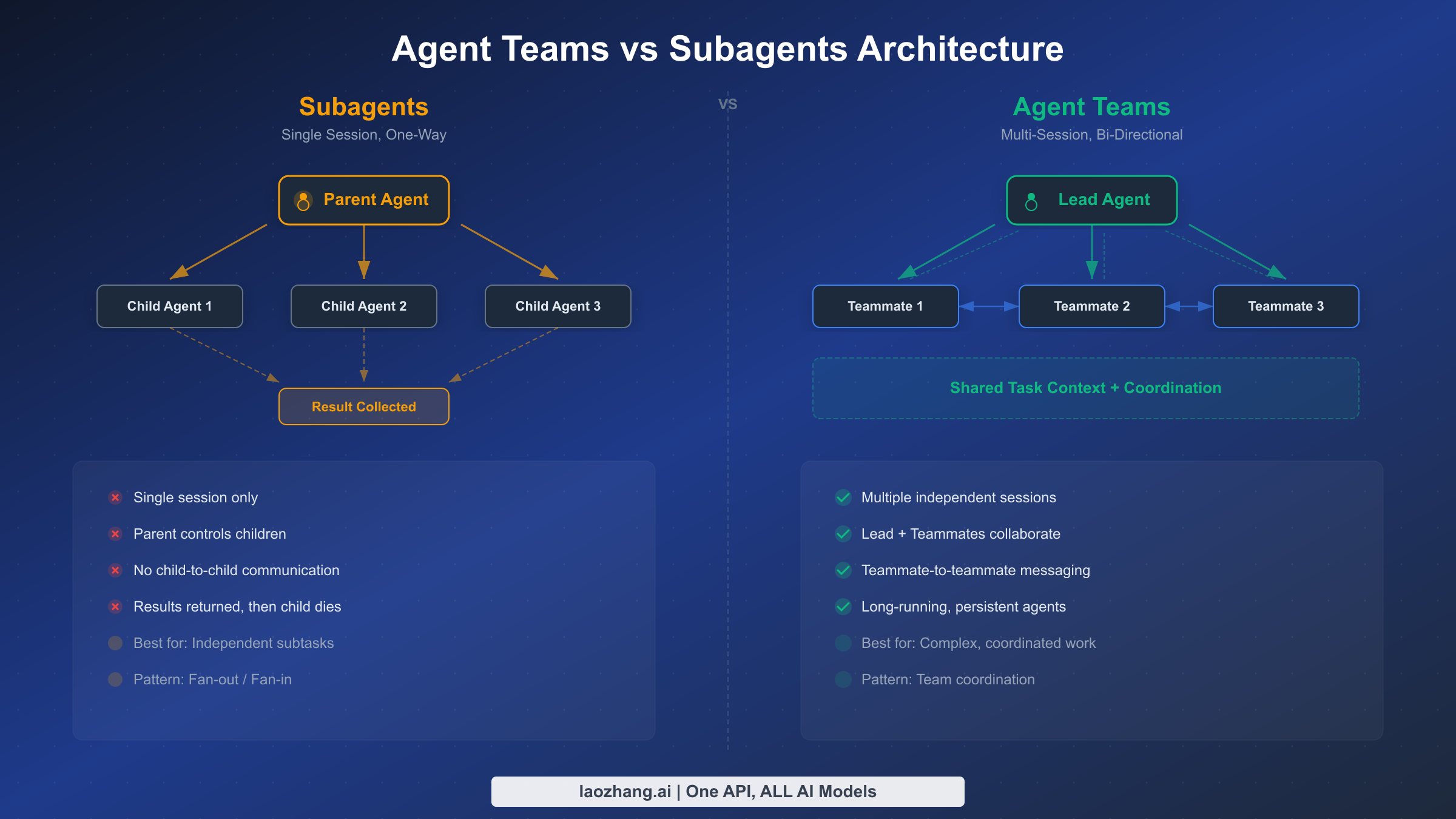
Before agent teams existed, Claude Code offered subagents as the primary way to parallelize work. Subagents run within a single session's context, execute a scoped task, and return results to the parent agent. They are useful for keeping exploration separate from the main conversation — for example, searching a codebase for a pattern while the main agent continues reasoning about architecture. But subagents have a fundamental limitation: they cannot talk to each other. If agent A discovers something relevant to agent B's work, that information must route through the parent agent, creating a bottleneck that limits the kinds of coordination possible.
Agent Teams solve this by giving each teammate its own full Claude Code session with independent context, tool access, and the ability to send messages to any other teammate or the lead. This architectural difference unlocks patterns that are impossible with subagents: a frontend agent can tell a backend agent about an API contract change directly, a test agent can alert a code author about a failing test without waiting for the lead to relay the message, and multiple agents can converge on a shared understanding of a problem through direct discussion.
The following table clarifies when to use each approach, because choosing the wrong one leads to either unnecessary complexity (agent teams for a simple search) or coordination bottlenecks (subagents for cross-cutting changes):
| Dimension | Subagents | Agent Teams |
|---|---|---|
| Sessions | Run inside parent's session | Each gets its own full session |
| Communication | One-way: child → parent only | Bi-directional: any → any |
| Context | Share parent's context window | Independent context windows |
| Coordination | Parent acts as intermediary | Direct peer-to-peer messaging |
| Best for | Focused, isolated tasks | Complex multi-part projects |
| Setup | Built-in, no configuration | Experimental flag required |
| Cost | Lower (single session overhead) | Higher (multiple session overhead) |
Think of subagents as hiring a specialist consultant who reports back to you, while agent teams are like assembling a project squad where everyone can talk to everyone else. If you are already familiar with Claude Code's capabilities and want to understand where agent teams fit in the broader toolset, our Claude Code installation guide covers the foundational setup.
How Agent Teams Work Under the Hood
The agent teams architecture consists of three core components: a team lead session, one or more teammate sessions, and a shared coordination layer built on task files and inter-agent messaging.
The team lead is your primary Claude Code session — the one where you type your initial prompt describing what you want the team to accomplish. When Claude determines that the task would benefit from parallel work, it uses the Teammate tool to spawn additional Claude Code processes. Each spawned process runs as an independent Claude Code session with its own context window, tool permissions, and conversation history. The lead assigns initial tasks to each teammate and monitors progress through the shared task system.
Teammates are fully autonomous Claude Code instances that receive an initial prompt from the lead and then work independently. They can read and write files, execute commands, search the codebase, and use all the standard Claude Code tools. Crucially, they can also send messages to the lead and to other teammates using the SendMessage tool, which enables the kind of real-time coordination that distinguishes agent teams from simple parallel execution.
The coordination layer consists of two mechanisms working together. First, a shared task list stored on disk that all team members can read and update. Tasks have statuses (pending, in_progress, completed), can block other tasks, and include metadata about who is working on what. When a teammate finishes a task, downstream tasks that were blocked automatically become available for other teammates to claim. Second, the SendMessage API provides direct inter-agent communication for situations that require more nuance than a task status change — sharing discoveries, requesting clarification, or proposing changes to the approach.
This architecture means that agent teams produce a burst of parallel activity when spawned, gradually converge as tasks complete and teammates communicate findings, and eventually collapse back into the lead session which synthesizes results and presents them to you. The entire process is visible in your terminal: you can watch messages flow between agents, see task statuses update, and intervene if the team goes off track.
Understanding the lifecycle of an agent team session helps you anticipate costs and timing. During the spawn phase (typically 10-30 seconds), the lead creates teammate sessions and assigns initial tasks. In the parallel execution phase (the bulk of the session, from minutes to hours), teammates work independently with occasional inter-agent messages. The convergence phase begins when the first teammates complete their tasks and start helping with remaining work or reviewing others' output. Finally, the synthesis phase sees the lead collecting all results, resolving any conflicts, and presenting a unified response. Each phase has different token consumption characteristics — spawning is cheap, parallel execution is the most expensive, and synthesis depends on how much reconciliation the lead needs to perform.
It is worth noting that each teammate session inherits the permissions and tool access of the lead session, but not the conversation history. Teammates start with a clean context containing only their assigned task description and any initial context the lead provides. This means teammates do not know what you discussed with the lead before the team was created, which is actually an advantage — it forces the lead to provide explicit, self-contained instructions rather than relying on implicit context from earlier in the conversation. If a teammate needs information from the conversation history, the lead must include it in the task description or send it via a message.
Setting Up Your First Agent Team (Step-by-Step)
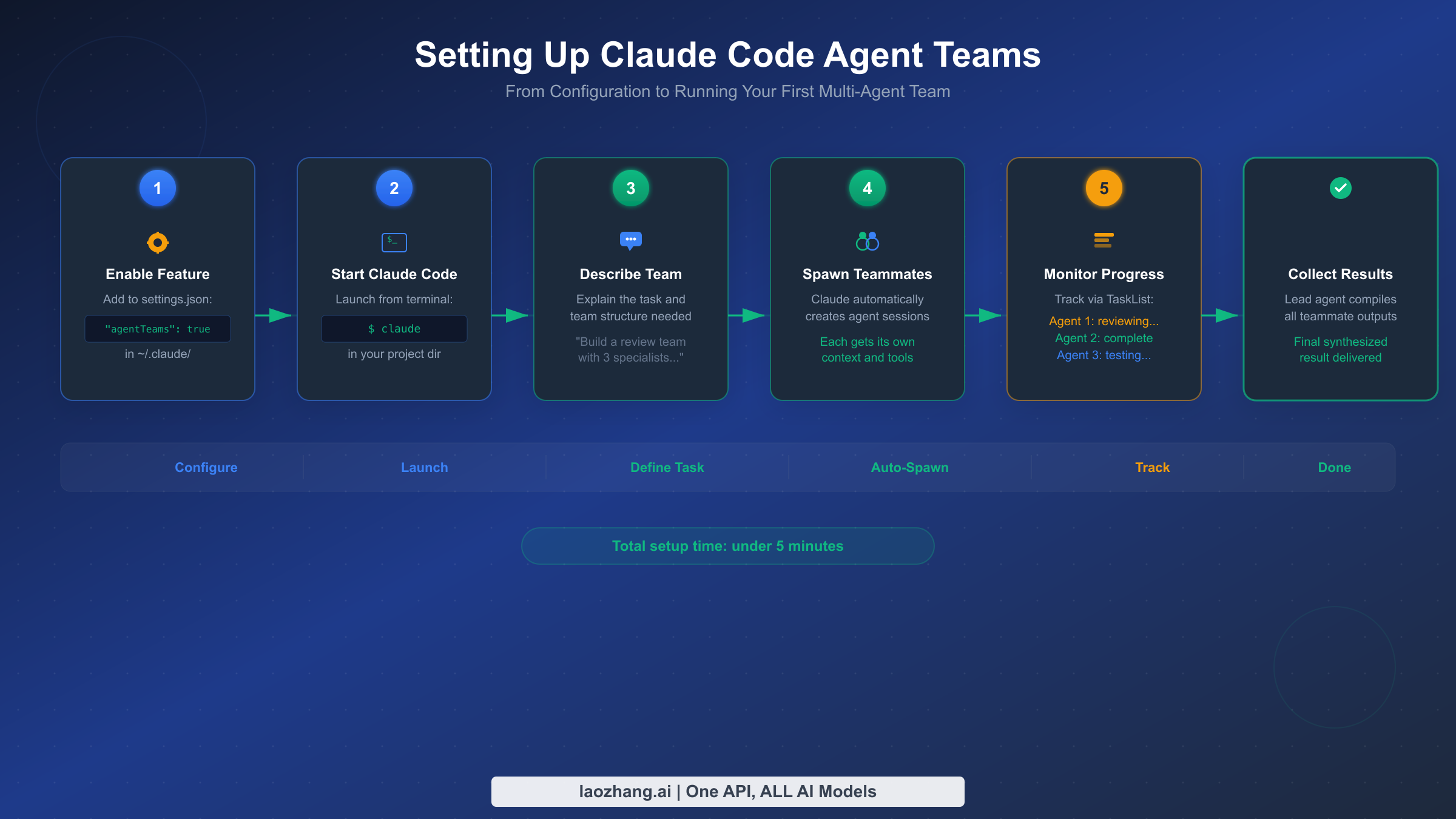
Getting agent teams running requires enabling the experimental feature flag and understanding a few configuration options that affect team behavior. The setup process takes less than five minutes, but the configuration choices you make here influence how effectively your teams operate.
Step 1: Verify your Claude Code version. Agent teams require v2.1.32 or later. Check your version by running claude --version in your terminal. If you need to update, run npm install -g @anthropic-ai/claude-code@latest or use the package manager appropriate for your installation method.
Step 2: Enable the experimental flag. You have three options for enabling agent teams, and the choice depends on whether you want the feature available globally or per-project:
json// Option A: Project-level settings (.claude/settings.json)
{
  "env": {
    "CLAUDE_CODE_EXPERIMENTAL_AGENT_TEAMS": "true"
  }
}

// Option B: User-level settings (~/.claude/settings.json)
{
  "env": {
    "CLAUDE_CODE_EXPERIMENTAL_AGENT_TEAMS": "true"
  }
}

// Option C: Environment variable (session-level)
// export CLAUDE_CODE_EXPERIMENTAL_AGENT_TEAMS=true
Project-level settings are recommended for teams because they ensure everyone working on the same repository has agent teams enabled without needing to modify their personal configuration. The setting persists across sessions and is checked into version control alongside your project.
Step 3: Start Claude Code and describe your team task. Launch Claude Code in your project directory and give it a prompt that naturally suggests parallel work. The key is describing the outcome you want and the distinct workstreams involved, rather than micromanaging how Claude should structure the team. For example, instead of saying "create three agents," say something like: "Review this pull request for security issues, performance problems, and test coverage gaps. Each area should be examined independently and findings compiled into a single report."
Claude will analyze your prompt, determine how many teammates would be effective, spawn them with focused instructions, and set up the task coordination structure. You will see messages in your terminal as teammates are created and begin working.
Step 4: Monitor progress. While the team works, you can observe the shared task list and inter-agent messages in your terminal output. The lead agent periodically checks on teammates and may reassign tasks if one teammate finishes early or encounters blockers. If you need to steer the team, you can send a message to the lead agent, which will relay relevant instructions to affected teammates.
Step 5: Collect and review results. When all tasks are complete, the lead agent synthesizes findings from all teammates and presents a unified response. Teammates are automatically shut down via the SendMessage shutdown protocol: the lead sends a shutdown_request, each teammate confirms with a shutdown_response, and the sessions close cleanly.
If you encounter issues during setup, the most common problems are version incompatibility (update Claude Code), missing feature flag (check all three possible settings locations), and permission errors (ensure your API key or subscription has sufficient quota for multiple concurrent sessions). For API users specifically, be aware that each teammate consumes its own token allocation, which can accelerate rate limit consumption significantly.
Another practical consideration is your system resources. Each teammate runs as a separate Node.js process, so spawning a large team on a machine with limited RAM can cause performance issues. For most development machines, three to five simultaneous teammates work comfortably. If you need larger teams (ten or more), consider running on a machine with at least 16GB of RAM and monitoring process memory usage. Network bandwidth is rarely a bottleneck since the communication between teammates happens through local file system operations and API calls, but latency to the Anthropic API can affect how quickly teammates respond to messages.
For teams using Claude Code with the free tier, agent teams are accessible but the limited usage quota will be consumed much faster with multiple concurrent sessions. Consider upgrading to Pro or Max before relying on agent teams for substantive work, or use API access with sufficient tier allocation to avoid frustrating interruptions mid-team-session.
Team Architecture Patterns for Real Projects
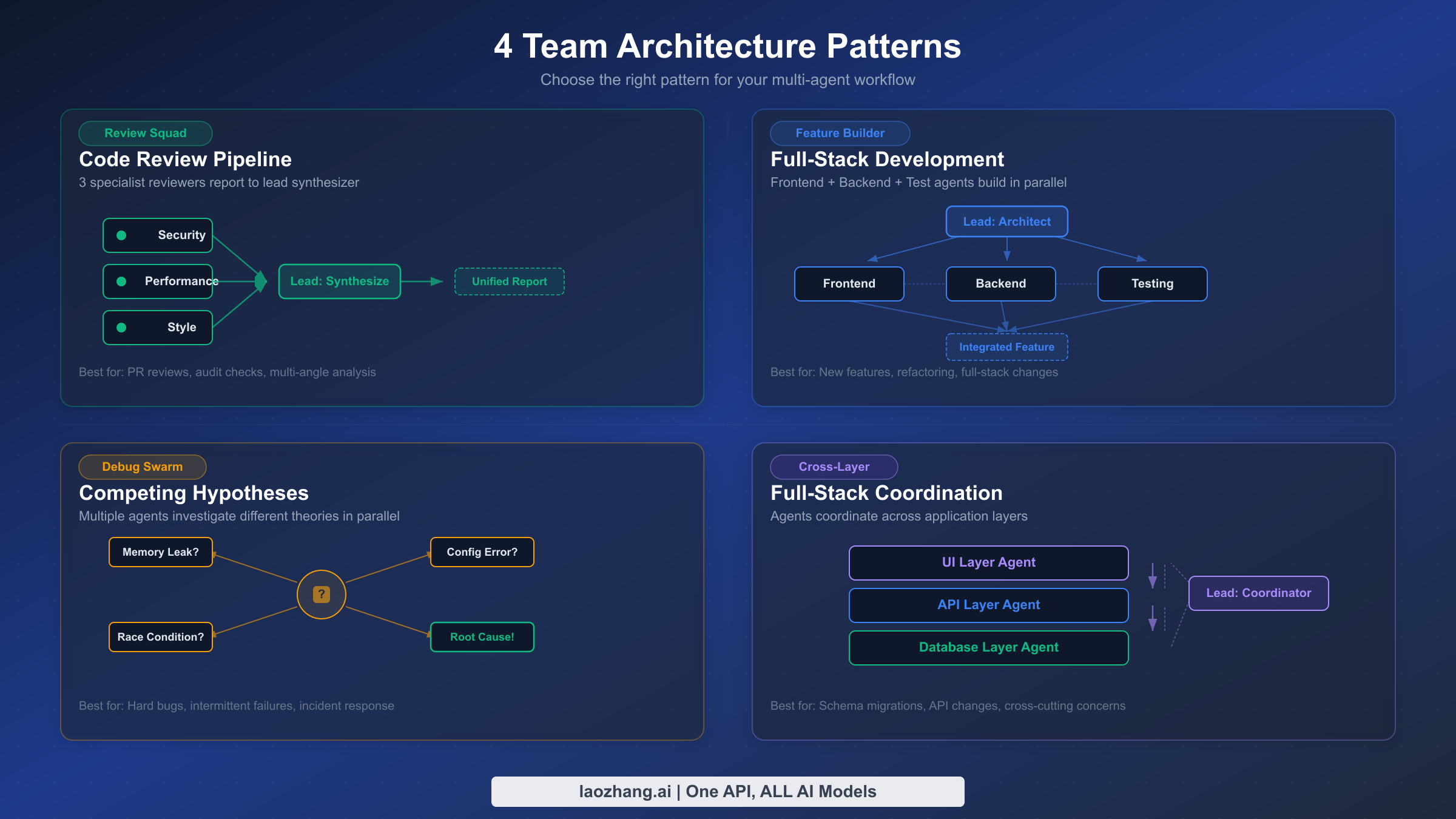
The difference between a productive agent team and a chaotic mess of parallel Claude sessions comes down to how you structure the team's responsibilities and communication patterns. Four architecture patterns have emerged from community experience and Anthropic's own testing as consistently effective for different types of work.
Pattern 1: The Review Squad. This pattern assigns the same artifact to multiple reviewers, each examining it through a different lens. A typical configuration spawns three teammates — one focused on security vulnerabilities, one on performance bottlenecks, and one on code style and maintainability. The lead collects all reviews and produces a unified report that prioritizes findings by severity. This pattern works exceptionally well for pull request reviews, architecture assessments, and documentation audits because the reviewers do not need to coordinate with each other — they examine the same content independently, and the lead handles synthesis. Token cost is relatively low because each reviewer reads the same files without generating large code changes.
Pattern 2: The Feature Builder. When building a new feature that spans multiple layers of the stack, the Feature Builder pattern assigns one teammate to each layer: frontend, backend, database, and tests. The lead defines the interfaces between layers upfront (API contracts, data schemas) and then lets each teammate implement their portion independently. This is where inter-agent messaging becomes critical — when the backend teammate discovers that the API contract needs adjustment, it messages the frontend teammate directly rather than routing through the lead. The Feature Builder pattern is most effective when the feature boundaries are clear and the interfaces between components can be defined before work begins.
Pattern 3: The Debug Swarm. Debugging complex issues often benefits from exploring multiple hypotheses simultaneously. The Debug Swarm spawns several teammates, each pursuing a different theory about the root cause. One might investigate recent code changes, another examines log patterns, and a third reviews configuration differences between environments. As teammates rule out hypotheses or discover supporting evidence, they share findings with each other. The swarm converges naturally as evidence accumulates, and the lead synthesizes the diagnosis once a clear picture emerges. This pattern is particularly valuable when dealing with intermittent failures, race conditions, or issues that span multiple services.
Pattern 4: Cross-Layer Coordination. The most sophisticated pattern handles tasks where changes in one area cascade into changes in several others — for example, renaming a core data model that appears in the API layer, database migrations, frontend components, and test fixtures. The lead plans the change sequence, assigns each layer to a teammate, and the teammates coordinate the specific changes through direct messaging. This pattern requires the most inter-agent communication and benefits from clear task dependencies: the database migration must complete before the API changes, which must complete before the frontend updates.
A real-world example illustrates how these patterns work in practice. In one documented case, a developer prompted Claude with "Use a team of agents to do QA against my blog at localhost:4321." The lead spawned five Sonnet-based teammates, each assigned a different QA perspective: core page responses, blog post rendering, navigation and links, RSS/sitemap/SEO, and accessibility. The teammates worked independently — the page-response agent checked 16 pages for HTTP 200 status codes, the link checker validated 146 internal URLs, and the accessibility agent discovered issues like a stringified boolean in an HTML class attribute and missing ARIA labels on a theme toggle. The lead synthesized all findings into a prioritized report of 10 issues (4 major, 2 medium, 4 minor) — work that would have taken a single agent considerably longer to accomplish sequentially.
One powerful but often overlooked feature is the plan approval gate. When spawning a teammate, you can require that it submit an implementation plan for approval before making any changes. The teammate works in read-only plan mode — it can read files and analyze the codebase but cannot modify anything until the lead (or you) approves its plan. If the plan is rejected, the teammate receives feedback and revises its approach. This is invaluable for high-stakes changes where you want a human checkpoint before code is modified, while still benefiting from the parallel analysis that agent teams provide.
Choosing between these patterns depends on two factors: how much the workstreams interact (low interaction favors Review Squad, high interaction favors Cross-Layer) and whether you are creating new code or modifying existing code (new code favors Feature Builder, existing code favors Debug Swarm or Cross-Layer). For most projects, start with the Review Squad pattern to build familiarity with agent teams before attempting the more coordination-heavy patterns.
Communication and Task Management Deep Dive
The effectiveness of agent teams depends heavily on how well teammates communicate and how tasks are structured. Understanding the communication primitives available to teammates helps you design prompts that lead to better coordination patterns.
SendMessage is the primary communication tool. It supports several message types that serve different coordination purposes. Standard messages deliver text from one agent to another — the sender specifies a recipient (by name or team role) and the message content. Broadcast messages go to all teammates simultaneously, useful when the lead needs to announce a change in direction or share a discovery relevant to everyone. Shutdown requests and responses form a graceful termination protocol that ensures no teammate is interrupted mid-task.
The important design choice Anthropic made is that SendMessage is the only direct communication channel. There is no shared memory, no shared clipboard, and no ability for one teammate to read another teammate's conversation history. This constraint is deliberate — it forces communication to be explicit and structured, preventing the kind of implicit coupling that would make team behavior unpredictable. When teammate A needs information from teammate B, it must ask for it through a message, and teammate B must respond with the relevant context. This makes the information flow auditable and debuggable.
Task management provides the structural backbone for coordination. Tasks are created with TaskCreate, updated with TaskUpdate, and queried with TaskList and TaskGet. Each task has a subject, description, status, owner, and optional dependency links. The dependency system is particularly powerful: you can specify that task B is blocked by task A, and when task A completes, task B automatically becomes available for a teammate to claim.
Here is an example of how a lead might structure tasks for a Feature Builder team:
python# The lead creates tasks with dependencies
TaskCreate(subject="Define API contract for user profiles", description="...")
TaskCreate(subject="Implement backend API endpoints", description="...",
           addBlockedBy=["task-1"])  # Blocked until API contract defined
TaskCreate(subject="Build frontend profile components", description="...",
           addBlockedBy=["task-1"])  # Also blocked until API contract
TaskCreate(subject="Write integration tests", description="...",
           addBlockedBy=["task-2", "task-3"])  # Blocked until both impl done
This dependency structure ensures that no teammate starts implementing before the contract is defined, and tests only begin after both frontend and backend are complete. Teammates self-claim the next available unblocked task when they finish their current one, which means the team automatically load-balances without the lead needing to intervene.
A common mistake is overcomplicating the task dependency graph. Dependencies should reflect genuine sequencing requirements — task B truly cannot start until task A finishes — rather than expressing preferences about execution order. Over-specifying dependencies reduces parallelism because teammates spend more time waiting for blocked tasks to unblock. Conversely, under-specifying dependencies leads to conflicts when two teammates modify overlapping code simultaneously. The sweet spot is to create dependencies only where there is a data or file-level dependency, and to use broad task scope definitions that give teammates clear file ownership.
For teams that process large codebases, monitoring the communication volume between agents provides a useful health signal. If agents are sending more than a few messages per task, it usually indicates that the task decomposition was too fine-grained and agents are spending excessive tokens coordinating rather than producing. The ideal pattern shows a brief burst of messages after spawning (agents confirming they understand their tasks), occasional messages during execution (sharing discoveries or requesting clarification), and a final round of messages during synthesis. For developers building applications that use Claude Code's API capabilities, the MCP integration guide explains how to extend agent teams with custom tools through the Model Context Protocol.
Cost Analysis — How Much Do Agent Teams Actually Cost?
Understanding agent team costs is essential for making informed decisions about when parallel execution is worth the investment versus when a single Claude Code session would suffice. The cost model for agent teams is straightforward in theory but has nuances that significantly affect real-world spending.
The basic formula is: total cost = number of teammates x average tokens per teammate x price per token. Each teammate is an independent session that consumes tokens for reading files, thinking, generating output, and communicating with other teammates. The lead session also consumes tokens for coordination overhead. Unlike subscription-based usage where you have a fixed monthly budget, API-based agent teams bill strictly per token, making cost directly proportional to the amount of work performed.
Anthropic's C compiler experiment provides the most concrete cost benchmark available. Using 16 parallel Opus 4.6 agents across approximately 2,000 Claude Code sessions, the team produced a 100,000-line Rust-based C compiler capable of compiling the Linux kernel on x86, ARM, and RISC-V architectures. The total cost was approximately $20,000 in API usage (verified from Anthropic's engineering blog, February 2026). That works out to roughly $0.20 per line of produced code, or $10 per session on average. This is a high-end scenario using the most expensive model (Opus) for an extremely complex task — most developer workflows will cost significantly less.
Model choice dramatically affects cost. Using Sonnet 4.6 instead of Opus 4.6 reduces per-token costs by 40% (Sonnet at $3/$15 per MTok versus Opus at $5/$25, as verified on claude.com/pricing, March 2026). For many agent team tasks — code review, documentation generation, test writing — Sonnet delivers comparable quality to Opus while substantially reducing costs. A practical strategy is to use Opus for the lead agent (which needs the strongest reasoning for coordination) and Sonnet for teammates (which execute more focused, well-defined tasks).
Cost optimization strategies that reduce agent team spending without sacrificing quality include limiting team size to the minimum number of teammates that can meaningfully parallelize the work (three to five is usually optimal), setting clear scope boundaries for each teammate to prevent redundant exploration, using task dependencies to avoid unnecessary token consumption on blocked work, and monitoring token usage through the Claude Console's real-time dashboards.
For developers who run agent teams frequently and want to reduce costs further, the safer discussion is official usage discipline: use Sonnet instead of Opus where possible, keep team size tight, improve caching, and monitor token spend in the Anthropic console so that weekly usage variance does not turn into uncontrolled monthly cost.
Another often-overlooked cost factor is prompt caching. When multiple teammates read the same large files (which is common in Review Squad patterns), prompt caching significantly reduces the effective token cost. Anthropic's cache-aware ITPM system means that cached input tokens do not count toward your rate limits and are billed at 10% of the base input price. For agent teams that share a common codebase context, effective caching can reduce input token costs by 50-80% compared to naive implementations. The key optimization is to structure teammate prompts so that shared context (like system instructions and common reference files) appears at the beginning of each request, maximizing cache hit rates across teammates. For a deeper understanding of how caching interacts with rate limits, see our Claude Code rate limit guide.
| Scenario | Agents | Model | Estimated Tokens | Estimated Cost |
|---|---|---|---|---|
| PR Review (3 perspectives) | 3 | Sonnet 4.6 | ~500K total | ~$2-5 |
| New Feature (3 layers) | 4 | Mixed Opus+Sonnet | ~2M total | ~$15-30 |
| Debug Swarm (4 hypotheses) | 4 | Sonnet 4.6 | ~1M total | ~$5-12 |
| Large Refactor (cross-layer) | 5 | Mixed | ~3M total | ~$25-50 |
| C Compiler (Anthropic case) | 16 | Opus 4.6 | ~Billions | ~$20,000 |
Lessons from Anthropic's C Compiler Experiment
The most instructive example of agent teams at scale comes from Anthropic's own engineering team, which used 16 Opus 4.6 agents to build a C compiler from scratch in Rust. This experiment, documented on Anthropic's engineering blog in February 2026, revealed both the extraordinary potential and the practical limitations of multi-agent development. The key lessons apply directly to how developers should structure their own agent teams.
Lesson 1: Parallelization works best with naturally decomposable problems. The C compiler project succeeded because compilation is inherently modular — parsing, type checking, code generation, and optimization can be developed and tested somewhat independently. The team found that the highest parallelism was achievable when there were many distinct failing tests, because each agent could pick a different failing test to work on without coordination. When the test suite reached a 99% pass rate and remaining failures were interrelated, parallelism naturally decreased as agents needed to coordinate more carefully. The takeaway for developers is to identify the naturally parallel boundaries in your project before spawning a team, rather than hoping that Claude will figure out the decomposition on its own.
Lesson 2: An oracle makes everything easier. For the Linux kernel compilation challenge, the team used GCC as a known-good compiler oracle. They built a test harness that randomly compiled most kernel files with GCC and only a few files with their new compiler, allowing each agent to focus on fixing different bugs in different files simultaneously. This pattern — comparing your output against a trusted reference — generalizes beyond compilers. If you are refactoring an API, keep the old implementation running alongside the new one and let agents verify behavioral equivalence. If you are migrating a database, compare query results between old and new schemas. The oracle pattern turns an open-ended quality problem into a closed-loop verification cycle that agents can execute independently.
Lesson 3: Communication overhead is real but manageable. With 16 agents, the potential for communication chaos is significant. The Anthropic team found that structured task dependencies reduced unnecessary inter-agent chatter: instead of agents constantly messaging each other about what they were working on, the task system provided visibility into who was doing what. Direct messaging was reserved for genuine discoveries or conflicts — such as when two agents attempted to modify the same file. For your own teams, resist the temptation to encourage excessive communication. Most agent team tasks benefit from a "divide and conquer with checkpoints" approach rather than continuous discussion.
Lesson 4: Token costs scale with exploration, not just output. The $20,000 cost for 100,000 lines of code might seem high, but it reflects the extensive exploration and debugging required to build a compiler that handles the full complexity of real-world C code. Each agent did not just write code — it read existing code, formulated hypotheses about bugs, tested fixes, reverted failed attempts, and iterated. The token cost of this exploratory work dwarfs the cost of the final output. Teams working on more straightforward tasks (feature implementation with clear specifications, for example) will see much lower cost-to-output ratios.
Lesson 5: Human intervention at key decision points multiplies team effectiveness. While the C compiler was largely built autonomously, the Anthropic team found that occasional human guidance at architectural decision points — choosing between competing approaches to code generation, for example — prevented agents from spending thousands of tokens exploring suboptimal paths. The most effective workflow was not fully autonomous but semi-autonomous: agents work independently on well-defined subtasks, and humans make the high-level strategic decisions that frame those subtasks. This hybrid approach respects the strengths of both parties — agents excel at executing well-defined tasks in parallel, while humans excel at strategic judgment and long-range planning.
Lesson 6: The value of agent teams compounds with project complexity. For a simple feature addition, a single Claude Code session is usually faster and cheaper than spawning a team. The breakeven point — where agent teams deliver better results per dollar than sequential work — occurs when the task involves either genuinely parallel workstreams (different files, different concerns) or when the task benefits from multiple perspectives (code review, architectural evaluation). The C compiler project was far beyond the breakeven point because it involved thousands of independent test cases that could be debugged in parallel. For most developer workflows, the breakeven is around three to five truly independent subtasks — fewer than that, and the overhead of team coordination outweighs the parallelism gains.
Frequently Asked Questions
How many teammates should I use for a typical project?
Start with three to five teammates for most tasks. The Review Squad pattern works well with three specialized reviewers, while the Feature Builder pattern typically needs four (one per layer plus tests). Going beyond five teammates rarely improves throughput because the coordination overhead starts to outweigh the parallelism benefits. The exception is highly decomposable tasks like Anthropic's compiler experiment, where 16 agents were effective because each worked on genuinely independent test cases with minimal need for coordination.
Can agent teams work with the Pro or Max subscription, or do they require API access?
Agent teams work with both subscription plans and direct API access. When using a subscription (Pro at $20/month or Max at $100-200/month), each teammate consumes tokens from your shared subscription quota, which means you will hit usage limits faster than with a single session. API access provides more granular control over token budgets per teammate and avoids the subscription quota ceiling, making it better suited for heavy agent team usage. Regardless of access method, ensure you have sufficient quota for the number of parallel sessions you intend to run.
What happens if two teammates try to edit the same file simultaneously?
Claude Code handles concurrent file access through its standard file locking and conflict resolution mechanisms. In practice, well-structured task dependencies prevent most conflicts by ensuring that only one teammate works on a given file at a time. If conflicts do occur, the lead agent typically detects them during synthesis and resolves them by having one teammate's changes take priority. You can minimize conflicts by structuring tasks around file ownership — assigning each teammate responsibility for distinct files or directories rather than overlapping areas.
Is there a way to save and reuse team configurations?
Currently, agent teams do not have a built-in template or configuration file for predefined team structures. However, you can achieve reusable configurations by creating CLAUDE.md instructions that describe your preferred team patterns, or by writing custom skills that encode specific team architectures. The community has also developed configuration patterns shared through GitHub gists and repositories. As the feature matures beyond experimental status, more structured configuration options are expected.
How do agent teams interact with git branches and version control?
Each teammate operates on the same working directory and git state as the lead. This means all teammates see the same branch, uncommitted changes, and file state. For complex tasks, the lead can instruct teammates to work in isolation mode using git worktrees, which gives each teammate a separate copy of the repository. This prevents merge conflicts during parallel work but requires a reconciliation step at the end. For simpler tasks where teammates modify different files, direct concurrent access to the main working directory works well.
Are agent teams stable enough for production workflows?
Agent teams are currently labeled as experimental, which means Anthropic may change the API, behavior, or availability without notice. For production workflows, this experimental status carries risk — a Claude Code update could change how teams coordinate or introduce breaking changes to the SendMessage protocol. That said, many developers successfully use agent teams in their daily workflows for code review, feature development, and debugging. The recommendation is to use them for tasks where partial failure is acceptable and manual intervention is feasible, rather than for fully automated CI/CD pipelines where reliability is critical. Notable current limitations include: no session resumption (the /resume command does not restore teammates), only one team per session, no nested teams (teammates cannot spawn their own teams), and teammates sometimes fail to mark tasks as complete which can block dependent tasks. These limitations are expected to improve as the feature moves beyond experimental status.
![Claude Opus 4.5 Message Limit Reset Time: Complete Guide to All Plans [2025]](/posts/en/claude-opus-message-limit-reset/img/cover.png)
