
Claude Code rate limits come in two completely different flavors, and confusing them is the number one reason developers waste time on the wrong fix. Whether you are seeing a vague "usage limit reached" banner on your Pro plan or a precise HTTP 429 error from the API, this guide will help you identify the exact bottleneck, apply the right solution, and build habits that keep limits from interrupting your workflow again.
TL;DR
Claude Code enforces two independent limit systems: subscription quotas (rolling 5-hour windows on Pro and Max plans, shared with Claude.ai) and API rate limits (per-minute RPM/ITPM/OTPM caps tied to your spend tier). The fastest fix for subscription limits is waiting for the 5-hour reset or upgrading to Max. For API limits, implement exponential backoff, use prompt caching to reduce effective token consumption by up to 80%, or route requests through a third-party API service like laozhang.ai that charges per token with no per-minute caps.
Why Does Claude Code Hit Rate Limits? (Two Separate Systems)
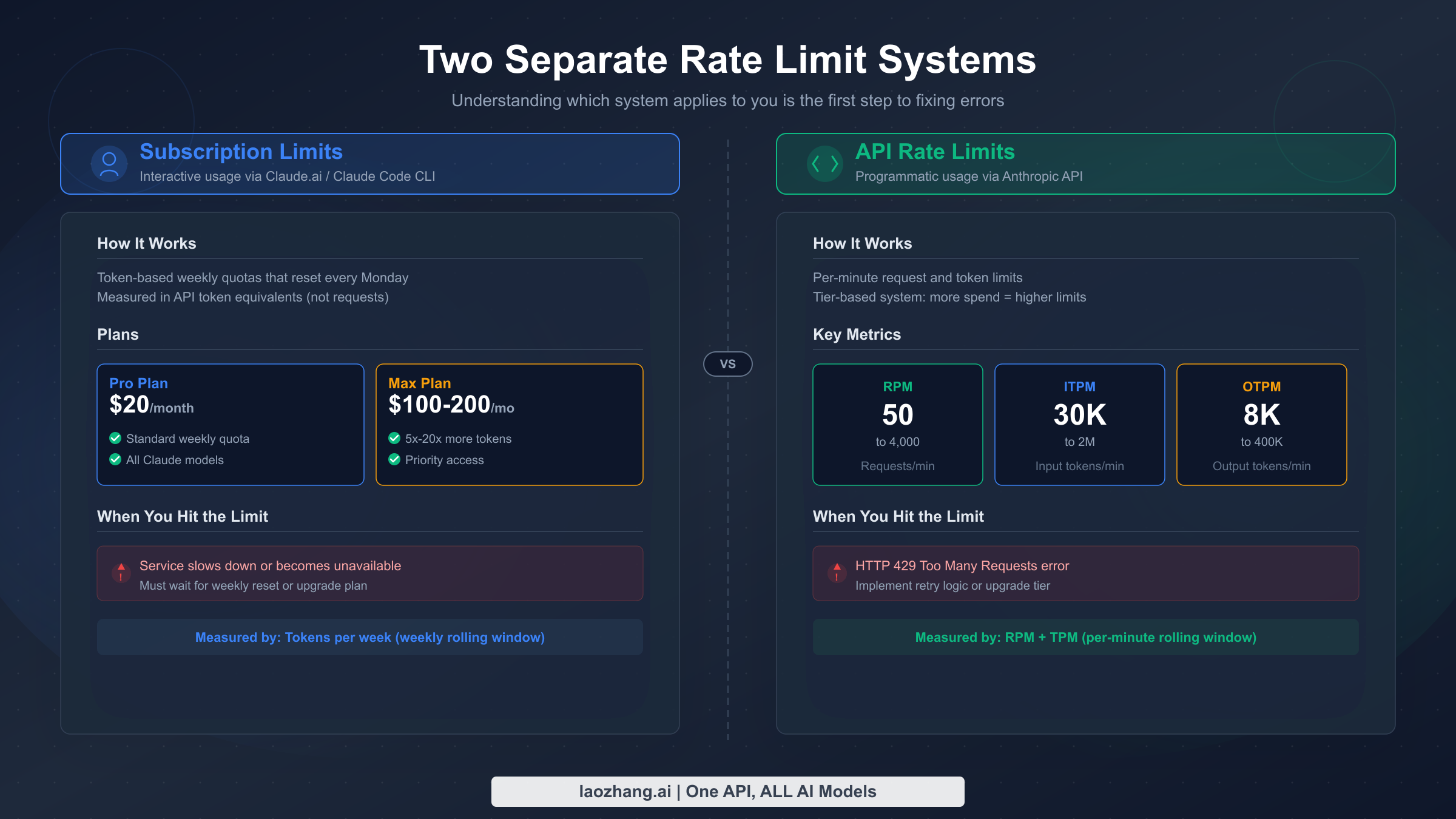
The single most important thing to understand about Claude Code rate limits is that there are two entirely separate systems controlling how much you can use the tool. Most troubleshooting guides online conflate these two systems, leading developers down rabbit holes that waste precious coding time. Understanding which system is throttling you determines whether the solution takes five seconds or five minutes.
System 1 — Subscription Quotas apply when you use Claude Code through a paid plan (Pro at $20/month, Max 5x at $100/month, or Max 20x at $200/month, as listed on Anthropic's pricing page, verified March 2026). These quotas measure your total usage across a rolling 5-hour window and are shared between Claude.ai chat and Claude Code. When you exhaust your subscription quota, Claude Code displays a soft message like "usage limit reached" or "you've reached your limit for now" rather than a standard HTTP error code. The key detail here is that heavier models consume your quota faster — Opus 4.6 burns through approximately five times the resources that Sonnet 4.6 does for the same conversation length, which explains why Max plan users who default to Opus can hit limits surprisingly fast.
System 2 — API Rate Limits kick in when you (or a tool on your behalf) make direct calls to the Anthropic Messages API. These limits are measured in requests per minute (RPM), input tokens per minute (ITPM), and output tokens per minute (OTPM). They are tied to your API organization's spend tier rather than your subscription plan, and they return a standard HTTP 429 response code with a retry-after header when exceeded. The API uses a token bucket algorithm (documented in Anthropic's rate limits page, verified March 2026), meaning your capacity refills continuously rather than resetting at fixed intervals.
These two systems operate independently. You can be well within your API rate limits while your subscription quota is exhausted, or vice versa. A developer who recently upgraded from Pro to Max 5x might see subscription limits vanish only to discover they are now hitting API-tier ITPM caps because Claude Code's multi-turn conversations bundle system prompts, file contents, and tool-use tokens into every request. If you are curious about how Claude Code's free tier fits into this picture, the free plan has even tighter limits on both fronts.
Subscription Rate Limits — Pro, Max 5x, and Max 20x Quotas
Subscription limits are the ones most Claude Code users encounter first, because every paid plan includes Claude Code access and the quotas are shared across all Claude products. When Anthropic introduced weekly quotas on August 28, 2025 — a change covered extensively by outlets like TechCrunch — the developer community saw a significant shift in how aggressively they could rely on Claude Code for extended coding sessions.
The following table summarizes the current subscription tiers for individual users (verified from claude.com/pricing and third-party reports, March 2026):
| Plan | Monthly Price | Approx. Messages / 5 Hours | Models Available | Auto-Downgrade Threshold |
|---|---|---|---|---|
| Free | $0 | Very limited (varies by demand) | Sonnet, Haiku | N/A |
| Pro | $20 ($17/mo annual) | ~45 messages | Sonnet 4.6 | N/A |
| Max 5x | $100 | ~225 messages (5x Pro) | Sonnet 4.6, Opus 4.6 | Opus → Sonnet at 20% usage |
| Max 20x | $200 | ~900 messages (20x Pro) | Sonnet 4.6, Opus 4.6 | Opus → Sonnet at 50% usage |
Several critical details shape how these limits actually feel in practice. First, the "messages" metric is approximate because each interaction's token footprint varies enormously depending on the size of your codebase context, the number of files pulled into the conversation, and whether Claude Code executes tool calls like file reads or bash commands. A simple question about a single file might consume one "message unit" while a complex refactoring task that touches dozens of files could consume the equivalent of ten or more messages in a single turn.
Second, the auto-downgrade behavior on Max plans is both a blessing and a frustration. When your Opus usage reaches the threshold (20% on Max 5x, 50% on Max 20x), Claude Code automatically switches to Sonnet for subsequent interactions. This preserves your remaining quota for lighter work but can feel jarring when the model's reasoning quality noticeably drops mid-session. You can override this with the /model command, but doing so will burn through your remaining quota much faster.
Third, and this catches many users off guard, your subscription quota is shared between Claude.ai web chat and Claude Code. If you spent the morning having long conversations in the Claude.ai interface, your Claude Code quota for the afternoon will be proportionally reduced. Teams where one member handles both research (via chat) and implementation (via Claude Code) often discover this the hard way.
The January 2026 controversy deserves careful examination because it reveals how subscription limits can feel unpredictable even when they technically behave as designed. After Anthropic doubled usage limits as a holiday promotion from December 25–31, 2025, many users reported what felt like a roughly 60% reduction in limits when normal quotas resumed on January 1. Anthropic clarified that limits returned to their standard baseline, but the contrast made the normal limits feel restrictive — a phenomenon that generated extensive discussion on Reddit, Hacker News, and developer communities on Discord.
The situation was further complicated by a February 2026 Hacker News thread reporting cases where rate limits appeared to trigger without corresponding usage. While Anthropic stated they could not identify a token consumption bug, the community documented several scenarios where Claude Code's background operations — such as automatic conversation indexing, context window management, and tool-use overhead — consumed tokens that users did not explicitly authorize. This highlights an important characteristic of Claude Code: unlike a simple API call where you control every token, Claude Code's agent-like behavior means the tool itself generates significant token overhead through system prompts, file reads, and internal reasoning steps that contribute to your quota consumption without appearing as visible "messages" in your terminal.
Understanding this hidden token consumption is key to managing subscription limits effectively. A single Claude Code interaction that appears as one exchange in your terminal might actually involve multiple internal API calls — reading files, executing commands, searching the codebase — each of which consumes tokens against your quota. This is why the "approximately 45 messages per 5 hours" metric for Pro users can feel wildly inaccurate: a complex coding task might consume the equivalent of 15 "messages" worth of tokens in what looks like a single interaction from the user's perspective.
API Rate Limits — RPM, ITPM, and OTPM by Tier
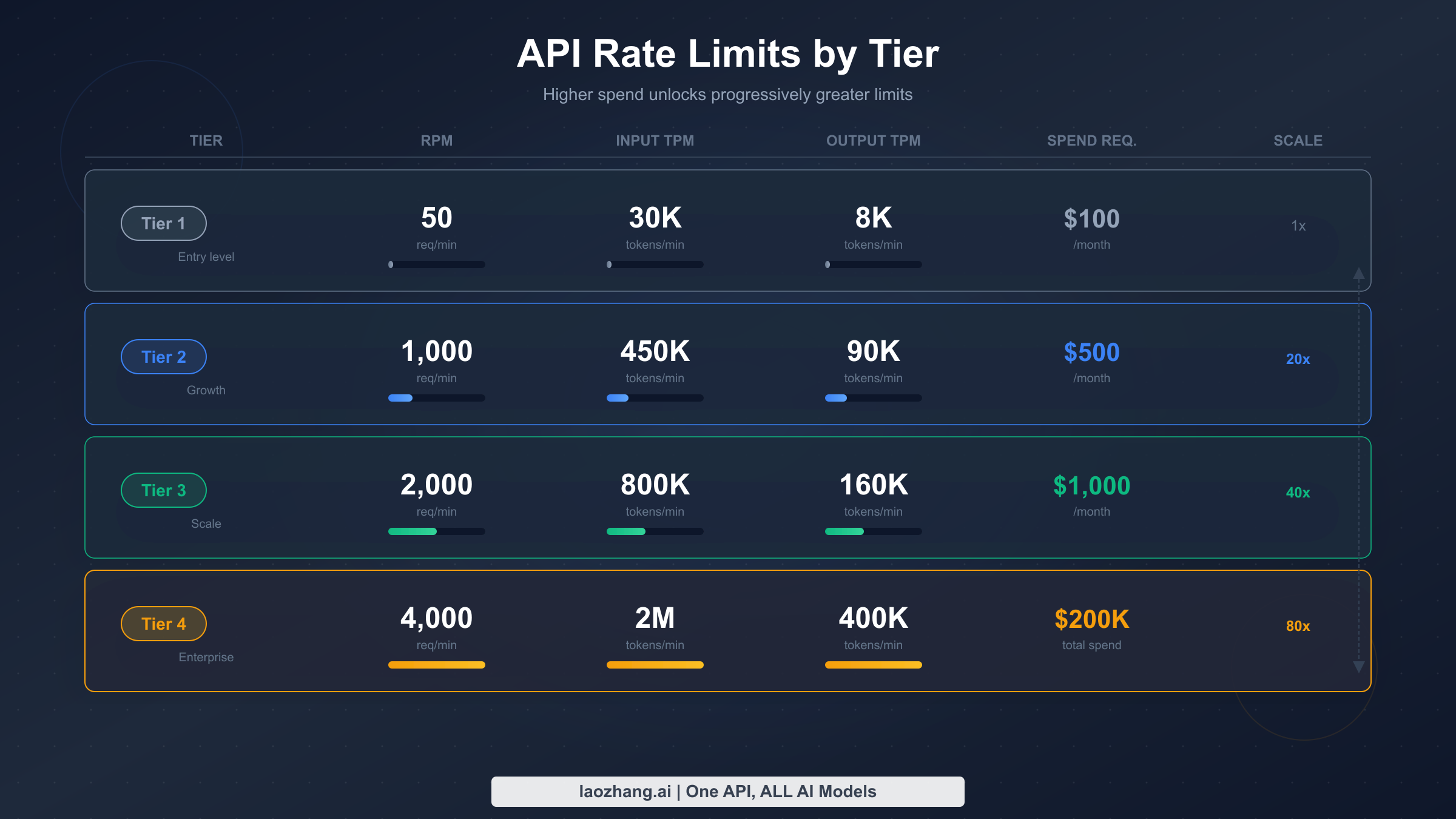
API rate limits govern direct calls to the Anthropic Messages API and are organized into four tiers based on cumulative credit purchases. Unlike subscription quotas, these limits are precisely defined and return structured error responses that your code can handle programmatically. For a more detailed breakdown, see the complete guide to Claude API quota tiers and limits.
Here are the current API rate limits per tier for the most commonly used models (verified from platform.claude.com/docs/en/api/rate-limits, March 2026):
| Model | Tier 1 (RPM / ITPM / OTPM) | Tier 2 | Tier 3 | Tier 4 |
|---|---|---|---|---|
| Sonnet 4.x | 50 / 30K / 8K | 1,000 / 450K / 90K | 2,000 / 800K / 160K | 4,000 / 2M / 400K |
| Opus 4.x | 50 / 30K / 8K | 1,000 / 450K / 90K | 2,000 / 800K / 160K | 4,000 / 2M / 400K |
| Haiku 4.5 | 50 / 50K / 10K | 1,000 / 450K / 90K | 2,000 / 1M / 200K | 4,000 / 4M / 800K |
To advance between tiers, you need cumulative credit purchases: $5 for Tier 1, $40 for Tier 2, $200 for Tier 3, and $400 for Tier 4. Each tier also has a monthly spend ceiling — $100, $500, $1,000, and $200,000 respectively — which acts as a separate guardrail.
One of the most powerful but least understood features of Anthropic's rate limiting is cache-aware ITPM. For most current models, cached input tokens do not count toward your ITPM rate limit. This means that if you achieve an 80% cache hit rate through effective use of prompt caching, you can effectively process five times your nominal token limit per minute. With a Tier 4 ITPM limit of 2,000,000, that translates to an effective throughput of 10,000,000 total input tokens per minute when caching is optimized. For detailed implementation guidance, see our Claude API prompt caching guide.
The token bucket algorithm deserves special attention because it affects burst behavior. Unlike a simple counter that resets every minute, the token bucket continuously refills at a steady rate up to your maximum limit. This means that a rate of 60 RPM may be enforced as approximately 1 request per second — short bursts that exceed this instantaneous rate can trigger 429 errors even if your average usage over a full minute stays under the limit. Developers who fire off rapid-fire requests in a loop are particularly likely to encounter this behavior.
Rate limits apply at the organization level, not per API key. If your organization has multiple projects or team members sharing the same API account, all of their requests draw from the same pool. This is why the 429 errors can sometimes appear even when your individual application seems to be making modest requests — another team member's workload might be consuming the shared capacity. For teams, Anthropic offers workspace-level limit configuration: organization admins can allocate a portion of the total capacity to each workspace, preventing any single project from monopolizing the entire organization's rate limit budget. For example, if your organization has a Tier 3 limit of 800,000 ITPM for Sonnet, you could allocate 500,000 to your production workspace and 300,000 to development, ensuring that development experiments never starve your production system.
The practical impact of these API limits on Claude Code usage depends heavily on how Claude Code is configured. When Claude Code operates through your subscription (the default for Pro and Max plans), it uses Anthropic's internal infrastructure and your subscription quota — not your API tier limits. But when you configure Claude Code to use your own API key (via environment variables or the --api-key flag), it switches to using the API tier limits instead of your subscription quota. This distinction is crucial for power users: if you have a Tier 4 API account with a $200,000 monthly spend limit, configuring Claude Code to use your API key gives you vastly more throughput than even the Max 20x subscription plan, at the cost of paying per token rather than a flat monthly fee.
It is also worth noting that Anthropic recently introduced fast mode for Opus 4.6, which has its own dedicated rate limits separate from standard Opus limits. If you are using the research preview of fast mode, you may encounter rate limit errors that are distinct from your standard Opus allocation. The response headers for fast mode use anthropic-fast-* prefixed headers rather than the standard anthropic-ratelimit-* headers, so your monitoring code needs to check both sets of headers if you use fast mode alongside standard inference.
How to Tell Which Rate Limit You've Hit
Correctly diagnosing which rate limit system has throttled you is the critical first step toward applying the right fix. The symptoms are different enough that you can usually identify the culprit within seconds if you know what to look for.
Subscription limit indicators are relatively informal. Claude Code will display a message in the terminal that says something like "Usage limit reached" or "You've run out of messages for now — please wait." There is no HTTP status code because the limit is enforced at the application layer before any API call is made. The Claude.ai web interface may also show a countdown timer indicating when your 5-hour window resets, and this same timer applies to Claude Code since the quota is shared.
API rate limit indicators are precise and machine-readable. You will receive an HTTP 429 response with a JSON error body that specifies which limit was exceeded (requests, input tokens, or output tokens). The response includes a retry-after header telling you exactly how many seconds to wait. Additionally, every successful API response includes a set of rate limit headers that let you monitor your remaining capacity in real time:
pythonimport anthropic

client = anthropic.Anthropic()

try:
    response = client.messages.create(
        model="claude-sonnet-4-6-20250514",
        max_tokens=1024,
        messages=[{"role": "user", "content": "Hello"}]
    )
    # Check remaining capacity from response headers
    print(f"Requests remaining: {response.headers.get('anthropic-ratelimit-requests-remaining')}")
    print(f"Input tokens remaining: {response.headers.get('anthropic-ratelimit-input-tokens-remaining')}")
    print(f"Output tokens remaining: {response.headers.get('anthropic-ratelimit-output-tokens-remaining')}")
    print(f"Reset time: {response.headers.get('anthropic-ratelimit-requests-reset')}")
except anthropic.RateLimitError as e:
    print(f"Rate limited! Retry after: {e.response.headers.get('retry-after')} seconds")
    print(f"Error details: {e.message}")
There is a third, less common scenario worth understanding: acceleration limits. Even when you are within your nominal RPM and TPM caps, the Anthropic API enforces acceleration limits that penalize sharp spikes in usage. If your organization's traffic jumps significantly in a short period — for example, going from zero requests to hundreds within a few minutes — you may receive 429 errors before reaching your published rate limits. The solution is to ramp up traffic gradually rather than making a burst of requests. This behavior is particularly relevant for CI/CD pipelines that spin up multiple Claude Code instances simultaneously at the start of a build process.
If you are not sure whether you are hitting subscription or API limits, check these three signals in order. First, look at the error format — if it is a conversational message in your Claude Code terminal rather than a structured HTTP error, it is a subscription limit. Second, check the Claude.ai web interface — if it also shows a usage limit banner, your subscription quota is exhausted. Third, examine the API response headers — if they show zero remaining tokens or requests, you have hit an API rate limit. For more troubleshooting patterns with 429 errors specifically, our guide to fixing Claude API 429 rate limit errors covers additional edge cases.
8 Proven Ways to Fix "Rate Limit Reached" Error
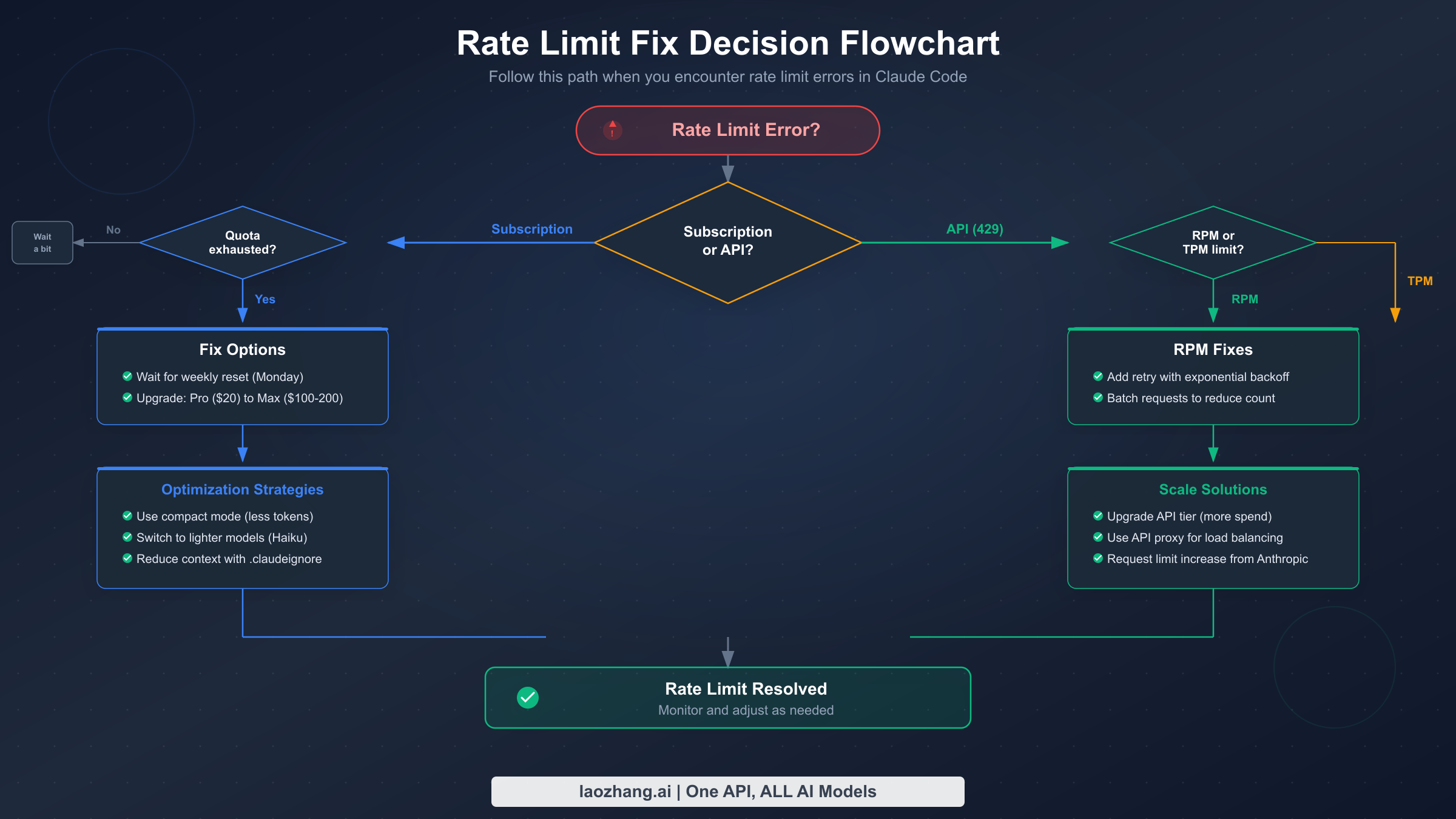
When you hit a rate limit, the correct fix depends on which system triggered it and how urgently you need to resume work. Here are eight strategies organized from quickest temporary relief to most sustainable long-term solution.
Fix 1: Wait for the rolling window to reset. For subscription limits, the 5-hour rolling window means your capacity gradually returns as older usage ages out. You do not need to wait the full five hours — even 30 to 60 minutes of inactivity often frees enough quota for a few more interactions. For API rate limits, the token bucket refills continuously, so waiting just the number of seconds specified in the retry-after header is usually sufficient.
Fix 2: Switch to a lighter model. If you are using Opus 4.6 and hit a subscription limit, switching to Sonnet 4.6 with the /model command immediately gives you approximately five times more interactions from the same remaining quota. Sonnet handles the vast majority of coding tasks effectively, and the quality difference is negligible for routine operations like file editing, test writing, and code navigation. Reserve Opus for tasks that genuinely require deeper reasoning, like complex architectural decisions or subtle bug hunting.
Fix 3: Reduce conversation context size. Claude Code bundles your system prompt, conversation history, file contents, and tool-use tokens into every request. Starting a fresh conversation with /clear or closing and reopening Claude Code eliminates accumulated history tokens that inflate each request's footprint. Be strategic about which files you pull into context — avoid loading entire directories when you only need specific files.
Fix 4: Implement exponential backoff for API limits. For programmatic API access, exponential backoff with jitter is the industry-standard approach. Here is a production-ready implementation:
pythonimport time
import random
import anthropic

def call_with_backoff(client, max_retries=5, **kwargs):
    """Call Anthropic API with exponential backoff on rate limit errors."""
    for attempt in range(max_retries):
        try:
            return client.messages.create(**kwargs)
        except anthropic.RateLimitError as e:
            retry_after = int(e.response.headers.get("retry-after", 2 ** attempt))
            wait_time = retry_after + random.uniform(0, 1)
            print(f"Rate limited. Waiting {wait_time:.1f}s (attempt {attempt + 1}/{max_retries})")
            time.sleep(wait_time)
    raise Exception(f"Failed after {max_retries} retries")

client = anthropic.Anthropic()
response = call_with_backoff(
    client,
    model="claude-sonnet-4-6-20250514",
    max_tokens=2048,
    messages=[{"role": "user", "content": "Analyze this code for bugs..."}]
)
Fix 5: Enable and optimize prompt caching. Since cached input tokens do not count toward ITPM limits on most current Claude models, effective caching can multiply your effective throughput by five times or more. Place your system instructions, large context documents, and tool definitions at the beginning of your messages with cache control breakpoints. Monitor your cache hit rate in the Claude Console's Usage page and aim for 70% or higher.
Fix 6: Spread requests across multiple model endpoints. Because API rate limits apply separately to each model class, you can use Sonnet and Haiku simultaneously up to their respective limits. Route simpler tasks like code formatting, documentation generation, and basic completions to Haiku 4.5 while reserving Sonnet 4.6 for more complex reasoning tasks. This effectively doubles or triples your total throughput without upgrading tiers.
Fix 7: Upgrade your plan or API tier. If you consistently hit limits, upgrading may be the most cost-effective solution. Moving from Pro ($20/month) to Max 5x ($100/month) gives you five times the subscription quota plus access to Opus. On the API side, advancing from Tier 1 to Tier 2 requires only $40 in cumulative credit purchases but unlocks a 20x increase in RPM (50 → 1,000) and a 15x increase in ITPM for Sonnet (30K → 450K).
Fix 8: Route through a third-party API service. For developers who frequently hit subscription limits and want API-level flexibility without managing tier progression, third-party API routing services offer an alternative path. Services like laozhang.ai provide access to Claude models through an OpenAI-compatible endpoint where you pay per token consumed with no per-minute rate caps. This approach bypasses subscription quotas entirely because you are making direct API calls rather than using the Claude Code subscription, and the routing service handles load balancing across multiple API keys to avoid per-organization limits.
Using Third-Party API Routing to Bypass Subscription Limits
When subscription quotas become a persistent bottleneck, configuring Claude Code to use a third-party API endpoint can fundamentally change your experience. Instead of a fixed monthly quota that runs out during intensive coding sessions, you pay only for the tokens you actually consume — which means your effective limit is your budget rather than an arbitrary usage cap.
The core idea is straightforward: Claude Code can be configured to send API requests to any endpoint that implements the Anthropic Messages API format. Third-party routing services like laozhang.ai accept these requests, forward them to Anthropic's infrastructure (or equivalent model providers), and bill you per token at rates that are competitive with direct API pricing. Because these services typically maintain pools of API keys across multiple organizations, the per-organization rate limits that constrain individual developers are spread across a much larger capacity pool.
Here is how to configure Claude Code to use an alternative API endpoint with automatic fallback to the official API when the routing service is unavailable:
pythonimport os
import anthropic


# Fallback: direct Anthropic API (subject to tier rate limits)
ENDPOINTS = [
    {
        "base_url": "https://api.laozhang.ai/v1",
        "api_key": os.environ.get("LAOZHANG_API_KEY"),
        "name": "laozhang.ai routing"
    },
    {
        "base_url": "https://api.anthropic.com",
        "api_key": os.environ.get("ANTHROPIC_API_KEY"),
        "name": "Anthropic direct"
    }
]

def create_message_with_fallback(messages, model="claude-sonnet-4-6-20250514", max_tokens=4096):
    """Try each endpoint in order, falling back on rate limit errors."""
    for endpoint in ENDPOINTS:
        if not endpoint["api_key"]:
            continue
        try:
            client = anthropic.Anthropic(
                base_url=endpoint["base_url"],
                api_key=endpoint["api_key"]
            )
            response = client.messages.create(
                model=model,
                max_tokens=max_tokens,
                messages=messages
            )
            print(f"Success via {endpoint['name']}")
            return response
        except anthropic.RateLimitError:
            print(f"Rate limited on {endpoint['name']}, trying next...")
            continue
        except Exception as e:
            print(f"Error on {endpoint['name']}: {e}, trying next...")
            continue
    raise Exception("All endpoints exhausted")
For Claude Code CLI specifically, you can set the environment variable ANTHROPIC_BASE_URL to point to your routing service before launching a session. This redirects all of Claude Code's API calls through the alternative endpoint without modifying any configuration files. The trade-off is cost transparency — you need to monitor your per-token spending manually rather than relying on the predictable ceiling of a monthly subscription.
This approach works best for developers who have unpredictable usage patterns: some days you barely touch Claude Code, other days you spend eight hours in intensive pair-programming sessions. A pay-per-token model aligns costs with actual consumption rather than forcing you into a tier that either wastes money on quiet days or leaves you rate-limited on busy ones.
There are important considerations to keep in mind when evaluating third-party routing services. First, verify that the service supports the specific Claude models you need — some routing providers only offer Sonnet while others provide the full model lineup including Opus and Haiku. Second, understand the latency implications — routing through an intermediary adds a small amount of network overhead, typically 50–200ms per request, which is negligible for Claude Code's interactive workflow but worth knowing about for latency-sensitive batch processing. Third, check whether the service supports streaming responses, which Claude Code relies on for real-time output display. Fourth, evaluate the pricing carefully — while per-token costs may be comparable to direct API pricing, some services add a markup or charge a minimum monthly fee. The best routing services offer transparent, per-token pricing that closely mirrors Anthropic's official rates while providing the added benefit of pooled rate limits and automatic failover across multiple API organizations.
For teams considering this approach at scale, it is worth running a one-week comparison: track your actual token consumption on your current plan, calculate what that same usage would cost through a routing service, and compare both the monetary cost and the productivity impact of not hitting rate limits. Many teams discover that the token cost is comparable to their subscription but the elimination of rate limit interruptions produces a measurable productivity improvement that justifies the switch.
Prevention Strategies for Heavy Claude Code Users
The most effective way to handle rate limits is to never hit them in the first place. These strategies are drawn from patterns observed across thousands of Claude Code sessions and the official recommendations in the Claude Code documentation.
Strategy 1: Structure conversations for minimal context bloat. Every Claude Code interaction carries forward the accumulated conversation history, which means token consumption grows with each exchange. Start new conversations frequently rather than running marathon sessions. Use the /compact command to summarize and compress conversation history when you need to maintain context across a long task. Be explicit about which files Claude Code should read — avoid broad commands like "look at the whole src directory" when you only need three specific files.
Strategy 2: Use model routing strategically. Not every task needs the most powerful model. Create a mental classification system: use Haiku for quick file lookups, formatting, and simple edits; Sonnet for standard coding tasks, debugging, and test generation; and Opus only for complex architectural reasoning, subtle bugs, or tasks that Sonnet consistently gets wrong. On Max plans, watch your Opus consumption and switch to Sonnet proactively before the auto-downgrade threshold kicks in, since voluntary switches let you control timing while auto-downgrades happen mid-workflow.
Strategy 3: Batch related operations. Instead of sending five separate requests to edit five files, describe all five edits in a single prompt. Claude Code handles multi-file operations efficiently, and each batch counts as one interaction against your subscription quota rather than five. Similarly, when reviewing code, ask for all your questions in one prompt rather than sending them one at a time. This approach also produces better results because Claude can consider the relationships between your questions rather than answering each in isolation.
Strategy 4: Monitor usage proactively. For API usage, check the rate limit headers on every response to see how much capacity remains before you hit a wall. For subscription quotas, the Claude.ai interface shows your current usage level. Some developers build simple dashboards that track their API consumption patterns and send alerts when usage reaches 70% of their tier limits, giving them time to adjust their workflow before interruption occurs. The Claude Console Usage page provides charts showing your hourly maximum token rates alongside your rate limit ceiling, which is invaluable for understanding your consumption patterns.
Strategy 5: Implement prompt caching at the infrastructure level. If you are building applications on top of the Claude API, make prompt caching a first-class architectural concern rather than an afterthought. Place static content (system prompts, tool definitions, large reference documents) at the beginning of every request with appropriate cache breakpoints. With an 80% cache hit rate, your effective ITPM capacity increases fivefold, which is equivalent to upgrading two full tiers without spending an additional dollar. The key to achieving high cache hit rates is consistency in how you structure your requests — if the system prompt and tool definitions are identical across requests, they will cache perfectly. Even small variations in prefix content can invalidate the cache, so standardize your prompt templates and use cache breakpoints strategically.
Strategy 6: Schedule heavy workloads during off-peak hours. While Anthropic does not officially publish usage-by-time-of-day data, community observations consistently report that rate limits feel more generous during North American off-peak hours (roughly 2 AM to 8 AM Pacific Time). This is likely because the token bucket refills faster when overall platform load is lower and fewer requests compete for the same infrastructure capacity. If you have batch-style work that does not require real-time interaction — such as generating documentation, running large test suites against Claude, or processing code reviews — scheduling these tasks for off-peak hours can reduce the frequency of rate limit interruptions.
Strategy 7: Use the Batch API for non-interactive workloads. For tasks that do not require immediate responses, the Message Batches API provides a dedicated path with its own rate limits separate from the real-time API. Batch requests can queue up to 100,000 items at Tier 1 (500,000 at Tier 4), and batch processing costs 50% less than standard API pricing. This makes it ideal for bulk operations like codebase-wide documentation generation, mass code review, or data extraction tasks where you can submit all requests at once and collect results later. The batch queue limits are generous enough that most developers never hit them, effectively giving you unlimited throughput for asynchronous work.
Frequently Asked Questions
Why am I hitting rate limits on Max plan with only 16% usage shown?
The usage percentage displayed in the Claude interface measures overall quota consumption, but rate limits can also be triggered by burst patterns within shorter time windows. If you send a cluster of complex requests in rapid succession, you may exceed the per-minute throughput limit even though your total 5-hour quota has plenty of headroom. Additionally, Opus 4.6 consumes approximately five times the resources of Sonnet 4.6 per interaction, so 16% of Max 5x quota used exclusively on Opus represents a much larger number of token exchanges than the percentage suggests. There is also a common misunderstanding about how the usage meter calculates its percentage — it reflects a weighted average that takes model complexity into account, meaning that ten Opus conversations might show 16% while consuming the same raw compute as eighty Sonnet conversations.
What is the difference between subscription limits and API limits?
Subscription limits are part of your Claude Pro or Max plan, apply across a rolling 5-hour window, are shared between Claude.ai and Claude Code, and produce a conversational "usage limit reached" message. API rate limits are tied to your organization's spend tier ($5 to $400+ in cumulative purchases), measured in RPM/ITPM/OTPM per minute, return HTTP 429 with structured headers, and apply only to direct API calls. The two systems are completely independent — you can exhaust one while having full capacity on the other. Think of subscription limits as a monthly gym membership with a visitor cap, and API limits as a pay-per-use facility with a speed limit on how fast you can enter.
Does clearing conversation history help with rate limits?
For future requests, yes — clearing history with /clear reduces the token footprint of subsequent interactions because less context is bundled into each API call. However, it does not retroactively restore quota that was already consumed. The tokens used in previous exchanges have already been counted against your limits. Clearing history is a prevention strategy rather than a retroactive fix. That said, the impact can be substantial: a conversation with 50 back-and-forth exchanges might carry 100,000+ tokens of history in every subsequent request. Clearing that history and starting fresh can reduce per-request token consumption by 80% or more, which directly translates to slower quota depletion going forward.
Can I use a different API endpoint to avoid limits?
Yes. Setting ANTHROPIC_BASE_URL to a third-party routing service redirects Claude Code's API calls through an alternative endpoint with different rate limit policies. Services like laozhang.ai pool capacity across multiple API organizations, which effectively provides higher per-minute throughput than an individual Tier 1 or Tier 2 account. The trade-off is that you pay per token consumed rather than having a fixed monthly quota. This approach is particularly valuable for developers who experience extreme day-to-day usage variance — some days zero usage, other days twelve-hour marathon sessions — because a pay-per-token model aligns costs with actual consumption rather than requiring subscription headroom for peak days.
How long does a rate limit reset take?
For subscription quotas, the 5-hour rolling window means your capacity gradually returns as older interactions age out — you do not need to wait the full five hours. In practice, most users find that 30 to 60 minutes of inactivity frees enough quota for several more interactions, and lighter models recover quota faster since they consumed less in the first place. For API rate limits, the token bucket refills continuously. The retry-after header on 429 responses tells you exactly how many seconds to wait, typically ranging from 1 to 60 seconds depending on how far you exceeded the limit. Acceleration limits (triggered by sudden usage spikes) may require longer cooldown periods of several minutes.
Is there a way to check my current usage before hitting the limit?
For API usage, inspect the response headers on every successful request — anthropic-ratelimit-requests-remaining, anthropic-ratelimit-input-tokens-remaining, and anthropic-ratelimit-output-tokens-remaining tell you exactly how much capacity remains. The Claude Console's Usage page provides historical charts showing your peak consumption rates alongside your rate limit ceiling, which helps you understand patterns and plan for capacity needs. For subscription quotas, the Claude.ai web interface displays a usage indicator, though it updates less frequently than the API headers. Some developers build lightweight monitoring scripts that log these header values after every API call, creating an early-warning system that alerts them when remaining capacity drops below 20% of the limit.