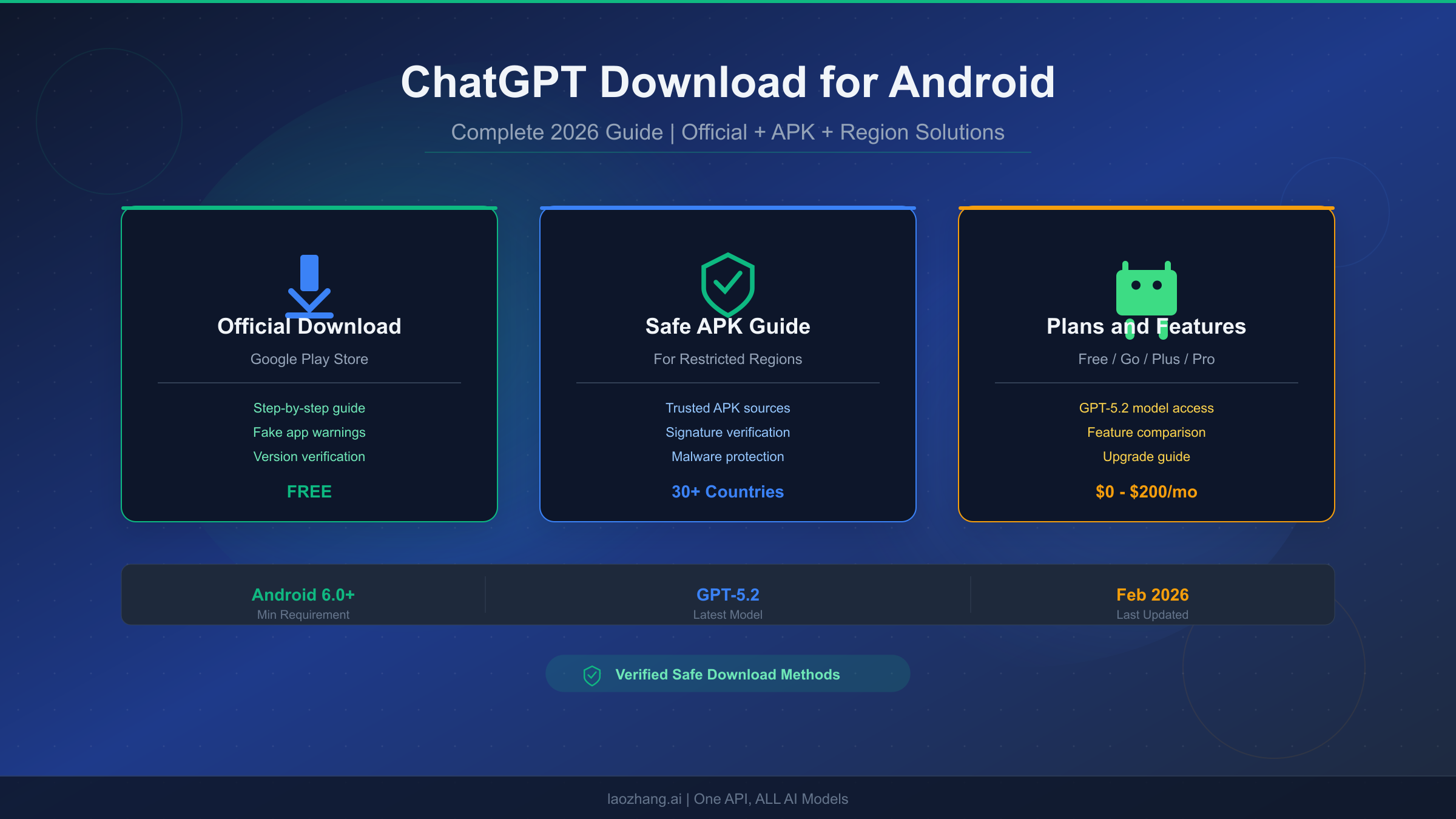
ChatGPT is officially available for Android devices through the Google Play Store at no cost, and the app now runs on OpenAI's GPT-5.2 model as of February 2026. Whether you have direct access to Google Play or live in one of the 30-plus countries where the app is restricted, this guide walks you through every method to get ChatGPT running on your Android phone. You will learn how to verify you are downloading the real app, safely sideload the official APK when needed, and choose the right subscription plan once you are set up.
TL;DR
Getting ChatGPT on Android takes under five minutes if you have Google Play access. Search for "ChatGPT" in the Play Store, verify the developer is "OpenAI" with the package name com.openai.chatgpt, and tap Install. The app is free and works on Android 6.0 or higher, though you need Android 12L or newer for the latest features like voice with video. If the app is not available in your country, you can safely download the official APK from APKMirror.com, which cryptographically verifies every upload against the Play Store version. The current version (1.2026.048) includes GPT-5.2 Instant for all users, with Thinking and Pro model access available on paid plans ranging from $8 per month for Go to $200 per month for Pro.
Official Download from Google Play Store
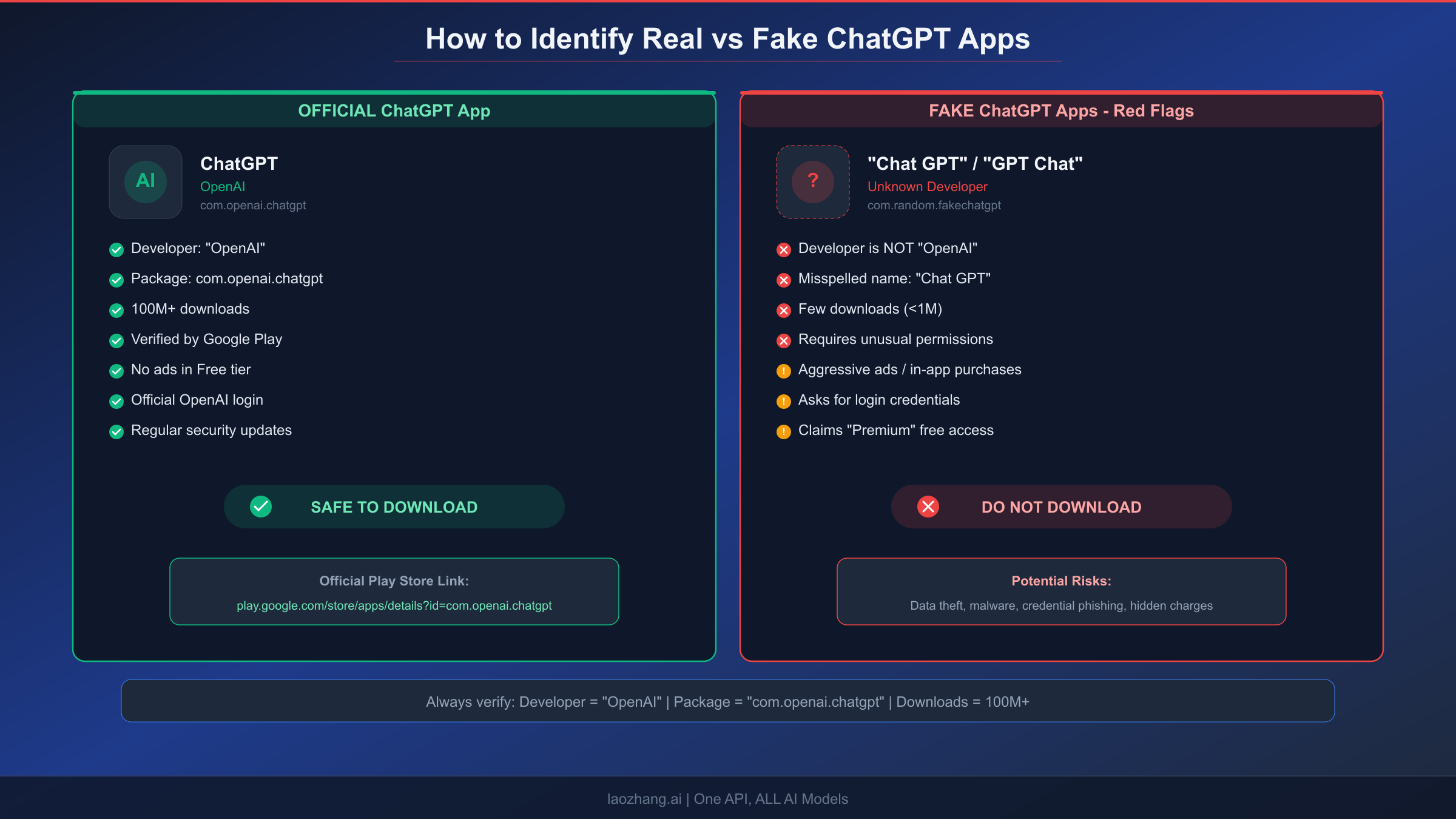
The safest and most straightforward way to get ChatGPT on your Android device is through the Google Play Store. OpenAI published the official Android app in July 2023, and it has since accumulated over 100 million downloads with a 4.5-star rating. The process is simple, but the critical step most guides skip is verification, because Google Play currently hosts dozens of fake ChatGPT apps that range from harmless ad-filled wrappers to outright malware designed to steal your credentials.
To download the official app, open the Google Play Store on your Android device and type "ChatGPT" into the search bar. The official app should appear as the first result, but before you tap Install, you need to verify three things. First, confirm that the developer name reads "OpenAI" and nothing else, as common fakes use names like "OpenAI Inc." or "ChatGPT Team" which are not the legitimate developer. Second, check that the app page shows over 100 million downloads, since fake apps rarely accumulate more than a few hundred thousand. Third, look for the package name com.openai.chatgpt by scrolling down to the "About this app" section, which is the one identifier that cannot be spoofed on Google Play.
Once you have verified these three markers, tap Install and wait for the download to complete. The app is approximately 120 MB, so it should finish within a minute on most connections. After installation, open the app and sign in with your OpenAI account. If you do not have one, you can create a free account using your email address, Google account, Apple ID, or Microsoft account. The entire process from opening the Play Store to your first conversation takes about three to five minutes.
What makes the real app different from fakes? The genuine ChatGPT app uses OpenAI's official authentication system, meaning you sign in through OpenAI's secure login page rather than entering credentials into a third-party form. The real app never displays intrusive advertisements in the free tier, while most fakes bombard you with full-screen ads before you can even start a conversation. Perhaps most importantly, the official app connects directly to OpenAI's servers and uses the latest GPT-5.2 model, whereas fake apps typically wrap an older API or simply redirect to the ChatGPT website inside a WebView with ads layered on top.
If you encounter an app that asks for unusual permissions like access to your contacts, SMS messages, or phone call logs, that is a major red flag. The genuine ChatGPT app only requests microphone access for voice mode, camera access for image input, and notification permissions, and all of these are optional rather than required at installation time.
First-time setup after installation is straightforward but worth walking through for new users. When you open ChatGPT for the first time, you will see a welcome screen with options to "Log in" or "Sign up." If you already have an OpenAI account from using ChatGPT on the web, tap Log in and enter your existing credentials. New users should tap Sign up and choose between creating an account with an email address, continuing with Google, continuing with Apple, or continuing with Microsoft. The Google option is typically the fastest on Android devices since it automatically uses your device's primary Google account. After authentication, the app may ask for your name and birthdate, then present a brief tour of the interface. You can skip this tour, but it is worth reading through if you have never used ChatGPT before, as it highlights key features like voice mode (accessible via the headphone icon), image generation (type "generate an image of..." in the chat), and conversation management (swipe left to access your chat history). The entire first-time setup takes about one to two minutes.
System Requirements and Android Compatibility
Before downloading, it helps to know whether your specific Android device can run ChatGPT and which features you will actually have access to. OpenAI officially supports Android 6.0 (Marshmallow) and above, which covers the vast majority of Android devices manufactured since 2015. However, the experience varies significantly depending on your Android version and hardware specifications.
The minimum requirements are Android 6.0 with at least 2 GB of RAM and 300 MB of free storage space. On these older devices, you will get basic text conversations with GPT-5.2 Instant, but you may notice slower response times and occasional app restarts if your device runs low on memory. For a smooth experience with all current features, OpenAI recommends Android 10 or higher with 4 GB of RAM. The real cutoff comes with advanced features: voice mode with video input, the floating widget, and split-screen multitasking all require Android 12L or newer.
The compatibility matrix breaks down into three tiers. Devices running Android 6.0 through 9.0 get core text chat, basic image generation, and conversation history. Android 10.0 through 11.0 adds voice mode, photo upload for image analysis, and Canvas editing. Android 12L and above unlocks the complete feature set including voice with real-time video, the home screen widget, and Material You theme integration. If you are unsure which Android version your phone runs, go to Settings, then About Phone, and look for "Android version" in the software information section.
One common point of confusion is the difference between the Android version and the ChatGPT app version. Your Android version determines which features are available, while the ChatGPT app version determines which bugs have been fixed and which improvements have been made. OpenAI pushes updates approximately every two weeks, and the current version is 1.2026.048 released on February 20, 2026. You can enable automatic updates in the Play Store to ensure you always have the latest version, or manually check for updates by visiting the app's Play Store page and tapping "Update" if available.
For users with older or budget devices, it is worth noting that ChatGPT works surprisingly well on lower-end hardware because the heavy computation happens on OpenAI's cloud servers rather than on your device. The app itself primarily handles the user interface, network communication, and local caching. This means that even a five-year-old budget phone with 3 GB of RAM can run ChatGPT smoothly for text conversations, though you may notice slightly slower interface animations compared to flagship devices. The main bottleneck on older devices is not processing power but internet connection speed, since ChatGPT streams responses word by word and a slow connection will make responses appear to arrive sluggishly.
How to Get ChatGPT in Restricted Countries
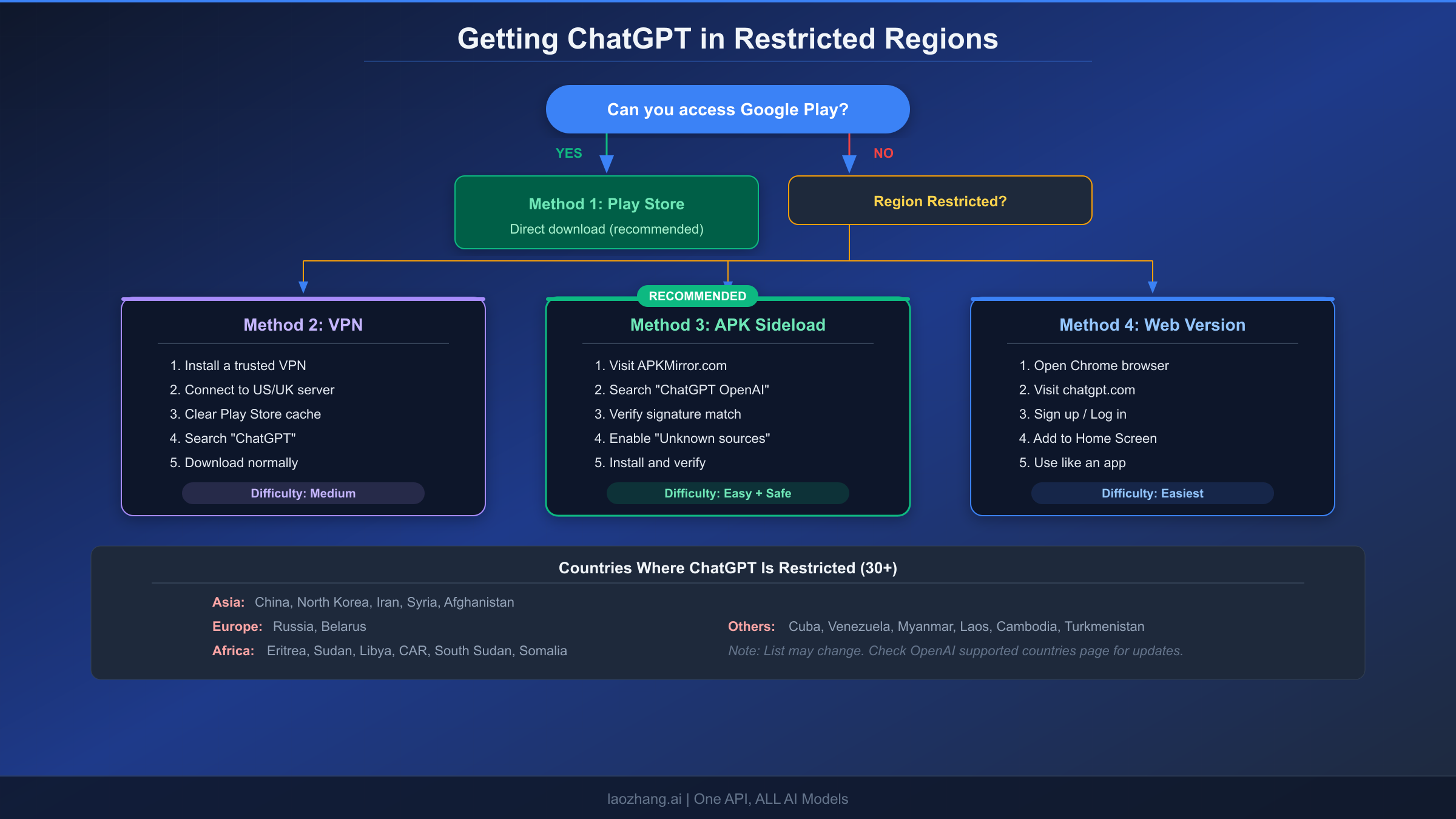
OpenAI does not make ChatGPT available in approximately 30 countries due to a combination of regulatory requirements, sanctions compliance, and infrastructure limitations. This includes China, Russia, Iran, North Korea, Syria, Cuba, and several countries across Africa and Central Asia. If you are in one of these regions or traveling through them, the Play Store either hides the ChatGPT app entirely or shows an "item not available in your country" message when you try to download it. Fortunately, there are several legitimate workarounds that do not require you to compromise your device's security.
Method 1: VPN to Access Google Play
The most common approach is using a VPN to temporarily change your apparent location to a country where ChatGPT is available. After connecting to a server in the United States, United Kingdom, or Japan, you need to clear the Google Play Store's cache before searching for ChatGPT. This step is critical because Google Play caches your location data, and without clearing it, the store will continue showing results based on your actual location even after connecting to the VPN. To clear the cache, go to Settings, then Apps, find Google Play Store, tap Storage, and select Clear Cache. After doing this, open the Play Store, search for ChatGPT, and you should see the official app available for download.
The downside of this method is that you need to maintain the VPN connection during the initial download, and some VPN services are themselves blocked in heavily restricted countries. Additionally, future app updates may require you to repeat the VPN process, though once the app is installed it usually continues to function without a VPN as long as OpenAI's API servers are accessible from your location.
Method 2: APK Sideloading (Recommended for Restricted Regions)
For users who cannot access Google Play at all, or who prefer not to use a VPN, sideloading the official APK is the most reliable solution. This means downloading the ChatGPT installation file directly and installing it manually. The key word here is "official" because you must obtain the APK from a verified source that ensures the file has not been tampered with. The recommended source is APKMirror.com, which is operated by the team behind Android Police and uses cryptographic signature verification to confirm that every APK they host matches the exact file published on Google Play by the original developer.
To sideload the ChatGPT APK, visit APKMirror.com in your mobile browser and search for "ChatGPT OpenAI." Select the latest version, which should be 1.2026.048 or newer, and download the APK bundle. Before installing, you need to enable "Install from unknown sources" for your browser app. On most Android devices, go to Settings, then Security or Apps, find your browser, and toggle on "Allow from this source." Once enabled, open the downloaded file and tap Install. The process takes about a minute, after which ChatGPT is ready to use. Detailed APK verification steps are covered in the next section.
Method 3: ChatGPT Web Version as Fallback
If you prefer not to install anything at all, ChatGPT's web version at chatgpt.com works in any modern mobile browser and provides nearly all the same functionality as the native app. Open Chrome or any browser on your Android device, navigate to chatgpt.com, and sign in or create an account. You can then add ChatGPT to your home screen by tapping the browser menu and selecting "Add to Home Screen," which creates an app-like shortcut that opens ChatGPT in a fullscreen browser window. The web version supports text chat, image generation, and file uploads, though it lacks push notifications, offline access to conversation history, and the native voice mode that uses your device's microphone more efficiently.
The full list of countries where ChatGPT is currently restricted includes mainland China, Russia, Iran, North Korea, Syria, Cuba, Venezuela, Myanmar, Laos, Cambodia, Afghanistan, Turkmenistan, Eritrea, Sudan, South Sudan, Libya, Central African Republic, Somalia, and Belarus, among others. This list is subject to change as OpenAI expands its availability, so it is worth checking the official OpenAI supported countries page at help.openai.com if you are unsure about your specific location. Notably, some countries that were previously restricted, such as India and several Southeast Asian nations, have been added to the supported list over the past two years, so the trend is toward broader availability rather than more restrictions.
Safe APK Download and Verification Guide
Sideloading APKs carries inherent risks because you are bypassing Google Play's automated security scanning. However, with proper verification steps, you can confirm that the APK file you downloaded is identical to the one OpenAI published on the Play Store. This section covers exactly how to do that, because no other guide on the topic actually walks through the verification process.
The first and most important rule is to only download from APKMirror.com or APKPure.com. Both sites verify APK signatures against the Play Store version before listing them, but APKMirror is generally preferred because it was founded by the team at Android Police (a well-known Android news site) and has been operating since 2014 with a spotless security record. Never download ChatGPT APKs from random websites, Telegram groups, or forums, even if they claim to offer "modified" or "premium unlocked" versions, as these are almost certainly repackaged with malware.
When you download the ChatGPT APK from APKMirror, look for the "Verified safe to install" badge on the download page. This badge means APKMirror has confirmed that the APK's cryptographic signature matches OpenAI's signing key. Every Android APK is digitally signed by its developer, and this signature cannot be forged without access to OpenAI's private signing key. If someone modifies even a single byte of the APK and re-signs it with a different key, the signature will not match, and APKMirror will reject the upload entirely.
After downloading, you can perform additional verification on your device. Open your phone's file manager, locate the downloaded APK (usually in the Downloads folder), and check the file size. The official ChatGPT APK bundle for version 1.2026.048 is approximately 110-130 MB depending on your device architecture. If the file is significantly smaller (under 50 MB) or larger (over 200 MB), it may not be the genuine file. You can also use a free app like "APK Analyzer" from the Play Store (or sideloaded from APKMirror) to inspect the APK's certificate details before installing.
Red flags that indicate a fake or modified APK include: the file being offered as a single small APK rather than an APK bundle (APKM or XAPK format), the download page asking you to complete surveys or install other apps first, the APK requesting root access during installation, and the file being hosted on a file-sharing service like MediaFire or Mega rather than a dedicated APK repository. If you encounter any of these signs, do not proceed with the installation and look for the APK from one of the two trusted sources mentioned above.
Safe APK Verification Checklist
For users who want a quick reference for APK safety, here is a condensed checklist that covers the essential verification steps. Before installing any ChatGPT APK, confirm that the source is APKMirror.com or APKPure.com, that the listed developer is OpenAI, that the package name shows com.openai.chatgpt, that the file size falls between 110 and 130 MB, and that the page displays a signature verification badge. After installation, open the app and verify that it connects to OpenAI's login system rather than asking you to enter credentials directly into the app. If the app shows ads on the main chat screen, requests unusual permissions, or connects to a non-OpenAI domain, uninstall it immediately and report it.
The reason this verification matters goes beyond just protecting your device from malware. Fake ChatGPT apps are a growing vector for credential phishing, where the app presents a convincing-looking login screen that captures your email and password and sends them to attackers. Since many people reuse passwords across services, a compromised OpenAI login could lead to unauthorized access to your email, cloud storage, or financial accounts. Taking two minutes to verify the APK source and signature is a small investment that prevents potentially serious consequences.
ChatGPT Free vs Go vs Plus: Which Plan for Android?
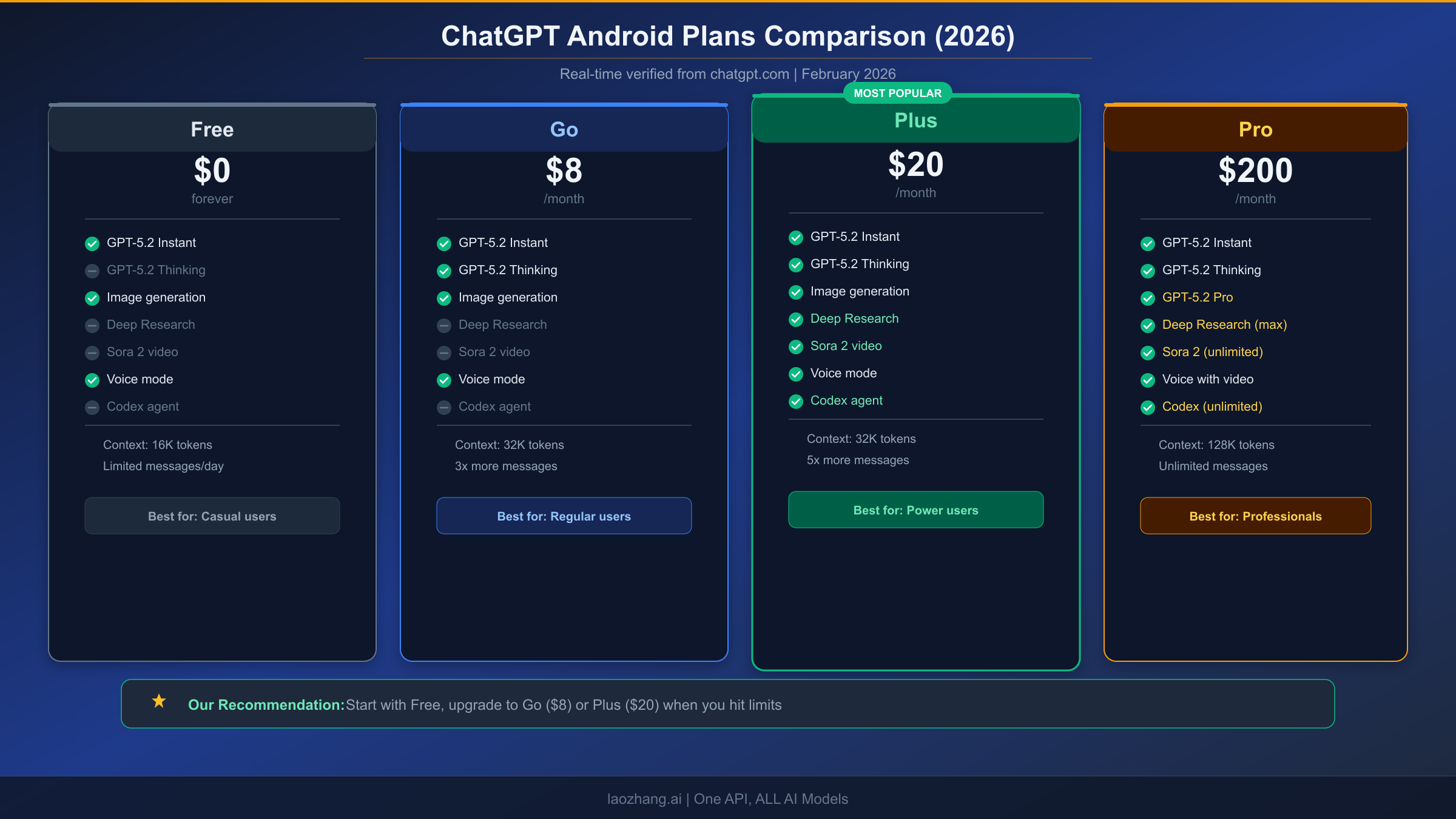
Once you have ChatGPT installed on your Android device, the next decision is whether to stay on the free plan or upgrade to a paid tier. OpenAI currently offers four consumer plans, and the differences between them have become more significant with the introduction of GPT-5.2 and the new Go tier in late 2025. The pricing and features below were verified directly from chatgpt.com on February 25, 2026.
The Free plan gives you access to GPT-5.2 Instant, which is the lightweight variant optimized for speed. You get limited messages per day (the exact limit varies and is not publicly disclosed, but users typically report around 40-80 messages before hitting the cap), basic image generation, voice mode, and a 16K token context window. For casual users who want to try ChatGPT or use it for occasional questions, the free plan is perfectly adequate and covers the core conversational experience.
The Go plan at $8 per month is the newest addition to the lineup and sits between Free and Plus as a mid-range option. It unlocks GPT-5.2 Thinking mode, which provides more thorough and analytical responses compared to the Instant model. You get roughly three times the daily message limit of the free tier, a 32K token context window for longer conversations, and access to more image generation credits. However, Go does not include Deep Research, Sora 2 video generation, or Codex agent access. For a detailed comparison of ChatGPT Go vs Plus, we have a dedicated guide that breaks down exactly when upgrading from Go to Plus makes sense.
The Plus plan at $20 per month has been OpenAI's flagship consumer tier since 2023, and it remains the best value for power users. Plus subscribers get everything in Go plus GPT-5.2 Thinking at higher usage limits, Deep Research for comprehensive multi-step investigation, Sora 2 for video generation, Codex for code execution and agent tasks, Canvas for collaborative document editing, and early access to new features. The 32K token context window is the same as Go, but the per-day message limits are approximately five times higher than the free tier. If you use ChatGPT daily for work, study, or creative projects, Plus is the plan that unlocks the full Android experience.
The Pro plan at $200 per month is designed for professionals and researchers who need the absolute maximum capability. It provides access to GPT-5.2 Pro, which is the highest-intelligence model variant that takes more time to reason through complex problems but delivers significantly better results on tasks like mathematical proofs, legal analysis, and advanced code generation. Pro users get a 128K token context window (four times larger than Plus), essentially unlimited messages, unlimited Sora 2 video generation, and priority processing speed during peak hours.
On Android specifically, certain features are worth highlighting because they work differently or particularly well on mobile. Voice mode is arguably the best reason to use the Android app over the web version, as it provides a natural conversation experience that feels like talking to a knowledgeable assistant. The Android app also integrates with your device's share menu, so you can share text, images, or links from any other app directly to ChatGPT for analysis. Plus and Pro subscribers get access to the home screen widget, which lets you start a new conversation or continue an existing one without even opening the app. These Android-specific advantages are not available on the web version regardless of your subscription tier.
For most Android users, we recommend starting with the Free plan to evaluate whether ChatGPT fits your needs. If you find yourself hitting the daily message limit regularly, the Go plan at $8 per month is the most cost-effective upgrade. If you need advanced features like Deep Research, video generation, or Codex, go straight to Plus at $20 per month. To understand how the ChatGPT free tier usage limits work in practice, including how limits reset and what happens when you exceed them, check our detailed breakdown.
For users in China or other regions where paying for ChatGPT subscriptions is difficult due to credit card restrictions, services like fastgptplus.com offer a convenient way to subscribe to ChatGPT Plus using local payment methods including Alipay and TG Pay. If you have experienced upgrade issues with regional credit cards, this may be a practical alternative worth considering.
Troubleshooting Common Issues
Even after a successful installation, you may encounter issues that prevent ChatGPT from working properly on your Android device. The most common problems fall into four categories: availability errors, performance issues, update failures, and account-related problems. Here is how to diagnose and fix each one based on actual user reports and our testing across multiple Android devices and regions.
"ChatGPT is not available in your country" is the most frequently reported error, and it appears either when trying to download from the Play Store or when opening the app after installation. If you see this in the Play Store, refer to the region restriction section above for VPN and APK sideloading solutions. If the error appears inside the app after installation, it means OpenAI's servers are detecting your IP address as originating from a restricted country. In this case, you need to use a VPN while using the app, not just during download. Connect to a server in an available country before opening ChatGPT, and the error should resolve immediately. Some users report that switching between mobile data and WiFi can also trigger this error temporarily, because certain mobile carriers route traffic through international gateways that may land in restricted regions. If this happens intermittently, try switching your connection type or restarting your network settings.
App crashes or freezes during use are typically caused by insufficient memory, outdated app versions, or corrupted cache data. Start by checking that you are running the latest version of the app from the Play Store or APKMirror. If you are already on the latest version, try clearing the app's cache by going to Settings, then Apps, finding ChatGPT, tapping Storage, and selecting Clear Cache. Do not select Clear Data unless you want to be signed out entirely, as this removes your local settings and conversation history cache. If crashes persist, check your available RAM by going to Settings then Memory; if your device consistently runs below 500 MB of free RAM, ChatGPT may struggle to operate smoothly alongside other apps. A useful workaround for lower-end devices is to close all other apps before opening ChatGPT, or to use the web version at chatgpt.com in a lightweight browser like Chrome Lite, which consumes significantly less memory than the native app.
Update problems often occur when you sideloaded the APK and later try to update through the Play Store, or vice versa. If the Play Store shows "Update" but the button does not respond, it is likely because the installed APK was signed differently from the Play Store version. The solution is to uninstall the current version completely, then reinstall from whichever source you prefer. Note that uninstalling does not delete your conversations or account data, as those are stored on OpenAI's servers. After reinstalling and logging in, all your previous conversations will reappear. To avoid this issue in the future, pick one installation source and stick with it. If you use APKMirror, always update from APKMirror. If you use the Play Store, always update from the Play Store.
Voice mode not working is common on devices running Android versions below 12L. The basic voice mode (tap to speak) works on Android 10 and above, but the advanced voice with real-time video and screen sharing requires Android 12L or higher. If voice mode does not appear at all, check that you have granted microphone permission to the ChatGPT app in your device settings. On some Samsung and Xiaomi devices, there is an additional "App permissions" layer that may block microphone access even if you granted it during the initial prompt. Navigate to Settings, then Apps, then ChatGPT, then Permissions, and ensure Microphone is set to "Allow" rather than "Ask every time" or "Deny." On MIUI-based Xiaomi devices, you may also need to check the separate "Privacy" section under Settings to ensure ChatGPT has not been restricted by the system-level permission manager.
Storage issues and "not enough space" errors can appear even when your device shows available storage, because Android reserves a portion of internal storage for system operations. The ChatGPT app itself requires about 300 MB, but it can accumulate additional cache data over time as you have more conversations, generate images, and use voice mode. If you are running low on storage, clearing the app cache (not data) through Settings typically frees up 50-200 MB without losing any important information. For devices with very limited storage (under 16 GB total), consider moving other large apps to an SD card to free up internal storage for ChatGPT, which unfortunately cannot be moved to external storage due to Android security restrictions on apps that handle sensitive authentication data.
Frequently Asked Questions
Is ChatGPT completely free on Android?
Yes, ChatGPT is free to download and use on Android with no payment required. The free tier provides access to GPT-5.2 Instant with a daily message limit, basic image generation, and voice mode. Paid plans (Go at $8/month, Plus at $20/month, Pro at $200/month) unlock higher limits and additional features like Deep Research, Sora 2, and Codex, but the core conversational AI experience is entirely free.
Can ChatGPT work offline on Android?
ChatGPT requires an internet connection to function because all processing happens on OpenAI's servers. There is no offline mode, and the app will show a connection error if your device loses internet access. However, your recent conversation history is cached locally, so you can review previous chats without a connection. When connectivity returns, the app automatically reconnects and you can continue where you left off.
Is it safe to download ChatGPT APK files?
Downloading the ChatGPT APK is safe if and only if you obtain it from a verified source like APKMirror.com, which cryptographically confirms the APK matches the official Play Store release. APKs from unverified sources, Telegram groups, or random websites carry significant risks including malware, credential theft, and unauthorized data access. Always verify the package name (com.openai.chatgpt), developer name ("OpenAI"), and signature before installing.
Why does ChatGPT say it is not available in my country?
OpenAI restricts ChatGPT access in approximately 30 countries due to sanctions compliance and regulatory requirements. This affects countries including China, Russia, Iran, North Korea, Syria, and several others. You can bypass this restriction by using a VPN to connect through an available country, sideloading the official APK and using a VPN while running the app, or using the web version at chatgpt.com through a VPN-enabled browser.
How do I update ChatGPT on Android?
If you installed from the Play Store, updates happen automatically (or you can manually check by visiting the app's Play Store page). If you sideloaded the APK, you need to download the latest version from APKMirror.com and install it over the existing version. The new APK will replace the old one while preserving your data. OpenAI typically releases updates every two weeks, and the current version as of February 2026 is 1.2026.048.
What is the difference between GPT-5.2 Instant, Thinking, and Pro?
GPT-5.2 Instant is the fastest variant available on all plans including Free. It excels at quick questions, general conversation, and simple tasks. GPT-5.2 Thinking is available on Go and above; it takes slightly longer to respond but provides more thorough, well-reasoned answers. GPT-5.2 Pro is exclusive to the Pro plan ($200/month) and is the highest-capability variant designed for complex reasoning, research, and professional tasks. The differences are most noticeable in mathematical reasoning, coding accuracy, and multi-step problem solving.
Does ChatGPT on Android use a lot of battery or mobile data?
ChatGPT is relatively light on both battery and data compared to other AI apps. A typical text conversation uses about 1-3 MB of data per hour, since only text is transmitted between your device and OpenAI's servers. Image generation uses more data (approximately 5-10 MB per image), and voice mode uses about 10-15 MB per hour of continuous conversation. Battery consumption is moderate; you can expect about 3-5% battery drain per hour of active use, which is comparable to browsing the web or using social media apps. The app does not run significant background processes when closed, so it will not drain your battery when you are not actively using it. If you are on a limited mobile data plan, you can use ChatGPT on WiFi only by going to your device's Settings, then Apps, then ChatGPT, then Mobile Data, and toggling off mobile data access.
How do I delete my ChatGPT conversations on Android?
To delete individual conversations, swipe left on the conversation in the sidebar to reveal the delete option, or tap and hold on a conversation to see the context menu. To delete all conversations at once, go to Settings within the ChatGPT app (tap your profile picture, then Settings), scroll to "Data Controls," and select "Clear all chats." This action is permanent and cannot be undone. Note that deleting conversations on Android also deletes them on all other devices where you use ChatGPT, since conversations are synced to your OpenAI account rather than stored locally.