TL;DR
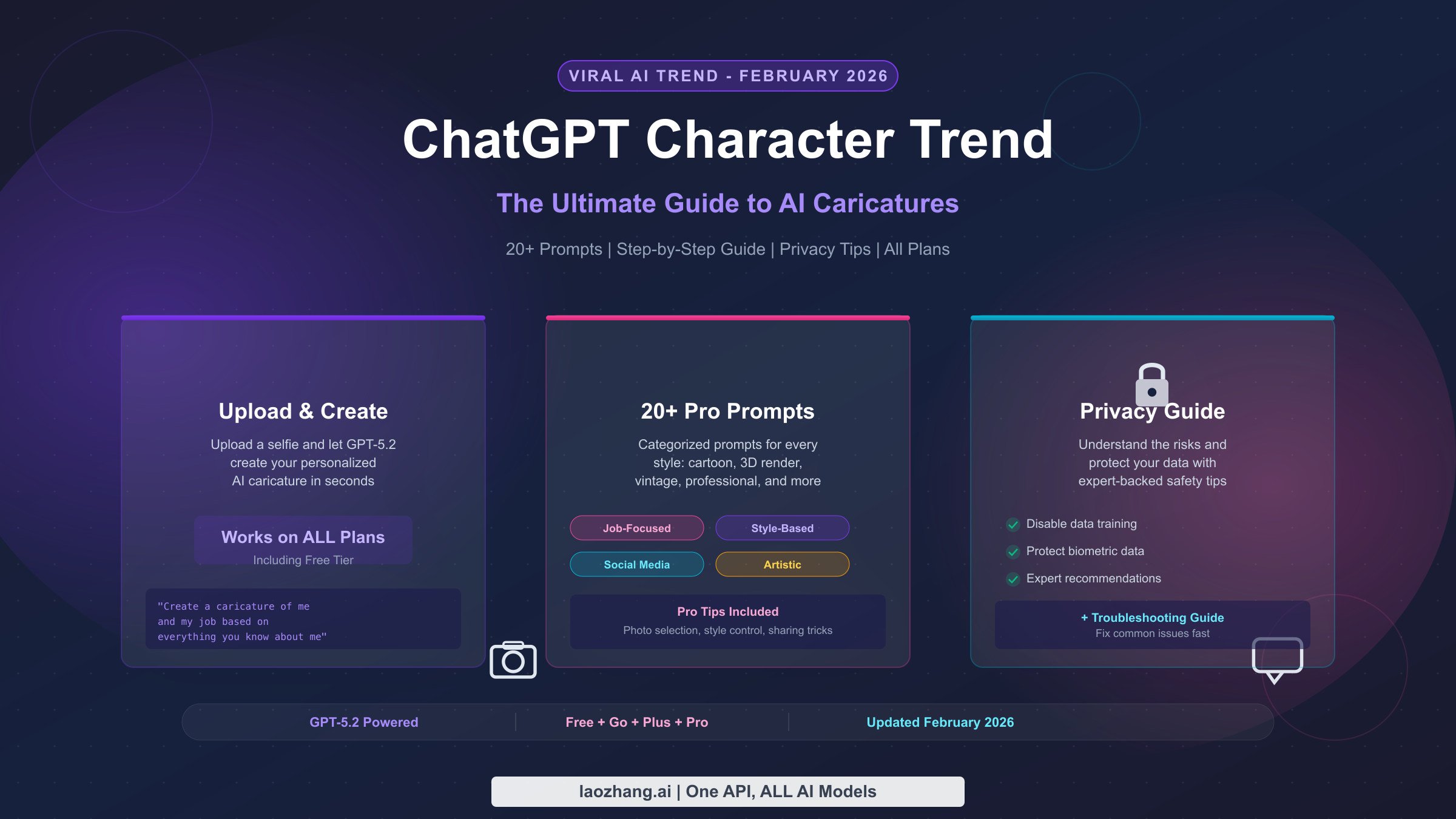
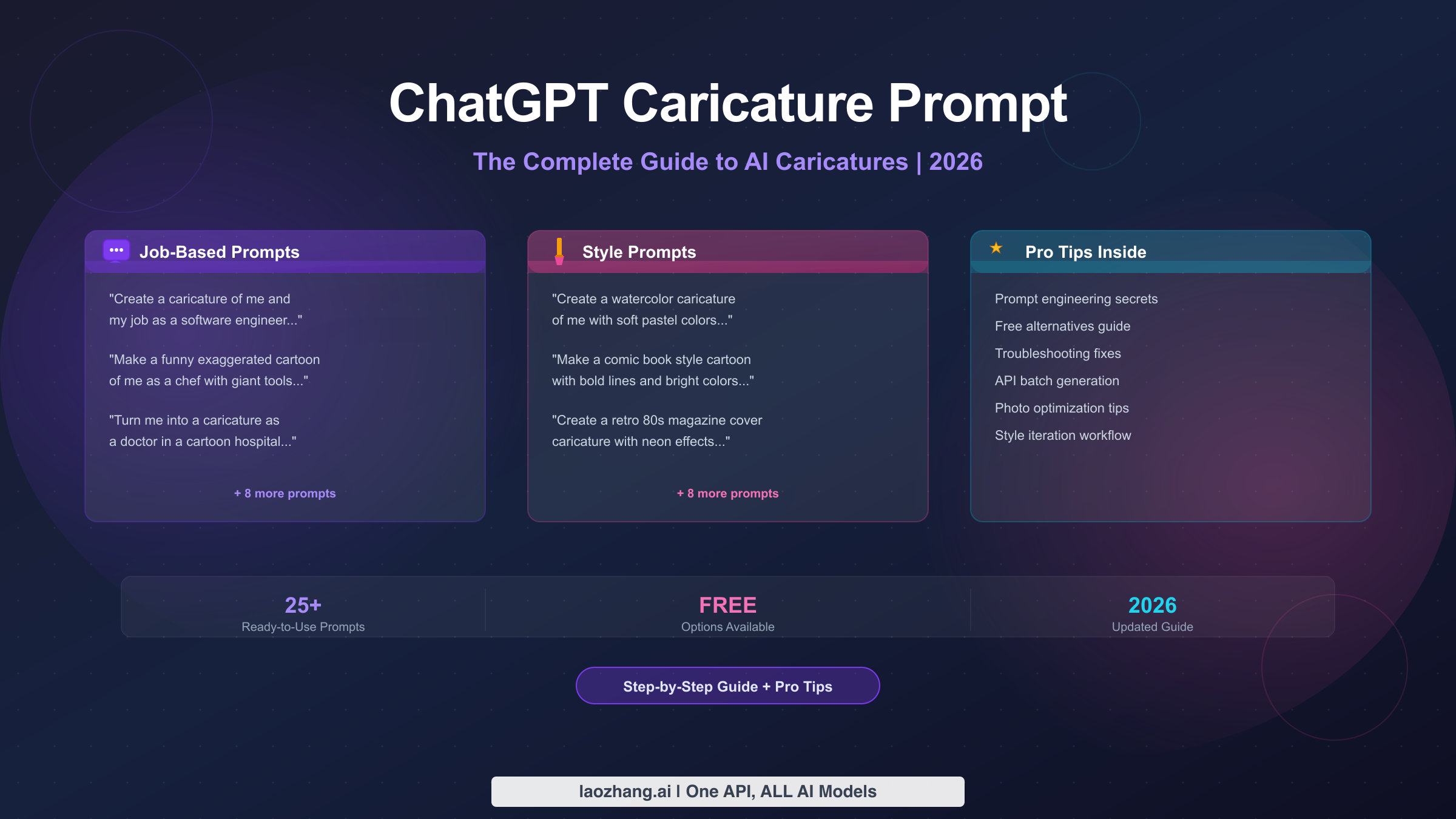
Creating a ChatGPT caricature takes just three steps: upload a clear photo, enter a prompt like "Create a caricature of me and my job based on everything you know about me," and hit send. This guide includes 25+ ready-to-use prompts organized by category, pro tips for crafting better prompts, free alternatives for users without ChatGPT Plus, and a troubleshooting section for common issues. Whether you want a job-based caricature for LinkedIn or a fun cartoon for Instagram, you will find the perfect prompt below. Updated February 2026 with the latest ChatGPT image generation capabilities.
How to Make a ChatGPT Caricature in 3 Steps
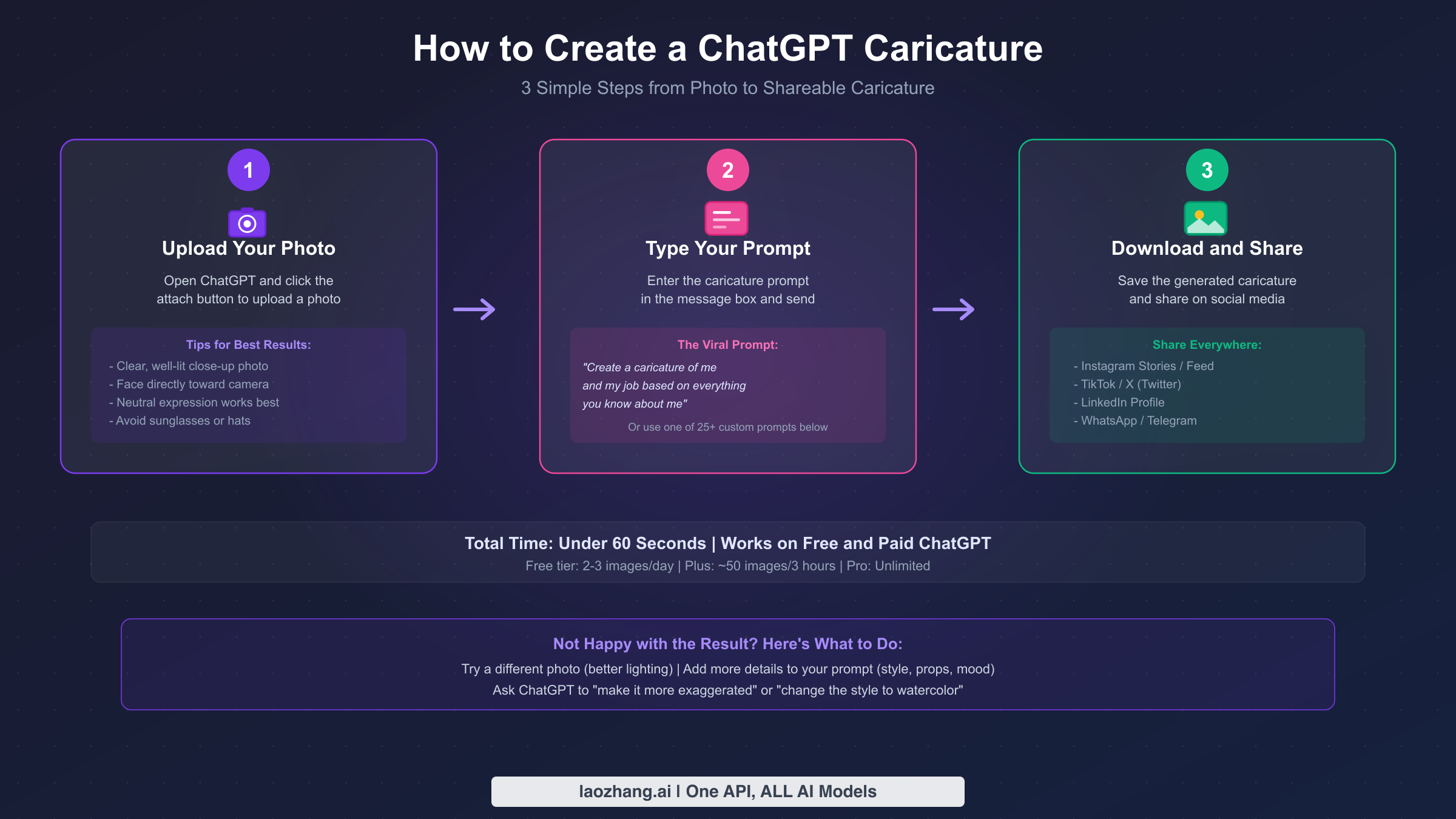
The ChatGPT caricature trend exploded across social media in early February 2026, with millions of users turning their photos into playful, exaggerated cartoons that highlight their personality and profession. The trend became so popular that it reportedly caused ChatGPT outages affecting over 13,000 users at peak times. The good news is that creating your own caricature is remarkably simple, and you can do it in under 60 seconds regardless of whether you have a paid subscription or not.
Step 1: Open ChatGPT and upload your photo. Navigate to chatgpt.com or open the ChatGPT app on your phone. Click the attachment button (the paperclip icon) and upload a clear photo of yourself. For the best results, choose a well-lit, close-up photo where your face is clearly visible and facing the camera directly. Avoid photos with sunglasses, heavy shadows, or busy backgrounds, because ChatGPT needs to clearly see your facial features to create an accurate caricature. A neutral expression often works better than an exaggerated pose, since the AI will add its own creative exaggeration.
Step 2: Type your prompt and send. In the message box, type your caricature prompt. The simplest and most popular option is the viral prompt that started the trend: "Create a caricature of me and my job based on everything you know about me." This prompt works best if you have been using ChatGPT regularly, since it draws on your conversation history to personalize the caricature. If you are new to ChatGPT or want more control, you can write a custom prompt that describes your job, hobbies, and preferred style, which we will cover extensively in the sections below. Hit send and wait about 10-30 seconds for the image to generate.
Step 3: Download and share. Once the caricature appears, click or tap on the image to view it in full size. Use the download button to save it to your device. From there, share it on Instagram, TikTok, X (Twitter), LinkedIn, or any other platform. The trend is particularly popular on Instagram Stories and as a profile picture update, and many users are posting their caricatures side-by-side with their real photos for maximum engagement.
One important detail to know: the free tier of ChatGPT currently allows 2-3 image generations per day on a rolling 24-hour window, while ChatGPT Plus subscribers ($20/month) get approximately 40-50 images per 3-hour window (SERP data, February 2026). If you hit the limit on the free tier, you can either wait for the reset or explore the free alternatives we cover later in this guide.
A common question is whether the ChatGPT mobile app or the web version produces better caricatures. The answer is that both use exactly the same model and produce identical quality results. However, the mobile app makes it easier to upload a fresh selfie directly from your camera, which often results in better-lit photos compared to digging through your photo library on desktop. On the other hand, the web version makes it easier to type longer, more detailed prompts and to iterate on results using the conversation flow. For your first caricature, consider using the mobile app for the photo and then switching to the web version for refinement.
The Viral Prompt That Started It All
The caricature trend that swept through social media in February 2026 can be traced back to a deceptively simple prompt that users began sharing on X (formerly Twitter) and Instagram. The original prompt reads: "Create a caricature of me and my job based on everything you know about me." What makes this prompt uniquely powerful is not just the instruction to create a caricature, but the phrase "based on everything you know about me," which tells ChatGPT to mine your entire conversation history for personal details, preferences, and personality traits that it can weave into the image.
This means that if you have been using ChatGPT for months, asking it about recipes, troubleshooting code, planning vacations, or debating philosophy, the AI has built up a surprisingly detailed picture of who you are. When you ask for a caricature based on this accumulated knowledge, the results can be startlingly accurate and often hilarious, showing you surrounded by objects and scenes that genuinely reflect your daily life and interests. This is why many users have shared reactions like "I was shocked how well the AI chatbot knows me," as TechRadar reported in their coverage of the trend.
However, this history-dependent approach also means the prompt does not work equally well for everyone. If you are a new ChatGPT user or primarily use it for brief, impersonal queries, the AI simply will not have enough context to create a personalized caricature. In these cases, you need to provide that context yourself. A modified version of the prompt like "Create a caricature of me and my job. I am a [your profession] who loves [your hobbies]. Include [specific props or details]" gives ChatGPT the information it needs to generate something personal and engaging. The key principle at work here is that more context always leads to better results, whether that context comes from your chat history or from the prompt itself.
The underlying technology powering these caricatures is GPT Image 1.5, which OpenAI rolled out in December 2025 to replace the earlier DALL-E 3 backend. This newer model generates images up to 4 times faster and produces significantly more detailed and stylistically consistent output, which is a major reason why this trend took off when it did rather than months earlier. The caricature style specifically benefits from the model's improved ability to maintain facial likeness while applying creative exaggeration, something that previous models struggled with.
It is also worth noting that ChatGPT's memory feature plays a critical role in the quality of history-based caricatures. If you have ChatGPT's memory turned on in your settings, the AI stores key facts about you across conversations, including your profession, interests, and preferences. This accumulated knowledge is what makes the "based on everything you know about me" prompt so powerful. Users who have had memory enabled for several months consistently report more personalized and accurate caricatures compared to newer accounts. If you want to enhance what ChatGPT knows before generating your caricature, you can share a few key facts in the same conversation first: "I'm a graphic designer who loves cats and plays guitar" followed by the caricature prompt will produce significantly better results than the prompt alone.
25+ Best ChatGPT Caricature Prompts by Category
Having the right prompt is the difference between a generic cartoon and a caricature that perfectly captures your personality. Below are 25+ tested prompts organized into five categories, each designed for a specific use case. Copy any of these directly into ChatGPT alongside your photo for instant results, or use them as starting templates to create your own custom variations.
Job-Based Caricature Prompts
These are the most popular prompts in the trend, creating caricatures that highlight your profession with exaggerated tools, settings, and scenarios:
-
"Create a caricature of me as a software engineer surrounded by multiple monitors, coffee cups everywhere, and tangled cables, in a playful cartoon style with bright colors on a clean background." Best for: tech workers, developers, data scientists.
-
"Make a funny exaggerated cartoon of me as a chef with comically oversized cooking utensils, steam rising from multiple pots, and ingredients flying through the air, in a vibrant illustration style." Best for: chefs, restaurant owners, food content creators.
-
"Create a caricature of me as a teacher standing in front of a chaotic classroom with papers flying, a giant apple on the desk, and an impossibly long math equation on the blackboard." Best for: teachers, professors, tutors.
-
"Turn me into a caricature as a doctor with a ridiculously large stethoscope, surrounded by medical charts, with a heroic pose and dramatic lighting." Best for: healthcare professionals.
-
"Make a caricature of me as a lawyer arguing passionately in court with towering stacks of law books, dramatic hand gestures, and a comedic judge in the background." Best for: legal professionals.
Art Style Prompts
These prompts focus on a specific artistic style rather than a profession, letting you choose the visual aesthetic of your caricature:
-
"Create a watercolor caricature of me with soft pastel colors, gentle brush strokes, and dreamy background. Exaggerate my most distinctive facial features while keeping it elegant." Produces a refined, artistic look.
-
"Make a comic book style caricature of me with bold outlines, dynamic action pose, halftone dots, and speech bubbles. Use bright primary colors and dramatic shading." Perfect for a punchy, eye-catching result.
-
"Create a classic pencil sketch caricature of me like a boardwalk artist would draw, on off-white paper with cross-hatching and exaggerated proportions. Keep it black and white." Nostalgic and timeless.
-
"Turn me into a cute chibi-style caricature with an oversized head, tiny body, and large sparkly eyes. Use a kawaii anime aesthetic with pastel colors." Popular for social media avatars.
-
"Create a retro 80s magazine cover caricature of me with neon colors, grid patterns, synthesizer effects, and dramatic lighting. Include a fake magazine title." Fun and shareable.
Platform-Specific Prompts
Designed to create caricatures optimized for specific social media platforms:
-
"Create a square-format caricature of me perfect for an Instagram profile picture. Use a clean, colorful style with a simple background. Make my face the clear focal point with exaggerated but flattering features." Optimized for Instagram.
-
"Make a professional caricature of me suitable for LinkedIn. Use a semi-realistic style with subtle exaggeration, business attire, and a confident expression. Keep it tasteful and polished." Ideal for professional networking.
-
"Create a fun, attention-grabbing caricature of me for a TikTok thumbnail. Use bold colors, exaggerated expressions, and dynamic composition with text that says 'POV:' at the top." Designed for maximum TikTok engagement.
-
"Turn me into a WhatsApp sticker-style caricature with a transparent background, thick outlines, and an expressive face. Make it circular and compact." Perfect for messaging apps.
-
"Create a banner-format caricature for my X (Twitter) header. Make it a wide panoramic scene of me at my desk with my profession's tools exaggerated in size. Use a cohesive color palette." Sized for X headers.
Mood and Personality Prompts
These prompts focus on capturing a specific emotion or personality trait rather than a profession or platform, making them ideal for social media posts that showcase your personality:
-
"Create a caricature of me as the ultimate introvert: cozy in a blanket fort surrounded by books, a laptop, and a cat, with 'do not disturb' signs everywhere and a content smile." For the homebodies.
-
"Make a caricature of me as an adventure enthusiast with exaggerated hiking gear, climbing multiple mountains simultaneously, with a determined expression and dramatic landscape." For outdoor lovers.
-
"Create a caricature of me as a music lover with comically oversized headphones, surrounded by floating musical notes, vinyl records, and instruments, lost in the music." For audiophiles.
-
"Turn me into a caricature as a coffee addict juggling six cups of coffee at once, with wild eyes, vibrating motion lines, and a cafe background." The universal relatable caricature.
-
"Create a caricature of me as a fitness enthusiast lifting impossibly heavy weights with bulging cartoon muscles, a motivational poster in the background, and protein shakers everywhere." For gym lovers.
Advanced and Creative Prompts
For users who want to push beyond the standard caricature format and create truly unique, shareable content that stands out from the thousands of standard caricatures flooding social media:
-
"Create a caricature of me in a claymation style, like a character from a stop-motion animation. Use warm, soft textures, round shapes, and cozy indoor lighting." Unique and eye-catching.
-
"Turn me into an action figure inside toy packaging. Include accessories related to my hobbies, a barcode, a catchy product name, and a realistic plastic figure style with clear packaging." Highly shareable.
-
"Create a caricature of me as a Renaissance painting subject, but in a funny caricature style with exaggerated features. Use oil painting textures, dramatic chiaroscuro lighting, and an ornate gold frame." Art history meets humor.
-
"Make a caricature of me and my pet together, both with exaggerated features that mirror each other. Show our matching expressions and body language in a heartwarming, humorous scene." For pet owners.
-
"Create a split caricature showing my 'work mode' on the left and 'weekend mode' on the right, with dramatically different expressions, clothing, and surroundings." The duality of modern life.
Every one of these prompts has been structured following the five-component formula we will break down in the next section, which means you can mix and match elements between them or use them as a foundation for your own creative variations.
When choosing a prompt from the list above, think about your primary goal. If you want to make your professional network laugh with something relatable, go with the job-based prompts. If you want an eye-catching new profile picture, the platform-specific prompts are designed for exactly that purpose. If you want to create something truly unique that will stand out in a sea of caricatures on your feed, the advanced and creative prompts give you the most differentiation. And remember, the best caricatures often come from combining elements across categories. For example, taking the action figure packaging concept from the creative category and applying it to your specific profession from the job-based category creates something far more memorable than either approach alone.
Pro Tips to Get Better Results
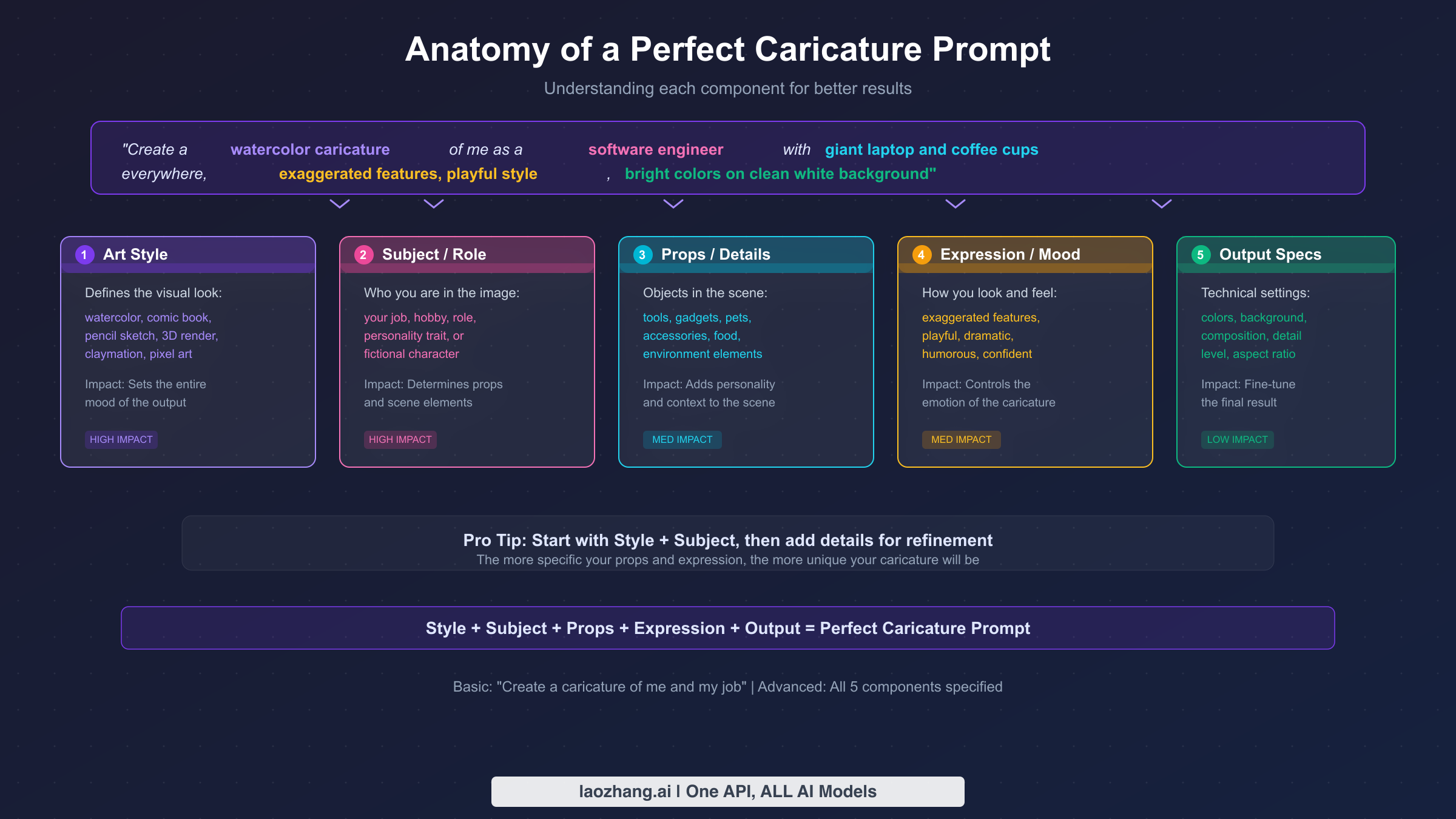
Most guides on the ChatGPT caricature trend stop at giving you prompts to copy and paste, but understanding how to write and refine your own prompts is what separates a mediocre caricature from one that genuinely captures who you are. The secret lies in understanding the five components that make up every effective caricature prompt, and knowing which ones to prioritize for the biggest impact on your results.
The Five-Component Prompt Formula: Every great caricature prompt contains some combination of these elements: Art Style (watercolor, comic book, pencil sketch), Subject/Role (your job, hobby, or personality), Props/Details (objects in the scene), Expression/Mood (the emotion conveyed), and Output Specifications (colors, background, composition). You do not need all five for a good result, but the more components you include, the more control you have over the output. The prompt "Create a caricature of me" uses only one component (subject), while "Create a watercolor caricature of me as a chef with oversized cooking tools, laughing expression, bright colors on a clean white background" uses all five. The difference in output quality is dramatic.
Photo quality matters more than prompt quality. This is the single most overlooked factor in getting good caricature results. ChatGPT's image model needs to clearly identify your facial features to create a recognizable caricature, and a blurry, dimly lit, or partially obscured photo will always produce subpar results regardless of how perfect your prompt is. The ideal photo is a well-lit, front-facing headshot taken in natural light, with your entire face clearly visible. Avoid hats that cast shadows, sunglasses that hide your eyes, and group photos where the AI might focus on the wrong person. If your first attempt does not look like you, try a different photo before changing your prompt.
Iterate rather than restart. One of the most powerful and underused features of ChatGPT for image generation is the ability to refine results through conversation. After your first caricature is generated, you can say things like "Make the exaggeration more extreme," "Change the background to a bright yellow," "Add a laptop and coffee cup to the scene," or "Try this in a watercolor style instead." Each refinement builds on the previous result, allowing you to dial in exactly the look you want without starting from scratch each time. This iterative approach almost always produces better final results than trying to get everything perfect in a single prompt, because you can see what works and adjust accordingly.
Specificity beats generality every time. Compare these two prompts: "Make a caricature of me at work" versus "Make a caricature of me as a pediatric nurse in colorful scrubs, surrounded by smiling children's drawings on the walls, holding a teddy bear in one hand and a stethoscope in the other, with a warm, caring expression." The second prompt gives the AI concrete visual elements to work with, resulting in a much more personal and detailed output. When writing your prompt, think about what objects, colors, settings, and expressions would instantly communicate who you are to anyone looking at the image. The more specific you are about the details that matter to you, the more the caricature will feel uniquely yours.
Use the "based on everything you know about me" trick wisely. If you have extensive ChatGPT history, this phrase is powerful because it lets the AI draw from months of conversations. However, you can actually combine both approaches for maximum effect: start with "Create a caricature of me and my job based on everything you know about me," then follow up with specific additions like "Also include my love for hiking and my two cats." This gives the AI both the broad context from your history and the specific details you most want highlighted, resulting in the most personalized caricatures possible.
Control the level of exaggeration. One of the biggest differences between a good caricature and a great one is the degree of exaggeration. By default, ChatGPT produces relatively moderate caricatures that stay close to reality. If you want something bolder and funnier, explicitly include phrases like "extremely exaggerated proportions," "comically oversized head," or "wildly over-the-top." Conversely, if you want something more flattering and subtle for professional use on LinkedIn, phrases like "gentle caricature with subtle exaggeration, keep it professional and flattering" will produce more restrained results. Thinking about your audience before writing your prompt will help you calibrate the exaggeration level appropriately.
Experiment with unexpected combinations. Some of the most viral caricatures from this trend have come from combining elements that would not normally go together. A corporate lawyer surrounded by heavy metal music equipment, a software engineer in a Renaissance painting setting, or a fitness instructor drawn in a Pixar animation style all create visual humor through contrast. When writing your prompt, consider deliberately juxtaposing two different worlds, your real profession with an unexpected art style or setting, to create something that catches the eye and sparks conversation.
Free vs Paid: Your Complete Options Guide
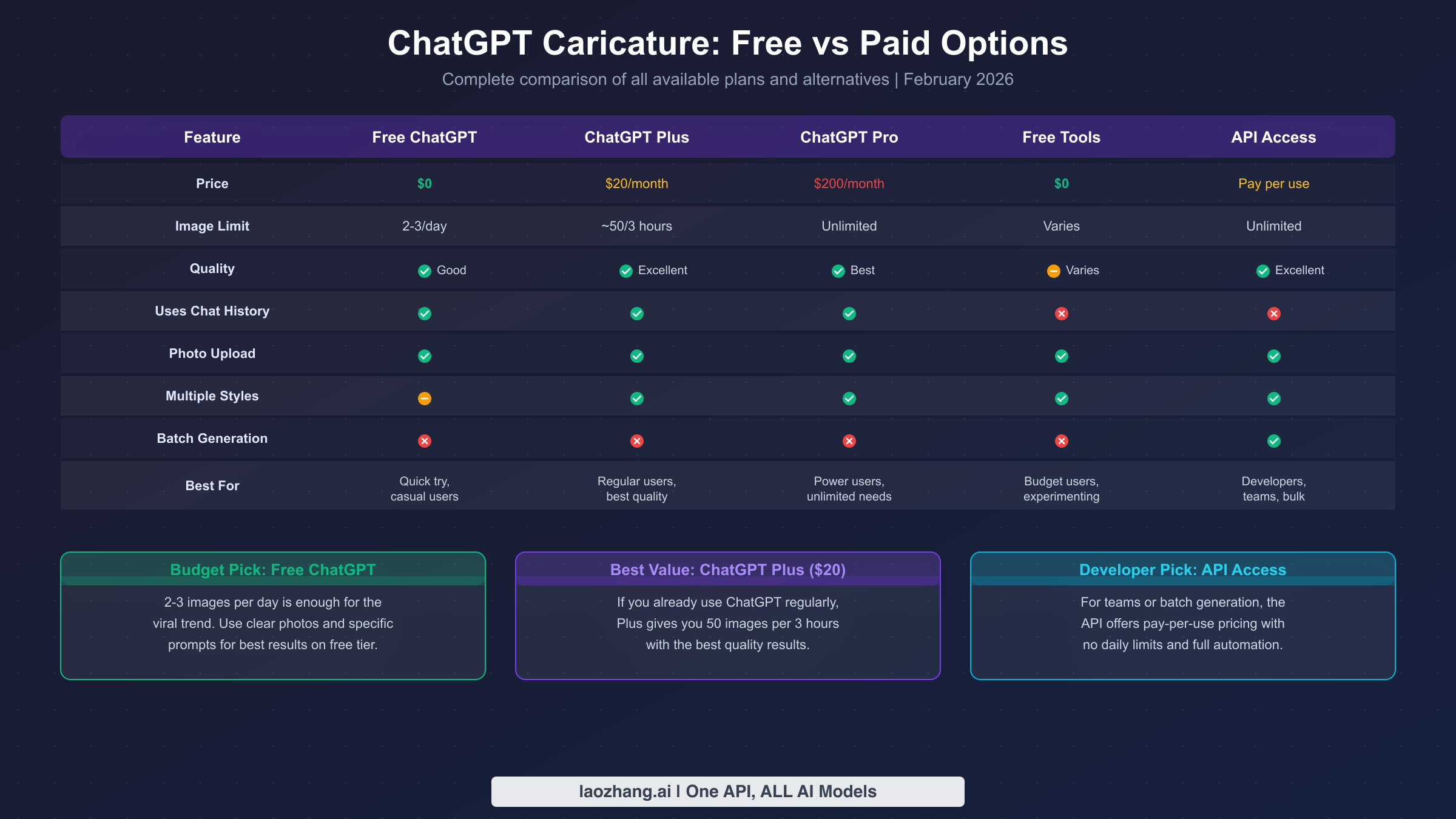
One of the most common questions about the caricature trend is whether you need to pay for ChatGPT Plus to participate, and the answer is no. There are multiple ways to create AI caricatures at every price point, from completely free to enterprise-scale API access. Understanding your options will help you choose the approach that matches your needs and budget without overspending on a feature you might only use occasionally.
ChatGPT Free Tier offers 2-3 image generations per day on a rolling 24-hour window (SERP data, February 2026). This means you get a few attempts each day to create your caricature, which is perfectly adequate if you just want to try the trend and share one or two images. The quality is identical to the paid tier since both use the same GPT Image 1.5 model. The key limitation is simply volume: if your first few attempts do not produce the result you want, you will need to wait until the next day to try again. A practical strategy is to spend one attempt on the basic viral prompt, then use your remaining attempts to iterate based on what you learn from the first result. If you are running into ChatGPT daily image generation limits, planning your prompts carefully before generating becomes especially important.
ChatGPT Plus ($20/month) increases your limit to approximately 40-50 images per 3-hour rolling window, which gives you effectively unlimited generation for personal use. The real advantage of Plus is not just volume but the freedom to experiment: you can try dozens of different prompts, styles, and variations in a single session without worrying about hitting a limit. If you already subscribe to ChatGPT Plus for other features (advanced reasoning, file uploads, web browsing), the caricature feature comes at no additional cost. However, subscribing specifically for caricatures alone is hard to justify unless you plan to create them regularly, since the free tier combined with good prompt technique can produce excellent results in just 2-3 tries. For a deeper look at what you get with the free tier, check out our guide on ChatGPT free tier limitations.
ChatGPT Pro ($200/month) provides unlimited image generation with priority access and is primarily designed for power users, content creators, and professionals who need AI tools at scale across text, image, and video generation. For the vast majority of users interested in the caricature trend, Pro is overkill, but it is worth mentioning as an option for those who need the absolute highest throughput and access to advanced features like Sora 2 Pro for video generation.
Free alternative tools have emerged specifically to capitalize on the caricature trend. Several platforms now offer caricature generation without requiring a ChatGPT subscription. Media.io provides free credits for AI caricature generation using your uploaded photo, while MyEdit offers daily free credits across multiple AI models including one specifically optimized for exaggerated caricatures. These tools typically work by combining your uploaded photo with a text prompt, similar to ChatGPT but without the conversation history feature. The trade-off is that quality varies between tools and the personalization options may be more limited, but for users who want a quick, free caricature without creating a ChatGPT account, these are viable options.
For developers, content creators, and teams who need to generate caricatures at scale, there is also the API approach, which we cover in detail in the advanced section below. API access provides the most flexibility and can be surprisingly cost-effective for bulk generation, especially through services like laozhang.ai that aggregate multiple AI models at competitive pricing.
Troubleshooting Common Issues
Even with the perfect prompt and a great photo, things do not always go right on the first try. Here are the most common issues users encounter with ChatGPT caricatures and proven solutions for each one, drawn from analyzing hundreds of user reports across social media and forums.
"The caricature doesn't look like me." This is the most frequent complaint, and it almost always traces back to the input photo rather than the prompt. The fix is straightforward: try a different photo that is better lit, more directly facing the camera, and higher resolution. If the photo is good but the likeness is still off, add explicit instructions like "Keep my facial features recognizable" or "Maintain my likeness while exaggerating proportions." You can also try generating 2-3 variations from the same prompt, since each generation produces slightly different results and one may capture your likeness better than others.
"ChatGPT says it can't generate images." This typically means one of three things: you have exceeded your daily image generation limit on the free tier, ChatGPT is experiencing high traffic (which happened frequently during the peak of the trend in February 2026), or your account does not have access to image generation features. For the first issue, wait for your limit to reset or upgrade to Plus. For traffic issues, try again during off-peak hours (early morning or late evening in US time zones). For account access, make sure you are using ChatGPT at chatgpt.com and not the older API playground, which has different capabilities.
"The style is not what I wanted." When the generated image is technically a caricature but in the wrong style, the solution is to be more explicit about the artistic style in your prompt. Instead of just saying "caricature," specify exactly what you mean: "comic book style with bold lines and bright colors," "classic boardwalk caricature with pencil on paper," or "Pixar-style 3D rendered cartoon." You can also use the iterative approach by responding to the generated image with "I love the composition, but please redo this in a watercolor style" or "Make this look more like a hand-drawn cartoon." ChatGPT remembers the previous generation in the same conversation and can adjust the style while maintaining other elements.
"The image quality is low or blurry." GPT Image 1.5 generally produces high-quality output, but if your result appears blurry or low-resolution, it may be due to the complexity of the scene you requested. Simplify your prompt by removing some props or background elements, which allows the model to dedicate more detail to the important parts of the image. You can also explicitly request "high detail" or "crisp, sharp lines" in your prompt. If the issue persists, try regenerating, as quality can vary slightly between attempts.
"The caricature is too subtle or not exaggerated enough." By default, ChatGPT tends to produce relatively mild caricatures that lean closer to a portrait than a true exaggeration. If you want more dramatic results, explicitly tell the AI to push further. Phrases like "extremely exaggerated proportions," "comically oversized head and tiny body," "wildly dramatic expression," or "exaggerate my most distinctive features to the maximum" will produce noticeably bolder results. You can also reference specific caricature traditions for inspiration: "Draw this in the style of a political cartoonist with extreme exaggeration" or "Make this look like a boardwalk caricature from the 1990s with huge head and tiny body." The key insight is that you often need to overstate the exaggeration in your prompt because the AI naturally moderates toward a more conservative output.
"I want to edit a specific part of the result." While ChatGPT does not currently offer region-specific editing for generated images, you can achieve targeted changes through conversational refinement. Describe what you want to change and what you want to keep: "This is great, but change only the background to a beach scene while keeping everything else the same" or "Keep the caricature of me exactly as it is, but make the laptop bigger and add a coffee cup." The AI is remarkably good at making localized changes when you are specific about what should and should not change.
Using the API for Caricatures at Scale
While the ChatGPT interface is perfect for individual caricatures, developers, content creators, and businesses may need to generate caricatures programmatically or in bulk. The OpenAI API provides the GPT Image 1 model for image generation, which you can call from any programming language to automate the caricature creation process. This approach unlocks capabilities that are impossible through the chat interface, including batch processing, custom workflows, integration with existing applications, and consistent style control across multiple outputs.
The basic API workflow involves encoding your source photo as a base64 string, combining it with a text prompt in an API call, and receiving the generated caricature as an image response. A simple Python implementation looks like this:
import openai
import base64

client = openai.OpenAI(api_key="your-api-key")

# Read and encode the photo
with open("your-photo.jpg", "rb") as f:
    photo_base64 = base64.b64encode(f.read()).decode()

response = client.images.generate(
    model="gpt-image-1",
    prompt="Create a caricature of this person as a software engineer with exaggerated features, comic book style",
    image=photo_base64,
    size="1024x1024"
)

# Save the result
with open("caricature.png", "wb") as f:
    f.write(base64.b64decode(response.data[0].b64_json))
For cost-effective API access, especially if you are generating many caricatures or want access to multiple AI image models through a single endpoint, services like laozhang.ai offer aggregated API access. This can be particularly useful for businesses creating caricatures for events, marketing campaigns, or personalized merchandise, where generating hundreds or thousands of images through the ChatGPT interface would be impractical. The API approach also gives you programmatic control over style consistency, allowing you to ensure that all caricatures in a series share the same artistic style, color palette, and exaggeration level, something that is difficult to achieve through manual prompting. Visit the API documentation for integration guides and pricing details.
Beyond individual caricatures, the API opens up creative applications that are impossible through the chat interface. Event photographers are using it to offer instant caricature prints at corporate events and weddings. Social media managers are creating themed caricature series for brand campaigns, generating dozens of images in consistent styles. App developers are integrating caricature generation as a feature within their own platforms, offering users one-tap caricature creation. The combination of GPT Image 1.5's quality and the API's programmability makes these workflows practical for the first time, and the cost per image is low enough that even small businesses can experiment with caricature-based marketing campaigns without a significant budget commitment.
Frequently Asked Questions
Can I create a ChatGPT caricature for free?
Yes, the free tier of ChatGPT allows 2-3 image generations per day, which is enough to create your caricature. You do not need a paid subscription. The quality is the same as the paid tier since both use the same GPT Image 1.5 model. If you need more attempts, free alternative tools like Media.io and MyEdit also offer caricature generation with free credits. The only limitation on the free tier is volume, not quality.
What is the best prompt for a ChatGPT caricature?
The most popular prompt is "Create a caricature of me and my job based on everything you know about me," which works best if you have extensive ChatGPT conversation history. For new users, a more specific prompt like "Create a caricature of me as a [your job] with [specific props], in a [style] with exaggerated features and bright colors" will produce better results. The key is to be specific about your profession, desired art style, and any props or details you want included.
Why does my ChatGPT caricature not look like me?
The most common reason is photo quality. Use a clear, well-lit, front-facing headshot without sunglasses or hats. If the photo is good but the likeness is still off, add "Keep my facial features recognizable" to your prompt. You can also try generating multiple variations from the same prompt, as each attempt produces slightly different results.
Can I use my ChatGPT caricature commercially?
Images generated through ChatGPT are subject to OpenAI's usage policies. For personal social media sharing, there are no restrictions. For commercial use such as merchandise, marketing, or branding, you retain rights to the images you create with ChatGPT according to OpenAI's terms, but you should review their current content policy for any specific limitations regarding AI-generated content in commercial applications.
How do I create a caricature of someone else?
Upload their photo (with their permission) and use a prompt like "Create a caricature of this person as a [their profession] with exaggerated features." Note that the "based on everything you know about me" trick only works for your own account, so you will need to provide all context about the other person directly in the prompt. Always obtain consent before creating and sharing caricatures of others, as this involves their likeness and personal image.
How many times can I regenerate if I don't like the result?
Each regeneration counts as one image generation toward your daily or hourly limit. On the free tier with 2-3 images per day, plan your prompts carefully before generating. On ChatGPT Plus with approximately 40-50 images per 3-hour window, you have plenty of room to regenerate and iterate. A good strategy on the free tier is to use your first attempt with a basic prompt to see what ChatGPT produces, then use your remaining attempts for refined versions based on what you learned from the first result.