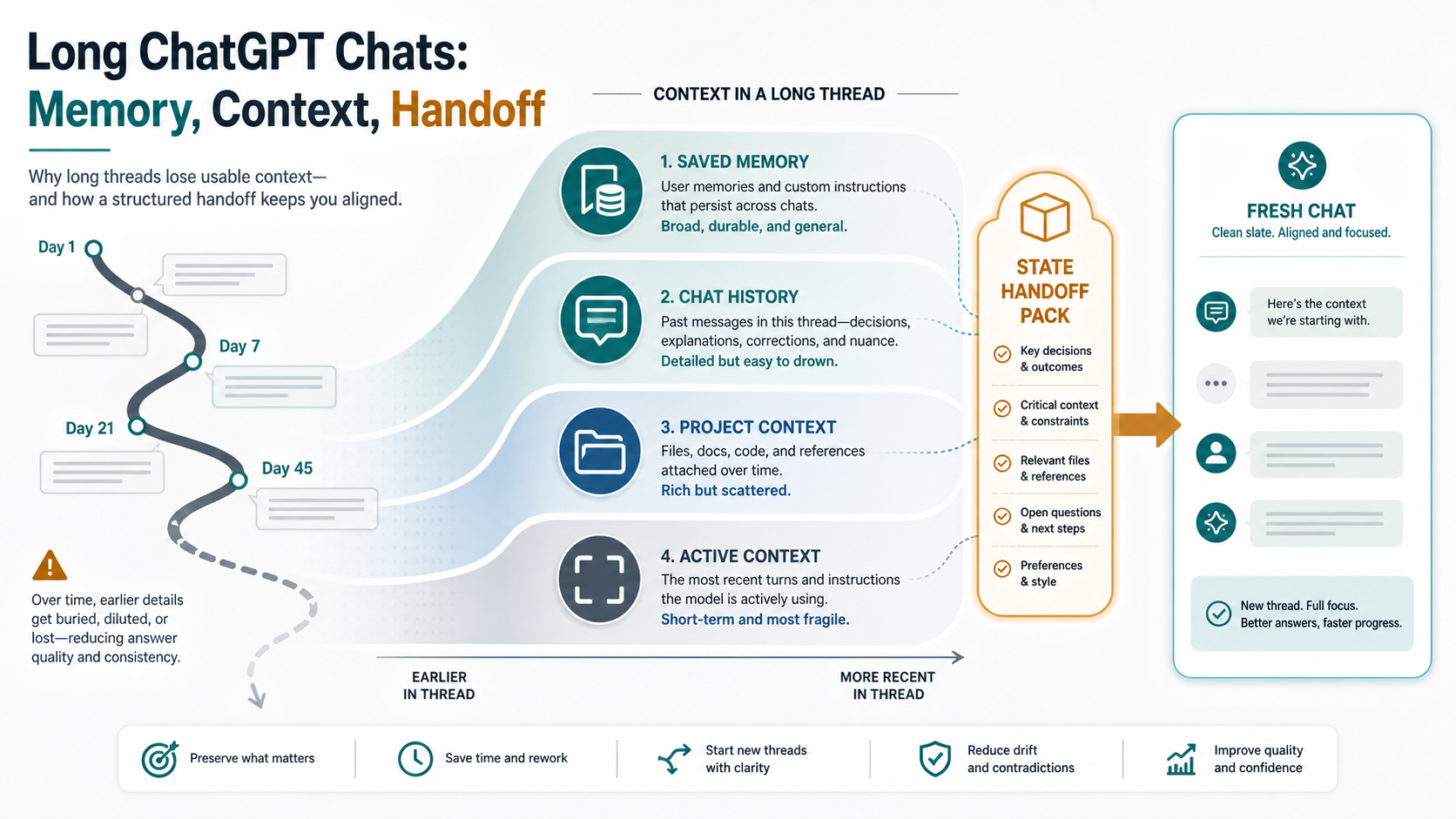
Long ChatGPT work can drift even when the old transcript is still visible. Memory helps with durable details and relevant past context, but it is not a full replay of every old turn. Before you keep correcting the same thread, decide whether to anchor the current chat, checkpoint the work, or move into a fresh chat or Project with a state handoff pack.
Use this route board first:
| If the thread is doing this | Best next action | Stop rule |
|---|---|---|
| It still follows the main decision, but misses one detail | Stay and anchor the next step | Stop if the same correction fails twice |
| It holds important decisions, sources, or constraints | Checkpoint the work before continuing | Stop before asking for another large rewrite |
| It keeps contradicting settled context or mixing old paths | Start fresh with a state handoff pack | Stop pasting the whole thread and hand off only the state that matters |
The core split is simple: saved Memory is for durable preferences and facts, Reference chat history and Projects can add relevant context, and the active context of a long thread is still finite. A better handoff names the objective, current decision, constraints, source material, rejected paths, open questions, next action, and stop rules.
Why long ChatGPT chats stop carrying the old context
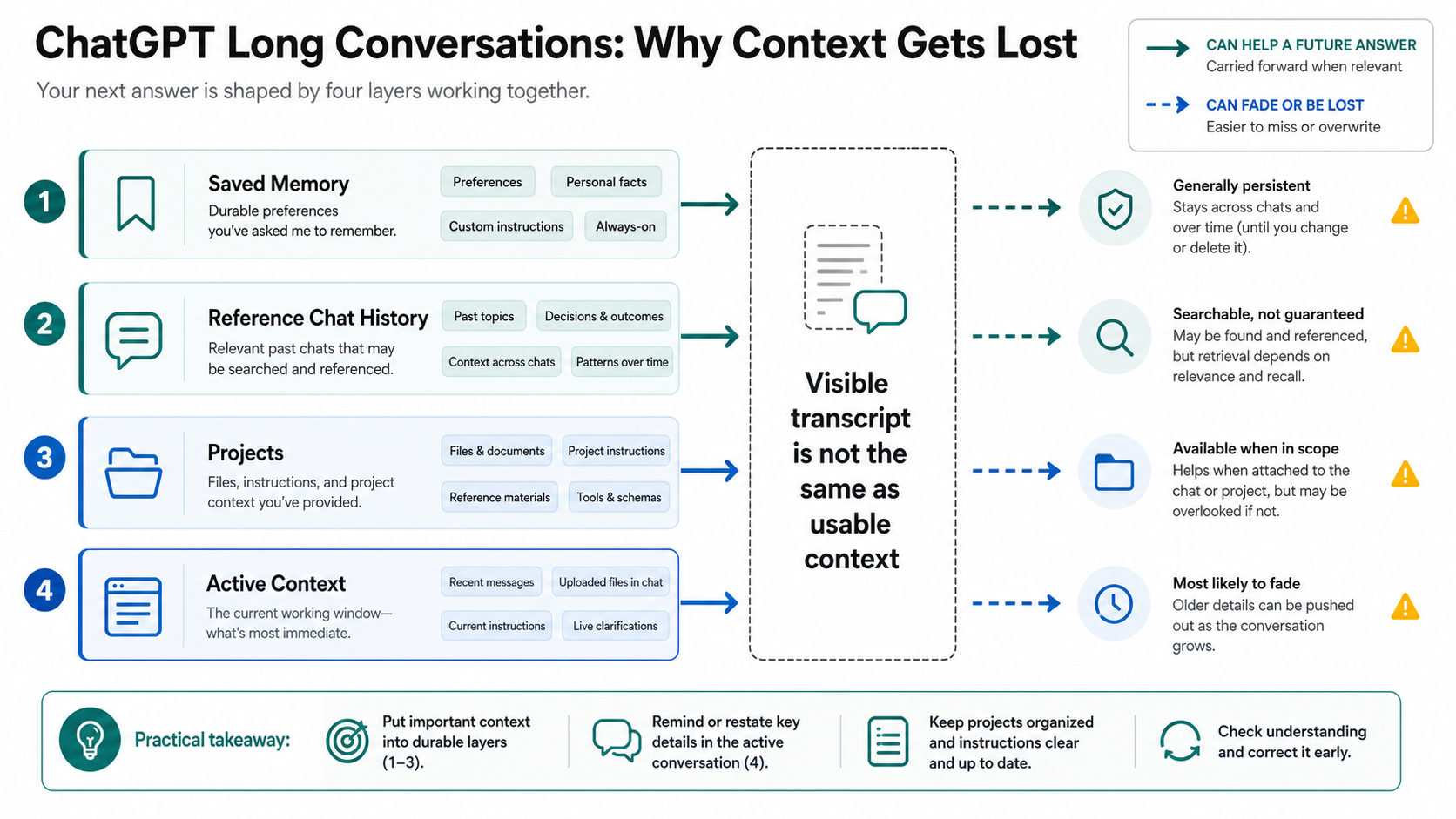
A long conversation is not a permanent working database. The transcript may remain visible in the sidebar, but a future answer still has to work within the context that the product and model actually provide to that response. That working set can include the latest turns, selected older context, memories, project instructions, files, tool state, and hidden system instructions. It is not the same thing as every sentence you have ever typed into the thread.
That distinction explains the common pattern. Early in a work session, ChatGPT may track your objective, style, constraints, rejected paths, and current plan very well. Later, after many turns, file references, corrections, side branches, and rewrites, it may start reintroducing an option you already rejected or miss a constraint that used to feel settled. The failure feels like personal memory loss, but the practical issue is usually state placement: too much important state lives only inside a long chat.
OpenAI's developer materials make the same tradeoff visible in agent workflows. Trimming old turns is predictable but can drop long-range context abruptly. Summarization preserves continuity in a compact form, but a poor summary can omit details or make the wrong detail authoritative. ChatGPT web and app behavior is product-specific, but the operating lesson still applies: long work needs explicit state management.
Do not respond by pasting the entire old conversation into a new chat. That often imports stale decisions, abandoned paths, and noisy context along with the useful state. The better move is to preserve the small set of information the next answer must treat as current truth.
Does ChatGPT Memory fix long-chat context loss?
Memory helps, but it solves a different problem from carrying every old turn inside a long thread. OpenAI's Memory FAQ separates saved memories from Reference chat history. Saved memories are durable facts or preferences that can remain available beyond one conversation. Reference chat history can use relevant past chats, but OpenAI also says ChatGPT does not retain every detail from past chats.
That means Memory is useful for stable information such as "prefer concise code explanations", "I work in Python", or "my company uses a particular naming style". It is weak as a dumping ground for dense project state such as a 40-turn debugging path, a research evidence table, a product requirements debate, or a list of rejected article angles. Those belong in a Project, a file, an external note, or a structured handoff pack.
There is another important boundary: Temporary Chat does not reference or create memories. That route is valuable when you want a clean conversation that should not use or update Memory, but it is not the route for preserving long-running work. If you are trying to carry a project forward, Temporary Chat is usually the opposite of what you want.
Use this quick placement rule:
| State type | Best place | Why |
|---|---|---|
| Stable preference or durable personal fact | Saved Memory | It may help across future chats without repeating it |
| Project-wide instruction or recurring work context | ChatGPT Project instructions or files | It is scoped to the work rather than your whole account |
| Current decision, constraint, rejected path, next task | Handoff pack | It is the active state the next chat must follow now |
| Sensitive one-off question | Temporary Chat | It avoids memory use and memory creation |
| Full old transcript | Usually nowhere | It carries too much noise and stale state |
If Memory is turned off, full, unavailable in your plan or region, or configured differently in a workspace, the interface may behave differently. Treat those as settings and availability checks, not as proof that one long thread should remember everything.
Stay, checkpoint, or start fresh
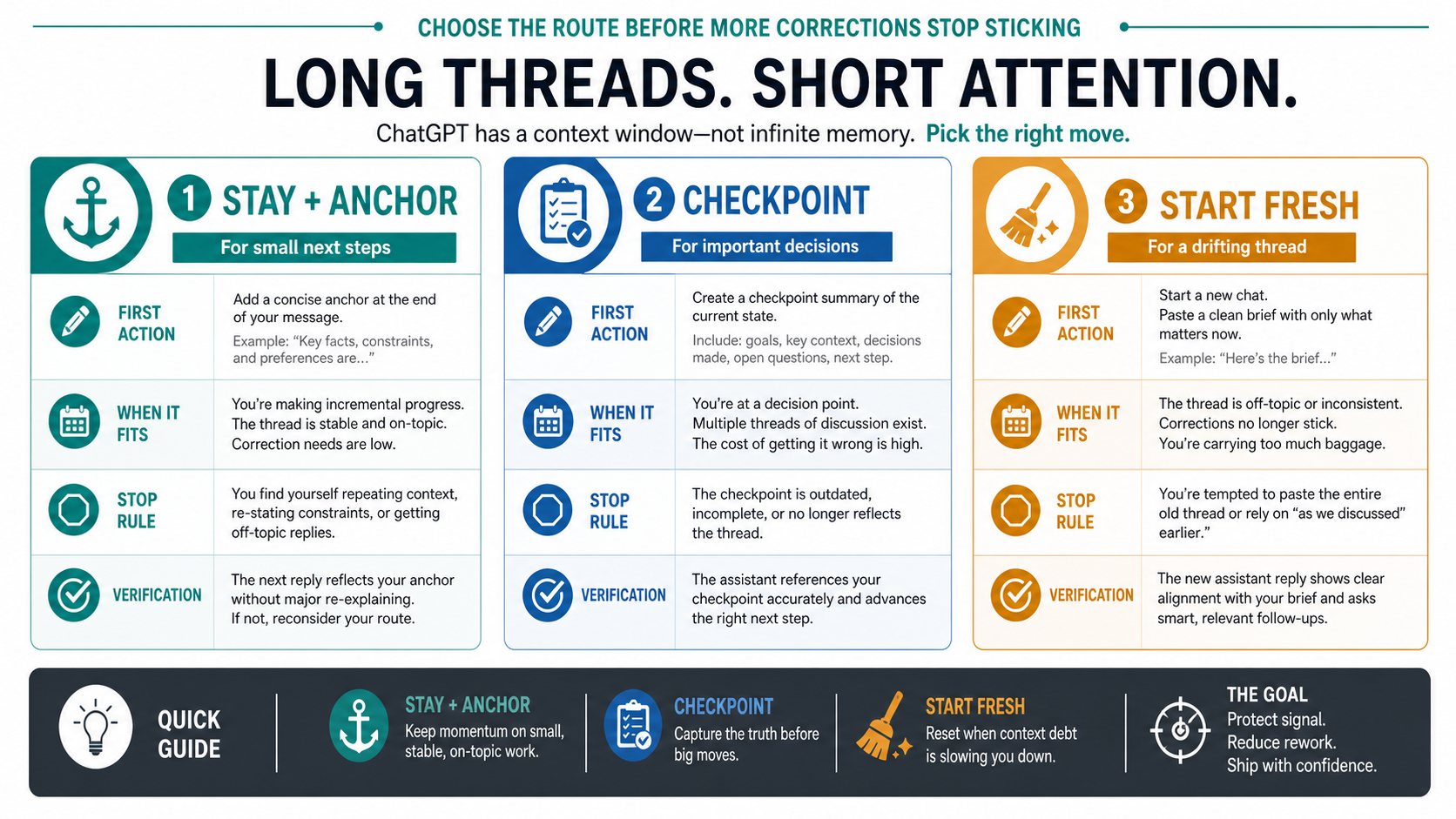
The fastest useful decision is not "how big is the context window?" It is whether the old thread still deserves to be the working surface. Use the size and importance of the next step to choose.
Stay in the same chat when the next step is small and the thread still obeys the main decision. For example, if a draft is mostly coherent and ChatGPT missed one style constraint, anchor the next request: "Use the same structure as the last answer, but revise only the examples to match the constraint below." Keep the ask narrow. If the same correction fails twice, stop treating the thread as reliable.
Checkpoint when the work contains decisions you cannot afford to lose. Ask ChatGPT to produce a state pack, then inspect and fix it before continuing. The inspection matters because a generated summary can flatten nuance, hide uncertainty, or preserve the wrong decision. A checkpoint is not just "summarize the chat"; it is a controlled transfer of the current working state.
Start fresh when the old thread keeps contradicting settled context, revives rejected paths, confuses file versions, or requires long reminders before every useful answer. A fresh chat can be sharper because it carries less noise. It only becomes safer when you give it the right state at the start.
Projects sit between "same chat" and "fresh chat". OpenAI's Projects help describes project instructions, files, chats, and project memory behavior. For recurring work, a Project can keep durable context closer to the task. It still should not be treated as a guarantee that every previous turn will be replayed.
Use a state handoff pack instead of a vague summary
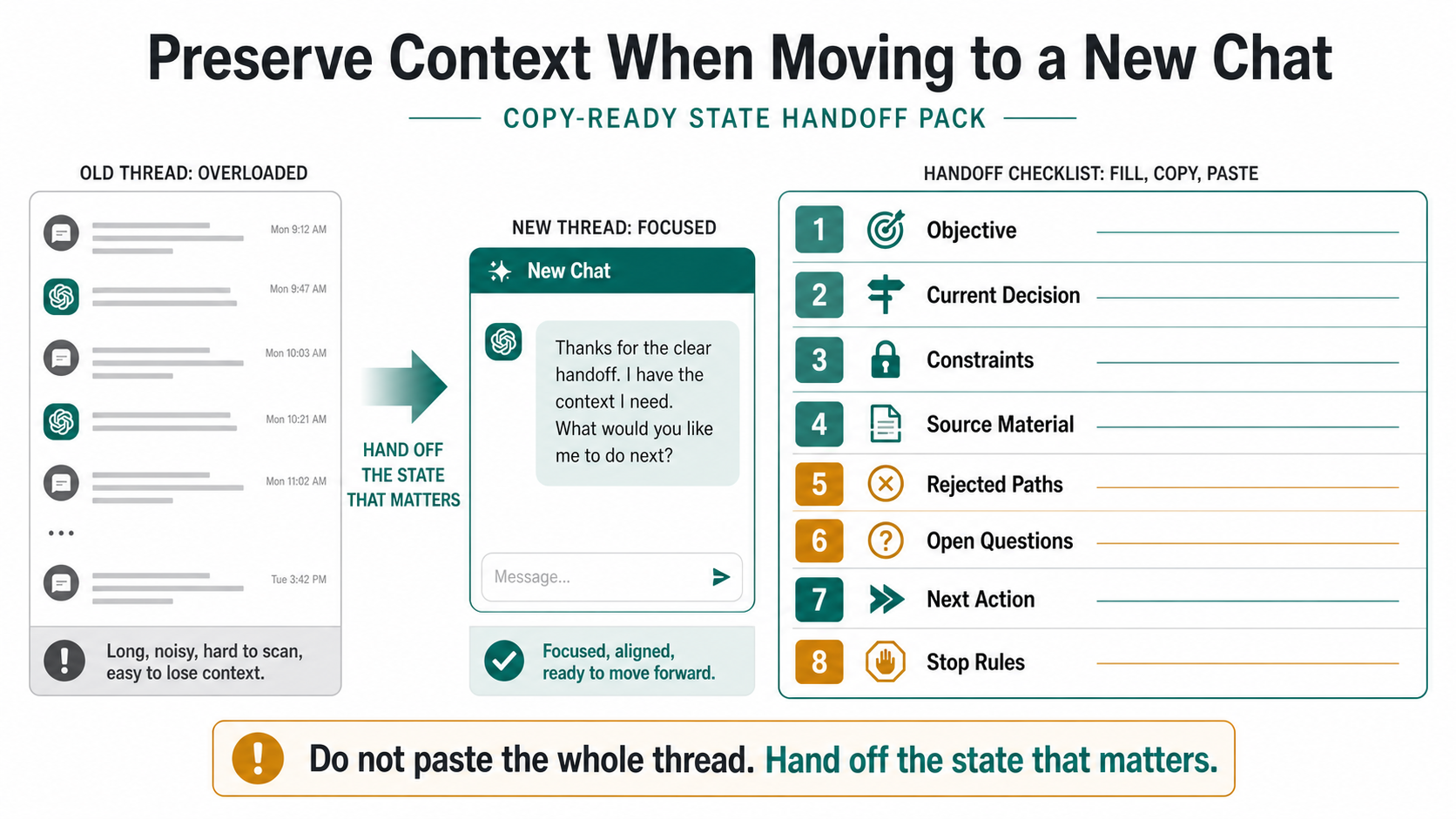
A useful handoff is not a recap. It is the state the next chat must treat as source of truth. The packet should be short enough to paste into a fresh conversation, but specific enough to protect the decisions that made the old thread valuable.
Use this prompt inside the old thread:
Create a state handoff pack for a fresh ChatGPT conversation.

Include only current, useful state:
1. Objective: what we are trying to finish.
2. Current decision: the latest agreed direction.
3. Constraints: must-follow requirements, style rules, limits, or exclusions.
4. Source material: files, URLs, notes, data, or examples that still matter.
5. Rejected paths: options we considered and should not reopen unless asked.
6. Open questions: what is unresolved and what evidence is still missing.
7. Next action: the first task the fresh chat should perform.
8. Stop rules: what the fresh chat must not assume or change.

Do not include old debate, repeated corrections, stale branches, or abandoned drafts.
Mark any uncertain item as uncertain.
Then edit the output before you paste it into the new chat. Remove stale branches. Add filenames or links that ChatGPT did not name. Make decisions explicit. If the old thread is confused, do not let it be the final judge of the handoff. Your own inspection is the quality control.
Here is a compact handoff shape:
Objective:
- Finish a practical article on why long ChatGPT work drifts and how to hand it off.

Current decision:
- The article should separate Memory, Projects, active context, and handoff state.

Constraints:
- Do not claim Memory replays every old turn.
- Do not publish exact context-window values without a dated official source.
- Do not recommend third-party memory extensions.

Source material:
- OpenAI Memory FAQ.
- OpenAI Projects help.
- OpenAI model/context-window help if exact values are needed.

Rejected paths:
- Generic Memory settings FAQ.
- "Just start over" advice.
- Tool roundup.

Open questions:
- Whether a live status incident exists. Check only if the symptom includes errors or failed replies.

Next action:
- Draft the section on when to stay, checkpoint, or start fresh.

Stop rules:
- Do not rewrite the article around a model-number leaderboard.
- Do not add product claims without current sources.
The important part is not the exact format. The important part is that the new chat receives decisions, constraints, and stop rules, not just a compressed story about the old chat.
What belongs in Memory, Projects, files, and the current thread
Saved Memory is best for durable user context. Put stable preferences, recurring background, and account-level facts there only when they should influence many future chats. Do not put private temporary data, sensitive client details, or dense project decisions into saved memories just because you are afraid of losing them.
Projects are better for recurring task context. Project instructions can tell ChatGPT how to behave inside that workspace. Project files can hold source material. Project chats can keep related work grouped. If you keep returning to the same product launch, codebase, content cluster, or research package, a Project is usually a better home than one giant conversation.
External files or notes remain the safest source of truth for important work. A local document, repo file, spreadsheet, ticket, or source pack gives you something inspectable outside ChatGPT. That matters when the chat's own summary becomes questionable. If the work is valuable, do not let the only authoritative version live in a chat thread.
The current thread is still useful for active collaboration. It is good for the next draft section, the next code explanation, the next comparison, or the next few decisions. It is weaker as an archive. Once the thread carries many rounds of stale context, make a handoff pack and reduce the working set.
Use Temporary Chat when you want separation, not continuity. It is useful for one-off questions, sensitive exploration, or a session that should not use or update Memory. It is not the place to build a long-running work base.
When the problem is not normal context drift
Sometimes the right branch is not Memory or context at all. If ChatGPT stops mid-answer, shows a stream error, or fails while generating a reply, preserve the partial answer and use a failure branch. The adjacent ChatGPT error in message stream recovery path is a better fit for interrupted replies, network issues, prompt complexity, upload branches, or API streaming errors.
If the thread starts failing after files, images, or attachments enter the workflow, test without the file branch before blaming long-chat context. Image upload and file limits have their own contracts. Use the ChatGPT image upload troubleshooting path when the symptom is a missing button, rejected image, ignored upload, quota message, browser issue, or workspace setting. Use the ChatGPT Plus upload limits reference only after the symptom is truly quota or storage related.
If you suspect a product incident, check status before rewriting your whole workflow. A status incident changes the action: save the work, wait, and retest. A clear status page does not prove your exact conversation is healthy, but it does move you back to branch isolation: fresh chat, shorter prompt, different browser or app, different network, no upload, and a clean handoff.
Exact context-window values are not stable enough to turn into a permanent headline. OpenAI's ChatGPT model help can list current context windows by model, plan, and mode, and those values can change. Use them only to decide whether a given session is likely overloaded. The durable habit is still the same: put durable state outside the drifting thread and hand off the current state explicitly.
FAQ
Does ChatGPT Memory remember everything from a long chat?
No. Memory can preserve durable saved memories and Reference chat history can use relevant past chats, but neither should be treated as a complete replay of every old turn. A long working thread can still drift because the active context for a response is separate from the visible transcript.
Should I start a new chat when ChatGPT forgets earlier details?
Start fresh when repeated corrections no longer stick, when the answer contradicts settled decisions, or when the thread keeps mixing old branches into the current task. Do not start fresh empty. First create and inspect a state handoff pack.
Are ChatGPT Projects better than one long conversation?
For recurring work, usually yes. Projects can keep instructions, files, and related chats closer to the task. They are still not a license to ignore state hygiene. Keep important decisions and source material inspectable in files or a handoff pack.
What should go into ChatGPT Memory?
Use saved Memory for durable preferences and stable facts that should help many future chats. Avoid stuffing dense project state, temporary decisions, sensitive client details, or full transcripts into Memory.
What should a handoff pack include?
Include objective, current decision, constraints, source material, rejected paths, open questions, next action, and stop rules. If a detail is uncertain, mark it as uncertain instead of letting the next chat treat it as fact.
Can a longer context window solve the problem?
A longer context window can help, but it does not remove the need for state management. Long conversations still accumulate stale branches, contradictory instructions, and old drafts. Use current OpenAI help for model-specific limits, then preserve the working state explicitly.
When is this actually a ChatGPT bug or outage?
Treat it as a possible incident when replies fail, stop, show errors, or break across clean chats and devices. Treat it as context drift when the product works but the old thread no longer follows earlier decisions well. The actions are different, so diagnose the branch before changing everything.