TL;DR
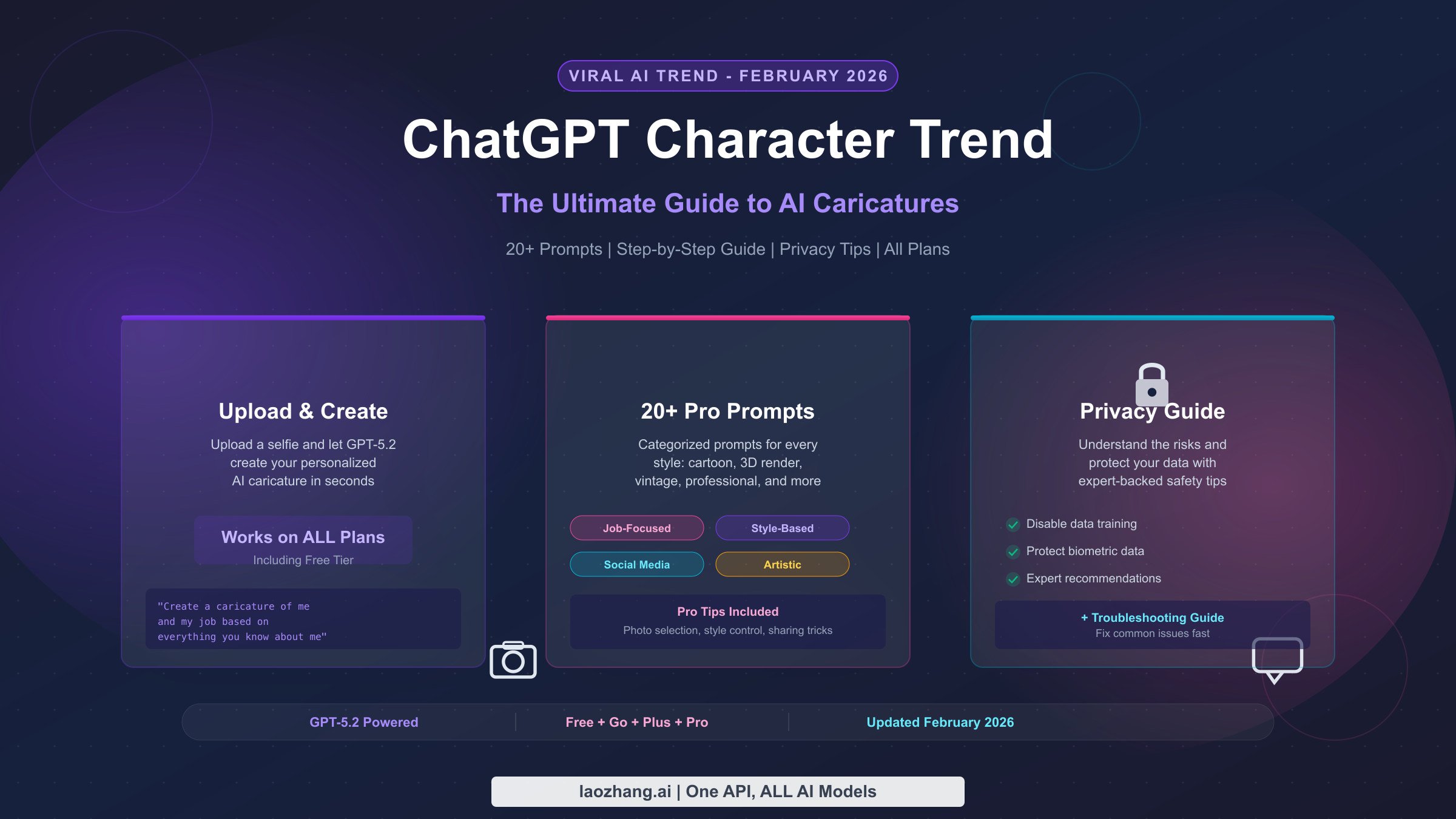
The ChatGPT character trend lets you upload a selfie and receive a personalized AI caricature powered by GPT-5.2. It works on all plans including Free, though paid plans like Go ($8/month) and Plus ($20/month) offer faster generation and higher limits. Upload a clear headshot, use one of the prompts below, and you will have a shareable caricature in under a minute. Turn off model training in Settings before you start, and delete the conversation after downloading your image to protect your privacy.
What Is the ChatGPT Character Trend Taking Over Social Media?
If you have scrolled through Instagram, TikTok, or LinkedIn in the past week, you have almost certainly seen them: colorful, exaggerated cartoon versions of real people, often holding objects related to their profession or hobbies. A barista clutching an oversized latte, a software engineer surrounded by floating code snippets, a teacher wielding a giant red pen. These are AI-generated caricatures created through ChatGPT, and they represent one of the biggest viral trends of early 2026.
The trend exploded in the first week of February 2026 when users discovered that ChatGPT's image generation capabilities had reached a new level of personalization. Unlike earlier AI image tools that produced generic cartoon avatars, the current GPT-5.2 model can analyze your uploaded photo alongside your entire conversation history to create a caricature that captures not just your physical appearance but also your personality and interests. The result feels surprisingly personal, which is exactly why millions of people have shared their versions across every major social platform.
What makes this trend different from previous AI image fads is the depth of personalization involved. Earlier trends like AI yearbook photos or Barbie selfies applied a uniform style filter to everyone. The ChatGPT character trend, by contrast, produces genuinely unique outputs because the model draws on context about you. If you have previously told ChatGPT about your job, hobbies, or daily routines, the caricature will reference those details in clever and often humorous ways. This contextual awareness is what turned a simple image generation feature into a viral social media phenomenon, as people were genuinely surprised by how much ChatGPT "knew" about them.
The trend gained additional momentum from celebrity and influencer participation. When public figures began sharing their ChatGPT caricatures with millions of followers, the effect was a massive cascade of everyday users wanting to try it themselves. Media outlets from Creative Bloq to TechRadar covered the trend extensively, and the volume of image generation requests was so high that OpenAI reportedly experienced temporary slowdowns during peak hours. For a deeper dive into how this specific caricature style emerged and evolved, check out our detailed ChatGPT caricature trend guide which traces the origin story from early experiments to global virality.
The core mechanic is straightforward: you upload a photo of yourself to ChatGPT, type a prompt asking it to create a caricature based on your appearance and what it knows about you, and the model generates a custom cartoon image within seconds. The most commonly used prompt that started the trend is simply "Create a caricature of me and my job based on everything you know about me," though as we will explore later in this guide, there are many variations that can produce dramatically different and often better results.
How to Create Your ChatGPT Character in 5 Minutes
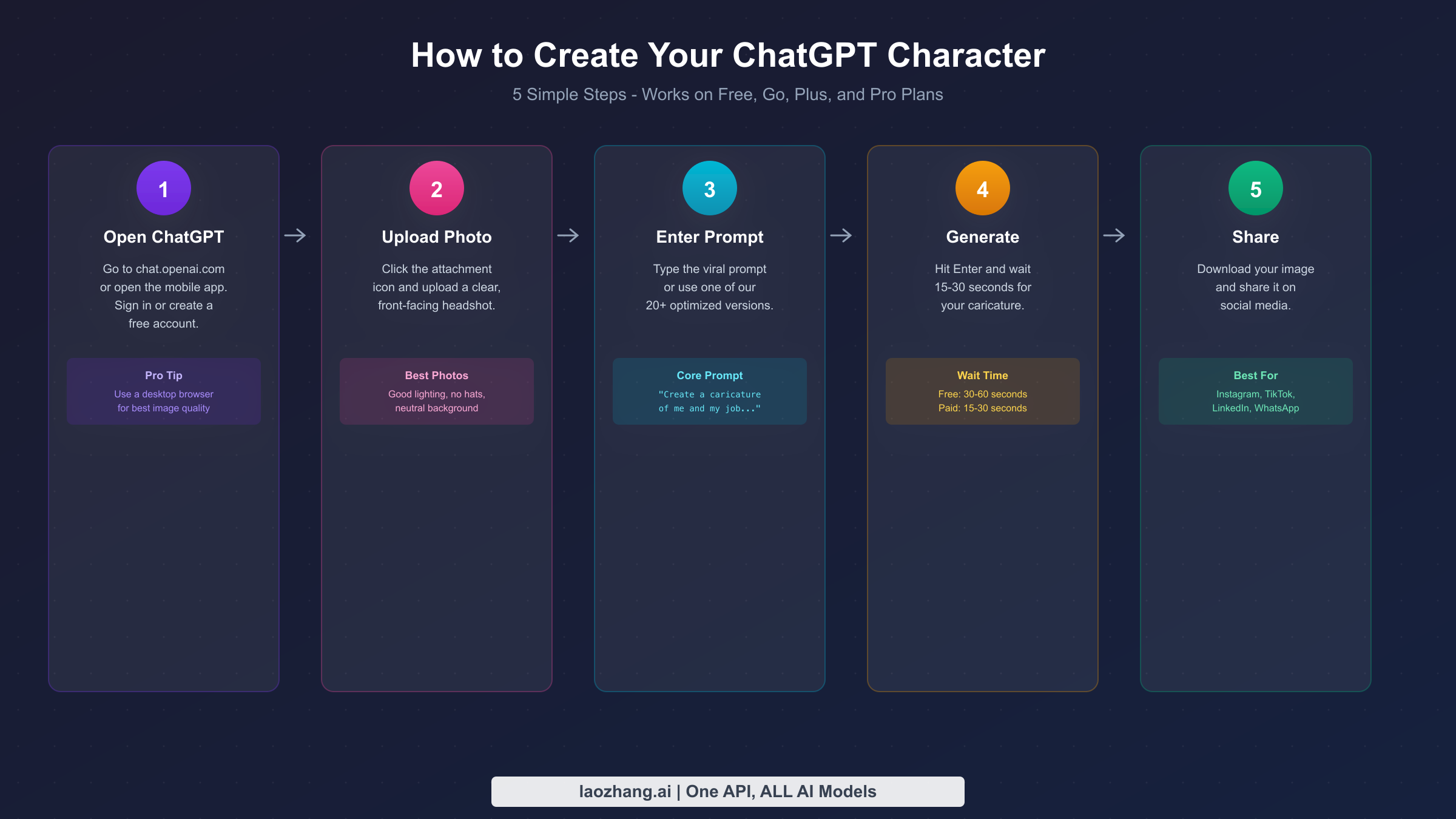
Creating your own ChatGPT character caricature is genuinely simple, but a few details make the difference between a mediocre result and something you will actually want to share. The process works on desktop browsers, the iOS app, and the Android app, though desktop browsers tend to produce slightly higher quality outputs because of the larger display and easier photo upload workflow. Here is the complete process from opening ChatGPT to downloading your finished caricature.
Step 1: Open ChatGPT and sign in. Navigate to chat.openai.com in your browser or open the ChatGPT mobile app. If you do not have an account, you can create a free one in under a minute. Free accounts do have access to image generation, though with daily limits that we will discuss in the pricing section below. Once signed in, start a new conversation rather than continuing an existing one, because a fresh chat gives the model a clean context for your image request.
Step 2: Upload a clear photo of yourself. Click the attachment icon (the paperclip or plus symbol) and select a photo from your device. The quality of your input photo has a direct and significant impact on the quality of your caricature. Choose a well-lit, front-facing headshot where your face is clearly visible. Avoid group photos, heavy filters, sunglasses, or hats that obscure your features. The model needs to see your facial structure, hair, and expression clearly to produce a recognizable caricature. A simple selfie taken in natural daylight against a plain background works best.
Step 3: Type your prompt and hit send. The prompt you choose determines the style, tone, and content of your caricature. The original viral prompt is: "Create a caricature of me and my job based on everything you know about me." However, if this is a new conversation and ChatGPT does not have prior context about your profession, you should provide that information directly. A more effective prompt for new users is: "Create a caricature of me as a [your profession]. Make it colorful and exaggerated with props related to my work." We have compiled more than 15 tested prompts organized by category later in this article.
Step 4: Wait for generation and review the result. After sending your prompt, ChatGPT will process your photo and generate the caricature. On paid plans, this typically takes 15 to 30 seconds. On the free plan, generation may take 30 to 60 seconds, especially during peak usage hours. If you are not satisfied with the result, you can ask ChatGPT to adjust specific elements. Try follow-up prompts like "make the expression more exaggerated," "add more props related to coding," or "change the style to look more like a Pixar character." Iterative refinement often produces the best results.
Step 5: Download and share your caricature. Once you are happy with the result, click or tap on the generated image to view it at full size, then use the download button to save it to your device. The image is generated at a resolution suitable for social media sharing. For Instagram, the square crop works naturally. For TikTok, you might want to add the image to a video template. LinkedIn users have found that posting their caricature alongside their real photo generates high engagement. Remember to delete the conversation after downloading if you are concerned about privacy, which we will cover in detail in the privacy section.
One important technical note: the ChatGPT character trend relies on the image generation capabilities built into GPT-5.2, which is the current model as of February 2026 (verified on OpenAI's official pricing page). Earlier models like GPT-4o also had image generation, but GPT-5.2 produces noticeably better results with more accurate facial feature recognition and more creative stylistic choices. You do not need to select a specific model version manually, as ChatGPT automatically uses the latest available model for your plan tier.
Which ChatGPT Plan Do You Actually Need for AI Characters?
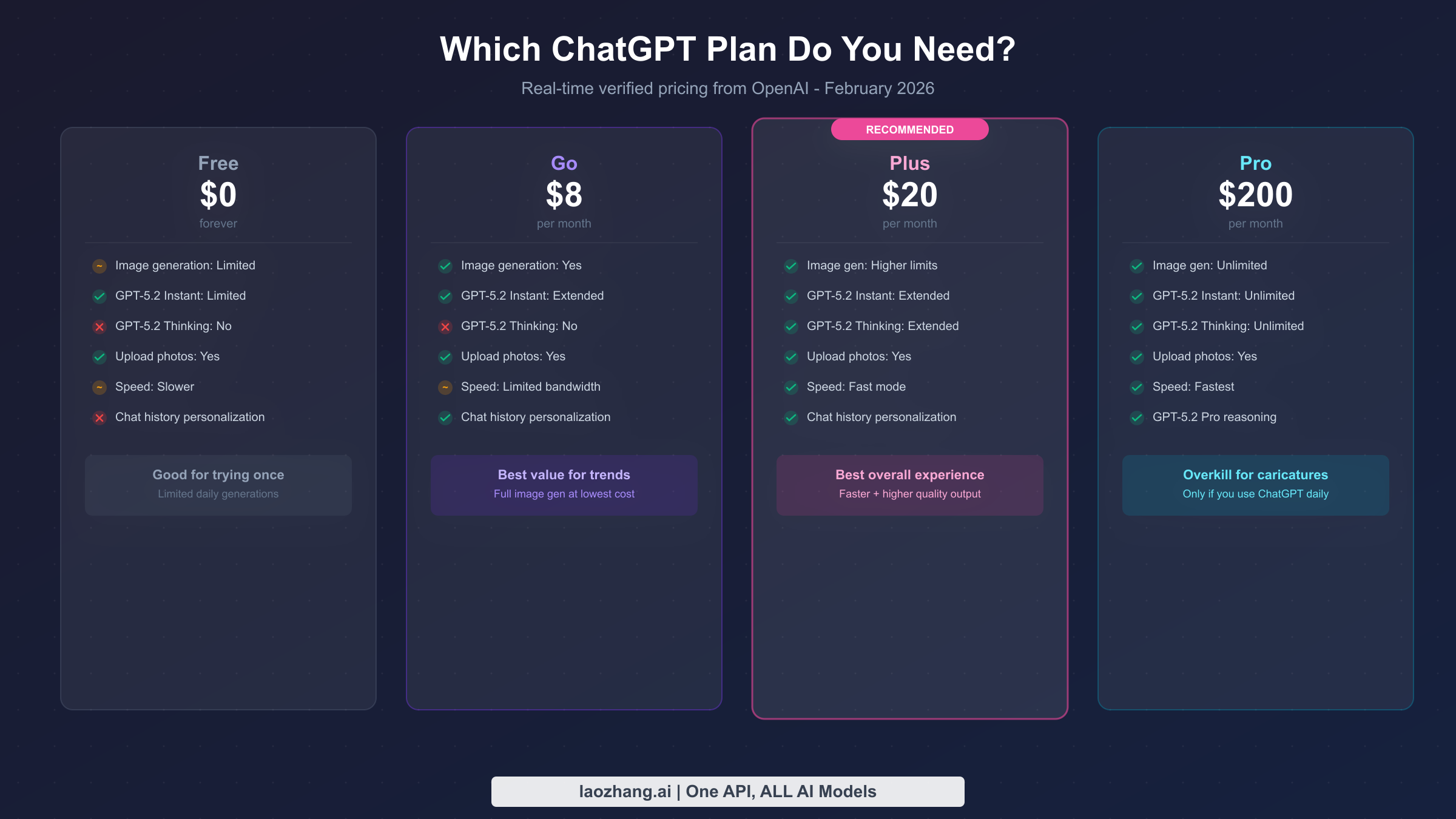
One of the most common questions surrounding the ChatGPT character trend is whether you need to pay for a subscription. The answer depends on how many caricatures you want to create and how quickly you need them. OpenAI currently offers four plans, and all of them include some level of image generation capability. Here is a breakdown based on real-time verified pricing from OpenAI's official website (openai.com/chatgpt/pricing, verified February 10, 2026).
The Free plan costs nothing and does include image generation, but with significant daily limits. You can create a handful of images per day, which is enough to try the trend once or twice and see what the fuss is about. The free tier uses GPT-5.2 Instant but with lower priority, meaning slower response times during peak hours. If you just want to create one caricature for yourself and share it on social media, the free plan is perfectly adequate. The limitation becomes frustrating only if you want to experiment with multiple prompts or create caricatures for friends and family. For a detailed breakdown of exactly how many images you can generate on the free tier, see our guide on free plan image generation limits.
The Go plan at $8 per month represents the best value specifically for the character trend. It provides extended access to GPT-5.2 Instant with significantly higher image generation limits than the free tier. You can comfortably create a dozen or more caricatures in a single session, experiment with different prompts and styles, and generate images for friends without hitting a wall. The Go plan does not include GPT-5.2 Thinking (the reasoning model), but that is irrelevant for image generation. If your primary reason for subscribing is to participate in the character trend, Go gives you everything you need at the lowest monthly cost.
The Plus plan at $20 per month is the most popular tier overall and the one OpenAI recommends for most users. It provides higher image generation limits than Go, access to both GPT-5.2 Instant and GPT-5.2 Thinking, and faster processing speeds. The additional speed is noticeable: where the Go plan might take 20 to 30 seconds for a complex caricature, Plus often delivers in 10 to 20 seconds. Plus also includes chat history personalization, which means the model can reference your previous conversations when creating your caricature, producing more personalized and context-aware results. If you use ChatGPT for other tasks beyond image generation, Plus is the better overall investment. For a detailed feature-by-feature comparison, read our detailed comparison of ChatGPT Go versus Plus.
The Pro plan at $200 per month is overkill for caricature generation. It provides unlimited image generation, the fastest processing speeds, and access to GPT-5.2 Pro for advanced reasoning tasks. Unless you are a professional content creator who needs to generate hundreds of AI images daily, or you rely heavily on ChatGPT for complex professional work, the Pro plan is not worth the premium for the character trend alone.
| Feature | Free ($0) | Go ($8/mo) | Plus ($20/mo) | Pro ($200/mo) |
|---|---|---|---|---|
| Image Generation | Limited daily | Extended | Higher limits | Unlimited |
| GPT-5.2 Instant | Limited | Extended | Extended | Unlimited |
| GPT-5.2 Thinking | No | No | Extended | Unlimited |
| Speed | Slower | Standard | Fast | Fastest |
| Personalization | No | Yes | Yes | Yes |
| Best For | Trying once | Trend participation | Daily use + trends | Professional creators |
For developers and businesses looking to integrate AI image generation into their own applications at scale, API access provides an alternative to consumer subscriptions. Services like laozhang.ai offer unified API access to multiple AI models at competitive rates, which can be more cost-effective than individual subscriptions when generating large volumes of images programmatically.
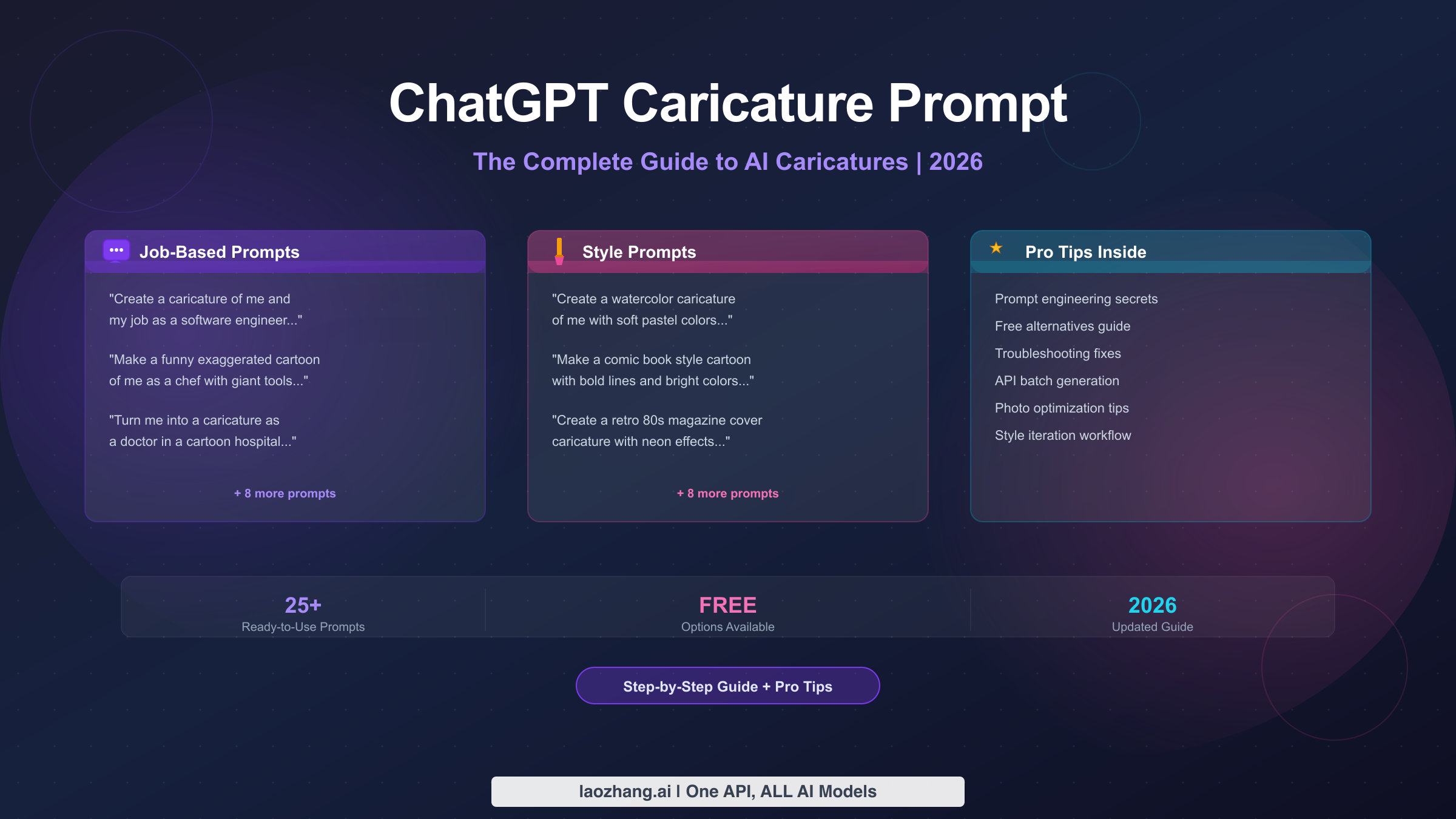
15+ Best Prompts for Stunning ChatGPT Characters
The prompt you use is the single biggest factor in determining the quality and style of your ChatGPT caricature, even more important than the photo you upload. A vague prompt produces a generic result, while a specific, well-crafted prompt can produce something genuinely impressive. After testing dozens of variations, we have organized the most effective prompts into categories so you can quickly find one that matches your desired outcome. For an even deeper exploration of prompt engineering for ChatGPT images beyond caricatures, see our comprehensive ChatGPT image prompts guide.
The Original Viral Prompt
The prompt that started the entire trend remains one of the most effective because it leverages ChatGPT's memory of your conversation history. If you have been using ChatGPT regularly and it has context about your life, profession, and interests, this prompt produces surprisingly personalized results: "Create a caricature of me and my job based on everything you know about me." The key phrase is "everything you know about me," which instructs the model to draw on stored context. If you are using a new account or a temporary chat, this prompt will still work but will produce a more generic caricature based solely on your photo.
Job-Focused Prompts
Job-focused prompts are the most popular category because professional identity is inherently visual and relatable. These prompts work best when you specify your exact role rather than a broad category, and when you include details about your daily work environment.
- "Create a colorful cartoon caricature of me as a [specific job title]. Show me surrounded by the tools and objects I use every day, with an exaggerated expression that shows how I feel about Monday mornings."
- "Turn me into an animated character in my workplace. I'm a [job title] and I want to see myself heroically battling [common challenge in your field], drawn in a fun cartoon style with bright colors."
- "Design a caricature trading card of me as a [job title]. Include stats like 'Coffee Consumed: 999+' and 'Meetings Survived: Expert Level' with my photo transformed into the character art."
Style-Based Prompts
These prompts focus on achieving a specific artistic style rather than a particular theme, giving you control over the visual aesthetic of your caricature.
- "Transform my photo into a Pixar-style 3D character with exaggerated features, big expressive eyes, and a warm color palette. Show me in a fun pose that captures my personality."
- "Create a Japanese anime-style character based on my photo. Use cel-shading, dramatic lighting, and give me an action pose. Include sparkle effects and a dynamic background."
- "Turn me into a vintage comic book character from the 1960s. Use halftone dots, bold outlines, primary colors, and add a speech bubble with a witty catchphrase about [your hobby or profession]."
- "Create a watercolor portrait caricature of me with exaggerated features. Use soft, flowing colors and artistic brush strokes. Make it look like it was painted by a skilled street caricature artist."
Social Media Optimized Prompts
These prompts are specifically designed to produce images that perform well on particular platforms, taking into account aspect ratios, visual impact at small sizes, and the kind of content that generates engagement.
- "Create a bold, eye-catching caricature of me for my Instagram profile. Use vibrant neon colors against a dark background, exaggerate my most distinctive features, and make it look professional enough to use as a profile picture."
- "Design a LinkedIn-appropriate professional caricature of me as a [job title]. Keep the style polished and business-friendly while still being fun and approachable. Include subtle professional elements in the background."
- "Create a fun, dynamic caricature of me that would work as a TikTok profile picture. Make it energetic with bright colors, a big smile, and include elements that represent [your main content niche]."
Advanced Creative Prompts
For users who want to push beyond the standard caricature style and create something truly unique, these prompts introduce more complex artistic directions and storytelling elements.
- "Create a movie poster featuring me as the main character in an action film about [your profession]. Draw me in a heroic caricature style with dramatic lighting, include a tagline, and show the movie title at the top."
- "Design a magazine cover featuring my caricature for a fictional magazine called '[Your Field] Monthly.' Include headlines, a barcode, and make the caricature look polished and editorial."
- "Create a fantasy RPG character card based on my photo. Give me a character class based on my profession, show me with magical equipment related to my job, include stats, and use a medieval art style."
- "Turn me into a Street Fighter-style character select screen portrait. Show my caricature in a fighting stance with special move names listed below based on skills from my real profession."
Prompt Optimization Tips
Beyond choosing the right base prompt, several techniques consistently improve results across all categories. Adding the phrase "with exaggerated features" explicitly tells the model to lean into the caricature style rather than producing a realistic portrait. Specifying a color palette like "vibrant colors" or "pastel tones" gives you more control over the aesthetic. Including emotional direction such as "looking confident" or "with a mischievous grin" adds personality to the output. Finally, mentioning specific props or background elements rather than leaving them to the model's imagination produces more relevant and interesting compositions. The most effective approach is to start with a base prompt, review the result, and then iterate with specific adjustments in follow-up messages.
Pro Tips to Make Your AI Character Stand Out
The difference between a forgettable AI caricature and one that gets hundreds of likes on social media comes down to details that most users overlook. While the prompt matters most, the combination of photo quality, generation settings, and post-generation optimization determines whether your result looks amateur or professional. These tips are based on extensive testing and observation of the caricatures that have performed best across social platforms during the trend's peak.
Photo selection is your most powerful lever. The model can only work with what you give it, and a poor input photo constrains even the best prompt. Natural lighting is essential because artificial light creates harsh shadows that confuse the model's facial feature detection. A front-facing angle with your face occupying at least 40 percent of the frame produces the most accurate caricatures. Avoid photos where you are looking to the side or downward, as the model struggles to exaggerate features it cannot fully see. Remove glasses if possible, as reflections and frames often create artifacts in the generated image. Background matters less than you might expect because the model replaces it entirely, but a clean, uncluttered background helps the model isolate your face more accurately during the initial processing step.
Provide context even in new conversations. If you are using a temporary chat or a new account without conversation history, the model has no context about your life beyond your photo. You can dramatically improve personalization by including relevant details directly in your prompt. Instead of just saying "create a caricature of me," try "create a caricature of me as a data scientist who loves hiking, plays guitar on weekends, and has two cats." This level of detail gives the model specific elements to incorporate, resulting in a much more personalized and interesting output. The users who get the most impressive results are those who treat the prompt as a creative brief rather than a simple instruction.
Iterate rather than starting over. Many users make the mistake of starting a brand new conversation when they are not happy with their first result. This is wasteful because the model loses all context from the previous attempt. Instead, use follow-up messages to refine the output. Phrases like "make the eyes bigger," "add more color to the background," "change my expression to a confident smirk," or "make the props more exaggerated" allow you to incrementally improve the caricature while building on what already works. Three rounds of iteration in the same conversation typically produces significantly better results than three separate attempts.
Time your generation for best results. Server load affects output quality and speed. The ChatGPT character trend has created massive demand, and during peak hours (typically 9 AM to 5 PM US Eastern time on weekdays), generation can be slower and occasionally produce lower quality results due to load balancing. If you have flexibility, generating during off-peak hours like early morning or late evening often yields faster and slightly better results. This is particularly relevant for free plan users, who experience the most significant impact from server congestion.
Post-generation editing can elevate your result. Once you have downloaded your caricature, minor adjustments in any photo editing app can make it pop even more. Slightly increasing saturation makes colors more vibrant for social media viewing. Cropping to a tight square for Instagram or adding a subtle border helps the image stand out in a feed. Some users have found success creating side-by-side comparisons with their real photo, which tends to generate higher engagement because viewers can directly compare the AI interpretation with reality. Adding your name or professional title as a text overlay transforms the caricature from a fun novelty into something that functions as a personal brand asset.
Privacy and Safety Guide for the ChatGPT Character Trend
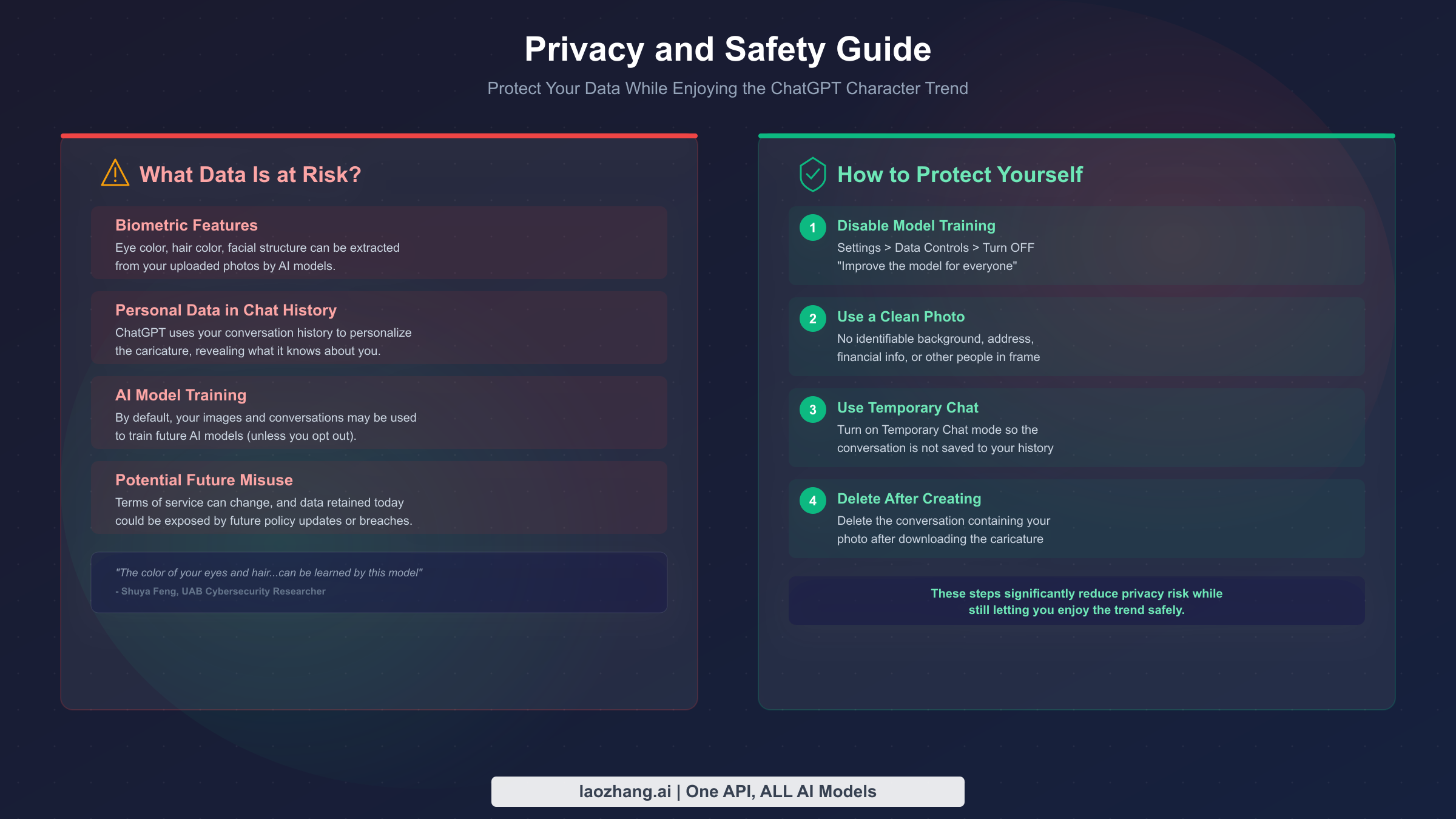
The ChatGPT character trend is fun, but it involves sharing personal data, specifically your face, with an AI system. Understanding what happens to that data and how to protect yourself is important, especially because many participants are uploading photos without considering the implications. This is not meant to discourage you from participating. Rather, it is a practical guide to enjoying the trend while making informed decisions about your privacy.
When you upload a photo to ChatGPT, the image is processed by OpenAI's servers to generate your caricature. The key privacy question is what happens to that photo afterward. By default, OpenAI uses conversations, including uploaded images, to improve their models through training. This means your photo could theoretically become part of the dataset used to train future AI models. The practical risk of any individual photo being identifiable in a training dataset is very low, but the principle matters: your facial data is being retained and potentially used beyond the immediate purpose of creating your caricature.
Cybersecurity researcher Shuya Feng from the University of Alabama at Birmingham has highlighted a specific concern that many users overlook. Beyond the photo itself, the AI model can extract and encode biometric features from your image, including eye color, hair color, skin tone, and facial structure. As Feng noted in widely reported comments, "the color of your eyes and hair...can be learned by this model." This is not unique to ChatGPT, as any AI system processing facial images has this capability, but it is worth understanding that you are sharing more than just a fun selfie. The model is analyzing your physical characteristics at a granular level.
Another layer of privacy consideration involves the conversation history aspect of the trend. The viral prompt specifically asks ChatGPT to create a caricature based on "everything you know about me," which means the model is drawing on your accumulated chat history to personalize the output. While this produces more interesting caricatures, it also reveals how much personal information ChatGPT has gathered over time. Some users have been surprised to see caricatures that reference their job, hobbies, relationship status, or other details they had mentioned in unrelated conversations months earlier. This revelation has prompted some users to reconsider how much personal information they share with AI assistants in general.
Four Steps to Protect Yourself
You can significantly reduce privacy risk while still participating in the trend by following four specific steps. First, disable model training before uploading your photo. Go to Settings, then Data Controls, and turn off "Improve the model for everyone." This prevents your uploaded images and conversations from being used to train future models. Note that this setting applies going forward and does not retroactively remove data from previous conversations.
Second, use a clean photo that does not contain sensitive background information. Remove photos that show your home address, license plate, financial documents, or other people who have not consented to having their image processed by AI. A simple headshot against a plain background is ideal for both privacy and caricature quality.
Third, use the Temporary Chat feature if available on your plan. Temporary chats are not saved to your conversation history and are not used for model training regardless of your data control settings. This provides an additional layer of privacy for the specific purpose of generating your caricature.
Fourth, delete the conversation after you have downloaded your caricature. This removes the uploaded photo and generated image from your conversation history. While OpenAI may retain data for a period according to their data retention policies, deleting the conversation ensures it is not readily accessible and signals your preference for data removal.
These four steps are not about paranoia. They are about making an informed choice. The ChatGPT character trend is entertaining and creative, and millions of people are participating safely. The goal is simply to ensure you are making a conscious decision about your data rather than sharing it without awareness.
Troubleshooting Common ChatGPT Character Issues
Even with a great prompt and a clear photo, things do not always go perfectly on the first try. Image generation is a complex process, and several common issues can prevent you from getting the result you want. This troubleshooting section covers the problems that users most frequently encounter and provides specific solutions for each.
The generated caricature does not look like you. This is the most common complaint, and it almost always stems from the input photo rather than the model. If the model produces a caricature that looks like a generic cartoon person rather than a recognizable version of you, the photo likely does not provide enough clear facial information. Switch to a higher resolution photo with even lighting, ensure your face is the dominant element in the frame, and remove any accessories that obscure your features. If you are wearing a hat, glasses, or a mask in the photo, the model has to guess at the hidden features, which reduces accuracy. Taking a fresh selfie specifically for this purpose, in good natural light with a neutral expression, typically resolves the issue.
Image generation fails or times out. During peak usage periods, especially in early February 2026 when the trend first went viral, many users experienced generation failures. If your request fails, wait 30 to 60 seconds and try again. If failures persist, check OpenAI's status page (status.openai.com) for any ongoing incidents. Free plan users are most affected by server congestion because they receive lower priority during high-demand periods. If you consistently experience timeouts on the free plan, trying during off-peak hours or upgrading to Go ($8/month) can resolve the issue, as paid plans receive higher processing priority.
The style is too realistic or not exaggerated enough. By default, GPT-5.2 sometimes produces images that look more like stylized portraits than true caricatures. To push the output toward a more exaggerated cartoon style, add explicit style directions to your prompt. Phrases like "highly exaggerated features," "cartoon caricature style with big head and small body," or "in the style of a theme park caricature artist" signal to the model that you want obvious exaggeration rather than subtle stylization. You can also add "make the nose, eyes, and smile much bigger than realistic" to specifically request feature exaggeration, which is the hallmark of traditional caricature art.
The props or background are wrong or irrelevant. If the model generates props or background elements that do not match your profession or interests, it is likely because you are using a new conversation without history, and the model is guessing. Be more specific in your prompt: instead of "add work-related items," say "surround me with laptops, coffee cups, and sticky notes" or "show me in a kitchen with pots, pans, and a chef's hat." The more specific your visual directions, the more accurate the output. If you are using the "everything you know about me" prompt and getting irrelevant results, it may mean ChatGPT does not actually have much context about your profession, in which case you should provide it directly.
You have hit your daily image generation limit. Free plan users and even Go plan users have daily limits on image generation. If you receive a message saying you have reached your limit, you have three options: wait until the next day when your limit resets, upgrade to a higher plan for increased limits, or try your prompt on an alternative AI image generation tool (covered in the next section). There is no workaround to exceed your plan's daily limit within ChatGPT itself, as these limits are enforced at the account level.
The image quality is low or blurry. If your generated caricature appears pixelated or low resolution, this is typically a rendering issue rather than a model limitation. Try regenerating the image by asking "generate this again at the highest possible resolution." If the issue persists, ensure you are downloading the full-size image rather than a compressed preview. On mobile, tap the image to view it at full resolution before saving, as the in-chat preview is often compressed to reduce bandwidth usage.
Best Free Alternatives for AI Character Generation
While ChatGPT is the most popular tool for the character trend, it is not the only option. Several alternatives offer AI caricature and character generation capabilities, some completely free. If you have hit your ChatGPT free plan limits, do not want to create an OpenAI account, or simply want to compare results across different AI systems, these alternatives are worth exploring.
| Tool | Price | Style Quality | Ease of Use | Best For |
|---|---|---|---|---|
| Microsoft Copilot (DALL-E 3) | Free | Good | Very Easy | Quick caricatures without signup hassle |
| Meta AI | Free | Good | Easy | Facebook/Instagram users |
| Ideogram | Free tier | Excellent | Moderate | Best free image quality |
| Midjourney | $10/mo | Excellent | Moderate | Highest artistic quality |
| Adobe Firefly | Free tier | Good | Easy | Professional look and feel |
| Gemini (Google) | Free | Moderate | Easy | Android/Google users |
Microsoft Copilot is perhaps the closest free alternative to ChatGPT for caricatures. It uses DALL-E 3 for image generation and can produce character-style images from photo descriptions. While it does not accept photo uploads as directly as ChatGPT does, you can describe your appearance in detail and receive a caricature-style output. The quality is generally good and the service is available for free through Bing or the Copilot app with no strict daily limits for casual use.
Ideogram has emerged as a strong contender in the AI image generation space, offering a free tier that produces remarkably high quality results. It excels at incorporating text into images, which makes it particularly good for caricatures that include name labels, professional titles, or humorous captions. The free tier provides a generous daily allowance that exceeds ChatGPT's free limits for image generation.
Midjourney remains the gold standard for artistic quality in AI image generation, but it requires a paid subscription starting at $10 per month and operates through Discord rather than a simple chat interface. If you care deeply about the artistic quality of your caricature and are willing to invest time in learning Midjourney's prompt syntax, the results can be stunning. However, for most users participating in the casual social media trend, the additional complexity and cost are not justified.
For developers and technical users who want to generate AI caricatures programmatically or at scale, API-based approaches offer more flexibility than consumer-facing chatbots. The laozhang.ai API platform provides unified access to multiple AI image generation models through a single API, allowing you to compare results across different models and choose the best output for each use case. This approach is most relevant for app developers building caricature features into their own products, or for content creators who need to generate large numbers of images efficiently.
The choice between these alternatives depends on your priorities. For a quick, easy, free caricature with no learning curve, Microsoft Copilot or Meta AI are the simplest options. For the highest quality results, Midjourney leads the field. For the best balance of quality, ease, and the specific "ChatGPT character trend" social media appeal, sticking with ChatGPT itself, even on the free plan, remains the most straightforward path since the trend is specifically associated with ChatGPT's output style.
Start Creating Your ChatGPT Character Today
The ChatGPT character trend represents a genuinely fun intersection of AI technology and social media creativity. Whether you want a professional LinkedIn avatar, a humorous cartoon for your Instagram stories, or simply a unique conversation starter, creating your AI caricature takes less than five minutes and costs nothing to try.
Here is your quick action plan. Open ChatGPT and start a new conversation. Before uploading anything, go to Settings and Data Controls and turn off model training if privacy matters to you. Upload a clear, well-lit headshot. Start with the classic prompt "Create a caricature of me and my job based on everything you know about me" if you have conversation history, or use a more specific prompt like "Create a colorful cartoon caricature of me as a [your job]. Show me with exaggerated features surrounded by [specific props]" if this is a new account. Review the result, iterate with follow-up refinements, download the image you are happy with, and delete the conversation afterward.
The Free plan works perfectly for a first try. If you find yourself wanting to experiment more, the Go plan at $8 per month provides the best value for trend participation. The Plus plan at $20 per month is worth considering if you use ChatGPT regularly beyond just image generation.
What started as a simple viral moment has revealed something interesting about the current state of AI: these models know us well enough to create surprisingly personal art. Whether that delights or unsettles you, it is worth experiencing firsthand. Upload a photo, try a prompt, and see what ChatGPT thinks you look like as a cartoon character. You might be surprised by what it creates, and that surprise is exactly what has made this trend impossible to ignore.