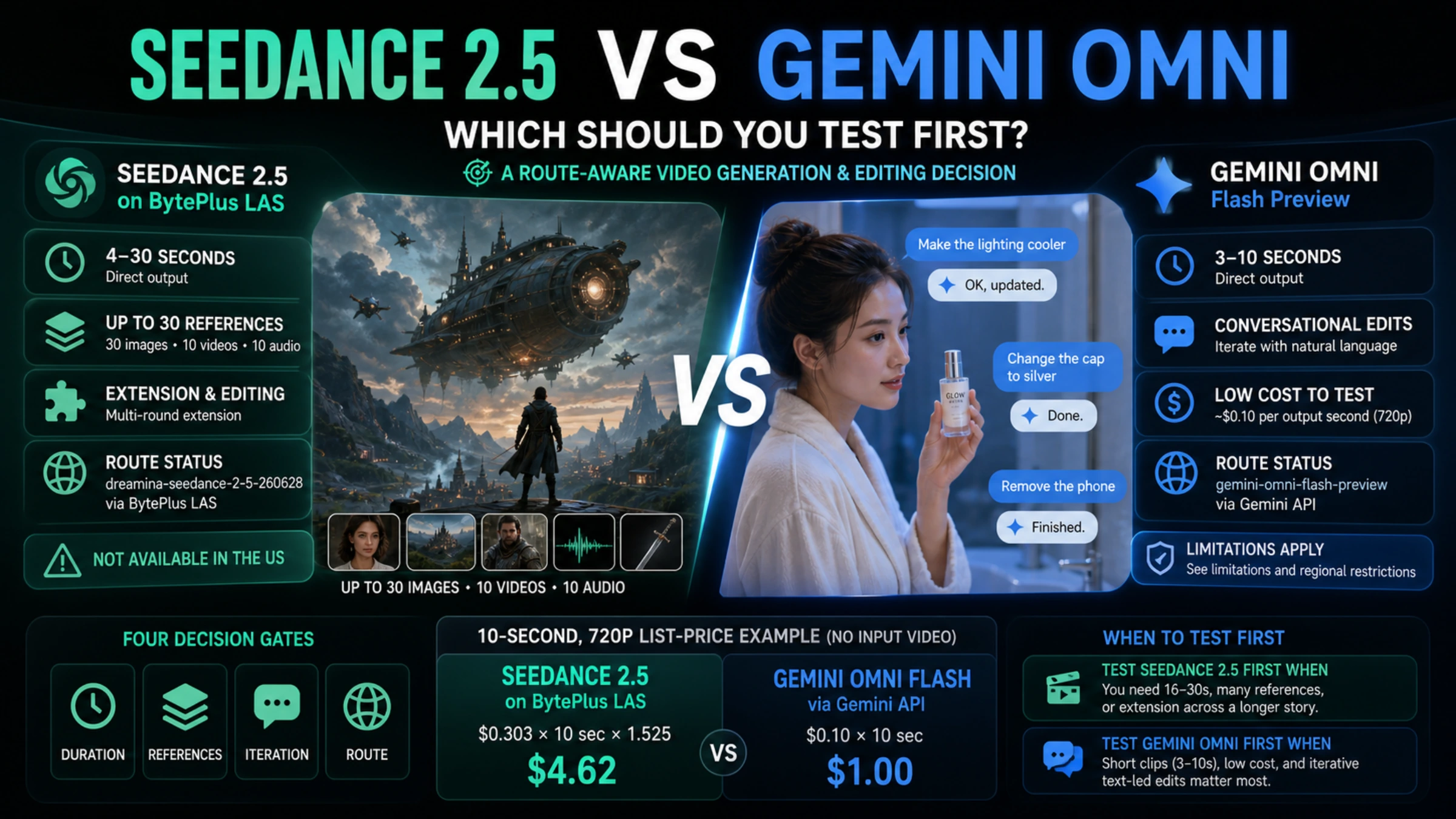
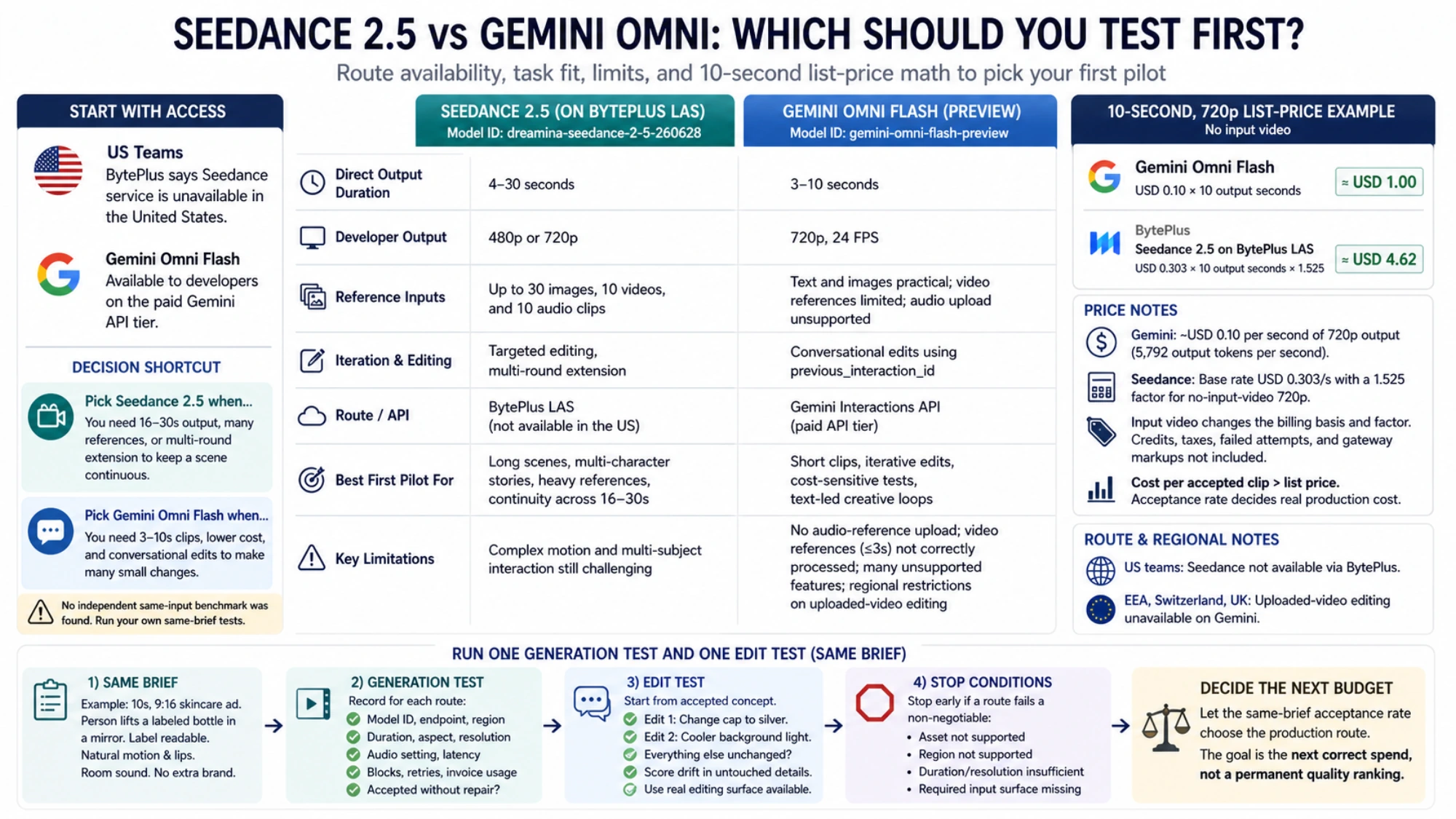
For a US team, the first question is not motion quality. It is access. BytePlus says its service is not available in the United States, while Gemini Omni Flash is available to developers on the paid Gemini API tier. If you require a direct first-party API in the US, Gemini can win the shortlist before a prompt is sent.
Outside that constraint, the models solve different production problems. Seedance 2.5 is the first pilot for a 16–30-second scene, a large mixed-reference pack, or a story that must continue beyond the first generation. Gemini Omni Flash is the first pilot for a 3–10-second clip that will be refined through several natural-language edits. Neither conclusion proves a universal image-quality winner; it tells you where to spend the first controlled test.
Four gates decide whether the comparison is real
| Gate | Seedance 2.5 | Gemini Omni Flash |
|---|---|---|
| Direct output | 4–30 seconds | 3–10 seconds |
| Current developer output | 480p or 720p through BytePlus LAS | 720p, 24 FPS through Gemini API |
| Reference workload | Up to 30 images, 10 videos, and 10 audio clips at the model level | Text and images are practical; current API video-reference handling is limited and audio upload is unsupported |
| Iteration | Targeted editing and multi-round extension | Conversational edits chained with previous_interaction_id |
| Route status | dreamina-seedance-2-5-260628 on BytePlus LAS | gemini-omni-flash-preview on the Interactions API |
The duration and reference figures come from ByteDance Seed's Seedance 2.5 release. Implementation details come from the BytePlus LAS video-generation documentation, which lists 4–30-second output, synchronized audio by default, and 480p/720p for this model.
Google's Gemini Omni Flash model page lists 3–10-second output at 720p and 24 FPS. The developer guide shows text-to-video, image-to-video, and the follow-up interaction used for conversational editing.
That route distinction matters. A consumer app, an official endpoint, and a gateway may expose the same model name with different inputs, retention rules, queues, prices, and safety filters. Record the surface with the model ID; otherwise the result cannot be reproduced.
Choose Seedance when the creative unit is larger than one short clip
Seedance 2.5 expands the amount of story and production context a single request can carry. A director can combine character images, location references, a motion clip, props, and audio, then ask for a continuous passage rather than reconstructing the world every few seconds. Multi-round extension lets a usable first segment become the foundation of a longer piece.
That makes Seedance a sensible first stress test for a multi-character ad, stage performance, education sequence, or narrative scene where an edit boundary is itself a risk. Its 30-second ceiling also changes shot planning: a 20-second performance can remain one generation instead of becoming three clips with two continuity joins.
The larger input surface is not a guarantee of control. References need explicit roles and permission. ByteDance also notes remaining weaknesses in complex motion and multi-subject interaction. A 30-asset request is useful only when each asset changes the intended result; it is not a recipe for automatic consistency.
Choose Gemini when the expensive part is the feedback loop
Gemini Omni Flash treats a generated clip as something that can remain in conversation. After the first result, a new interaction can ask to remove a phone, change a hat, cool the lighting, or replace a sign while retaining the rest. That is valuable when client notes arrive as small changes rather than a new creative brief.
The current output window is short, but it is inexpensive to probe. Google's list price is approximately USD 0.10 per second of 720p output, so a team can test whether repeated edits preserve the subject, action, audio, and untouched details without committing a large generation budget.
The preview limitations are material. Google's current limitation list says audio-reference upload is unsupported; video references of up to three seconds are accepted by the schema but are not correctly processed; multiple-video reference, extension, interpolation, and voice editing are unsupported. Uploaded-video editing is unavailable in the EEA, Switzerland, and the UK. English is fully supported, while other languages have not received the same evaluation.
This makes Omni a strong fit for short generation from text or images followed by edits to the model's output. It should not be sold as a complete multi-video post-production system.
A 10-second list-price test starts near USD 1.00 versus USD 4.62
For one 10-second, 720p output with no input video, the first-party price surfaces produce a useful starting comparison:
| Route | Calculation | Approximate output cost |
|---|---|---|
| Gemini Omni Flash | USD 0.10 × 10 output seconds | USD 1.00 |
| Seedance 2.5 on BytePlus LAS | USD 0.303 × 10 output seconds × 1.525 | USD 4.62075 |
The Gemini Developer API pricing page lists no free API tier, USD 1.50 per million input tokens, and USD 17.50 per million video-output tokens. At 5,792 output tokens per second, Google describes the effective 720p rate as about USD 0.10 per second.
BytePlus uses a base rate and resolution factor. If the Seedance request includes input video, its billing basis becomes input-video duration plus output duration and uses a different factor. Credits, contracts, taxes, failed attempts, gateway markup, and labor are outside both simple examples.
The metric that matters is cost per accepted clip. If Gemini needs four attempts and Seedance needs one, their gap can nearly disappear. If a Seedance scene requires several expensive regenerations while Gemini edits converge, the gap can widen. List price sets a test budget; acceptance rate decides production cost.
Run one generation test and one edit test
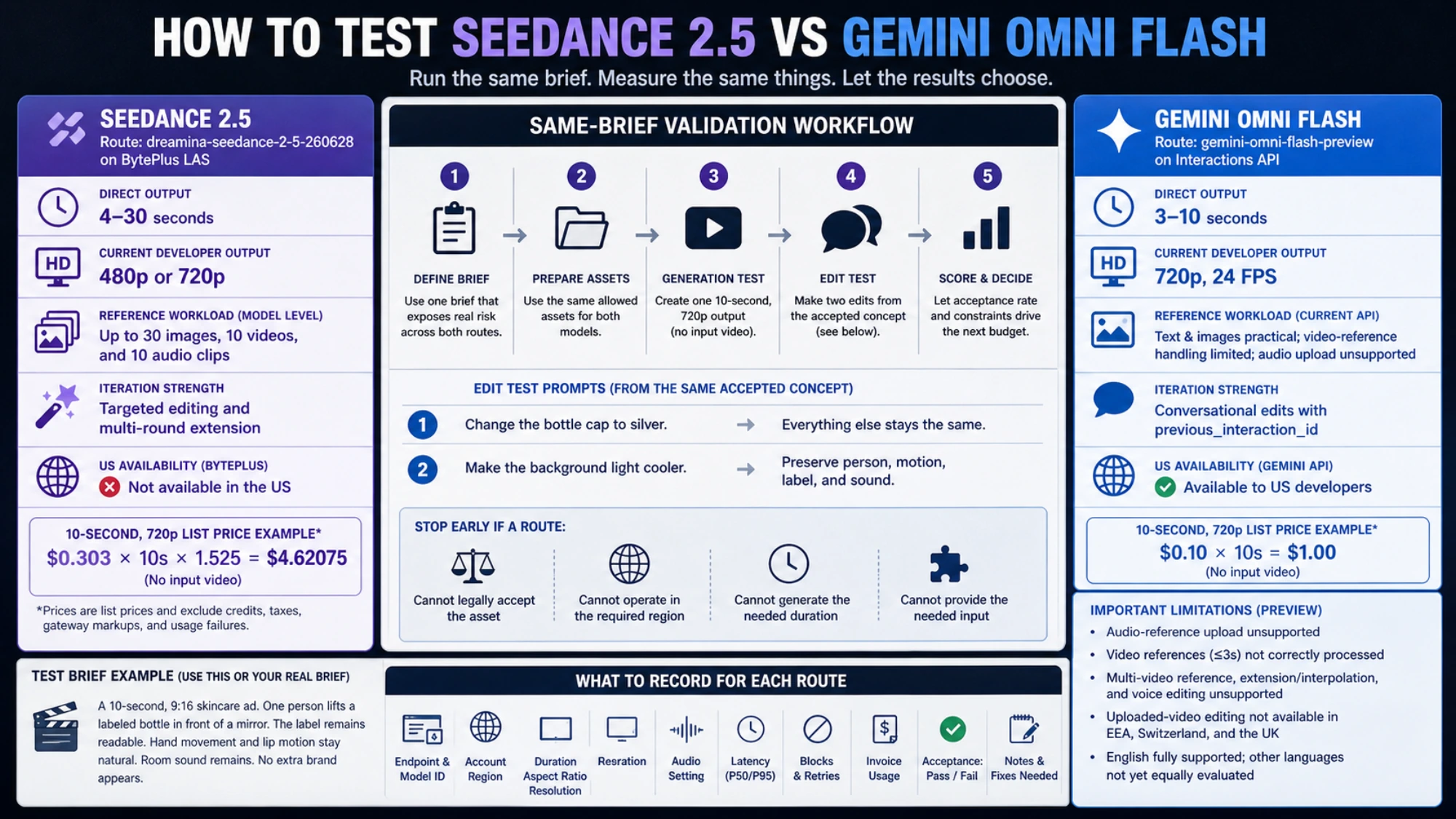
Use a delivery brief that exposes real failure. For example: a 10-second, 9:16 skincare ad; one person lifts a labeled bottle in front of a mirror; the label remains readable; hand movement and lip motion stay natural; room sound remains; no extra brand appears.
Give each route the same allowed assets and acceptance threshold. For the generation round, record the endpoint, model ID, account region, duration, aspect ratio, resolution, audio setting, latency, blocks, retries, invoice usage, and whether the output can be delivered without repair.
For the edit round, start from the same accepted concept. Ask for a silver cap while everything else remains unchanged. Then ask for cooler background light while preserving the person, motion, label, and sound. Gemini can chain edits through the interaction ID. Seedance should use the editing surface actually available to your account. Score drift in the untouched details, not just the requested change.
Stop early when a route misses a non-negotiable condition. A model that cannot legally accept the asset, operate in the required region, generate the needed duration, or expose the needed input is not rescued by a beautiful showcase.
The decision is about the next budget, not a permanent ranking
Test Seedance 2.5 first when continuity across 16–30 seconds, mixed references, or extension is the expensive risk and you have a valid BytePlus or provider route. Test Gemini Omni Flash first when 10 seconds is enough, 720p is acceptable, cost is sensitive, and iterative text-led changes matter more than video or audio references.
US teams needing a direct official route should start with Gemini or treat a Seedance gateway as a separate vendor decision. European teams editing uploaded video must account for Gemini's regional restriction. Once access is valid, let the same-brief acceptance rate choose the production route.
For a deeper look at ByteDance's tiers, read the Seedance 2.5, 2.0, Fast, and Mini guide. If neither candidate survives the pilot, expand the shortlist with the current AI video model comparison instead of spending more on the wrong two-model contest.