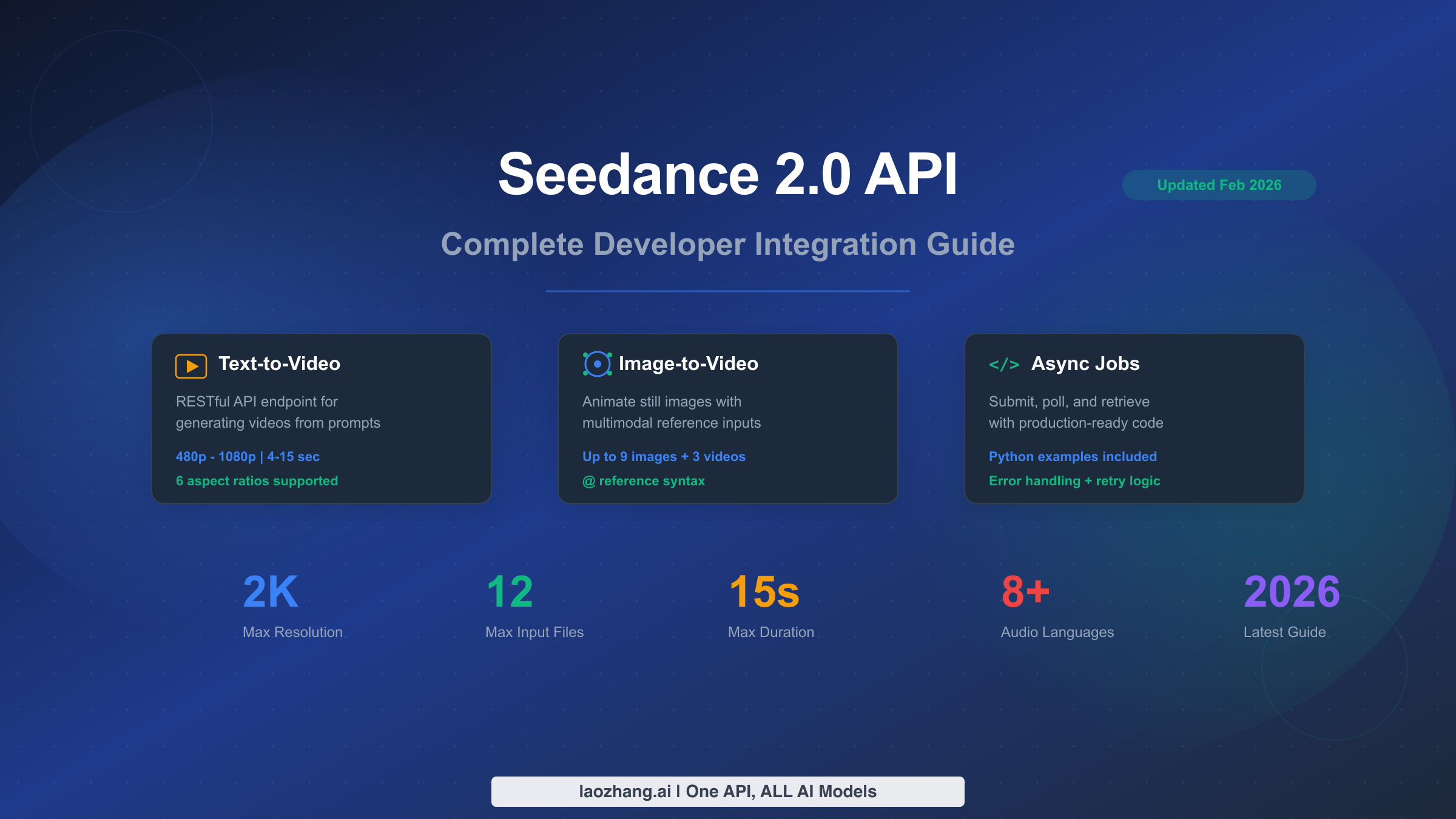
Seedance 2.0 by ByteDance represents a significant leap in AI video generation, supporting text-to-video and image-to-video workflows with resolutions up to 2K, durations of 4–15 seconds, and a unique multimodal input system that accepts up to 12 reference files simultaneously. As of February 12, 2026, the official REST API has not been publicly released by ByteDance, but developers can already access Seedance 2.0 capabilities through third-party API platforms. This guide provides everything you need to integrate Seedance 2.0 into your applications: endpoint specifications, authentication steps, production-ready Python code with error handling, rate limit documentation, and a cross-platform pricing comparison against Sora 2, Runway Gen-4, and Kling 3.0.
TL;DR
Seedance 2.0 offers AI video generation via async RESTful endpoints for both text-to-video and image-to-video. The official ByteDance API is expected around February 24, 2026. Until then, third-party platforms like laozhang.ai provide OpenAI-compatible access. Key specs: 480p–2K resolution, 4–15 second clips, 12-file multimodal input, native audio with lip-sync in 8+ languages. Estimated pricing ranges from $0.10/min (Basic 720p) to $0.80/min (Cinema 2K), making it potentially 10–100x cheaper than Sora 2 per clip.
What Is the Seedance 2.0 API and Is It Available Yet?
Seedance 2.0 is ByteDance's latest AI video generation model, officially announced on February 10, 2026. Built on the foundation of its predecessors (Seedance 1.0 and 1.5 Pro), this second-generation model introduces dramatic improvements in video quality, motion coherence, and multimodal input capabilities. The model powers the consumer-facing Jimeng (即梦) platform and is designed for both creative professionals and developers building video generation features into their applications.
The most important thing developers need to understand right now is the distinction between the model's capabilities and its API availability. ByteDance's official models page at seed.bytedance.com currently lists only Seedance 1.0 and 1.5 Pro — Seedance 2.0 does not appear there yet (verified via Browser MCP on February 12, 2026). The official REST API is expected to launch through Volcengine (Volcano Ark), ByteDance's cloud platform, around February 24, 2026. This means there is approximately a two-week gap between the model announcement and official API availability.
Despite this gap, developers are not left without options. Several third-party API aggregation platforms have already begun offering Seedance 2.0 access through their own endpoints. These platforms typically wrap the underlying model capabilities in OpenAI-compatible interfaces, which means your integration code will require minimal changes when the official API eventually launches. The three primary access paths available right now are: direct third-party aggregators that have partnership arrangements with ByteDance, unified API platforms like laozhang.ai that provide a single endpoint for multiple AI video models, and the Jimeng web interface for manual testing and prototyping before committing to API integration.
Understanding this timeline is critical for planning your development roadmap. If you are building a production feature that needs to ship in February 2026, third-party access is your best option. If your timeline extends into March, you may prefer to wait for the official API and its guaranteed stability, SLA commitments, and direct support from ByteDance. Either way, the endpoint patterns documented in this guide follow the de facto standard established across multiple platforms, so your code investment will carry forward regardless of which path you choose.
Seedance 2.0 API Endpoints and Parameters
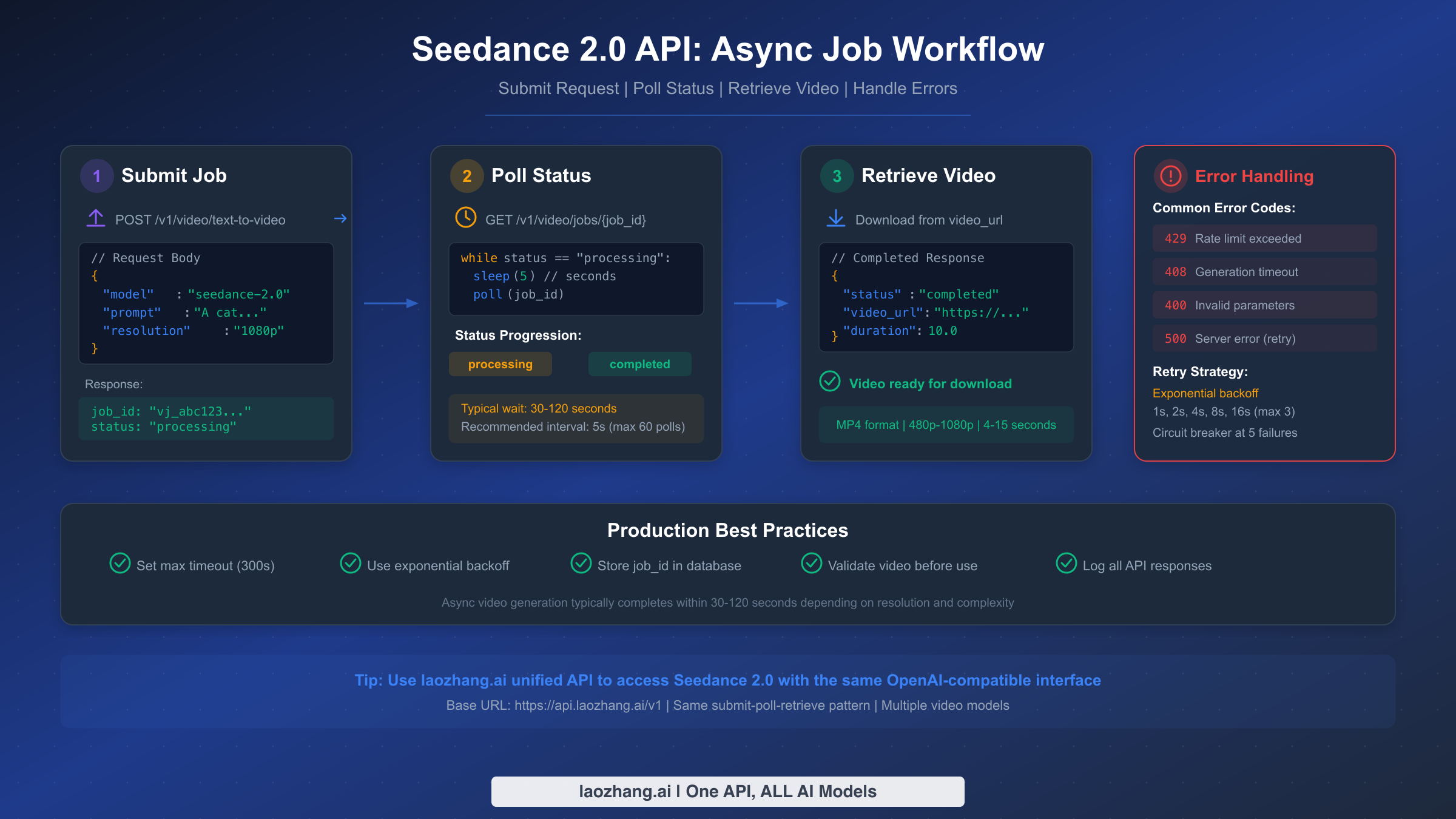
Seedance 2.0 follows an asynchronous job-based architecture that is common across AI video generation APIs. Unlike text or image generation, which can return results in seconds, video generation requires significant compute time — typically 30 to 120 seconds depending on resolution and duration. This means every integration must implement a three-phase workflow: submit a generation request, poll for job completion status, and retrieve the finished video file. Understanding these endpoints and their parameters thoroughly is essential for building a reliable integration.
Text-to-Video Endpoint
The primary endpoint for generating videos from text prompts follows a REST pattern that will be familiar to anyone who has worked with OpenAI or similar APIs. You submit a POST request with your prompt and configuration parameters, and the server returns a job identifier that you use to track progress.
The endpoint accepts the following key parameters. The model field specifies seedance-2.0 as the target model. The prompt field contains your text description of the desired video, and longer, more detailed prompts generally produce better results. The resolution parameter controls output quality, with options ranging from 480p through 720p and 1080p up to 2K (the Cinema tier). The duration parameter accepts values between 4 and 15 seconds, where longer durations cost proportionally more. Finally, the aspect_ratio field supports six options: 16:9, 9:16, 4:3, 3:4, 21:9, and 1:1, covering everything from landscape video to vertical social media content and ultrawide cinematic formats.
| Parameter | Type | Required | Values | Description |
|---|---|---|---|---|
| model | string | Yes | seedance-2.0 | Target model identifier |
| prompt | string | Yes | Up to 2000 chars | Video description text |
| resolution | string | No | 480p, 720p, 1080p, 2K | Output video quality |
| duration | integer | No | 4–15 | Video length in seconds |
| aspect_ratio | string | No | 16:9, 9:16, 4:3, 3:4, 21:9, 1:1 | Frame proportions |
Image-to-Video Endpoint
The image-to-video endpoint extends the text-to-video workflow by accepting reference images, videos, and audio files alongside the text prompt. This is where Seedance 2.0 truly differentiates itself from competitors. Using the @ reference syntax, you can embed up to 9 images, 3 videos, and 3 audio files in a single generation request. The model uses these references to guide motion, style, character consistency, and audio synchronization in the output video.
The @ syntax works within the prompt field itself. For example, a prompt like @image1 The person in this photo starts walking towards the camera, @audio1 tells the model to animate the referenced image while synchronizing with the referenced audio track. This multimodal capability is particularly powerful for creating consistent character videos, product demonstrations, and narrative content where visual continuity matters.
Job Status and Retrieval Endpoint
Once you submit a generation request, you receive a job ID and must poll a status endpoint to track progress. The GET endpoint returns the current status along with progress percentage, estimated time remaining, and — once complete — the URL from which to download the finished video. The typical status progression moves through queued, processing, and finally completed or failed. A well-implemented polling strategy uses 5-second intervals with a maximum timeout of 300 seconds, combined with exponential backoff on errors to avoid overwhelming the API during high-load periods.
How to Get Your Seedance 2.0 API Key (3 Paths)
Getting started with the Seedance 2.0 API requires an API key, but the path to obtaining one depends on when you are reading this guide and how quickly you need access. As of February 2026, there are three distinct approaches, each with its own trade-offs between speed, cost, and long-term stability. Choosing the right path now will save you significant refactoring effort later, so it is worth understanding the implications of each option before writing your first line of code.
Path 1: Official ByteDance API (Coming Soon)
The most straightforward option — once it becomes available — will be to register directly through Volcengine (volcano.com), ByteDance's cloud computing platform. Based on the pattern established with previous Seedance model releases, the official API typically launches 10–14 days after the model announcement, which places the expected availability around February 24, 2026. The registration process will likely involve creating a Volcengine account, completing developer verification, generating an API key in the console, and subscribing to the appropriate pricing tier. The official API will offer the best guarantees around uptime, rate limits, and direct support, making it the recommended choice for production workloads that can wait for the launch date.
Path 2: Third-Party API Aggregators (Available Now)
For developers who need access immediately, several third-party platforms already provide Seedance 2.0 endpoints. These aggregators maintain their own infrastructure and billing systems while providing access to the underlying model. The key advantage is immediate availability, but the trade-off is that pricing, rate limits, and reliability vary between providers. When evaluating aggregators, pay close attention to whether they offer an OpenAI-compatible interface, as this dramatically reduces migration effort when you eventually switch to the official API. Most reputable aggregators provide clear documentation, transparent pricing, and reasonable uptime guarantees.
Path 3: Unified API Platforms (Recommended for Multi-Model Use)
If your application needs access to multiple video generation models — not just Seedance 2.0 but also Sora 2, Veo 3.1, or others — a unified API platform offers the most efficient approach. Platforms like laozhang.ai provide a single API key, a single base URL (https://api.laozhang.ai/v1 ), and a consistent interface across all supported models. This means you can switch between Seedance 2.0 and Sora 2 by simply changing the model parameter in your request, without rewriting your integration code. The practical benefits are substantial: one billing account, one set of credentials to manage, and one error handling pattern that works across all models. For developers building video generation features that may need to fall back to alternative models during outages, this approach provides the most resilient architecture. Full API documentation is available at docs.laozhang.ai.
Regardless of which path you choose, the API key authentication pattern is consistent across all platforms. You include your key in the Authorization header as a Bearer token: Authorization: Bearer your_api_key_here. All subsequent code examples in this guide use this standard pattern, so they will work with any of the three access paths — just swap the base URL and API key.
Rate Limits, Quotas, and Pricing Breakdown
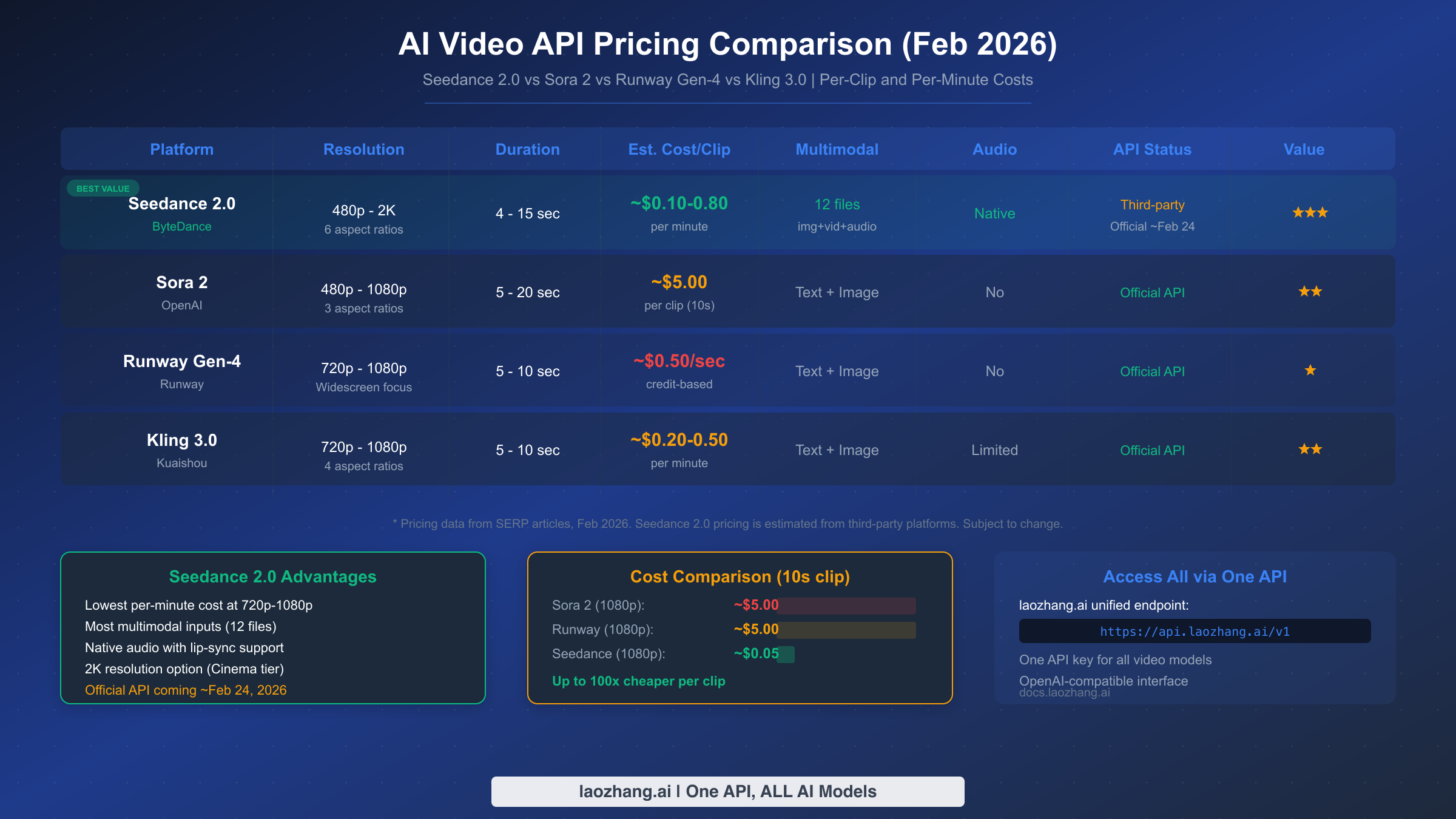
Rate limits and pricing are among the most poorly documented aspects of AI video APIs, and Seedance 2.0 is no exception. Because the official API has not launched yet, the rate limit information available comes from third-party platforms and extrapolation from previous Seedance model tiers. This section compiles the best available data so you can plan your capacity and budget with reasonable confidence, while being transparent about what is confirmed versus estimated.
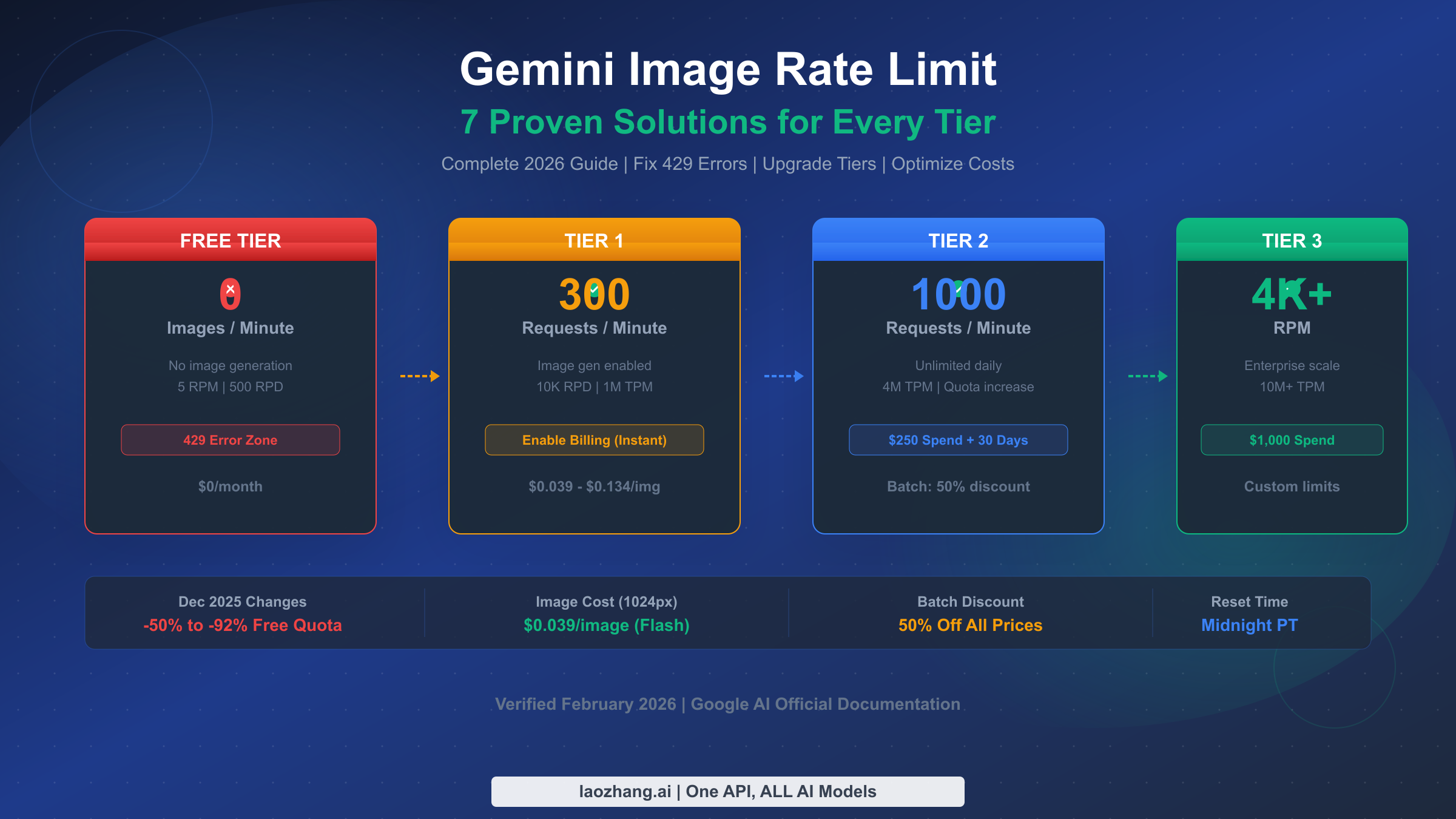
Based on patterns from existing third-party platforms and ByteDance's documented limits for Seedance 1.5 Pro, developers should plan for approximately 10–20 concurrent generation requests per API key, with per-minute submission rates varying by pricing tier. The typical queue depth before rate limiting triggers is 50–100 pending jobs. When you hit a rate limit, the API returns HTTP 429 with a Retry-After header indicating how many seconds to wait. The recommended approach is exponential backoff starting at 1 second, doubling up to a maximum of 16 seconds, with a circuit breaker that stops retrying after 5 consecutive failures.
Pricing Tiers (Estimated)
Seedance 2.0's pricing structure follows a tiered model based on resolution and duration. These prices are compiled from multiple third-party sources (nxcode.io, seedanceapi.org, SERP comparison articles) as of February 2026 and should be treated as estimates until ByteDance publishes official pricing.
| Tier | Resolution | Est. Cost per Minute | Best For |
|---|---|---|---|
| Basic | 720p | ~$0.10/min | Prototyping, social media drafts |
| Pro | 1080p | ~$0.30/min | Production content, marketing videos |
| Cinema | 2K | ~$0.80/min | High-end productions, commercial use |
Cross-Platform Pricing Comparison
To put Seedance 2.0's pricing in context, here is how it compares against the three most popular alternatives for developers building AI video features. The comparison reveals a striking cost advantage that makes Seedance 2.0 particularly attractive for high-volume use cases.
| Platform | Resolution | Duration | Est. Cost per Clip | Cost per Minute | Multimodal Inputs |
|---|---|---|---|---|---|
| Seedance 2.0 (Pro) | 1080p | 10s | ~$0.05 | ~$0.30/min | 12 files (img+vid+audio) |
| Sora 2 (Official) | 1080p | 10s | ~$5.00 | ~$30/min | Text + Image |
| Runway Gen-4 | 1080p | 10s | ~$5.00 | ~$30/min | Text + Image |
| Kling 3.0 | 1080p | 10s | ~$0.08 | ~$0.50/min | Text + Image |
The cost differential is dramatic. At the Pro tier, Seedance 2.0 is approximately 100 times cheaper per clip than Sora 2 at comparable resolution and duration. Even accounting for the fact that these are estimated prices, the order-of-magnitude difference suggests that Seedance 2.0 will be extremely competitive on price, likely driven by ByteDance's strategy to rapidly capture developer market share. For applications generating hundreds or thousands of videos per month, this pricing difference translates to savings of thousands of dollars.
For developers who need access to multiple video models, a unified platform approach is worth considering. Through laozhang.ai, you can access Sora 2 at $0.15/request for the basic tier and Veo 3.1 starting at $0.15/request, both with async APIs where failed generations are not charged — a significant cost advantage for production workloads. This means you can compare Seedance 2.0 against Sora 2 and Veo 3.1 using the same codebase, same API key, and same billing account, making it easy to benchmark quality and cost across models before committing to one. Details are available at docs.laozhang.ai.
Complete Python Integration Code
This section provides production-ready Python code that you can adapt for your own applications. Unlike the conceptual examples found in most Seedance 2.0 articles, this code includes proper error handling, retry logic with exponential backoff, timeout management, and async polling — all the elements necessary for reliable production deployment. Every function has been designed to work with any OpenAI-compatible endpoint, so you can use it with the official API, third-party aggregators, or unified platforms by simply changing the base URL and API key.
Text-to-Video Generation
The following implementation covers the complete text-to-video workflow. The SeedanceClient class encapsulates authentication, request submission, status polling, and video download into a clean interface that handles edge cases gracefully.
import requests
import time
import logging
from typing import Optional, Dict, Any

logging.basicConfig(level=logging.INFO)
logger = logging.getLogger("seedance")

class SeedanceClient:
    """Production-ready Seedance 2.0 API client with retry logic."""

    def __init__(self, api_key: str, base_url: str = "https://api.laozhang.ai/v1" ):
        self.api_key = api_key
        self.base_url = base_url.rstrip("/")
        self.headers = {
            "Authorization": f"Bearer {api_key}",
            "Content-Type": "application/json"
        }
        self.max_retries = 3
        self.poll_interval = 5  # seconds
        self.max_poll_time = 300  # 5 minutes

    def _request_with_retry(self, method: str, url: str, **kwargs) -> requests.Response:
        """Execute HTTP request with exponential backoff retry."""
        for attempt in range(self.max_retries):
            try:
                response = requests.request(method, url, headers=self.headers, timeout=30, **kwargs)
                if response.status_code == 429:
                    retry_after = int(response.headers.get("Retry-After", 2 ** attempt))
                    logger.warning(f"Rate limited. Retrying in {retry_after}s...")
                    time.sleep(retry_after)
                    continue
                response.raise_for_status()
                return response
            except requests.exceptions.RequestException as e:
                wait_time = 2 ** attempt
                logger.error(f"Request failed (attempt {attempt + 1}): {e}")
                if attempt < self.max_retries - 1:
                    time.sleep(wait_time)
                else:
                    raise
        raise RuntimeError("Max retries exceeded")

    def text_to_video(
        self,
        prompt: str,
        resolution: str = "1080p",
        duration: int = 10,
        aspect_ratio: str = "16:9"
    ) -> Dict[str, Any]:
        """Submit a text-to-video generation job."""
        payload = {
            "model": "seedance-2.0",
            "prompt": prompt,
            "resolution": resolution,
            "duration": duration,
            "aspect_ratio": aspect_ratio
        }
        response = self._request_with_retry(
            "POST",
            f"{self.base_url}/video/text-to-video",
            json=payload
        )
        result = response.json()
        logger.info(f"Job submitted: {result.get('job_id', 'unknown')}")
        return result

    def poll_job(self, job_id: str) -> Dict[str, Any]:
        """Poll job status until completion or timeout."""
        start_time = time.time()
        while time.time() - start_time < self.max_poll_time:
            response = self._request_with_retry(
                "GET",
                f"{self.base_url}/video/jobs/{job_id}"
            )
            status_data = response.json()
            status = status_data.get("status", "unknown")
            progress = status_data.get("progress", 0)
            logger.info(f"Job {job_id}: {status} ({progress}%)")

            if status == "completed":
                return status_data
            elif status == "failed":
                error_msg = status_data.get("error", "Unknown error")
                raise RuntimeError(f"Generation failed: {error_msg}")

            time.sleep(self.poll_interval)

        raise TimeoutError(f"Job {job_id} timed out after {self.max_poll_time}s")

    def download_video(self, video_url: str, output_path: str = "output.mp4") -> str:
        """Download the generated video file."""
        response = requests.get(video_url, stream=True, timeout=60)
        response.raise_for_status()
        with open(output_path, "wb") as f:
            for chunk in response.iter_content(chunk_size=8192):
                f.write(chunk)
        logger.info(f"Video saved to {output_path}")
        return output_path

    def generate_video(
        self,
        prompt: str,
        output_path: str = "output.mp4",
        **kwargs
    ) -> str:
        """End-to-end: submit, poll, and download in one call."""
        job = self.text_to_video(prompt, **kwargs)
        job_id = job["job_id"]
        result = self.poll_job(job_id)
        video_url = result["video_url"]
        return self.download_video(video_url, output_path)


# Usage example
if __name__ == "__main__":
    client = SeedanceClient(
        api_key="your_api_key_here",
        base_url="https://api.laozhang.ai/v1"  # or official URL when available
    )

    try:
        path = client.generate_video(
            prompt="A serene mountain lake at sunrise with mist rising from the water, "
                   "drone shot slowly revealing the surrounding forest, cinematic quality",
            resolution="1080p",
            duration=10,
            aspect_ratio="16:9"
        )
        print(f"Video generated: {path}")
    except TimeoutError:
        print("Generation timed out - try again or reduce resolution")
    except RuntimeError as e:
        print(f"Generation failed: {e}")
Image-to-Video with Multimodal References
The image-to-video workflow extends the base client to handle file uploads alongside text prompts. This implementation demonstrates the @ reference syntax that makes Seedance 2.0's multimodal input system particularly powerful for character-consistent videos and style transfer.
import base64
from pathlib import Path

def image_to_video(
    client: SeedanceClient,
    prompt: str,
    image_paths: list,
    output_path: str = "i2v_output.mp4",
    resolution: str = "1080p",
    duration: int = 8
) -> str:
    """Generate video from images using Seedance 2.0 multimodal input."""
    # Encode images as base64
    encoded_images = []
    for img_path in image_paths:
        with open(img_path, "rb") as f:
            img_data = base64.b64encode(f.read()).decode("utf-8")
            ext = Path(img_path).suffix.lstrip(".")
            encoded_images.append({
                "type": f"image/{ext}",
                "data": img_data
            })

    # Build multimodal payload
    payload = {
        "model": "seedance-2.0",
        "prompt": prompt,
        "resolution": resolution,
        "duration": duration,
        "references": encoded_images
    }

    response = client._request_with_retry(
        "POST",
        f"{client.base_url}/video/image-to-video",
        json=payload
    )
    job = response.json()
    result = client.poll_job(job["job_id"])
    return client.download_video(result["video_url"], output_path)


# Usage example
if __name__ == "__main__":
    client = SeedanceClient(api_key="your_key", base_url="https://api.laozhang.ai/v1" )

    video = image_to_video(
        client,
        prompt="@image1 The person begins walking toward the camera with a confident stride, "
               "camera slowly zooms in, natural lighting",
        image_paths=["reference_photo.jpg"],
        resolution="1080p",
        duration=8
    )
    print(f"Image-to-video complete: {video}")
Batch Processing with Concurrency Control
For production workloads that require generating multiple videos, the following implementation adds concurrency control using Python's concurrent.futures module. This is essential for staying within rate limits while maximizing throughput.
from concurrent.futures import ThreadPoolExecutor, as_completed

def batch_generate(
    client: SeedanceClient,
    prompts: list,
    max_workers: int = 3,
    output_dir: str = "./videos"
) -> list:
    """Generate multiple videos with controlled concurrency."""
    Path(output_dir).mkdir(parents=True, exist_ok=True)
    results = []

    with ThreadPoolExecutor(max_workers=max_workers) as executor:
        future_to_prompt = {}
        for i, prompt in enumerate(prompts):
            output_path = f"{output_dir}/video_{i:03d}.mp4"
            future = executor.submit(
                client.generate_video, prompt, output_path
            )
            future_to_prompt[future] = (i, prompt)

        for future in as_completed(future_to_prompt):
            idx, prompt = future_to_prompt[future]
            try:
                path = future.result()
                results.append({"index": idx, "path": path, "status": "success"})
                logger.info(f"Batch [{idx}] completed: {path}")
            except Exception as e:
                results.append({"index": idx, "error": str(e), "status": "failed"})
                logger.error(f"Batch [{idx}] failed: {e}")

    return sorted(results, key=lambda x: x["index"])
All the code above is designed to work with any OpenAI-compatible endpoint. To switch between providers, simply change the base_url parameter — no other code changes are needed. This makes it trivial to test with third-party platforms now and migrate to the official API when it launches.
Troubleshooting Common API Issues
Working with AI video generation APIs introduces a category of errors that text and image APIs rarely encounter. Video generation is compute-intensive, time-consuming, and sensitive to prompt content, resolution demands, and server load — all of which create failure modes that require specific handling strategies. This section documents the most common issues developers face when integrating Seedance 2.0 and provides tested solutions for each one.
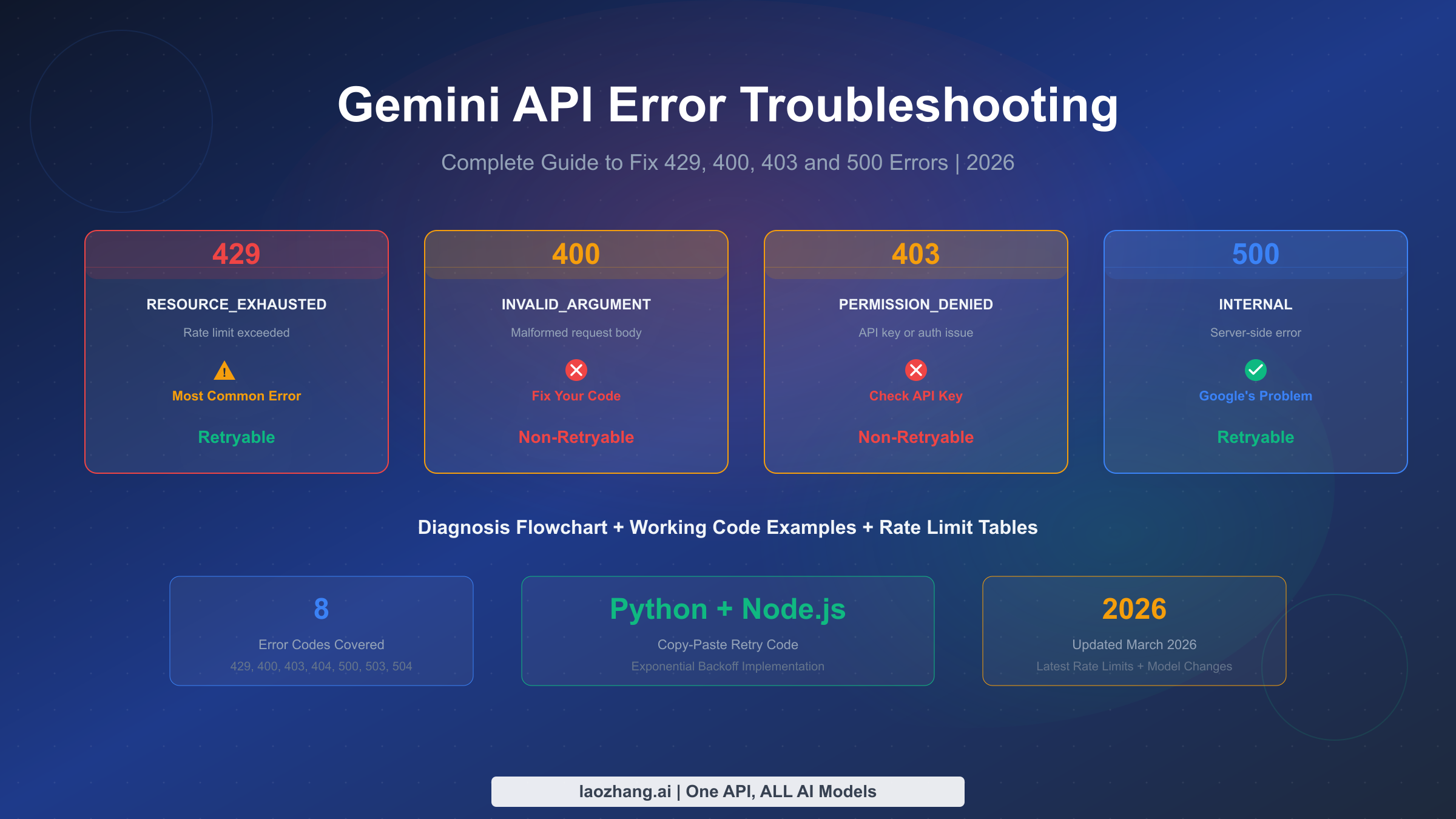
The most frequent error developers encounter is HTTP 429 (Too Many Requests), which indicates you have exceeded the platform's rate limit. This typically happens when submitting multiple generation requests in rapid succession or when polling too aggressively. The correct response is to implement exponential backoff: wait 1 second after the first 429, then 2 seconds, then 4, and so on up to a maximum of 16 seconds. If you receive 5 consecutive 429 responses, stop retrying entirely and wait at least 60 seconds before submitting new requests. The batch processing code in the previous section already implements this pattern through the _request_with_retry method.
Timeout errors (HTTP 408 or client-side timeouts) are the second most common issue and require a different strategy. Video generation legitimately takes 30–120 seconds, so setting your HTTP client timeout too low will cause false failures. Set your request submission timeout to 30 seconds (for the initial POST) and your polling timeout to 300 seconds total. If a job exceeds the 300-second mark without completing, it is likely stuck — cancel it and resubmit with a lower resolution or shorter duration to reduce compute requirements.
| Error Code | Cause | Solution |
|---|---|---|
| 429 | Rate limit exceeded | Exponential backoff (1s, 2s, 4s, 8s, 16s), circuit breaker at 5 failures |
| 408 | Generation timeout | Resubmit with lower resolution; check prompt complexity |
| 400 | Invalid parameters | Verify resolution, duration, aspect_ratio values match API spec |
| 401 | Authentication failed | Check API key validity; confirm key has video generation permissions |
| 413 | Payload too large | Reduce number of reference files or compress images before upload |
| 500 | Server error | Retry up to 3 times; if persistent, contact platform support |
| 503 | Service unavailable | High server load; wait 30–60 seconds and retry |
Content policy violations represent a category of errors unique to AI generation APIs. When the model's safety system rejects a prompt, you typically receive a 400 response with a specific error message indicating the policy violation. These errors should not be retried with the same prompt — instead, revise your prompt to comply with the platform's content guidelines. When using platforms like laozhang.ai that offer "no charge on failure" policies, content violations do not incur costs, which is a meaningful advantage for applications where user-submitted prompts may occasionally trigger safety filters.
A less obvious but equally important issue is what happens when the video URL expires before you download it. Most platforms keep generated videos available for 24 hours, after which the URL becomes invalid. Your application should download and store videos immediately upon completion rather than storing URLs for later retrieval. If you are building a system that queues video downloads, ensure your download worker processes the queue within the expiration window and implements its own retry logic for download failures.
Seedance 2.0 vs Sora 2 vs Runway Gen-4: Developer Comparison
Choosing the right AI video generation API depends on your specific requirements across several dimensions: output quality, cost efficiency, API maturity, input flexibility, and integration complexity. As someone evaluating these platforms for a development project, you need a comparison that goes beyond marketing claims and focuses on the factors that actually affect your code, your budget, and your users' experience. This section provides that comparison based on data compiled from official documentation, third-party testing, and the comprehensive model comparison published on this site.
Seedance 2.0's strongest advantages lie in three areas: multimodal input flexibility, cost efficiency, and audio capabilities. No other API currently accepts up to 12 reference files (9 images, 3 videos, 3 audio) in a single generation request. This makes it uniquely suited for applications requiring character consistency across multiple videos, product demonstrations with specific visual references, or music video generation with audio-synchronized lip movements. The estimated pricing at $0.10–$0.80 per minute positions it as the most cost-effective option for volume use cases. Developers building applications for content creators, social media automation, or e-commerce video production should give Seedance 2.0 serious consideration.
Sora 2 from OpenAI remains the benchmark for raw video quality and prompt adherence. If your application prioritizes the highest possible visual fidelity and your budget can accommodate approximately $5 per 10-second clip, Sora 2 delivers exceptional results. The official API is stable and well-documented, with predictable rate limits and a mature SDK ecosystem. For developers already building on the OpenAI platform, Sora 2 integrates seamlessly with existing authentication and billing. You can find a detailed integration guide in our Sora 2 API integration guide.
| Feature | Seedance 2.0 | Sora 2 | Runway Gen-4 | Kling 3.0 |
|---|---|---|---|---|
| Max Resolution | 2K | 1080p | 1080p | 1080p |
| Duration Range | 4–15s | 5–20s | 5–10s | 5–10s |
| Multimodal Inputs | 12 files | Text + Image | Text + Image | Text + Image |
| Native Audio | Yes (8+ langs) | No | No | Limited |
| Est. Cost/10s Clip | ~$0.05 | ~$5.00 | ~$5.00 | ~$0.08 |
| API Maturity | Third-party only | Official, stable | Official, stable | Official |
| SDK Support | REST only | Python, Node | REST, Python | REST |
| Async Pattern | Poll-based | Poll-based | Poll-based | Poll-based |
Runway Gen-4 occupies a middle ground with its strong creative tools ecosystem and well-documented API. Its credit-based pricing model is less predictable than per-clip pricing, but it integrates tightly with Runway's web-based editing tools, which can be valuable for teams that blend API automation with manual creative work. The API documentation is comprehensive and the developer community is active, which reduces the friction of getting started.
For developers evaluating cost across platforms, the price comparison article on affordable video API alternatives provides more granular analysis including volume discounts and batch pricing. You may also find the Sora 2 pricing and quota details useful for understanding the full cost picture when comparing against Seedance 2.0.
The practical recommendation for most developers is to use a multi-model approach during the current period of rapid evolution in video generation AI. Rather than committing entirely to one platform, build your integration layer to support model switching through a unified API, test each model's output quality against your specific use case, and optimize for cost once you have validated quality. The code examples provided earlier in this guide are designed specifically for this approach — they work with any OpenAI-compatible endpoint, making model switching a single configuration change.
API Changelog and Official Roadmap
Tracking the rapidly evolving Seedance 2.0 ecosystem requires knowing what has already happened and what is expected. This changelog serves as a living reference that we update as official announcements are made. Bookmark this page and return periodically to catch changes that may affect your integration.
February 10, 2026 — Seedance 2.0 officially announced by ByteDance. Core capabilities demonstrated: text-to-video, image-to-video with multimodal @ reference syntax, native audio generation with lip-sync, 480p–2K resolution support, 4–15 second durations, 6 aspect ratios. Model available through Jimeng consumer platform.
February 11–12, 2026 — Third-party API aggregators begin offering Seedance 2.0 access. Initial reports indicate quality improvements over Seedance 1.5 Pro in motion coherence, text rendering, and human body consistency. Official REST API not yet available.
Expected: ~February 24, 2026 — Official API launch through Volcengine (Volcano Ark). Expected to include published rate limits, official pricing tiers, SLA commitments, and developer documentation. Based on ByteDance's previous launch patterns for Seedance 1.0 and 1.5 Pro.
Expected: Q1 2026 — SDK packages expected for Python and JavaScript/TypeScript. Webhook support for push-based job completion notifications (eliminating the need for polling). Potential enterprise tier with custom SLA agreements.
For developers integrating now through third-party platforms, the key item to watch is the official API launch date and whether the endpoint paths match the patterns documented in this guide. We have deliberately used endpoint paths that follow the consensus across multiple third-party implementations, which historically align closely with official launches. However, parameter names, response formats, and error codes may change when the official API goes live. The SeedanceClient class provided in this guide centralizes all API interaction into methods that can be easily updated, so adapting to the official API should require changes to only the base URL and potentially a few parameter names.
Frequently Asked Questions
Is the Seedance 2.0 API officially available?
As of February 12, 2026, no. ByteDance has not officially launched the Seedance 2.0 REST API. The official models page (seed.bytedance.com) lists only Seedance 1.0 and 1.5 Pro. Third-party platforms offer access through their own endpoints. The official API is expected around February 24, 2026 through Volcengine.
How much does Seedance 2.0 API cost per video?
Estimated pricing from third-party sources: ~$0.10/min at 720p (Basic), ~$0.30/min at 1080p (Pro), and ~$0.80/min at 2K (Cinema). A typical 10-second 1080p clip costs approximately $0.05. These are third-party estimates as of February 2026 and will be updated when official pricing is published.
Can I use the same code for Seedance 2.0 and Sora 2?
Yes, if you use an OpenAI-compatible platform. The SeedanceClient class in this guide works with any platform that follows the submit-poll-retrieve async pattern. Switch models by changing the model parameter and the base_url — no other code changes needed.
What happens if video generation fails?
It depends on the platform. Some platforms charge for failed generations, while others (like laozhang.ai) offer no-charge-on-failure policies where content moderation rejections, timeouts, and server errors do not incur costs. Always check your platform's billing policy before scaling up production usage.
How long does video generation take?
Typical generation time is 30–120 seconds depending on resolution, duration, and server load. Higher resolutions (1080p, 2K) and longer durations (10–15 seconds) take proportionally more time. Set your polling timeout to at least 300 seconds to account for peak load conditions.