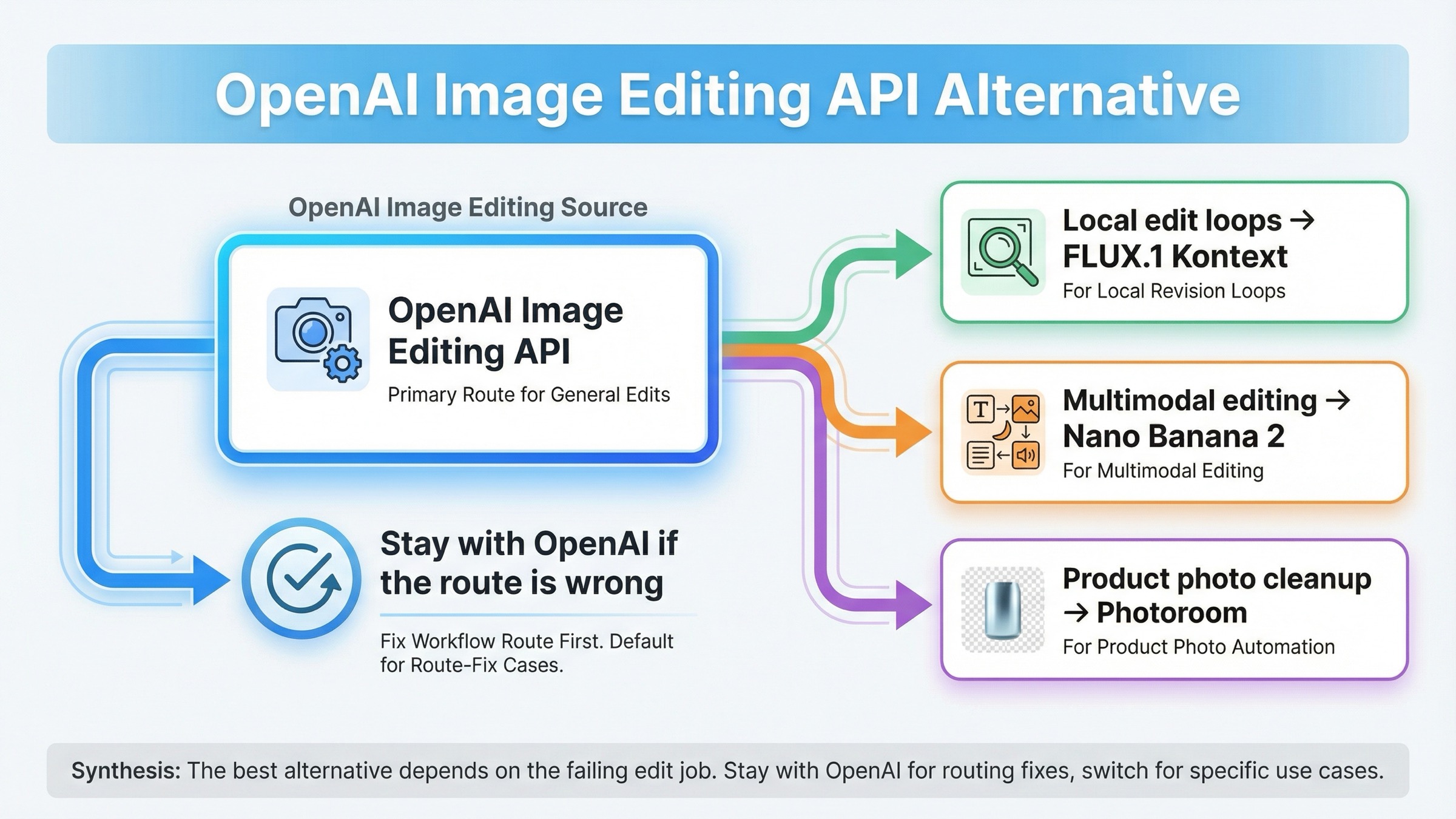
As checked on March 27, 2026, the best OpenAI image editing API alternative depends on what kind of edit OpenAI is actually failing at. If your real pain is iterative local edits and consistency, switch to FLUX.1 Kontext. If you need faster multimodal editing with stronger text and localization behavior, switch to Nano Banana 2. If your real job is product photos, backgrounds, shadows, and catalog cleanup, use Photoroom. But do not switch just because one OpenAI mask workflow disappointed you: OpenAI still says the Image API is the best path for one-shot edits, and many teams are really fighting route choice or soft-mask expectations rather than the need for a new vendor.
That short answer matters because the exact SERP is still serving the wrong page shape. Exact-match results lean toward broad OpenAI API alternatives pages, while the more relevant sibling results surface image-editing leaderboards, workflow roundups, and capability comparisons. In other words, Google is still rewarding market coverage, but the reader's actual problem is much narrower: what should I replace OpenAI image edits with for this exact editing job?
There is one more caveat worth stating early. OpenAI's current image generation guide still says the Image API is the best choice when you only need to generate or edit a single image from one prompt, while the Responses API is for conversational, editable image experiences. That means some alternative intent is really a workflow mistake. There is also a short-term mask-specific wrinkle: OpenAI still lists DALL·E 2 as the inpainting-with-mask lane, but the same guide says support for DALL·E 2 and DALL·E 3 ends on May 12, 2026. So even when the mask complaint is real, the long-term answer may still be a different vendor.
TL;DR
- Stay with OpenAI if one-shot edits are mostly fine and the real problem is route choice, setup, or soft-mask expectations.
- Use FLUX.1 Kontext when repeated local edits keep drifting and you need stronger
keep most of the image, change this partbehavior. - Use Nano Banana 2 when the workflow needs text-plus-image reasoning, localization, and fast multimodal revision loops.
- Use Photoroom when the workload is product photos, backgrounds, shadows, catalog cleanup, and ad variants rather than open-ended creative generation.
- Treat DALL·E 2 as a short-term mask bridge only: OpenAI's published support end date for DALL·E 2 and DALL·E 3 is May 12, 2026.
The fastest switch rule for OpenAI image editing users
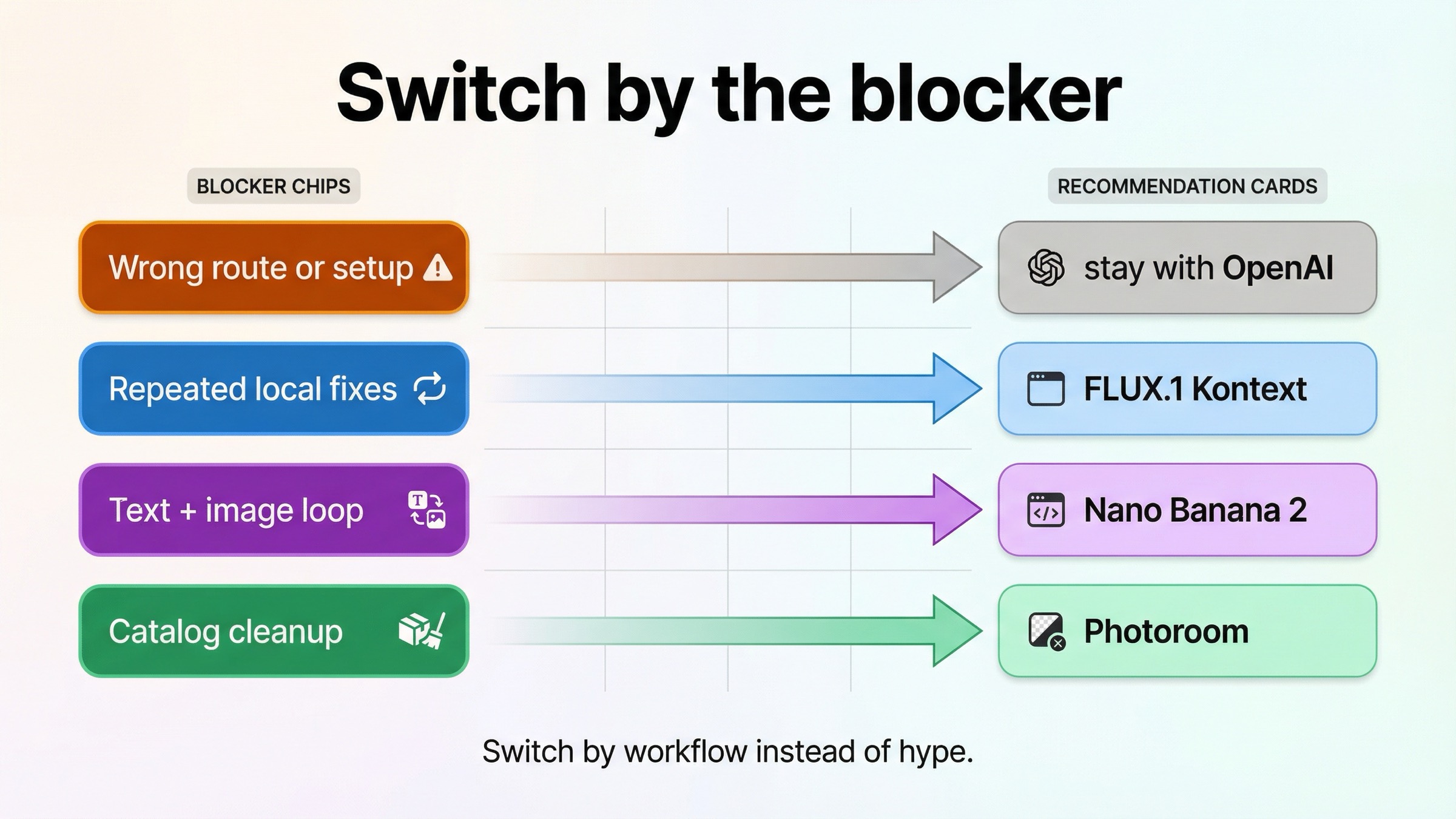
If you only need the routing answer, start here.
| If OpenAI edits are failing because... | Use this instead | Why it fits | Main tradeoff |
|---|---|---|---|
| the image keeps drifting across repeated edits, and you need to change one part without losing the rest | FLUX.1 Kontext | Black Forest Labs positions Kontext around image editing, character consistency, text editing, and changing specific parts while keeping the rest intact | Another vendor and a separate API lane; Kontext Pro is currently priced at $0.04 per image |
| you want faster advanced editing with stronger text rendering, multimodal reasoning, and localization inside the same workflow | Nano Banana 2 | Google positions Nano Banana 2 around high-fidelity generation plus faster advanced editing, and the Gemini image docs make image editing a first-class path | Google's image family naming is more complex than OpenAI's single-model story, and premium work can still push you toward the Pro lane |
| your real job is product photos, backgrounds, shadows, relighting, catalog consistency, or ad variants | Photoroom Image Editing API | Photoroom is built for commercial photo editing workflows, not broad creative-model exploration | It is specialized. If you want open-ended creative image generation, this is the wrong benchmark |
| one-shot edits are basically fine, but your workflow feels awkward or your mask behavior is not what you expected | Stay with OpenAI and fix the route first | OpenAI still recommends the Image API for one-shot edits and Responses for conversational editable experiences | You keep OpenAI pricing and you still need to accept the current limits of soft-mask editing |
That table is the actual job of this article. It turns a vague alternatives query into four concrete decisions. Most current pages fail here because they keep comparing tools as a market instead of as replacements for a specific OpenAI editing failure.
When you should not replace OpenAI yet
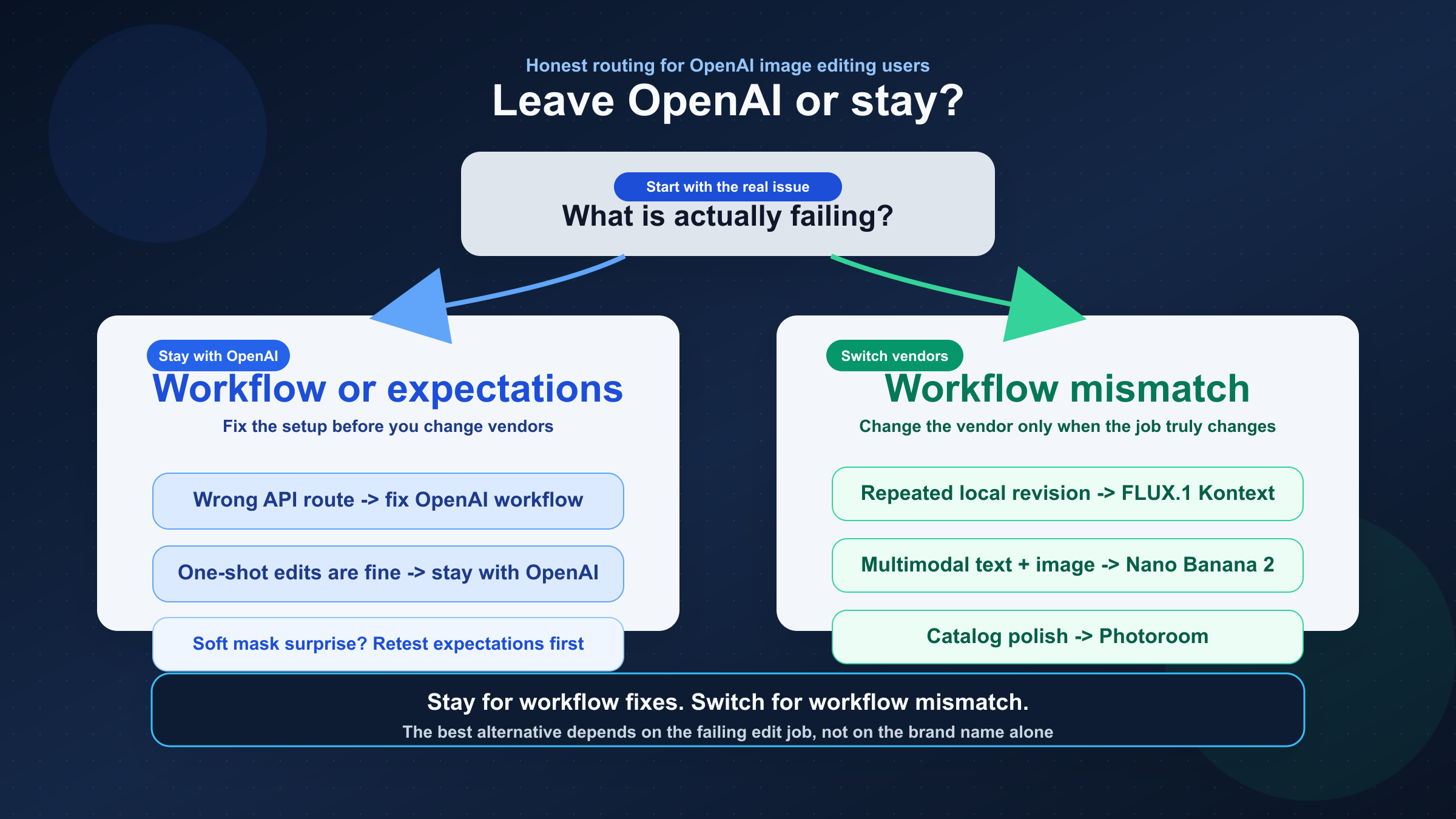
Some readers should absolutely switch. Others should not leave OpenAI until they prove the real problem is not the workflow itself.
The first check is endpoint choice. OpenAI's current docs still say the Image API is the best choice when you only need one image from one prompt or one direct edit from one prompt. The Responses API makes more sense when image output is only one step inside a longer multimodal flow. If you started on the wrong surface, moving vendors can feel like progress while quietly preserving the same confusion under a different API.
The second check is expectation setting around masks. OpenAI's current GPT Image docs show mask edits, high input fidelity, and direct images.edit() usage. But the community evidence is still consistent enough to matter. Developers continue reporting that masked edits can feel like the whole image is being reimagined instead of one clean local patch being replaced. That does not mean OpenAI image editing is useless. It means mask is still not the same thing as deterministic Photoshop-style fill.
This is where the DALL·E 2 caveat becomes useful. OpenAI's own current guide still lists DALL·E 2 as the lower-cost lane for inpainting with a mask. If your exact requirement is old-school mask-guided patching, that tells you the problem is real and known. But the same guide also says DALL·E support ends on May 12, 2026. So the right reading is not great, I can ignore the rest of the market. The right reading is I have a short-term bridge, but I still need a longer-term replacement if mask behavior is the thing I truly care about.
That is why the first follow-up after this article depends on what is actually wrong. If the issue is still basic OpenAI setup and route choice, the better next read is OpenAI image editing API or OpenAI image generation API endpoint. If the issue is broader vendor-switch logic across image workflows, then OpenAI image generation API alternative is the wider comparison.
FLUX.1 Kontext is the best alternative for iterative edits and local control
If your main complaint sounds like keep most of this image, but change these exact things, FLUX.1 Kontext is the strongest alternative to test first.
That recommendation is not based on hype language. It comes from how Black Forest Labs currently positions the product. The official Kontext overview is built around image editing, character consistency, text editing, and style transformation, and it explicitly describes editing specific parts of an image while keeping the rest untouched. That is a much tighter match for revision-heavy work than a page that mainly optimizes for one strong first-pass generation.
This matters because many OpenAI editing frustrations are really revision-system frustrations. The first version may be acceptable, but the second edit drifts, the logo loses fidelity, the character face changes too much, or the layout shifts when you only wanted one region updated. Once that pattern starts showing up repeatedly, it is no longer a prompt-tuning problem. It is a workflow-fit problem.
Kontext is built for that workflow fit. It is easier to justify when the product process keeps looking like this:
- keep the subject identity, but change the outfit
- keep the composition, but swap the text on the sign
- keep the packaging shape, but replace the branding element
- keep the character, but move them into a new scene across multiple iterations
Those are not one-shot generation tasks. They are controlled revision tasks. The strongest reason to leave OpenAI for Kontext is not that Kontext is universally better. It is that OpenAI's current edit behavior can still feel too global for teams that need local, repeated, predictable change.
There is also a practical cost signal that supports the recommendation. Black Forest Labs currently lists in its pricing page FLUX.1 Kontext Pro at $0.04 per image and Kontext Max at $0.08 per image. That is not the cheapest lane in the market, but it is also not an abstract premium without a use case. If your team is burning operator time on repeated cleanup after every edit round, a nominally cheaper image API can still be the more expensive workflow.
So the rule is simple: switch to FLUX.1 Kontext when the job is controlled revision, not when the job is simply show me another image API.
Nano Banana 2 is the best alternative for fast multimodal editing and localization
If your complaint is less about local patch control and more about OpenAI feeling too narrow for rich multimodal editing, Google's current image stack becomes much more interesting.
The best Google-side answer here is usually Nano Banana 2, which Google says is Gemini 3.1 Flash Image. The official Gemini image-generation docs make image editing a first-class route, not an afterthought, and Google's Nano Banana 2 launch post says the model brings high-fidelity generation plus faster advanced editing. That is a meaningful distinction from OpenAI's current positioning because it makes the Google lane attractive when your product wants image editing plus broader multimodal understanding in the same system.
This is especially relevant when the edit request needs more than a single masked rewrite. Think about jobs like:
- update an image and keep the text readable in another language
- combine text instructions, reference images, and follow-up edits in one loop
- generate and then revise marketing assets with cleaner text-in-image output
- use the model's broader world knowledge to keep visual details more grounded
That is the part of the market where Google's current image family is strongest. The official Gemini docs separate the image lineup clearly: one lane is optimized for speed and high-volume use, while the Pro lane is for professional asset production. That means the practical starting point is not which Google image model is best in every possible way? The better question is do I need a faster multimodal editing lane, or do I need a pure local-edit specialist like Kontext?
For most OpenAI-switch cases, start with Nano Banana 2 rather than jumping straight to the premium Pro lane. Google's own launch framing says it is the current model for faster advanced editing with good price-performance. If later tests show that your use case needs the heavier production lane, then you can move up the family. But the first Google benchmark should usually be the fast edit-first lane, not the most expensive one.
That also keeps this article from duplicating a full Gemini family comparison. If you want the deeper Google-side workflow after choosing the lane, the better follow-up is Gemini image-to-image editing or Gemini vs OpenAI image generation. This page is narrower: it is about when Google's image stack is the better editing replacement for OpenAI.
Photoroom is the best alternative for product photos, backgrounds, and catalog automation
Many OpenAI image editing API alternative searches are not really model-switch questions at all. They are commercial photo-editing questions disguised as model questions.
That is where Photoroom becomes the right answer.
Photoroom's own docs are unusually clear about the job. The API documentation is positioned around photo editing, not general creative image generation, and the intro talks about separating a subject from its background, relighting the subject, adding realistic shadows, generating a new background, resizing to requirements, and more. The Image Editing API product page goes even narrower: catalog photos, listings, ads, and consistency at scale.
That is a totally different benchmark from OpenAI or FLUX Kontext.
If the business metric is:
- cleaner product cutouts
- consistent white backgrounds
- faster marketplace listings
- scalable ad variants from the same product asset
- catalog polish without manual retouching
then the right comparison is not which foundation model is smartest. The right comparison is which API is built to automate this exact commercial image-cleanup workflow with the least manual repair.
This is also where many alternative articles lose credibility. They keep comparing foundation models when the reader really needs an e-commerce image pipeline. That advice sounds sophisticated, but it wastes time. A specialized editing API can beat a stronger general model if the output requirements are narrower and more repetitive.
So the rule here is blunt on purpose: if your actual workload is product listings, catalog cleanup, and repeatable visual merchandising edits, stop comparing OpenAI to general image models first. Benchmark Photoroom before you benchmark another foundation model.
What I would choose in four real situations
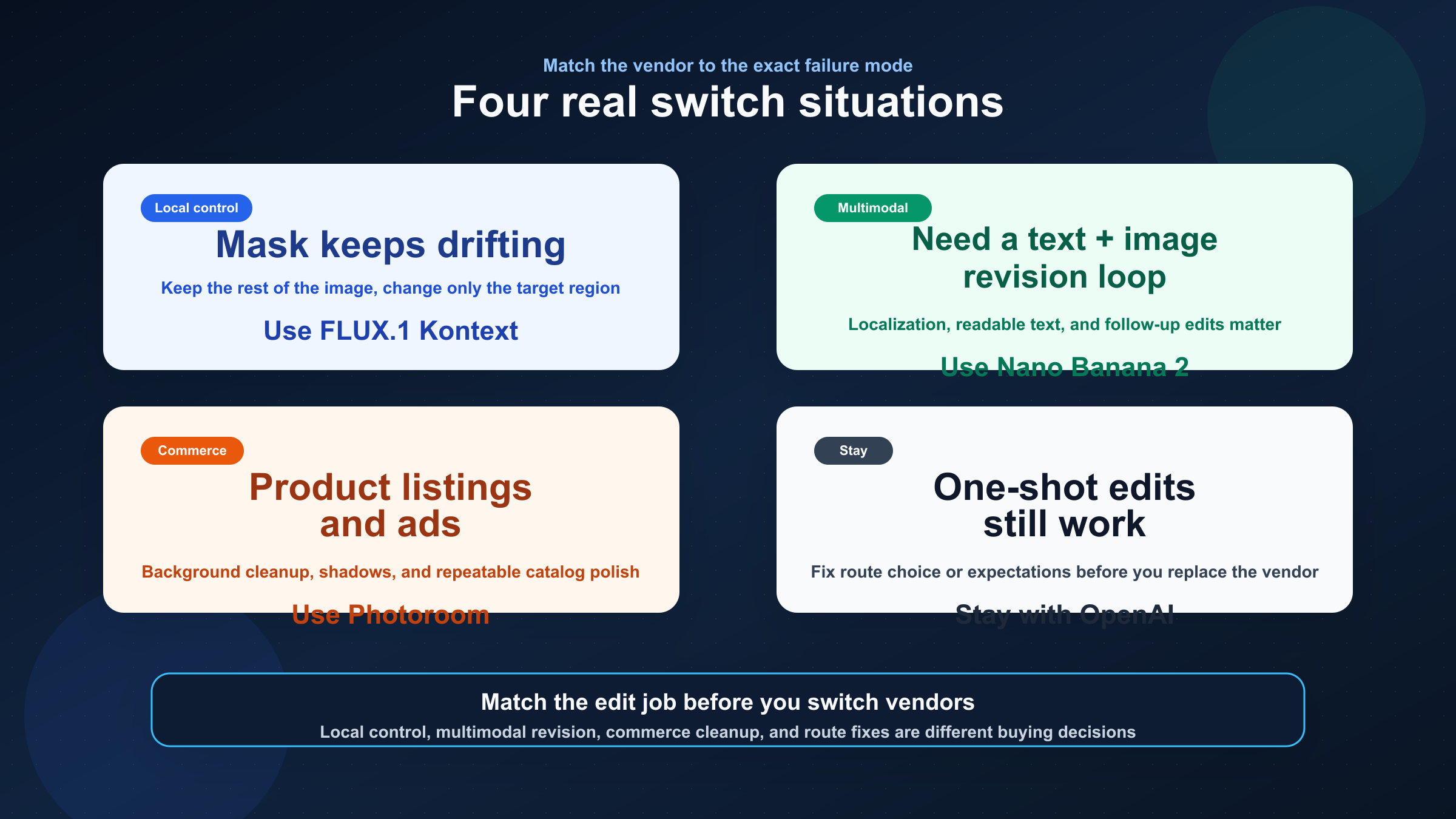
If I were making this decision today, these are the rules I would use.
1. My mask edits keep changing more of the image than I want, and I need repeated local fixes.
Start with FLUX.1 Kontext. This is the cleanest move when the workflow is fundamentally about changing a small part of an image without restarting from scratch each time.
2. I need one system that can reason about text and images together, then keep editing quickly.
Start with Nano Banana 2. This is the better test when the OpenAI complaint is not only mask behavior, but the whole multimodal editing loop.
3. I run product photos, catalogs, or ad variants and I care more about commercial polish than creative exploration.
Start with Photoroom. This is a specialist workflow, and specialist workflows deserve specialist APIs.
4. My one-shot OpenAI edits are mostly fine, but the workflow still feels awkward.
Stay with OpenAI first. Re-check whether you should be on the Images API or the Responses API, and decide whether your real problem is soft-mask behavior, not vendor fit. If hard-mask inpainting is the only thing you care about, treat DALL·E 2 as a short-term bridge only, because the published support end date is already set.
Those four situations are the real buying logic underneath this keyword. They are also why this page can beat the current result average. Most ranking pages are answering the market. This one is answering the failure mode.
FAQ
What is the best OpenAI image editing API alternative for mask-heavy edits?
If the real need is repeated local control, start with FLUX.1 Kontext. OpenAI still lists DALL·E 2 as the inpainting-with-mask bridge, but that is a short-term path only because the published support end date for DALL·E 2 and DALL·E 3 is May 12, 2026.
Should I switch away from OpenAI just because mask edits feel too global?
Not immediately. First confirm that you are on the right OpenAI surface and that the task is not still a one-shot edit with mismatched expectations. Switch when the workflow repeatedly needs local revision, multimodal editing, or specialist commercial cleanup.
Nano Banana 2 or Photoroom: which one is better for ecommerce work?
Use Nano Banana 2 when the workflow mixes reasoning, text, localization, and broader creative revision. Use Photoroom when the workload is repeatable product-photo cleanup: backgrounds, shadows, catalog consistency, listings, and ad variants.
Is FLUX.1 Kontext cheaper than OpenAI?
Price alone is the wrong trigger. Black Forest Labs currently lists Kontext Pro at $0.04 per image and Kontext Max at $0.08 per image, but the real question is whether fewer failed edit rounds and less operator cleanup lower the total workflow cost.
Bottom line
The best OpenAI image editing API alternative is not one model. It is the one that matches the edit job OpenAI is failing at.
If the problem is iterative local edits and consistency, use FLUX.1 Kontext. If the problem is fast multimodal editing, text rendering, and localization, use Nano Banana 2. If the problem is product photos, backgrounds, and catalog automation, use Photoroom. And if the problem is really route choice or soft-mask expectations, stay with OpenAI first and fix the workflow before you switch vendors.