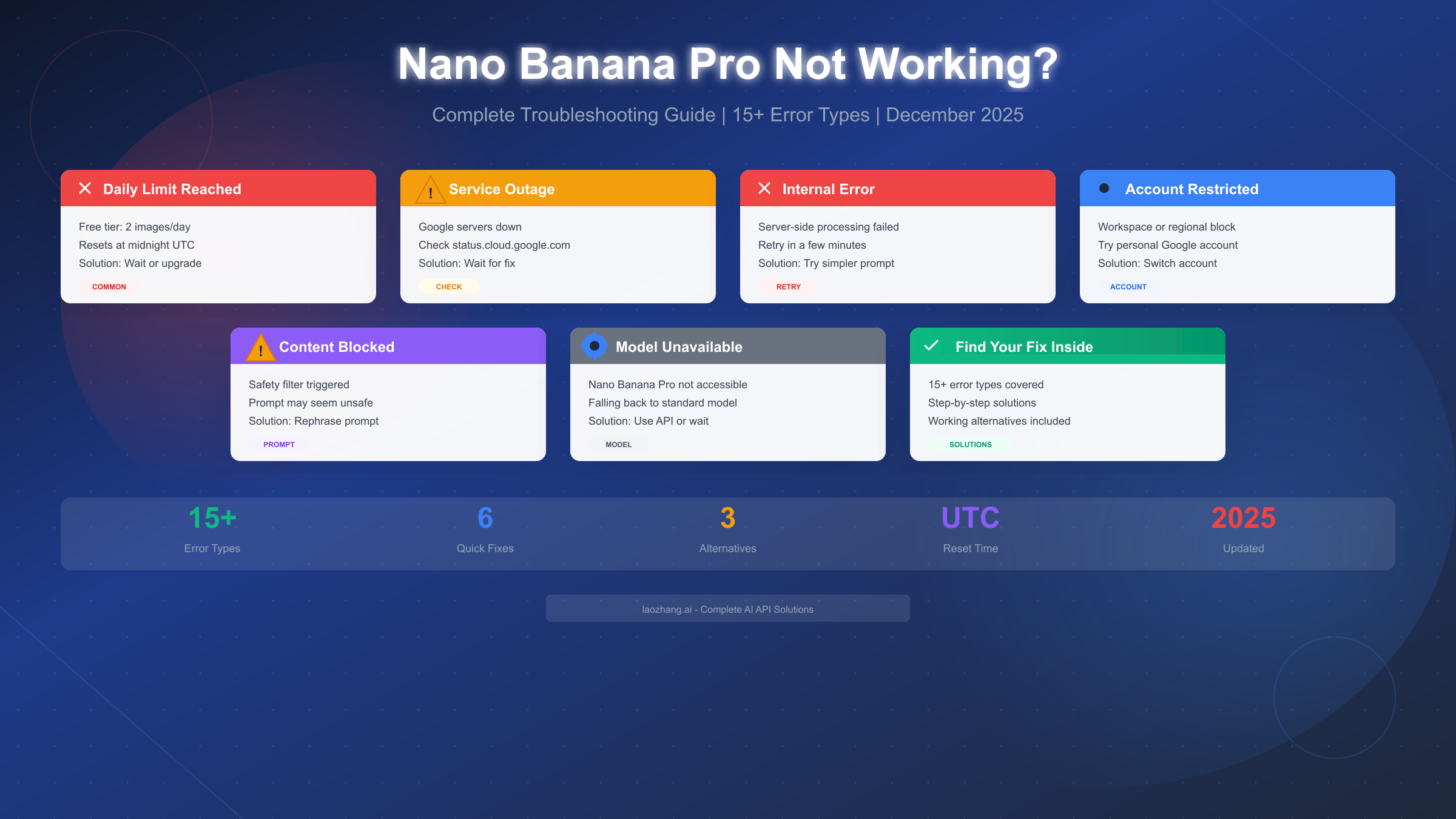
Google's Nano Banana Pro has revolutionized AI image generation since its November 2025 launch, but it's far from perfect. If you're seeing error messages, experiencing failed generations, or wondering why your images suddenly look different, you're not alone. Thousands of users report issues daily on Google's support forums, and the causes range from simple daily limits to complex account restrictions.
This guide covers every known issue with Nano Banana Pro, organized so you can identify your specific problem and find a working solution within minutes. Whether you're hitting rate limits, dealing with internal errors, or discovering your Workspace account doesn't support the feature, we have the fix.
Quick Diagnosis: Find Your Issue in 60 Seconds
Before diving into specific solutions, let's identify what type of issue you're experiencing. The troubleshooting path varies significantly depending on whether you're dealing with a quota problem, a service outage, or an account restriction.
Start with this quick checklist to categorize your issue:
The most common scenario is hitting the daily limit. Free tier users get just 2 Nano Banana Pro images per day, and once exhausted, Gemini silently falls back to the standard Nano Banana model—producing noticeably lower-quality results without any explicit warning. If your image quality suddenly dropped or you're seeing "limit reached" messages, this is likely your issue. Check the timestamp of your last successful generation; if it was earlier today, you've probably hit your quota.
Service outages represent the second most frequent cause of failures. Google's infrastructure, while generally reliable, experiences periodic issues that affect Nano Banana Pro availability. During outages, you'll typically see generic error messages like "An internal error has occurred" or "Failed to generate content." These errors affect all users simultaneously and require no action on your part—just patience.
Account and access restrictions form a more persistent category of issues. Google Workspace accounts, certain regional restrictions, and age verification requirements can permanently block access to Nano Banana Pro. Unlike quota or outage issues, these require specific configuration changes or alternative access methods to resolve.
Platform-specific issues deserve special attention because Gemini App, AI Studio, and API access each have unique quirks. A feature working perfectly in the Gemini mobile app might fail entirely in AI Studio, and vice versa. Knowing where you're accessing the feature helps narrow down the cause.
Finally, content safety filters can block seemingly innocent prompts. Google's safety systems sometimes flag legitimate creative requests as potentially harmful, resulting in blocked generations even when you haven't violated any guidelines.
Common Error Messages Explained
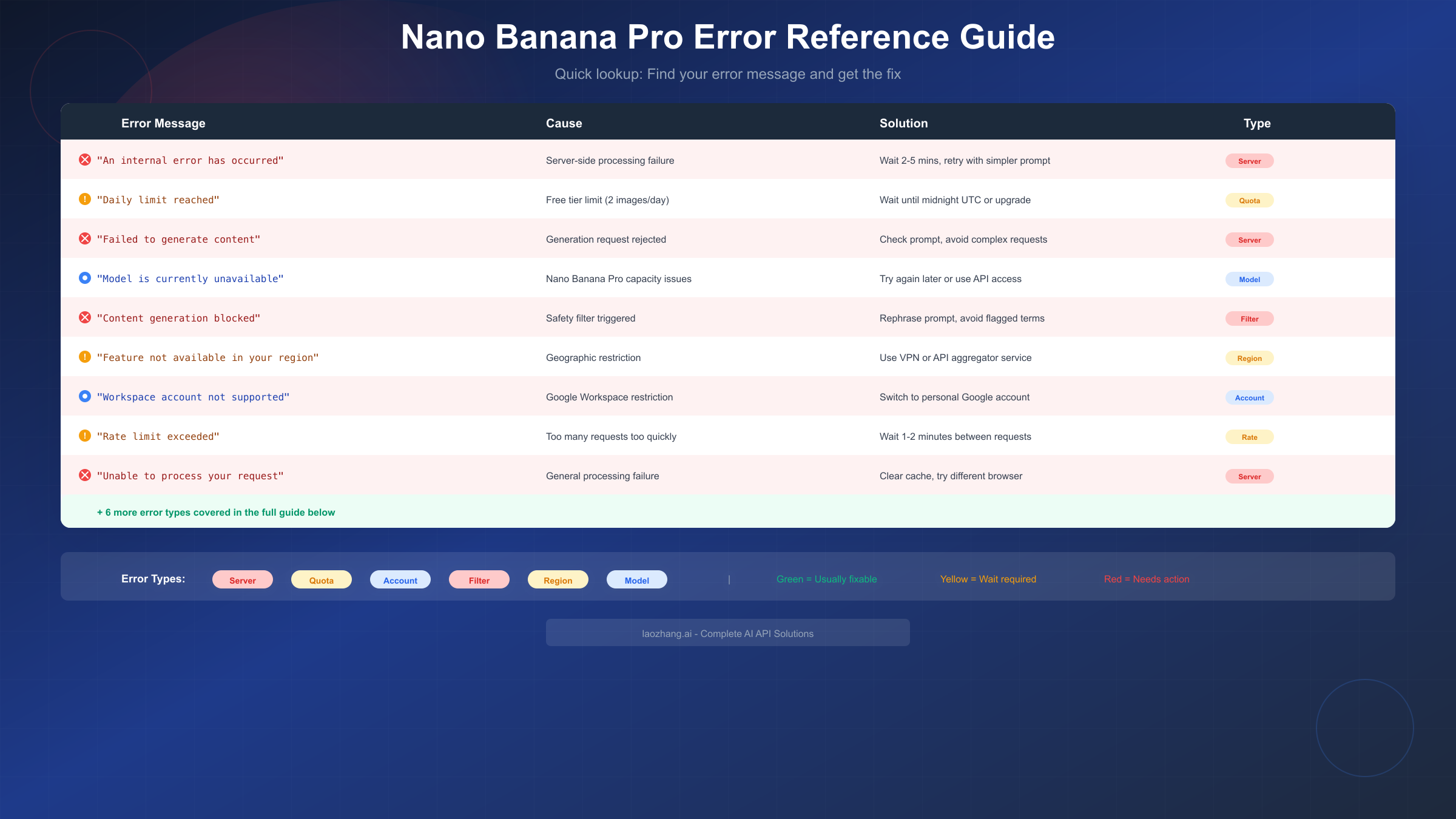
Understanding what each error message means is crucial for applying the right fix. Here's a comprehensive reference of every known Nano Banana Pro error, what causes it, and how to resolve it.
"An internal error has occurred. Please try again." appears when Google's servers encounter processing failures. This is almost always a temporary issue on Google's end, not something you caused. The fix involves waiting 2-5 minutes and retrying with a simpler prompt. If the error persists across multiple attempts over 15+ minutes, check Google's status page—you're likely experiencing a broader outage.
"Daily limit reached" or "You've reached your image generation limit" means exactly what it says. Free tier accounts have a strict 2-image daily limit for Nano Banana Pro specifically. Note that this limit is separate from general Gemini usage limits and resets at midnight UTC, not your local time. For users needing more generations, upgrading to Google One AI Premium ($20/month) increases the limit substantially.
"Failed to generate content" is a catch-all error that can indicate several different issues. Most commonly, it means the generation request timed out or was rejected by content filters. Try simplifying your prompt by removing specific names, reducing complexity, or avoiding potentially ambiguous terms. If the same prompt worked previously, the issue is likely temporary server strain.
"The model is currently unavailable" indicates capacity issues with Nano Banana Pro specifically. During peak usage times or after major announcements, Google's infrastructure can become overwhelmed. This error typically resolves within 30-60 minutes. If you need immediate results, consider using the standard Nano Banana model or an API alternative like laozhang.ai, which offers Nano Banana Pro access at approximately 20% of Google's pricing with higher availability guarantees.
"Content generation blocked due to safety concerns" occurs when Google's safety filters flag your prompt. These filters are intentionally aggressive and can flag innocent requests. Try rephrasing your prompt to avoid specific named individuals, trademarked content, or any terms that could be interpreted as violent, sexual, or harmful—even in clearly artistic contexts.
"Feature not available in your region" indicates geographic restrictions. Nano Banana Pro isn't available everywhere, particularly in regions with strict AI regulations. VPN usage can sometimes bypass these restrictions, though Google actively blocks known VPN IP ranges. API access through aggregation services typically provides more reliable regional bypass.
"Workspace account not supported" means your Google Workspace administrator hasn't enabled Gemini features, or the organization policy explicitly blocks image generation. The only solutions are using a personal Google account instead or requesting your IT administrator to enable the feature.
"Rate limit exceeded" differs from daily quota limits—it indicates you're making requests too quickly. Wait 1-2 minutes between generation attempts to avoid triggering rate limiting. This often happens when using browser automation or making rapid sequential requests.
Is Nano Banana Pro Down Right Now?
When Nano Banana Pro fails across multiple attempts with generic error messages, determining whether it's a personal issue or a service-wide outage saves significant troubleshooting time. Google doesn't provide real-time status specifically for Nano Banana Pro, but several methods help you verify service availability.
The most reliable official source is Google Cloud's status dashboard at status.cloud.google.com. While this focuses on cloud infrastructure rather than consumer AI features, major outages affecting the underlying systems will appear here. For Gemini-specific status, check Google's AI services page, though updates can lag behind actual outages by 15-30 minutes.
Third-party status checkers provide faster updates based on user reports. Downdetector (downdetector.com/status/google) aggregates user complaints in real-time, showing spikes when issues emerge. If you see a sudden increase in "Gemini" reports coinciding with your problems, the issue is almost certainly service-wide.
Google's support community forums offer another verification method. Search for recent threads mentioning "Nano Banana Pro" or "image generation" and sort by newest. Active threads with multiple users reporting identical issues confirm outages more reliably than status pages, which often underreport consumer-facing problems.
Social media monitoring on platforms like X (Twitter) and Reddit's r/GoogleAI can also reveal real-time issues. Users frequently report problems on social platforms before official acknowledgment, making these useful early warning systems.
If you confirm a service outage, the only solution is patience. Google typically resolves major outages within 1-4 hours, though some have lasted longer. There's no need to continue attempting generations during confirmed outages—you're only wasting your daily quota limit each time the request fails.
Daily Limit Issues and Reset Times
Understanding how Nano Banana Pro's daily limits work prevents frustration and helps you maximize your free access. The system is more complex than simple daily quotas, involving multiple overlapping restrictions.
Free tier users receive exactly 2 Nano Banana Pro images per day. This limit applies across all platforms—if you generate one image in the Gemini app and one through AI Studio, you've used your full allocation. The counter resets at exactly midnight UTC, which translates to different local times depending on your timezone.
For reference, here are reset times in major timezones:
- Pacific Time (PST): 4:00 PM previous day
- Eastern Time (EST): 7:00 PM previous day
- London (GMT): 12:00 AM (midnight)
- Berlin (CET): 1:00 AM
- Tokyo (JST): 9:00 AM
- Sydney (AEDT): 11:00 AM
If you want a deeper understanding of how these limits work and the differences between free and paid tiers, our detailed guide on Nano Banana Pro's free tier limits covers the complete tier structure.
When you exceed your daily limit, Gemini doesn't explicitly tell you. Instead, it silently falls back to the standard Nano Banana model, which produces lower-quality images. This behavior confuses many users who notice quality degradation without understanding why. If your recent images look significantly worse than earlier ones, you've likely exceeded your Nano Banana Pro quota.
Google One AI Premium subscribers ($20/month) receive substantially higher limits, though Google doesn't publish exact numbers for premium tiers—estimates suggest approximately 50-100 images daily based on user reports. Business and Enterprise Workspace tiers have even higher or unlimited quotas, depending on organizational agreements.
API access through Google AI Studio operates under different quota systems. While the free API tier has its own limits, these function independently from consumer Gemini app limits. For developers needing consistent high-volume access, API aggregation platforms remove quota restrictions entirely—you pay per image generated without arbitrary daily caps.
Account and Access Problems
Account-related issues represent the most persistent category of Nano Banana Pro failures. Unlike temporary outages or quota exhaustion, these require specific configuration changes to resolve.
Workspace Account Restrictions affect millions of users whose organizations use Google Workspace. By default, Gemini features including Nano Banana Pro are disabled in Workspace environments. Your IT administrator must explicitly enable "Gemini for Workspace" and allow image generation in the admin console. Even when enabled, some organizations block image generation specifically while allowing text-based Gemini features.
If you're using a Workspace account and encountering blocks, your immediate workaround is signing into Gemini with a personal Google account instead. Create a free personal account if necessary—personal accounts have full access to free-tier Nano Banana Pro features without organizational restrictions.
Age Verification Requirements can block access for accounts where age hasn't been confirmed or where the registered age is under 18. Google requires users to be 18+ for many AI features, including image generation. If your account age is incorrect, updating it in your Google Account settings (account.google.com) may restore access, though age changes can take up to 48 hours to propagate.
Regional Restrictions affect users in certain countries where Google limits AI feature availability due to regulatory requirements or infrastructure limitations. The full list of supported regions isn't publicly documented, but users in the EU, US, UK, Australia, Canada, Japan, and most of Southeast Asia generally have access. Users in China, Russia, and some Middle Eastern countries may face blocks regardless of account type.
VPN usage can bypass regional restrictions, but Google actively identifies and blocks known VPN IP addresses. Residential proxies or API access through aggregation services typically provide more reliable bypass than consumer VPN services.
Multi-Account Conflicts occasionally cause issues when you're signed into multiple Google accounts simultaneously. Try signing out of all accounts and signing in with only the account you want to use for Gemini. Some users report success by using Chrome profiles or incognito mode to isolate their Gemini-specific account.
Platform-Specific Troubleshooting
Nano Banana Pro availability and behavior differ significantly across platforms. An issue on one platform doesn't necessarily indicate problems on others.
Gemini Web App (gemini.google.com) is the primary consumer interface. Most users access Nano Banana Pro here. If you're experiencing issues, try these platform-specific fixes:
Clear your browser cache and cookies for google.com and gemini.google.com specifically. Corrupted cache data frequently causes generation failures that persist across sessions. In Chrome, go to Settings → Privacy and Security → Delete browsing data, select "Cookies" and "Cached images and files," then enter "google.com" in the delete data popup.
Disable browser extensions, particularly ad blockers and privacy tools. Extensions like uBlock Origin or Privacy Badger can interfere with Gemini's API calls, causing silent failures. Test in an extension-free incognito window to isolate extension-related issues.
Gemini Mobile App (iOS/Android) sometimes exhibits different behavior than the web app. The mobile app may continue working during web outages or vice versa. If the web app fails, try the mobile app as a fallback.
Mobile-specific issues often relate to app version. Check your app store for updates—Google frequently pushes fixes for image generation bugs through app updates. If problems persist after updating, try uninstalling and reinstalling the app to reset any corrupted local data.
AI Studio (aistudio.google.com) targets developers and has its own unique quirks. AI Studio uses API-based access, which operates under different quota and rate limiting systems than consumer Gemini. For deeper understanding of API pricing and limits, see our comprehensive Gemini API pricing guide.
AI Studio errors often relate to API key configuration. Ensure your API key is valid and has the necessary permissions enabled in Google Cloud Console. The "generativelanguage.googleapis.com" API must be enabled for your project.
API Access through direct API calls or SDK usage follows yet another set of rules. API users commonly encounter quota exhaustion faster than expected because API limits are measured in requests per minute and tokens per day, not just images. Monitor your usage in Google Cloud Console to avoid unexpected blocks.
Best Alternatives When Nano Banana Pro Fails
When Nano Banana Pro remains unavailable despite troubleshooting, having backup options ensures you can continue working. Several alternatives offer comparable or superior results.
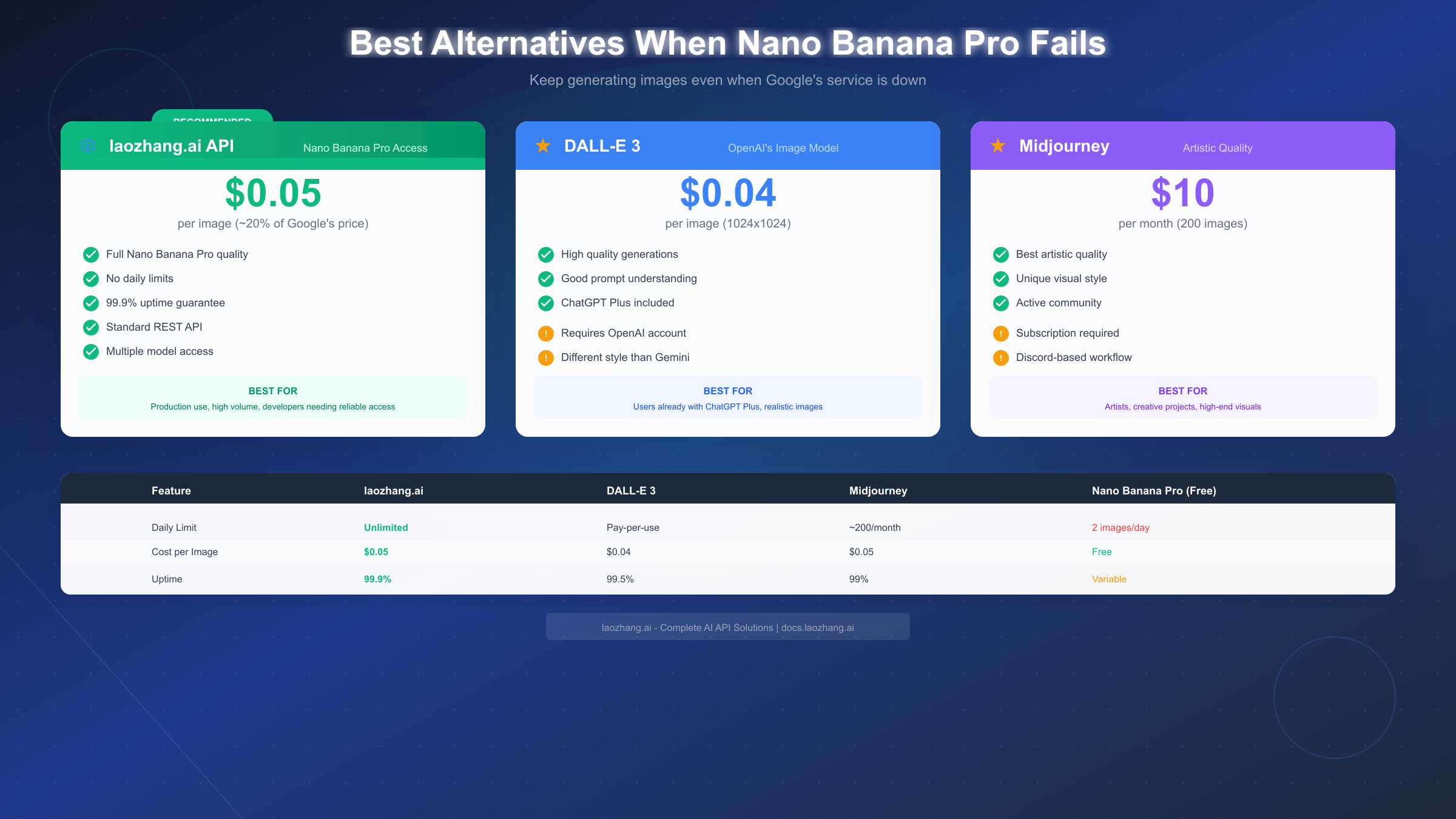
API Aggregation Services provide the most seamless fallback for Nano Banana Pro specifically. Platforms like laozhang.ai offer direct access to Nano Banana Pro through their aggregated API at approximately $0.05 per image—roughly 20% of Google's direct pricing. The key advantage is reliability: these services maintain multiple access paths and failover systems, typically achieving 99.9% uptime even when Google's consumer services experience issues. For developers and power users, API aggregation eliminates daily limits entirely while providing consistent access. Learn more at docs.laozhang.ai.
DALL-E 3 from OpenAI offers comparable quality with different stylistic tendencies. At approximately $0.04 per image (1024×1024), pricing is competitive. DALL-E 3 excels at photorealistic outputs and follows complex prompts effectively. ChatGPT Plus subscribers ($20/month) get included DALL-E 3 access, making it effectively free if you're already subscribed. The main disadvantage is DALL-E's different aesthetic style—if you specifically need Gemini's look, DALL-E won't perfectly replicate it.
Midjourney remains the industry leader for artistic and stylized outputs. At $10/month for Basic plans (~200 images), per-image costs are comparable to API services. Midjourney's strength is aesthetics—it produces visually stunning results that often require less prompt refinement than other models. However, its Discord-based workflow can frustrate users expecting a traditional interface.
Stable Diffusion via local deployment offers unlimited free generations if you have capable hardware (modern GPU with 8GB+ VRAM). The setup complexity is significant, but for high-volume users, eliminating per-image costs eventually justifies the effort. Various hosted Stable Diffusion services also exist at competitive per-image rates.
For most users experiencing temporary Nano Banana Pro issues, waiting for resolution is the simplest approach. But for mission-critical work or ongoing reliability requirements, maintaining access to at least one alternative service prevents costly delays.
Still Not Working? Report the Issue
If you've exhausted troubleshooting options without resolution, reporting the issue to Google helps them identify and fix problems faster—and creates documentation if you need support escalation.
Google's built-in feedback tool is accessible from within Gemini. Click the three-dot menu in any conversation and select "Send feedback" or "Report a problem." Include specific details:
- Exact error message (screenshot if possible)
- Timestamp when the error occurred
- Your account type (personal, Workspace, etc.)
- Platform used (web, app, AI Studio)
- Steps that led to the error
- Whether the issue is consistent or intermittent
Google Support Community at support.google.com/gemini provides public discussion forums where both users and Google employees participate. Posting your issue here creates visibility and often attracts solutions from experienced users. Search first—your issue may already have an active discussion with solutions.
X (Twitter) @GoogleAI sometimes responds to widespread issues, though response isn't guaranteed. Public social media visibility occasionally accelerates fixes for widespread problems.
For persistent account-specific issues, Google One support (if you're a subscriber) provides direct support channels that consumer accounts lack. This escalation path often resolves complex account issues faster than community forums.
FAQ: Quick Answers
Why did my Nano Banana Pro images suddenly look worse?
You've likely exceeded your daily limit. When quota is exhausted, Gemini silently falls back to the standard Nano Banana model, which produces lower-quality results. Check if you've generated 2+ images today. Limits reset at midnight UTC. For timezone-specific reset times, see our guide on AI image generation limit reset times which covers similar patterns across services.
Can I use Nano Banana Pro with a Google Workspace account?
It depends on your organization's configuration. By default, Workspace accounts don't have access. Your IT administrator must enable Gemini for Workspace and specifically allow image generation. Contact your IT team or try using a personal Google account instead.
Why does Nano Banana Pro work in the Gemini app but not AI Studio?
These platforms use different backends with separate quotas and access controls. Your API key in AI Studio may have insufficient permissions, or you may have exceeded API-specific rate limits that don't apply to consumer Gemini. Check your Google Cloud Console for API quota status.
Is there a way to check my remaining Nano Banana Pro quota?
Unfortunately, Google doesn't provide explicit quota tracking for free tier users. You discover you've hit the limit only when quality drops (silent fallback) or you receive an error message. Tracking your generations manually is the only reliable method.
How long do Nano Banana Pro outages typically last?
Based on historical patterns, minor outages resolve within 1-2 hours. Major outages affecting core infrastructure can last 4-8 hours, though Google usually provides updates for extended incidents. Check status.cloud.google.com and Downdetector for real-time information.
Can I appeal if my prompt was incorrectly blocked?
Google doesn't provide a direct appeal mechanism for individual blocked prompts. Your only option is rephrasing. Try removing specific names, simplifying the request, or removing any terms that could be misinterpreted. Sometimes identical prompts succeed on retry due to the probabilistic nature of content filtering.
Does using a VPN help with Nano Banana Pro issues?
For regional restrictions, VPNs may help but Google actively blocks known VPN IP ranges. Success varies by VPN provider. For all other issues (quota, outages, account restrictions), VPNs provide no benefit. Refer to our Gemini regional restrictions guide for detailed regional availability.
Why does "model unavailable" error appear even during off-peak hours?
Nano Banana Pro capacity constraints aren't purely traffic-based. Google may limit model availability during maintenance windows, A/B testing periods, or infrastructure updates that don't correlate with user traffic patterns. The error can appear anytime regardless of global usage levels.
Summary: Fixing Nano Banana Pro Issues
Troubleshooting Nano Banana Pro issues requires matching your specific error to the correct solution category. Use this quick reference to navigate common problems:
For immediate diagnosis, identify whether you're dealing with quota limits (2 images/day for free users), service outages (check status pages), account restrictions (Workspace or regional blocks), or content safety filters. Each category has fundamentally different solutions.
The most common fix is simply waiting. Daily quotas reset at midnight UTC, and most outages resolve within hours. If you need immediate results, API access through aggregation services or alternative models like DALL-E 3 provide reliable fallback options.
For persistent account issues, switching to a personal Google account resolves most Workspace and organizational restrictions. Regional blocks may require VPN or API service access.
Report ongoing issues through Google's feedback tools to help improve the service. Document your errors, timestamps, and troubleshooting attempts—this information helps both Google engineers and support staff resolve issues faster.
Nano Banana Pro represents impressive AI image generation capability when it works, and understanding its failure modes helps you maintain productivity even when issues arise. Keep this guide bookmarked for the next time you encounter problems—with the specific error message in hand, you'll find your solution in seconds rather than hours.


