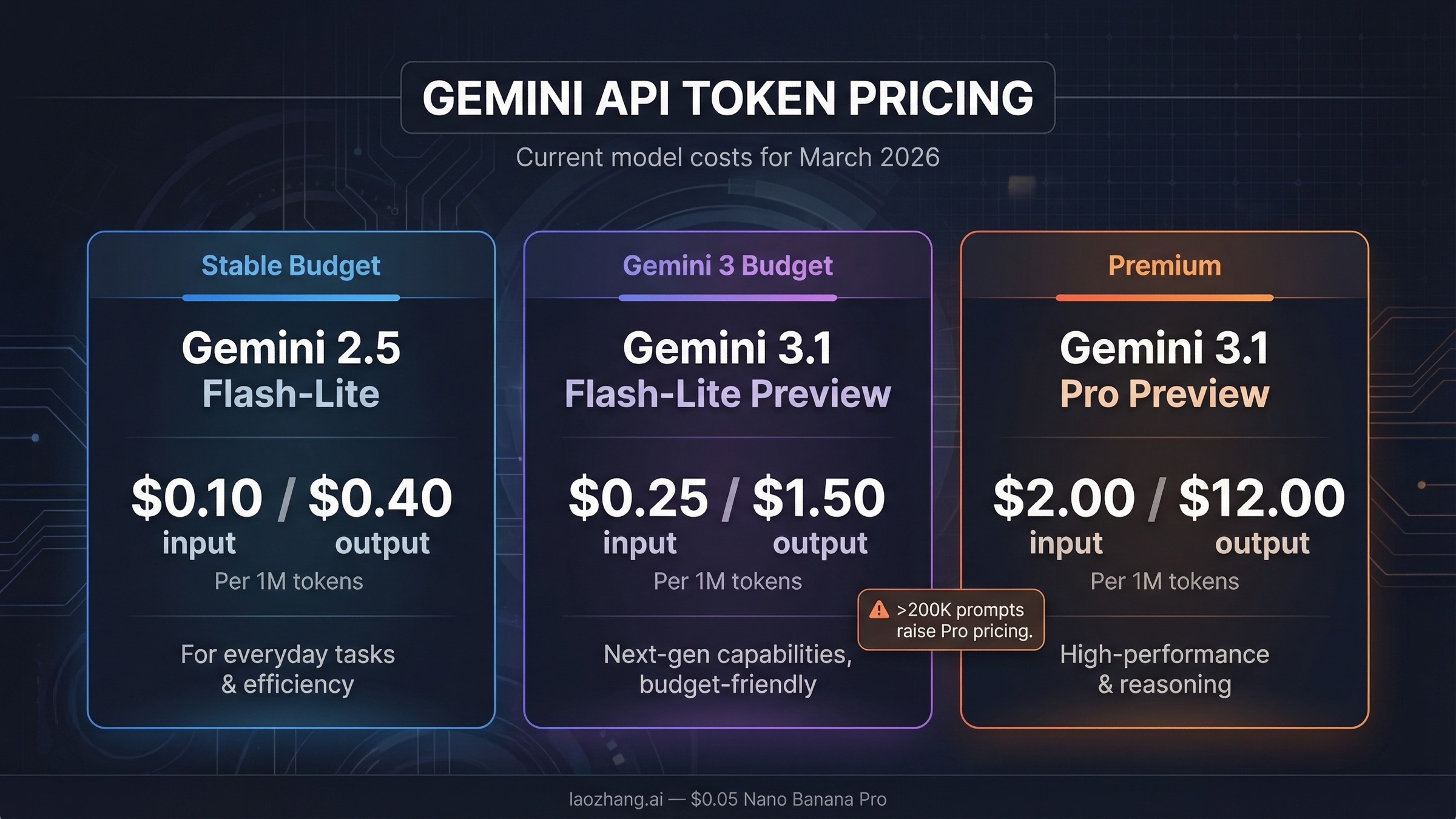
Gemini API token pricing in March 2026 runs from $0.10 per 1M input tokens on Gemini 2.5 Flash-Lite to $2.00 per 1M input tokens on Gemini 3.1 Pro Preview for prompts up to 200K tokens. On the output side, the current range is $0.40 to $12.00 per 1M output tokens for the main text-model lanes, with higher long-context pricing on Pro-class models and additional charges for features such as grounding, context caching, and audio input on some models. If you want the short answer, Gemini 2.5 Flash-Lite is still the cheapest stable option, Gemini 3.1 Flash-Lite Preview is the cheapest Gemini 3 option, and Gemini 3.1 Pro Preview is the current premium text lane after Google shut down Gemini 3 Pro Preview on March 9, 2026 according to the models page.
Use this page to answer three budgeting decisions quickly: which Gemini model to price first, when the 200K context threshold changes the math, and which billing modifiers can quietly dominate your real spend. Stay on the Gemini Developer API lane, not Vertex or app subscriptions, and check batch pricing, caching, grounding, audio, and long-context thresholds before you trust the headline token number as your production budget.
Key Takeaways
- Cheapest stable text model: Gemini 2.5 Flash-Lite at $0.10 input and $0.40 output per 1M tokens.
- Cheapest Gemini 3 text model: Gemini 3.1 Flash-Lite Preview at $0.25 input for text, image, and video, plus $1.50 output.
- Current premium lane: Gemini 3.1 Pro Preview at $2.00 input and $12.00 output up to 200K tokens, then $4.00 and $18.00 above 200K.
- Best default for many production apps: Gemini 2.5 Flash remains the safest balanced lane at $0.30 input and $2.50 output if you want a stable model with better reasoning than Flash-Lite.
- Fastest way to cut costs: Batch pricing roughly halves the standard token rates on the current pricing page.
- Most common billing mistake: developers compare headline token prices but forget cache charges, cache storage, audio premiums, grounding charges, or the 200K context threshold on Pro-class models.
Gemini API token pricing table for March 2026
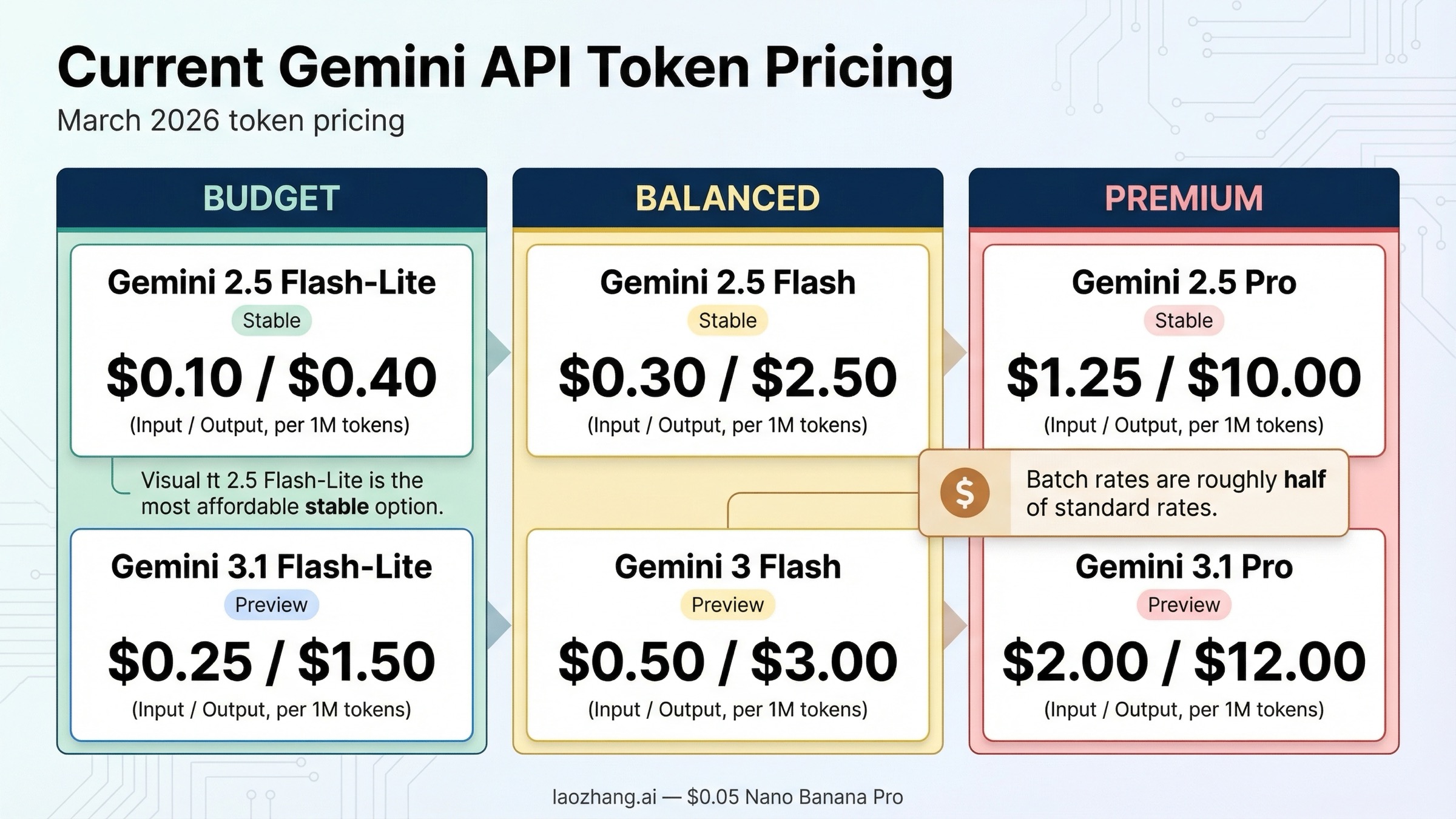
The official Gemini Developer API pricing page is the source of truth, but it is not the fastest page to interpret if you just want the current token rates side by side. This table focuses on the live text-model lanes most developers actually compare today.
| Model | Standard input | Standard output | Batch input | Batch output | Notes |
|---|---|---|---|---|---|
| Gemini 3.1 Pro Preview | $2.00 per 1M tokens up to 200K, $4.00 above 200K | $12.00 up to 200K, $18.00 above 200K | $1.00 up to 200K, $2.00 above 200K | $6.00 up to 200K, $9.00 above 200K | Paid only, current top-end text lane |
| Gemini 3 Flash Preview | $0.50 per 1M text, image, or video tokens; $1.00 audio | $3.00 | $0.25 text, image, or video; $0.50 audio | $1.50 | Fast Gemini 3 lane, free tier available |
| Gemini 3.1 Flash-Lite Preview | $0.25 per 1M text, image, or video tokens; $0.50 audio | $1.50 | $0.125 text, image, or video; $0.25 audio | $0.75 | Cheapest Gemini 3 text lane |
| Gemini 2.5 Pro | $1.25 up to 200K, $2.50 above 200K | $10.00 up to 200K, $15.00 above 200K | $0.625 up to 200K, $1.25 above 200K | $5.00 up to 200K, $7.50 above 200K | Strong lower-cost alternative to 3.1 Pro |
| Gemini 2.5 Flash | $0.30 per 1M text, image, or video tokens; $1.00 audio | $2.50 | $0.15 text, image, or video; $0.50 audio | $1.25 | Best balanced stable lane for many apps |
| Gemini 2.5 Flash-Lite | $0.10 per 1M text, image, or video tokens; $0.30 audio | $0.40 | $0.05 text, image, or video; $0.15 audio | $0.20 | Cheapest stable lane overall |
Two details matter immediately.
First, Google's current lineup mixes stable 2.5 models with preview Gemini 3 models, so "latest" and "cheapest" are not the same thing. If your main goal is the lowest stable text cost, 2.5 Flash-Lite still beats the Gemini 3 preview options. If your goal is to stay on the Gemini 3 surface, then 3.1 Flash-Lite Preview is the real budget lane.
Second, several older pages still cite Gemini 3 Pro Preview. That is now stale. Google's live models page explicitly warns that Gemini 3 Pro Preview was deprecated and shut down on March 9, 2026, and points users to Gemini 3.1 Pro Preview instead. If you see an older comparison that treats Gemini 3 Pro Preview as active, assume the rest of its pricing page may also be stale.
Which Gemini model should you budget for?
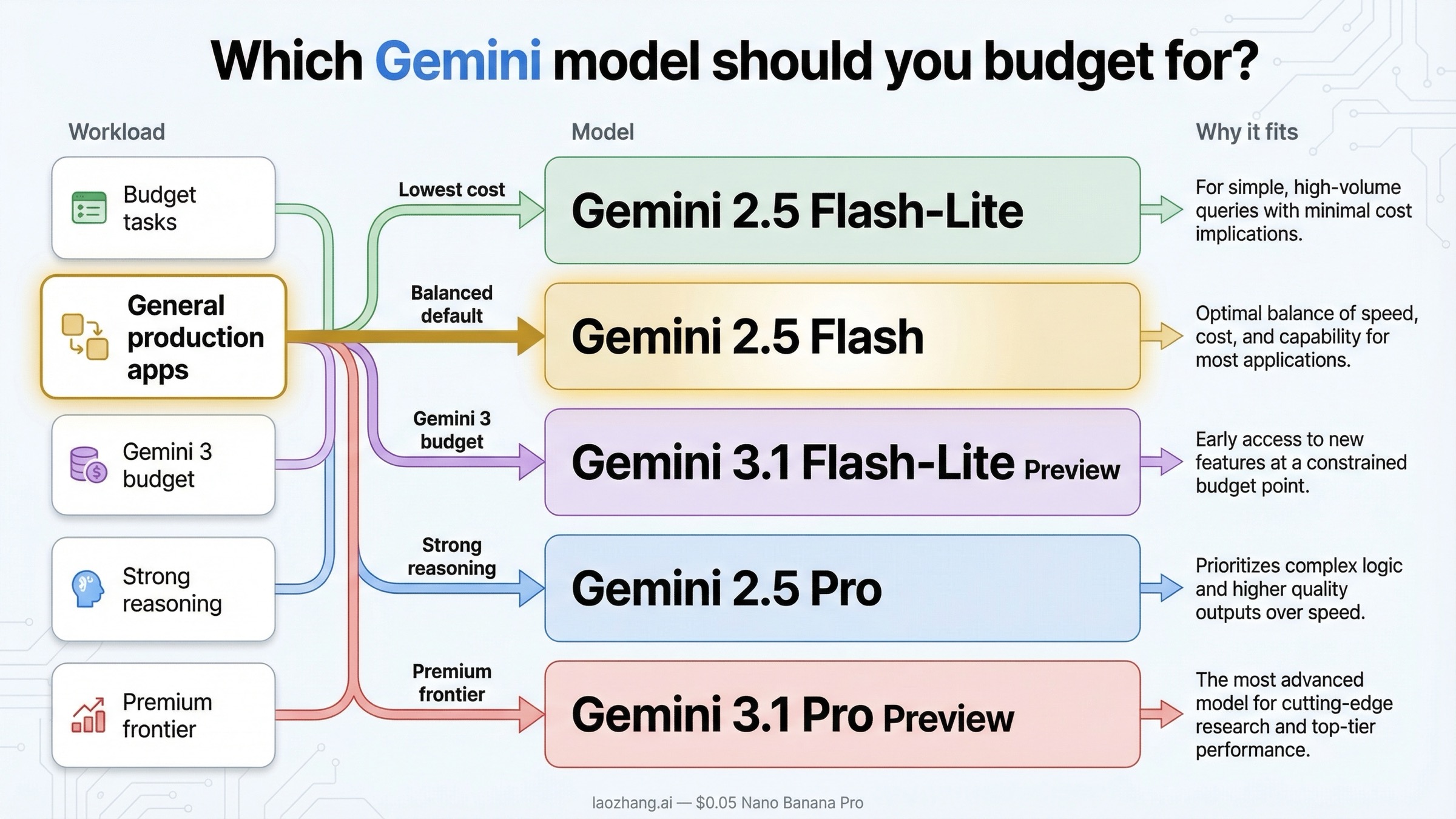
The answer depends less on "which model is newest" and more on how much reasoning quality you really need per request.
If you care mostly about low cost, Gemini 2.5 Flash-Lite is still the cleanest answer. At $0.10 input and $0.40 output per 1M tokens, it remains the cheapest stable text lane in Google's API lineup. That makes it a strong fit for classification, extraction, translation, routing, lightweight chat, or any pipeline where you value throughput more than maximum reasoning depth.
If you want the safer middle ground, Gemini 2.5 Flash is still the practical default for many production teams. It costs more than Flash-Lite, but not dramatically more in the kinds of workloads that matter to startups and internal tools. At $0.30 input and $2.50 output per 1M tokens, it is much cheaper than the Pro lanes and usually good enough for customer support bots, internal copilots, document Q&A, or lightweight agent workflows. If you are not sure where to start, this is still the lane I would budget first.
If you specifically want to stay on the Gemini 3 family without paying Pro pricing, Gemini 3.1 Flash-Lite Preview is the budget path. It is not as cheap as 2.5 Flash-Lite, but it gives you the current Gemini 3 track at $0.25 input and $1.50 output. That matters if your organization prefers to stay on the newest family and can tolerate preview-model rate-limit and change risk.
If your workload is genuinely reasoning-heavy, the real choice is between Gemini 2.5 Pro and Gemini 3.1 Pro Preview. Gemini 2.5 Pro is materially cheaper at $1.25 and $10.00 up to 200K tokens, while Gemini 3.1 Pro Preview is the premium lane at $2.00 and $12.00. The price delta is not small enough to ignore. For code generation, long-form synthesis, or agent planning, you should assume 3.1 Pro is the premium decision rather than the obvious default.
That is the part most generic pricing guides do not state clearly: the Gemini lineup is not one clean staircase where the newest model is automatically the best buy. In March 2026, the sensible budgeting question is:
- use 2.5 Flash-Lite if cost is everything
- use 2.5 Flash if you want the safest stable default
- use 3.1 Flash-Lite Preview if you want the cheapest Gemini 3 lane
- use 2.5 Pro if you need strong reasoning without paying the maximum Gemini 3 premium
- use 3.1 Pro Preview only when the extra reasoning quality is worth the higher token rate
If your project is still in the testing stage, also remember that the billing FAQ and pricing page both make a distinction between free access and paid usage. Some models still offer free-tier access, but that does not mean every Gemini API surface is free, and it does not mean your later production bill will resemble your AI Studio experiments.
What your Gemini bill actually includes
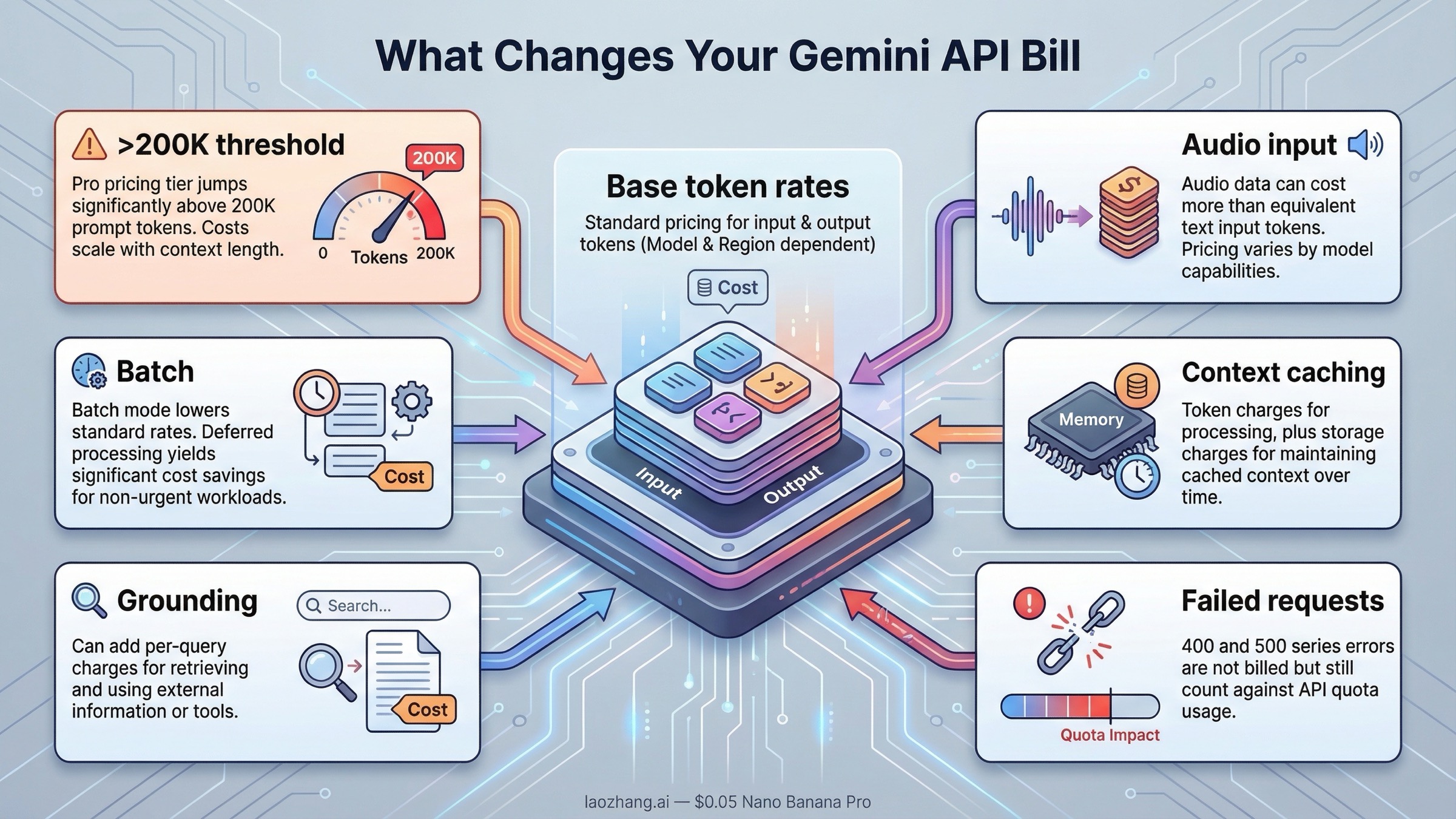
This is where many "Gemini pricing" pages stop too early. Google's billing page says Gemini API billing is based on input token count, output token count, cached token count, and cached token storage duration. In other words, you are not only paying for the text you typed and the text the model returned.
You also need a usable mental model for token counting. Google's token guide says one Gemini token is roughly 4 characters, and 100 tokens is roughly 60 to 80 English words. That is not precise enough for billing, but it is good enough to stop making bad back-of-the-envelope estimates. A short 300-word prompt is not expensive. A retrieval-heavy prompt that repeatedly attaches long system instructions, tool traces, or large document chunks is where your bill starts to move.
The next surprise is that not every token is priced the same way. On several models, audio input costs more than text input. On Pro-class models, requests above 200K prompt tokens move into a higher price tier. And if you use context caching, you may save on repeated input processing while also paying for cached tokens and storage time. That is why "Gemini costs $X per million tokens" is only the headline, not the whole budget.
Here is the short billing-modifier table most searchers actually need:
| Billing modifier | What changes | Why it matters |
|---|---|---|
| Pro-class prompts above 200K tokens | Gemini 3.1 Pro Preview jumps from $2.00 to $4.00 input and from $12.00 to $18.00 output; Gemini 2.5 Pro jumps from $1.25 to $2.50 input and from $10.00 to $15.00 output | Long-context requests can cost much more than the headline row suggests |
| Audio input | Flash and Flash-Lite models charge higher audio-input rates than text, image, or video input | Voice and multimodal apps are often under-budgeted if you ignore this |
| Batch mode | Batch pricing cuts standard rates roughly in half on the main text-model lanes | This is the easiest savings lever for async workloads |
| Context caching | Google charges cached token count plus storage duration | Caching can reduce repeated compute, but it is not "free memory" |
| Grounding | Search or Maps grounding can add separate per-query charges | Retrieval quality may improve, but your bill is no longer only token-based |
| Failed requests | 400 and 500 failures are not billed, but still count against quota | Error storms hurt throughput even when they do not increase spend |
Grounding is also not priced uniformly across the current Gemini lineup. On Google's live March 22, 2026 pricing page, Gemini 3.1 Pro Preview, Gemini 3.1 Flash-Lite Preview, and Gemini 3 Flash Preview show $14 per 1,000 Google Search or Maps queries after their free allowance. Gemini 2.5 Pro, Gemini 2.5 Flash, and Gemini 2.5 Flash-Lite show a higher pattern of $35 per 1,000 grounded Google Search prompts and $25 per 1,000 grounded Maps prompts after their free allowance. If grounding is central to your app, check the exact model row instead of assuming every Gemini model uses the same retrieval surcharge.
Two of those rows deserve extra emphasis.
Batch mode is the cleanest price lever for offline or asynchronous jobs. If you are generating reports, evaluating data, rewriting content, or running nightly backfills, batch pricing usually deserves to be your default estimate before you even compare vendors. Cutting the token rate in half often matters more than shaving a few cents off the standard row.
Context caching is the most misunderstood Gemini pricing feature. Teams sometimes talk about it as if it simply makes repeated prompts cheap. That is directionally true, but incomplete. Google charges for cached tokens and storage duration, so you should treat caching like an optimization feature, not free persistence. If your app reuses large prompt prefixes or shared context, caching can still be a major win. If it does not, forcing caching into the design will not magically lower your bill. If you want the deeper implementation side, the existing guide on Gemini API context caching and cost reduction is the better follow-up read.
When Gemini pricing changes faster than expected
Three patterns create the biggest gap between the rate people remember and the amount they actually pay.
The first is the 200K prompt threshold on the Pro lanes. Developers often remember the base number, then forget that large prompts move into a higher bracket. The practical consequence is simple: if you are attaching large RAG contexts, codebase chunks, or long multi-turn histories, you should not assume the cheaper Pro row applies. This is also why some long-context use cases that sound "Pro-shaped" still end up making more financial sense on Flash plus better retrieval discipline.
The second is free-tier confusion. Gemini's pricing surface makes it easy to blur Google AI Studio experimentation, model availability, and paid API billing into one story. But the billing FAQ is explicit: AI Studio usage remains free unless you link a paid API key for access to paid features, and free-tier behavior differs by model. That means "I tried it for free in AI Studio" is not a valid cost estimate for production.
The third is grounding and quota confusion. Token pricing is only one layer of Gemini cost planning. Google's rate-limits page says limits are applied per project, not per API key, and that rate limits depend on the model and usage tier. Once you enable billing and move into paid tiers, pricing and quota decisions start interacting. For example, if you batch async jobs to cut token cost, you may still need to plan around batch queue limits. If you hit 429s regularly, the operational question shifts from "what is the cheapest per-token rate?" to "which lane gives me the throughput I actually need?" The follow-up guide on fixing Gemini API 429 Resource Exhausted errors is more useful than another pricing table at that point.
This is also why I would not over-index on tiny rate differences between similar models unless the workload is huge. The bigger budget swings usually come from model choice, long-context behavior, batch usage, or preventable prompt bloat.
Gemini Developer API vs Vertex AI vs AI Studio pricing confusion
Pricing confusion starts when three different surfaces get blended into one budget conversation.
The first surface is the Gemini Developer API pricing page, which is what this article is about. That is the cleanest answer for most developers who are using Gemini directly through Google's public developer stack. The second surface is Vertex AI, which exposes the Gemini models inside Google Cloud's broader enterprise platform. The third surface is Google AI Studio, which is an experimentation interface and not the same thing as a permanent production billing model.
The problem is that many pages combine those surfaces with consumer Gemini subscription plans, Workspace add-ons, or even Google developer-seat products. That makes the page feel comprehensive, but it makes the exact token-pricing question harder to answer.
The practical rule is:
- use the Gemini Developer API pricing page when you are pricing direct Gemini API calls
- use the Vertex AI pricing page when your workload is actually being routed through Vertex and enterprise billing matters
- use AI Studio only as an experimentation surface, not as your final production pricing model
In March 2026, the important detail is that Vertex AI broadly mirrors the same Gemini token price patterns, but it also exposes enterprise-oriented lanes such as priority or flex and batch pricing more explicitly. If a page does not tell you which surface its price table belongs to, treat that page as incomplete until you confirm the official source.
For budgeting, the practical rule is simple: if you are estimating token spend, stay on token-pricing surfaces. Do not mix app subscriptions and workspace bundles into the same spreadsheet unless those are truly part of your deployment path.
Example monthly cost math for common workloads
The easiest way to make token pricing useful is to turn it into a few realistic workload estimates. These are not official quotes. They are simple planning examples using the current March 2026 standard rates.
Example 1: small customer-support bot on Gemini 2.5 Flash
Assume you process 30M input tokens and 10M output tokens per month. At Gemini 2.5 Flash standard pricing, that is:
- input: 30 x $0.30 = $9.00
- output: 10 x $2.50 = $25.00
- estimated monthly total: $34.00
That is why 2.5 Flash is still such a strong default. It is cheap enough for production experimentation without forcing you all the way down to Flash-Lite.
Example 2: high-volume routing or extraction service on Gemini 2.5 Flash-Lite
Assume 200M input tokens and 40M output tokens per month. At 2.5 Flash-Lite standard pricing:
- input: 200 x $0.10 = $20.00
- output: 40 x $0.40 = $16.00
- estimated monthly total: $36.00
That is an important reminder that the cheapest output lane can matter more than the cheapest input lane if your app produces a lot of text.
Example 3: premium coding or synthesis workload on Gemini 3.1 Pro Preview
Assume 20M input tokens and 4M output tokens per month, with prompts staying under 200K each:
- input: 20 x $2.00 = $40.00
- output: 4 x $12.00 = $48.00
- estimated monthly total: $88.00
That is not absurdly expensive, but it is still meaningfully higher than using Gemini 2.5 Pro for the same token volume:
- 2.5 Pro input: 20 x $1.25 = $25.00
- 2.5 Pro output: 4 x $10.00 = $40.00
- estimated monthly total: $65.00
In other words, the premium for 3.1 Pro is real even before you cross the 200K threshold.
Example 4: async backfill job with batch mode
Take the first example again, but run it through batch mode instead of standard mode on 2.5 Flash:
- input: 30 x $0.15 = $4.50
- output: 10 x $1.25 = $12.50
- estimated monthly total: $17.00
That is why batch pricing is the first optimization lever worth checking before you redesign your whole stack or migrate vendors.
If you are still in the free-testing stage, the better companion read is the repo's Gemini API free quota 2026 guide. If you already know your workload shape and are only comparing the Gemini 3 fast lane, the narrower Gemini 3 Flash API price guide may be enough.
The bottom line is simple. The current Gemini API token-pricing question is not really "what is the price?" It is "which Gemini lane matches my workload, and which billing modifiers will change the real number?" Once you answer that, the rest of the Gemini pricing surface becomes much easier to navigate.