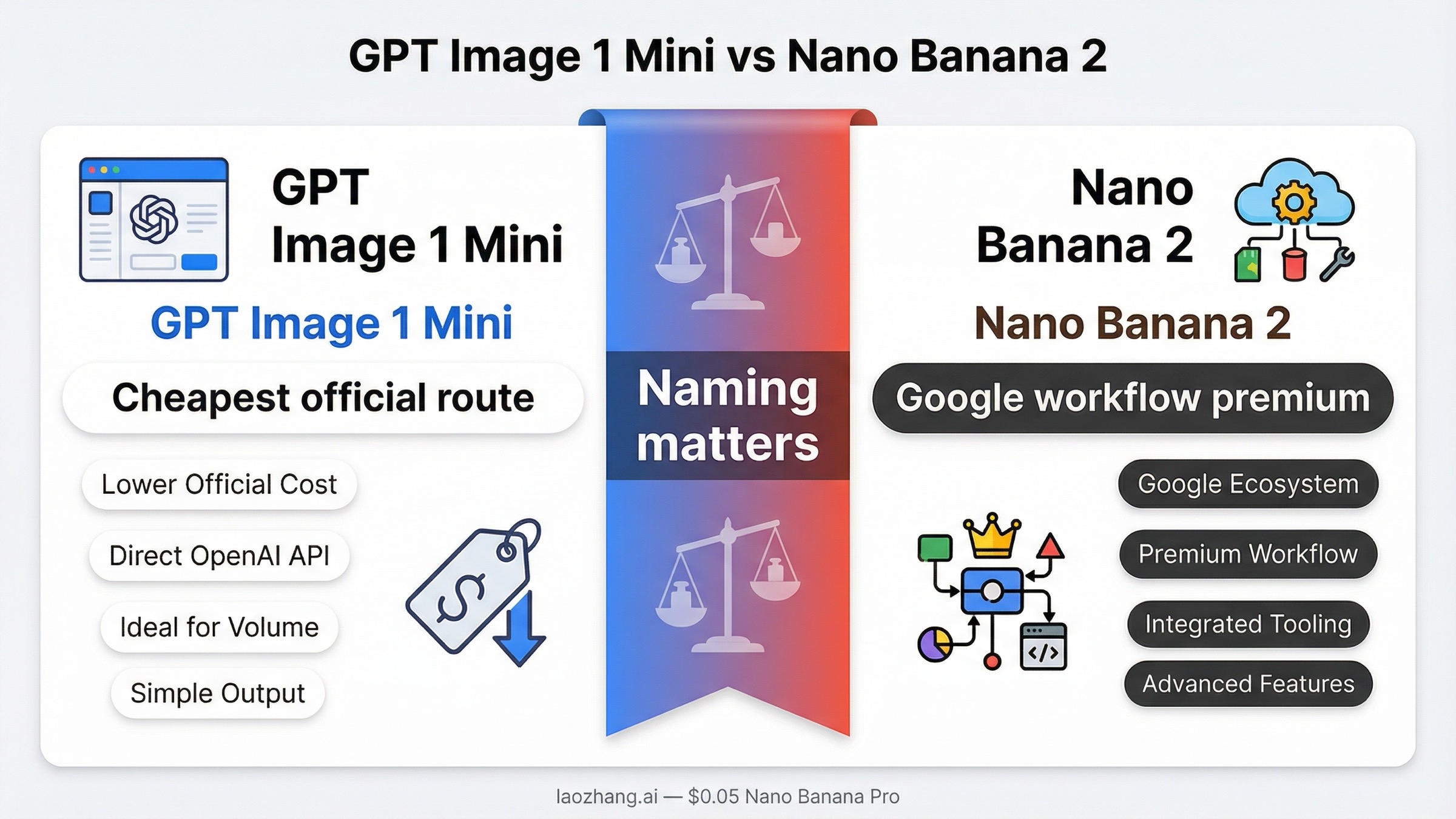
As of March 27, 2026, the cleanest answer is this: pick gpt-image-1-mini if you want the cheapest official image route and the easiest OpenAI-native starting point. Pick Nano Banana 2 only if you specifically want Google's image-generation stack, its clearer 0.5K-to-4K image ladder, or Google-native multimodal and grounding workflows badly enough to pay more per image. The biggest mistake is treating this as a neutral abstract quality contest. It is a routing decision.
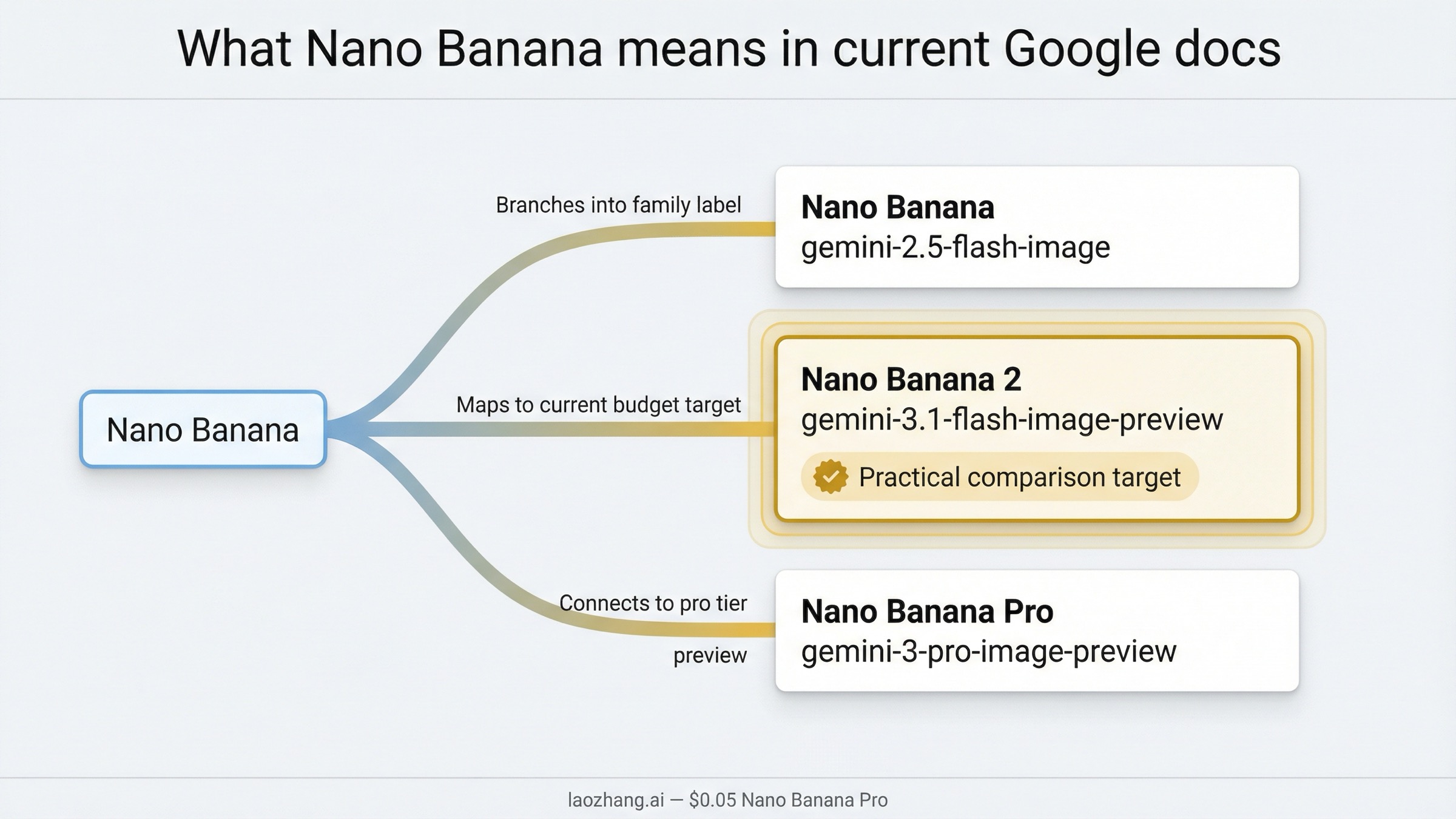
There is one naming problem to fix before anything else. Current Google docs no longer use "Nano Banana" as one clean product name. They split the family into Nano Banana 2, Nano Banana Pro, and Nano Banana, each pointing at different Gemini image surfaces. In current buyer language, most people using this keyword really mean Nano Banana 2, which maps to gemini-3.1-flash-image-preview. If you skip that cleanup, the comparison becomes muddled fast.
That naming correction also changes the budget answer. On current official numbers, GPT Image 1 Mini is not just a little cheaper. It is dramatically cheaper on the visible sticker-price ladder. Nano Banana 2 still has reasons to win, but those reasons are about workflow, resolution packaging, and Google-native fit, not about being the cheaper image call in a vacuum.
TL;DR
If you only need the fast answer, use this table and stop there.
| Your priority | Better choice | Why |
|---|---|---|
| Lowest official cost per image | GPT Image 1 Mini | OpenAI's current mini ladder starts at $0.005 for 1024x1024 low quality, far below Nano Banana 2's $0.045 at 0.5K. |
| Cheapest current OpenAI starting point | GPT Image 1 Mini | OpenAI positions it as the current cost-efficient image branch, not as a legacy fallback. |
| Clear Google-native resolution ladder | Nano Banana 2 | Google's current pricing page translates image output into 0.5K, 1K, 2K, and 4K planning numbers. |
| OpenAI-native app or agent workflow | GPT Image 1 Mini | It fits the current OpenAI image family and exposes a visible tier table from 5 IPM to 250 IPM. |
| Search-grounded Gemini image workflow | Nano Banana 2 | Google's current image docs keep image generation inside the broader Gemini and Search-grounded environment. |
| "Nano Banana" naming clarity | Neither, until you clarify the model | In current Google docs, Nano Banana, Nano Banana 2, and Nano Banana Pro are different things. |
The practical recommendation is blunt. If a buyer asks which route to standardize on first and gives no extra context, start with GPT Image 1 Mini. Upgrade to Nano Banana 2 only when you have a workflow reason, not because page-one comparison pages imply it is automatically the better deal.
What "Nano Banana" means right now
This is the part current page one handles poorly.
In Google's live image-generation guide, the naming split is explicit:
- Nano Banana 2 maps to Gemini 3.1 Flash Image Preview or
gemini-3.1-flash-image-preview - Nano Banana Pro maps to Gemini 3 Pro Image Preview or
gemini-3-pro-image-preview - Nano Banana maps to Gemini 2.5 Flash Image or
gemini-2.5-flash-image
That means the keyword most buyers type is already slightly behind the live product surface. The phrase "Nano Banana" is still useful search language, but it is not precise enough for implementation or pricing analysis. If you are comparing a current OpenAI budget lane against the current practical Google budget lane, the fair match is GPT Image 1 Mini vs Nano Banana 2, not GPT Image 1 Mini versus the entire Banana family.
This matters because many comparison pages quietly widen the question. Some compare against Nano Banana Pro. Some compare against the older Gemini 2.5 image surface. Some reuse screenshots or provider labels without telling you which actual model ID sits behind the branding. That creates fake certainty. A buyer thinks they are comparing two budget lanes, but they are really looking at a blended comparison of budget, Pro, and legacy surfaces.
Google's current docs also make two workflow facts clearer than many third-party pages do. First, all generated images include SynthID watermarking. Second, the current gemini-3.1-flash-image-preview branch supports Google's broader image workflow language, including grounded image-generation use cases and multi-image handling that feel native inside the Gemini stack. Those are real reasons a Google-leaning team might prefer Nano Banana 2. They are just different reasons from "it is cheaper."
So if you want the cleanest naming rule, use this:
When a 2026 buyer says "Nano Banana" in a budget-comparison context, assume they probably mean Nano Banana 2 unless the source explicitly says gemini-2.5-flash-image or Nano Banana Pro.
For a broader map of Google's current image family, see our guide to Nano Banana 2 or Imagen. If your real comparison is actually the higher-end Google route, the more relevant page is Nano Banana 2 vs GPT Image 1.5, not this budget-branch article.
Quick comparison: pricing, text, workflow, limits
The table below is the fastest honest way to compare the routes as of March 27, 2026.
| Dimension | GPT Image 1 Mini | Nano Banana 2 |
|---|---|---|
| Current official surface | gpt-image-1-mini | gemini-3.1-flash-image-preview |
| Current family positioning | OpenAI's cost-efficient GPT Image branch | Google's practical current Flash image branch under the Nano Banana 2 label |
| Lowest visible official price | $0.005 for 1024x1024 low | $0.045 for 0.5K |
| Practical mid-tier planning number | $0.011 for 1024x1024 medium | $0.067 for 1K |
| Higher output band | $0.036 square high, $0.052 portrait or landscape high | $0.101 for 2K, $0.151 for 4K |
| Pricing shape | Quality ladder | Resolution ladder |
| Official rate-limit visibility | Clear tier table from 5 IPM to 250 IPM | Google docs are clearer on image sizes and model packaging than on a buyer-facing tier table |
| Naming clarity | Clean | Messy unless you explicitly map Nano Banana 2 to Gemini 3.1 Flash Image Preview |
| Better default if you only care about current official cost | Yes | No |
| Better fit if your team is already committed to Gemini and Google Search grounding | Sometimes | Yes |
Three conclusions matter more than the rest of the table.
First, GPT Image 1 Mini is the cheaper official route. That is not really debatable on the visible price cards. If your buying question is, "Which one costs less to start with?" mini wins.
Second, Nano Banana 2 is not trying to win in the same way. Google's pricing story is organized around output-size planning, not around a low-medium-high sticker ladder. That matters for teams who already think in terms of 0.5K, 1K, 2K, and 4K deliverables. If your design or product workflow actually depends on that ladder, the more expensive route can still be the more useful route.
Third, the surrounding ecosystem is part of the comparison. OpenAI's side is easier to understand from a budget-routing perspective because the current OpenAI model catalog clearly places mini in the image family and the current mini model page exposes a rate-limit table. Google's side is more confusing in naming but stronger when you care about the broader Gemini-native image workflow rather than just the cheapest possible image call.
So the buyer question should not be "Which one is better?" The real question is: Do I want the cheapest official current route, or am I paying for Google's image workflow packaging on purpose?
When GPT Image 1 Mini is the better buy
GPT Image 1 Mini is the better buy in more cases than page-one comparison pages usually admit.
The first reason is obvious: price. On current official numbers, mini starts at $0.005 for a square low-quality image, $0.011 for square medium, and $0.036 for square high. Larger portrait and landscape outputs are still modest by current API standards at $0.006, $0.015, and $0.052. Even before you look at anything else, that is a very strong default for prototyping, batch ideation, low-risk creative work, or any product team that wants the cheapest current OpenAI route.
The second reason is family clarity. OpenAI's current catalog gives a relatively clean picture: GPT Image 1.5 is the flagship, GPT Image 1 is the previous model, and GPT Image 1 Mini is the cost-efficient branch. That does not automatically make mini the best-looking model, but it does make the buying journey easier. You spend less time decoding branding and more time deciding whether the cheaper route is good enough for your prompts and approval bar.
The third reason is operational visibility. The current OpenAI mini page publishes a buyer-legible rate-limit table: Free is not supported, then Tier 1 through Tier 5 scale from 100,000 TPM / 5 IPM up to 8,000,000 TPM / 250 IPM. That does not answer every throughput question, but it gives teams something concrete to plan against. If you are building an app or automation pipeline and need a visible starting limit, that clarity matters.
Mini is also the better default when your real question is, "What is the cheapest official route inside the OpenAI stack before I decide whether I need GPT Image 1.5?" Many buyers searching this keyword do not actually want Google. They want to know whether they can stay cheap without leaving the OpenAI ecosystem. For that reader, mini is the right starting point.
There is also a softer but still real workflow advantage. If your application already uses OpenAI auth, OpenAI SDK patterns, and GPT-style tool or agent flows, mini creates less system sprawl. That matters more in production than many comparison pages admit. Engineering teams do not just pay model prices. They also pay the cost of an extra vendor mental model, extra docs, and extra debugging surface.
This does not mean GPT Image 1 Mini wins every quality or editing scenario automatically. It means mini wins the burden-of-proof test. Nano Banana 2 has to justify why you should leave the cheaper official route. If it cannot do that for your workload, mini is the smarter first choice.
Readers leaning OpenAI-first should also look at our separate guides to GPT Image 1 Mini pricing, GPT Image 1 Mini API, and the broader GPT Image 1 Mini alternative market if the real question is cheaper or more flexible routing.
When Nano Banana 2 is the better buy
Nano Banana 2 becomes the better buy only when you care about something more specific than absolute unit cost.
The strongest reason is workflow fit inside Google's image stack. Google's current docs frame gemini-3.1-flash-image-preview as the practical Flash image surface, and the same guide keeps that model close to multimodal image workflows, grounding, and the broader Gemini toolchain. If your team already thinks in Gemini-native terms, or if grounded image generation and Google-aligned tooling are part of the point, Nano Banana 2 can be easier to defend even at a higher price.
The second reason is resolution packaging. Google's current pricing page translates output into a ladder that buyers can plan around: 0.5K, 1K, 2K, and 4K. That is a very different buying experience from OpenAI's low-medium-high ladder. It lets a design or content team think in deliverable sizes first. If a team routinely needs 2K or 4K assets and already likes the Gemini workflow, that clarity can be worth paying for.
The third reason is Google-side image workflow nuance. In the current Google image-generation guide, gemini-3.1-flash-image-preview is described in terms that go beyond one-shot text-to-image. The same page notes that the Flash image branch supports character resemblance across up to 4 characters and fidelity for up to 10 objects in a single workflow. That is not the same thing as saying it is universally better. It does mean Google is clearly packaging the model for richer image-native scenarios than a simple price table suggests.
Nano Banana 2 can also make sense if your organization is already committed to Google's ecosystem. If the rest of your stack lives in Gemini, the cost premium may be less important than keeping models, docs, identity, and team habits in one place. That is the same logic that can make GPT Image 1 Mini attractive for an OpenAI-native team. In both cases, the ecosystem reduces friction.
What Nano Banana 2 does not do well is win the cheap-sticker-price argument. If that is the only question on the table, it loses. But if your real question is, "Which model lines up better with a Google-native multimodal workflow and a size-based image-planning mindset?" then the answer can reasonably become Nano Banana 2.
Cost math that changes the decision
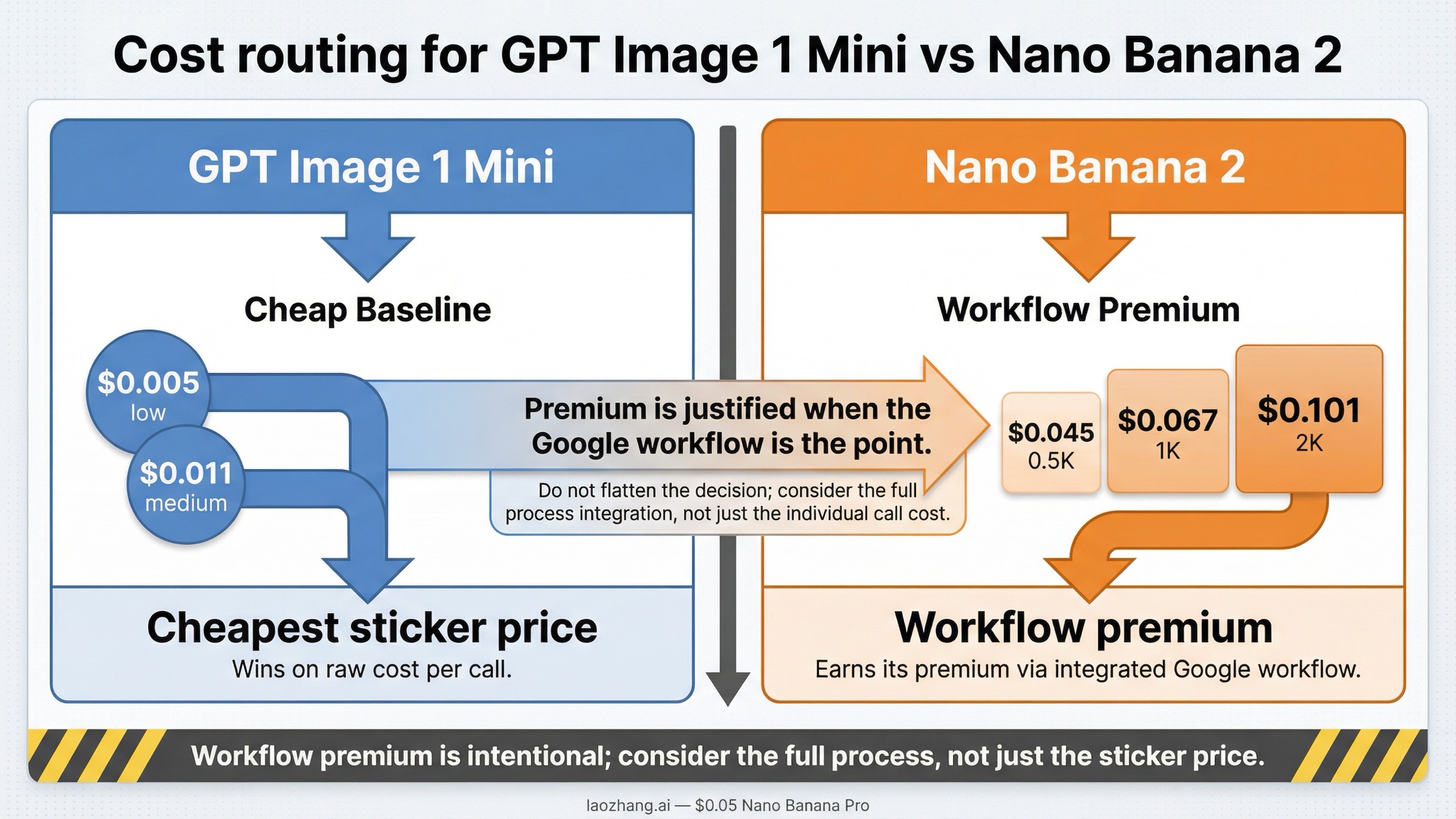
This is where shallow comparison pages usually become misleading. They show one cheap row and then declare a winner. The better way to think about the pricing is to separate cheapest sticker price from best spend for the workflow you actually need.
| Workload example | GPT Image 1 Mini square low | GPT Image 1 Mini square medium | Nano Banana 2 1K | Nano Banana 2 2K | What it means |
|---|---|---|---|---|---|
| 100 images | $0.50 | $1.10 | $6.70 | $10.10 | Mini is dramatically cheaper if basic square output is enough. |
| 1,000 images | $5 | $11 | $67 | $101 | The gap becomes impossible to ignore for volume generation. |
| 5,000 images | $25 | $55 | $335 | $505 | If you only want low-cost generation, mini wins by a wide margin. |
| 1,000 images at Google's 4K band | not directly expressed this way | not directly expressed this way | not directly expressed this way | $151 at 4K | Google's price becomes a conscious premium for the higher-resolution workflow, not a budget answer. |
Those rows make the base decision clear: GPT Image 1 Mini is the default choice for cost-sensitive generation.
So why does Nano Banana 2 still deserve consideration at all?
Because the price table is not the whole workflow. Some teams are not shopping for the absolute cheapest image call. They are shopping for a Google-native image route with a clearer size ladder, Gemini-side grounding context, and a workflow that already aligns with the rest of their stack. For those teams, the premium is not an accident. It is the point.
The right mental model is this:
- if you need the cheapest official image output for experimentation, variants, low-risk marketing art, or product prototyping, choose GPT Image 1 Mini
- if you need Google's image stack specifically and the resolution ladder is part of your planning, you are not paying for a cheaper image call, you are paying for a different workflow
That distinction matters because too many pages phrase Nano Banana 2 as the smarter budget choice. On current official pricing, it is not. It may still be the better fit choice, but it is not the cheaper sticker-price route.
This is also why the comparison should stay narrow. If your actual problem is premium image quality rather than budget routing, you should benchmark against GPT Image 1.5 or Nano Banana Pro, not assume the budget branches are supposed to solve a flagship-quality problem.
Best default by team scenario
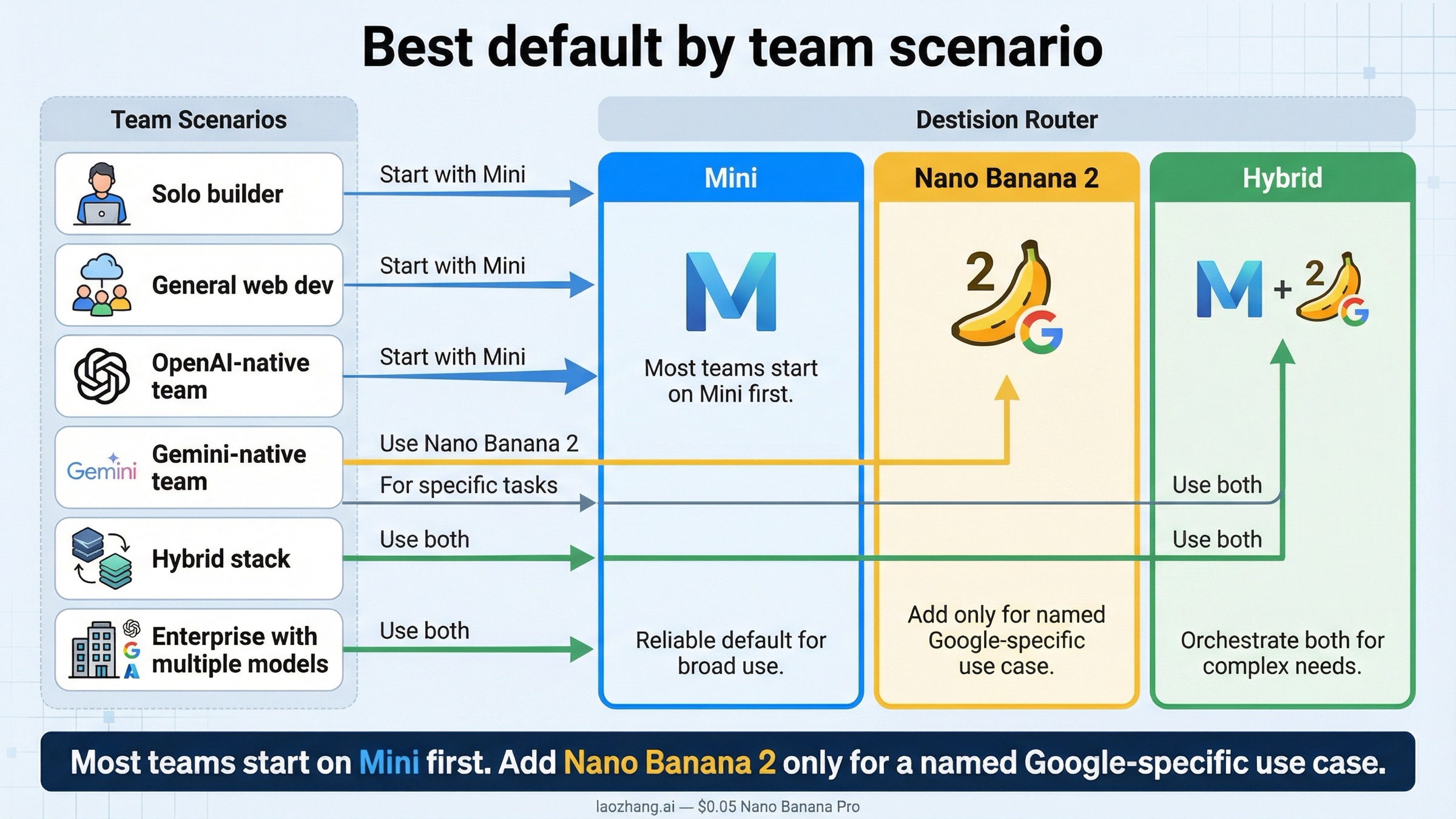
Most teams should not make this decision by reading one more abstract benchmark paragraph. They should route by scenario.
| Team situation | Better default | Why |
|---|---|---|
| Solo builder testing an image feature cheaply | GPT Image 1 Mini | Lowest official entry cost and clearer OpenAI-side starting point. |
| Content team generating many low-risk variants | GPT Image 1 Mini | The price gap compounds fast at volume. |
| Existing OpenAI-native app team | GPT Image 1 Mini | Lower vendor complexity plus visible rate-limit guidance. |
| Existing Gemini-native product team | Nano Banana 2 | Higher price can be justified if the rest of the workflow is already in Google's image stack. |
| Team that needs Google's resolution ladder and grounding workflow | Nano Banana 2 | This is the real reason to pay the premium. |
| Team unsure whether Google workflow value is real | Start with mini, then benchmark Nano Banana 2 | Cheapest controlled baseline first, then add the premium route only if it solves a visible problem. |
If I had to give one default policy to a mixed team, it would be:
Start with GPT Image 1 Mini. Move to Nano Banana 2 only after you can name the exact Google-specific workflow benefit you are buying.
That rule is deliberately conservative. It keeps the team from paying more for a brand or a trend instead of for a real operational advantage. It also respects how early this market still is. Preview surfaces, naming, and pricing can all change. When the market is still moving, the safer first choice is usually the one that gives you the cheapest clean baseline.
There is also a sensible hybrid route. Some teams may choose mini as the default and keep Nano Banana 2 only for Google-specific image workflows or higher-resolution jobs that genuinely benefit from the Gemini ladder. That is more realistic than pretending one route has to win every job forever.
FAQ
Is Nano Banana the same thing as Nano Banana 2?
No. In current Google docs, Nano Banana, Nano Banana 2, and Nano Banana Pro are separate labels tied to different Gemini image surfaces. For this article, the fair comparison is against Nano Banana 2, which maps to gemini-3.1-flash-image-preview.
Which one is cheaper right now?
GPT Image 1 Mini is cheaper on current official pricing. As of March 27, 2026, OpenAI's visible mini ladder starts at $0.005 for square low and $0.011 for square medium. Google's current Nano Banana 2 ladder starts at about $0.045 for 0.5K and $0.067 for 1K.
Does Nano Banana 2 beat mini on quality?
That is not the cleanest current answer. The safer answer is that Nano Banana 2 can be the better fit when you want Google's workflow and size ladder, while mini is the cheaper default route. Quality alone is too vague to settle the decision honestly without your own prompts.
Which one has clearer rate limits?
OpenAI is clearer for this specific comparison because the current mini model page exposes a visible tier table from 5 IPM to 250 IPM. Google's current image docs are stronger on naming and resolution planning than on a buyer-facing tier table for this exact choice.
Should a team ever use both?
Yes. A pragmatic setup is to start on GPT Image 1 Mini as the cheap baseline, then add Nano Banana 2 only for the subset of jobs where the Google-native workflow or size ladder solves a real need. That is a more defensible operating model than trying to force one branch into every job.
What should I compare next if mini feels too limited?
If the problem is output quality or premium capability rather than budget routing, compare against the higher-end lanes instead: Nano Banana 2 vs GPT Image 1.5 or other flagship-focused evaluations. This article is intentionally about the cheaper current branches.


