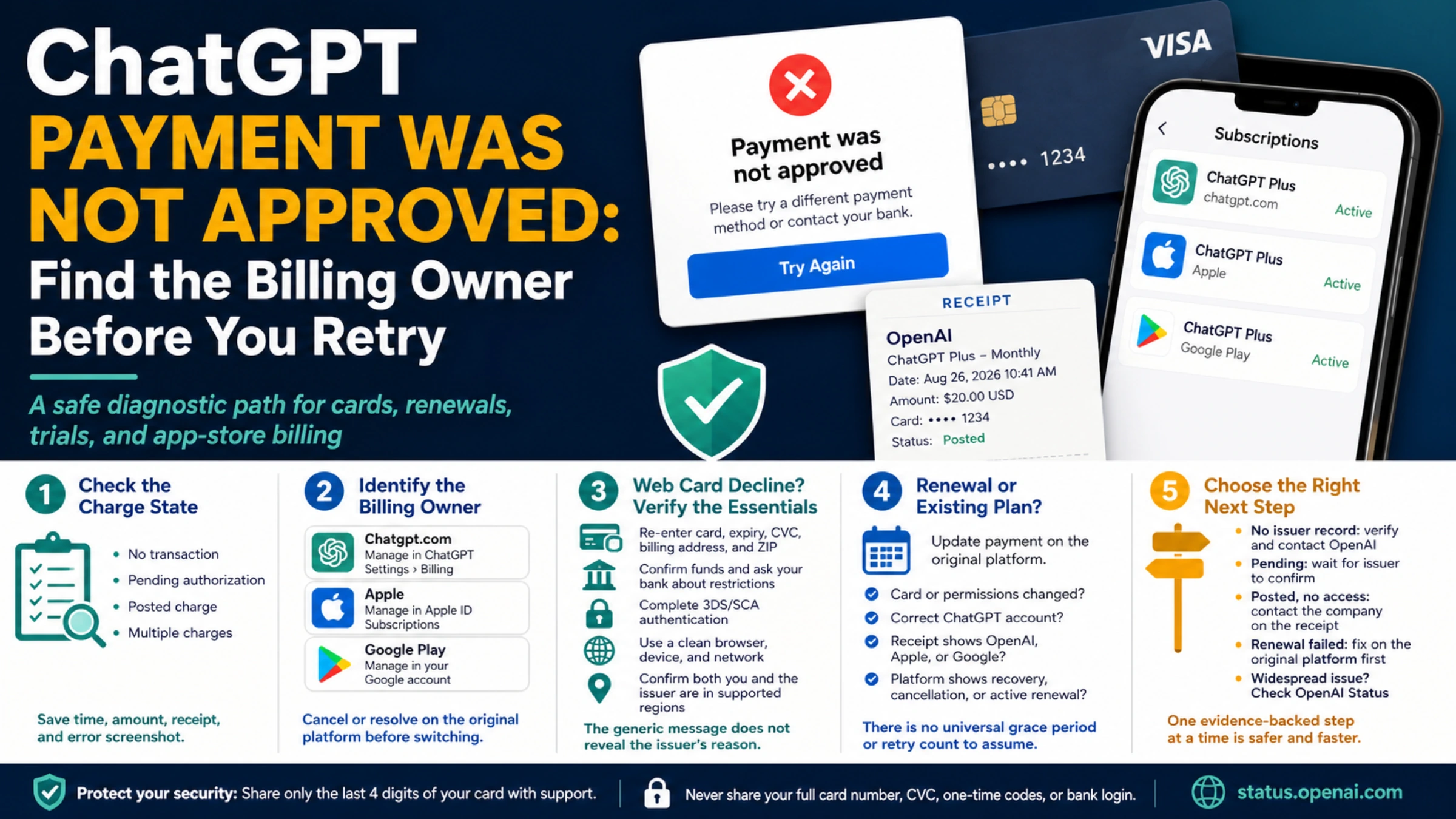
A “payment was not approved” message tells you that checkout did not finish. It does not tell you whether the rejection came from a card issuer, a 3D Secure step, chatgpt.com, Apple, Google Play, or a regional payment rail. It can also appear during a promotional offer even when the amount due today is zero.
Before changing cards or pressing Subscribe again, answer two questions: is there a pending or posted charge, and which platform owns this subscription? Those answers turn a vague error into a case that the right support team can actually investigate.
Start with the bank or wallet record
Open the card, bank, or wallet activity used at checkout and classify what you see:
- No transaction at all: the authorization may have failed before the issuer recorded it.
- A pending authorization: the issuer is still deciding whether it will post or release the hold.
- A posted charge but no paid access: payment and entitlement are out of sync.
- More than one charge: check for subscriptions on multiple platforms or accounts before disputing anything.
Save the timestamp, amount, merchant descriptor, plan or offer name, receipt, and a screenshot of the error. Share only the last four digits of a card with support. Never send a full card number, CVC, one-time password, or bank login.
If the charge is pending, do not immediately buy the same plan through another platform. The first authorization may still settle, and a second checkout can create a duplicate subscription.
Identify who manages the subscription
ChatGPT consumer subscriptions can be billed in three separate places:
- A purchase on chatgpt.com is managed in ChatGPT Settings under Billing.
- An iPhone or iPad purchase is managed in Apple ID subscriptions.
- An Android purchase is managed in the Google Play account used at checkout.
These are not interchangeable copies of one billing record. OpenAI’s multi-platform billing guidance warns that an Apple renewal that failed for a payment issue is not necessarily canceled. Apple can recover it later. Starting a new web or Google subscription first may leave you with two active plans.
If you want to switch platforms, cancel or resolve the original subscription on the platform that created it and confirm that it will not renew. Uninstalling the ChatGPT app does not cancel an Apple or Google subscription.
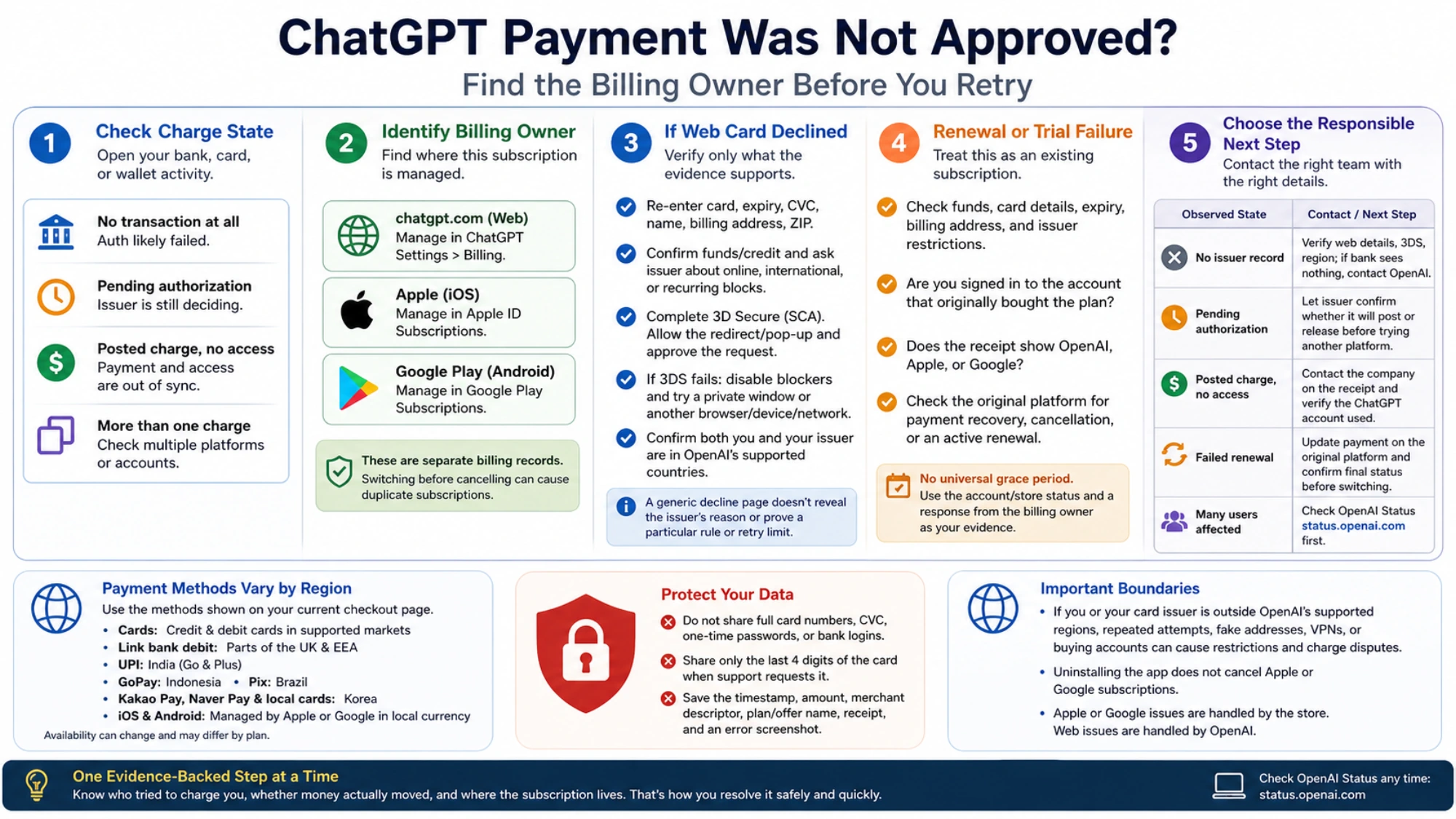
For a web card decline, verify only what the evidence supports
OpenAI’s credit-card decline guide recommends a compact set of checks:
- Re-enter the card number, expiration date, CVC, cardholder name, billing address, and postal code exactly as the issuer records them.
- Confirm available funds or credit and ask the issuer whether it blocked an online, international, or recurring transaction from OpenAI.
- Complete any 3D Secure or Strong Customer Authentication step. Allow the checkout redirect or pop-up and approve the request in the bank app or with the issuer’s one-time code.
- If the authentication window never appears or fails, disable ad and pop-up blockers, use a private window or another browser, device, or network, and complete one clean attempt.
- Confirm that both you and the card issuer are in a country on OpenAI’s current supported-country list.
A generic decline page does not reveal the issuer’s internal decline code. It also does not prove a particular BIN rule, risk score, processor decision, retry limit, or cooldown. If the bank can see the attempt, ask whether it rejected the specific OpenAI online recurring transaction and whether 3DS approval is required.
If the issuer sees no attempt and the checkout data and regional eligibility are correct, contact OpenAI Support through the Help Center chat. Include the time, plan or offer, billing surface, error screenshot, merchant descriptor if present, and card last four digits.
Treat renewal failure as an existing-subscription problem
A first payment creates a subscription. A renewal failure belongs to a subscription that already exists. OpenAI’s Plus and Pro renewal guidance recommends checking funds, card details, billing address, expiration, issuer restrictions, region, cache, and cookies.
Renewal adds several questions that do not apply to a first purchase:
- Did the card expire, get replaced, or lose permission for recurring international payments?
- Are you signed in to the ChatGPT account that originally bought the plan?
- Does the receipt name OpenAI, Apple, or Google?
- Does the original platform show payment recovery, cancellation, or an active renewal?
There is no reliable universal grace period or retry count to assume. The account or store status and a response from the billing owner are the evidence.
Handle iOS and Android errors in the store account
Web-card troubleshooting does not automatically apply to a store purchase. If the app says a subscription is associated with another OpenAI account, OpenAI’s account-association guide says the Apple ID or Google Play account may already be linked to the ChatGPT account used for the original purchase.
Sign out of ChatGPT and return to that original ChatGPT account. Do not repurchase on a second account. For an Apple transaction, review the payment method, pending renewal, and receipt under Apple subscriptions. For Google Play, use the Google account that made the purchase. If the store says the purchase succeeded but ChatGPT remains free, restore the purchase or sign back into the original ChatGPT account before escalating with the store receipt.
Payment methods depend on the current checkout
OpenAI’s payment-method and multi-currency page currently lists credit and debit cards for supported web markets, with additional methods in certain regions: Link bank debit in parts of the UK and EEA, UPI for Go and Plus in India, GoPay in Indonesia, Pix in Brazil, and Kakao Pay, Naver Pay, and local cards in Korea. iOS and Android purchases are managed by their stores in local currency.
The option visible in another country’s help article is not a promise that it will appear for your account or plan. Use the methods offered on your own current checkout page, and keep plan-specific limits in mind.
If you or the card issuer is outside OpenAI’s supported regions, changing an IP address, inventing a billing address, borrowing an identity, or buying an account is not payment troubleshooting. It can create account restrictions, charge disputes, and refund problems. Stop repeated attempts and use a service officially available in your location.
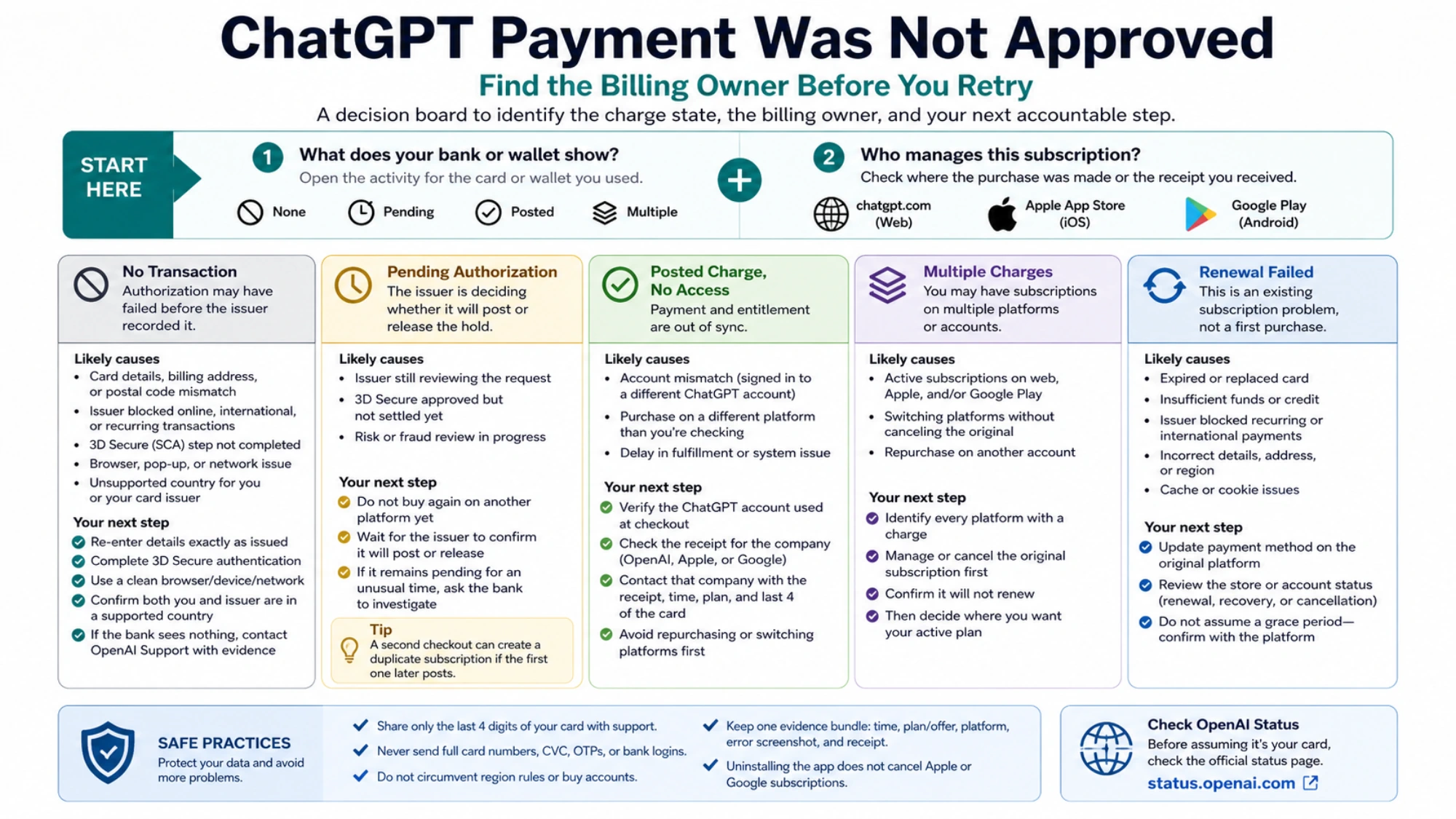
End the diagnosis with one accountable next step
Use the observed state to choose the owner:
- No issuer record: verify web details, 3DS, region, and the current checkout; if the bank sees nothing, contact OpenAI.
- Pending authorization: let the issuer confirm whether it will post or release before attempting another platform.
- Posted charge with no access: contact the company shown on the receipt and verify the ChatGPT account used for purchase.
- Failed renewal: update payment on the original platform and establish the old subscription’s final status before moving.
- Many users appear affected at once: check OpenAI Status before blaming an individual card.
Once you know who tried to charge you, whether money actually moved, and where the subscription lives, the next action becomes specific. Handle one evidence-backed step at a time; that is both safer and faster than cycling through cards and platforms.