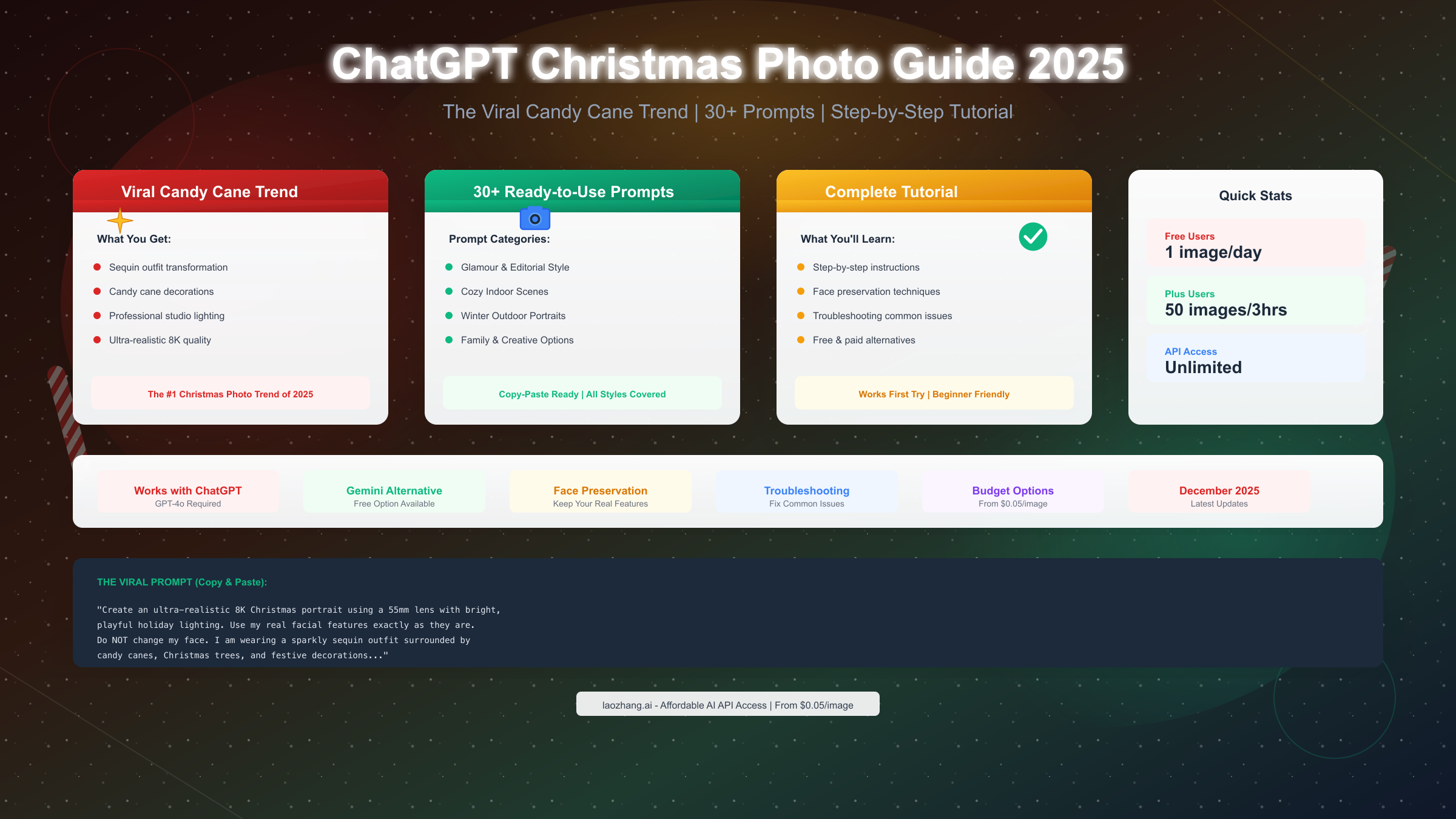
Creating viral AI Christmas photos has become the biggest holiday trend of 2025, with millions of users transforming their selfies into stunning festive portraits using ChatGPT. The most popular version—known as the "candy cane trend"—produces professional-looking photos featuring sequin outfits, candy cane decorations, and magical holiday lighting that appear as if taken in an expensive photography studio. Free users receive just 1 image generation per day through ChatGPT, while Plus subscribers can create up to 50 images per 3-hour window. This comprehensive guide covers everything you need to create the perfect AI Christmas photo, including 30+ copy-paste prompts, face preservation techniques, troubleshooting tips, and cost-effective alternatives when your quota runs out.
What is the ChatGPT Christmas Photo Trend?
The ChatGPT Christmas photo phenomenon emerged in late 2024 and exploded across social media platforms during the 2025 holiday season. Users upload a selfie to ChatGPT, provide a detailed prompt describing their desired festive look, and receive an AI-generated portrait that transforms them into a holiday version of themselves—complete with sparkling outfits, festive decorations, and professional studio lighting.
The trend gained massive traction because the results look remarkably realistic, often fooling friends and family into thinking users actually did professional holiday photoshoots. Unlike previous AI image trends that produced obviously artificial results, the ChatGPT Christmas photos achieve a level of realism that makes them genuinely shareable. The images maintain the user's recognizable features while adding elaborate festive elements that would cost hundreds of dollars to recreate in a real photography studio.
The "candy cane" variant specifically refers to a popular aesthetic featuring sequin or sparkly outfits, oversized candy canes and lollipops as props, Christmas trees and ornaments in the background, and warm holiday lighting with a pink and red color palette. This specific look originated from a few viral examples and quickly became the most requested style, with users copying and sharing the exact prompts that produced the best results.
What makes this trend particularly accessible is that it works with ChatGPT's free tier, though with significant limitations. Free users can generate one image per day, which creates both urgency and frustration—you need to get your prompt right on the first try, or wait until tomorrow. This constraint has led to extensive prompt sharing in online communities, with users refining and perfecting the exact wording that produces the best results consistently.
The technology behind these transformations relies on GPT-4o's image generation capabilities, which combine OpenAI's advanced language understanding with DALL-E 3's image synthesis. When you upload a photo and provide a prompt, the system analyzes your facial features, understands your described modifications, and generates a new image that preserves your identity while applying the requested transformations.
How to Create Your First AI Christmas Photo
Getting started with ChatGPT Christmas photos requires understanding the platform's current capabilities and limitations. The process itself is straightforward, but several key decisions will determine whether your first attempt produces a shareable result or a disappointing approximation that doesn't look like you.
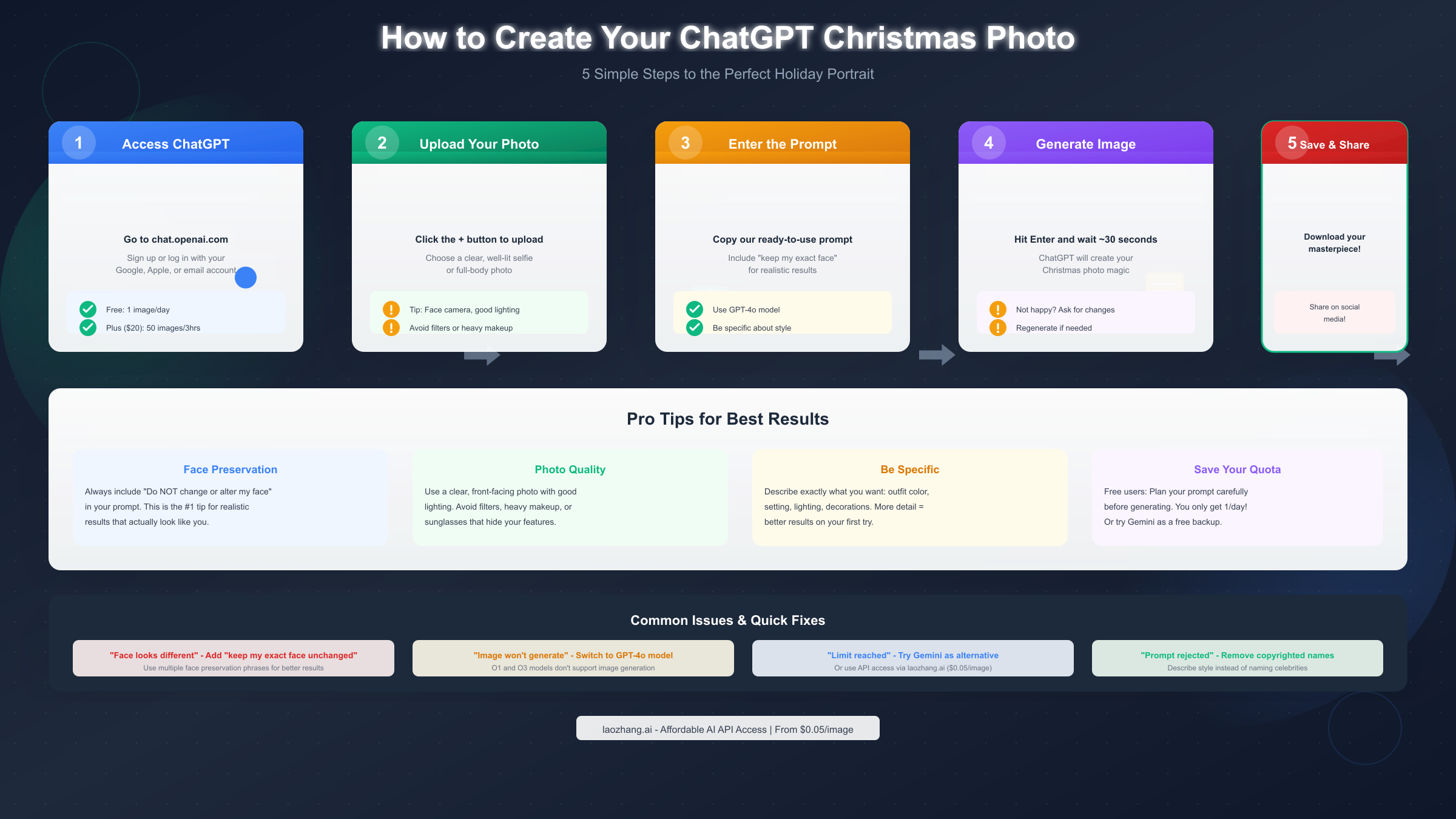
Begin by accessing ChatGPT at chat.openai.com and ensuring you're using the correct model—this is crucial because not all ChatGPT versions support image generation. You'll need to select GPT-4o from the model picker, as the older GPT-4 and the reasoning-focused o1/o3 models cannot generate images. Free users have access to GPT-4o with daily limits, while Plus subscribers ($20/month) get expanded access with higher generation limits.
The photo you upload significantly impacts your final result. Choose a clear, well-lit selfie where your face is clearly visible and directly facing the camera. Avoid photos with heavy filters, dramatic angles, or accessories that obscure your features like sunglasses or hats. The AI needs to clearly see your facial structure to preserve it in the generated image. Photos with natural lighting work better than heavily processed images, as the AI can more accurately interpret and recreate your actual features.
Once you've selected your photo, click the attachment button (the plus icon) in the ChatGPT input field to upload it. After the image appears in the chat, you'll type your prompt—the specific instructions telling ChatGPT how to transform your photo. This is where precision matters most, as vague prompts produce inconsistent results while detailed prompts give you much more control over the final image.
For your first attempt, use a proven prompt structure that includes face preservation instructions, outfit description, setting details, and lighting specifications. The face preservation language is particularly important—without explicit instructions to maintain your features, ChatGPT may "improve" your appearance in ways that make you unrecognizable. Including phrases like "keep my exact facial features unchanged" or "do not alter my face in any way" significantly improves the likelihood that the final image actually looks like you.
After submitting your prompt, ChatGPT takes approximately 30-60 seconds to generate the image. If you're unhappy with the result, you can ask for specific modifications ("make the lighting warmer" or "add more candy canes in the background") without starting over. However, remember that each modification counts against your daily limit if you're on the free tier. For detailed information about ChatGPT's free tier limits, including reset times and workarounds, check our comprehensive guide.
30+ Best Prompts for Every Christmas Style
Having the right prompt is the difference between a disappointing result and a stunning image worth sharing. These prompts have been tested and refined by the community to produce consistent, high-quality results across different face types and photo qualities.
The Viral Candy Cane Prompt (Most Popular)
This is the prompt that started the trend and continues to produce the most impressive results:
Create an ultra-realistic 8K Christmas portrait using a 55mm lens with bright, playful holiday lighting. Use my real facial features exactly as they are. Do NOT change or alter my face in any way. My hair is styled in a soft textured holiday updo with loose face-framing curls. My makeup is festive glam with winged liner, warm eyeshadow, rosy cheeks, and soft pink lips. I am wearing a sparkly red long-sleeve sequin jumpsuit with a scoop-back cut. I am sitting on a white cube block in a whimsical candy-cane themed Christmas set. I am holding a giant pink-and-white peppermint lollipop over my shoulder. Around me are fluffy artificial snow, frosted Christmas trees, pink ornaments, oversized candy canes, and warm string lights. Colors are vibrant reds, whites, and silvers with a magical North Pole studio vibe.Glamour and Editorial Style Prompts
For users wanting a more sophisticated, magazine-worthy aesthetic:
Transform this photo into an ultra-realistic 8K holiday editorial portrait. Keep my exact facial features unchanged. I'm wearing an elegant emerald green velvet gown with gold jewelry. The setting is a luxurious living room with a decorated Christmas tree, crackling fireplace, and soft candlelight. Professional studio lighting creates warm shadows. Style: Vogue magazine holiday spread.Create a glamorous Christmas portrait maintaining my exact face. I'm wearing a silver sequin cocktail dress with diamond earrings. Background: elegant holiday party with champagne glasses, twinkling lights, and subtle gold decorations. Lighting: soft, diffused, creating a dreamy glow. Quality: 8K ultra-realistic photography.Generate a sophisticated holiday portrait keeping my facial features unchanged. I'm dressed in a classic red turtleneck sweater with pearl accessories. Setting: snowy window backdrop with city lights visible, hot cocoa in hand. Mood: warm, intimate, editorial quality.Cozy Indoor Scene Prompts
Perfect for a warmer, more intimate Christmas aesthetic:
Create a cozy Christmas morning portrait using my exact face. I'm wearing comfortable plaid pajamas, sitting by a window with snow falling outside. Warm morning light streams in. A decorated tree and wrapped presents are nearby. I'm holding a steaming mug of cocoa. Atmosphere: hygge, warm, nostalgic. Quality: 8K realistic photography.Transform this into a heartwarming holiday scene keeping my face unchanged. I'm wearing a chunky cream knit sweater, surrounded by fairy lights and pine garlands. Setting: cozy cabin with wooden beams, fireplace, and holiday decorations. Soft golden hour lighting. Mood: peaceful and content.Generate a festive indoor portrait maintaining my exact features. I'm in a classic Christmas sweater with reindeer pattern, sitting on a plush couch covered in holiday throw pillows. Background shows a beautifully decorated tree. Warm tungsten lighting creates a homey atmosphere.Winter Outdoor Portrait Prompts
For those wanting a snowy, outdoor aesthetic:
Create an ultra-realistic winter portrait keeping my exact face. I'm wearing a stylish white faux fur coat with a red scarf. Setting: snow-covered forest with soft snowfall. Golden hour lighting through bare trees. Breath visible in cold air. Quality: 8K professional photography.Transform this photo into a magical winter scene using my unchanged facial features. I'm dressed in a navy peacoat with matching winter accessories. Background: charming snowy street with vintage lampposts and holiday shop windows. Snowflakes catching the light. Mood: romantic winter wonderland.Generate a festive outdoor portrait maintaining my face exactly. I'm wearing a red plaid jacket and white earmuffs. Setting: in front of a giant outdoor Christmas tree with lights. Fresh snow everywhere. Evening blue hour lighting with warm string lights creating contrast.Family and Group Style Prompts
Adaptable prompts for creating coordinated family or couple photos:
Create a professional family Christmas portrait keeping all faces exactly as they appear. We're wearing coordinated red and green holiday outfits. Setting: elegant studio backdrop with decorated tree and presents. Professional portrait lighting. Quality: 8K studio photography.Transform this couple photo into a romantic holiday portrait keeping both faces unchanged. We're in matching cream sweaters, sitting together by a fireplace. Decorated mantle with stockings visible. Warm intimate lighting. Mood: love and holiday joy.Funny and Creative Prompts
For users wanting something more playful:
Create a hilarious Christmas photo keeping my exact face. I'm dressed as a very serious mall Santa, complete with beard and suit, but maintaining my actual facial expression. Setting: official Santa photo booth with line of confused children. Quality: realistic but comedic.Transform this into a festive photo keeping my face unchanged. I'm wrapped entirely in Christmas lights like a human Christmas tree, with a star hat on top. Expression: proud and festive. Background: living room with family looking confused. Style: realistic comedy.For more advanced techniques on crafting effective image prompts, our guide on ChatGPT image prompt techniques covers the principles that make these prompts work.
Make It Actually Look Like You (Face Preservation)
The most common complaint about AI-generated Christmas photos is that the result doesn't look like the person who uploaded the original image. This happens because ChatGPT's image generation sometimes "improves" or "idealizes" features, resulting in a generic attractive face rather than the user's actual appearance. Understanding why this happens and how to prevent it is crucial for creating photos you'll actually want to share.
Face preservation requires explicit, repeated instructions within your prompt—the AI won't automatically prioritize keeping your features unless you tell it to multiple times. The most effective approach combines multiple preservation phrases throughout your prompt, placing them both at the beginning and within the description. Simply saying "keep my face" once often isn't enough; you need variations like "maintain my exact facial features," "do not alter my face in any way," and "use my real facial features exactly as they appear."
The quality of your original photo significantly impacts face preservation success. Photos with clear, direct lighting that illuminates your entire face give the AI the most information to work with. Side-lit photos, selfies with heavy shadows, or images where your face is partially obscured result in the AI filling in the missing information with generic features. For best results, upload a front-facing photo taken in daylight or with even artificial lighting, where both eyes and your full face are clearly visible.
Certain facial features are more challenging for AI to preserve accurately. Distinctive elements like freckles, moles, asymmetric features, or unique eye colors sometimes get "corrected" by the AI unless specifically mentioned. If you have notable features you want preserved, consider explicitly including them in your prompt: "maintain my freckles exactly as shown" or "keep my natural beauty mark."
When face preservation fails despite these precautions, there are several troubleshooting approaches. First, try uploading a higher-quality source photo with better lighting. Second, simplify your prompt—sometimes overly complex descriptions distract the AI from the face preservation instructions. Third, try generating the image again, as results can vary between attempts even with identical prompts. Fourth, explicitly describe your actual features in the prompt: "I have brown eyes, dark hair, and a round face shape—preserve these exactly."
Some users have found success with a two-step approach: first generating an image with minimal changes to test face preservation, then iterating with more elaborate styling once they confirm the AI is accurately capturing their likeness. This method uses more of your daily quota but produces more reliable results.
Troubleshooting: When Things Go Wrong
Even with perfect prompts, various technical issues can prevent successful image generation. Understanding the common problems and their solutions saves time and prevents wasted generations, which is especially important for free-tier users with limited daily attempts.
The most frequent issue is selecting the wrong model—ChatGPT's reasoning models (o1 and o3) cannot generate images, and attempting to use them will result in text descriptions instead of actual images. Always verify you're using GPT-4o before uploading your photo. The model selector appears at the top of the chat interface, and if you're unsure which model you're using, start a new conversation and explicitly select GPT-4o.
Image generation failures often occur during high-demand periods, particularly around holidays when millions of users are attempting the Christmas photo trend simultaneously. If you receive errors about the service being unavailable or requests timing out, waiting 15-30 minutes and trying again usually resolves the issue. OpenAI's status page (status.openai.com) shows current service availability if you're experiencing persistent problems.
Photo upload issues have several common causes. ChatGPT supports JPG, PNG, and GIF formats, with file sizes up to 20MB for most users. If your upload fails, try reducing the image size or converting to JPG format. Some browser extensions, particularly ad blockers and privacy tools, can interfere with the upload process—temporarily disabling them often resolves the issue.
When your prompt gets rejected with a content policy violation, it usually means you've triggered OpenAI's safety filters. Common triggers include requesting photos of real celebrities, copyrighted characters, or content that could be considered inappropriate. Instead of using celebrity names, describe the style you want: rather than "make me look like Taylor Swift," try "glamorous award show style with elegant gown and professional makeup."
For users hitting their daily image generation limits, several alternatives exist. The limit resets every 24 hours based on your first generation of the day, not at midnight. Plus subscribers have separate, higher limits. And as we'll discuss in the next section, alternative platforms like Gemini offer additional free generations.
Beyond Free: Alternatives and Budget Options
When ChatGPT's free tier limits prove insufficient—whether you're creating photos for multiple family members, want to experiment with different styles, or simply need more than one generation per day—several alternatives offer varying balances of cost and capability.
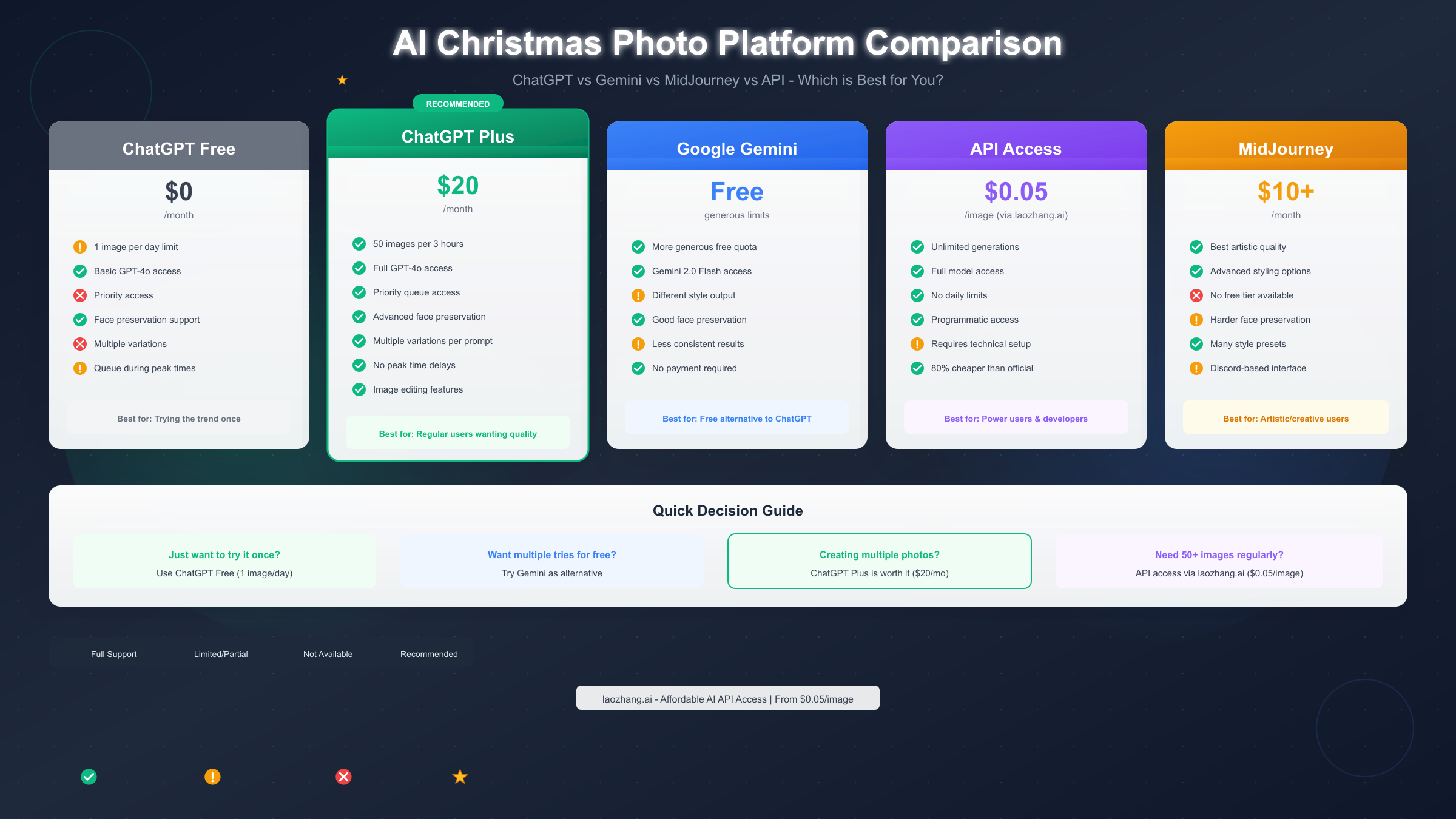
ChatGPT Plus at $20 per month represents the most straightforward upgrade, providing up to 50 image generations per 3-hour window along with priority access during high-demand periods. For users creating Christmas photos throughout December, this subscription easily pays for itself compared to the frustration of the one-per-day free limit. Plus subscribers also get access to DALL-E 3's advanced features and the ability to edit generated images rather than starting from scratch.
Google's Gemini offers a compelling free alternative with more generous limits than ChatGPT's free tier. While the exact quota varies and isn't publicly documented, users report being able to generate significantly more images before hitting restrictions. The results differ stylistically from ChatGPT—Gemini tends toward a slightly different aesthetic that some users prefer while others find less realistic. For users who've exhausted their ChatGPT quota, Gemini provides a viable backup option for additional generations.
For power users generating 50+ images regularly—photographers creating Christmas card series, content creators, or businesses producing holiday marketing materials—API access provides unlimited generations at per-image pricing. Services like laozhang.ai offer API access to multiple AI image models at approximately $0.05 per image, representing roughly 80% savings compared to official API pricing. This approach requires basic technical setup but eliminates quota concerns entirely.
MidJourney, while not free, offers a different artistic approach starting at $10/month. Its results tend toward more artistic, stylized interpretations rather than photorealistic transformations. Face preservation is more challenging in MidJourney, making it less ideal for the realistic Christmas portrait trend but excellent for more creative, artistic holiday imagery.
| Platform | Cost | Daily Limit | Best For |
|---|---|---|---|
| ChatGPT Free | $0 | 1 image/day | Trying the trend once |
| ChatGPT Plus | $20/month | 50/3hrs | Regular users |
| Gemini | Free | ~10-20/day | Free alternative |
| API (laozhang.ai) | $0.05/image | Unlimited | Power users |
| MidJourney | $10+/month | 200/month | Artistic styles |
For comprehensive information about Gemini's API pricing and capabilities, including how it compares to ChatGPT for image generation, our detailed guide covers all the options.
FAQ and Quick Reference
How long does the free quota take to reset?
ChatGPT's free tier image generation resets 24 hours after your first generation of the previous day, not at midnight. If you generated an image at 3 PM yesterday, you'll be able to generate again at 3 PM today. Plus subscribers have rolling 3-hour windows with 50-image limits.
Why doesn't my generated image look like me?
Face preservation requires explicit instructions repeated throughout your prompt. Include phrases like "keep my exact facial features unchanged" and "do not alter my face in any way" at multiple points. Also ensure your source photo has good lighting and a clear view of your face without heavy filters or obscuring elements.
Can I use ChatGPT Christmas photos commercially?
Images generated with ChatGPT are generally covered by OpenAI's terms of service, which grant users rights to use generated images including for commercial purposes. However, if your source photo includes other people, you'll need their permission. For professional or commercial use, reviewing OpenAI's current usage policies is recommended.
What's the best photo to upload for realistic results?
Upload a front-facing selfie with natural or even lighting where your full face is clearly visible. Avoid heavy filters, dramatic angles, sunglasses, or hats. Higher resolution photos generally produce better results, though extremely large files may need to be compressed before uploading.
Why does ChatGPT refuse to generate my image?
Common reasons include: requesting images of real celebrities or copyrighted characters, using language that triggers content filters, or attempting to generate content that violates OpenAI's policies. Rephrase your prompt to describe the style you want rather than naming specific people, and ensure your request doesn't include inappropriate content.
Is this the same as the Ghostface Halloween trend?
Yes, it's the same technology and process, just with Christmas-themed prompts instead of Halloween themes. The technique of uploading a selfie and using detailed prompts for transformation works for any seasonal theme.
Can I edit the generated image if something's wrong?
ChatGPT Plus subscribers can ask for modifications to generated images, such as "make the background warmer" or "add more decorations." Free users can ask for changes, but each modification attempt counts as a new generation against your daily limit.
What if I want to create photos for my whole family?
Each person needs to upload their own photo for individual portraits. For group photos, you can upload a photo containing multiple people and ask for the scene to be transformed while preserving everyone's faces. However, face preservation becomes less reliable with more people in the image.
Conclusion: Creating Your Perfect Holiday Portrait
The ChatGPT Christmas photo trend represents a genuinely impressive application of AI image generation that's accessible to everyone, from free users creating a single festive portrait to power users producing entire holiday photo series. The key to success lies in understanding the technology's requirements—using the right model, uploading quality source photos, crafting detailed prompts with explicit face preservation instructions, and knowing the troubleshooting steps for common issues.
Start with the viral candy cane prompt if you want proven results, but don't hesitate to experiment with the cozy, outdoor, or creative variations that might better match your personal style. Remember that your first attempt is the most important on the free tier, so take time to craft your prompt carefully before submitting. If you find yourself wanting more generations than the free tier allows, Gemini provides an excellent free backup, while ChatGPT Plus offers the most seamless upgrade experience.
The technology continues to improve, with each generation of AI image models producing more realistic results and better face preservation. What seemed like magic just a year ago is now accessible to anyone with a ChatGPT account and a few minutes to craft the right prompt. Whether you're creating a holiday card, a social media post, or simply capturing a festive memory, the tools are now available to transform your selfie into the professional holiday portrait of your imagination.
For users requiring consistent, high-volume access without quotas—whether for business use or extensive personal projects—API access through services like laozhang.ai offers unlimited generations at $0.05 per image, with documentation and setup guides available at https://docs.laozhang.ai/.


