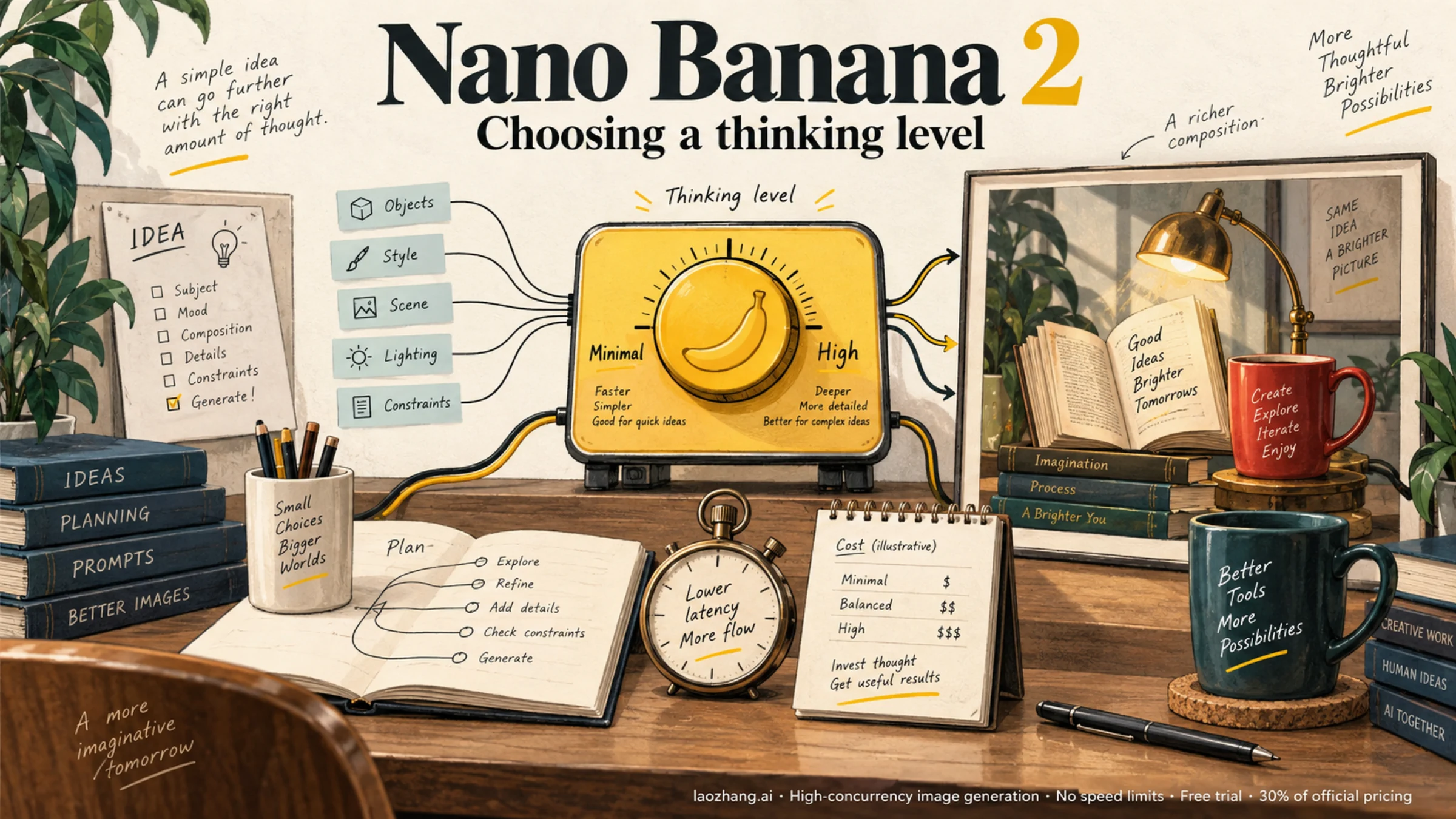
Nano Banana 2 supports two documented thinking levels: minimal and high. The default is minimal. For a new integration using Google's Interactions API, set generation_config.thinking_level. For an existing generateContent integration, the setting lives inside a nested thinking configuration. These request formats are different. Google's image-generation guide documents the current Interactions format.
Start with Minimal for a baseline. Try High when you can name a specific problem to solve: a missing object, an incorrect spatial relationship, a layout that ignores instructions, or an edit that loses an important detail. A nicer-looking image alone may not justify changing your production default.
What the setting actually controls
Nano Banana 2 is Gemini 3.1 Flash Image, currently identified by gemini-3.1-flash-image in the Google API. Use that model's documentation when selecting parameters; settings from a text-only Gemini example do not automatically apply to image generation. Older examples may show a preview model name. Google's model page is the reference for the current identifier.
The thinking level controls reasoning effort. It is separate from output resolution, aspect ratio, and the content of your prompt. Minimal also does not mean that reasoning is completely disabled, as the generateContent image guide explicitly explains.
| Choice | A useful starting point | What to check afterward |
|---|---|---|
| Minimal | Exploring a look, making straightforward variations, or establishing your baseline | Whether the image already satisfies the brief |
| High | Testing a difficult composition, several simultaneous constraints, or a precise edit | Whether fewer mistakes or retries justify the additional time and any extra billed usage |
These are workflow suggestions, not measured performance claims. A vague instruction remains vague at either level. Before increasing reasoning, make the requirement observable: “three objects, with the red mug behind the book” is easier to evaluate than “make the scene smarter.”
Why some guides say High/Dynamic
Google's Nano Banana 2 launch article uses High/Dynamic wording when discussing complex prompts. The current model-specific API guides document minimal and high; that launch wording does not establish a separate dynamic value you should send.
Likewise, do not import low, medium, off, or thinkingBudget: 0 from another Gemini model's tutorial. Use the values documented for this model and the API you actually call. An app's mode selector also needs its own documented mapping before you can treat it as an API thinking setting.
Set High in the Interactions API
The following Python example uses the current Google Gen AI SDK interface. Install google-genai and Pillow in your environment, and supply your Google API key through GEMINI_API_KEY. The script makes a billable image-generation request when you run it.
It asks for one image, measures the request duration, and checks the returned image before saving it. The example is based on the documented request and response structure; it is not a reported live test.
import base64
import io
import time
from pathlib import Path

from google import genai
from PIL import Image

client = genai.Client()
level = "high"  # Change only this to "minimal" for the baseline.

prompt = (
    "Create a clean editorial illustration of a desk. "
    "Show exactly three objects: a red mug, a closed blue book, "
    "and a small brass lamp. Put the mug behind the book and "
    "the lamp to the right. Use a plain cream background."
)

started = time.perf_counter()
interaction = client.interactions.create(
    model="gemini-3.1-flash-image",
    input=prompt,
    generation_config={"thinking_level": level},
    response_format={
        "type": "image",
        "mime_type": "image/png",
        "aspect_ratio": "16:9",
        "image_size": "1K",
    },
)
elapsed = time.perf_counter() - started

output = interaction.output_image
if output is None or not output.data:
    raise RuntimeError("No final image returned; inspect the response.")
if getattr(output, "mime_type", None) != "image/png":
    raise RuntimeError("Unexpected image MIME type; inspect before saving.")

image_bytes = base64.b64decode(output.data, validate=True)
with Image.open(io.BytesIO(image_bytes)) as image:
    image.verify()

path = Path(f"nano-banana-2-{level}-{time.time_ns()}.png")
path.write_bytes(image_bytes)
print(f"Saved {path}; API request elapsed: {elapsed:.2f}s")
The timer covers the API request, including network time; it does not measure the model's reasoning time in isolation. The filename keeps successive results separate so a later run does not overwrite your comparison.
For JavaScript Interactions requests, the field names remain snake_case:
generation_config: { thinking_level: "high" }The REST endpoint is POST https://generativelanguage.googleapis.com/v1beta/interactions; its JSON body uses the same model, input, and generation_config names. The SDK's output_image convenience property returns the last generated image block, so a workflow requesting multiple interleaved images needs to inspect the full output instead. See the official examples.
Keep generateContent requests in their own format
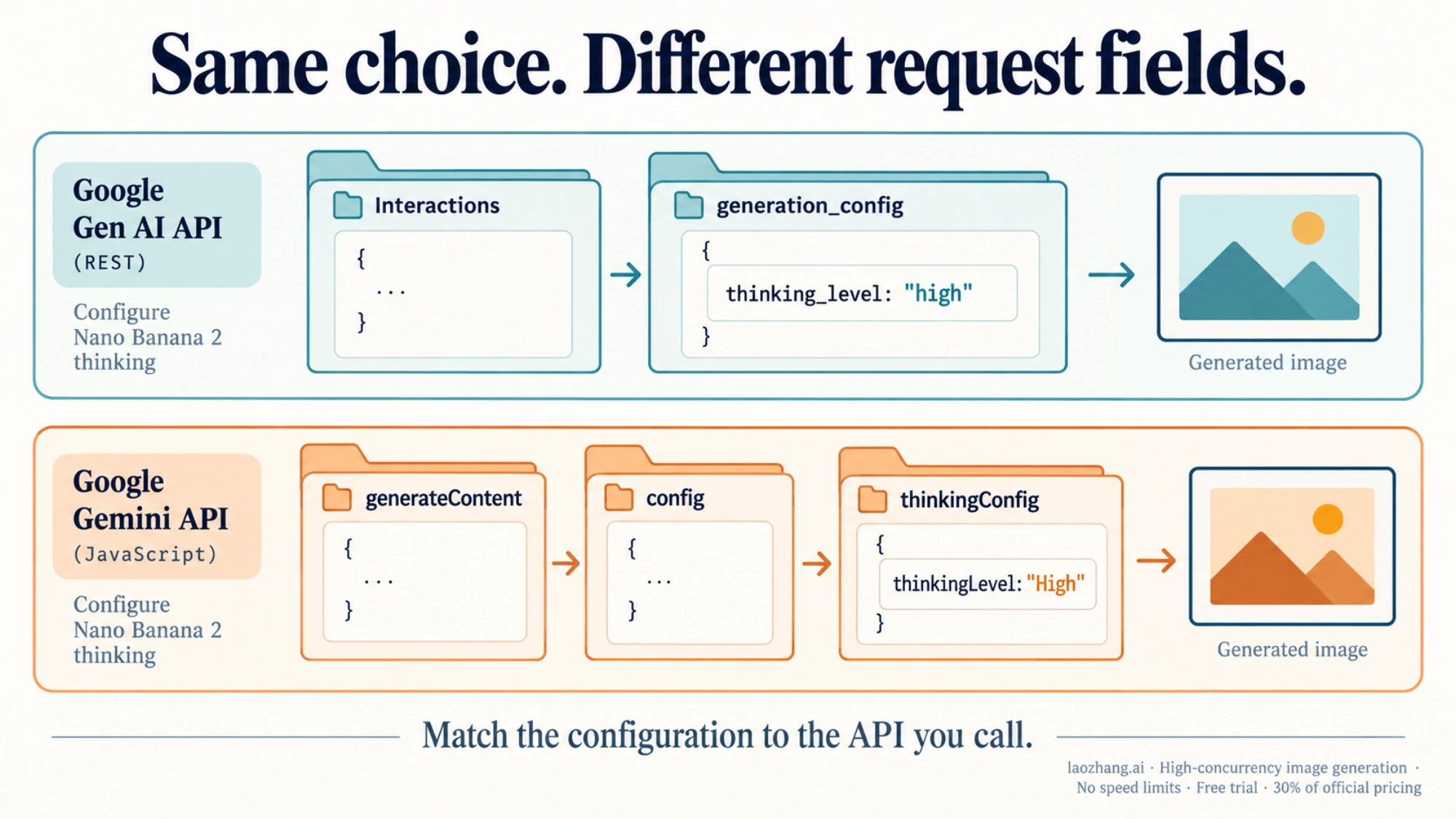
If your application already calls client.models.generate_content, place the thinking setting in config.thinking_config:
from google import genai
from google.genai import types

client = genai.Client()
response = client.models.generate_content(
    model="gemini-3.1-flash-image",
    contents="Create an editorial illustration of a red mug behind a blue book.",
    config=types.GenerateContentConfig(
        response_modalities=["IMAGE"],
        thinking_config=types.ThinkingConfig(
            thinking_level="High",
            include_thoughts=False,
        ),
    ),
)

saved = 0
for part in response.parts or []:
    if part.thought:
        continue
    image = part.as_image()
    if image is not None:
        saved += 1
        image.save(f"final-image-{saved}.png")

if saved == 0:
    raise RuntimeError("No final image found; inspect the response.")
This follows the capitalization shown in Google's Python example. JavaScript uses config.thinkingConfig.thinkingLevel; REST uses generationConfig.thinkingConfig.thinkingLevel. Do not transplant the Interactions configuration object into these calls. Google's generateContent examples show the API-specific nesting.
Skip parts marked as thoughts when delivering final images. Setting include_thoughts=False only hides returned thoughts; it does not turn off reasoning or its billing. If you maintain a multi-turn editing conversation, preserve the returned thought signatures unchanged in subsequent turns as described in Google's thought-signature guidance.
Decide whether High improves your actual workflow
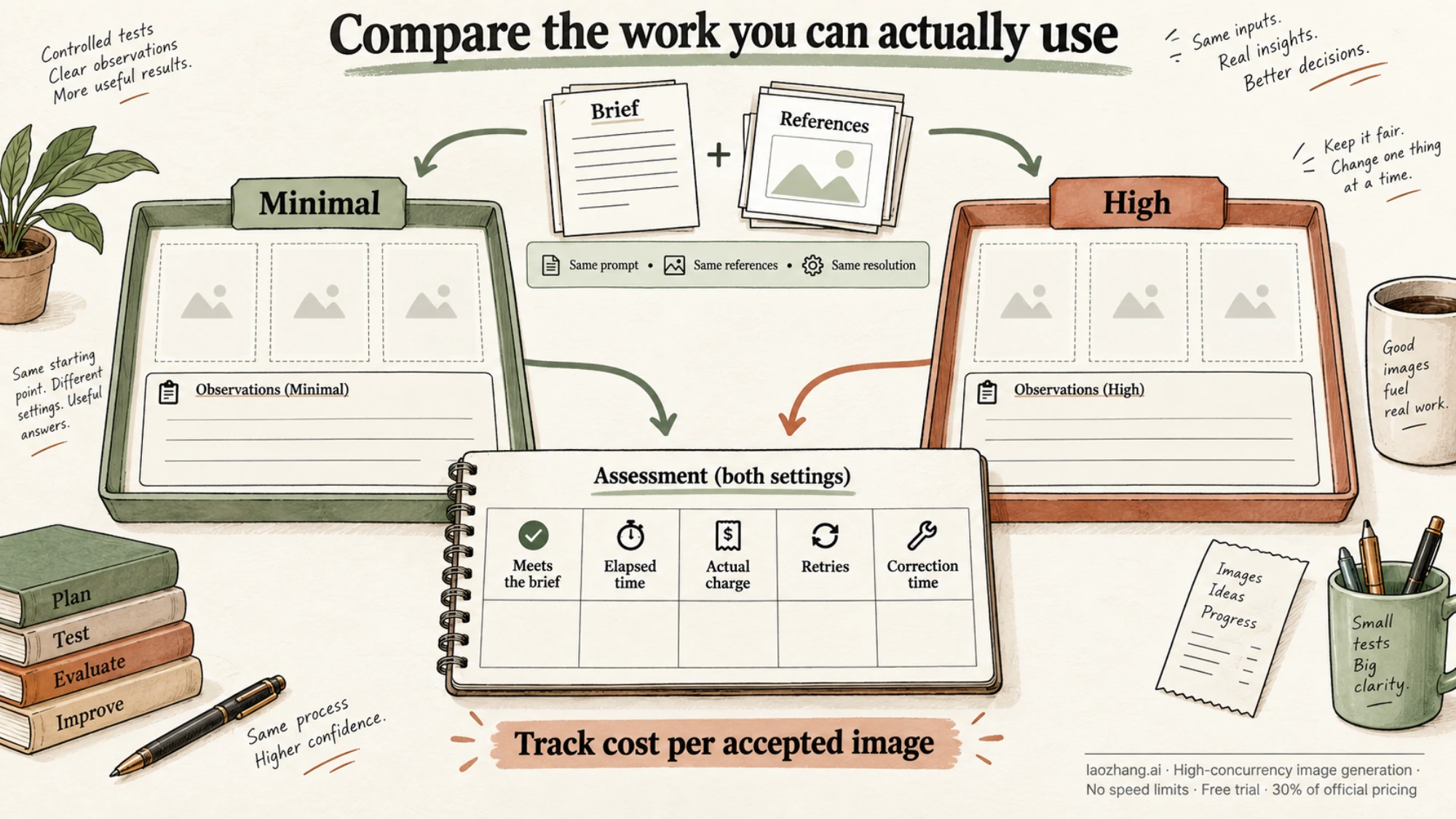
A fair comparison starts with your acceptance criteria, before looking at either result. For the desk prompt above, you could require exactly three objects, the correct colors, the mug behind the book, and the lamp on the right. These checks assess the requested image rather than your reaction to its style.
For a product campaign, the criteria would be different: preserving the package shape, keeping the label readable, and leaving space for a headline. Pick requirements that matter to the asset's intended use.
Run the same task with each level and keep the following fixed:
- The model ID, prompt, and reference files.
- Resolution, aspect ratio, and search or other tool settings.
- Conversation history, if the task is an edit rather than a fresh generation.
- The definition of an acceptable image.
Use more than one result per level if the decision will affect many future requests. Alternate the order of the two settings to reduce the risk of comparing a quiet period with a busy one. There is no universal sample count that makes every creative task representative; use enough examples to see whether the apparent advantage survives different runs and your common prompt types.
Record each attempt before selecting favorites:
| Record | Why it matters |
|---|---|
| Thinking level and unchanged request settings | Confirms what was compared |
| Elapsed request time | Captures the wait your application experiences |
| Final image present and decodable | Separates delivered images from nominally successful responses |
| Each acceptance criterion passed or failed | Makes the quality judgment reproducible |
| Actual billed usage and request charge | Avoids estimating the total from an image-only price |
| Retry count and manual correction time | Shows whether the output was useful in practice |
For interactive work, look at both a typical wait and unusually slow attempts. Averages can conceal the requests that make an interface feel stuck. For production batches, count accepted images and the total spend needed to obtain them, including unsuccessful attempts that were charged.
A useful measure is total generation spend divided by accepted images. Keep human correction time alongside it rather than assigning an arbitrary dollar value. If neither level produces an acceptable image, revise the prompt, references, or workflow before drawing a pricing conclusion.
Keep Minimal when it meets the brief reliably and High adds little practical benefit. Use High selectively when your records show it reduces a recurring failure enough to improve delivery. This is a proposed comparison method; no Nano Banana 2 A/B benchmark is claimed here.
Count thinking cost without confusing it with image cost
As of September 8, 2026, Google's standard Gemini 3.1 Flash Image pricing lists input at $0.50 per million text/image tokens, text and thinking output at $3 per million tokens, and image output at $60 per million image tokens. Its listed equivalent for a 1K output image is $0.067. These are Google API rates, not a consumer subscription or a third-party service quote. Google's pricing table is the source to recheck before budgeting.
The 1K image figure is only the image-output component. Inputs, text/thinking output, and any separately charged tools can add to the request total.
For a narrow arithmetic example, 1,000 additional thinking tokens × $3 / 1,000,000 = $0.003. That is the marginal cost under the stated rate, not a claim that High typically consumes 1,000 more tokens. Without actual usage, you cannot infer a fixed High surcharge or a percentage increase.
For the wider resolution and pricing comparison, see our Nano Banana 2 API pricing guide. For this setting decision, the most relevant number is the cost of getting an image you can use.
When the setting appears to do nothing
If Minimal and High look similar, first confirm the exact outgoing request: model ID, endpoint, field nesting, and value. With a wrapper or gateway, consult its parameter mapping; accepting a field does not establish that it reaches Google's model unchanged.
Then review what you asked the model to do. An uncomplicated image may leave little room for extra reasoning to make a visible difference. A complex image may still fail because the reference or instructions are ambiguous. Compare the same criteria across several attempts before changing your default.
Finally, inspect the final output itself. HTTP 200, returned text, or a visible thought summary is not evidence that your application received a usable image. Save and open the final image, inspect the usage record, and make the decision from the completed task.