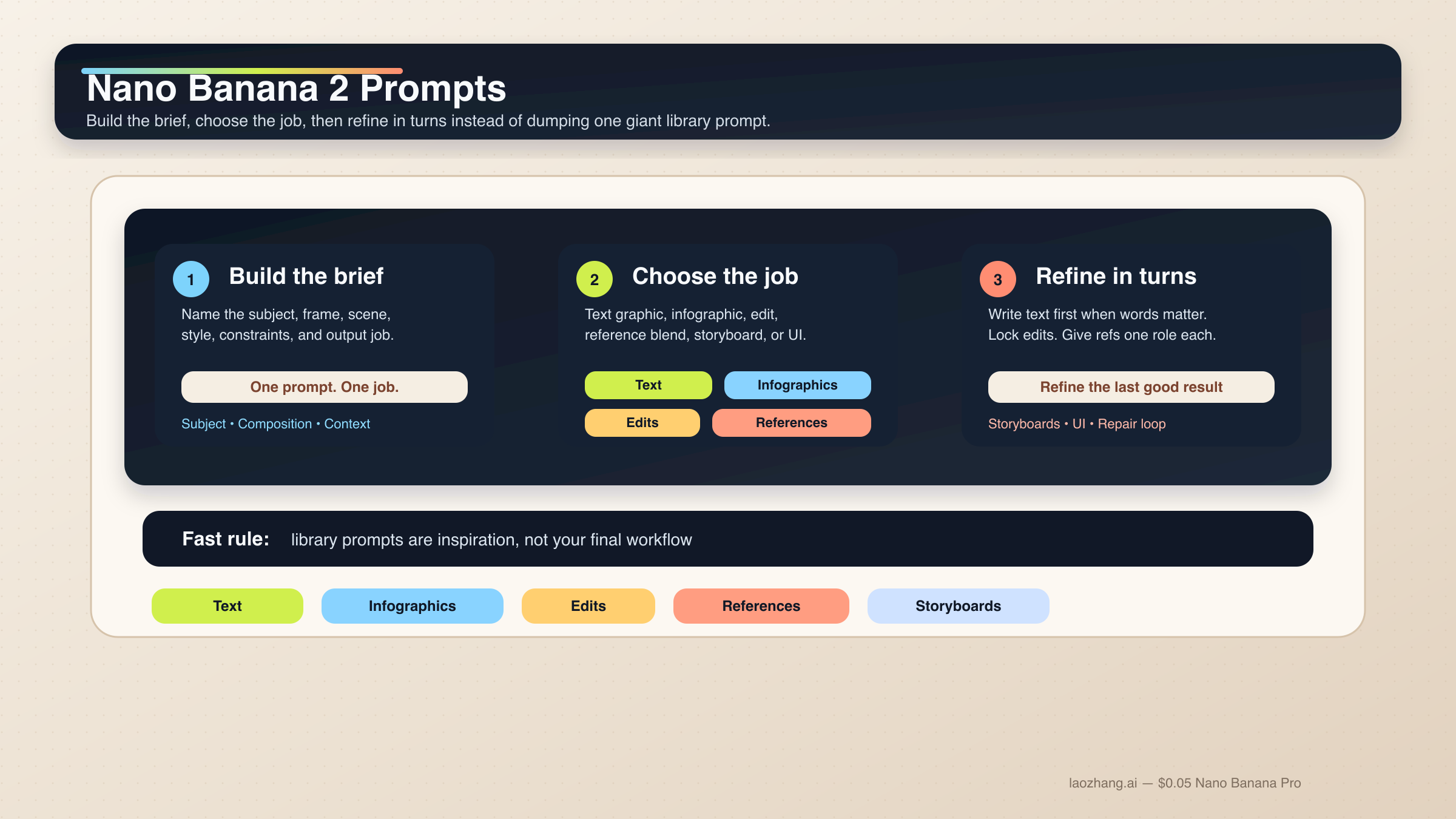
Nano Banana 2 prompts work best as structured briefs, not giant prompt piles. The right default is one six-part prompt that names the subject, composition, scene, style, constraints, and output job, then improves the result in follow-up turns. If you want better text, cleaner edits, stronger reference-image control, or fewer broken compositions, that is the safest place to start.
Short answer: start with one structured six-part prompt, not a library prompt. For text-heavy or localized graphics, use a text-first two-step workflow. For edits and reference-image jobs, lock what must stay the same and give each reference one clear role.
That matches Google's current Gemini image-generation guidance. The official docs for gemini-3.1-flash-image-preview, the model behind Nano Banana 2, keep pushing the same rules: be hyper-specific, give context and intent, refine conversationally, and use step-by-step instructions for complex scenes. Google also says text-in-image workflows work better when you generate the text first and then ask for the image that should contain it. That one rule alone explains why so many page-one prompt libraries feel exciting but still fail on real poster, infographic, and UI jobs.
One caveat should be visible early. Nano Banana 2 is the right default for most fast image work, but it is not the answer to every prompt problem. If the job is premium typography, stricter reference fidelity, or high-stakes brand output, read Nano Banana 2 vs Nano Banana Pro next. For most people, though, the better move is not switching models immediately. It is learning how to prompt Nano Banana 2 like a working creative system instead of a random prompt toy.
| If your job is this | Start with this prompt pattern | The part you cannot skip |
|---|---|---|
| Text graphic or poster | Two-step exact-text workflow | Generate the text first, then quote it exactly in the image prompt |
| Infographic or labeled diagram | Factual layout prompt | Name the components and hierarchy, then verify the labels manually |
| Photo edit | Change-only edit prompt | State what changes and what must stay exactly the same |
| Reference-image blend | Role-based multi-image prompt | Give each reference one clear job: subject, style, product, or environment |
| Character consistency | Canonical-reference prompt | Lock the face, body proportions, and costume anchors before changing the scene |
| Storyboard or UI layout | Composition-first prompt | Tell the model how the scene or layout should be organized before styling it |
Start with this Nano Banana 2 prompt formula
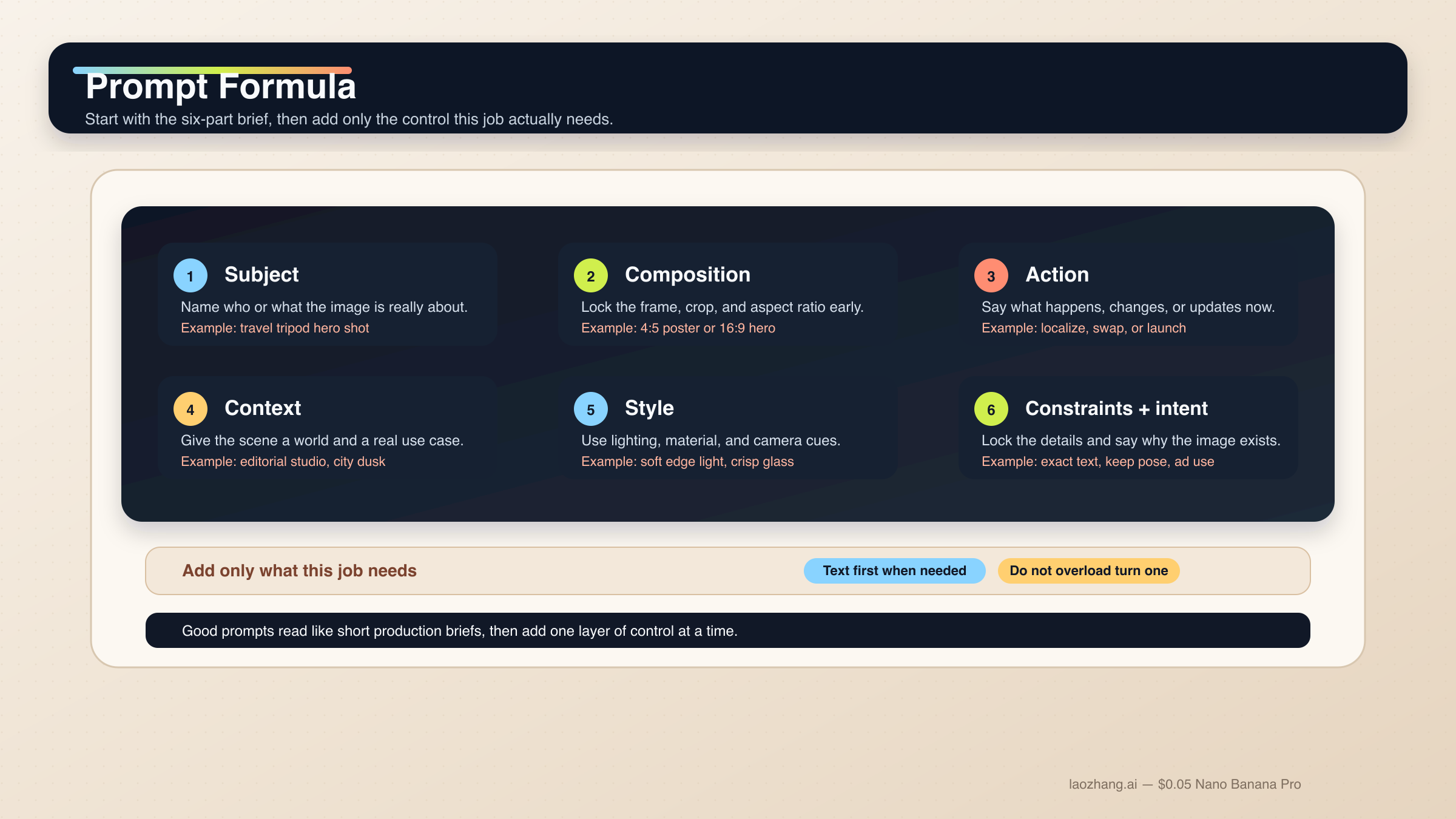
The easiest way to stop writing weak Nano Banana 2 prompts is to stop thinking in prompt-library fragments. The model handles descriptive scene prompts, controlled edits, and multi-turn refinement far better than disconnected adjective stacks. A good prompt usually looks like a short creative brief.
Use this base formula when you need a clean starting point:
[Subject]. Framed as [composition / lens / aspect ratio].
[Action or change].
Set in [scene / environment / context].
Visual style: [lighting / materials / color / mood].
Constraints: [what must remain, exact text, references, things to avoid].
Output intent: [poster / product shot / infographic / storyboard / UI / edit].
Each part has a job:
Subject: who or what is the image about.Composition: shot distance, angle, crop, and aspect ratio.Action or change: what should happen in the scene or edit.Context: where this is happening and what real-world logic should guide it.Style: lighting, materials, tone, and finish.Constraints and output intent: exact text, locked details, layout needs, or the reason the image exists.
That last line is where most weak prompts collapse. Readers keep adding more style words when what they really need is clearer intent. "Create a logo" is broad. "Create a logo for a minimalist skincare brand sold in premium hotel spas" gives the model a usable job. Nano Banana 2 is good at reasoning through intent, but it still needs you to tell it what kind of output it is trying to produce.
The current Gemini image-generation docs make the same point more directly: specific prompts, context, iteration, and step-by-step construction matter more than giant adjective stacks. The Gemini 3.1 Flash Image model card also shows Google evaluating the model on text, infographics, character work, multi-turn editing, and multi-image tasks. That is exactly why a task-first prompt guide makes more sense than another generic inspiration gallery.
Another rule matters even more for this model family: one prompt should do one main job. If you need exact text, localization, and an edit to the existing image, split that into stages. If you need multiple characters or many objects, describe the hierarchy and accept that a multi-turn workflow is safer than a heroic first prompt. Google's current docs say Nano Banana 2 supports up to four characters and up to ten objects in one workflow, and up to fourteen reference images overall. That is a capability ceiling, not a recommendation to dump fourteen inputs into every request.
In practice, a strong Nano Banana 2 prompt workflow follows this order:
- get the base composition right;
- lock the details that must survive;
- add exact text or localized changes in a controlled pass;
- keep repairs narrow when the output drifts.
If you want a broader capability and model overview before you start prompting, Nano Banana 2 (Gemini 3.1 Flash Image Preview) covers the current model surface, pricing ladder, and official naming.
One official best practice is easy to miss because prompt-library pages almost never teach it clearly: use semantic negatives instead of raw command-negatives where possible. "An empty street with no sign of traffic" gives Nano Banana 2 a more legible target than "street, no cars, no traffic, no buses." This is a small wording change, but it helps the model aim at the scene you actually want instead of only trying to suppress objects after the fact.
Prompt templates for text, infographics, and localized graphics
Nano Banana 2 is strong at text rendering and infographics compared with older Gemini image flows, but it still behaves better when you stop treating "text in image" as a single-shot magic trick. For text-heavy outputs, build the copy first, then tell the model exactly how it should appear. For diagrams and localized assets, be explicit about hierarchy, labels, and what must not change.
1. Exact-text poster or launch graphic
Use this when the words are part of the deliverable, not a decorative afterthought.
Turn 1:
Write one 6-word headline and one 14-word subhead for a launch poster about a lightweight travel tripod for creators.

Turn 2:
Create a 4:5 product launch poster for a compact carbon-fiber travel tripod standing on a stone pedestal. Clean premium studio look, muted graphite background, soft edge lighting, wide top margin.
Render the exact headline "READY TO MOVE LIGHT" in bold uppercase sans-serif near the top.
Render the exact subhead "Stable enough for long exposure, small enough for a carry-on." below it in smaller white text.
Keep the typography crisp, aligned, and readable at thumbnail size.
Output intent: premium ad creative.
Why it works: the copy is already decided, so Nano Banana 2 can spend more of its reasoning budget on composition and rendering instead of inventing text under pressure.
2. Infographic or labeled diagram
Use this when the image needs to explain a system, not just look attractive.
Create a 16:9 infographic explaining a mirrorless camera sensor stack. Show these labeled components from front to back: cover glass, microlens array, color filter array, photodiodes, wiring layer, sensor substrate.
Use a clean flat editorial style with wide margins, short labels, thin leader lines, and one callout area for "light path".
Keep the diagram factual, readable, and easy to scan in 3 seconds.
Output intent: educational article graphic.
Why it works: you are specifying the information architecture, not just the visual mood. For factual images, this is more important than piling on style terms.
3. Localize an existing graphic without breaking the layout
Use this when you already have a working English image and only need the language changed.
Update this existing infographic to Spanish.
Do not change the layout, icon positions, color system, chart proportions, or visual hierarchy.
Replace all English text with natural Spanish text that fits the same design style.
Keep the headings short and the body labels easy to read.
Output intent: localized marketing graphic.
Why it works: this is a change-only localization prompt. It tells the model what must remain locked, which is what most translation-style prompt libraries forget to do.
These are also the cases where Google's text-first rule matters most. If the graphic contains a headline, caption, legend, and multiple labels, do not hope the model gets all of them right in the first image. Generate or finalize the copy first, then render the visual with exact quoted strings.
Prompt templates for photoreal scenes, product shots, and brand visuals
Nano Banana 2 gets much better when you stop asking for "realistic" and start describing the shot like a photographer or art director. Composition, lens feel, lighting, and the real job of the image matter more than generic quality modifiers. This is also where readers often overprompt. You do not need twenty style tags when the scene logic is still unclear.
4. Editorial portrait
Use this when the subject should feel photographed, not generically AI-lit.
A waist-up editorial portrait of a ceramic artist in a bright studio. 3:4 composition, subject slightly off-center, captured with an 85mm portrait lens look.
The artist is shaping a clay bowl while looking just past the camera.
Set in a sunlit workshop with pale walls, wooden shelves, and small traces of clay dust in the air.
Visual style: soft natural window light from camera-left, warm skin tones, realistic fabric texture, calm magazine mood.
Constraints: keep the hands natural and the studio believable.
Output intent: editorial feature image.
Why it works: the prompt tells Nano Banana 2 how to frame the scene, what the subject is doing, and what kind of realism matters.
5. Product hero or launch banner
Use this when the product is the point and the composition needs to feel commercially usable.
Create a 16:9 premium product hero image of a matte black wireless speaker on a dark stone plinth.
Three-quarter view, low camera angle, the speaker centered with controlled negative space on the left for future headline placement.
Set in a minimal studio environment with subtle haze and soft reflected highlights.
Visual style: luxury commercial photography, clean shadows, brushed texture detail, restrained graphite and silver palette.
Constraints: no extra props, no floating UI, no fake sales text.
Output intent: homepage hero banner.
Why it works: the prompt states the product, the intended layout behavior, and the reason the empty space exists.
6. Grounded travel or city scene
Use this when real-world context matters and your surface supports Grounding with Google Search.
Create a twilight editorial travel image of a rain-slicked street scene near Pike Place Market in Seattle.
Wide environmental composition with the market sign visible in the scene and the Space Needle grounded in the distance.
The foreground should include a couple under one umbrella walking past a cafe chalkboard.
Visual style: cinematic wet reflections, realistic signage, cool blue ambient light with warm cafe spill.
Constraints: keep the city details plausible and the typography readable.
Output intent: travel feature illustration.
Why it works: the prompt names specific real-world anchors and a coherent scene goal. If you have grounding available in your app or API flow, this is the kind of prompt where it can materially help. It is not a reason to overload every prompt with place names.
Prompt templates for edits, reference images, and multi-image blends
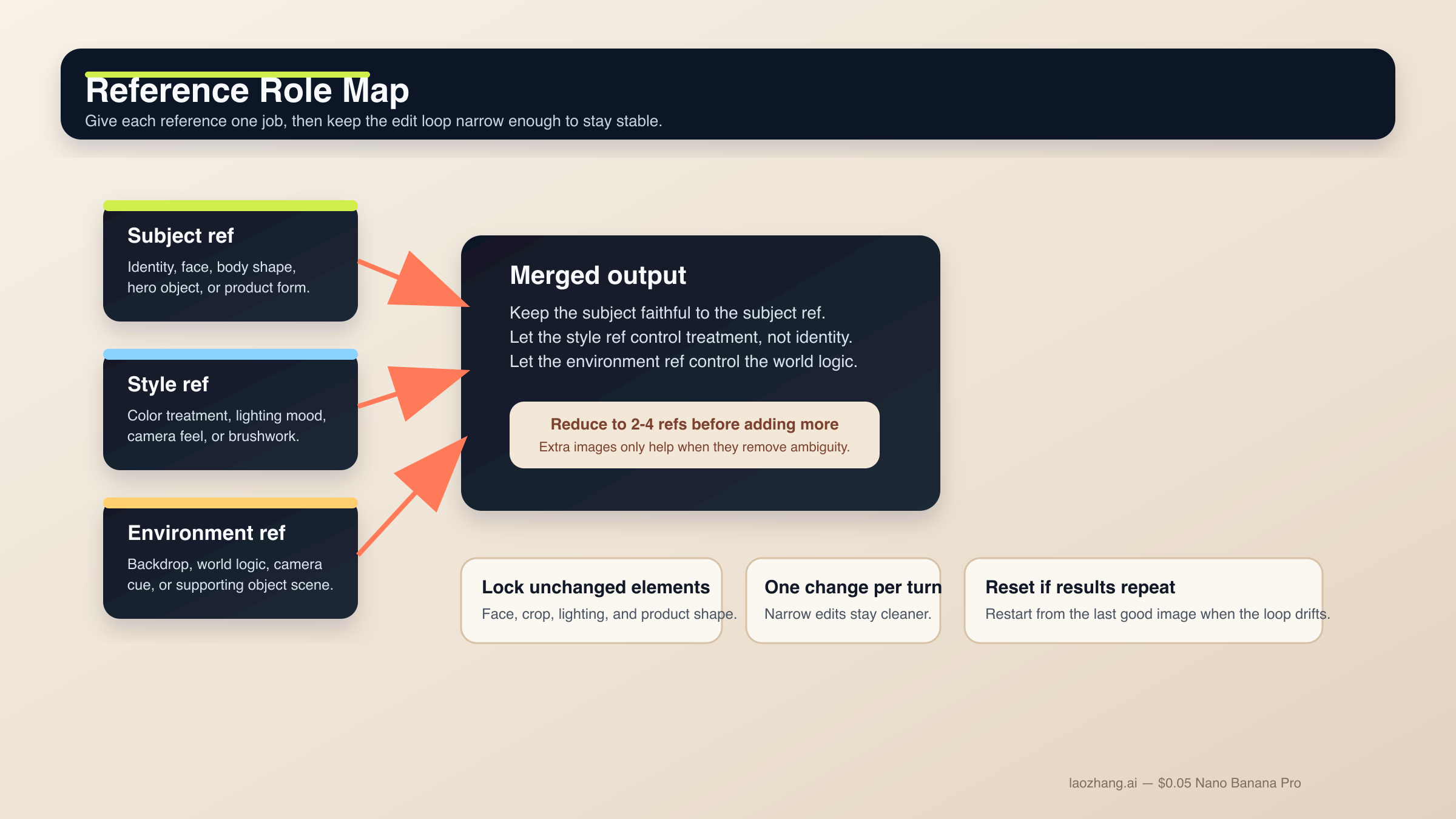
This is the section where Nano Banana 2 becomes most useful and most fragile at the same time. The model is strong at semantic editing, but you need to tell it what must stay frozen. The same rule applies to reference images. Even though the current docs allow many references, the best working setup is still small and explicit: start with two to four important images, give each one a role, and only add more when you know what problem the extra image is solving.
If you need a bigger picture on edit workflows, read the dedicated Gemini image-to-image editing guide after this page.
7. Change-only edit
Use this when one detail should change and the rest of the image should survive.
Using the provided image, change only the jacket color to deep forest green.
Keep the same face, pose, body position, camera crop, lighting direction, background blur, and fabric texture.
Do not change any other clothing items or the expression.
Output intent: controlled wardrobe edit.
Why it works: the edit is narrow and the locked details are listed explicitly. That is how you prevent a small request from turning into a scene rewrite.
8. Role-based reference-image blend
Use this when multiple images matter for different reasons.
Use Image A for the subject's face and body proportions.
Use Image B for the illustration style and color treatment.
Use Image C for the forest environment and fog mood.
Create a 3:4 fantasy book-cover portrait of the subject walking through that forest at dawn.
Keep the face closest to Image A, the brushwork closest to Image B, and the atmosphere closest to Image C.
Constraints: preserve one clear focal subject and avoid mixing the references into a crowded collage.
Output intent: character-led cover art.
Why it works: each image has a clear role. Without that, reference prompts often become a voting contest the model resolves badly.
9. Product mockup from references
Use this when the product design must stay faithful while the surrounding world changes.
Use Image A as the handbag reference and Image B as the photography-style reference.
Create a 4:5 fashion campaign image of a woman walking in Paris at golden hour while carrying the handbag from Image A.
Keep the bag shape, hardware, stitching, and materials faithful to Image A.
Use the editorial color treatment, soft lens bloom, and shallow depth of field style from Image B.
Constraints: the bag must remain the hero object even though the scene is lifestyle-driven.
Output intent: product campaign creative.
Why it works: the product and style are separated. That gives Nano Banana 2 a much cleaner job than "make this product look like this reference photo."
This is also where the current limit context matters. Nano Banana 2 supports more references than older Gemini image models, but you should still be selective. More inputs are only better when they reduce ambiguity. When they introduce conflicting style, lighting, or subject rules, the output gets worse.
Prompt templates for character consistency, storyboards, and UI layout work
The official docs and model card both make it clear that Nano Banana 2 is not only a single-image generation model. Google evaluates it on character work, multi-turn flows, and more structured visual design tasks. That does not mean the model automatically understands your character bible or design system. It means you can get good results when you lock the canonical details and give the composition a real structure.
10. Character consistency scene
Use this when the same person or mascot needs to survive across different scenes.
Use the provided character image as the canonical reference.
Create a 16:9 scene of the same character standing in a bright startup office, holding a tablet and talking with a small team.
Keep the same face, hair shape, body proportions, jacket color, and overall age.
Only change the pose, camera angle, and environment.
Visual style: polished editorial realism with clean daylight and subtle depth of field.
Output intent: brand storytelling image.
Why it works: it tells the model what identity anchors are non-negotiable before introducing a new scene.
11. Three-panel storyboard
Use this when the output is about sequence and continuity, not a single hero frame.
Create a 3-panel storyboard in a clean cinematic concept-art style.
Panel 1: wide establishing shot of a courier arriving at a neon-lit train platform at night.
Panel 2: medium shot as the courier opens a metal case and checks a glowing device.
Panel 3: close-up of the courier looking up as the train lights appear in the fog.
Keep the same character design, coat color, bag shape, and lighting logic across all panels.
Output intent: visual storytelling board.
Why it works: each panel has a job, but the consistency rules are kept global.
12. UI or landing-page mockup
Use this when you need a visual layout concept rather than a raw illustration.
Create a clean 16:9 SaaS landing-page mockup for a project-planning product.
The hero area should show a strong headline region on the left, one primary call-to-action button, one secondary text link, and a product dashboard preview on the right.
Use a 12-column grid feel, clear spacing, restrained color palette, and realistic interface hierarchy.
Visual style: premium modern product design, soft shadows, crisp typography, subtle gradients.
Constraints: avoid fake lorem ipsum walls and avoid cluttering the dashboard with meaningless widgets.
Output intent: polished website concept.
Why it works: UI prompts fail when they focus only on style. This one tells Nano Banana 2 what the page needs to contain and how the hierarchy should feel.
For higher-stakes reference-heavy UI work, or when a layout must match brand standards tightly, Nano Banana Pro still has the stronger premium-control case. That is also why the dedicated Nano Banana Pro prompts guide and Nano Banana Pro reference images guide are worth reading when your job stops being a fast-default Nano Banana 2 workflow.
How to fix drift, bad text, blocked edits, and weak outputs
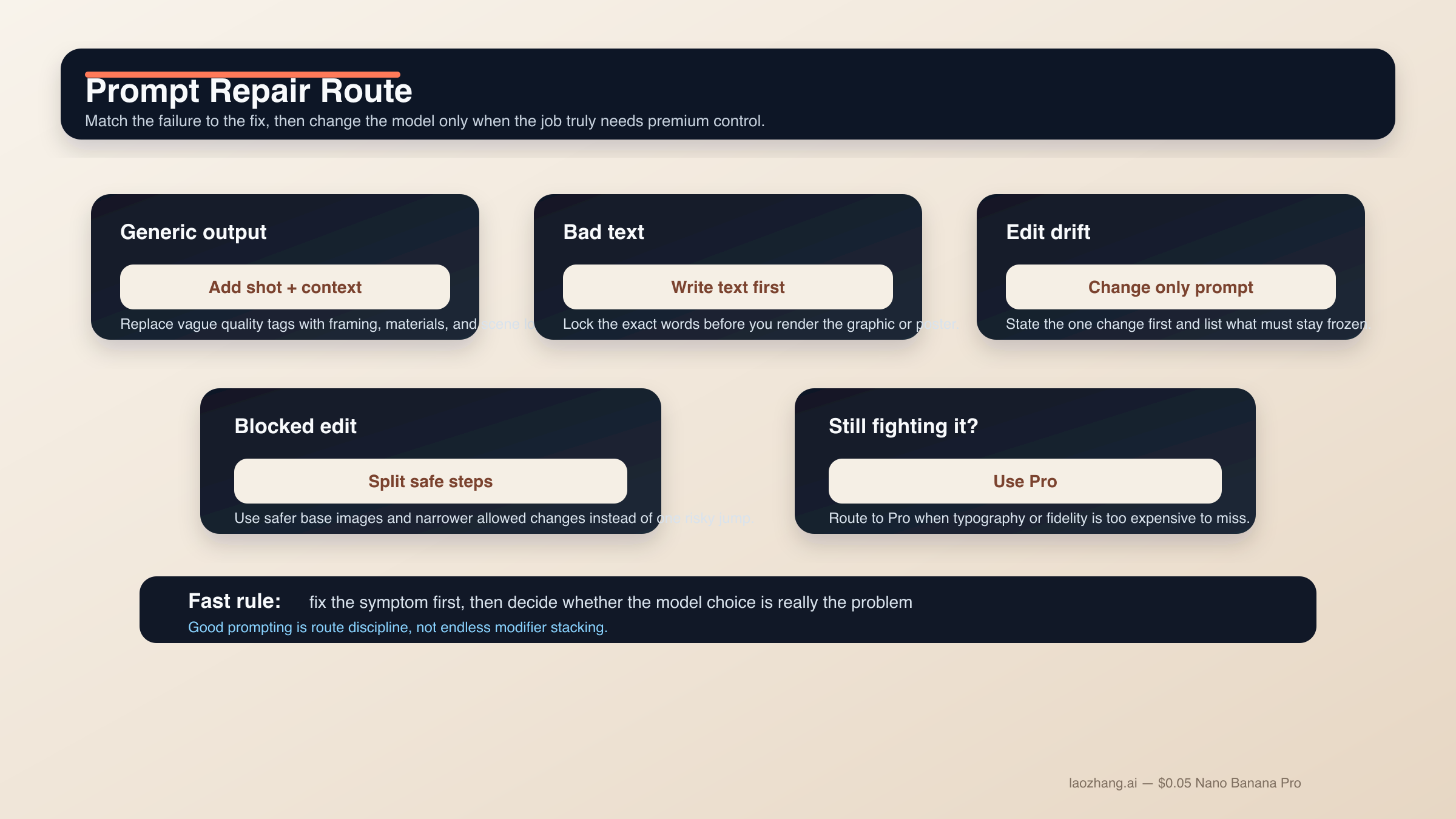
Most Nano Banana 2 prompt failures are not mysterious. They come from asking the model to solve too many jobs at once, failing to lock what must survive, or treating a difficult edit like a text-to-image request. The fastest improvement is usually not another pile of modifiers. It is a narrower prompt with better sequence control.
If the output looks generic or "AI-ish." Stop adding random quality tags. Add shot language, scene logic, and material detail instead. "Photorealistic, detailed, 4K, ultra HD" is weaker than "three-quarter product shot, brushed metal texture, morning side light, room for copy on the left."
If text keeps breaking. Use the text-first workflow. Finalize the headline, subhead, button copy, label list, or chart legend first. Then ask Nano Banana 2 to render the exact strings. Quote important text and keep the hierarchy simple.
If the edit changes too much. Turn the request into a change-only prompt. Name the single change first, then list the locked elements: face, pose, crop, lighting, background, texture, or logo placement. The narrower the edit, the more stable the result.
If reference-image blends get muddy. Reduce the active references. Give each image one job. One image for subject, one for style, one for environment is usually much cleaner than six semi-relevant images all competing for control.
If the scene is too complex. Use step-by-step prompting. Get the background. Then add the main subject. Then add the text or localized layer. Nano Banana 2 is strong in multi-turn workflows because it can preserve context, but only if you stop resetting the whole task every time.
If prompts start getting blocked. Community reports around Nano Banana 2 and the broader Gemini image surfaces show that likeness-preservation, clothing removal, and sensitive edit requests can trip policy behavior faster than users expect. The practical fix is not trying to outsmart the filter. Use safer base images, keep the edit within normal product or creative use, and split risky transformations into allowed steps instead of one ambiguous request.
If you are forcing Nano Banana 2 to behave like Pro. Switch models instead of escalating prompt complexity forever. Nano Banana Pro still makes more sense when the image is a premium deliverable, typography accuracy is business-critical, reference fidelity needs to be tighter, or the 4K output is expensive to get wrong. That is not a failure of Nano Banana 2. It is correct routing.
FAQ
Should Nano Banana 2 prompts be long?
Not by default. They should be complete, but not bloated. A short structured brief with clear intent is usually better than a giant prompt pile. If the job is complex, add the missing detail in a second or third turn instead of forcing everything into the first request.
Do I need to use English prompts for the best results?
Not always. Nano Banana 2 supports multiple languages, and localized edits are a real use case in Google's current image docs. What matters more is clarity, exact quoted text where needed, and keeping the visual job narrow. For high-control brand work, many users still test English first, then localize deliberately in a follow-up turn.
How many reference images should I use?
Start with two to four important references even though the model can support more. One for subject, one for style, one for environment, and maybe one extra for a crucial product or object is usually enough. Add more only when you know exactly what each extra image should control.
Does Grounding with Google Search improve every prompt?
No. It helps most when the scene depends on real-world visual facts such as places, signage, or products. It is less useful for abstract illustrations, stylized portraits, or simple product shots where the scene logic is already clear.
When should I stop refining Nano Banana 2 prompts and switch to Nano Banana Pro?
Switch when typography accuracy is business-critical, reference fidelity must be tighter, or the final image is a premium 4K brand asset that is expensive to get wrong. If you are spending too many turns trying to coerce Nano Banana 2 into premium-control behavior, you are probably solving the wrong problem.
The bottom line is simple. Nano Banana 2 prompts work best when they read like short production briefs with one clear job. Start with a structured formula, choose the template family that matches the task, and split hard text or edit work into stages. That approach is less glamorous than a giant prompt library, but it is the one that actually scales.


