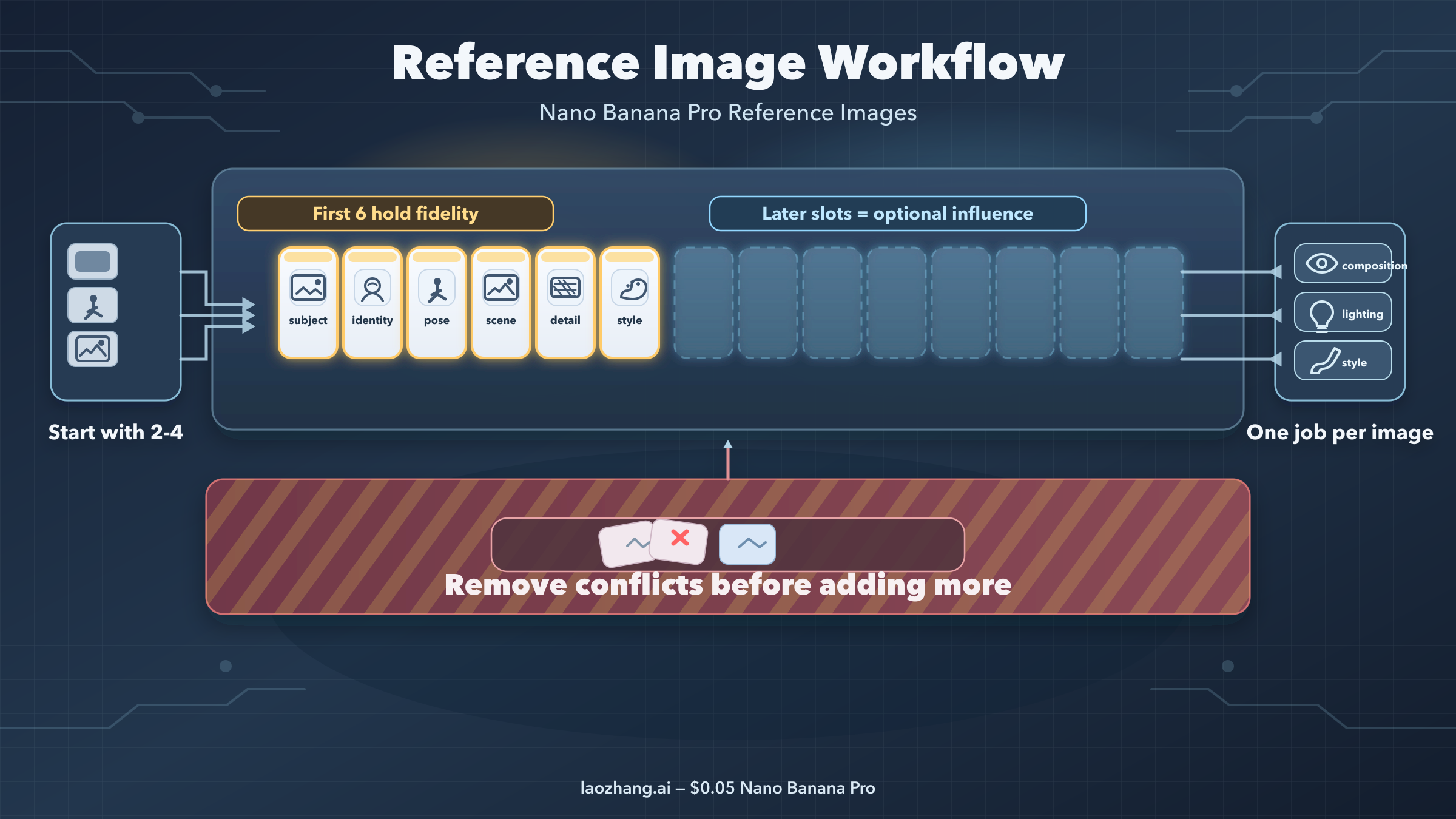
Short answer: as of March 28, 2026, Nano Banana Pro reference images work best when you treat them as assigned roles instead of a loose mood board. Start with 2 to 4 references, put the images that must survive in the first six slots, and write one prompt sentence that tells the model what each image controls. If you dump in every useful-looking image at once, you usually get more drift, not more precision.
Nano Banana Pro is Google's gemini-3-pro-image-preview, the higher-precision image model in the Gemini family. The official Gemini image-generation docs now say Gemini 3 image models can mix up to 14 reference images in one request, and the Pro model can use up to 6 high-fidelity object references plus up to 5 character-consistency references. That sounds generous, but those numbers are a ceiling, not a recommended starting point. Most failed generations come from starting too wide, not too small.
The practical rule is simple. Decide what the output must preserve first: a person, a product, a scene, a material detail, or a style direction. Give that visual anchor the earliest slot you can, then add only the references that do a different job. Everything else should wait until the base workflow is already working. If you want the broader 14-image system after that, our full multi-image composition guide goes deeper. This page stays narrower on purpose: reference-image setup, slot order, prompt structure, and the reasons Pro sometimes still drifts.
TL;DR
- Official limit: Google says Gemini 3 image models can mix up to 14 reference images, while Nano Banana Pro supports up to 6 high-fidelity object references and up to 5 character-consistency references.
- Best starting set: begin with 2 to 4 images, not 10-plus. More references only help when each one owns a distinct role.
- First-six rule: keep the references that must survive with the highest fidelity in the first six slots.
- Prompt rule: assign one job per image: subject, character, environment, pose, style, detail, or lighting.
- Common failure: when references conflict, the model often averages them instead of choosing the one you care about.
- When Pro is worth it: use Pro when you need harder reference fidelity, better text rendering, or more complex blends. Use Nano Banana 2 for cheaper, faster drafts once you know the composition you want.
Start with the smallest useful reference set
The mistake most people make is treating reference images like insurance. They add a few extra pictures "just in case" the model misses something, but that extra context often introduces more ambiguity than clarity. A second face shot with different lighting, a different crop of the product, or an unrelated inspiration board image can all compete for control over the final result. Nano Banana Pro is powerful, but it still has to reconcile conflicting visual instructions inside one generation.
That is why the best default is a minimal reference set. If you are restyling a product or object, one subject image plus one style or environment image is enough to test whether your workflow is sound. If you are preserving a person, one identity image plus one pose or environment image is enough to test whether the model is locking onto the right face and body language. Only after that base version works should you add a third or fourth image for lighting, material detail, or a more specific background cue.
The benefit of starting small is diagnostic clarity. When the model fails, you know which reference probably caused the problem. When you start with 8 references, every failure becomes a mystery. You no longer know whether the output drifted because the style image was too strong, the subject image was too weak, or the extra mood board image hijacked the composition.
There is also a practical cost argument. Google's official pricing page currently lists Nano Banana Pro at the equivalent of $0.134 per 1K or 2K image and $0.24 per 4K image as of March 28, 2026. That is not extreme for a precision workflow, but it is still expensive enough that blind trial-and-error with huge reference packs gets wasteful fast. If you want to experiment cheaply, get the visual logic right with a smaller set first, then decide whether Pro is the right final renderer for the polished output.
The right mindset is not "how many references can Pro take?" but "what is the smallest set that fully describes the decision I need the model to make?" If you answer that question honestly, most workflows land in the 2-to-4-image range for the first successful run.
What belongs in your first six slots
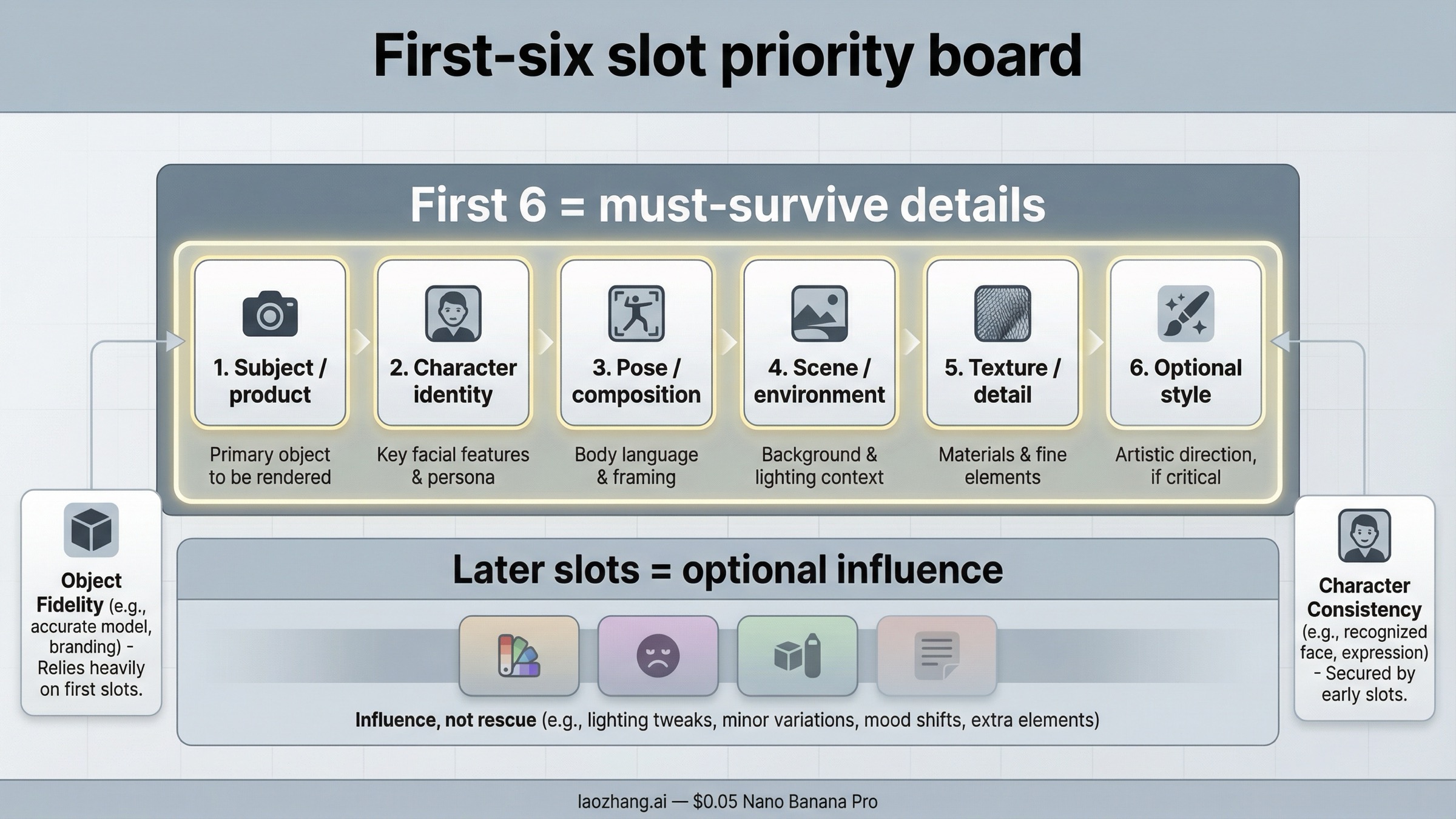
Google's official docs now make the limits clearer than most third-party guides do, but the practical implication is still easy to miss. The first six high-fidelity object references are where your non-negotiable visual anchors should live. If the output must keep the exact product silhouette, a specific face, a key garment detail, or a particular object texture, those images should be early. Late-slot references should be optional supporting cues, not the images you are secretly hoping the generation will center around.
The cleanest way to think about slot priority is this: early slots are for identity and structural fidelity, later slots are for influence. That does not mean later images are irrelevant. It means they should never be the only place where your most important information exists.
| Reference Job | Put It in the First Six? | Why It Deserves Priority | Common Mistake |
|---|---|---|---|
| Main subject or product that must survive | Yes | This is the image the model should preserve most faithfully | Letting a later style or scene image overpower the hero subject |
| Character identity photo | Yes | DeepMind says Pro is strong on character consistency, but consistency only works when the face reference is clear and high quality | Using a weak selfie, tiny face crop, or dramatically different lighting |
| Pose or composition anchor | Usually yes | Good early placement helps the model understand framing before decorative influences arrive | Treating pose as optional and hoping the prompt text will fix body language |
| Environment or scene anchor | Yes when the background matters | Early placement helps if the environment is part of the story, not just decoration | Adding several scene references with different perspectives |
| Material or detail close-up | Yes when the texture must survive | Useful for luxury products, fabrics, packaging, surfaces, or logos | Keeping the detail image late and then wondering why texture fidelity collapsed |
| Style reference | Sometimes | Use an early slot only when the style is a non-negotiable output constraint | Putting style first when identity or product fidelity matters more |
| Lighting reference | Usually later | Lighting is influential, but it is often a supporting instruction rather than the main anchor | Giving several lighting refs that contradict each other |
| Extra inspiration or mood-board image | Usually later or not at all | Good as a tiebreaker only after the base references already work | Uploading vague inspiration images that compete with real references |
If you are working with people, remember that "character consistency" is not the same as "everything about the whole image stays fixed." It is mostly about preserving the person. That means your face or identity reference still needs to be clean, well lit, and large enough for the model to actually read it. DeepMind's Pro model page says the model can still struggle with small faces and complex blends, which is why bad identity shots remain one of the most common causes of drift.
If you are working with products, the priority is slightly different. Product workflows usually care more about silhouette, logos, material finish, and proportions than character identity. In that case, the hero product shot belongs early, followed by the detail close-up or packaging reference that carries the specific surface cues you cannot risk losing. Style and lifestyle context should come after that.
The simplest operational rule is this: if you would be angry to lose a detail, do not hide it in a late slot.
A prompt formula that gives every image one job
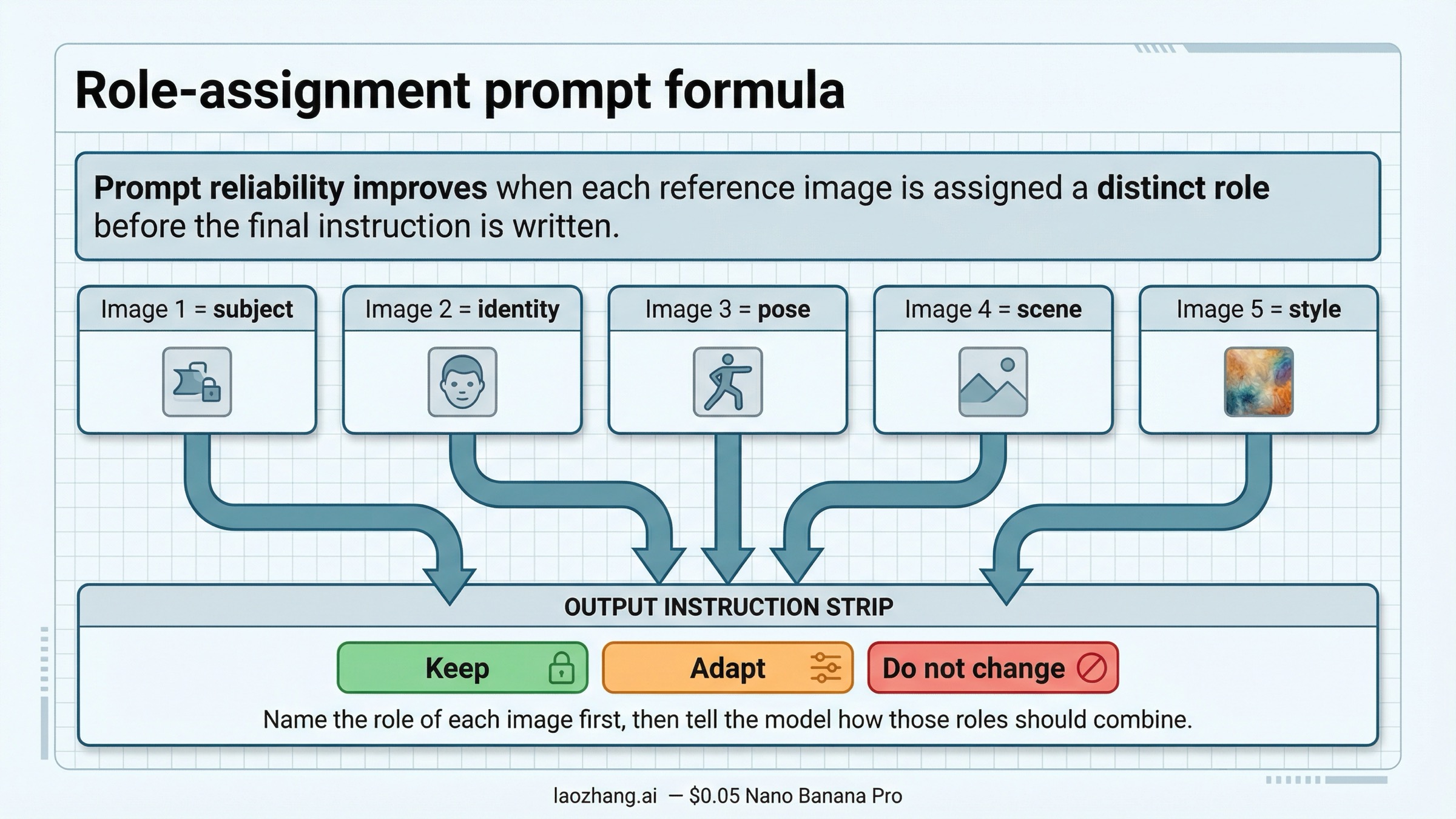
Most prompt advice around Nano Banana Pro is correct but incomplete. Yes, clarity matters. Yes, constraints matter. But the workflow only becomes reliable when the prompt mirrors the structure of your reference set. The model needs to know which image supplies identity, which image supplies pose, which one controls style, and which cues are optional.
The most reliable prompt pattern is a role-assignment prompt. Do not describe the final image first and mention your references later. Name the references first, then describe how they should combine. That reduces the chance that the model treats your images as general inspiration instead of instructions.
Use a pattern like this:
Image 1: main subject or product to preserve exactly
Image 2: character identity / face reference
Image 3: pose or composition reference
Image 4: environment or scene reference
Image 5: style or lighting reference

Create one final image that keeps the subject from image 1 intact,
preserves the face from image 2, follows the pose from image 3,
uses the environment from image 4, and applies only the color mood
and lighting direction from image 5. Do not redesign the subject.
Do not replace the face. Keep the final result realistic and cohesive.
That structure does two important things. First, it prevents role overlap. Second, it gives you something you can debug. If the face drifted, you look at the face reference or the wording around image 2. If the environment took over too strongly, you know the scene reference or the environment clause was too dominant.
What you want to avoid is the "everything everywhere" prompt. That looks like: "Use all these images as reference and make a beautiful premium lifestyle photo with cinematic lighting, perfect skin, realistic texture, and modern composition." It sounds specific, but it still leaves the model to guess which image matters most. That guess is exactly where drift begins.
A better way to write constraints is to separate must keep, can adapt, and should avoid:
- Must keep: the face, the product silhouette, the logo placement, the fabric pattern
- Can adapt: the background styling, lighting warmth, the final crop, the exact camera angle
- Should avoid: changing the product shape, swapping the person, merging two style cues into one muddy look
If you want to push style transfer harder, use only one style reference at a time and make sure the prompt says style should influence rendering, not replace identity. If you want more help with phrasing after the role logic is solid, our prompt mastery guide and style-cloning guide are better follow-ups than adding more references blindly.
The key insight is that the prompt should describe relationships between images, not just the final image you want. Nano Banana Pro is good at inference. Your job is to reduce the number of bad inferences it has to make.
Three reference-image workflows worth copying
Different reference-image jobs fail for different reasons, so it helps to keep a few repeatable patterns instead of one universal recipe. The point is not to memorize templates. The point is to recognize which workflow shape you are really running.
1. Product plus style reference
This is the cleanest reference workflow and the one most people should test first. You have one product shot that must survive and one second image that defines mood, composition, or scene quality. The model's job is straightforward: keep the object, change the presentation.
This pattern works well for cosmetics, consumer electronics, packaging, furniture, shoes, and fashion accessories. The product image should be the clearest and earliest slot. The style or environment image should come second and should not include visual cues that directly contradict the hero product angle or lighting. If your product is shot straight-on and the environment reference is a dramatic overhead shot, the model has to pick a winner. That is not a faithful workflow. That is a negotiation.
For this setup, your prompt can stay compact:
Image 1: hero product to preserve exactly
Image 2: premium campaign style and background mood

Create a polished product campaign image that keeps the product from image 1
unchanged while applying the lighting mood, composition style, and background
treatment from image 2. Keep the product proportions, logos, and material finish intact.
This workflow is also the fastest way to learn whether Pro is actually helping you. If even a two-image product workflow cannot hold the silhouette, proportions, or logos you care about, the issue is usually your input quality or your role wording, not the lack of more references.
2. Character identity plus pose or environment control
Character workflows are more fragile because people are less forgiving than products. A slightly wrong face is immediately obvious. That is why the face or identity reference has to be strong. Use a clear photo with good lighting, visible eyes, and enough facial area to read. If the face is tiny, the model may keep the general person but lose the exact identity. DeepMind's own limitations page is candid about this.
In this workflow, the character identity should come first or second, and the pose or environment should come after that. If the environment is dramatic but the person matters most, the environment should never outrank the identity. The same logic applies to style transfer. Do not let an aggressive style image occupy the strongest slot when identity fidelity is the main reason you searched for reference images in the first place.
This workflow is often where creators start blaming prompt wording for what is really an input problem. If your identity photo is low-resolution, heavily filtered, or inconsistent with the desired angle, the model is forced to interpolate too much. A better identity image helps more than a cleverer paragraph.
3. Small multi-reference composition
This is the point where many workflows become unstable, but it is also where Pro starts showing why it exists. Small multi-reference composition means you have more than two real jobs to solve at once: maybe a person, a product, a background, and a style reference, or a garment, a model, a location, and a lighting reference.
The reliable version of this workflow is still small. Four or five carefully separated jobs are better than twelve fuzzy ones. Your references should not all describe the same dimension. If two images both claim to control composition, or two images both fight over the same facial identity, the model has to blend them. That blend is usually what people interpret as "the model ignored my references."
When you need the broader system of many inputs, it is better to think in layers:
- Core fidelity layer: subject, person, or product that cannot drift
- Structural layer: pose, environment, scene layout
- Aesthetic layer: style, color mood, lighting direction
- Optional detail layer: texture, prop, or finish refinement
If a reference does not clearly fit one of those layers, it probably should not be in the first run.
Troubleshooting: Why Nano Banana Pro ignored, blended, or distorted your references
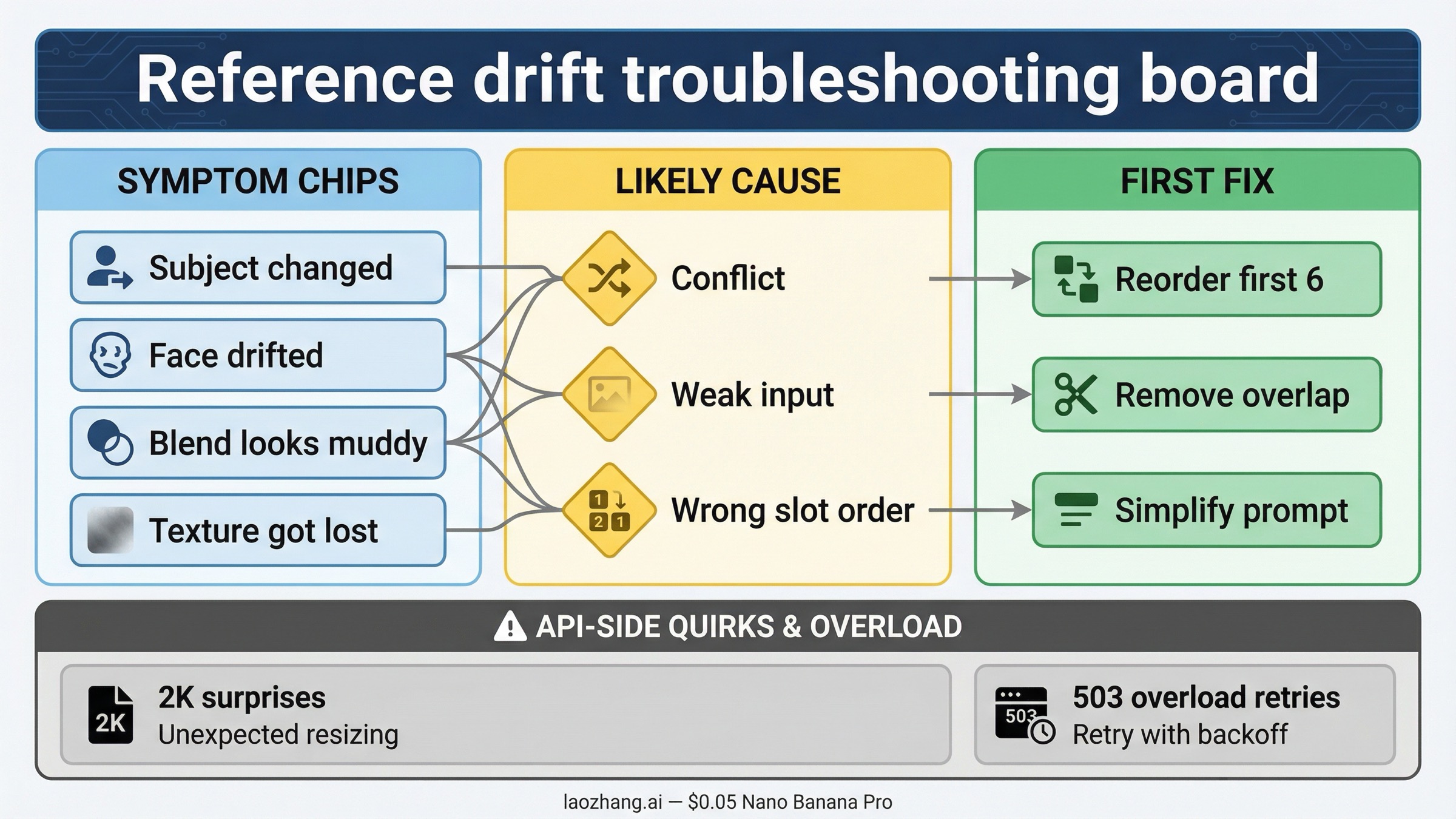
The bad news is that reference-image failures are normal. The good news is that they are usually diagnosable. Google's own Pro model page warns that blending multiple images can create disjointed scenes, and forum threads show that even output-size handling can behave unexpectedly in some API workflows. That means you should troubleshoot in a specific order instead of rewriting the whole prompt every time.
| Symptom | Likely Cause | What to Change First |
|---|---|---|
| The output kept the style but changed the subject | The style image is stronger or earlier than the subject image | Move the hero subject earlier, reduce style language, and tell the prompt to preserve the subject exactly |
| The face looks similar but not like the same person | The identity photo is weak, too small, or contradicted by another image | Replace the face image with a cleaner shot and remove any conflicting character-style reference |
| The composition looks muddy or averaged | Too many references are trying to control the same dimension | Remove any duplicate-role images and keep only one composition anchor |
| The background is right but the product texture is wrong | The detail close-up is too late or missing | Move the texture or material detail into the first six slots |
| The final image feels disjointed | The references disagree on perspective, lighting, or realism level | Harmonize the inputs before prompting and use one realism target instead of mixed aesthetics |
| The API result ignores the requested 2K output or behaves inconsistently | Preview-model behavior or SDK-specific handling can still be rough in some flows | Verify dimensions in the returned file, retry through a different SDK or direct REST call, and keep a fallback render plan |
| You are seeing intermittent 503 or overload errors | Backend capacity, not necessarily your prompt | Retry with backoff and do not confuse temporary service issues with a broken reference workflow |
The most useful troubleshooting habit is to remove, not add. When a run fails, cut the reference set back to the minimum version that should still work. If the two-image version works and the six-image version fails, you have already found the problem category. Your job is now to identify which added image changed the hierarchy, not to invent a more complicated prompt.
Another common mistake is fixing the wrong variable first. People often rewrite the prompt when the reference pack is the real problem, or they replace the reference images when the prompt never clearly assigned roles. A reliable debugging order looks like this:
- Confirm the subject or identity image is good enough.
- Remove any overlapping or duplicate-role references.
- Reorder the first six slots so the must-keep images are early.
- Rewrite the prompt to name each reference role explicitly.
- Only after that, change style strength or add more detail references.
If the failure is a refusal or a safety block rather than plain drift, the path is different. In that case, move to our guides on image-generation refusals and image safety errors. Those are not prompt-quality problems. They are policy and request-shape problems.
When Pro is worth paying for and when Nano Banana 2 is enough
You do not need Nano Banana Pro for every reference-image task. Use it when you care about harder fidelity, cleaner text rendering, or more complex reference composition than a cheaper model can usually hold. That includes branded product visuals, tighter character continuity, more demanding promotional graphics, and cases where you want one image to preserve a lot of visual structure while another image changes the art direction.
Use Nano Banana 2 when the workflow is still exploratory. Google's Gemini 3 developer guide positions gemini-3.1-flash-image-preview as the higher-volume, lower-price sibling, and that is exactly the right mental model. If you are still testing mood, broad composition, or rough scene ideas, the cheaper route often makes more sense. Once the visual logic is proven, Pro is where you pay for better adherence and a higher-quality final pass.
The simplest split is this:
- Choose Pro when the reference hierarchy matters more than generation speed.
- Choose Nano Banana 2 when iteration speed and cost matter more than perfect adherence on the first pass.
That also means you do not need to turn this page into a pricing war. The real user decision is not just cost per image. It is whether the model saves enough retries to justify the higher-quality path. For many reference-heavy commercial workflows, the answer is yes. For rough ideation, it often is not. The official release notes are also a useful reminder that Pro is still a preview-line model released on November 20, 2025, so cautious expectations are part of the correct workflow, not a sign that you are using it wrong.
If you want a more technical implementation path after the workflow is clear, continue with our API setup guide. If your next decision is output quality, go to the 4K image generation guide. And if you end up needing the broader multi-reference system after all, the full composition guide is the right next page.
The important part is that your first success should come from a clean hierarchy, not from luck. Nano Banana Pro is strong, but the model follows reference images best when you decide the hierarchy before you ask it to create anything.


