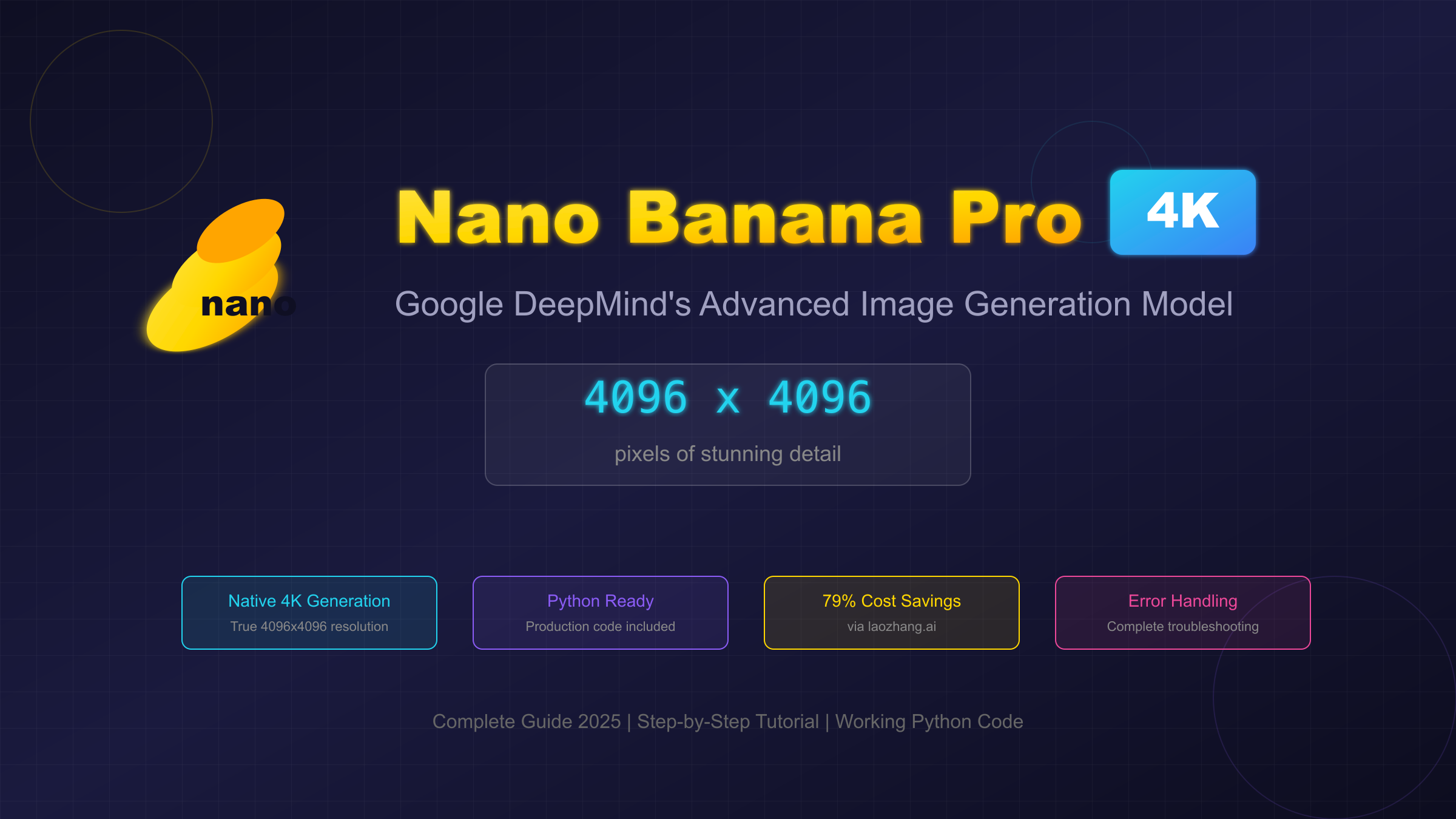
Nano Banana Pro, Google DeepMind's latest image generation model (officially known as Gemini 3 Pro Image), has revolutionized AI-powered image creation with its native 4K (4096×4096) resolution capability. Whether you're a developer building AI-powered applications or a content creator seeking the highest quality outputs, this comprehensive guide will walk you through everything you need to know about generating stunning 4K images with Nano Banana Pro.
By the end of this tutorial, you'll have working Python code, understand how to save 79% on costs through laozhang.ai, and be equipped to troubleshoot any issues you encounter. Let's dive in.
Understanding Nano Banana Pro and 4K Generation
Before we get into the technical implementation, it's essential to understand what makes Nano Banana Pro special and why 4K resolution matters for your projects.
What is Nano Banana Pro?
Nano Banana Pro is the community nickname for Google DeepMind's Gemini 3 Pro Image model, released in late 2025. The playful name emerged from early API testing communities and has stuck as the model's unofficial moniker. Here's what sets it apart:
| Feature | Specification |
|---|---|
| Official Name | Gemini 3 Pro Image |
| Max Resolution | 4096 × 4096 (4K) |
| Generation Speed | Under 10 seconds |
| Key Technology | Reasoning-guided synthesis |
| Watermark | SynthID (invisible) |
| Character Consistency | Native support |
Unlike previous image generation models that required upscaling for high-resolution outputs, Nano Banana Pro generates true 4K images natively. This means no quality loss from interpolation, sharper details, and better text rendering within images.
For those familiar with other Gemini models, you might want to explore our complete Gemini Flash Image API guide which covers the free tier options and compares them to the Pro version.
4K Resolution Explained
4K resolution (4096×4096 pixels) represents 16.78 million pixels per image—four times the pixel count of 2K (2048×2048) and sixteen times that of 1K (1024×1024). Here's why this matters:
| Resolution | Pixels | Print Size (300 DPI) | Best Use Case |
|---|---|---|---|
| 1K (1024×1024) | 1.05M | 3.4" × 3.4" | Web thumbnails |
| 2K (2048×2048) | 4.19M | 6.8" × 6.8" | Social media |
| 4K (4096×4096) | 16.78M | 13.6" × 13.6" | Print, marketing |
4K is essential for:
- Print materials: Brochures, posters, and marketing collateral
- Product mockups: E-commerce images that need zoom capability
- Professional portfolios: Design and photography showcases
- Digital assets: Stock images and commercial licensing
Access Options Overview
There are several ways to access Nano Banana Pro's 4K capabilities:
| Provider | Price per 4K Image | Setup Difficulty | Regional Restrictions |
|---|---|---|---|
| Google Official | $0.24 | Complex | Yes (some regions) |
| laozhang.ai | $0.05 | Easy (5 min) | None |
| Other third-party | $0.08-$0.15 | Varies | Varies |
| Free tier | $0 (limited) | Easy | 1024×1024 max |
As you can see, using laozhang.ai saves you 79% compared to official pricing while providing global access without regional restrictions. This is why we recommend it as the primary access method throughout this guide.
If you're interested in comparing image generation models, check out our Flux image generation API guide for alternative options.
Setting Up Your API Access via laozhang.ai
Now let's get you set up with API access. We'll use laozhang.ai because it offers the best combination of price ($0.05 per 4K image), ease of setup, and reliability.
Creating Your laozhang.ai Account
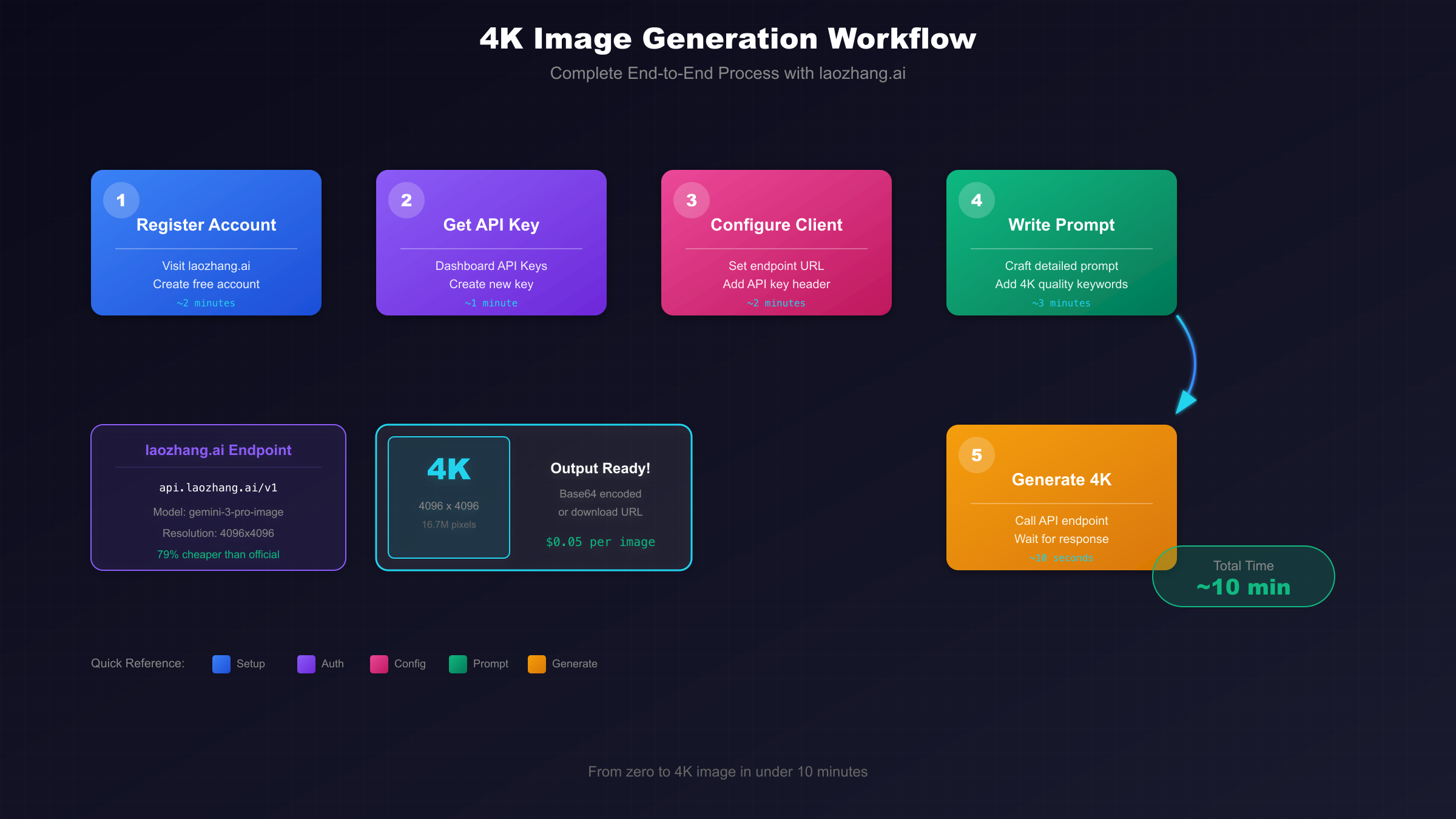
The registration process takes less than 2 minutes:
Step 1: Navigate to laozhang.ai and click "Register"
Step 2: Enter your email address and create a password
Step 3: Verify your email (check spam folder if needed)
Step 4: Log in to access your dashboard
Upon registration, new accounts receive free credits to test the service. This is enough to generate approximately 10-20 4K images at no cost, giving you ample room to experiment before committing.
Getting Your API Key
Once logged in, follow these steps to obtain your API key:
Step 1: Click on "API Keys" in the left sidebar
Step 2: Click "Create New Key"
Step 3: Give your key a descriptive name (e.g., "nano-banana-4k-project")
Step 4: Copy and securely store your API key
Security Note: Never share your API key publicly, commit it to version control, or include it in client-side code. Treat it like a password.
Configuration and Security
laozhang.ai uses OpenAI-compatible endpoints, making integration seamless if you've worked with OpenAI's API before. Here's the configuration you'll need:
# Configuration for laozhang.ai
BASE_URL = "https://api.laozhang.ai/v1"
MODEL_NAME = "gemini-3-pro-image"
API_KEY = "your_api_key_here"  # Store securely, never hardcode
Security features include:
- TLS 1.3 encryption: All API traffic is encrypted
- No data retention: Your prompts and images are not stored
- Rate limiting: Protection against accidental overspending
- 99.5% uptime: Enterprise-grade reliability
For a deeper understanding of API gateway architecture and security, see our developer's guide to LLM API gateways.
Step-by-Step 4K Image Generation
Now let's generate your first 4K image. Follow this complete workflow to go from setup to stunning output.
Prerequisites and Setup
Before running any code, ensure you have:
System Requirements:
- Python 3.8 or higher
- 100MB+ free disk space (for image outputs)
- Stable internet connection
Required Packages:
pip install openai requests pillowEnvironment Setup:
Create a .env file in your project root:
LAOZHANG_API_KEY=your_api_key_hereThen load it in Python:
import os
from dotenv import load_dotenv

load_dotenv()
api_key = os.getenv("LAOZHANG_API_KEY")
Your First 4K Image
Here's the simplest working code to generate a 4K image:
from openai import OpenAI
import base64
from pathlib import Path

# Initialize client with laozhang.ai endpoint
client = OpenAI(
    api_key="your_api_key_here",
    base_url="https://api.laozhang.ai/v1"
)

# Generate 4K image
response = client.images.generate(
    model="gemini-3-pro-image",
    prompt="A majestic mountain landscape at golden hour, ultra detailed, professional photography, 4K quality",
    size="4096x4096",
    quality="hd",
    n=1
)

# Extract and decode image
image_data = response.data[0].b64_json
image_bytes = base64.b64decode(image_data)

# Save to file
output_path = Path("my_first_4k_image.png")
output_path.write_bytes(image_bytes)

print(f"4K image saved to: {output_path}")
print(f"File size: {output_path.stat().st_size / 1024 / 1024:.2f} MB")
Run this code, and within 10 seconds you'll have your first 4K image saved locally.
Verifying Output Quality
After generation, verify your image meets 4K standards:
from PIL import Image

# Load and verify
img = Image.open("my_first_4k_image.png")
width, height = img.size

print(f"Resolution: {width} × {height}")
print(f"Total pixels: {width * height:,}")
print(f"Is 4K: {width >= 4096 and height >= 4096}")
print(f"Color mode: {img.mode}")
Expected output:
Resolution: 4096 × 4096
Total pixels: 16,777,216
Is 4K: True
Color mode: RGB
If your image isn't 4096×4096, check that you specified size="4096x4096" in your API call.
Python Code for 4K Generation
Let's build a production-ready Python client that handles real-world scenarios.
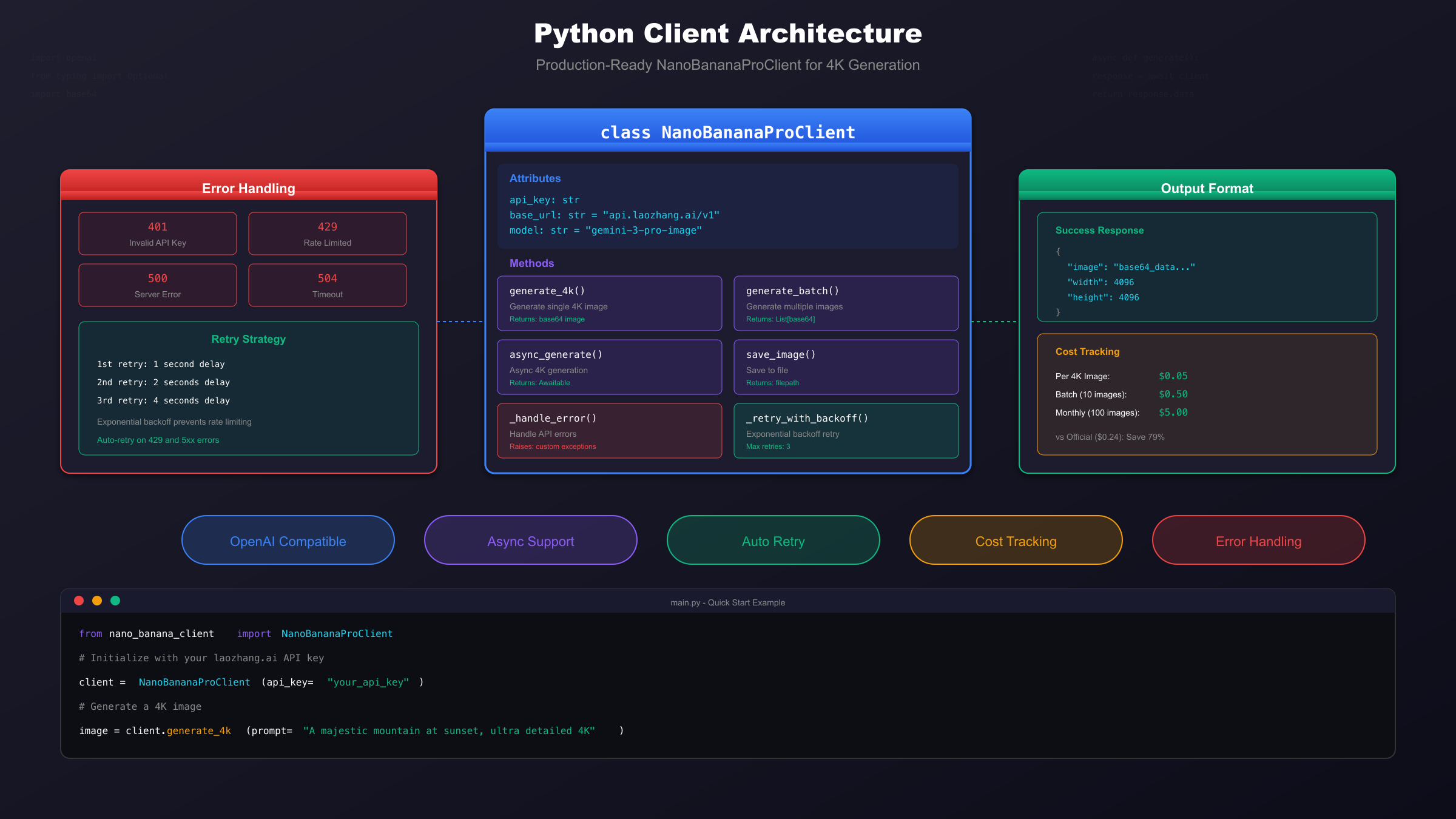
Basic Generation Code
Here's a clean, well-documented basic implementation:
"""
Nano Banana Pro 4K Image Generator
Basic implementation for single image generation
"""

from openai import OpenAI
import base64
from pathlib import Path
from typing import Optional
import time

class NanoBananaProClient:
    """Client for generating 4K images with Nano Banana Pro via laozhang.ai"""

    def __init__(self, api_key: str):
        self.client = OpenAI(
            api_key=api_key,
            base_url="https://api.laozhang.ai/v1"
        )
        self.model = "gemini-3-pro-image"
        self.default_size = "4096x4096"

    def generate_4k(
        self,
        prompt: str,
        output_path: Optional[str] = None,
        quality: str = "hd"
    ) -> bytes:
        """
        Generate a single 4K image.

        Args:
            prompt: Image description
            output_path: Optional path to save image
            quality: Image quality ("standard" or "hd")

        Returns:
            Raw image bytes
        """
        start_time = time.time()

        response = self.client.images.generate(
            model=self.model,
            prompt=prompt,
            size=self.default_size,
            quality=quality,
            n=1
        )

        image_bytes = base64.b64decode(response.data[0].b64_json)
        generation_time = time.time() - start_time

        print(f"Generated in {generation_time:.2f} seconds")

        if output_path:
            Path(output_path).write_bytes(image_bytes)
            print(f"Saved to: {output_path}")

        return image_bytes


# Usage example
if __name__ == "__main__":
    import os

    client = NanoBananaProClient(api_key=os.getenv("LAOZHANG_API_KEY"))

    image = client.generate_4k(
        prompt="A serene Japanese garden with cherry blossoms, koi pond, traditional architecture, 4K ultra detailed",
        output_path="japanese_garden_4k.png"
    )
Production-Ready Client Class
For production use, you need error handling, retries, and cost tracking:
"""
Production-Ready Nano Banana Pro Client
Includes error handling, retry logic, and cost tracking
"""

from openai import OpenAI, APIError, RateLimitError, APIConnectionError
import base64
from pathlib import Path
from typing import Optional, List, Dict
import time
import logging
from dataclasses import dataclass

# Configure logging
logging.basicConfig(level=logging.INFO)
logger = logging.getLogger(__name__)

@dataclass
class GenerationResult:
    """Result of image generation"""
    image_bytes: bytes
    generation_time: float
    cost: float
    prompt: str
    resolution: str

class NanoBananaProClient:
    """Production-ready client for 4K image generation"""

    COST_PER_4K_IMAGE = 0.05  # laozhang.ai pricing
    MAX_RETRIES = 3
    RETRY_DELAYS = [1, 2, 4]  # Exponential backoff

    def __init__(self, api_key: str):
        self.client = OpenAI(
            api_key=api_key,
            base_url="https://api.laozhang.ai/v1"
        )
        self.model = "gemini-3-pro-image"
        self.total_cost = 0.0
        self.total_images = 0

    def generate_4k(
        self,
        prompt: str,
        output_path: Optional[str] = None,
        quality: str = "hd"
    ) -> GenerationResult:
        """Generate 4K image with retry logic"""

        last_error = None

        for attempt in range(self.MAX_RETRIES):
            try:
                start_time = time.time()

                response = self.client.images.generate(
                    model=self.model,
                    prompt=prompt,
                    size="4096x4096",
                    quality=quality,
                    n=1
                )

                image_bytes = base64.b64decode(response.data[0].b64_json)
                generation_time = time.time() - start_time

                # Track costs
                self.total_cost += self.COST_PER_4K_IMAGE
                self.total_images += 1

                # Save if path provided
                if output_path:
                    Path(output_path).write_bytes(image_bytes)
                    logger.info(f"Saved to: {output_path}")

                logger.info(f"Generated in {generation_time:.2f}s | Cost: ${self.COST_PER_4K_IMAGE}")

                return GenerationResult(
                    image_bytes=image_bytes,
                    generation_time=generation_time,
                    cost=self.COST_PER_4K_IMAGE,
                    prompt=prompt,
                    resolution="4096x4096"
                )

            except RateLimitError as e:
                last_error = e
                if attempt < self.MAX_RETRIES - 1:
                    delay = self.RETRY_DELAYS[attempt]
                    logger.warning(f"Rate limited. Retrying in {delay}s...")
                    time.sleep(delay)

            except APIConnectionError as e:
                last_error = e
                if attempt < self.MAX_RETRIES - 1:
                    delay = self.RETRY_DELAYS[attempt]
                    logger.warning(f"Connection error. Retrying in {delay}s...")
                    time.sleep(delay)

            except APIError as e:
                logger.error(f"API error: {e}")
                raise

        raise last_error

    def get_stats(self) -> Dict:
        """Get usage statistics"""
        return {
            "total_images": self.total_images,
            "total_cost": f"${self.total_cost:.2f}",
            "average_cost_per_image": f"${self.COST_PER_4K_IMAGE}"
        }
Batch Processing Implementation
For generating multiple images efficiently:
import asyncio
from concurrent.futures import ThreadPoolExecutor
from typing import List

class BatchGenerator:
    """Batch processing for multiple 4K images"""

    def __init__(self, client: NanoBananaProClient, max_workers: int = 3):
        self.client = client
        self.max_workers = max_workers

    def generate_batch(
        self,
        prompts: List[str],
        output_dir: str = "output"
    ) -> List[GenerationResult]:
        """Generate multiple images in parallel"""

        Path(output_dir).mkdir(exist_ok=True)
        results = []

        with ThreadPoolExecutor(max_workers=self.max_workers) as executor:
            futures = []

            for i, prompt in enumerate(prompts):
                output_path = f"{output_dir}/image_{i:03d}.png"
                future = executor.submit(
                    self.client.generate_4k,
                    prompt=prompt,
                    output_path=output_path
                )
                futures.append(future)

            for future in futures:
                try:
                    result = future.result()
                    results.append(result)
                except Exception as e:
                    logger.error(f"Batch generation error: {e}")

        return results


# Usage example
if __name__ == "__main__":
    import os

    client = NanoBananaProClient(api_key=os.getenv("LAOZHANG_API_KEY"))
    batch = BatchGenerator(client, max_workers=3)

    prompts = [
        "A futuristic city skyline at night, neon lights, 4K ultra detailed",
        "A peaceful forest with morning mist, sunbeams through trees, 4K",
        "An underwater coral reef with tropical fish, crystal clear water, 4K"
    ]

    results = batch.generate_batch(prompts, output_dir="batch_output")

    print(f"\nBatch complete!")
    print(f"Generated: {len(results)} images")
    print(f"Stats: {client.get_stats()}")
Optimizing Prompts for 4K Quality
Writing effective prompts is crucial for getting the best results from Nano Banana Pro's 4K capabilities. Let's explore techniques that maximize image quality.
For more comprehensive prompt engineering strategies, see our ChatGPT image prompts master guide which covers advanced techniques applicable to all image generation models.
4K Prompt Structure
A well-structured 4K prompt follows this pattern:
[Subject] + [Setting/Context] + [Style] + [Quality Modifiers] + [Technical Specs]Example breakdown:
| Component | Example | Purpose |
|---|---|---|
| Subject | "A majestic lion" | What to generate |
| Setting | "on African savanna at sunset" | Context and environment |
| Style | "wildlife photography, National Geographic style" | Artistic direction |
| Quality Modifiers | "ultra detailed, sharp focus, dramatic lighting" | Enhancement |
| Technical Specs | "4K resolution, professional quality" | Resolution hint |
Complete prompt:
A majestic lion on African savanna at sunset, wildlife photography,
National Geographic style, ultra detailed, sharp focus, dramatic lighting,
4K resolution, professional quality
Detail and Quality Keywords
These keywords consistently improve 4K output quality:
Detail Enhancement:
- "ultra detailed", "intricate details", "fine textures"
- "photorealistic", "hyperrealistic"
- "sharp focus", "crystal clear"
Lighting Keywords:
- "golden hour lighting", "dramatic shadows"
- "soft diffused light", "rim lighting"
- "studio lighting", "natural lighting"
Quality Indicators:
- "4K quality", "high resolution"
- "professional photography", "award-winning"
- "magazine quality", "editorial style"
Style Specificity:
- "cinematic", "film grain"
- "DSLR photo", "mirrorless camera"
- "85mm lens", "shallow depth of field"
Example Prompts That Work
Here are proven prompts optimized for 4K generation:
Portrait Photography:
Professional headshot of a confident business executive,
studio lighting, neutral gray background, sharp eye focus,
Canon EOS R5, 85mm f/1.4 lens, 4K ultra detailed
Landscape Photography:
Breathtaking mountain vista at golden hour,
snow-capped peaks reflected in alpine lake,
dramatic clouds, professional landscape photography,
wide angle lens, ultra detailed 4K resolution
Product Photography:
Luxury watch floating on reflective black surface,
studio product photography, perfect lighting,
every detail visible, commercial quality,
4K resolution, professional product shot
Architectural Visualization:
Modern minimalist interior design, living room with
floor-to-ceiling windows, natural light flooding in,
high-end furniture, architectural photography,
4K ultra detailed, magazine cover quality
Abstract Art:
Abstract fluid art with vibrant colors,
flowing organic shapes, iridescent highlights,
contemporary art style, museum quality,
4K resolution, ultra detailed textures
Troubleshooting Common Issues
Even with the best setup, you'll occasionally encounter issues. This section covers the most common problems and their solutions.
Authentication Errors (401)
Symptom: API returns 401 Unauthorized error
Common Causes and Solutions:
| Cause | Solution |
|---|---|
| Invalid API key | Regenerate key in laozhang.ai dashboard |
| Key not activated | Check email for activation link |
| Typo in API key | Copy-paste directly from dashboard |
| Wrong environment variable | Verify .env file and loading |
Debugging Code:
import os

# Verify API key is loaded
api_key = os.getenv("LAOZHANG_API_KEY")
print(f"API Key loaded: {api_key is not None}")
print(f"Key length: {len(api_key) if api_key else 0}")
print(f"Key prefix: {api_key[:10]}..." if api_key else "No key")

# Test with simple request
try:
    from openai import OpenAI
    client = OpenAI(api_key=api_key, base_url="https://api.laozhang.ai/v1" )
    # Make minimal test request
    response = client.models.list()
    print("Authentication successful!")
except Exception as e:
    print(f"Authentication failed: {e}")
Rate Limits and Timeouts (429, 504)
429 Rate Limited:
laozhang.ai has generous rate limits, but you may hit them with batch processing:
import time
from functools import wraps

def rate_limit_handler(max_retries=3, base_delay=2):
    """Decorator for handling rate limits"""
    def decorator(func):
        @wraps(func)
        def wrapper(*args, **kwargs):
            for attempt in range(max_retries):
                try:
                    return func(*args, **kwargs)
                except RateLimitError:
                    if attempt == max_retries - 1:
                        raise
                    delay = base_delay * (2 ** attempt)  # Exponential backoff
                    print(f"Rate limited. Waiting {delay}s...")
                    time.sleep(delay)
        return wrapper
    return decorator

@rate_limit_handler(max_retries=3)
def generate_with_retry(client, prompt):
    return client.generate_4k(prompt)
504 Timeout:
4K generation can sometimes take longer than expected:
from openai import OpenAI

# Increase timeout for 4K generation
client = OpenAI(
    api_key=api_key,
    base_url="https://api.laozhang.ai/v1",
    timeout=60.0  # 60 second timeout
)
Content and Generation Errors
Content Policy Violations:
Nano Banana Pro has content filters. If you receive a content policy error:
- Avoid explicit or violent content
- Don't request copyrighted characters by name
- Avoid generating realistic public figures
- Remove any potentially harmful requests
Generation Failures:
If generation consistently fails for specific prompts:
def safe_generate(client, prompt, fallback_prompt=None):
    """Generate with fallback option"""
    try:
        return client.generate_4k(prompt)
    except APIError as e:
        if "content_policy" in str(e).lower():
            print("Content policy issue. Trying modified prompt...")
            if fallback_prompt:
                return client.generate_4k(fallback_prompt)
        raise

# Usage
result = safe_generate(
    client,
    prompt="A detailed fantasy warrior",
    fallback_prompt="A detailed medieval knight in armor, epic style"
)
Cost Optimization Strategies
Managing costs effectively is crucial for production use. Here's how to maximize value while generating 4K images.
Pricing Comparison Table
| Provider | 4K Image Cost | 100 Images | 1000 Images | Savings vs Official |
|---|---|---|---|---|
| Google Official | $0.24 | $24.00 | $240.00 | - |
| laozhang.ai | $0.05 | $5.00 | $50.00 | 79% |
| Other third-party | $0.10-$0.15 | $10-$15 | $100-$150 | 38-58% |
For detailed pricing across all Gemini models, see our comprehensive Gemini API pricing guide.
When to Use 4K vs 2K
Not every image needs 4K. Use this decision matrix:
| Use Case | Recommended Resolution | Reasoning |
|---|---|---|
| Web thumbnails | 1K (1024×1024) | Faster loading, lower cost |
| Social media posts | 2K (2048×2048) | Sufficient for most platforms |
| Blog images | 2K (2048×2048) | Good balance of quality/cost |
| Print materials | 4K (4096×4096) | Required for print quality |
| Commercial licensing | 4K (4096×4096) | Clients expect max resolution |
| Product mockups | 4K (4096×4096) | Zoom capability required |
Cost Impact:
# Resolution-based pricing via laozhang.ai
PRICING = {
    "1024x1024": 0.02,  # 1K
    "2048x2048": 0.03,  # 2K
    "4096x4096": 0.05,  # 4K
}

def calculate_monthly_cost(images_per_day: int, resolution: str) -> float:
    daily_cost = images_per_day * PRICING[resolution]
    monthly_cost = daily_cost * 30
    return monthly_cost

# Example: 50 images per day
print(f"1K monthly: ${calculate_monthly_cost(50, '1024x1024'):.2f}")
print(f"2K monthly: ${calculate_monthly_cost(50, '2048x2048'):.2f}")
print(f"4K monthly: ${calculate_monthly_cost(50, '4096x4096'):.2f}")

# Output:
# 1K monthly: $30.00
# 2K monthly: $45.00
# 4K monthly: $75.00
Volume Optimization Tips
1. Batch Processing with Off-Peak Hours
Generate in batches during off-peak hours for best performance:
import schedule
from datetime import datetime

def batch_generation_job():
    """Run batch generation during off-peak hours"""
    client = NanoBananaProClient(api_key=os.getenv("LAOZHANG_API_KEY"))
    batch = BatchGenerator(client)

    # Load pending prompts from queue
    prompts = load_pending_prompts()

    if prompts:
        results = batch.generate_batch(prompts)
        print(f"Generated {len(results)} images")

# Schedule for 2 AM (typically off-peak)
schedule.every().day.at("02:00").do(batch_generation_job)
2. Prompt Caching
Avoid regenerating similar images:
import hashlib
import json
from pathlib import Path

class PromptCache:
    """Cache generated images by prompt hash"""

    def __init__(self, cache_dir: str = ".image_cache"):
        self.cache_dir = Path(cache_dir)
        self.cache_dir.mkdir(exist_ok=True)
        self.index_file = self.cache_dir / "index.json"
        self.index = self._load_index()

    def _load_index(self) -> dict:
        if self.index_file.exists():
            return json.loads(self.index_file.read_text())
        return {}

    def _save_index(self):
        self.index_file.write_text(json.dumps(self.index, indent=2))

    def _hash_prompt(self, prompt: str) -> str:
        return hashlib.sha256(prompt.encode()).hexdigest()[:16]

    def get(self, prompt: str) -> bytes | None:
        """Get cached image if exists"""
        prompt_hash = self._hash_prompt(prompt)
        if prompt_hash in self.index:
            cache_path = self.cache_dir / self.index[prompt_hash]
            if cache_path.exists():
                return cache_path.read_bytes()
        return None

    def set(self, prompt: str, image_bytes: bytes):
        """Cache generated image"""
        prompt_hash = self._hash_prompt(prompt)
        filename = f"{prompt_hash}.png"
        cache_path = self.cache_dir / filename
        cache_path.write_bytes(image_bytes)
        self.index[prompt_hash] = filename
        self._save_index()
3. Resolution Downgrade for Drafts
Generate drafts at lower resolution, then upgrade for finals:
def generate_with_draft(client, prompt, final_4k: bool = False):
    """Generate draft first, then optionally upgrade to 4K"""

    # Generate 2K draft first (cheaper)
    draft = client.client.images.generate(
        model=client.model,
        prompt=prompt,
        size="2048x2048",  # 2K draft
        quality="standard",
        n=1
    )

    print("Draft generated. Preview and confirm before 4K generation.")

    if final_4k:
        # Generate final 4K version
        return client.generate_4k(prompt)

    return base64.b64decode(draft.data[0].b64_json)
Summary and FAQ
You've now learned everything needed to generate professional 4K images with Nano Banana Pro. Let's recap the key points and answer common questions.
Key Takeaways
-
Nano Banana Pro (Gemini 3 Pro Image) offers native 4K generation at 4096×4096 resolution
-
laozhang.ai provides 79% cost savings ($0.05 vs $0.24 per image) with easy setup
-
Production-ready code should include:
- Error handling with retry logic
- Exponential backoff for rate limits
- Cost tracking for budget management
-
Prompt optimization matters:
- Use structured prompts (subject + context + style + quality)
- Include quality keywords ("ultra detailed", "4K", "professional")
- Be specific about lighting and style
-
Cost optimization strategies:
- Use 2K for drafts and non-critical images
- Implement prompt caching
- Batch process during off-peak hours
Frequently Asked Questions
Q: Is laozhang.ai safe to use? A: Yes. laozhang.ai uses TLS 1.3 encryption, doesn't store your prompts or images, and maintains 99.5% uptime. Many developers and businesses use it as their primary Nano Banana Pro access point.
Q: Can I use the same code with Google's official API?
A: Yes, simply change the base_url to Google's endpoint and use your Google API key. The OpenAI-compatible interface works with both.
Q: What's the maximum number of images I can generate per minute? A: laozhang.ai allows up to 60 requests per minute for most accounts. For higher limits, contact their support team.
Q: Why does 4K generation cost more than 2K? A: 4K images contain 4x the pixels of 2K images, requiring more compute resources. The $0.05 price via laozhang.ai is already significantly discounted.
Q: Can I generate images with text in them? A: Yes, Nano Banana Pro has improved text rendering compared to earlier models. Specify the text clearly in your prompt, e.g., "A coffee mug with the text 'Morning Coffee' written on it."
Q: How long does 4K generation typically take? A: Usually 5-10 seconds via laozhang.ai. Complex prompts or high server load may occasionally increase this to 15-20 seconds.
Q: Is there a free tier for testing? A: The official free tier limits you to 1024×1024 resolution. However, new laozhang.ai accounts receive free credits sufficient for approximately 10-20 4K images.
Q: What file formats are supported? A: Nano Banana Pro returns images as base64-encoded PNG. You can convert to JPEG or other formats using Python's Pillow library if needed.
Ready to start generating 4K images? Register at laozhang.ai to get your API key and begin creating stunning visuals with Nano Banana Pro today. With 79% cost savings and the production-ready code provided in this guide, you're equipped to integrate professional-quality 4K image generation into any project.