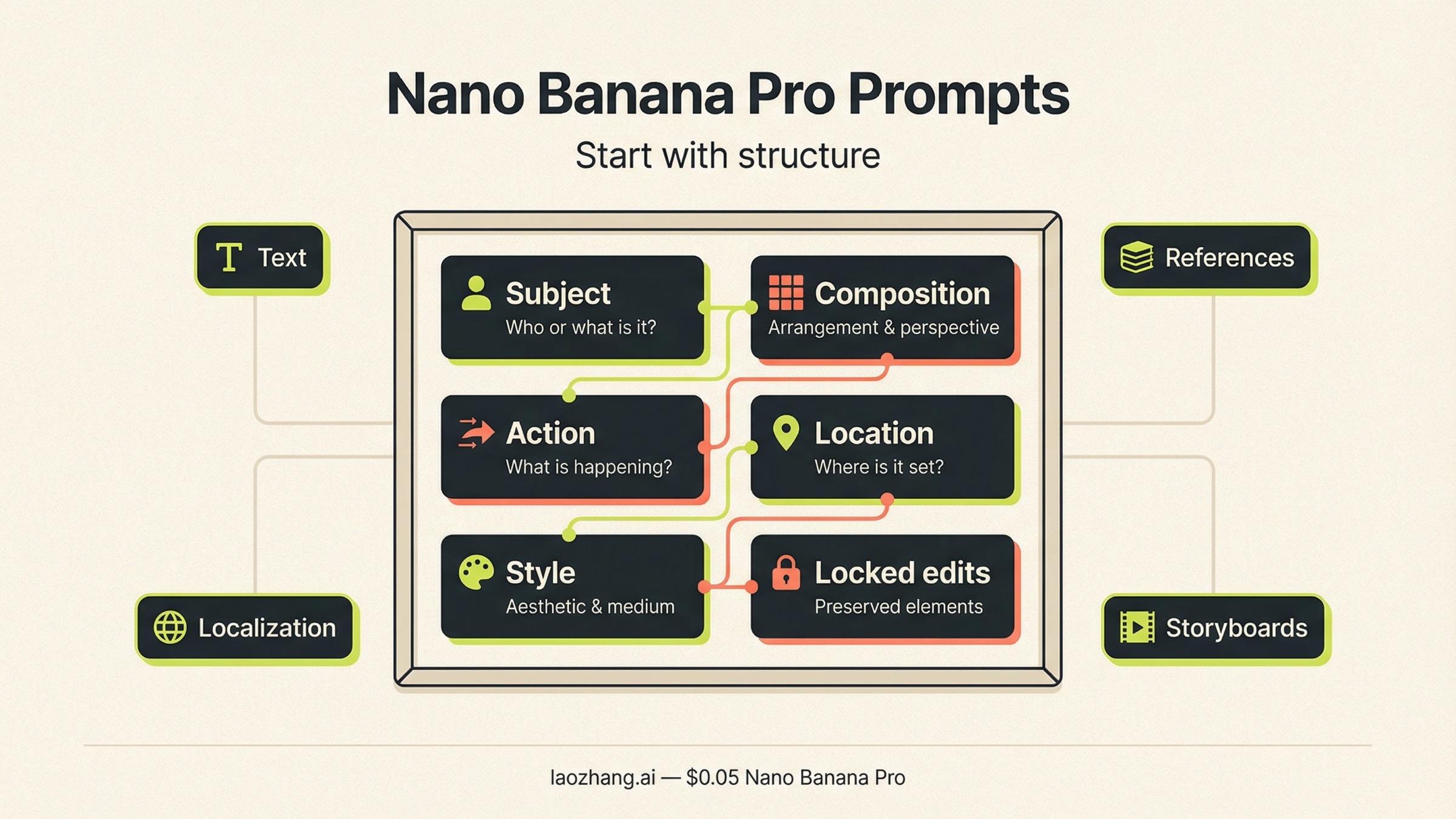
The best Nano Banana Pro prompts are not giant keyword piles. They are structured production briefs: subject, composition, action, location, style, and edit instructions, followed by only the extra controls your job actually needs. If you are using Nano Banana Pro for posters, infographics, reference-image edits, or storyboard work, that structure matters much more than collecting a hundred random gallery prompts.
That advice is not just a writing preference. Google's current Nano Banana Pro prompt tips and the official Gemini image-generation docs both push the model toward descriptive scene prompts rather than disconnected keyword lists. In Google's image-generation docs, last updated March 23, 2026, Nano Banana Pro, officially gemini-3-pro-image-preview, is still positioned as the Gemini image lane for professional asset production and more complex instructions.
One caveat should be visible early. Nano Banana Pro is not the right answer for every image job. In that same Google doc updated March 23, 2026, Gemini 3.1 Flash Image is the go-to default for most new image work, while Pro is the premium route when typography, composition control, reference handling, or premium output quality really matter. If you only need fast rough drafts, read Nano Banana 2 vs Nano Banana Pro next. If you need cleaner text, richer edits, or more controlled assets, this is the right prompt guide.
| If your job is this | Start with this prompt pattern | The part you cannot skip |
|---|---|---|
| Poster, ad, or social graphic | Exact-text prompt with layout and font instructions | Put every important word in quotes and say where it should sit |
| Infographic or labeled diagram | Factual-constraint prompt | Name the components and the visual hierarchy, then verify the output manually |
| Reference-image blend | Role-based multi-image prompt | Tell the model what each image is for: subject, style, product, or environment |
| Semantic edit of an existing image | Change-only edit prompt | Say what changes and what must remain exactly the same |
| Storyboard or comic sequence | Scene-plus-panel prompt | Describe the scene first, then ask for panel logic |
| Premium hero shot or brand visual | Descriptive scene paragraph | Use camera, lighting, and texture details instead of generic style tags |
The prompt formula Nano Banana Pro responds to best
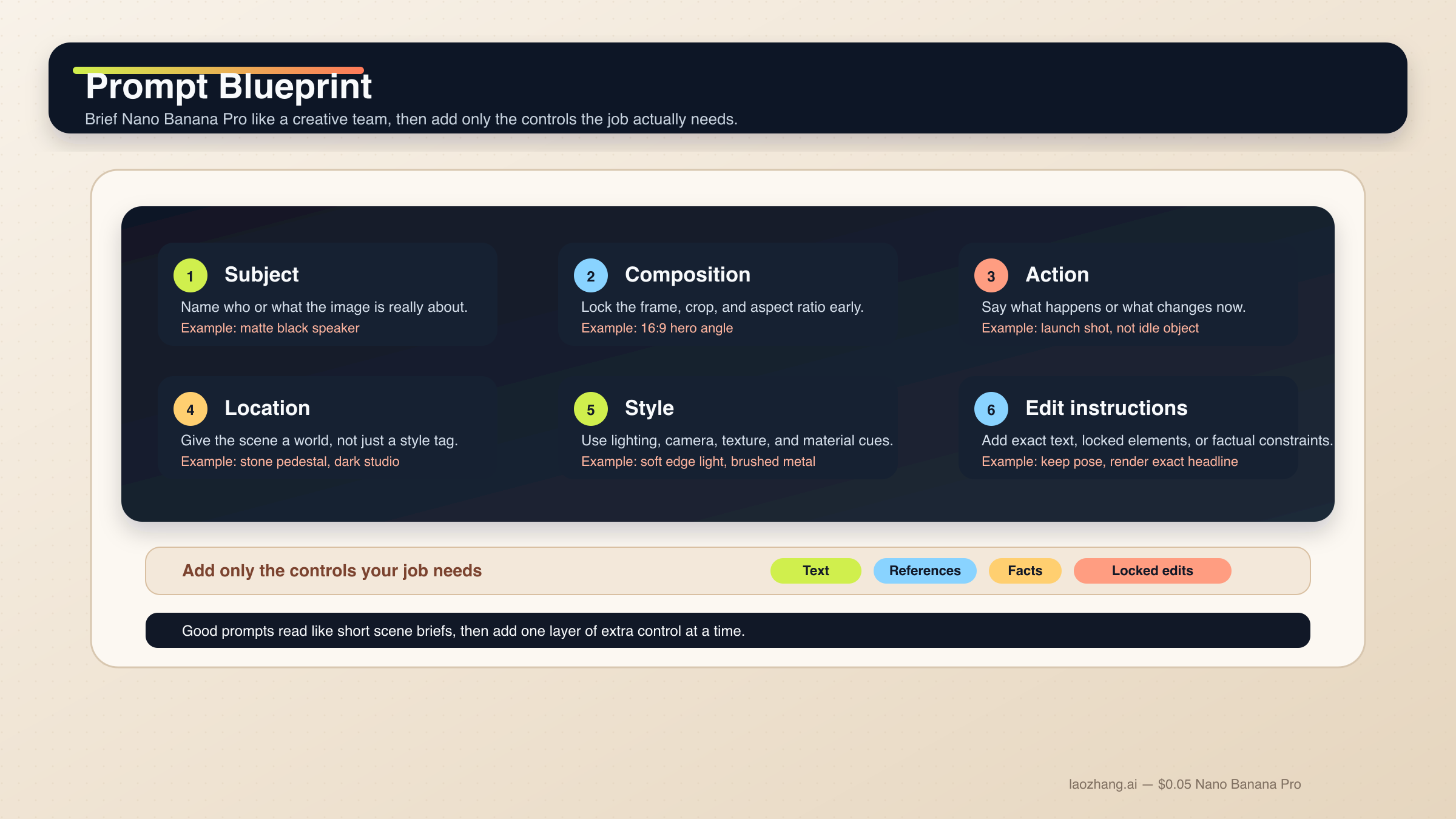
The simplest way to think about Nano Banana Pro is this: it behaves better when you brief it like a creative director, not when you dump a moodboard into the prompt box. Google’s own prompt guide breaks the prompt into six parts, and that model is still the cleanest starting point.
Subject: what or who is in the image.Composition: shot type, framing, aspect ratio, and where the subject sits.Action: what is happening or what should change.Location: the environment, era, or scene context.Style: realism level, design language, lighting, color grade, lens feel.Edit instructions: exact text, locked elements, or specific changes.
In practice, a good Nano Banana Pro prompt usually reads like a short paragraph, not a shopping list. The model's current image docs explicitly say descriptive scene prompts outperform disconnected keywords, and that matches what strong community users keep discovering in practice as well.
Use this base template when you do not know where to start:
[Subject]. Framed as [composition / aspect ratio]. The subject is [action or change].
Set in [location / context]. Visual style: [style, lighting, camera, materials].
If editing: change only [X]. Keep [Y and Z] exactly the same.
If text matters: render the exact text "[TEXT]" in [font / placement / hierarchy].
If accuracy matters: include [specific components / labels / facts] and keep the layout clear.
That last line is what separates Nano Banana Pro prompting from generic image prompting. You do not need to add every advanced instruction every time. You add the exact control that matches the job:
- use exact text for posters, menus, ads, and diagrams;
- use locked elements for edits and continuity;
- use factual constraints for infographics;
- use role-based references when multiple images are involved.
The most common prompt mistake is trying to solve generation, layout, localization, and semantic editing in one shot. Nano Banana Pro is strong at multi-turn work, but that is not the same thing as "do every creative decision in one prompt." If the image needs both a strong scene and exact text, get the composition first, then refine the text treatment. If the image needs localization, get the base infographic right first, then run the language update in the same chat. Splitting the work that way gives Pro less room to improvise in the wrong direction.
If you want a deeper capability overview before you start experimenting, Nano Banana Pro capabilities is the better background read. But for most people, it is faster to start with a working prompt shape and refine from there.
15 Nano Banana Pro prompt templates by job
The point of these templates is not to be copied forever without thinking. The point is to show the prompt pattern that fits the job. Replace the specifics, but keep the structure.
1. Poster with exact headline
Use this when the text itself is part of the visual, not an afterthought.
Create a 4:5 poster for an urban photography exhibition. A rainy evening street scene in Berlin with reflective pavement and soft neon highlights. Cinematic editorial style, realistic lighting, subtle film grain.
Render the exact headline "CITY AFTER RAIN" in bold white condensed sans-serif at the top.
Render the subhead "Berlin, June 2026" in smaller white text below it.
Keep the text clean, centered, and readable at thumbnail size.
2. Product launch banner
Use this when you need brand-style polish without turning the image into a cluttered ad.
Create a 16:9 product launch banner for a matte black wireless speaker on a stone pedestal. Three-quarter hero angle, soft edge lighting, premium studio shadows, dark charcoal background with subtle texture.
Render the exact text "SOUND WITHOUT DISTRACTION" in elegant uppercase sans-serif on the left side.
Keep the product realistic, the background minimal, and the text hierarchy clean.
3. Technical infographic
Use this when the model needs to explain something, not just decorate it.
Create a modern 16:9 infographic explaining a mirrorless camera sensor. Show these exact labeled layers from front to back: cover glass, microlens array, color filter array, photodiodes, wiring layer, sensor substrate.
Use a clean flat vector style, wide margins, black sans-serif labels, and thin leader lines.
Keep the layout educational, factual, and easy to scan.
4. Localize an existing graphic
Google's current docs explicitly show this same-chat pattern for translating an infographic image.
Update this infographic to be in Spanish. Do not change any other elements of the image.
Keep the same layout, color system, icon positions, and visual hierarchy.
5. Change only one element
This is the safest semantic edit pattern when you want the model to stop improvising.
Using the provided image, change only the man's tie to forest green.
Keep the same pose, facial expression, body position, background, lighting, and image crop exactly the same.
Do not alter any other clothing details.
6. Outfit swap while preserving identity
Use this when you want a stronger edit but still need continuity.
Using the provided portrait, replace the current outfit with a structured navy wool coat and charcoal scarf.
Keep the same face, hairstyle, skin tone, expression, pose, background perspective, and lighting.
Make the wardrobe change look natural and realistic.
7. Reference-image blend with clear roles
Do not upload three images and hope the model guesses what matters.
Use Image A for the subject's face and body proportions.
Use Image B for the illustration style and color treatment.
Use Image C for the forest environment and fog mood.
Create a 3:4 fantasy book-cover portrait of the subject walking through that forest at dawn.
Keep the face closest to Image A, the brushwork closest to Image B, and the atmosphere closest to Image C.
8. Product mockup from references
This is better than asking for a "realistic mockup" and praying.
Use Image A as the handbag reference and Image B as the lifestyle photography style.
Create a 4:5 fashion campaign image of a woman walking in Paris at golden hour, carrying the handbag from Image A.
Keep the bag design, materials, and silhouette faithful to the reference.
Use the editorial color treatment and soft lens bloom from Image B.
9. Character consistency scene
Use this when you want the same mascot or protagonist across multiple outputs.
Use the provided character image as the canonical reference.
Create a 16:9 scene of the same character standing in a bright startup office, holding a tablet and speaking to a small team.
Keep the same face, hair shape, costume colors, and body proportions.
Only change the pose, camera angle, and background.
10. Editorial portrait
This works better than stacking style adjectives with no camera direction.
A photorealistic waist-up portrait of a ceramic artist in a sunlit studio. 3:4 composition, subject slightly off-center, shallow depth of field.
Soft window light from camera-left, warm highlights on the hands, subtle dust in the air.
Captured with an 85mm portrait lens look, rich clay textures, calm editorial mood.
11. Premium product hero
Use Pro here when the image is the deliverable, not just a draft.
Create a 16:9 premium hero image of a stainless steel espresso machine on a polished stone counter.
Low-angle three-quarter composition, soft morning light from the right, visible steam, realistic reflections, fine brushed-metal texture.
Luxury commercial photography style, clean background, no extra props.
12. Storyboard
This is one of the clearest current Pro strengths on the official DeepMind page.
Create a 3-panel storyboard for this scene.
Panel 1: wide establishing shot of a young astronaut standing alone in a neon-lit city street.
Panel 2: medium shot as she looks up toward a glowing rooftop signal.
Panel 3: close-up of her hand activating a wrist device.
Keep the same character design and color palette across all panels.
13. Comic cover with stylized text
Use this when text and illustration both matter.
Create a vintage comic-book cover featuring the person in the reference image as a new superhero in a retro-futurist city.
Bold primary-color art style, dramatic action pose, halftone texture.
Render the exact title "THE LAST ORBIT" at the top in vintage comic lettering.
Add a generic issue badge in the corner with no real brand names.
14. Aspect-ratio adaptation
This is useful when you already have a strong image and need a platform resize without destroying the subject.
Change the aspect ratio of this image to 9:16 by reducing background and preserving the subject exactly.
Keep the character locked in the current position and maintain the original lighting, expression, and styling.
15. Repair an over-clean image
Nano Banana Pro often gets better when you tell it how to be less perfect.
Create a documentary-style street photo of a florist closing shop at dusk.
Natural handheld composition, slight motion in the hands, imperfect flower wrapping, soft reflections on the pavement, realistic clutter near the doorway.
Keep the lighting believable, the textures worn-in, and the mood intimate rather than polished.
The pattern behind all 15 is the same: the more your image depends on text, locked continuity, or high-stakes composition, the more you should tell Pro exactly what it is allowed to change and what it must preserve.
How to use reference images without drift
Reference images are where Nano Banana Pro can feel much better than generic image models, but they are also where bad prompts collapse fastest. Google's current docs support up to 14 reference images on Gemini 3 image models, and Google's prompt tips add the important caveat that the practical limit can vary by surface. That means you should treat "more references" as an option, not as a default.
In most real workflows, two or three references are easier to control than ten. Start with the smallest set that fully describes the job. One image for identity, one for style, and one for environment is usually more stable than a giant pile of "inspiration" images. Every extra reference adds ambiguity unless you explain exactly why it is there.
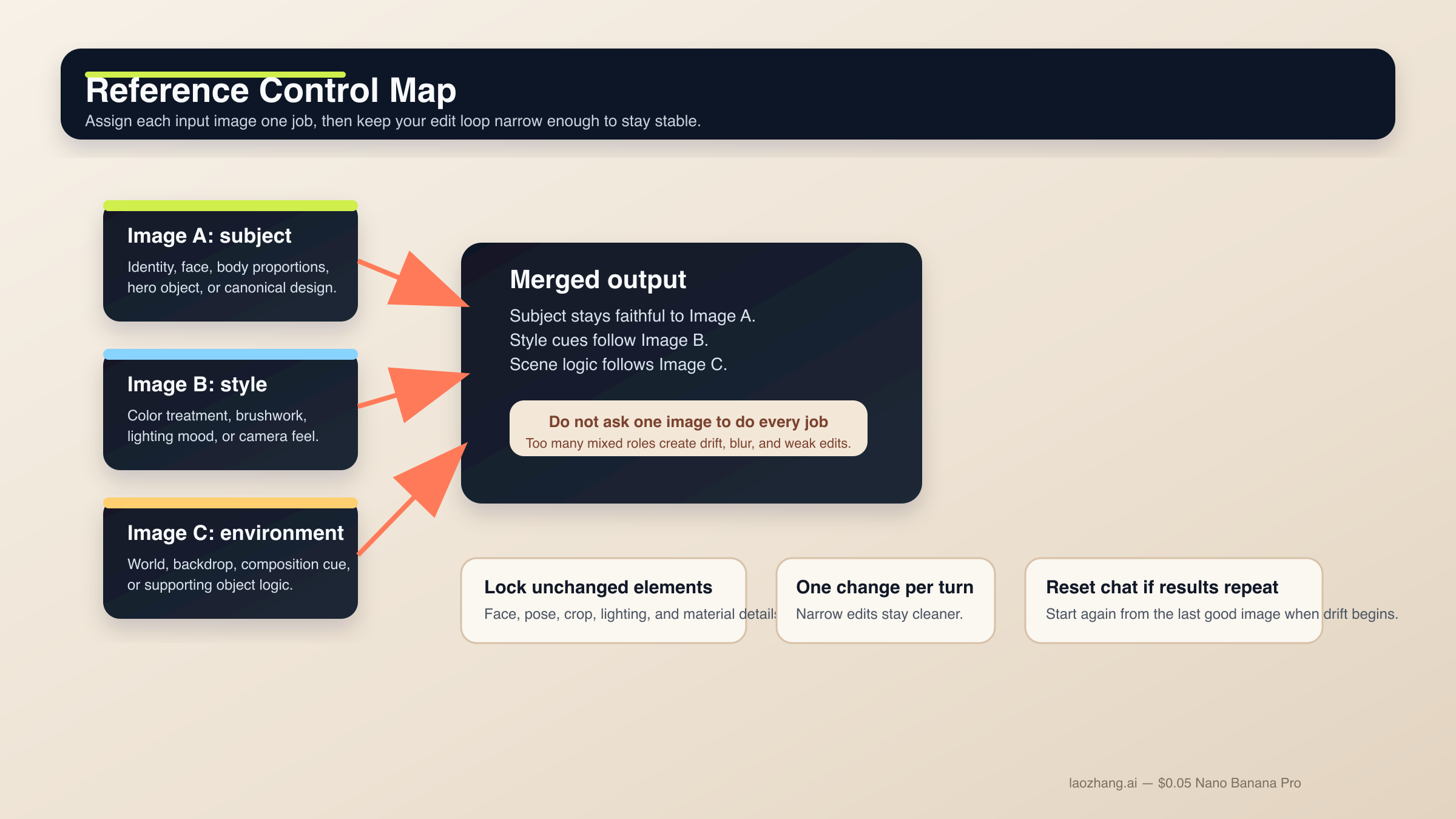
The best habit is to give every reference image one clear job:
Image A: subject identity;Image B: illustration or photography style;Image C: environment or composition cue;Image D: product or object fidelity.
If you do not assign those roles, the model has to guess, and guessing is where identity drift starts. The same rule applies to edits. If you want one part of the image changed, say what must remain untouched:
- keep face and expression the same;
- keep background perspective the same;
- keep outfit except for the jacket;
- keep object proportions and materials unchanged.
The second rule is to stop before the conversation goes stale. A useful community pattern in the r/GeminiAI thread about Nano Banana becoming "impossibly stubborn" is that long edit chains can get blurrier, start repeating the same image, or ignore requested changes. When that happens, do not keep hammering the same chat. Start a new conversation with the last good image and a cleaner, narrower instruction.
That single reset rule is more useful than most "advanced prompt hacks." Multi-turn prompting is still powerful, but only when each turn narrows the job instead of piling more variables onto an already unstable edit chain.
How to get text, diagrams, and localized graphics right
This is where Nano Banana Pro earns its reputation. Google's prompt tips and DeepMind model page both emphasize text-heavy and diagram-heavy work, but that does not mean the model can read your mind. You still need to prompt for text like a designer, not like a slogan generator.
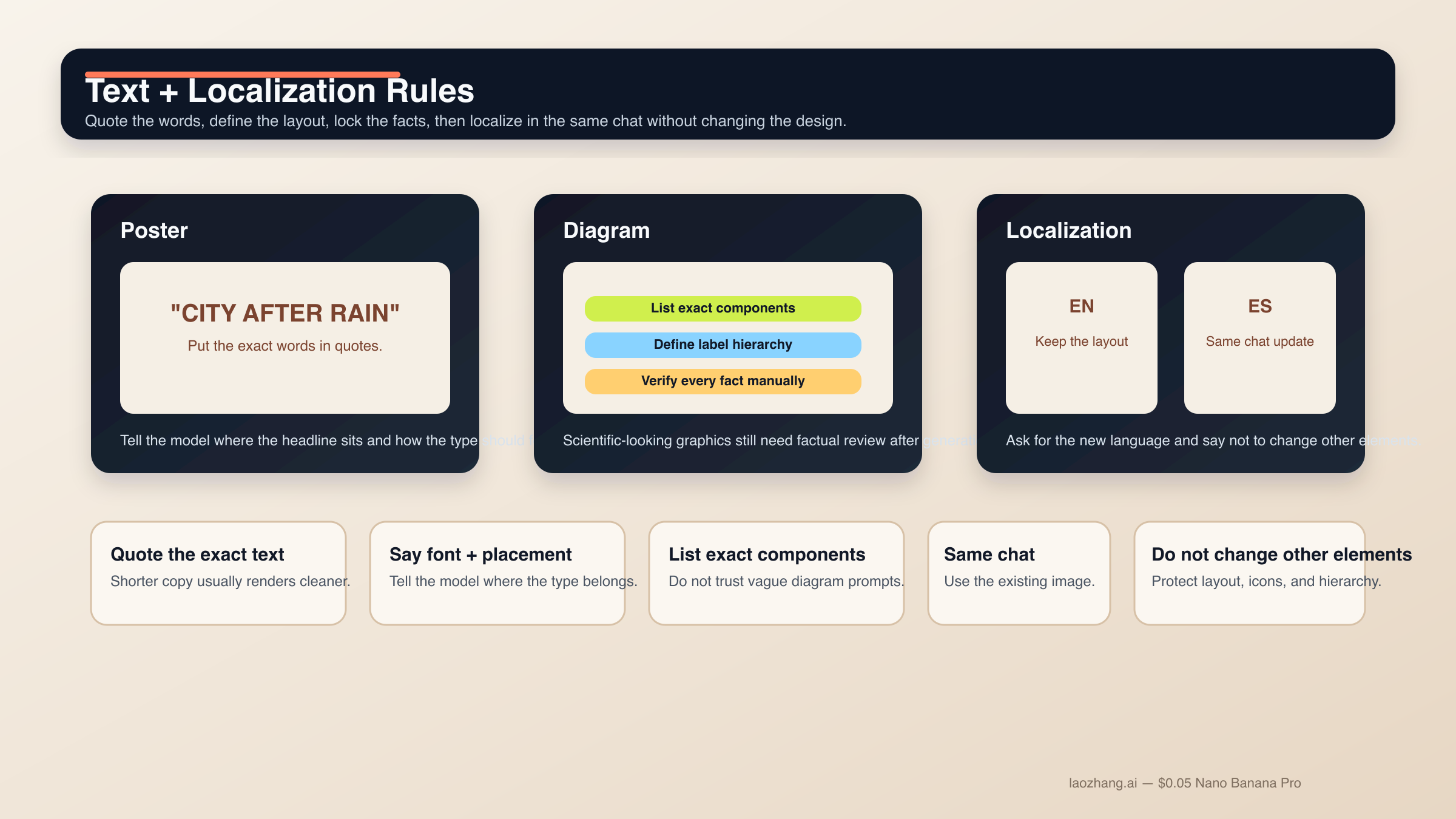
For text-heavy outputs:
- put the critical words in quotes;
- say where the text should appear;
- describe the font family, weight, or tone;
- keep the copy short enough to render cleanly.
If the image is a diagram or infographic, add a second layer of constraint:
- list the exact components that must appear;
- specify the layout style;
- define the label treatment;
- tell the model what kind of hierarchy matters most.
Google’s own current docs also show a clean localization workflow: keep the same chat, ask the model to update the image to another language, and explicitly say not to change the other elements. That is a much stronger pattern than regenerating the whole asset from scratch and hoping the translated version keeps the same structure.
Even so, do not hand off quality control to the model. On the DeepMind Nano Banana Pro page checked during this research pass on March 28, 2026, Google still warns about spelling, fine details, grammar, cultural nuance, factual accuracy, and complex blends. So the rule is simple: use Pro to draft the graphic faster, then manually verify every word and every fact before you ship it.
This is also where surface choice matters. In the Gemini app, you are working inside a conversational UI with product-level routing and quotas. In AI Studio or the API, you have more direct control over the model surface and the prompt loop. The prompt patterns in this guide work in both places, but reference-heavy and text-heavy jobs are usually easier to debug when you can work directly with the model and iterate more deliberately.
If your work depends on exact API surface behavior, the practical follow-up is Gemini image generation API base URL. If your work depends on higher resolution output, read Nano Banana Pro maximum resolution before you assume every surface behaves the same way.
When Nano Banana Pro is worth using instead of Nano Banana 2
The cleanest current rule is not "Pro is better, so use Pro for everything." Google no longer frames the lineup that way. In the official image-generation docs updated March 23, 2026, Gemini 3.1 Flash Image is the go-to model for most new image work, while Nano Banana Pro is the professional lane for more demanding assets.
Use Nano Banana Pro when:
- the image needs readable text inside the frame;
- you are building an infographic, diagram, or slide-style graphic;
- you need more controlled reference-image behavior;
- the edit quality matters more than raw speed;
- the output itself is a premium deliverable, not just an idea draft.
Use Nano Banana 2 when:
- you are doing fast ideation;
- you need cheaper everyday mockups;
- you are testing lots of rough directions quickly;
- text fidelity and polished layout are not the core job.
That route rule keeps this page honest. It also makes the prompt advice stronger, because good prompts are not just about wording. They are also about using the right model for the job you actually have.
Why outputs still fail and how to repair them
Even good Nano Banana Pro prompts still fail for predictable reasons. Usually the fix is not "try harder." It is narrowing the instruction, separating the jobs, or resetting the conversation before the model drifts.
| Symptom | Likely cause | Prompt fix |
|---|---|---|
| The text is misspelled or ugly | Too much copy, vague type instructions, or tiny layout space | Shorten the text, put it in quotes, define font style and placement, and verify manually |
| The model ignores one of your references | You uploaded multiple images but did not assign roles | Name each reference image's job and state which one controls subject, style, product, or environment |
| A simple edit keeps changing the whole image | You described the change but not the locked elements | Add change only X and explicitly list what must stay the same |
| Follow-up edits get blurrier or repeat the same result | The conversation has entered an edit loop | Start a new chat with the best current image and a narrower instruction |
| The image feels sterile or uncanny | The prompt only lists style words and no lived-in context | Add action, physical texture, imperfections, and environmental cues |
| The infographic looks convincing but wrong | The model inferred facts you did not lock down | Provide exact labels and components, then manually review every factual detail |
The last point matters most. Nano Banana Pro is strong enough to make a bad infographic look believable. That is exactly why your prompt needs factual constraints, and exactly why your workflow still needs human review.
If you remember one rule from this guide, make it this one: prompt Nano Banana Pro like a production brief, then edit it like a collaborative draft. That is the shortest path to better text, better edits, and better reference-image control without turning your workflow into trial-and-error chaos.


