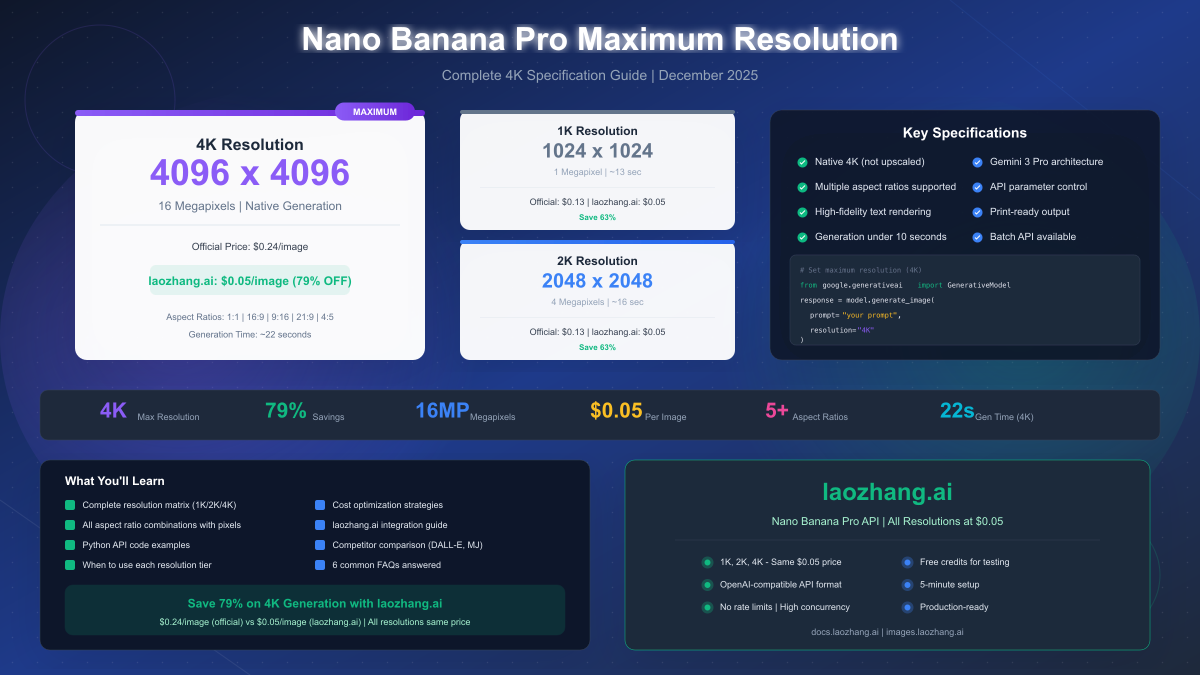
Nano Banana Pro supports a maximum resolution of 4K (4096×4096 pixels, 16 megapixels) for native AI image generation—the highest among current AI image generators. The model, officially known as Gemini 3 Pro Image Preview (gemini-3-pro-image-preview), offers three resolution tiers: 1K (1024×1024), 2K (2048×2048), and 4K, with flexible aspect ratios including 1:1, 16:9, 9:16, 21:9, and 4:5. Official Google pricing is $0.134 for 1K/2K and $0.24 for 4K images, but third-party providers like laozhang.ai offer all resolutions at a flat $0.05/image—delivering 79% savings on 4K generation.
Understanding Nano Banana Pro Maximum Resolution
Nano Banana Pro achieves what no other mainstream AI image generator currently offers: true native 4K image generation without upscaling. Released by Google in December 2024, this model generates images at 4096×4096 pixels natively, meaning every pixel originates from the AI model rather than algorithmic interpolation. This distinction matters significantly for professional applications where image quality cannot be compromised.
The technical specifications break down as follows:
| Resolution Tier | Pixel Dimensions | Total Megapixels | Image Tokens | Generation Time |
|---|---|---|---|---|
| 1K Standard | 1024 × 1024 | 1.05 MP | ~1,120 | ~13 seconds |
| 2K Enhanced | 2048 × 2048 | 4.19 MP | ~1,120 | ~16 seconds |
| 4K Maximum | 4096 × 4096 | 16.78 MP | ~2,000 | ~22 seconds |
The 4K tier represents a 16x increase in pixel count compared to 1K output, enabling print-quality images at 300 DPI for sizes up to 13.7 × 13.7 inches. For digital applications, 4K resolution supports 4K displays at native resolution—critical for hero images, product photography, and premium marketing assets.
Understanding the model's internal architecture clarifies why resolution matters. Nano Banana Pro generates images through a diffusion-based process that creates detail at the specified resolution from the start. Unlike upscaling approaches that generate smaller images then interpolate additional pixels, native 4K generation produces genuinely high-resolution detail in textures, edges, and fine elements like text characters or fabric weave patterns.
The free tier through Google's Gemini app limits output to 1K resolution (1 megapixel maximum), with watermarks applied via SynthID technology. Accessing 2K and 4K capabilities requires API access through Google AI Studio, Vertex AI, or third-party providers. This tier structure reflects Google's positioning of higher resolutions as premium features for production use cases.
Google's official documentation confirms these specifications, noting that the model supports "high-quality image outputs up to 4K resolution with native generation capabilities." The company emphasizes this as a key differentiator from competing models that achieve similar pixel counts only through post-processing upscaling techniques.
Complete Resolution Matrix: All Tiers and Aspect Ratios
Selecting the right resolution involves considering both pixel dimensions and aspect ratio requirements. Nano Banana Pro supports five primary aspect ratios, each available at all three resolution tiers. The following comprehensive matrix shows exact pixel dimensions for every combination—a reference missing from most official documentation.
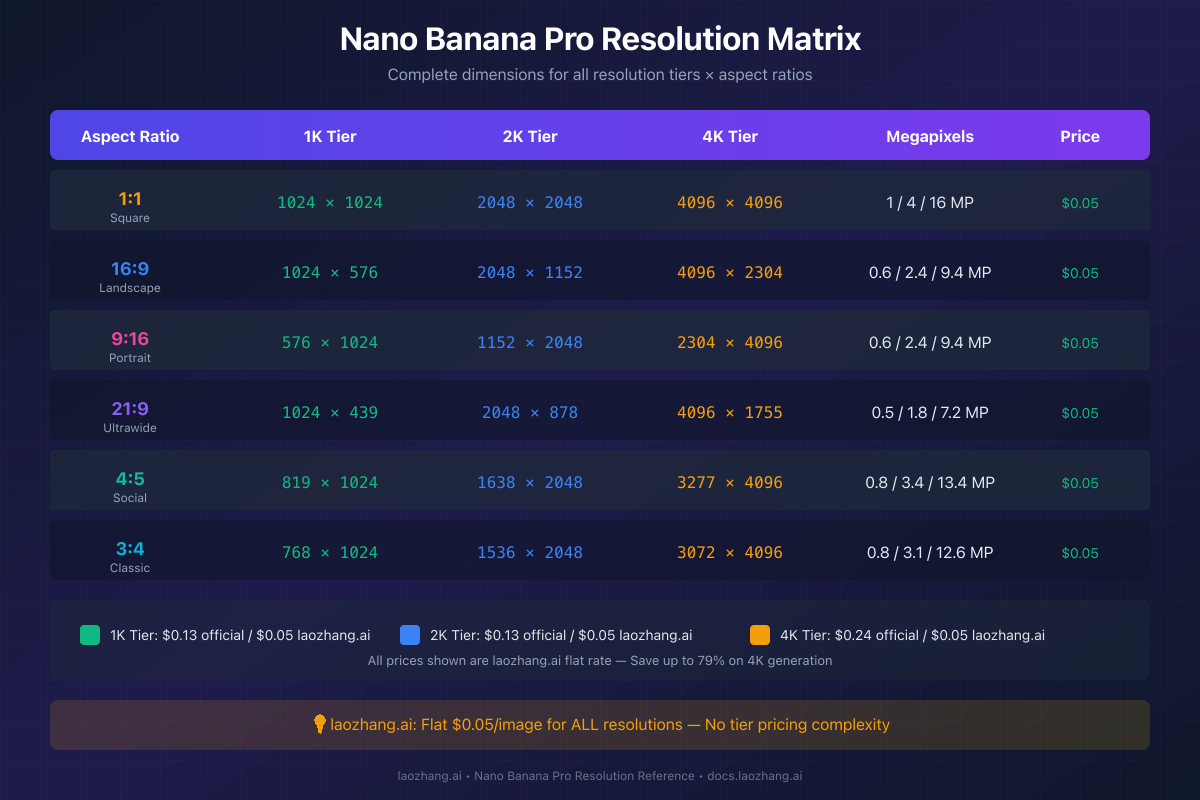
Square Format (1:1) - Maximum Pixels Per Tier:
The 1:1 aspect ratio maximizes total pixel count at each tier, making it ideal when resolution takes priority over composition constraints. At 4K, square format delivers the full 16.78 megapixels—optimal for profile images, product shots centered on a single subject, or artwork intended for square display contexts.
| Tier | Dimensions | Megapixels | Ideal Use Cases |
|---|---|---|---|
| 1K | 1024 × 1024 | 1.05 MP | Thumbnails, avatars, quick prototypes |
| 2K | 2048 × 2048 | 4.19 MP | Social media, web graphics |
| 4K | 4096 × 4096 | 16.78 MP | Print, high-DPI displays, archival |
Landscape Format (16:9) - Widescreen Standard:
The 16:9 aspect ratio matches standard widescreen displays, making it natural for YouTube thumbnails, presentation slides, desktop wallpapers, and hero banners. At 4K tier, 16:9 generates images at 4096×2304 pixels—exceeding standard 4K video resolution (3840×2160) for cropping flexibility.
| Tier | Dimensions | Megapixels | Ideal Use Cases |
|---|---|---|---|
| 1K | 1024 × 576 | 0.59 MP | Video thumbnails, preview images |
| 2K | 2048 × 1152 | 2.36 MP | Blog headers, presentation backgrounds |
| 4K | 4096 × 2304 | 9.44 MP | YouTube 4K thumbnails, widescreen prints |
Portrait Format (9:16) - Vertical Content:
Vertical 9:16 format aligns with mobile-first content demands—Instagram Stories, TikTok backgrounds, Pinterest pins, and smartphone wallpapers. The 4K tier at 2304×4096 pixels provides exceptional vertical detail for scroll-stopping social content.
| Tier | Dimensions | Megapixels | Ideal Use Cases |
|---|---|---|---|
| 1K | 576 × 1024 | 0.59 MP | Story templates, mobile mockups |
| 2K | 1152 × 2048 | 2.36 MP | Instagram posts, mobile backgrounds |
| 4K | 2304 × 4096 | 9.44 MP | High-quality vertical prints, premium social |
Ultrawide Format (21:9) - Cinematic Ratio:
The 21:9 ultrawide ratio serves cinematic and banner applications—website hero sections, monitor wallpapers for ultrawide displays, and panoramic compositions. While pixel height is reduced, the format excels for establishing shots and horizontal compositions.
| Tier | Dimensions | Megapixels | Ideal Use Cases |
|---|---|---|---|
| 1K | 1024 × 439 | 0.45 MP | Banner previews, email headers |
| 2K | 2048 × 878 | 1.80 MP | Website heroes, monitor wallpapers |
| 4K | 4096 × 1755 | 7.19 MP | Ultrawide display backgrounds, panoramas |
Social Format (4:5) - Instagram Feed Optimized:
The 4:5 format maximizes vertical real estate in Instagram feed posts while maintaining wide platform compatibility. This ratio often outperforms 1:1 for engagement as it occupies more screen space during scrolling.
| Tier | Dimensions | Megapixels | Ideal Use Cases |
|---|---|---|---|
| 1K | 819 × 1024 | 0.84 MP | Instagram feed drafts |
| 2K | 1638 × 2048 | 3.35 MP | Production Instagram posts |
| 4K | 3277 × 4096 | 13.42 MP | High-quality social content, print crossover |
Classic Format (3:4) - Print Standard:
The 3:4 ratio aligns with traditional print photography dimensions (6×8, 9×12), making it suitable for framed prints and photo books. This format works well for portrait photography and product shots intended for physical output.
| Tier | Dimensions | Megapixels | Ideal Use Cases |
|---|---|---|---|
| 1K | 768 × 1024 | 0.79 MP | Draft layouts, sizing tests |
| 2K | 1536 × 2048 | 3.15 MP | Web galleries, digital frames |
| 4K | 3072 × 4096 | 12.58 MP | Professional prints, photo products |
When to Use Each Resolution: Selection Guide
Choosing the optimal resolution tier involves balancing output quality against cost and generation time. Each tier serves distinct use cases where its specifications align with requirements—overspending on resolution wastes budget, while underspecifying risks quality issues.
1K Resolution: Prototyping and Thumbnails
The 1K tier at 1024px maximum dimension serves rapid iteration and low-resolution applications. At $0.134 per image (or $0.05 via laozhang.ai), 1K enables cost-effective prompt engineering—generating dozens of variations to refine composition and style before committing to higher-resolution final outputs.
Appropriate 1K use cases include: prompt testing and refinement, thumbnail generation for video platforms, small website elements like icons or button graphics, social media preview images, and any application where the image displays at 500px or smaller. The 13-second average generation time supports rapid creative workflows.
A critical consideration: 1K output upscaled to larger dimensions reveals artifacts and softness. If your workflow might require larger versions later, generating at 2K from the start often proves more efficient than regenerating prompts at higher resolution.
2K Resolution: Production Standard
The 2K tier at 2048px provides the practical balance for most production applications. Image dimensions support full-width website display, social media posting at native quality, and digital signage up to moderate viewing distances. At identical pricing to 1K ($0.134 official, $0.05 via laozhang.ai), 2K represents the default choice for final assets.
Appropriate 2K use cases include: blog post images and article headers, social media content across all major platforms, email marketing visuals, digital advertising at standard sizes, PowerPoint and presentation graphics, and web applications requiring sharp display on high-DPI screens.
The 16-second average generation time adds only 3 seconds versus 1K while quadrupling pixel count—making 2K the obvious choice when 1K might suffice but 4K isn't required. Most professional content creators default to 2K for this reason.
4K Resolution: Premium and Print Applications
The 4K tier unlocks professional print capabilities and premium digital applications where maximum quality justifies the 80% price premium ($0.24 official, still just $0.05 via laozhang.ai). At 4096px, images support large-format printing, zoom-in functionality on e-commerce platforms, and archival storage at maximum fidelity.
Appropriate 4K use cases include: print products (posters, canvas prints, photo books), e-commerce product photography requiring zoom detail, marketing hero images for major campaigns, stock photography contributions, digital art for sale or exhibition, and any application where the image might be cropped significantly while retaining quality.
Print Size Capabilities by Resolution:
| Resolution | 300 DPI (Photo Quality) | 150 DPI (View Distance) | 72 DPI (Screen Only) |
|---|---|---|---|
| 1K (1024px) | 3.4 × 3.4 inches | 6.8 × 6.8 inches | 14.2 × 14.2 inches |
| 2K (2048px) | 6.8 × 6.8 inches | 13.7 × 13.7 inches | 28.4 × 28.4 inches |
| 4K (4096px) | 13.7 × 13.7 inches | 27.3 × 27.3 inches | 56.9 × 56.9 inches |
The 22-second generation time for 4K remains practical for batch workflows. However, iterative prompt refinement at 4K wastes both time and money—establish your prompt at 1K or 2K before generating final 4K outputs.
Decision Framework:
- Will the image ever print larger than 5×7 inches? → Use 4K
- Will users zoom or crop the image significantly? → Use 4K
- Is this for web/social display at standard sizes? → Use 2K
- Is this for prompt testing or tiny thumbnails? → Use 1K
- Uncertain about final usage? → Default to 2K
API Implementation: Setting Resolution in Code
Controlling Nano Banana Pro's resolution output requires specifying parameters correctly in your API requests. The following code examples demonstrate resolution settings across all three tiers, using both Google's official API and the cheapest Gemini 3 Pro Image API alternative endpoint.
1K Resolution Generation (Python):
import google.generativeai as genai
from PIL import Image
import io
import base64

# Configure API (official Google endpoint)
genai.configure(api_key="YOUR_GOOGLE_API_KEY")

# 1K Resolution: 1024×1024 default, fastest generation
model = genai.GenerativeModel("gemini-3-pro-image-preview")

response = model.generate_content(
    "A photorealistic golden retriever puppy playing in autumn leaves, "
    "warm afternoon sunlight, shallow depth of field",
    generation_config={
        "response_modalities": ["image", "text"],
        "resolution": "1024x1024"  # 1K tier
    }
)

# Extract and save image
for part in response.candidates[0].content.parts:
    if hasattr(part, 'inline_data'):
        image_data = base64.b64decode(part.inline_data.data)
        image = Image.open(io.BytesIO(image_data))
        image.save("output_1k.png")
        print(f"Generated: {image.size[0]}×{image.size[1]} pixels")
2K Resolution Generation (Python):
import google.generativeai as genai
from PIL import Image
import io
import base64

genai.configure(api_key="YOUR_GOOGLE_API_KEY")
model = genai.GenerativeModel("gemini-3-pro-image-preview")

# 2K Resolution: 2048×2048, production standard
response = model.generate_content(
    "Professional product photography of a luxury watch on marble surface, "
    "studio lighting, reflections, 8K commercial quality",
    generation_config={
        "response_modalities": ["image", "text"],
        "resolution": "2048x2048"  # 2K tier - same price as 1K
    }
)

for part in response.candidates[0].content.parts:
    if hasattr(part, 'inline_data'):
        image_data = base64.b64decode(part.inline_data.data)
        image = Image.open(io.BytesIO(image_data))
        image.save("output_2k.png")
        print(f"Generated: {image.size[0]}×{image.size[1]} pixels")
4K Resolution Generation (Python):
import google.generativeai as genai
from PIL import Image
import io
import base64

genai.configure(api_key="YOUR_GOOGLE_API_KEY")
model = genai.GenerativeModel("gemini-3-pro-image-preview")

# 4K Resolution: 4096×4096, maximum quality
response = model.generate_content(
    "Ultra-detailed fantasy castle on a cliff overlooking the ocean, "
    "dramatic sunset, volumetric clouds, architectural details visible",
    generation_config={
        "response_modalities": ["image", "text"],
        "resolution": "4096x4096"  # 4K tier - premium pricing
    }
)

for part in response.candidates[0].content.parts:
    if hasattr(part, 'inline_data'):
        image_data = base64.b64decode(part.inline_data.data)
        image = Image.open(io.BytesIO(image_data))
        image.save("output_4k.png")
        print(f"Generated: {image.size[0]}×{image.size[1]} pixels")
        # Output: Generated: 4096×4096 pixels
Alternative Aspect Ratios:
For non-square outputs, specify the aspect ratio parameter. The API automatically calculates appropriate pixel dimensions based on your resolution tier:
# 16:9 at 4K tier (4096×2304)
generation_config={
    "response_modalities": ["image", "text"],
    "resolution": "4096x4096",
    "aspect_ratio": "16:9"
}

# 9:16 at 2K tier (1152×2048)
generation_config={
    "response_modalities": ["image", "text"],
    "resolution": "2048x2048",
    "aspect_ratio": "9:16"
}
laozhang.ai Endpoint (79% Savings on 4K):
Using the laozhang.ai alternative endpoint maintains identical functionality while reducing costs dramatically. The flat $0.05 per image applies to all resolution tiers—meaning 4K costs 79% less than Google's official $0.24 rate:
import openai
from PIL import Image
import io
import base64

# Configure laozhang.ai endpoint
client = openai.OpenAI(
    api_key="YOUR_LAOZHANG_API_KEY",
    base_url="https://api.laozhang.ai/v1"
)

# Generate 4K image at $0.05 instead of $0.24
response = client.chat.completions.create(
    model="gemini-3-pro-image-preview",
    messages=[{
        "role": "user",
        "content": "A photorealistic image of a cozy cabin in snowy mountains, "
                   "warm light from windows, northern lights in sky, 4K ultra detailed"
    }],
    extra_body={
        "resolution": "4096x4096",
        "response_modalities": ["image", "text"]
    }
)

# Process response (same format as official API)
print(f"Cost: $0.05 (vs $0.24 official = 79% savings)")
Cost Optimization: Save 79% on 4K Generation
Understanding the full cost landscape for Nano Banana Pro resolution tiers reveals significant optimization opportunities. The gap between official Google pricing and third-party alternatives represents one of the largest arbitrage opportunities in the AI image generation market.
Official Google API Pricing (December 2025):
| Resolution Tier | Standard API | Batch API (50% off) | Free Tier |
|---|---|---|---|
| 1K (1024×1024) | $0.134/image | $0.067/image | 3/day (watermarked) |
| 2K (2048×2048) | $0.134/image | $0.067/image | Not available |
| 4K (4096×4096) | $0.240/image | $0.120/image | Not available |
The batch API offers 50% savings but requires accepting asynchronous delivery (up to 24 hours). For real-time applications, the standard API prices apply. Notably, 1K and 2K share identical pricing, making 2K the rational default choice when real-time generation is needed.
Third-Party Alternative: laozhang.ai Flat Rate:
| Resolution Tier | laozhang.ai Price | Savings vs Official | Savings vs Batch |
|---|---|---|---|
| 1K (1024×1024) | $0.05/image | 63% savings | 25% savings |
| 2K (2048×2048) | $0.05/image | 63% savings | 25% savings |
| 4K (4096×4096) | $0.05/image | 79% savings | 58% savings |
The flat-rate structure at laozhang.ai eliminates tier-based pricing complexity. Whether generating 1K thumbnails or 4K print-quality images, each generation costs exactly $0.05. This pricing model particularly benefits workflows requiring maximum resolution, where the 79% savings on 4K accumulates rapidly.
For a deeper analysis of pricing options, see our Nano Banana Pro pricing guide which covers additional providers and volume discount structures.
Monthly Cost Comparison (1,000 images/month):
| Scenario | Google Standard | Google Batch | laozhang.ai | Annual Savings |
|---|---|---|---|---|
| All 1K images | $134 | $67 | $50 | $1,008 |
| All 2K images | $134 | $67 | $50 | $1,008 |
| All 4K images | $240 | $120 | $50 | $2,280 |
| Mixed (50% 2K, 50% 4K) | $187 | $93.50 | $50 | $1,644 |
For production workflows emphasizing 4K output, the annual savings approach $2,300 versus official pricing—often exceeding the total cost of using laozhang.ai for the same volume. This cost differential enables more generous image budgets, faster iteration, and higher-resolution output throughout the creative process.
Getting Started with laozhang.ai:
- Register at docs.laozhang.ai for API access
- Receive initial credits for testing (no credit card required)
- Use the same Gemini 3 Pro Image model (
gemini-3-pro-image-preview) - Generate at any resolution tier for $0.05 flat rate
For comprehensive cost reduction strategies across your AI image workflow, see our cost optimization strategies guide covering batch processing, caching, and resolution selection algorithms.
Resolution Comparison: Nano Banana Pro vs Competitors
Evaluating Nano Banana Pro's resolution capabilities against competing AI image generators clarifies its market position. As of December 2025, no other major model matches its native 4K generation capability—competitors either cap at lower resolutions or achieve 4K through post-generation upscaling.
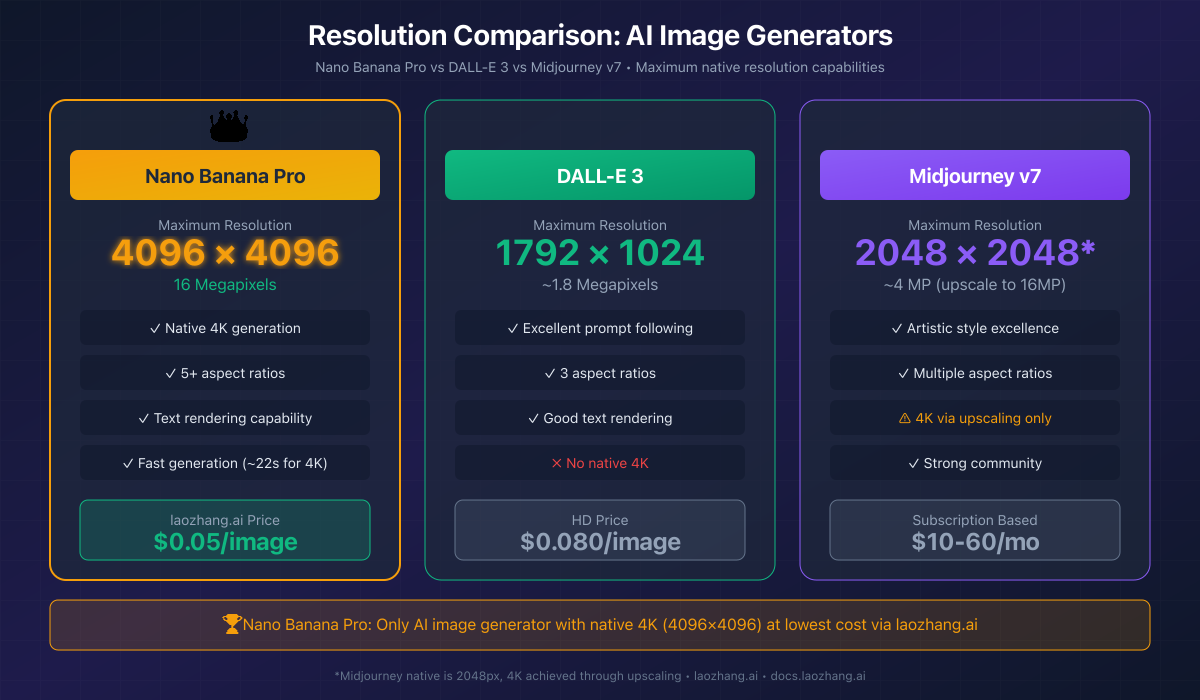
Nano Banana Pro vs DALL-E 3:
OpenAI's DALL-E 3 generates images at a maximum native resolution of 1792×1024 pixels (approximately 1.8 megapixels). While DALL-E 3 excels at prompt interpretation and has recently added 4K output options, the higher resolutions use upscaling rather than native generation.
| Feature | Nano Banana Pro | DALL-E 3 |
|---|---|---|
| Maximum Native | 4096×4096 (16MP) | 1792×1024 (1.8MP) |
| Native 4K | Yes | No (upscaled) |
| Aspect Ratios | 5+ supported | 3 supported |
| Text Rendering | Industry-leading | Good |
| Per-Image Cost (HD) | $0.134-0.24 official | $0.080 |
| laozhang.ai Rate | $0.05 | N/A |
For applications requiring genuine 4K detail—print production, e-commerce product zoom, or archival quality—Nano Banana Pro provides capabilities DALL-E 3 cannot match natively. For detailed comparison, see our in-depth analysis.
Nano Banana Pro vs Midjourney v7:
Midjourney generates images at a native maximum of approximately 2048×2048 pixels, with 4K achieved through its built-in upscaling feature. While Midjourney's artistic style capabilities remain exceptional, the resolution comparison favors Nano Banana Pro for technical applications.
| Feature | Nano Banana Pro | Midjourney v7 |
|---|---|---|
| Native Generation | 4096×4096 | ~2048×2048 |
| 4K Method | Native | Upscaling |
| API Access | Yes | Limited |
| Subscription Model | Pay-per-image | $10-60/month |
| Text Rendering | Excellent | Improving |
| Photorealism | Excellent | Excellent |
Midjourney's subscription model suits users generating large volumes at predictable monthly costs, while Nano Banana Pro's per-image pricing (especially via laozhang.ai at $0.05) benefits variable or lower-volume workflows where 4K quality matters.
Nano Banana Pro vs Stable Diffusion XL:
Stable Diffusion XL generates at 1024×1024 native resolution, with community upscalers extending output to higher resolutions. The open-source model offers free local generation but requires significant GPU hardware and technical expertise.
| Feature | Nano Banana Pro | SDXL |
|---|---|---|
| Native Resolution | 4096×4096 | 1024×1024 |
| Deployment | Cloud API | Local/Cloud |
| Cost | $0.05-0.24/image | Hardware + Electric |
| Setup Complexity | Minutes | Hours-Days |
| Text Rendering | Excellent | Variable |
For teams without GPU infrastructure or ML expertise, Nano Banana Pro provides superior resolution with zero setup overhead. SDXL remains compelling for high-volume users willing to invest in local infrastructure.
Resolution Leadership Summary:
Nano Banana Pro currently leads the market in native resolution capability. While competitors continue development—DALL-E 4 and Midjourney v8 may close the gap—as of December 2025, no other mainstream model generates true 4K images natively. Combined with accessible API pricing and the laozhang.ai cost optimization path, this resolution advantage addresses professional use cases other models cannot serve at equivalent quality.
FAQ: Common Resolution Questions
What is the maximum resolution Nano Banana Pro can generate?
Nano Banana Pro generates images at a maximum native resolution of 4096×4096 pixels (approximately 16.78 megapixels) in square 1:1 aspect ratio. This is the highest native resolution available from any major AI image generator as of December 2025. At other aspect ratios, the longest edge reaches 4096 pixels while maintaining the specified proportions—for example, 16:9 format at 4K tier produces 4096×2304 pixels.
Is Nano Banana Pro's 4K resolution native or upscaled?
Native. Unlike some competitors that achieve 4K through post-generation upscaling algorithms, Nano Banana Pro generates all 16+ million pixels directly through its diffusion model. This produces genuinely higher detail in textures, edges, and fine elements rather than interpolated approximations. The difference becomes apparent when zooming or printing—native 4K maintains sharp details that upscaled images blur or artifact.
Why is 4K more expensive than lower resolutions?
4K generation consumes approximately 2,000 image tokens internally versus about 1,120 tokens for 1K/2K resolution. This ~80% increase in token consumption translates to the price differential ($0.24 vs $0.134 through official Google API). Third-party providers like laozhang.ai absorb this differential, offering flat $0.05 pricing across all resolution tiers—making 4K accessible at 79% savings versus official rates.
Can I get 4K resolution in the free tier?
No. Google's free tier through the Gemini app limits output to approximately 1K resolution (1 megapixel maximum) with SynthID watermarks. Accessing 2K and 4K resolution requires paid API access through Google AI Studio, Vertex AI, or third-party providers. However, the $300 in Google Cloud credits available to new accounts enables approximately 1,250 free 4K generations for evaluation purposes.
How long does 4K generation take?
Average generation time for 4K images is approximately 22 seconds, compared to 13 seconds for 1K and 16 seconds for 2K. The additional time reflects the increased computational work generating 16 million pixels versus 1-4 million. For batch workflows, this time overhead accumulates—generating 100 4K images requires approximately 37 minutes versus 22 minutes for 1K.
What aspect ratios are available at 4K resolution?
All supported aspect ratios are available at all resolution tiers: 1:1 (square), 16:9 (widescreen), 9:16 (portrait), 21:9 (ultrawide), 4:5 (social), and 3:4 (classic print). The API calculates appropriate pixel dimensions automatically—4K at 16:9 produces 4096×2304 pixels, while 4K at 9:16 produces 2304×4096 pixels. Specify both resolution tier and aspect ratio in your API request for precise control.
How can I get 4K images at the lowest cost?
The most cost-effective path to 4K Nano Banana Pro images is through laozhang.ai, which offers flat $0.05/image pricing regardless of resolution tier. This represents 79% savings versus Google's official $0.24 4K rate and 58% savings versus Google's Batch API discount rate of $0.12. Register at docs.laozhang.ai for API access with no minimum commitment.
Last updated: December 2025. Pricing and specifications verified against official Google documentation and third-party provider rate cards.