GPT Image 2 API access is not decided by one tier label. As of May 16, 2026, the Free API tier should not be treated as a supported gpt-image-2 route, while paid tiers still need dashboard limits, model access, and organization verification checked before production.
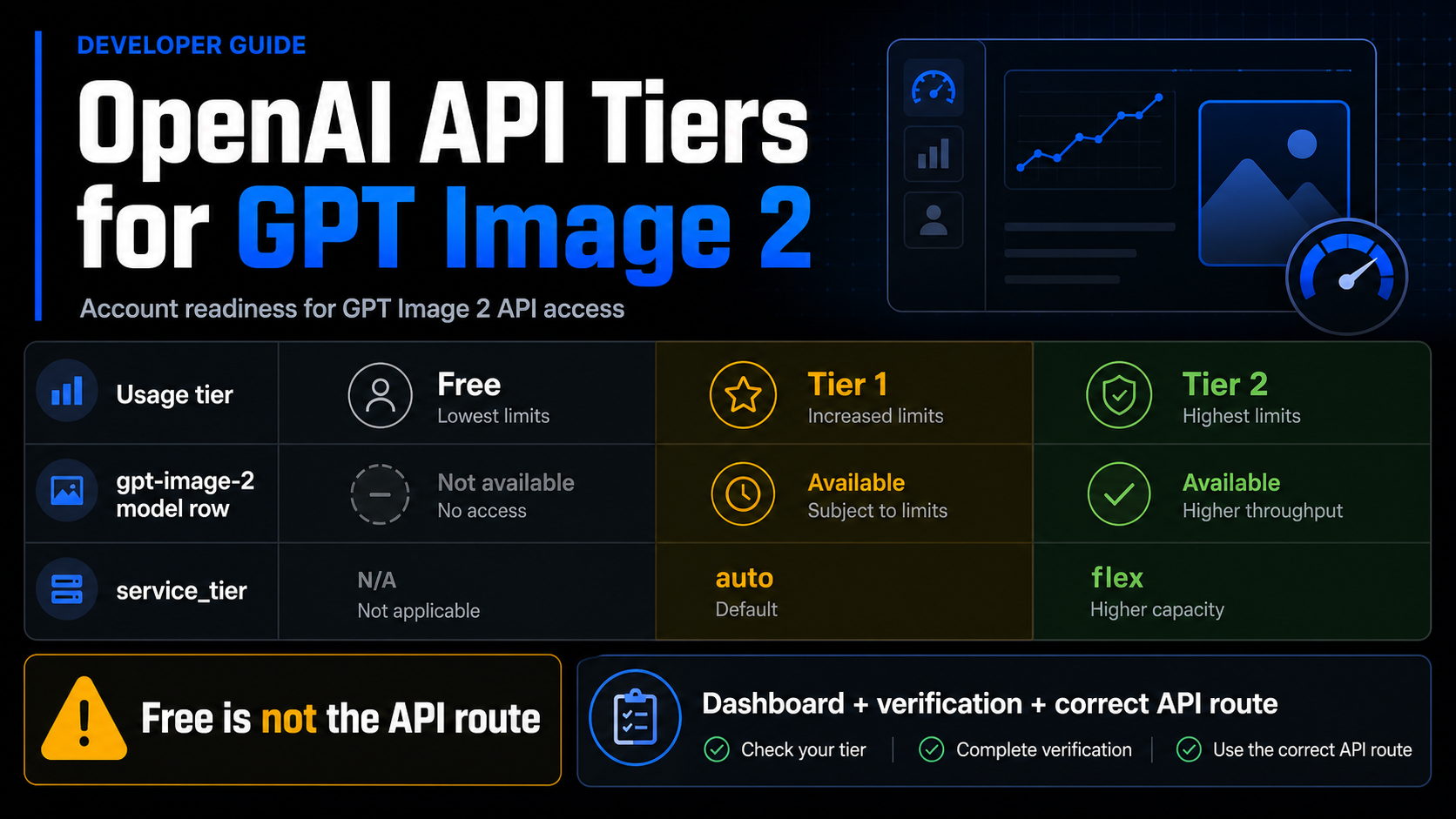
Use three separate surfaces before you upgrade or rewrite a request. Your OpenAI usage tier tells you the organization's account bucket. The gpt-image-2 model row and your dashboard show model-specific capacity. The service_tier request option controls processing mode where supported; it is not the same thing as Tier 1, Tier 2, or Tier 5.
| Surface | What it answers | What it does not prove |
|---|---|---|
| OpenAI usage tier | Account qualification and spend-limit bucket | Exact gpt-image-2 capacity for your org |
| Model row or dashboard | Model support and rate-limit capacity | ChatGPT product access or provider billing terms |
service_tier | Request processing mode | Account tier, model entitlement, or verification status |
The first stop rule is simple: check your OpenAI dashboard and organization verification before assuming a key can call GPT Image 2. If the official route is blocked, a cloud or provider route may still be useful, but it changes who owns billing, limits, support, and failure handling.
Which tier answer should you trust first?
Start with the official model and account surfaces, then narrow the answer to your own organization. The GPT Image 2 model page identifies the API model ID as gpt-image-2 and lists the current snapshot as gpt-image-2-2026-04-21. The same public model surface marks Free as not supported for this model and shows paid tiers with model-specific capacity values.
That does not mean a public table can tell you your exact quota. The OpenAI rate limits guide says organization limits live in the account settings limits page, and that model pages provide a high-level summary. Treat the public model row as a support and scale signal. Treat your dashboard as the operational truth for the organization that will send requests.
For planning, the tier answer should be read in this order:
| Question | Best surface | Practical answer |
|---|---|---|
| Is GPT Image 2 an official API model? | GPT Image 2 model page | Yes, use model ID gpt-image-2 for direct Images API work. |
| Does Free API tier prove access? | GPT Image 2 model row | No. Free was not a supported gpt-image-2 API route as of May 16, 2026. |
| What does Tier 1 or Tier 2 mean? | Usage-tier guide plus model row | Account tier and model capacity are related but not identical. |
| What can my org actually do? | OpenAI dashboard limits | Check the org/project limits before production. |
Can service_tier unlock the model? | API request reference | No. It selects processing mode where supported. |
This order matters because it prevents the common wrong upgrade path. A developer may see that Tier 1 exists and assume the only blocker is payment. Payment can be necessary, but GPT Image 2 access can still be constrained by model-specific availability, dashboard limits, project configuration, organization verification, route shape, and rate-limit behavior.
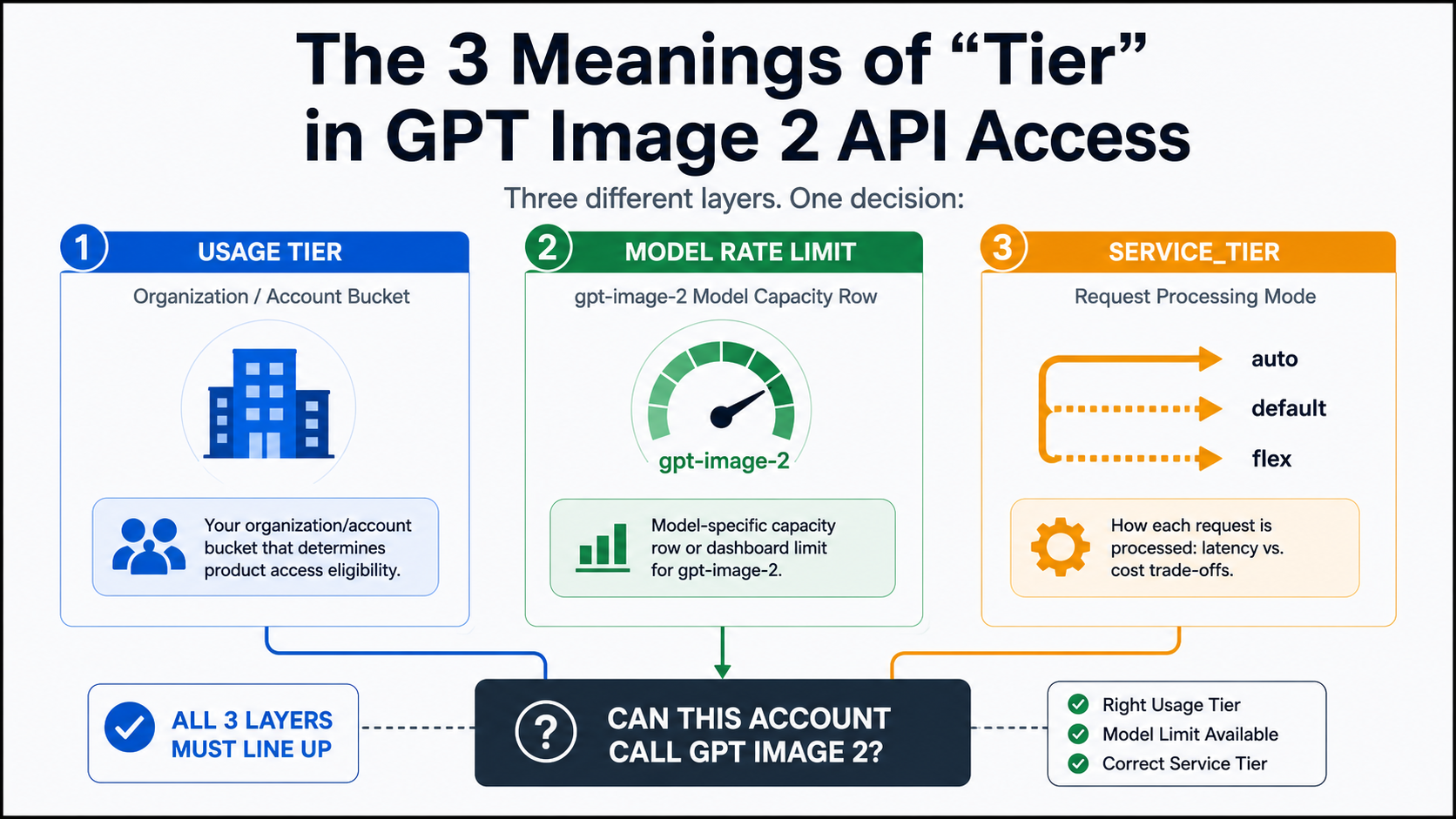
Usage tier is an account bucket, not a model entitlement by itself
An OpenAI usage tier is an organization-level account bucket. The current usage-tier table says Free depends on allowed geography, Tier 1 starts after $5 paid, Tier 2 after $50 paid, Tier 3 after $100 paid, Tier 4 after $250 paid, and Tier 5 after $1,000 paid. Those qualification thresholds come with monthly usage-limit buckets, but they do not replace model-specific checks.
The reason is simple: usage tiers graduate most rate limits as API spend rises, while a model page or account dashboard answers a narrower question about a model. A Tier 2 organization can still need to check whether gpt-image-2 appears in its limits page, whether the project is eligible, and whether the request route is valid.
Do not copy a model-page number into an SLO or billing spreadsheet without reading the live labels and your dashboard. Public rate-limit rows are useful for planning the order of magnitude. Production capacity should be built from account settings, response headers, and actual request behavior. The rate-limit guide also notes that headers such as request and token limits can appear in HTTP responses, which is the right place to confirm what a running integration is experiencing.
That distinction is especially important for image models because cost and capacity are not the same thing. A request can be affordable but rate-limited. A tier can permit spend but still require verification. A provider can offer a hosted route but bill and limit it under its own contract.
The model row tells you GPT Image 2 capacity, but the dashboard decides your org
The gpt-image-2 model row is the right public place to confirm model support and a high-level paid-tier scale signal. At the May 16 check, Free was listed as not supported for GPT Image 2, while Tier 1 through Tier 5 had paid-tier entries with increasing capacity. That is the correct public answer to the Free-tier part of the question.
The dashboard still matters because the public model row is not personalized. Your account may have project-specific settings, organization verification requirements, different model access timing, or temporary operational limits. If the dashboard does not show the model or the limits you expect, do not assume a code change will fix it.
Use this practical checklist before building around the model:
- Confirm the organization is on a paid tier that can use GPT Image 2.
- Open the limits page for the specific organization and project that owns the key.
- Confirm whether GPT Image model access requires organization verification.
- Test the simplest Images API request before adding references, streaming, or edits.
- Record response IDs and rate-limit headers when debugging blocked or throttled requests.
- Recheck the model page and pricing calculator before quoting limits or costs to users.
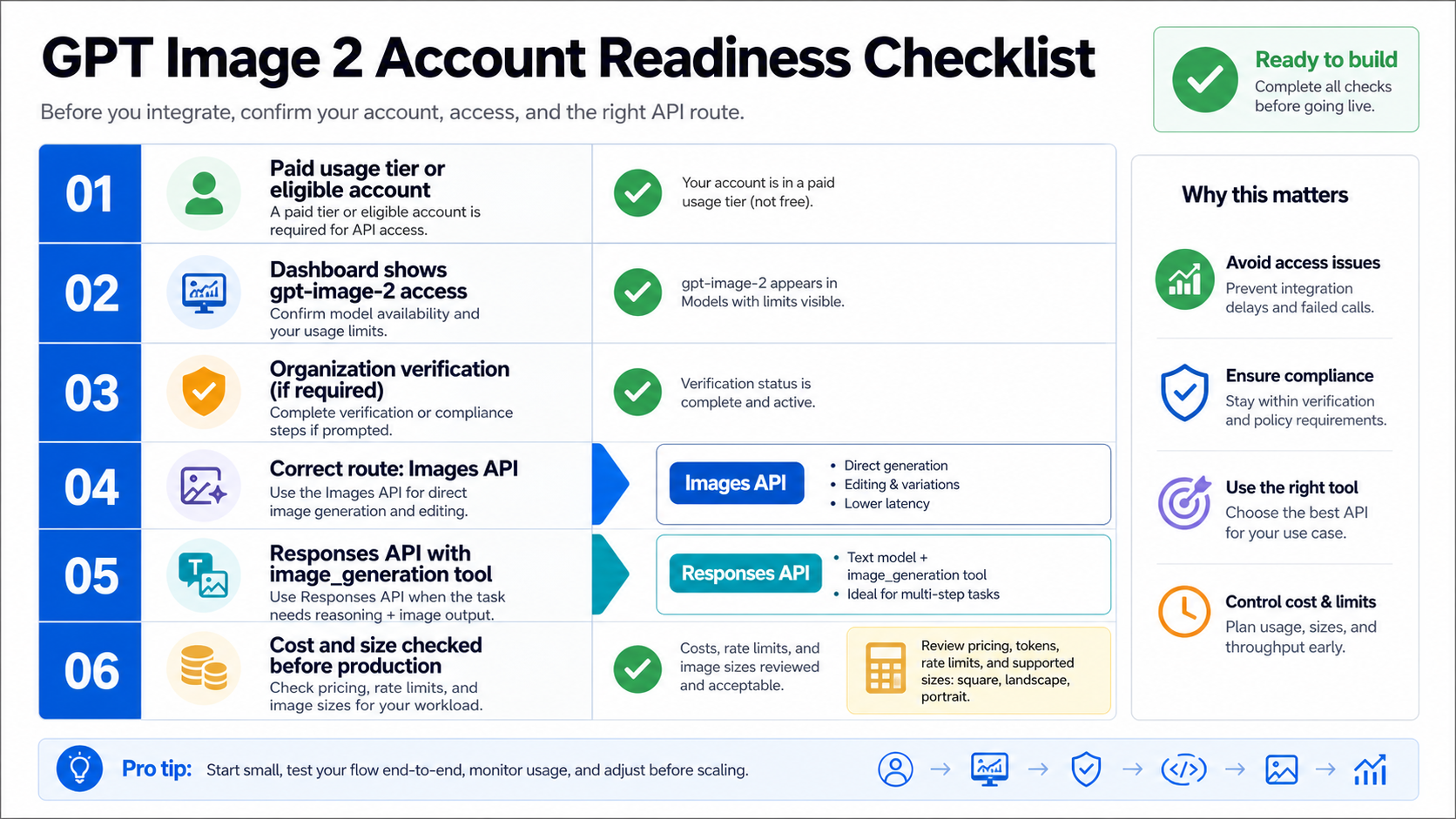
If that checklist feels longer than a normal model lookup, that is because image generation touches more surfaces than text-only completions. You are not only asking whether the model exists. You are asking whether your organization, project, route, request fields, moderation posture, output size, and cost assumptions are all ready for the same workflow.
service_tier is processing mode, not Tier 1 or Tier 2
The service_tier parameter is a separate API request control. In the Responses reference, service_tier selects how the request is processed, such as auto, default, flex, or priority where supported. It does not pay your bill, graduate the organization, verify the account, or make an unsupported model available.
That makes service_tier a frequent naming trap. A developer may read "tier" in a request body and connect it to Tier 1 or Tier 2 account status. Those are different layers. Account usage tier is about organization qualification and limits. Model-specific capacity is about whether gpt-image-2 is available and how much traffic the account can send. service_tier is about the processing lane used for a request that is otherwise valid.
Use service_tier only after the basic access path is already true. If the model is unsupported, if organization verification is incomplete, or if the request is using the wrong endpoint, changing service_tier is the wrong fix. It can change serving behavior for eligible requests; it cannot turn a missing entitlement into an entitlement.
Put gpt-image-2 in the right API route
For direct image generation or editing, use the Images API with model: "gpt-image-2". The image generation guide shows direct image generation with gpt-image-2 through image endpoints, and it also separates the Responses image-generation tool from the direct Images API route.
import OpenAI from "openai";

const client = new OpenAI({ apiKey: process.env.OPENAI_API_KEY });

const result = await client.images.generate({
  model: "gpt-image-2",
  prompt: "A clean product diagram explaining API account tiers",
  size: "1024x1024",
  quality: "medium"
});
Use that route when the product requirement is direct: one prompt should generate an image, or a controlled set of image inputs should be edited into a new output. It keeps the model placement obvious, which makes the first access test easier to debug.
Responses is different. In Responses, the top-level model should be a text-capable model that can use the hosted image_generation tool. The guide's examples use a text model such as gpt-5.5 at the top level, with tools: [{ type: "image_generation" }]. The image work happens through the tool; the top-level Responses model is not gpt-image-2.
import OpenAI from "openai";

const client = new OpenAI({ apiKey: process.env.OPENAI_API_KEY });

const response = await client.responses.create({
  model: "gpt-5.5",
  input: "Plan a simple visual and generate it as an image.",
  tools: [{ type: "image_generation" }]
});
The route choice should follow the product job. Choose Images API when the application only needs direct image output. Choose Responses when image generation belongs inside a conversation, assistant flow, or multi-step tool sequence. If a direct Images API request fails, do not move to Responses until you know whether the failure is account tier, model support, verification, or request shape.
Diagnose blocked GPT Image 2 requests by owner
A blocked GPT Image 2 request is not one problem. It can belong to the account, model, route, request body, rate limit, verification state, or provider layer. Classifying the owner first is faster than changing several variables at once.
| Symptom | Likely owner | First check | Stop rule |
|---|---|---|---|
Free tier account cannot call gpt-image-2 | Model support and account tier | Model page plus dashboard limits | Do not plan production on Free API access. |
| Paid account still blocked | Organization verification or project access | Developer console and limits page | Finish verification or open support evidence before rewriting code. |
| 429 or throttling | Rate limits | Response headers and dashboard limits | Reduce concurrency or request tier increase only after confirming headers. |
| Endpoint accepts request shape poorly | Wrong route | Images API versus Responses docs | Put direct model calls in Images API. |
Responses request uses gpt-image-2 as top-level model | Model placement | Responses image-generation tool docs | Use a text-capable model plus image_generation. |
| Provider route works while OpenAI route fails | Different contract | Provider model mapping, billing, and limits | Treat provider success as provider access, not OpenAI API entitlement. |
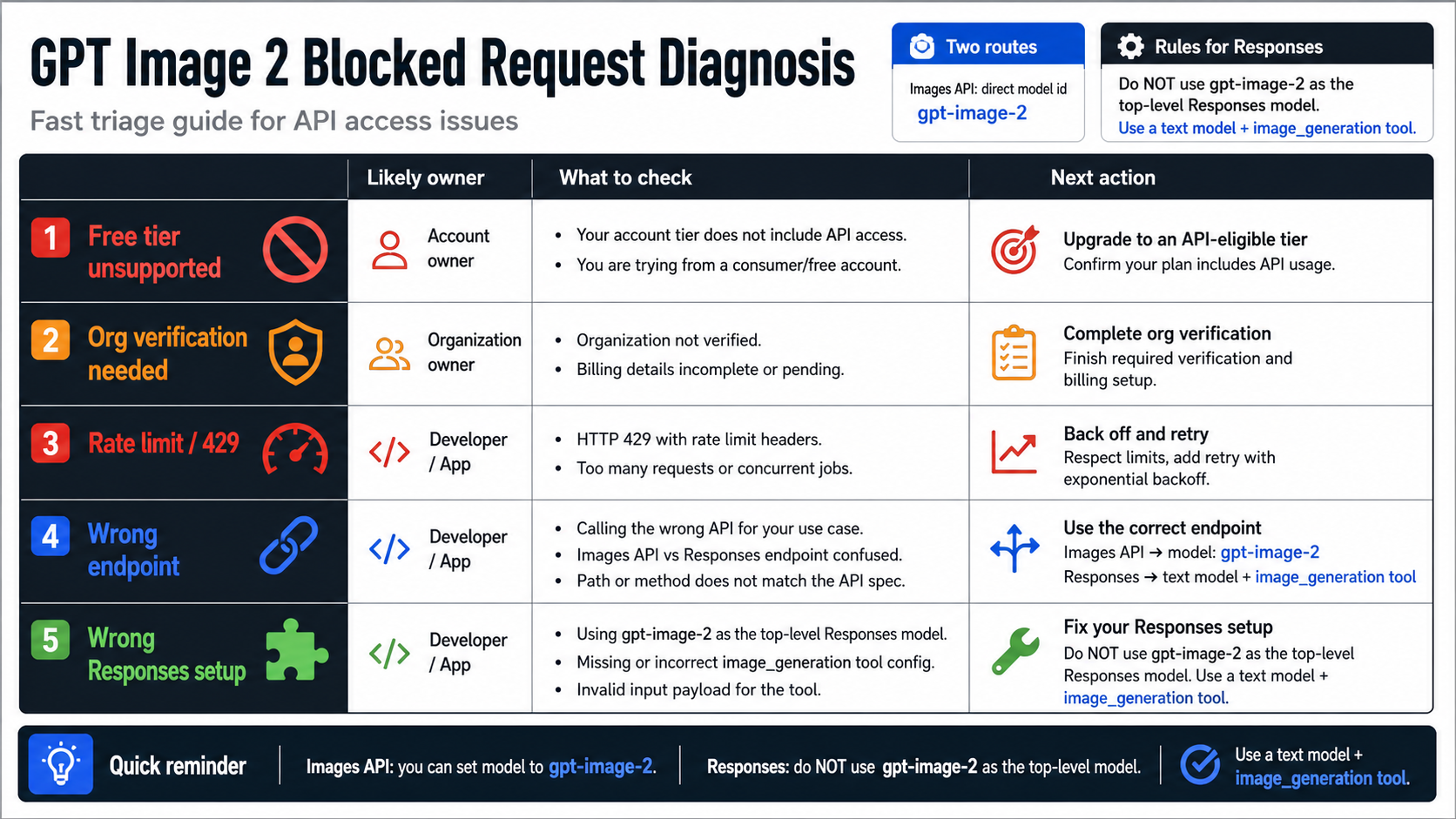
The most useful debugging artifact is a small evidence bundle: organization ID, project, model ID, endpoint, request ID, response status, rate-limit headers, and whether organization verification is complete. That bundle helps you distinguish a capacity problem from a route problem. It also prevents a provider success from hiding a direct OpenAI account issue.
Cost, size, and verification still matter after tier access
Tier access is not the end of production planning. GPT Image 2 cost depends on input text tokens, input image tokens for edits or reference-image workflows, and image output tokens. The image generation guide points readers to the calculator because size and quality can change cost materially. Use that calculator before quoting a price to customers or setting a per-user quota.
Size is also a contract. GPT Image 2 supports flexible sizes, including common landscape, portrait, square, and larger formats, but requests still need to satisfy documented constraints. The guide also says gpt-image-2 does not currently support transparent backgrounds. If a workflow needs transparency, plan a separate design step rather than assuming a request option will unlock it.
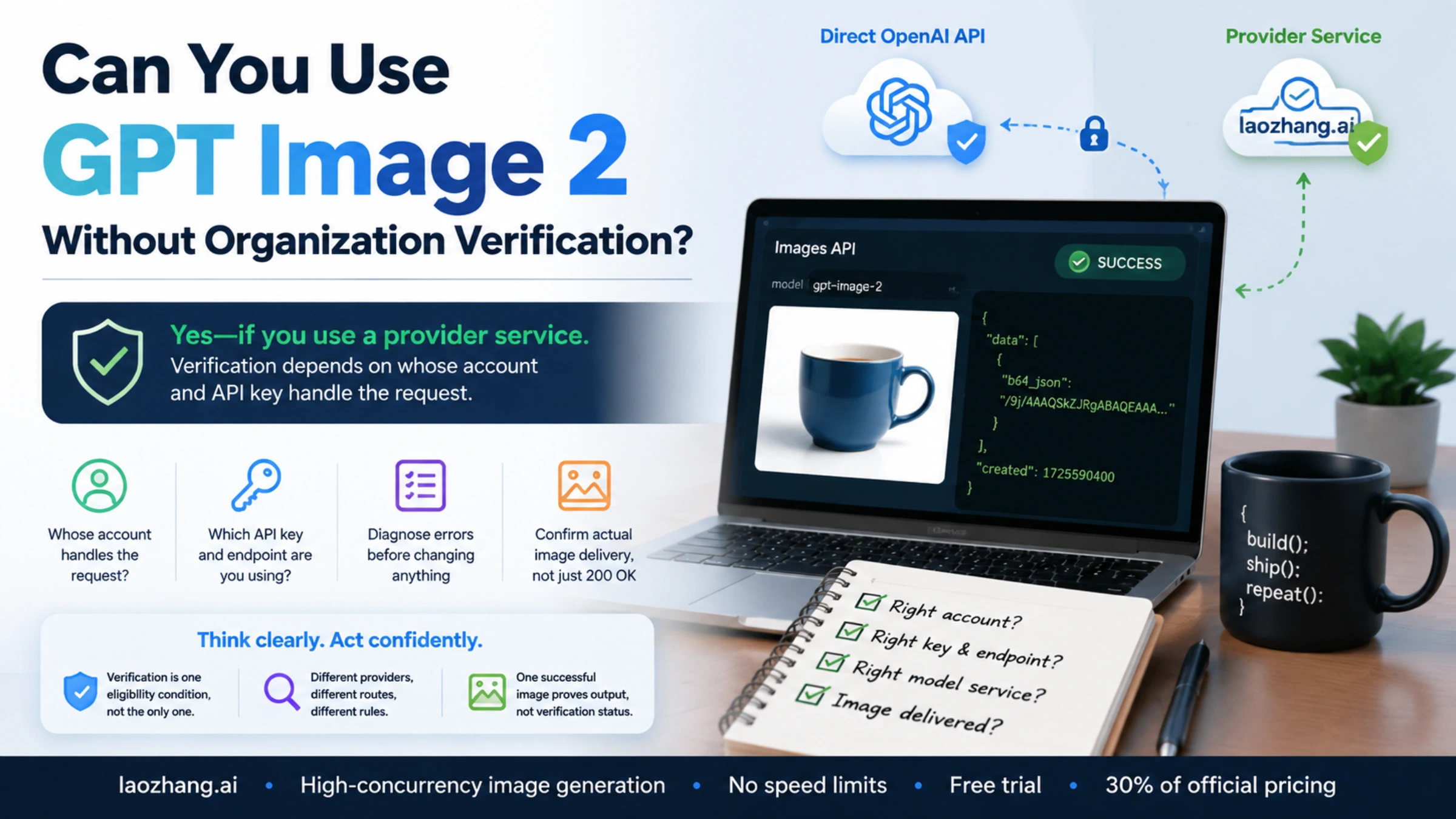
Verification is the third post-tier check. The image generation guide says GPT Image models, including gpt-image-2, may require API Organization Verification before use. That wording matters: a paid tier and a valid API key are not a universal guarantee that the image model is ready in every organization. A production rollout should include a simple verification-status check before user-facing launch.
Provider routes are useful only as separate contracts
Cloud platforms and provider gateways can be useful when direct OpenAI account readiness is not the fastest path. They can also be useful when a team wants routing, billing aggregation, local payment, or operational controls outside the official dashboard. But the contract changes the moment you leave the direct OpenAI API route.
Ask four questions before treating a provider route as production-ready:
- Does the provider name
gpt-image-2clearly, and can you verify the model mapping? - Who owns billing, refunds, rate limits, retries, and support?
- What happens to uploaded reference images and generated files?
- Can you reproduce the same request shape, output size, and failure behavior you need in production?
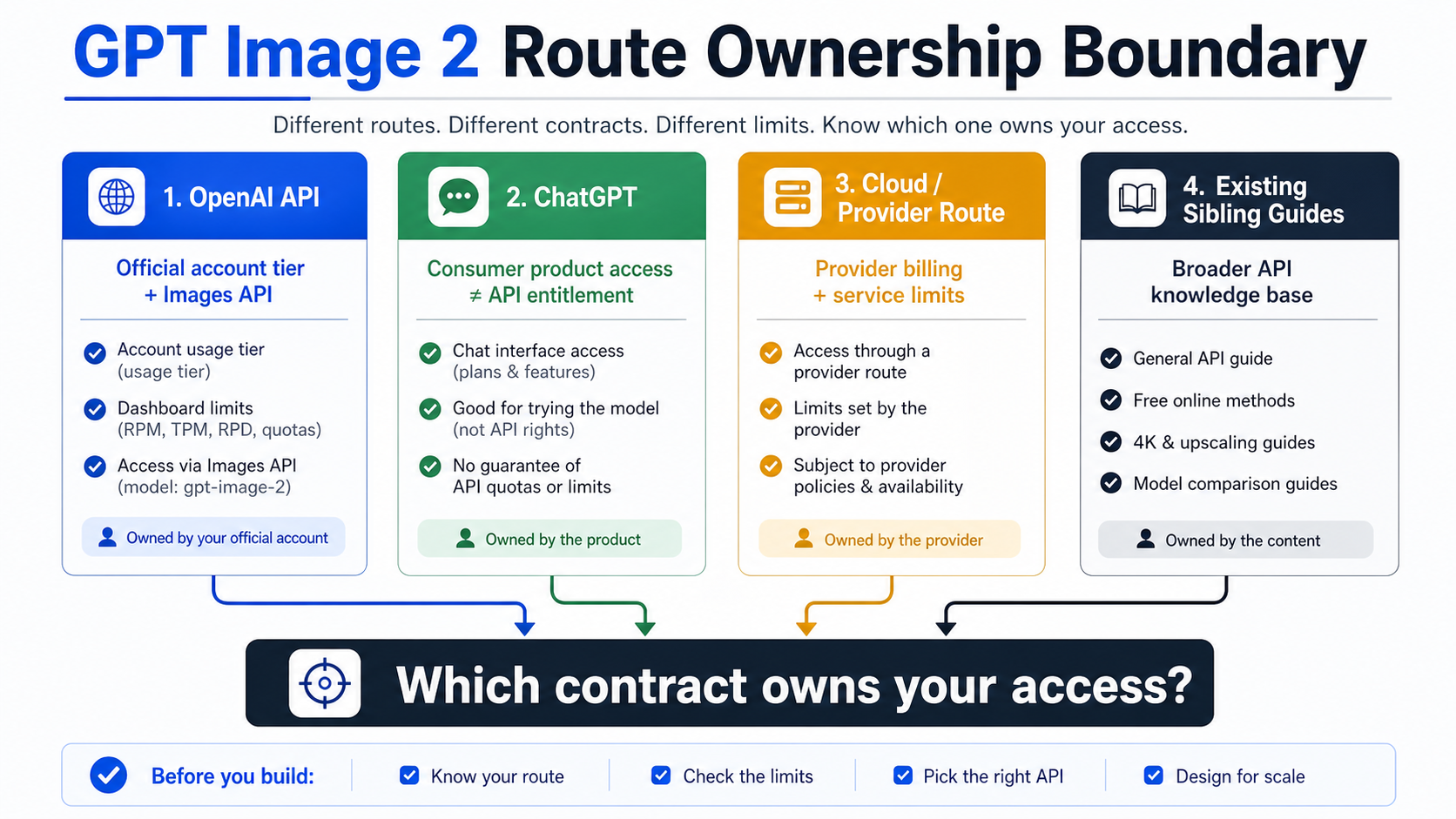
This boundary also keeps nearby questions in the right lane. Use the broader GPT Image 2 API guide when the main choice is Images API versus Responses versus Codex versus gateway routing. Use the GPT Image 2 free online guide when the question is browser testing and upload safety. Use the free GPT Image 2 4K API guide when the question is official-free claims plus 4K size proof. Use the Nano Banana Pro vs GPT Image 2 comparison when the question is which image model to test first.
A practical readiness path
The safest production path is short and sequential. First, confirm the model is official and current. Second, confirm Free is not your assumed API route for GPT Image 2. Third, check your organization tier and model-specific dashboard limits. Fourth, complete any organization verification requirement. Fifth, run a minimal Images API request. Sixth, add size, quality, edits, streaming, or Responses only after the direct access path is clear.
If the minimal request works, move into scale planning. Record output size, quality, cost estimate, response IDs, request latency, and rate-limit headers. If the minimal request fails, classify the owner before changing product architecture. A provider route may be the right temporary or commercial path, but it should be evaluated as a different bill owner and support owner.
That is the durable mental model: usage tier can unlock account capacity, the model row and dashboard reveal gpt-image-2 capacity, service_tier chooses processing mode, and provider routes are separate contracts. Keeping those four layers separate is the difference between a clean integration plan and a confusing upgrade loop.
FAQ
Is GPT Image 2 available on the Free OpenAI API tier?
Do not plan on Free API tier support for GPT Image 2. As of May 16, 2026, the public gpt-image-2 model surface marked Free as not supported. Free ChatGPT or browser experiences are separate product routes and do not prove API entitlement.
Does Tier 1 mean my account can definitely call gpt-image-2?
Not by itself. Tier 1 means the organization has met a usage-tier qualification threshold, but the account still needs model support in the dashboard, any required organization verification, and a valid request route. Use the dashboard for your own organization's actual limits.
What is the difference between usage tier and model rate limit?
Usage tier is the organization's account bucket. Model rate limit is the model-specific capacity visible through model pages, account settings, response headers, or dashboard limits. A higher usage tier usually increases limits across many models, but model support and exact capacity still need their own check.
Is service_tier the same as Tier 1 or Tier 2?
No. service_tier is a request processing option such as auto, default, flex, or priority where supported. It does not change your organization's usage tier and does not unlock a model that the account cannot use.
Should I use Images API or Responses for GPT Image 2?
Use Images API when the job is direct image generation or editing with model: "gpt-image-2". Use Responses when a text-capable model should run an assistant or multi-step flow and call the hosted image_generation tool. Do not put gpt-image-2 as the top-level Responses model.
Can a provider gateway bypass OpenAI tier limits?
A provider gateway can offer a separate access route, but that does not change your direct OpenAI API entitlement. The provider owns its own billing, limits, support, model mapping, and failure behavior. Verify those terms before production use.
What should I check before upgrading tiers?
Check the GPT Image 2 model page, your organization limits page, organization verification status, minimal Images API request behavior, pricing calculator, and response headers from a real test. Upgrade only after the blocker is clearly account capacity rather than model availability, verification, or request placement.