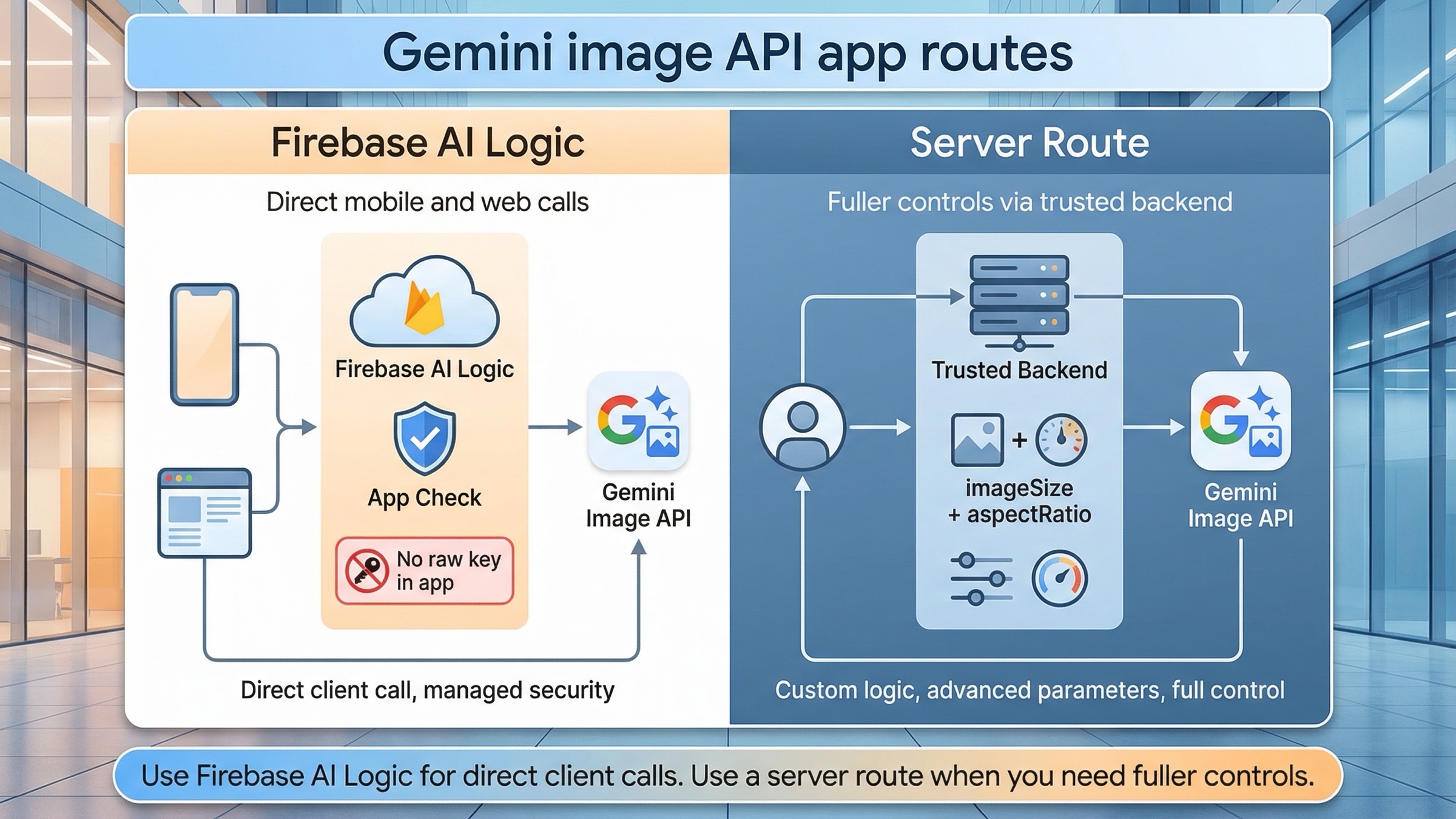
If your app needs to call Gemini image generation directly from a mobile or web client, use Firebase AI Logic first. If you control a trusted backend and need fuller image controls, use the Gemini API server-side instead. That is the safest current default because Firebase AI Logic is the official direct-from-app route, while the lower-level Gemini image API still exposes controls that Firebase does not yet surface.
That route split matters more than the first code snippet. The biggest implementation mistake in this topic is not "wrong syntax." It is choosing the wrong security boundary. A mobile or browser app should not ship a raw Gemini API key. Firebase's current getting-started guide, checked on March 23, 2026, explicitly says not to add the Gemini API key into the app codebase and strongly recommends App Check early. That pushes most true client-side integrations toward Firebase AI Logic before you even think about prompt tuning.
The most important caveat belongs up front too. Firebase's image-generation guide, also checked on March 23, 2026, labels Gemini image generation in Firebase AI Logic as Preview, says the image-generating Gemini models require the Blaze plan, and notes that explicit aspect_ratio and image_size settings are not yet supported there. If your feature depends on exact output sizes, stricter backend validation, or broader Gemini API surface area, the better route is a server endpoint that calls the Gemini API directly.
TL;DR
- Use Firebase AI Logic if your app truly needs to call Gemini image generation directly from a mobile or web client.
- Use a trusted backend route if you control the server and want explicit image controls like
aspectRatioandimageSize, or if your workflow needs features Firebase AI Logic does not yet expose. - Do not put a raw Gemini API key in mobile or frontend code. Firebase's current setup flow explicitly warns against that.
- Start with
gemini-3.1-flash-image-previewfor most new integrations. Move togemini-3-pro-image-previewonly when text-heavy or premium assets justify the higher cost. - Treat Firebase AI Logic image generation as a Preview feature and budget for the Blaze plan if you are using Gemini image models there.
- Add App Check, set a realistic per-user RPM limit, and think about cost caps before you expose image generation to real traffic.
| Route | Use it when | Where the secret lives | Best current start | Main trade-off |
|---|---|---|---|---|
| Firebase AI Logic direct route | Your mobile or web app needs direct client-side image generation or editing | Behind Firebase's gateway, not in your app code | gemini-3.1-flash-image-preview | Image generation is still Preview, requires Blaze, and does not yet expose explicit aspectRatio or imageSize |
| Trusted backend Gemini API route | You control a server route, worker, or API layer and want fuller image controls | On your server in GEMINI_API_KEY | gemini-3.1-flash-image-preview with imageConfig | More backend work, but much better control and easier auditing |
| Premium backend route | Your app generates text-heavy graphics, infographics, or expensive creative assets | On your server | gemini-3-pro-image-preview | Cost rises fast, so it should be a deliberate opt-in |
If your question is broader than app integration, start with Gemini Image Generation Tutorial: App, AI Studio, and API. If you mainly want copyable server-side examples, Gemini Image Generation Code Examples is the better companion. If the next problem is budget rather than architecture, use Gemini image generation API pricing.
Choose the right Gemini image integration route before you write code
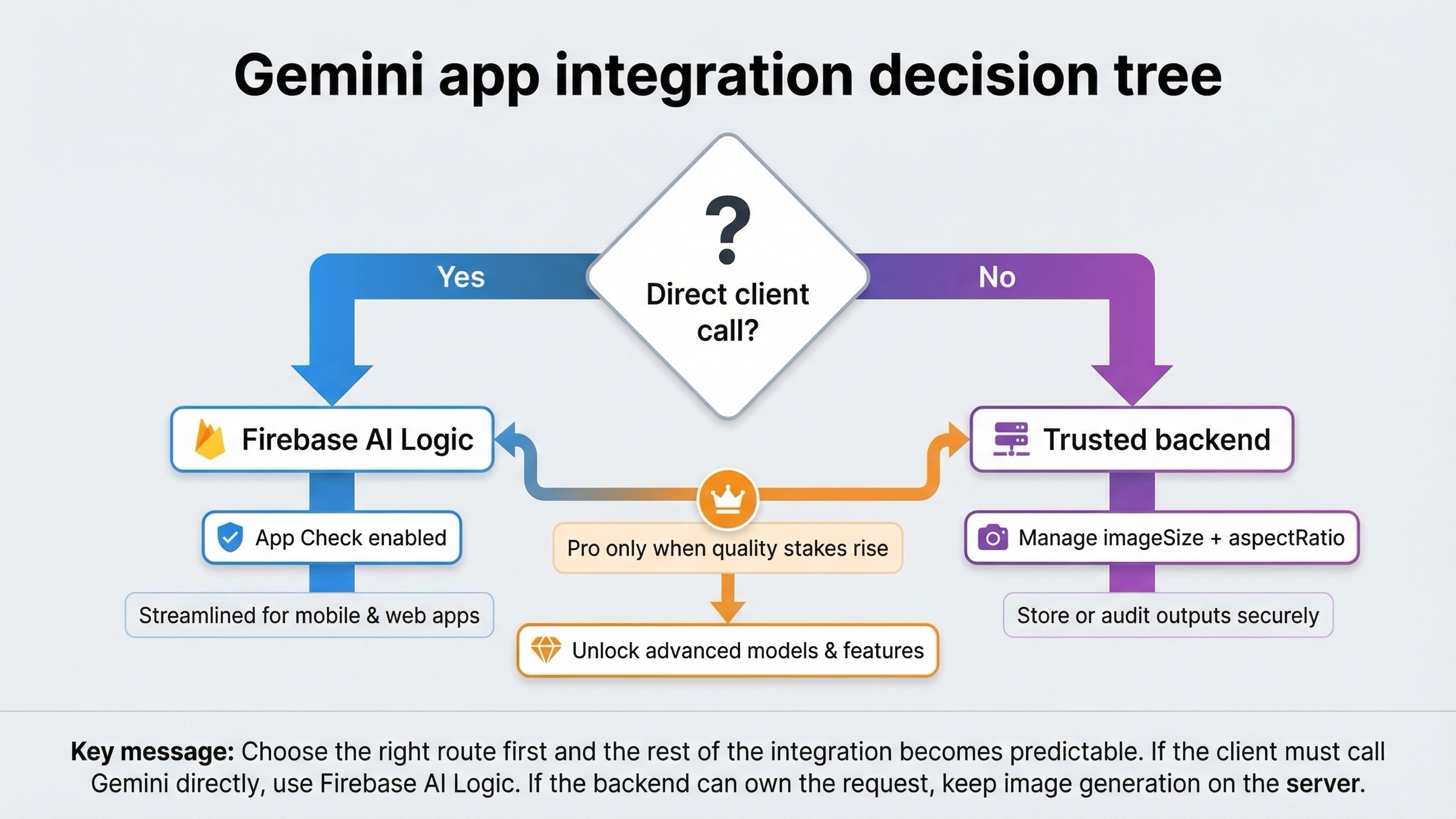
The current SERP is noisy because it mixes three different jobs into one topic. Firebase docs answer "how do I call Gemini from my app?" The Gemini image docs answer "what does the lower-level image API support?" Android docs answer "how does this look in a mobile stack?" If you read those pages one by one without a routing rule, they can feel contradictory even when they are each technically correct.
The cleanest rule is simple. Use Firebase AI Logic when the app itself needs to make Gemini calls. Use a server route when your backend can own the request safely and you care about control more than direct-client simplicity. That distinction is stronger than any framework preference. It matters more than whether you use Next.js, Android, Flutter, or another client.
Firebase AI Logic wins when you want the shortest secure path for user-facing app features. It is built specifically for mobile and web apps, has App Check in the story, and fits product experiences like "generate an image in this chat thread" or "edit this uploaded photo from inside the app." It is the right answer when the client needs a direct conversational loop and you do not want to invent your own proxy layer from scratch.
The trusted backend route wins when the app does not need direct model access from the client. If your app already has a server boundary, an API route, or a background worker, the lower-level Gemini API gives you a cleaner place to enforce quotas, validate prompts, log usage, strip sensitive metadata, and use image settings that Firebase AI Logic does not yet expose. That matters a lot once the feature stops being a demo and starts becoming part of your product economics.
There is also a practical middle path. Some teams start with Firebase AI Logic for fast client-side iteration, then move image generation behind a backend route once they know the feature is valuable and the limitations start to matter. That is a sane upgrade path. The mistake is pretending those two routes are interchangeable from day one.
Firebase AI Logic is the direct mobile and web app route
Firebase's overview page currently says the quiet part out loud: if you need to call the Gemini API directly from a mobile or web app rather than server-side, use the Firebase AI Logic client SDKs. That is why this should be the default answer for the "into app" branch of the topic.
The benefit is not only convenience. It is the security boundary. The same setup flow recommends starting with the Gemini Developer API, creates the Gemini API key in the Firebase project, and then tells you not to add that key into your app code. It also strongly encourages App Check as soon as the app becomes serious. That is a much better starting point than a tutorial that tells you to paste a long-lived provider key into frontend JavaScript and hope nobody abuses it.
Here is the current web shape with Firebase AI Logic. The code below follows the official Firebase AI Logic pattern, but for a new integration it swaps the older gemini-2.5-flash-image sample model name for the newer supported default gemini-3.1-flash-image-preview.
javascriptimport { initializeApp } from "firebase/app";
import {
  getAI,
  getGenerativeModel,
  GoogleAIBackend,
  ResponseModality,
} from "firebase/ai";

const firebaseConfig = {
  // ...
};

const firebaseApp = initializeApp(firebaseConfig);
const ai = getAI(firebaseApp, { backend: new GoogleAIBackend() });

const model = getGenerativeModel(ai, {
  model: "gemini-3.1-flash-image-preview",
  generationConfig: {
    responseModalities: [ResponseModality.TEXT, ResponseModality.IMAGE],
  },
});

const prompt =
  "Create a clean onboarding illustration for a budgeting app. Use a calm blue palette and leave room for headline text.";

const result = await model.generateContent(prompt);
const imagePart = result.response.inlineDataParts()?.[0];

if (imagePart) {
  console.log(imagePart.inlineData.mimeType, imagePart.inlineData.data);
}
Two details matter here. First, Firebase AI Logic image generation currently returns text and image together, so your client needs to handle both. Second, because Firebase AI Logic does not yet support explicit aspect_ratio and image_size, the prompt itself still has to carry composition hints like "leave room for headline text" or "design this as a tall poster." That is workable, but it is also the clearest sign that Firebase AI Logic is the simpler route, not the most controllable one.
This is also where the billing reality needs to be honest. Firebase's broader Gemini Developer API onboarding language can make the ecosystem sound friendly to free-tier experimentation, but the Firebase image-generation guide is narrower and more current for this exact use case: Gemini image models in Firebase AI Logic currently require the Blaze plan. So the safe summary is not "Gemini app integration is free" or "Gemini app integration is always paid." The safe summary is: general Firebase AI Logic onboarding can start cheaply, but Gemini image generation itself is a paid route today.
Use a trusted backend when you need fuller Gemini image controls
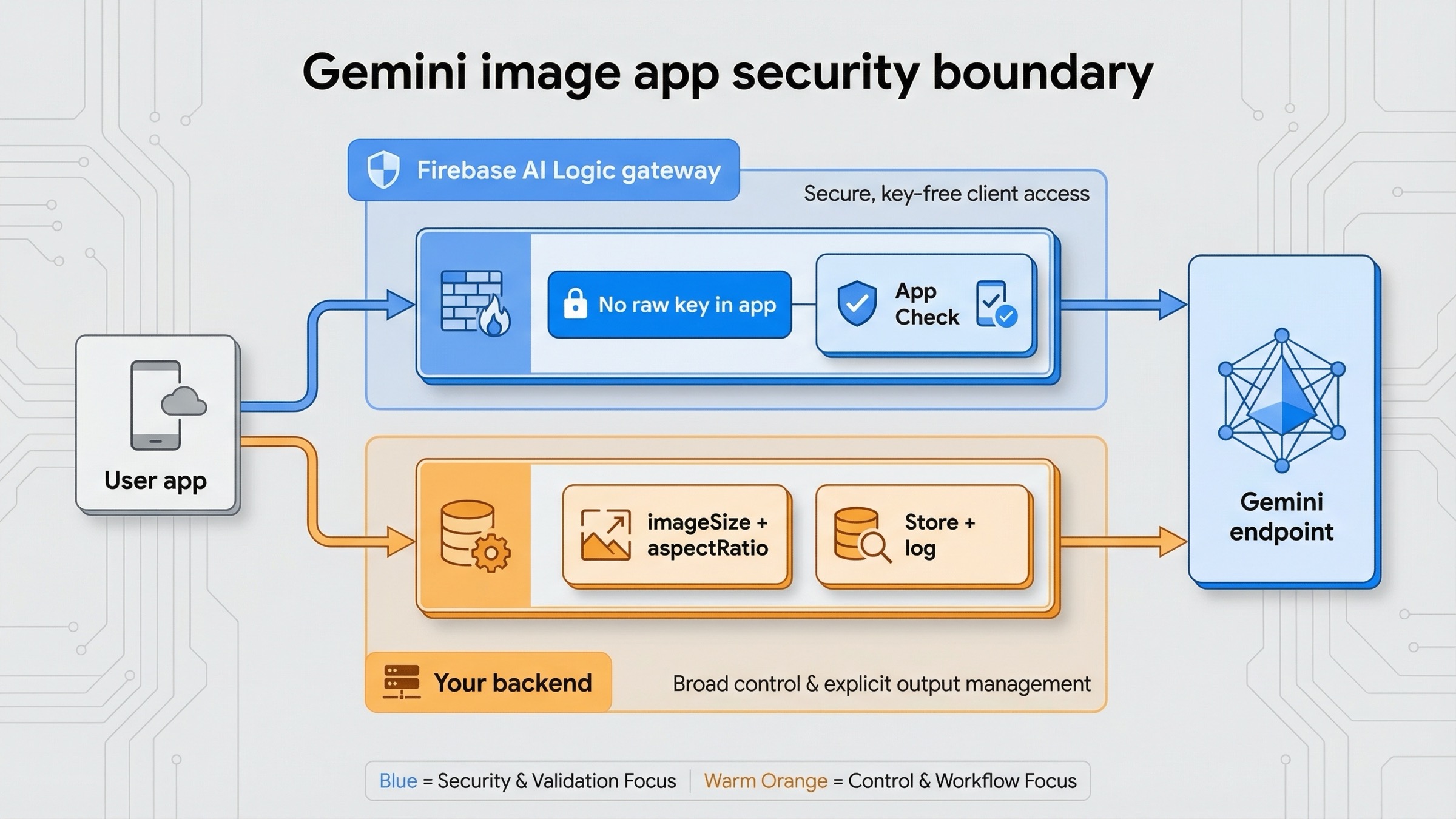
If your app already has a backend, the lower-level Gemini API is often the better long-term integration shape. The reason is not fashion. It is control.
Google's Gemini image-generation docs expose explicit imageConfig controls such as aspectRatio and imageSize for the Gemini 3 image models. The same Firebase image-generation guide says Firebase AI Logic does not yet expose those controls directly. That one difference is enough to change the architecture for many apps. If your product needs reliable hero images at 16:9, product cards at 1:1, story graphics at 9:16, or separate low-cost and premium output sizes, the backend route gives you a cleaner contract.
The backend route also helps when the app needs logic around the request rather than only a prompt box. You may want server-side abuse filtering, user-level billing enforcement, storage to Cloud Storage or S3, moderation hooks, audit logs, team-only admin flows, or prompt templates that should never ship to the client. All of that is easier when the model call lives in your own infrastructure.
Here is the simplest current server-side pattern in JavaScript using the Gemini API directly. This is the route to prefer when you need output-size control or want to return a stable JSON payload from your own API route.
javascriptimport { GoogleGenAI } from "@google/genai";

const ai = new GoogleGenAI({ apiKey: process.env.GEMINI_API_KEY });

export async function createMarketingImage(prompt) {
  const response = await ai.models.generateContent({
    model: "gemini-3.1-flash-image-preview",
    contents: prompt,
    config: {
      responseModalities: ["IMAGE"],
      imageConfig: {
        aspectRatio: "16:9",
        imageSize: "2K",
      },
    },
  });

  const imagePart = response.candidates?.[0]?.content?.parts?.find(
    (part) => part.inlineData
  );

  if (!imagePart?.inlineData) {
    throw new Error("No image returned from Gemini");
  }

  return {
    mimeType: imagePart.inlineData.mimeType,
    data: imagePart.inlineData.data,
  };
}
This is the route that scales better for production asset generation, admin-only creative tooling, and any feature where you need stable inputs, fixed aspect ratios, explicit image sizes, or cleaner observability. It also makes it much easier to implement your own request throttling before you hit provider limits.
If you like Firebase as the surrounding stack but still want server-owned orchestration, Firebase's own overview page points to Genkit as the server-side route. That is the better mental model here: Firebase AI Logic for direct client integrations, Genkit or your own server endpoint for more sophisticated server-owned AI behavior.
Web app example: secure integration shape for Next.js or Firebase App Hosting
For a web app, the route question is usually less about framework branding and more about trust boundaries.
If the user needs immediate client-side image generation inside the app experience, Firebase AI Logic is the shortest secure path. Your frontend talks through Firebase's gateway, you can layer in App Check, and you avoid exposing a raw Gemini API key in public JavaScript. That is the right fit for creator tools, in-app chat plus image features, or simple user-triggered editing flows.
If the feature is more operational than interactive, use your own server route instead. A Next.js route handler, Cloud Function, or App Hosting backend is a better home for image generation when the output needs to be stored, normalized, post-processed, or charged back to the user carefully. It is also where you should go if the app needs one canonical size, one prompt policy, and one audit trail.
The dividing line is simple:
- Frontend Firebase AI Logic route: the user asks, the app gets a result, and the feature benefits from direct conversational flow.
- Backend Gemini API route: the app requests a job from your own server, and your server decides the model, image size, aspect ratio, storage, and quota behavior.
Most product teams should make this decision before writing reusable UI components. Otherwise they end up designing a client-side feature that later has to be pushed behind a server under time pressure.
Android app example: Firebase AI Logic plus App Check
Android is where the direct-app route feels most natural because Google already frames the topic that way in its platform docs. The Android Developers page for the Gemini Developer API points developers toward Firebase AI Logic for app integration, which is one reason those pages are rewarded so heavily in the SERP.
The Kotlin shape is straightforward. As with the web example, the important part is not only the code. It is that the code sits inside a Firebase AI Logic project with App Check and a realistic per-user quota plan.
kotlinval model = Firebase.ai(backend = GenerativeBackend.googleAI()).generativeModel(
    modelName = "gemini-3.1-flash-image-preview",
    generationConfig = generationConfig {
        responseModalities = listOf(ResponseModality.TEXT, ResponseModality.IMAGE)
    }
)

val prompt = "Create a 1:1 travel sticker of Seoul at night in a bright flat illustration style."
val response = model.generateContent(prompt)

val image = response.candidates
    .first()
    .content
    .parts
    .filterIsInstance<ImagePart>()
    .firstOrNull()
    ?.image
This is the right first Android path when the app feature is truly interactive and the image is part of the user session. But Android teams should still think like operators before launch. Firebase AI Logic's quotas page says the Firebase AI Logic API default is 100 RPM per user, applied at the project level, and that provider limits still take precedence. That means an Android app with bursty image features should not rely on default quotas forever. Lower the per-user cap to something your business can actually support, and treat App Check as part of the release checklist rather than as a post-launch hardening task.
If the Android app needs shared-team asset generation, high-cost infographic output, or a back-office workflow rather than an end-user prompt box, the server route is usually cleaner there too. Mobile platform docs can make the direct SDK path feel like the default for every case, but it is only the default for the cases where direct client interaction is genuinely the product.
Model choice, editing flows, and when the route should change
For most new app integrations, start with gemini-3.1-flash-image-preview. Google's pricing page and deprecations page, checked on March 23, 2026, support that recommendation. Flash Image is the current fast default, while gemini-2.5-flash-image is now the legacy lane with a listed shutdown date of October 2, 2026.
You should move to gemini-3-pro-image-preview only when the product outcome justifies it. That usually means text-heavy graphics, infographic-style output, or premium assets where weak first-pass quality is expensive to revise. If the job is "generate social images quickly inside the app," Flash Image is the stronger default. If the job is "create polished visual assets with lots of on-image text," Pro becomes more defensible.
Editing flows are where the route choice can also change. Firebase AI Logic is strong for conversational edits that fit its supported app-side contract. But if the workflow grows into reference-heavy edits, custom file pipelines, or stronger output-shape guarantees, a server route becomes more attractive. Firebase's FAQ and troubleshooting page also says the Gemini Developer API Files API is not supported through the Firebase AI Logic SDKs. That is another signal that more complex asset workflows belong on the backend.
So the best route rule is not static. Start with Firebase AI Logic when the app needs a direct user interaction loop. Move to a trusted backend when you need output guarantees, broader feature support, or stronger cost governance. That is the kind of route change you should expect as the feature matures.
| Model | Current status | Best fit | What to watch in app integration |
|---|---|---|---|
gemini-3.1-flash-image-preview | Current default image lane, no shutdown date announced | Most new user-facing image generation and editing features | Preview-labeled, so quotas are stricter and you should cap usage early |
gemini-3-pro-image-preview | Current premium image lane, no shutdown date announced | Text-heavy graphics, premium visual assets, infographic-style output | Higher cost means it should usually be a selective upgrade path |
gemini-2.5-flash-image | Legacy image lane, shutdown scheduled for October 2, 2026 | Cost-sensitive legacy flows only | Do not build a fresh app feature around it unless you accept the retirement path |
Security, quotas, and cost controls before launch
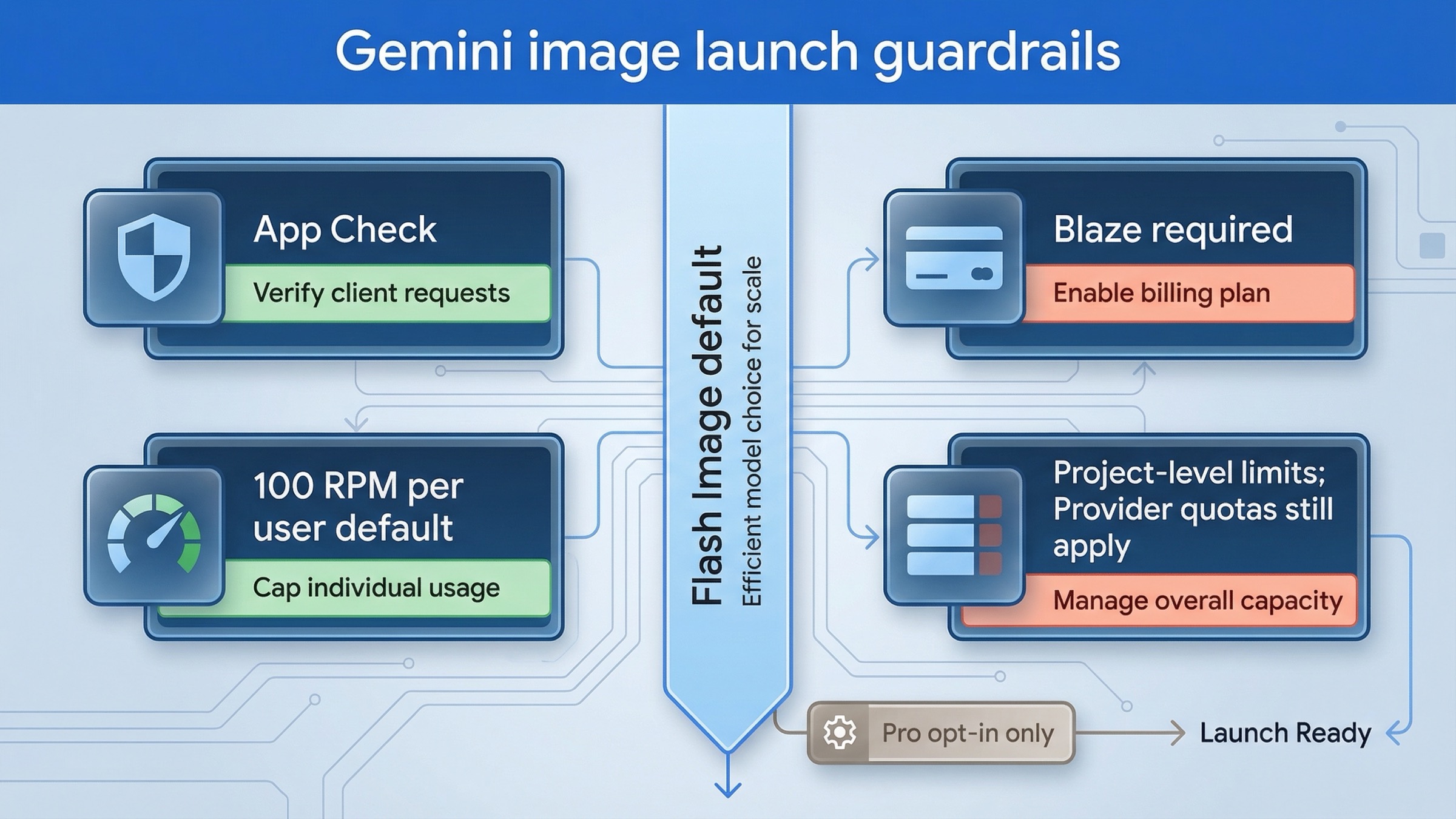
This is the section most ranking pages still underplay.
App Check is part of the architecture, not a nice-to-have. Firebase's current setup guide says you do not need App Check on minute one if you are only trying things out, but it also says it is critical to add it as early as possible before you share the app publicly. If you are recommending a direct client-side integration route to your own users, App Check belongs in the main build checklist.
Firebase AI Logic adds one quota layer, and Gemini adds another. Firebase's quotas page says the Firebase AI Logic API defaults to 100 RPM per user, but provider quotas still take precedence. Google's rate-limit docs say Gemini limits are applied at the project level, and preview models are more restricted. The operational takeaway is that one app can fail for two different quota reasons: your Firebase AI Logic gateway limit or the underlying Gemini provider limit. Product teams should monitor both.
Pricing needs a model policy, not just a footnote. Google's pricing page, checked on March 23, 2026, lists gemini-3.1-flash-image-preview at about $0.045 per 0.5K image, $0.067 per 1K image, $0.101 per 2K image, and $0.151 per 4K image. The same page lists gemini-3-pro-image-preview at about $0.134 per 1K or 2K image and $0.24 per 4K image. Those numbers should shape your product defaults. Most apps should not silently let every user request the premium lane at large sizes.
Preview status should change your rollout plan. Firebase AI Logic image generation is still Preview, and Google's pricing page says preview models can have more restrictive rate limits. That does not mean you should avoid the feature. It means you should launch with guardrails: feature flags, user-level caps, predictable image sizes, and fallback messaging when quota is exhausted.
In practice, a production checklist for this feature should include:
- App Check enabled
- Per-user RPM lowered to something your product can actually afford
- One default model and one optional premium upgrade path
- Logging of model choice, success rate, and quota failures
- A decision on whether images are stored only client-side or also persisted server-side
If you skip that checklist, the first bug report will usually be economic or abuse-related, not visual.
FAQ
Can I call Gemini image generation directly from frontend code without Firebase?
You should not ship a raw Gemini API key in frontend or mobile code. If the feature truly needs direct client calls, use Firebase AI Logic so the provider key stays out of the app codebase. If the feature does not need direct client calls, keep Gemini image generation behind your own backend.
Does Firebase AI Logic support explicit imageSize and aspectRatio today?
Not explicitly for Gemini image generation as of March 23, 2026. Firebase's current image-generation guide says those settings are not yet supported there, which is why the backend Gemini API route is the better fit when exact output controls matter.
Do I need a paid plan for Gemini image generation in Firebase AI Logic?
Yes. Firebase's current Gemini image-generation guide says the image-generating Gemini models require the Blaze plan regardless of the Gemini API provider. That is the right current answer for this exact use case, even though broader Gemini onboarding language can sound more free-tier-friendly.
Common mistakes that cause app-integration rework
The first mistake is embedding a raw Gemini API key in the client. Firebase's current docs explicitly tell you not to do that. If a tutorial still suggests it, the tutorial is below the current bar for this topic.
The second mistake is assuming the Firebase AI Logic route and the lower-level Gemini API expose the same image controls. They do not. Firebase's image guide currently says explicit aspect_ratio and image_size settings are not yet supported there, while the lower-level Gemini image docs clearly expose them. If exact output size matters, make the server route decision early.
The third mistake is reading general Gemini Developer API onboarding language as proof that Firebase image generation is free. That is too broad. The narrower image-generation guide is the correct current source for this use case, and it says Gemini image models require Blaze in Firebase AI Logic.
The fourth mistake is copying an older gemini-2.5-flash-image sample as if it were the best current default. Firebase's code samples still show that model in some places, but the supported-model list and Google's deprecation page make the better editorial recommendation clear: for new work, start with gemini-3.1-flash-image-preview unless you have a deliberate reason not to.
The fifth mistake is treating quota problems as a later concern. The Firebase quotas page and Gemini rate-limit docs both make it clear that image features can fail because of project-level or per-user limits long before the code itself is "wrong." That is why quota planning belongs in the build section, not in a buried appendix.
If your main problem is no longer architecture but implementation detail, use Gemini Image Generation Code Examples. If the issue is image edits specifically, Gemini image-to-image editing is the tighter follow-up. If you are debugging quota failures, Gemini API rate limit explained will help more than another image tutorial.
Bottom line
The best current answer to "how do I integrate the Gemini image API into my app?" is not one SDK name. It is one architecture choice.
Use Firebase AI Logic when the app must call Gemini image generation directly from a mobile or web client. Use a trusted backend Gemini API route when your team controls the server and needs explicit image controls, better observability, or stricter cost governance. Keep gemini-3.1-flash-image-preview as the default for most new work, move to gemini-3-pro-image-preview only when premium output is worth it, and treat gemini-2.5-flash-image as the legacy branch it now is.
That route-first approach is what the current SERP still fails to give in one place. Once you make that decision early, the rest of the integration becomes much easier to reason about and much less expensive to redo later.