Google's Gemini API remains one of the most generous free AI API offerings in 2026, giving developers access to frontier models like Gemini 2.5 Pro with a 1-million-token context window at absolutely no cost. After the December 2025 quota reductions that caught thousands of developers off guard, understanding exactly what you get for free and when it makes sense to pay has become essential knowledge for any developer building with AI. This guide provides Chrome-verified data from Google's official documentation, practical cost calculations, and a decision framework you can apply to your specific situation today.
TL;DR
The Gemini API free tier currently offers three stable models with rate limits ranging from 5 to 15 requests per minute, depending on which model you choose. Here is the essential breakdown every developer needs to know before writing a single line of code.
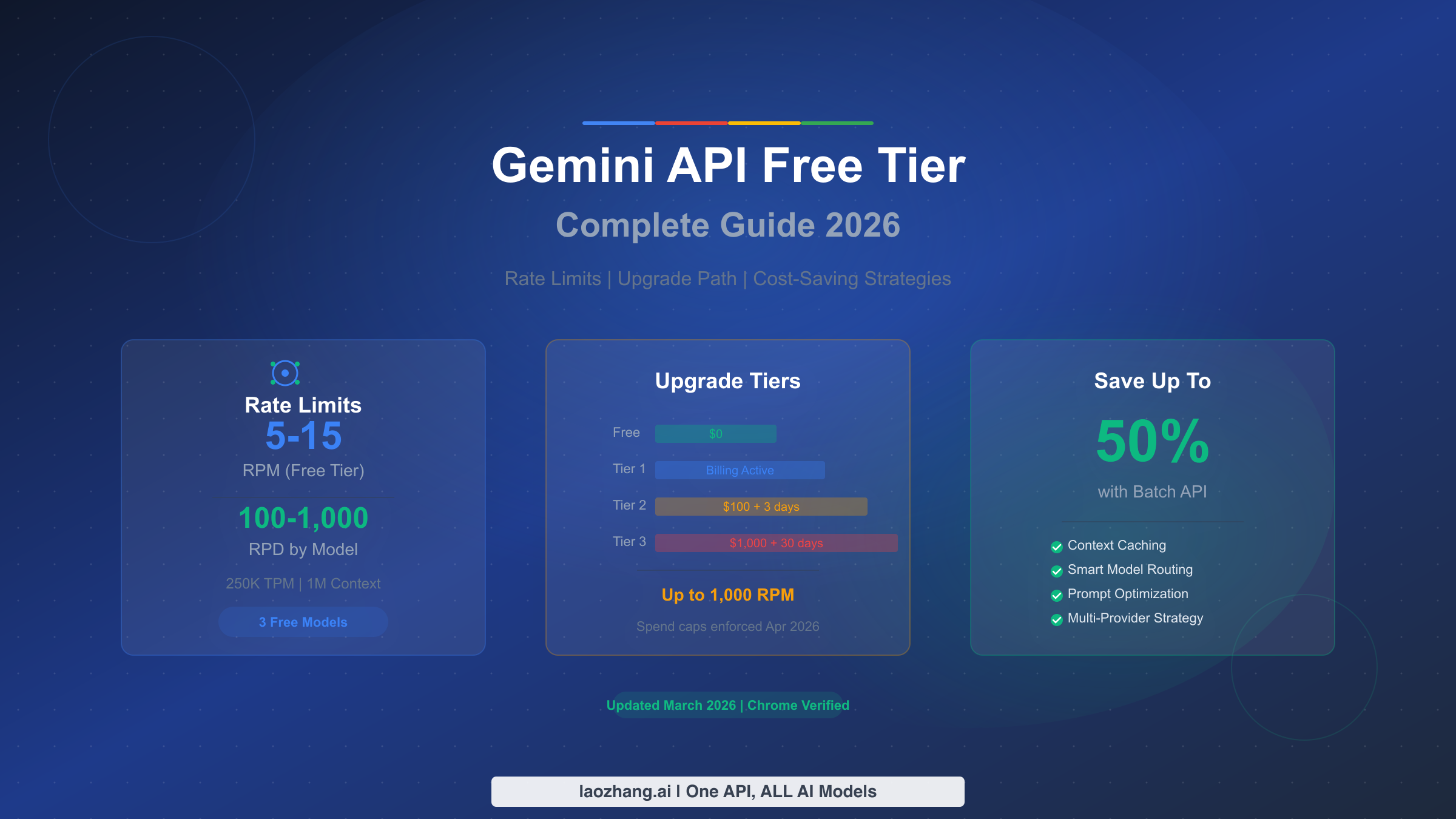
The three models available on the free tier as of March 2026 are Gemini 2.5 Pro with 5 RPM and 100 requests per day, Gemini 2.5 Flash with 10 RPM and 250 daily requests, and Gemini 2.5 Flash-Lite which leads the pack with 15 RPM and 1,000 daily requests. All three models share a 250,000 tokens-per-minute limit and full access to the 1-million-token context window. Two additional preview models, Gemini 3 Flash and Gemini 3.1 Flash-Lite, are also available for free with more restrictive limits. No credit card is required to get started, but be aware that your prompts and responses on the free tier may be used to improve Google's products. Upgrading to Tier 1 costs nothing upfront since you only pay for what you use, and it immediately removes the data-sharing concern while boosting your rate limits to 150-300 RPM.
Complete Free Tier Rate Limits: Every Model, Every Number
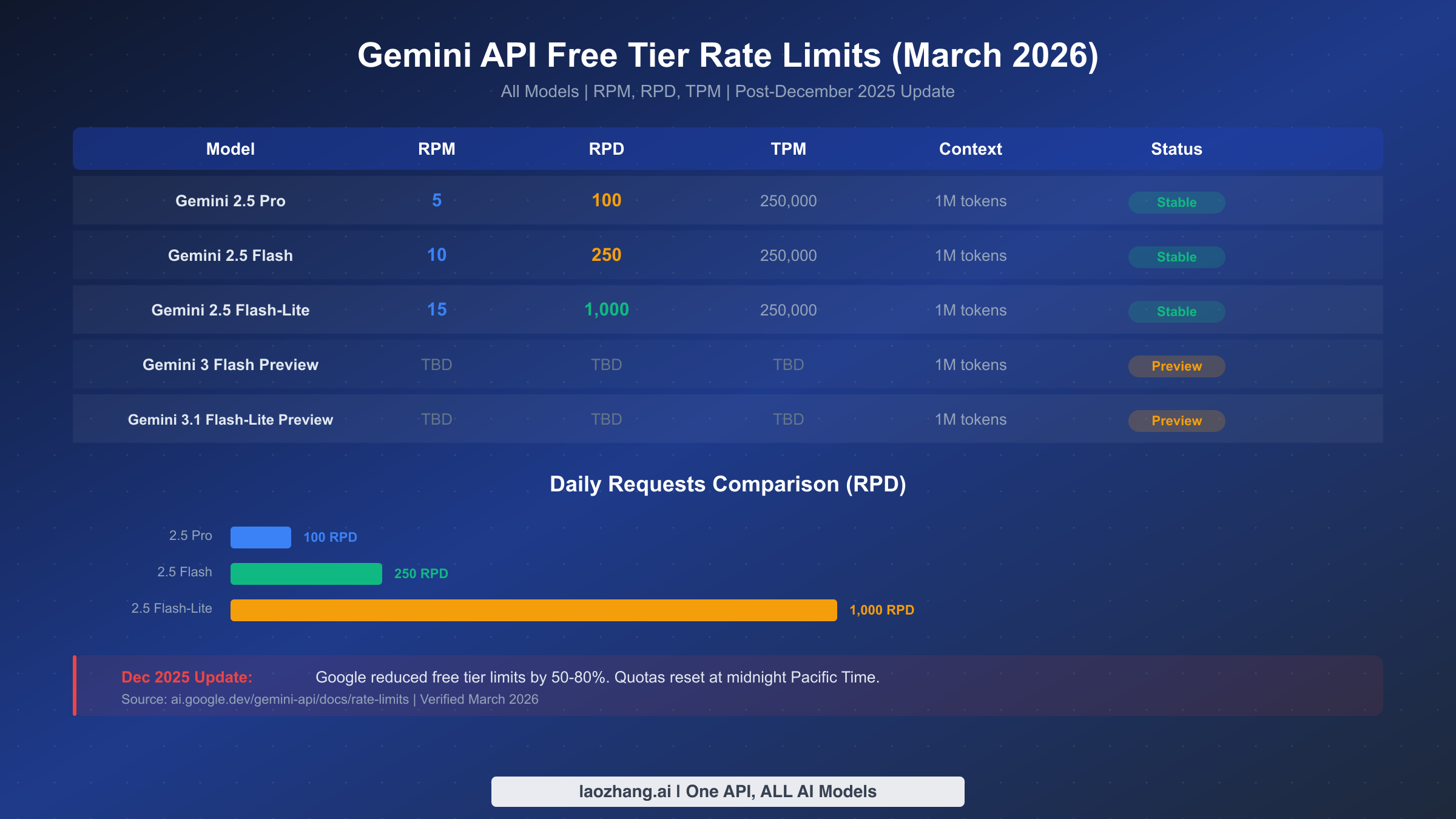
Understanding rate limits is the foundation of working effectively with the Gemini API, and the numbers have changed significantly since late 2025. Google measures rate limits across three dimensions: requests per minute (RPM), tokens per minute (TPM), and requests per day (RPD). Your usage is evaluated against all three simultaneously, and exceeding any single limit triggers a 429 error, even if you are well within the other two limits. These limits are applied per Google Cloud project rather than per individual API key, and daily quotas reset at midnight Pacific Time.
The table below presents the complete, Chrome-verified rate limits for every model available on the free tier as of March 2026. These numbers were extracted directly from Google's official rate limits documentation at ai.google.dev on the day this article was published.
| Model | RPM | RPD | TPM | Context Window | Status |
|---|---|---|---|---|---|
| Gemini 2.5 Pro | 5 | 100 | 250,000 | 1M tokens | Stable |
| Gemini 2.5 Flash | 10 | 250 | 250,000 | 1M tokens | Stable |
| Gemini 2.5 Flash-Lite | 15 | 1,000 | 250,000 | 1M tokens | Stable |
| Gemini 3 Flash Preview | Limited | Limited | Limited | 1M tokens | Preview |
| Gemini 3.1 Flash-Lite Preview | Limited | Limited | Limited | 1M tokens | Preview |
Beyond these text generation models, Google also provides free access to embedding models. The Gemini Embedding model supports 10 million tokens per minute on the free tier, which is remarkably generous for building search and retrieval systems. The newer Gemini Embedding 2 Preview adds multimodal embedding capabilities, supporting text, image, audio, and video inputs, all free of charge.
It is worth noting that the stated rate limits represent the official ceiling, but actual available capacity may vary. Multiple developers on Reddit have reported hitting rate limits well below the official numbers, particularly during peak hours. The r/GeminiAI subreddit documented cases where Gemini 2.5 Flash effectively delivered as few as 20 requests per day during high-traffic periods, despite the official 250 RPD limit. Google's documentation acknowledges this with the disclaimer that specified rate limits are not guaranteed and actual capacity may vary.
Understanding Preview Model Limitations
Preview models like Gemini 3 Flash and Gemini 3.1 Flash-Lite carry additional restrictions beyond the standard rate limits. These models have more restrictive quotas that Google adjusts frequently as the models progress through development. They also lack features available on stable models, such as context caching and batch API support. For production workloads, the stable 2.5 series remains the recommended choice, while preview models are best used for evaluation and experimentation.
Getting Your Free API Key in 5 Minutes
Setting up access to the Gemini API free tier is straightforward and requires no payment information. The entire process takes roughly five minutes and involves just three steps. First, visit Google AI Studio at aistudio.google.com and sign in with your Google account. If you do not already have a Google account, you will need to create one, which adds about two minutes to the process.
Once signed in, navigate to the API keys section, which you can find in the left sidebar or at aistudio.google.com/api-keys. Click the "Create API Key" button. Google will either create a new Google Cloud project automatically or let you select an existing project. Your API key will be generated instantly, and you can begin making API calls immediately with the free tier limits applied.
Testing your key with a simple curl command works like this:
bashcurl "https://generativelanguage.googleapis.com/v1beta/models/gemini-2.5-flash:generateContent?key=YOUR_API_KEY" \
  -H "Content-Type: application/json" \
  -d '{"contents":[{"parts":[{"text":"Explain rate limits in one sentence"}]}]}'
A few important details about API key management deserve attention. Each Google Cloud project can have up to five API keys, and a single billing account can support up to ten projects. This means you could theoretically manage up to 50 API keys under one billing structure, though rate limits are enforced at the project level, not the key level. Creating multiple keys within the same project does not multiply your quota. If you need higher total throughput on the free tier, you would need separate projects, but be aware that Google monitors for abuse of this approach. For a detailed walkthrough of the key generation process, including troubleshooting common issues, see our complete Gemini API key guide.
What Really Changed in December 2025
The weekend of December 6-7, 2025 marked a watershed moment for the Gemini API free tier. Without advance notice, Google significantly reduced rate limits across all free-tier models, causing widespread 429 "resource exhausted" errors that broke production workflows for thousands of developers overnight. The community response on Reddit and Hacker News was immediate and intense, with the r/GeminiAI thread on the topic accumulating over 210 comments from frustrated developers.
Logan Kilpatrick, Google's Lead Product Manager for AI Studio, provided context for the decision. He explained that the generous free tier limits had been "originally only supposed to be available for a single weekend" but "inadvertently lingered for several months." Google cited "at scale fraud and abuse" as the primary driver behind the broader cutbacks. The reductions were not uniform across all models. Some models saw limits cut by 50 percent while others experienced reductions of up to 80 percent, with the exact impact depending on the specific model and the type of request.
The practical impact was significant. Developers who had built applications relying on the previous limits suddenly found their systems failing. Chatbots stopped responding, batch processing pipelines stalled, and automated workflows ground to a halt. The situation was compounded by the fact that Google provided no migration period or advance warning, leaving developers scrambling to either optimize their usage or upgrade to paid tiers over a weekend.
Since December 2025, the situation has stabilized at the current rate limits documented in this guide. Google also deprecated Gemini 2.0 Flash in February 2026, with the model officially retiring on March 3, 2026. This means developers who were using 2.0 Flash as a high-throughput free option need to migrate to the 2.5 Flash or Flash-Lite models. The lesson from this episode is clear: building production systems entirely on free tier quotas carries inherent risk, regardless of how generous those quotas appear at any given moment. If you encountered 429 errors during this transition, our detailed error troubleshooting guide covers recovery strategies.
Gemini vs OpenAI vs Claude: Free Tier Showdown
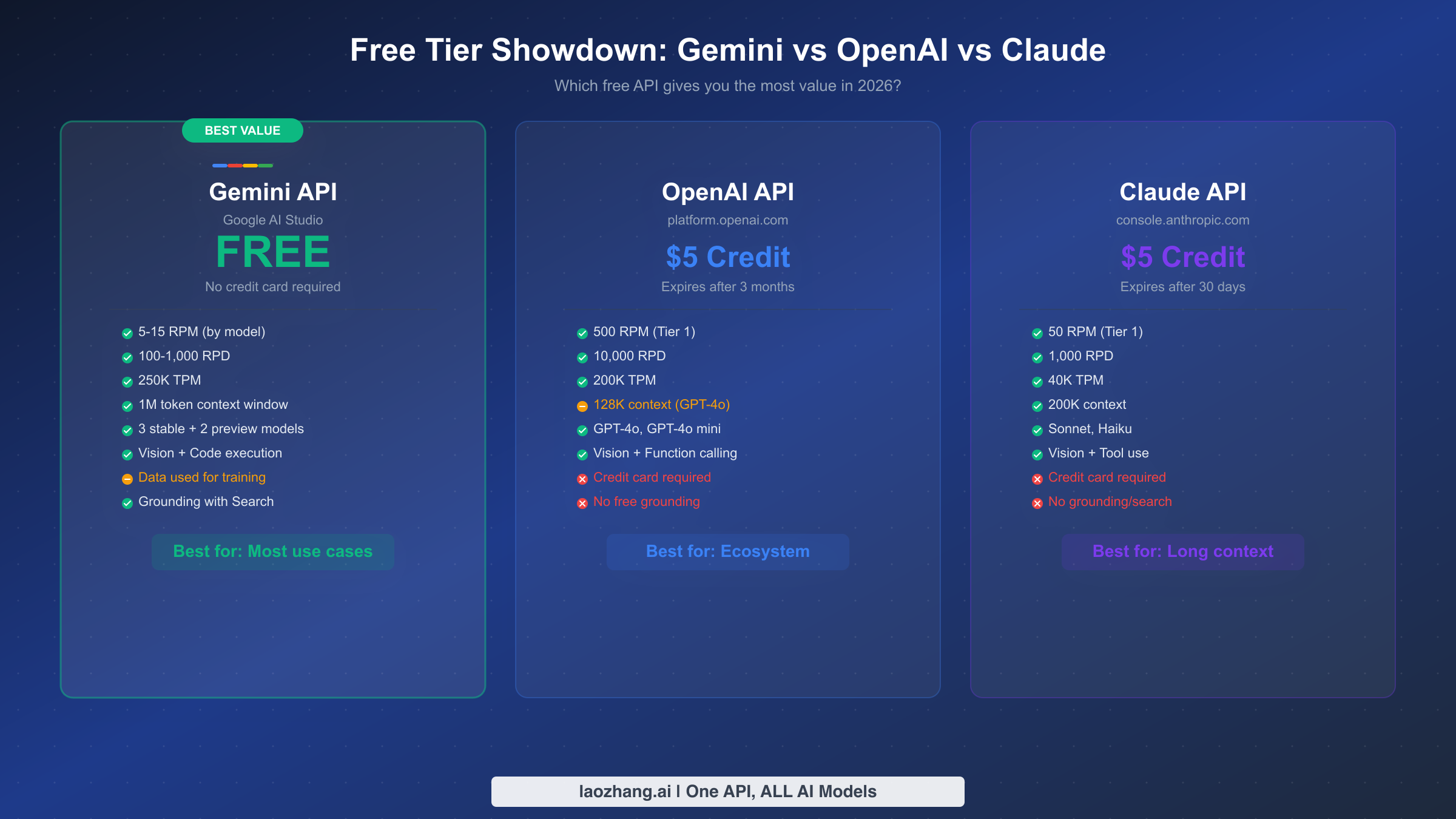
No discussion of the Gemini free tier is complete without understanding how it stacks up against the competition. This comparison reveals why Gemini remains the strongest free option for most developers in 2026, despite the December 2025 cutbacks. The three major AI API providers take fundamentally different approaches to free access, and understanding these differences can save you significant money and development time.
Google's Gemini API stands alone in offering a truly free tier that requires no credit card and no initial payment of any kind. You sign up with a Google account and start making API calls immediately. OpenAI and Anthropic, by contrast, both require credit card registration and offer initial credits that expire. OpenAI provides a $5 credit that expires after three months, while Anthropic's Claude API offers a similar $5 credit with a 30-day expiration window. Once these credits run out, you are immediately on a paid plan.
| Feature | Gemini (Free) | OpenAI ($5 credit) | Claude ($5 credit) |
|---|---|---|---|
| Credit Card Required | No | Yes | Yes |
| RPM | 5-15 | 500 (Tier 1) | 50 (Tier 1) |
| RPD | 100-1,000 | 10,000 | 1,000 |
| TPM | 250,000 | 200,000 | 40,000 |
| Context Window | 1M tokens | 128K (GPT-4o) | 200K (Claude) |
| Free Models | 5 (3 stable + 2 preview) | GPT-4o, GPT-4o mini | Sonnet, Haiku |
| Duration | Unlimited | 3 months | 30 days |
| Data Privacy | Used for training | Not used | Not used |
| Grounding/Search | Free (500 RPD) | Not available free | Not available |
The context window advantage is Gemini's most dramatic differentiator. With 1 million tokens of context on the free tier, you can process entire codebases, lengthy documents, or hours of conversation history in a single request. OpenAI's GPT-4o tops out at 128K tokens, and even Claude's generous 200K context window is just one-fifth of what Gemini offers for free.
However, Gemini's free tier comes with a significant trade-off that developers must consider carefully: data privacy. On the free tier, your prompts and responses may be used to improve Google products. This makes the free tier inappropriate for applications handling sensitive user data, proprietary business information, or any content subject to privacy regulations. OpenAI and Claude do not use API data for training regardless of tier. If data privacy is a requirement, upgrading to Gemini's paid Tier 1 eliminates data sharing while still offering competitive pricing. For a deeper dive into how Gemini and OpenAI compare on pricing across all tiers, see our detailed pricing comparison guide.
For developers who need to access multiple AI providers without managing separate API keys and billing accounts, unified API platforms like laozhang.ai provide a single endpoint for Gemini, OpenAI, Claude, and dozens of other models, simplifying multi-provider architectures while often providing cost advantages through volume aggregation.
Real Cost Breakdown: What You'll Actually Pay After Upgrading
Understanding the actual cost of upgrading beyond the free tier requires translating token-based pricing into real-world usage scenarios. The pricing page shows numbers like "$0.30 per million input tokens" for Gemini 2.5 Flash, but what does that mean for your monthly bill? Let us calculate costs for three common use cases using verified pricing from ai.google.dev as of March 2026 (source: Gemini API pricing).
Scenario 1: Customer Support Chatbot (Small Business)
A chatbot handling 200 conversations per day, each averaging 3 exchanges with 500 input tokens and 300 output tokens per exchange. Monthly usage: 200 conversations x 30 days x 3 exchanges = 18,000 requests. Input tokens: 18,000 x 500 = 9M tokens. Output tokens: 18,000 x 300 = 5.4M tokens. Using Gemini 2.5 Flash at $0.30/$2.50 per million tokens: input cost is $2.70, output cost is $13.50, totaling approximately $16.20 per month. The same workload on OpenAI's GPT-4o at $2.50/$10.00 per million tokens would cost $22.50 input plus $54.00 output, totaling $76.50 per month. That is a 79% savings with Gemini.
Scenario 2: RAG-Based Document Search (Startup)
A retrieval-augmented generation system processing 500 queries per day, each with a 10,000-token context from retrieved documents and a 1,000-token response. Monthly usage: 500 x 30 = 15,000 requests. Input: 150M tokens. Output: 15M tokens. Gemini 2.5 Flash cost: $45.00 input + $37.50 output = $82.50 per month. With Batch API (50% discount on eligible requests): approximately $41.25 per month if queries can be batched. The same workload on GPT-4o: $375 input + $150 output = $525 per month. Gemini saves you $442.50 monthly, or 84%.
Scenario 3: High-Volume Content Processing (Enterprise)
Processing 2,000 documents per day, averaging 50,000 input tokens and 2,000 output tokens each. Monthly usage: 60,000 requests. Input: 3B tokens. Output: 120M tokens. Here, Gemini 2.5 Flash-Lite at $0.10/$0.40 per million tokens becomes the smart choice: $300 input + $48 output = $348 per month. With Batch API: approximately $174 per month. Compare to GPT-4o mini at $0.15/$0.60: $450 + $72 = $522 per month. The difference grows even larger at the 2.5 Pro tier, where context caching can reduce repeated input costs by up to 75 percent. For complete pricing across all models and tiers, our Gemini API pricing and quotas guide provides exhaustive tables.
| Scenario | Gemini 2.5 Flash | GPT-4o | Savings |
|---|---|---|---|
| Chatbot (200/day) | $16.20/mo | $76.50/mo | 79% |
| RAG Search (500/day) | $82.50/mo | $525/mo | 84% |
| Content Processing (2K/day) | $348/mo* | $522/mo** | 33% |
*Using Flash-Lite with Batch API brings this to ~$174/mo. **Using GPT-4o mini.
When to Upgrade: The Decision Framework
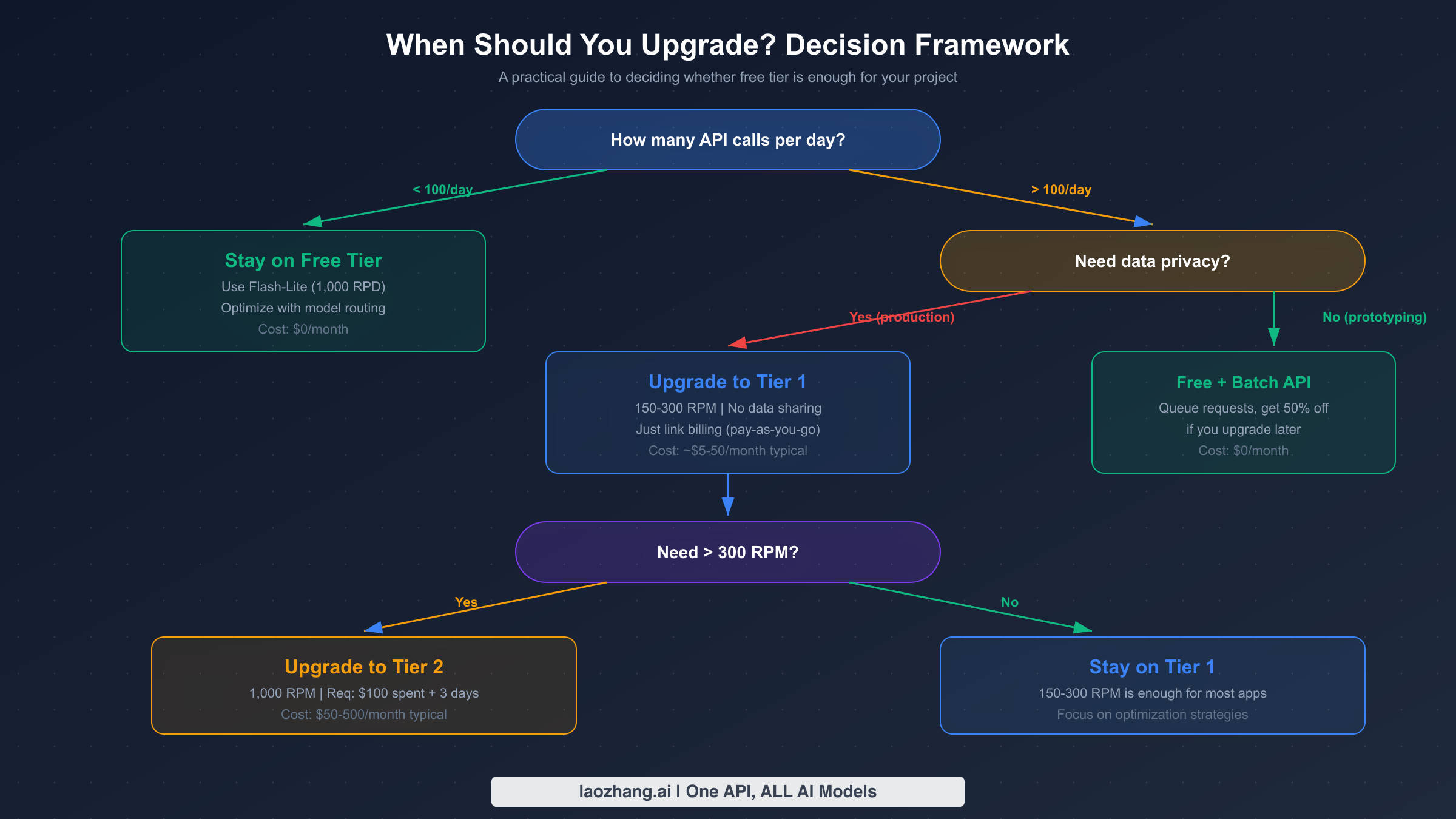
The decision to upgrade from the free tier should be based on concrete usage metrics rather than speculation. Google offers four tiers, each with distinct rate limits, pricing, and qualification requirements. The tier system was updated in early 2026, with spending caps set to be enforced starting April 1, 2026 (source: ai.google.dev/gemini-api/docs/billing, verified March 2026).
Stay on the Free Tier if your application makes fewer than 100 API calls per day and you are comfortable with your data being used to improve Google products. The free tier is ideal for personal projects, prototyping, academic research, and low-volume internal tools. By routing requests to Flash-Lite, you get up to 1,000 requests per day at zero cost, which is more than enough for many legitimate use cases.
Upgrade to Tier 1 if you need more than 100 daily requests, require data privacy guarantees, or need consistent rate limits for production workloads. Tier 1 activation requires only linking a billing account with no minimum spend. You immediately get 150-300 RPM depending on the model, which is a 30x improvement over the free tier. The monthly spending cap is $250, providing a natural safety net against unexpected costs. Most small to medium applications will find Tier 1 sufficient.
Upgrade to Tier 2 if you consistently need more than 300 RPM or your monthly usage exceeds $250. Qualifying requires $100 in cumulative spending and at least 3 days since your first payment. Tier 2 unlocks up to 1,000 RPM and raises the spending cap to $2,000 per month. This tier is appropriate for production applications serving hundreds of concurrent users.
Upgrade to Tier 3 if you are running enterprise-scale workloads requiring the highest throughput. Qualifying requires $1,000 in cumulative spending and 30 days since your first payment. Tier 3 offers the highest rate limits and spending caps ranging from $20,000 to over $100,000 per month. For a step-by-step walkthrough of the upgrade process, see our detailed tier upgrade tutorial.
The critical insight many developers miss is that Tier 1 is functionally free to enter. You only pay for the tokens you actually consume, there is no subscription fee or minimum commitment. If your usage stays low, your monthly bill might be just a few dollars while gaining significantly higher rate limits and full data privacy protection.
7 Strategies to Maximize Your Free Tier
Whether you stay on the free tier or upgrade to a paid plan, these optimization strategies will help you extract maximum value from every API call. These techniques are cumulative, and combining multiple strategies can reduce your effective cost by 60-80 percent compared to naive usage patterns.
Strategy 1: Smart Model Routing
The simplest optimization is routing requests to the cheapest model that can handle them adequately. Not every query needs the reasoning power of Gemini 2.5 Pro. For classification tasks, simple question answering, and structured data extraction, Flash-Lite delivers comparable results at a fraction of the cost. Build a routing layer that evaluates query complexity and directs simple requests to Flash-Lite (15 RPM, 1,000 RPD on free tier) while reserving Pro for tasks that genuinely require advanced reasoning.
Strategy 2: Leverage the Batch API
For workloads that do not require real-time responses, Google's Batch API delivers a flat 50 percent discount on all model pricing. Batch requests are queued and processed within 24 hours, making this ideal for content generation, document analysis, data extraction pipelines, and any task where a few hours of latency is acceptable. On the free tier, batch requests have their own separate rate limits, effectively doubling your available throughput. This single strategy can halve your costs when you eventually upgrade to a paid tier.
Strategy 3: Context Caching for Repeated Contexts
If your application repeatedly sends the same large context, such as a system prompt, reference documents, or few-shot examples, context caching can reduce input token costs dramatically. Cached context is charged at about 75 percent less than standard input tokens, with an additional hourly storage fee. The break-even point is roughly when you reuse the same context more than 4-5 times within an hour. For RAG applications and chatbots with fixed system prompts, this optimization alone can cut input costs by 50-75 percent. Our context caching cost reduction guide provides implementation details and code examples.
Strategy 4: Prompt Compression and Optimization
Reducing input token count without sacrificing output quality is a high-leverage optimization. Remove unnecessary verbosity from system prompts, use concise formatting instructions, and leverage structured output schemas that tell the model exactly what format to return. A well-optimized prompt can be 40-60 percent shorter than a naive one while producing identical results. On the free tier, where TPM is limited to 250,000, efficient prompts mean more useful requests per minute.
Strategy 5: Implement Exponential Backoff with Jitter
When you hit rate limits, naive retry logic can make things worse by creating synchronized retry storms. Implement exponential backoff with random jitter to spread retries over time. Start with a 1-second delay, double it on each retry, and add random variation of up to 50 percent. Cap the maximum delay at 60 seconds and limit total retries to 5 attempts. This approach maximizes your actual throughput by avoiding wasted retries while respecting Google's rate limiting.
Strategy 6: Request Deduplication and Caching
Before sending any request to the API, check whether you have already received an identical or sufficiently similar response. Implement a local cache, whether in-memory for simple applications or Redis-backed for production systems, that stores responses keyed by a hash of the input. For many applications, 20-40 percent of requests are duplicates or near-duplicates that can be served from cache, dramatically reducing both cost and latency.
Strategy 7: Multi-Provider Failover Strategy
Rather than depending entirely on a single API provider, build a failover chain that routes to alternative providers when you hit Gemini's rate limits. When your Gemini quota is exhausted, automatically fall back to OpenAI, Claude, or open-source alternatives through platforms like laozhang.ai that aggregate multiple providers under a single API endpoint. This approach maximizes your effective free quota across all providers while ensuring your application never goes down due to rate limiting from any single provider.
Frequently Asked Questions
Is the Gemini API really free?
Yes, the Gemini API offers a genuinely free tier that requires no credit card and has no expiration date. You get access to models including Gemini 2.5 Pro, Flash, and Flash-Lite with rate limits of 5-15 RPM and 100-1,000 RPD. The main trade-off is that your data may be used to improve Google products on the free tier.
How do I fix 429 "resource exhausted" errors?
A 429 error means you have exceeded one of your rate limits (RPM, TPM, or RPD). First, check which limit you are hitting by examining the error response headers. If it is RPD, wait until midnight Pacific Time for the daily reset. If it is RPM or TPM, implement exponential backoff with jitter. Consider switching to a model with higher limits, such as Flash-Lite with 1,000 RPD, or upgrading to Tier 1 for 30x higher rate limits.
What is the difference between free tier and Tier 1?
The free tier requires only a Google account and provides limited RPM and RPD. Tier 1 requires linking a billing account but has no minimum spend. The key differences are rate limits (150-300 RPM vs 5-15 RPM), data privacy (Tier 1 does not use your data for training), and access to features like context caching and the Batch API at paid rates. Upgrading is essentially free since you only pay for tokens consumed.
Can I use the free tier for production applications?
Technically yes, but it carries significant risks. The December 2025 quota cuts demonstrated that Google can reduce free tier limits without notice. Free tier rate limits of 5-15 RPM are too low for most user-facing applications, and the data privacy implications may violate your users' expectations or regulatory requirements. For any application serving real users, Tier 1 is the recommended minimum.
How does Gemini's free tier compare to using local LLMs?
Local LLMs eliminate rate limits and API costs entirely but require significant hardware investment. Running a capable open-source model like Llama requires at least 12GB of VRAM for inference, and quality generally lags behind Gemini 2.5 Pro for complex tasks. The Gemini free tier is better for most developers who need frontier model quality without hardware investment, while local models suit privacy-sensitive workloads with simpler requirements and available GPU resources.
Will Google reduce free tier limits again?
Google has not announced plans for further reductions, but the December 2025 precedent shows that free tier limits can change without notice. The best approach is to design your application architecture to handle rate limit changes gracefully, use the optimization strategies in this guide to minimize dependence on any single provider's free tier, and have an upgrade path planned even if you do not activate it immediately.