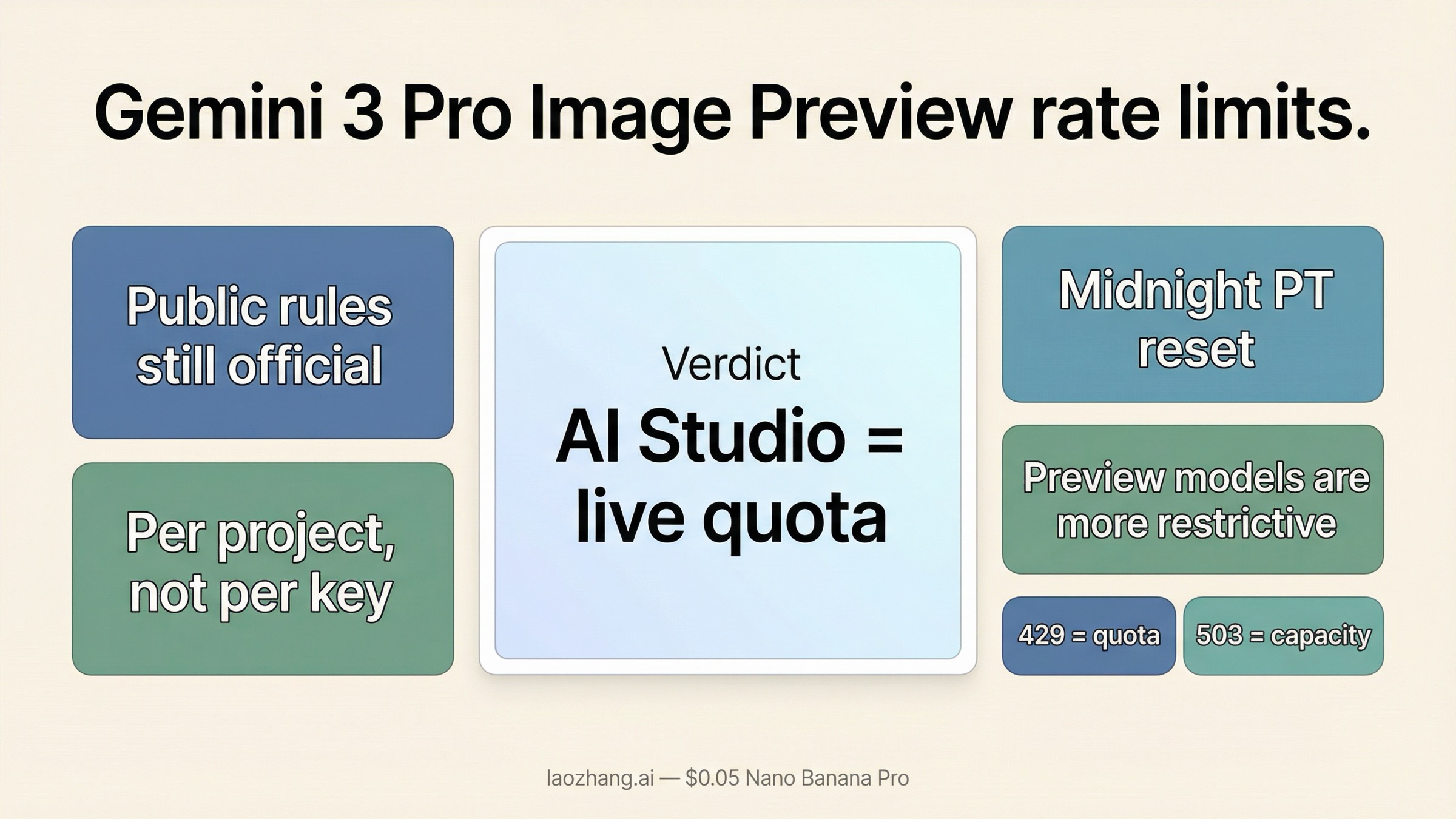
As of March 24, 2026, the safest answer is this: Gemini 3 Pro Image Preview still follows Google's public quota rules, but Google no longer exposes the full live numeric limit table publicly. The official docs still confirm the important parts that change your decisions: quotas are enforced per project, not per API key; image workloads can be limited by RPM, TPM, RPD, and IPM; preview models are more restrictive; and daily request quotas reset at midnight Pacific time. If you need the exact current numbers for your project, Google now points you to AI Studio, not to a public static table.
That sounds less convenient than the old screenshot-based quota posts, but it is actually the more useful operational answer. Once the live numbers moved behind sign-in, the question stopped being "What limit did some blog publish last month?" and became "What does my project show right now, and which bucket am I exhausting?" If you are already seeing 429 errors, the default next step is to confirm billing and the live AI Studio quota, then decide whether the problem is burst control, daily quota, or a low paid tier. If you are seeing 503 instead, treat that as a capacity problem, not a quota problem.
TL;DR
If you only need the fast version, use this table.
| Question | Current answer | Why it matters |
|---|---|---|
Where do the exact active gemini-3-pro-image-preview limits live? | In signed-in Google AI Studio | Google's public rate-limits page now tells developers to view active limits there |
| Is the quota per API key? | No, it is per project | Rotating keys inside one project does not increase throughput |
| Which quota buckets matter for image generation? | RPM, TPM, RPD, and IPM | Image jobs can fail because of image throughput, request bursts, or daily caps |
| When does the daily quota reset? | Midnight Pacific time | Global teams need to plan around the reset timezone, not their local timezone |
| Does enabling billing always fix 429? | No | Billing helps only if your current tier is the bottleneck; bursty workloads can still hit limits |
| Does 503 mean the same thing as 429? | No | 429 is quota exhaustion; 503 is temporary server overload or unavailable capacity |
Two caveats matter more than any copied screenshot.
First, Google still publishes the rule set, but not the full live numeric table for every project and model. That is why older posts continue to circulate exact values while the current official docs tell you to check AI Studio.
Second, Gemini 3 Pro Image Preview is still a preview model. Preview models are more restrictive on rate limits, more likely to change, and more likely to show capacity behavior that feels less stable than a mature general-availability lane.
What Google publicly confirms about Gemini 3 Pro Image Preview rate limits
The public official answer is spread across four Google pages rather than one neat quota matrix.
On the current Gemini API rate-limits page, Google says rate limits are measured across requests per minute (RPM), tokens per minute (TPM), and requests per day (RPD), with images per minute (IPM) applying to image-capable models. The same page says rate limits are enforced per project, not per API key, and that RPD resets at midnight Pacific time. It also says preview models have more restrictive limits than stable models.
That already answers three common mistakes:
- a new API key does not create a new quota pool inside the same project
- "my day resets at local midnight" is wrong unless you live in Pacific time
- a preview image model should not be treated like a stable long-term throughput promise
The next important piece is that Google no longer uses the public docs as the full live numeric source for online request quotas. The rate-limits page explicitly tells developers to view active rate limits in AI Studio. In other words, the public docs still define how the system works, but the exact current values for your project now live in the signed-in dashboard.
That change explains a lot of the confusion in search results. Some articles still quote exact per-model IPM or RPM numbers as if Google were publishing a universal public table. In reality, the official public surface is now more cautious. It explains the quota dimensions, the tier logic, and the reset rules, then sends you to AI Studio for the live values.
Pricing adds one more practical constraint. On the current Gemini Developer API pricing page, gemini-3-pro-image-preview is shown as a paid-only lane on the public pricing table. That matters because some 429 problems are still really billing-tier problems. If you assumed the model had a public free API lane, the public pricing page does not support that reading anymore.
Finally, Google is clear that the model is still recent and still preview-stage. The official release notes list Gemini 3 Pro Image Preview as launching on November 20, 2025, and the current models page keeps Nano Banana Pro in the preview image family while separately warning that Gemini 3 Pro Preview, the text model, shut down on March 9, 2026. That naming cleanup matters because a surprising amount of quota confusion starts with people mixing the retired text model and the current image model.
What those limits mean for real image workloads
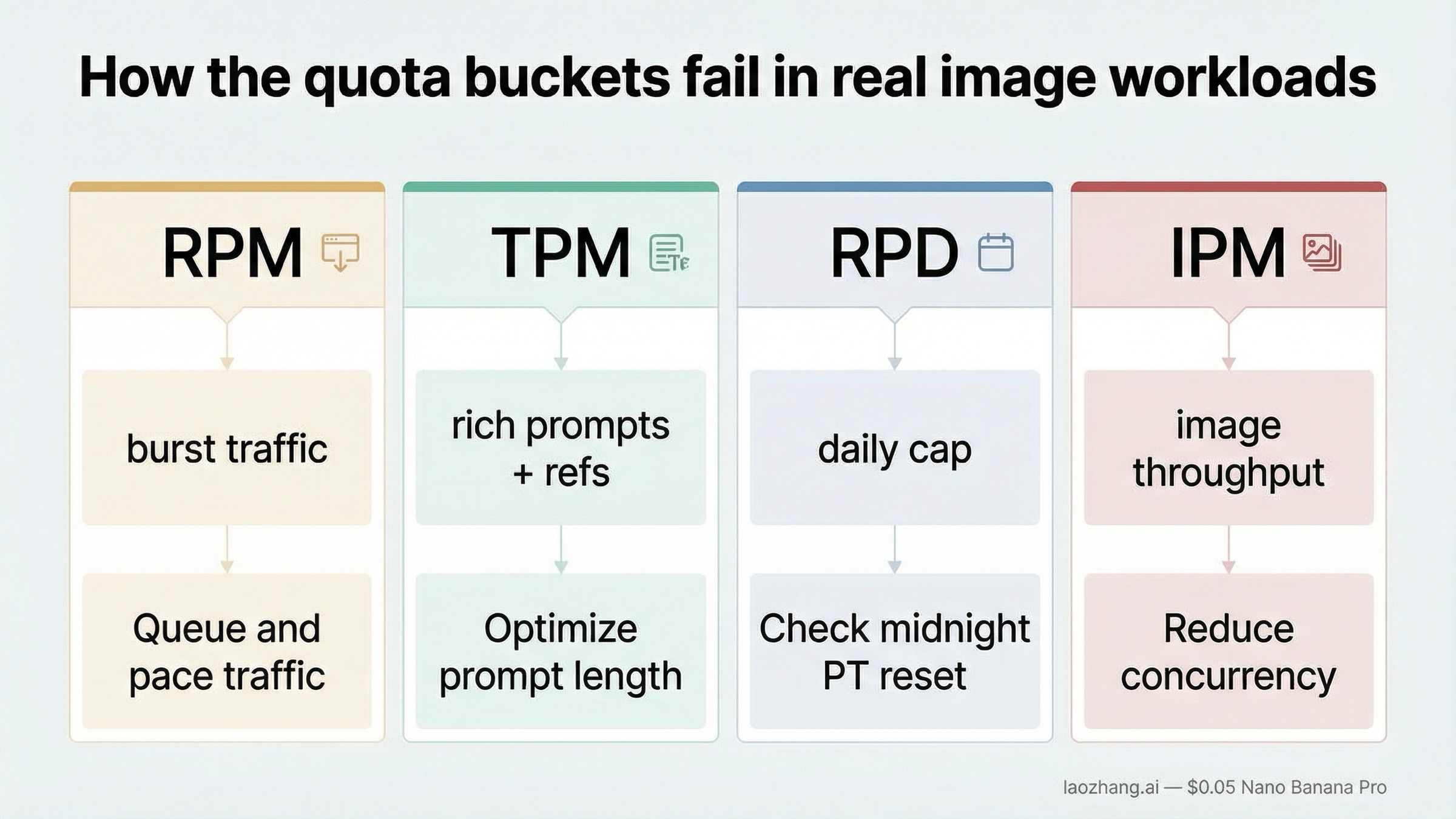
The quota labels are simple. The way they fail in real image systems is not.
RPM is the easiest one to understand: you sent too many requests too quickly. If your app turns one user action into multiple image calls, bursty front-end traffic can exhaust RPM long before your daily allowance looks scary. This is why a team can look at a dashboard and say "we still have quota left" while users are already getting 429s. They may still have daily headroom and still be exhausting the short-window request bucket.
TPM is easier to ignore until you add richer prompts, reference images, or larger multimodal context. Gemini image workflows are not just "one image equals one request." The text prompt, any input media, and the returned text parts all feed the token budget. If your pipeline does heavy prompt construction or multi-image editing, TPM can become the invisible limiter even when the request count looks moderate.
RPD is where teams get surprised during prototyping and internal demos. You can stay comfortably under your per-minute behavior and still burn through the daily cap if a QA team, design team, or batch process runs many generations across the same project. Because the reset happens at midnight Pacific, the "end of day" for your team may arrive in the middle of your own business day.
IPM is the most intuitive and the least forgiving for image workloads. It effectively answers: how many image generations can this project push through in the short term? Even when Google does not publish the full current table publicly, this is often the bucket that builders feel first. If your job is queue-driven visual generation, IPM is usually more actionable than raw RPM because it maps more directly to user-visible throughput.
That is why the most important planning rule is not "memorize one number." It is "design around the bucket that your product can exhaust first." For many image teams that means:
- queue requests instead of firing them in parallel
- smooth traffic bursts with worker pacing
- retry intelligently instead of retrying immediately
- separate offline generation from interactive generation
If the workload is non-interactive, Google's own rate-limits page is a clue that the Batch API may be the better lane. Google lists separate batch limits with their own request and token rules. That is a strong hint: do not spend your interactive quota budget on bulk jobs that could live in a batch pipeline.
If you need a cleaner mental model, think of Gemini 3 Pro Image Preview like this: the public docs tell you what kinds of buckets exist, AI Studio tells you how large those buckets currently are for your project, and your production architecture determines which bucket you run into first.
Why you can still hit 429 even after enabling billing
This is one of the most frustrating parts of the topic because enabling billing feels like it should end the conversation.
Sometimes it does. If your project was still operating under a very limited starting tier, linking billing can unlock a higher quota surface. Google's public rate-limits page also explains the current tier logic: higher tiers require cumulative spend and account age, and those tier upgrades are what increase the available limits over time.
The public tier rules are worth stating directly because they shape the answer more than most "429 fix" pages admit:
- Free means an active project or free trial
- Tier 1 starts after you set up and link an active billing account
- Tier 2 currently requires $100 in cumulative billing spend and at least 3 days since the first successful payment
- Tier 3 currently requires $1,000 in cumulative billing spend and at least 30 days since the first successful payment
That means "I enabled billing yesterday" and "I am on a mature higher-throughput tier" are not the same sentence. A lot of developers mentally skip that middle step and assume payment setup should immediately feel like production scale.
But billing is not a magic switch for three reasons.
First, billing does not change the fact that the quota is per project. If five workers, multiple test environments, and a live app all share the same project, they also share the same quota pool. A paid project can still be badly behaved if too many workloads hit the same pool at once.
Second, preview models remain more restrictive than stable ones. Even after moving to a paid tier, you are still dealing with a preview image lane whose quotas may stay tighter than you expect. The public docs say this directly, and it is exactly why older "just upgrade and you're done" advice ages badly.
Third, billing does not fix burst patterns. If your app sends many requests at once, the system may reject you because of the short-window bucket even though your monthly cost profile looks small. In other words, a paid tier can still fail a spiky architecture.
This is where community-reported quota tables need careful handling. You will still see forum posts, screenshots, and third-party guides quoting specific IPM or RPM values for different tiers. Those can be useful as rough context, but they are not the same thing as a live official guarantee for your project. The reliable workflow is:
- confirm billing status
- open AI Studio and read the live quota values for the project
- identify whether the problem is request burst, image throughput, or daily cap
- only then decide whether tier growth or architecture changes are actually required
If your real issue turns out to be cost rather than quota, the better next read is our current guide to Gemini 3 Pro Image Preview pricing or the more detailed cost-per-image breakdown. Rate-limit decisions and cost decisions are tightly linked for this model, so you usually need both answers together.
429 versus 503: how to tell a quota problem from a capacity problem
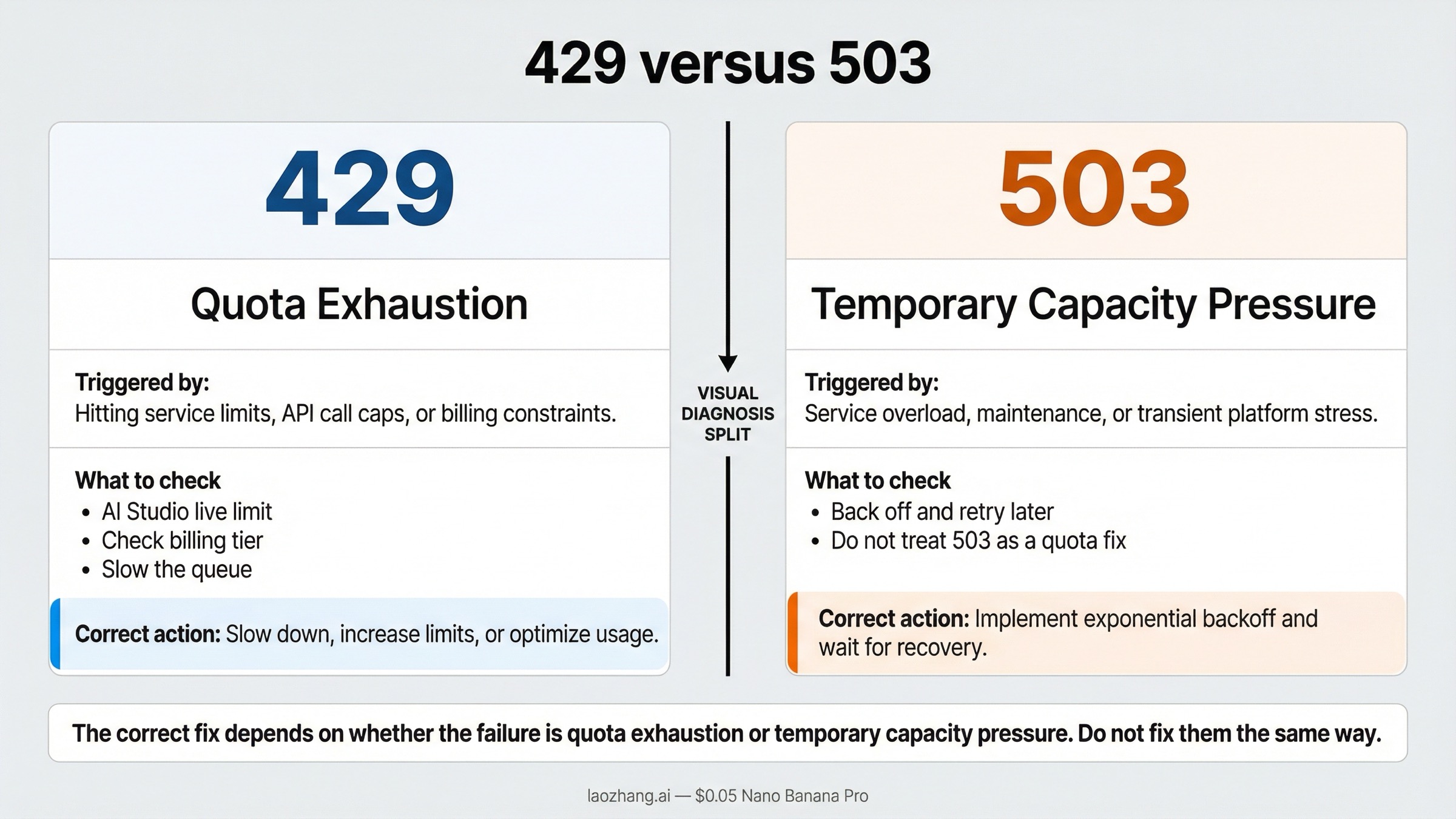
Google's own troubleshooting guide is very clear here:
- 429
RESOURCE_EXHAUSTEDmeans you exceeded a rate limit - 503
UNAVAILABLEmeans the service is temporarily overloaded or unavailable
That distinction should control your next action immediately.
When you get 429, ask:
- which bucket did we actually exhaust
- is the project on the right billing tier
- are we bursting too hard
- did we accidentally treat one project like a quota-free shared pool
When you get 503, ask:
- is the service temporarily overloaded
- should we back off and retry later
- do we need a fallback model or alternate provider for this workload
The expensive mistake is to respond to both errors the same way. Teams frequently waste time requesting quota increases for what is actually a 503 capacity incident, or they keep retrying a 429 in a tight loop as if patience alone will solve it.
For Gemini 3 Pro Image Preview specifically, this confusion happens often because preview image workloads can experience both pressure types in the same broader time period. A spiky workload might push you into 429, and a busy global traffic window might produce 503 around the same time. That overlap makes the logs feel messy unless you separate them early.
Use this table instead of guessing:
| Symptom | Likely cause | What to do next |
|---|---|---|
429 RESOURCE_EXHAUSTED after a burst of image requests | Project quota bucket exhausted | Check live AI Studio limits, slow the queue, and verify billing tier |
429 even though the daily quota looks fine | Short-window limit such as RPM or IPM | Reduce concurrency and add paced retries |
503 UNAVAILABLE or model is overloaded | Temporary service capacity issue | Back off, retry later, or switch lanes |
| Mixed 429 and 503 during peak periods | Both quota pressure and service pressure are possible | Diagnose each status separately instead of using one generic retry rule |
If the failure mode is mostly 503, go straight to our dedicated guide on Gemini 3 Pro Image 503 overloaded errors. If the failures are broader than one status code, the more general Gemini API error fix guide for 429, 400, and 500-class issues is the better next step.
What to do if Gemini 3 Pro Image Preview is too tight for your workload
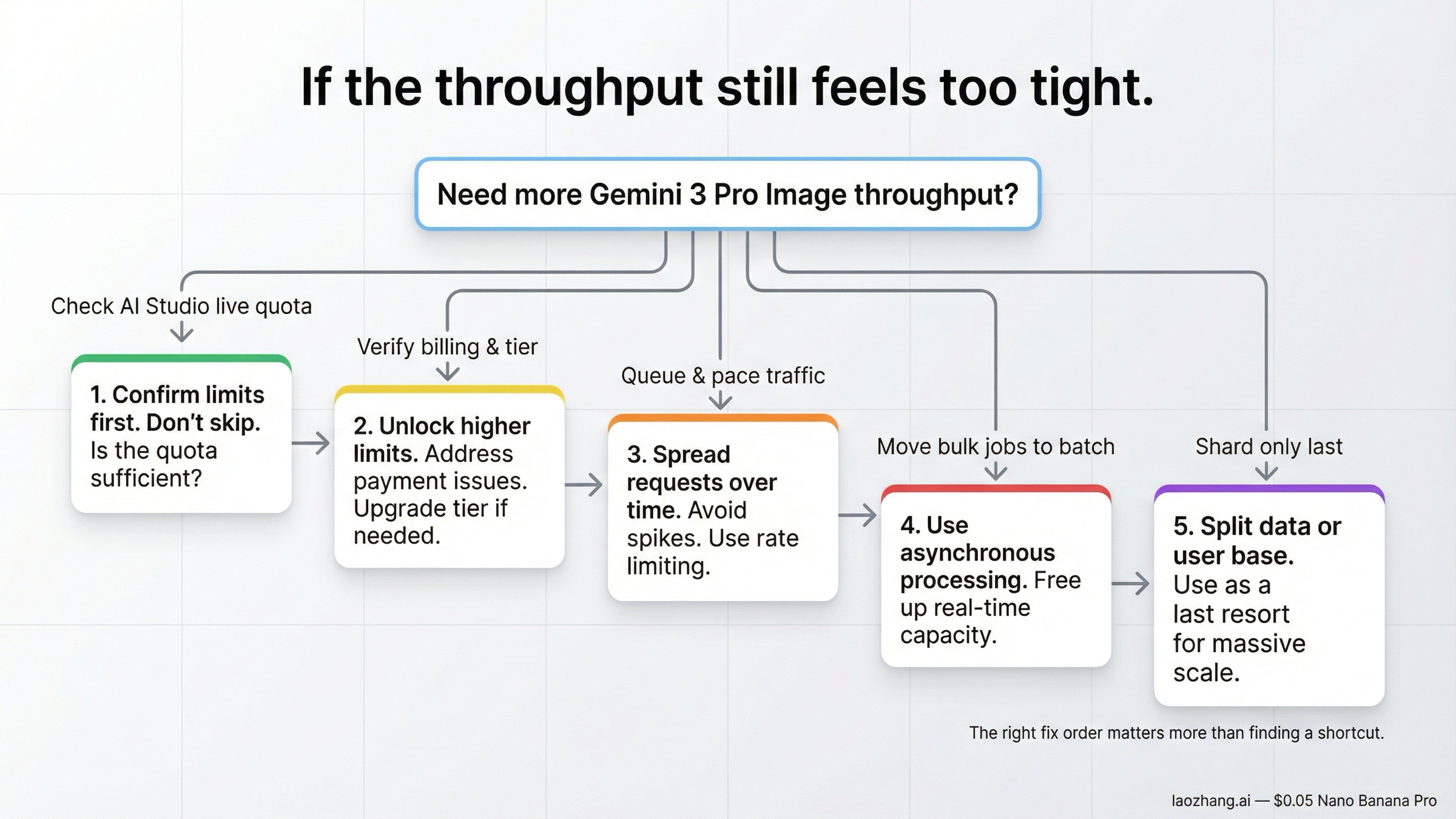
The right answer is usually more boring than people hope. It is rarely "find a secret trick." It is usually "pick the next scaling step in the right order."
Start here:
- Confirm the live quota in AI Studio. Do not optimize against an outdated screenshot or a third-party table.
- Check billing and tier status. If the project is still on an entry-level lane, the next improvement may be tier growth rather than code changes alone.
- Pace the workload. Queue requests, limit concurrency, and add exponential backoff instead of retry storms.
- Move non-interactive work out of the interactive lane. If the job is batch generation, use the batch-shaped route instead of spending interactive budget.
- Shard only after the first four are true. Project-level sharding is an architecture choice, not a first-line workaround.
That order matters because the common shortcut is the least educational one: create more API keys, add more workers, and hope the problem disappears. Inside one project, that usually just makes the pressure more chaotic.
If you are still early in the product cycle, another practical question is whether Gemini 3 Pro Image Preview is the right default lane for this workload at all. If the job is high-volume, cost-sensitive, and less dependent on premium text rendering or studio-quality layouts, the more efficient Gemini image lanes can be easier to scale. Our guide to the current Gemini image API free and low-cost paths is useful here because many rate-limit problems are really model-selection problems in disguise.
If you are committed to Gemini 3 Pro Image Preview because the work genuinely needs premium output, then the path is not mysterious:
- keep traffic smooth
- separate interactive and offline workloads
- monitor the real bottleneck bucket
- treat preview behavior as current reality, not as a bug in your expectations
That sounds less exciting than a hack, but it is how production systems stop falling over.
The current limits checklist I would use before shipping
Before calling this model production-ready, I would verify these seven items in order.
1. The exact live quota is recorded from AI Studio, not copied from a blog post.
If the number came from a screenshot someone saved weeks ago, it is already too weak for capacity planning.
2. The team knows the quota is per project.
If multiple apps, workers, or environments share the same project, they also share the same pain.
3. The team knows the reset timezone.
Midnight Pacific is a real product constraint, not a footnote.
4. Retries use backoff and jitter.
Immediate retries are the fastest way to turn a quota issue into a self-inflicted outage.
5. 429 and 503 are handled as different incidents.
Quota exhaustion and service overload should not share one generic "wait and pray" branch.
6. Interactive and non-interactive image jobs are separated.
Bulk generation belongs in a different path from user-facing generation.
7. The model choice still matches the workload.
If the workload is mostly high-volume utility generation rather than premium asset work, re-check whether Pro Image is the right lane before buying more throughput around it.
The best outcome of reading this article should not be "I memorized one quota number." It should be "I now know where the live number comes from, which rule is official, which error means what, and which next step is actually worth doing."
Bottom line
Gemini 3 Pro Image Preview rate limits are not fully opaque, but they are no longer fully public either. Google still publishes the important rules, and those rules are enough to make the right decisions: quotas are per project, preview models are more restrictive, daily quota resets at midnight Pacific time, 429 means quota exhaustion, and 503 means temporary overload. For the exact active numeric limit on your project, AI Studio is now the authoritative source.
That means the practical workflow in March 2026 is straightforward. If you hit a 429, confirm billing and the live AI Studio quota, then slow the workload or move up the right tier. If you hit a 503, back off and treat it as service pressure instead of a personal quota failure. And if you keep searching for one universal static number to memorize, you are solving the 2025 version of the product, not the 2026 one.