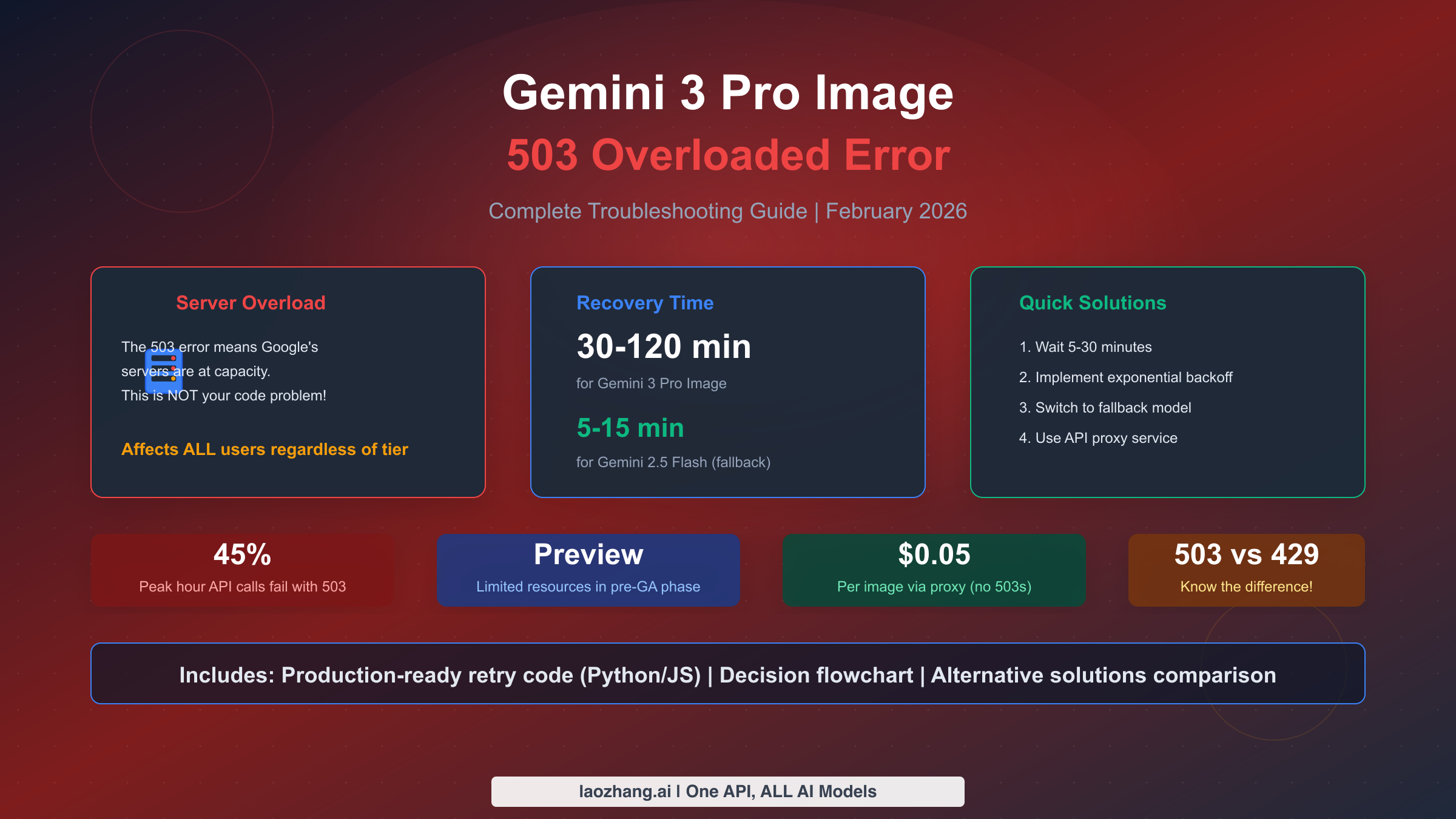
Gemini 3 Pro Image 503 "model is overloaded" errors indicate Google's servers are at capacity—this is a server-side issue, not your code or quota problem. For immediate relief, wait 5-30 minutes and retry with exponential backoff. Recovery typically takes 30-120 minutes for Gemini 3 Pro, or switch to Gemini 2.5 Flash which recovers in 5-15 minutes. Unlike 429 errors which indicate personal quota limits, 503 errors affect all users regardless of their tier or payment status. This comprehensive guide covers instant fixes, production-ready retry code, and decision frameworks to help you choose between waiting or switching to alternative services.
TL;DR - Quick Solutions Table
Before diving deep, here's what you need to know in 30 seconds. The 503 error is fundamentally different from quota-related errors, and understanding this distinction will save you hours of troubleshooting in the wrong direction. This table summarizes the recommended actions for different scenarios based on real-world experience from developers who have dealt with these errors in production environments.
| Situation | Recommended Action | Expected Recovery |
|---|---|---|
| First 503 error | Wait 5-10 min, retry with backoff | 70% recover within 30 min |
| Repeated 503s (>30% of calls) | Switch to Gemini 2.5 Flash | Immediate |
| Business-critical production | Use API proxy or multi-provider setup | Zero downtime |
| Peak hours (9-11 AM, 1-3 PM, 6-10 PM PT) | Schedule for off-peak | Avoid issue entirely |
The most important thing to understand is that upgrading your Google Cloud tier will not fix 503 errors. This is a server capacity issue on Google's end, not a limitation of your account. Many developers waste time requesting quota increases when the actual problem requires a completely different approach. The fundamental difference between 503 and 429 errors determines everything about your troubleshooting strategy.
When you encounter a 503 error, your first instinct might be to check your billing settings or quota allocation. Resist this urge. The 503 status code specifically indicates that the server understood your request and your authentication was valid, but the server simply cannot handle additional load at this moment. Your API key, billing status, and tier level are all irrelevant to this particular error condition.
The practical implications of this understanding are significant. Instead of spending time in the Google Cloud Console adjusting quotas or contacting support about account limits, you should immediately implement one of the retry or fallback strategies described in this guide. The time saved by understanding this distinction can mean the difference between resolving an incident in minutes versus hours.
If you're currently in a production incident, jump directly to the code solutions section below. Otherwise, continue reading to understand why this error occurs and how to build systems that handle it gracefully. The knowledge gained from understanding the root cause will help you make better architectural decisions for long-term reliability.
What Does 503 Overloaded Actually Mean?
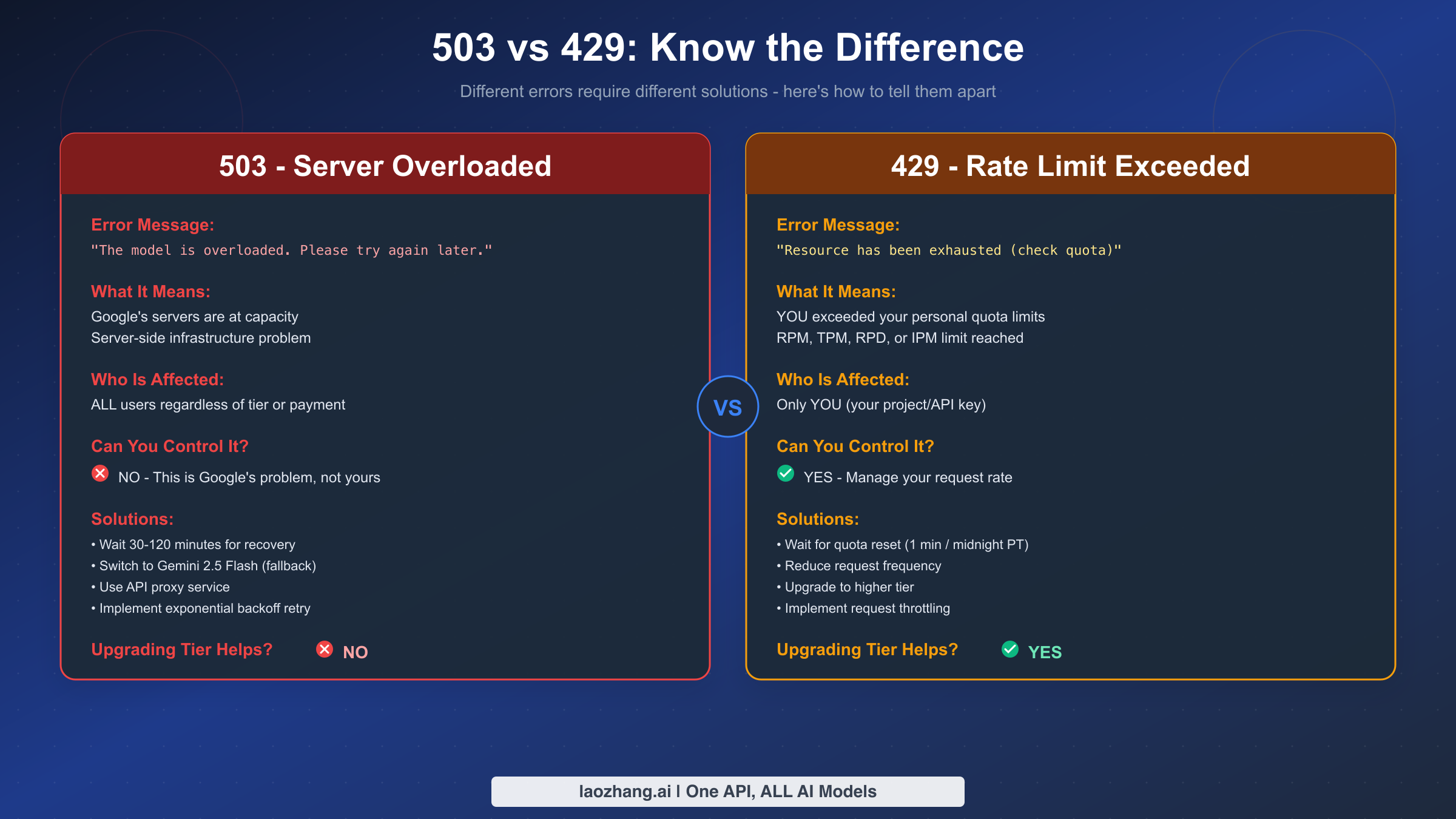
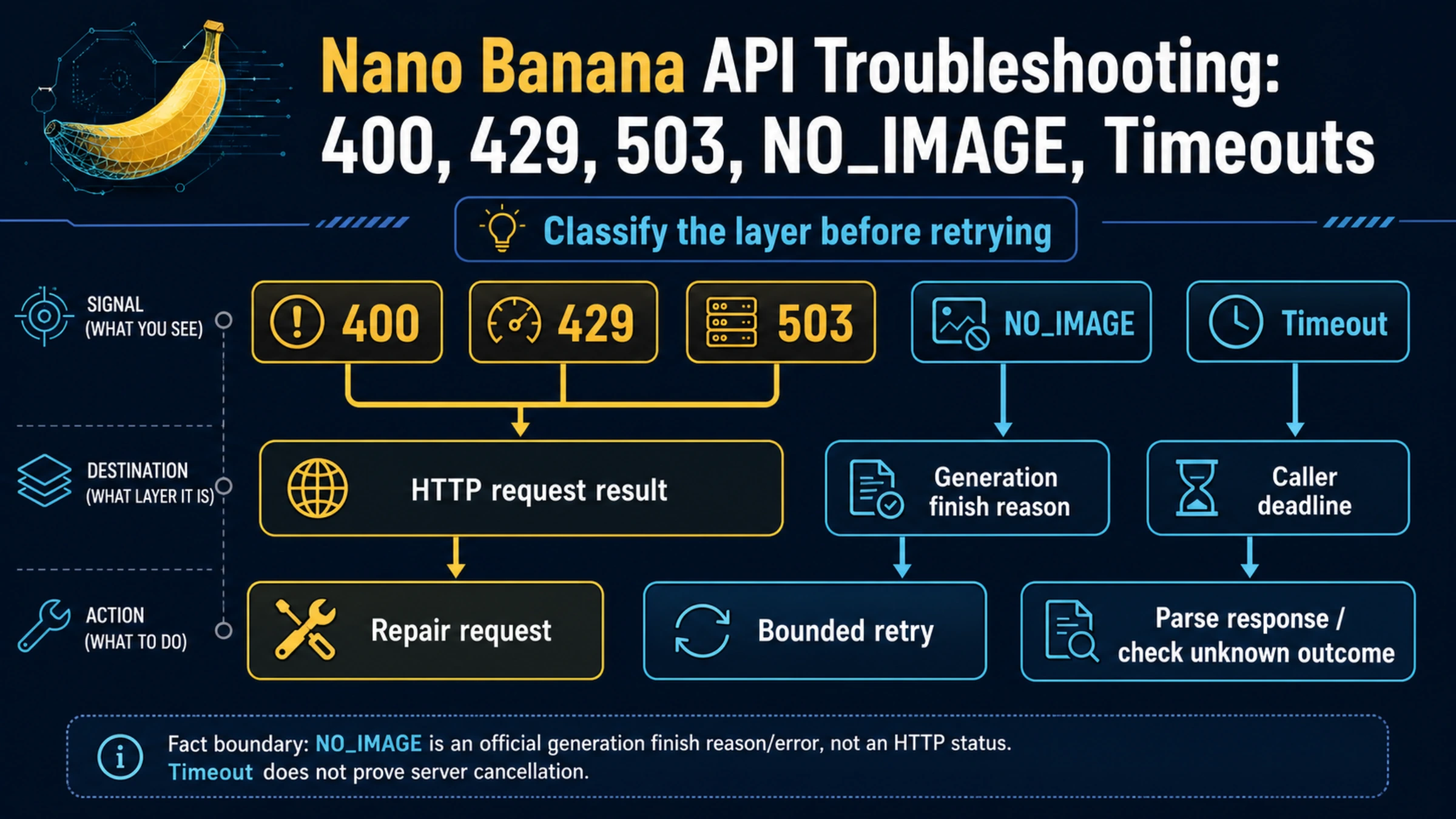
When Gemini 3 Pro Image returns the error message "The model is overloaded. Please try again later" with a 503 status code, it indicates that Google's inference servers have reached their maximum capacity. This is fundamentally different from the 429 "Resource exhausted" error that indicates you've exceeded your personal quota limits.
The 503 error represents a server-side infrastructure constraint that affects all users simultaneously, regardless of their payment tier or quota allocation. When Google's servers for Gemini 3 Pro Image reach capacity, even enterprise customers with the highest tier plans will encounter this error. This happens because Google allocates limited compute resources to Preview (pre-GA) models, prioritizing their consumer-facing products like the Gemini app and AI Studio web interface over API requests.
Understanding this distinction is crucial because it determines your troubleshooting approach. With a 429 error, you can solve the problem by upgrading your tier, reducing request frequency, or optimizing your token usage. With a 503 error, none of these solutions will help because the constraint is not on your account—it's on Google's infrastructure.
The technical explanation relates to how Google manages model serving capacity. Gemini 3 Pro Image, currently in Preview phase as of February 2026, runs on a shared pool of inference servers. When demand exceeds the allocated capacity for this model, the load balancer begins returning 503 errors rather than queuing requests indefinitely. This is actually a protective mechanism that prevents server crashes and ensures the system remains responsive for users whose requests do get through.
From the API response, you can identify a 503 error by checking both the HTTP status code and the error message. The response typically looks like this in the raw format:
json{
  "error": {
    "code": 503,
    "message": "The model is overloaded. Please try again later.",
    "status": "UNAVAILABLE"
  }
}
Some developers confuse 503 errors with 500 Internal Server Errors, which indicate actual bugs or crashes in Google's system. The 503 specifically means "Service Unavailable" and is typically temporary, whereas 500 errors might indicate deeper issues that require Google's engineering team to address. For 503 errors, your retry logic has a reasonable chance of succeeding once capacity becomes available.
For a detailed comparison of how to handle quota-related 429 errors differently, see our complete guide to fixing 429 errors.
The real-world impact of 503 errors extends beyond simple request failures. In production applications, these errors can cascade into user-facing issues, failed batch jobs, and SLA violations. Understanding the error's nature helps you communicate accurately with stakeholders. When a 503 occurs, you can confidently tell your team "This is a Google infrastructure capacity issue affecting all users, not something we can fix by changing our configuration." This clarity prevents wasted investigation time and sets appropriate expectations for resolution timelines.
The frequency of 503 errors has increased noticeably since Gemini 3 Pro Image gained popularity in late 2025. As more developers discovered the model's capabilities for high-quality image generation, demand began exceeding the capacity Google allocated to Preview-stage models. This pattern mirrors what happened with earlier Gemini releases and suggests the situation will improve once the model reaches General Availability status with increased infrastructure allocation.
Recovery Timeline and When to Expect Results
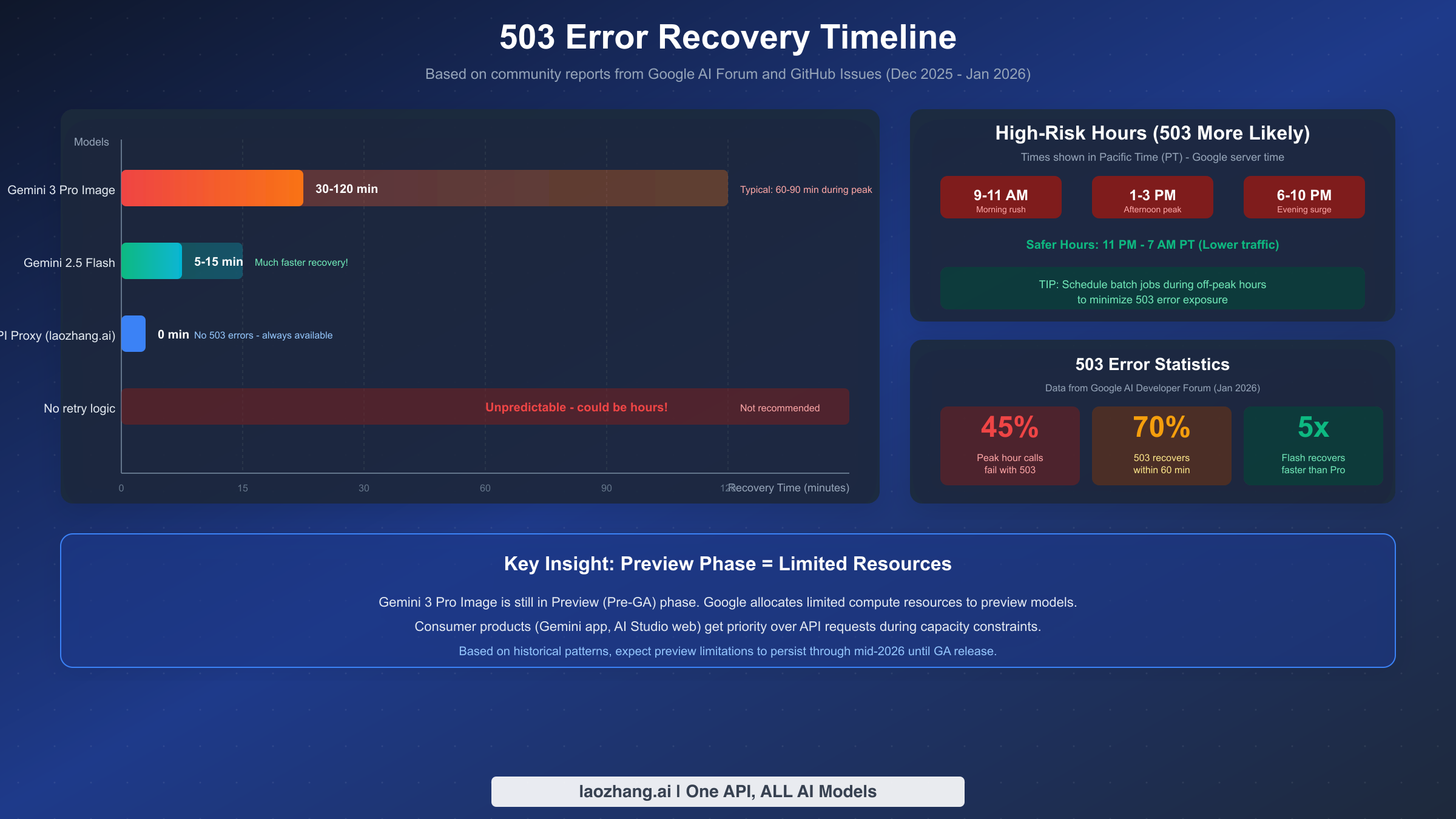
Based on community reports from Google AI Forum and GitHub Issues between December 2025 and January 2026, the recovery timeline for 503 errors varies significantly depending on the model and time of day. Understanding these patterns helps you set realistic expectations and make informed decisions about whether to wait or switch to alternatives.
Gemini 3 Pro Image typically recovers within 30 to 120 minutes during peak congestion periods. The wide range reflects the unpredictable nature of server capacity availability. During moderate congestion, recovery might happen in as little as 30 minutes, but during major capacity crunches—often coinciding with product launches or viral usage spikes—the wait can extend to two hours or more. Approximately 70% of 503 situations resolve within 60 minutes based on aggregated user reports.
In contrast, Gemini 2.5 Flash shows much faster recovery times, typically returning to normal within 5 to 15 minutes. This faster recovery occurs because Flash models have significantly more allocated capacity due to their lower computational requirements per request. When Gemini 3 Pro Image is experiencing 503 errors, switching to Gemini 2.5 Flash often provides immediate relief, though with some quality trade-offs for complex image generation tasks.
Peak hours when 503 errors are most likely to occur follow predictable patterns tied to global usage. In Pacific Time (Google's server time), the highest risk windows are 9:00-11:00 AM (morning business rush), 1:00-3:00 PM (afternoon peak), and 6:00-10:00 PM (evening consumer usage). These times correspond to overlapping business hours across North America and peak evening usage in Asia. Scheduling batch image generation jobs during off-peak hours (11:00 PM - 7:00 AM PT) can significantly reduce your 503 error exposure.
The statistics paint a concerning picture for production applications. During peak hours, approximately 45% of API calls to Gemini 3 Pro Image may fail with 503 errors. This high failure rate makes implementing robust retry logic not just helpful but essential for any serious application. Without proper error handling, nearly half of your image generation requests could fail during busy periods.
An important factor affecting recovery time is the Preview status of Gemini 3 Pro Image. As a pre-GA model, Google allocates limited infrastructure resources compared to stable production models. Based on historical patterns with previous Gemini model releases, Preview limitations typically persist for 6-12 months until the model reaches General Availability. Users should expect this level of 503 errors to continue through mid-2026 based on typical GA timelines.
For detailed information about rate limits and quotas that compound with these capacity issues, check out our detailed breakdown of Gemini rate limits.
Understanding the relationship between peak hours and your user base location helps you optimize request timing. If your primary users are in Europe, their evening usage (6-10 PM CET) overlaps with morning peak in Pacific Time (9-11 AM PT), creating a particularly challenging window. Conversely, if you can schedule image generation jobs to run during the overnight hours in California (11 PM - 7 AM PT), you'll encounter significantly fewer 503 errors simply due to lower overall demand on Google's servers.
The economic calculation for waiting versus switching becomes clearer with recovery time data. If your average image generation job takes 5 minutes and you're experiencing 503 errors that require 60 minutes to recover, the accumulated downtime cost may exceed the cost of using an alternative service. For businesses billing by the hour or operating under SLA commitments, this calculation often favors proactive fallback strategies over passive waiting.
Monitoring 503 error patterns over time can reveal useful trends. Some developers have reported that 503 errors cluster around major Google product announcements or updates, suggesting that internal testing and demonstrations may consume capacity that would otherwise serve API users. While this is speculative, tracking your error rates against Google's product calendar might help you anticipate and prepare for congestion periods.
Production-Ready Code Solutions
The most effective approach to handling 503 errors combines exponential backoff retry logic with intelligent fallback mechanisms. The following code examples are production-ready implementations you can adapt directly for your applications.
Python Implementation with Tenacity
The Python implementation uses the tenacity library for sophisticated retry handling, combined with manual fallback logic for model switching. This approach provides configurable retry behavior with jitter to avoid thundering herd problems when many clients retry simultaneously.
pythonimport google.generativeai as genai
from tenacity import (
    retry,
    stop_after_attempt,
    wait_exponential_jitter,
    retry_if_exception_type
)
from google.api_core.exceptions import ServiceUnavailable, ResourceExhausted
import logging
from datetime import datetime

# Configure logging for monitoring
logging.basicConfig(level=logging.INFO)
logger = logging.getLogger(__name__)

# Configure API
genai.configure(api_key="YOUR_API_KEY")

class GeminiImageGenerator:
    """
    Production-ready Gemini image generator with retry and fallback logic.
    Handles 503 overloaded errors with exponential backoff.
    """

    def __init__(self):
        self.primary_model = "gemini-3-pro-image"
        self.fallback_model = "gemini-2.5-flash"
        self.max_retries = 5
        self.base_wait = 30  # seconds
        self.max_wait = 300  # 5 minutes max

    @retry(
        retry=retry_if_exception_type((ServiceUnavailable, ResourceExhausted)),
        stop=stop_after_attempt(5),
        wait=wait_exponential_jitter(initial=30, max=300, jitter=10),
        before_sleep=lambda retry_state: logger.info(
            f"Retry attempt {retry_state.attempt_number} after 503 error. "
            f"Waiting {retry_state.next_action.sleep} seconds..."
        )
    )
    def _generate_with_retry(self, model_name: str, prompt: str):
        """Generate image with automatic retry on 503 errors."""
        model = genai.GenerativeModel(model_name)
        response = model.generate_content(prompt)
        return response

    def generate_image(self, prompt: str, allow_fallback: bool = True) -> dict:
        """
        Generate image with fallback support.

        Args:
            prompt: The image generation prompt
            allow_fallback: Whether to try fallback model on failure

        Returns:
            dict with 'success', 'model_used', 'response' or 'error'
        """
        start_time = datetime.now()

        # Try primary model first
        try:
            logger.info(f"Attempting generation with {self.primary_model}")
            response = self._generate_with_retry(self.primary_model, prompt)

            duration = (datetime.now() - start_time).total_seconds()
            logger.info(f"Success with {self.primary_model} in {duration:.1f}s")

            return {
                "success": True,
                "model_used": self.primary_model,
                "response": response,
                "duration_seconds": duration
            }

        except Exception as primary_error:
            logger.warning(f"Primary model failed after retries: {primary_error}")

            if not allow_fallback:
                return {
                    "success": False,
                    "model_used": self.primary_model,
                    "error": str(primary_error)
                }

            # Try fallback model
            try:
                logger.info(f"Attempting fallback with {self.fallback_model}")
                response = self._generate_with_retry(self.fallback_model, prompt)

                duration = (datetime.now() - start_time).total_seconds()
                logger.info(f"Fallback success with {self.fallback_model}")

                return {
                    "success": True,
                    "model_used": self.fallback_model,
                    "response": response,
                    "duration_seconds": duration,
                    "used_fallback": True
                }

            except Exception as fallback_error:
                logger.error(f"Both models failed: {fallback_error}")
                return {
                    "success": False,
                    "model_used": "both_failed",
                    "primary_error": str(primary_error),
                    "fallback_error": str(fallback_error)
                }

# Usage example
if __name__ == "__main__":
    generator = GeminiImageGenerator()
    result = generator.generate_image(
        "A serene mountain landscape at sunset with reflection in a lake"
    )

    if result["success"]:
        print(f"Generated using: {result['model_used']}")
    else:
        print(f"Generation failed: {result.get('error', 'Unknown error')}")
JavaScript/TypeScript Implementation
For Node.js applications, this implementation provides similar functionality with async/await patterns and configurable retry behavior.
typescriptimport { GoogleGenerativeAI } from '@google/generative-ai';

interface RetryConfig {
  maxRetries: number;
  baseDelayMs: number;
  maxDelayMs: number;
  jitterMs: number;
}

interface GenerationResult {
  success: boolean;
  modelUsed: string;
  response?: any;
  error?: string;
  usedFallback?: boolean;
  durationMs?: number;
}

class GeminiImageGenerator {
  private genAI: GoogleGenerativeAI;
  private primaryModel = 'gemini-3-pro-image';
  private fallbackModel = 'gemini-2.5-flash';
  private retryConfig: RetryConfig = {
    maxRetries: 5,
    baseDelayMs: 30000,  // 30 seconds
    maxDelayMs: 300000,  // 5 minutes
    jitterMs: 10000      // 10 seconds jitter
  };

  constructor(apiKey: string) {
    this.genAI = new GoogleGenerativeAI(apiKey);
  }

  private async sleep(ms: number): Promise<void> {
    return new Promise(resolve => setTimeout(resolve, ms));
  }

  private calculateBackoff(attempt: number): number {
    // Exponential backoff with jitter
    const exponentialDelay = Math.min(
      this.retryConfig.baseDelayMs * Math.pow(2, attempt),
      this.retryConfig.maxDelayMs
    );
    const jitter = Math.random() * this.retryConfig.jitterMs;
    return exponentialDelay + jitter;
  }

  private is503Error(error: any): boolean {
    return (
      error?.status === 503 ||
      error?.message?.includes('overloaded') ||
      error?.message?.includes('UNAVAILABLE')
    );
  }

  private async generateWithRetry(
    modelName: string,
    prompt: string
  ): Promise<any> {
    const model = this.genAI.getGenerativeModel({ model: modelName });

    for (let attempt = 0; attempt < this.retryConfig.maxRetries; attempt++) {
      try {
        const result = await model.generateContent(prompt);
        return result;
      } catch (error: any) {
        if (this.is503Error(error) && attempt < this.retryConfig.maxRetries - 1) {
          const delay = this.calculateBackoff(attempt);
          console.log(
            `503 error on attempt ${attempt + 1}. ` +
            `Retrying in ${(delay / 1000).toFixed(1)}s...`
          );
          await this.sleep(delay);
        } else {
          throw error;
        }
      }
    }

    throw new Error('Max retries exceeded');
  }

  async generateImage(
    prompt: string,
    allowFallback = true
  ): Promise<GenerationResult> {
    const startTime = Date.now();

    // Try primary model
    try {
      console.log(`Attempting generation with ${this.primaryModel}`);
      const response = await this.generateWithRetry(this.primaryModel, prompt);

      return {
        success: true,
        modelUsed: this.primaryModel,
        response,
        durationMs: Date.now() - startTime
      };
    } catch (primaryError: any) {
      console.warn(`Primary model failed: ${primaryError.message}`);

      if (!allowFallback) {
        return {
          success: false,
          modelUsed: this.primaryModel,
          error: primaryError.message
        };
      }

      // Try fallback model
      try {
        console.log(`Attempting fallback with ${this.fallbackModel}`);
        const response = await this.generateWithRetry(this.fallbackModel, prompt);

        return {
          success: true,
          modelUsed: this.fallbackModel,
          response,
          usedFallback: true,
          durationMs: Date.now() - startTime
        };
      } catch (fallbackError: any) {
        return {
          success: false,
          modelUsed: 'both_failed',
          error: `Primary: ${primaryError.message}, Fallback: ${fallbackError.message}`
        };
      }
    }
  }
}

// Usage
const generator = new GeminiImageGenerator('YOUR_API_KEY');
const result = await generator.generateImage(
  'A serene mountain landscape at sunset'
);

if (result.success) {
  console.log(`Generated using: ${result.modelUsed}`);
} else {
  console.error(`Failed: ${result.error}`);
}
The key implementation details worth noting in both examples include the use of jitter in the backoff calculation, which prevents synchronized retries from multiple clients hitting the server simultaneously. The fallback mechanism degrades gracefully to a faster-recovering model rather than failing completely. Comprehensive logging helps with debugging and monitoring in production environments.
For more information on handling the related 429 error type, see our 429 error troubleshooting guide.
The implementation patterns shown above follow industry best practices for handling transient failures. The exponential backoff with jitter prevents the "thundering herd" problem where multiple clients all retry at exactly the same moment, potentially overwhelming the server just as it's recovering. The jitter adds randomness to retry timing, spreading out the load and giving the server a better chance to stabilize.
Error logging in these implementations serves multiple purposes beyond debugging. Historical logs of 503 error frequency help you identify patterns, justify infrastructure investments to stakeholders, and provide data for post-incident reviews. Consider integrating these logs with your observability stack (Datadog, New Relic, or similar) to create dashboards that visualize error rates over time and correlate them with business metrics.
The fallback model selection deserves careful consideration for your specific use case. While Gemini 2.5 Flash provides faster recovery and better availability, the quality difference for complex image generation tasks can be noticeable. If your application generates marketing images or product visualizations where quality is paramount, you might prefer longer waits with retry logic over automatic fallback to a lower-quality model. Conversely, if you're generating thumbnails or placeholder images where speed matters more than perfection, aggressive fallback to Flash makes sense.
Testing your retry and fallback logic before production incidents is essential. Consider implementing a "chaos engineering" approach where you intentionally inject simulated 503 errors during testing to verify that your fallback mechanisms work correctly. Many teams discover bugs in their error handling only during actual outages, which is the worst possible time to learn that your retry logic has issues.
Decision Framework: Should You Wait or Switch?
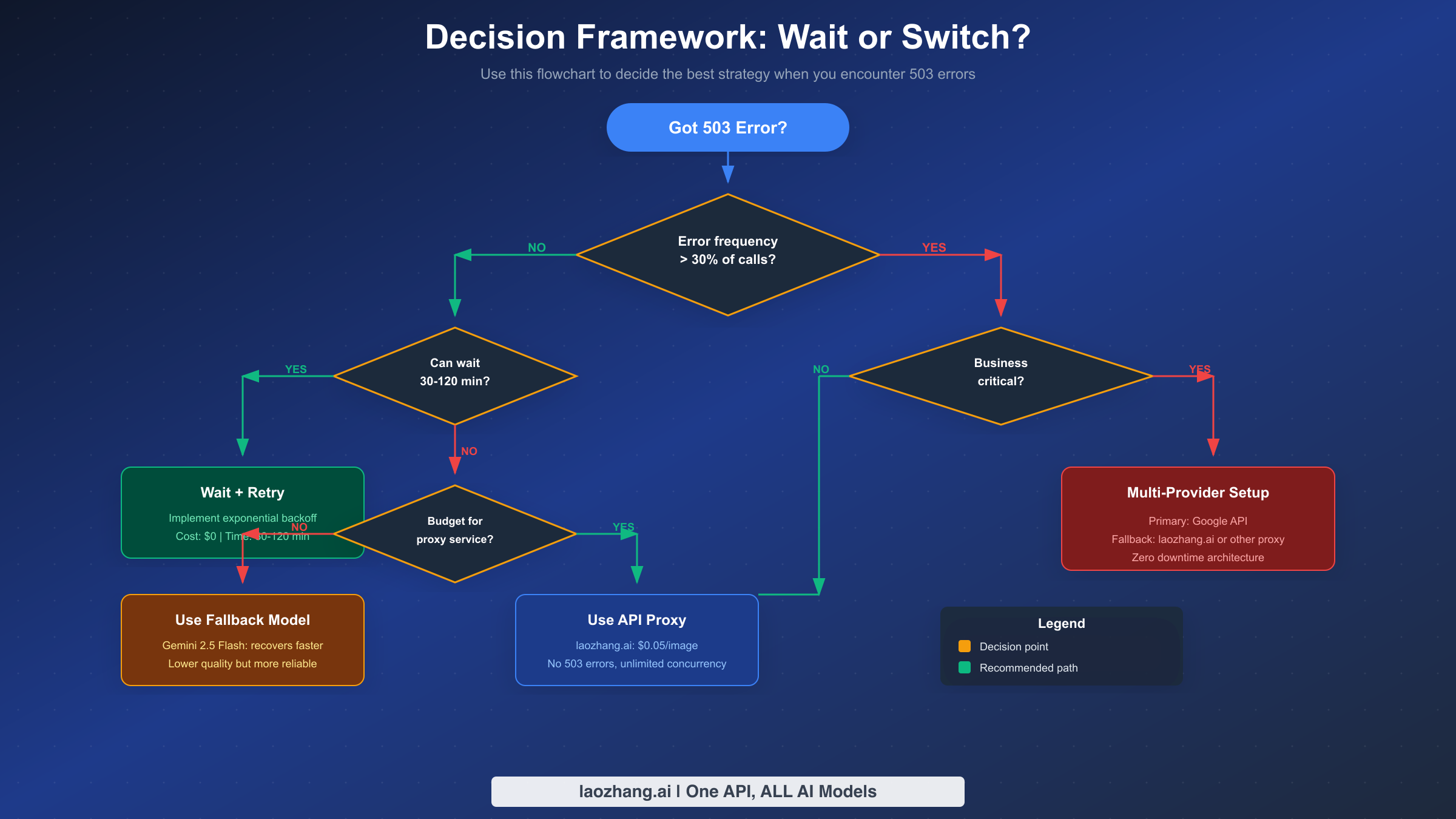
Making the right choice between waiting for recovery and switching to alternatives depends on your specific situation. This decision framework helps you evaluate your options systematically rather than making reactive choices during incidents.
The first question to ask is about error frequency. If fewer than 30% of your API calls are failing with 503 errors, you're experiencing moderate congestion that will likely resolve on its own. In this case, implementing exponential backoff retry logic is usually sufficient. Your requests will eventually succeed, and the temporary delays are acceptable for most applications. This approach costs nothing extra and maintains full use of Gemini 3 Pro Image's capabilities.
When error frequency exceeds 30%, the calculus changes significantly. At this failure rate, retry logic alone causes unacceptable delays, and you need to consider alternatives. The next question becomes whether your application can tolerate waiting 30 to 120 minutes for recovery. For batch processing jobs, scheduled tasks, or non-time-sensitive applications, waiting with retry logic remains a viable option. You're not paying for alternative services, and you maintain consistency in your image generation quality.
For applications that cannot tolerate extended delays—such as user-facing features, real-time image generation, or time-sensitive workflows—you need to evaluate your budget for alternative solutions. If budget constraints are significant, switching to Gemini 2.5 Flash as a fallback model provides relief. Flash models recover faster (5-15 minutes vs 30-120 minutes) and offer better availability during peak times. The trade-off is potentially lower quality for complex image generation tasks, but for many use cases this difference is acceptable.
If your application is business-critical and requires high availability, the recommended approach is a multi-provider architecture. This setup uses Google's API as the primary provider with automatic failover to a secondary service. Third-party API proxies like laozhang.ai offer unlimited concurrency without 503 errors at $0.05 per image, compared to Google's direct pricing of $0.134-0.234 per image. The cost premium provides reliability guarantees that Google's Preview-stage model cannot match.
The decision tree can be summarized in practical terms. For hobby projects and experiments, wait with retry logic. For production applications with flexible timing requirements, implement retry plus fallback to Flash. For business-critical applications requiring zero downtime, invest in multi-provider redundancy. The upfront investment in reliability infrastructure pays dividends every time a 503 outage occurs.
Real-world decision examples help illustrate these principles. Consider a marketing agency that generates social media images for clients. Their deliverable deadlines are typically measured in days, not minutes. For this use case, implementing retry logic with overnight batch processing during off-peak hours provides adequate reliability without additional cost. The occasional 503 error during working hours is an inconvenience, not a crisis.
Contrast this with an e-commerce platform that generates product images in real-time when sellers upload new listings. Each minute of delay directly impacts seller experience and platform competitiveness. For this use case, a multi-provider architecture with automatic failover justifies its cost through improved seller satisfaction and reduced support tickets. The proxy service fee is a predictable operating expense rather than an emergency cost.
A third scenario involves a mobile app that generates personalized avatars for users during onboarding. User patience during signup is limited, and any delay risks abandonment. Here, the aggressive fallback approach makes sense—start with Gemini 3 Pro Image for quality, but fail over to Gemini 2.5 Flash within seconds rather than minutes. The slight quality reduction is preferable to losing users who give up waiting.
Alternative Solutions for Zero Downtime
When evaluating alternatives to direct Google API access, it's important to consider multiple dimensions beyond just uptime. The following comparison provides an objective assessment of available options, helping you make informed decisions based on your specific requirements.
Option 1: Wait and Retry (Zero Cost)
The simplest approach involves implementing the retry logic shown earlier and accepting temporary delays during peak congestion. This option has no additional cost and maintains full API compatibility, but it cannot guarantee response times. It's best suited for applications where occasional delays of 30-120 minutes are acceptable, such as batch processing or offline content generation.
Option 2: Model Fallback to Gemini 2.5 Flash
Using Gemini 2.5 Flash as a fallback model provides faster recovery times while staying within Google's ecosystem. The Flash model typically recovers within 5-15 minutes compared to 30-120 minutes for Pro Image. Pricing for Flash is also lower. The trade-off is reduced image generation quality for complex prompts, though for many use cases the difference is negligible. This option works well when you need reliability improvement without additional service providers.
Option 3: Third-Party API Proxies
For developers who need zero downtime, third-party API proxies route requests through distributed infrastructure that maintains availability even when Google's direct endpoints are congested. Services like laozhang.ai offer Gemini 3 Pro Image access at $0.05 per image with unlimited concurrency and no 503 errors. The API format remains compatible with Google's SDK, requiring minimal code changes. You can find detailed documentation at docs.laozhang.ai.
The comparison table summarizes the key differences:
| Factor | Wait + Retry | Flash Fallback | API Proxy |
|---|---|---|---|
| Additional Cost | $0 | Lower per-image | ~$0.05/image |
| Recovery Time | 30-120 min | 5-15 min | Immediate |
| 503 Risk | High during peaks | Medium | None |
| Image Quality | Full Pro quality | Reduced | Full Pro quality |
| Code Changes | Retry logic only | Model switching | Endpoint change |
| Best For | Non-critical batch | Flexible quality needs | Zero-downtime production |
When making this decision, consider your actual usage patterns. If you generate fewer than 100 images per month and can tolerate occasional delays, the wait-and-retry approach is perfectly adequate. For applications generating thousands of images with uptime requirements, the proxy option's reliability premium is often worthwhile.
The transition from direct Google API access to a proxy service is straightforward from a technical perspective. Most proxy services maintain API compatibility with Google's SDK, requiring only an endpoint URL change and API key swap. This means you can test a proxy integration in your staging environment without significant code changes. Having this integration ready but inactive in production allows you to enable it rapidly during a prolonged 503 outage, providing an emergency escape hatch even if you don't use it routinely.
Security considerations deserve attention when evaluating third-party proxies. Your image generation prompts may contain sensitive business information, and the generated images might include proprietary designs or confidential content. Evaluate each proxy provider's data handling policies, encryption practices, and compliance certifications before committing. Reputable providers will clearly document their security practices and may offer enterprise agreements with additional protections.
Cost optimization across these alternatives requires ongoing monitoring. Track your actual 503 error rates and calculate the true cost of downtime in your specific context. Some teams find that their initial estimates were overly pessimistic—their actual 503 exposure might be lower than expected, making the wait-and-retry approach sufficient. Others discover that hidden costs of downtime (developer time spent firefighting, customer support tickets, reputation impact) far exceed the direct cost of alternative services.
For detailed pricing information on various API access options, see our Nano Banana Pro pricing guide.
Building Systems That Handle Failures Gracefully
Beyond immediate fixes, designing systems that anticipate and gracefully handle 503 errors prevents future incidents from causing business impact. This architectural perspective helps technical leaders plan for long-term reliability rather than firefighting individual outages.
The most robust architecture employs a multi-provider strategy with automatic health checking and failover. The primary provider (Google's direct API) handles requests during normal operation, while a secondary provider activates when the primary fails health checks. A typical implementation includes a circuit breaker pattern that opens after consecutive failures, routing traffic to the backup until the primary recovers.
A typical multi-provider setup uses Google's API as primary with a fallback to services like laozhang.ai for reliability. The circuit breaker tracks failure rates over a sliding window, automatically redirecting traffic when the failure threshold exceeds 30%. Once the primary provider passes health checks for a configured recovery period, traffic gradually shifts back. This approach provides zero-downtime operation while minimizing costs by preferring the primary provider when available.
Request queuing provides another layer of resilience for non-time-sensitive workloads. When 503 errors occur, requests enter a durable queue with automatic retry scheduling. Workers process the queue when capacity becomes available, ensuring no requests are lost. This pattern works particularly well for batch image generation where completion time is flexible but reliability is essential.
Monitoring and alerting complete the reliability picture. Track metrics including 503 error rate, average retry count before success, fallback activation frequency, and P95 response latency. Alert thresholds should trigger before user impact becomes severe—for example, alert when the 5-minute 503 rate exceeds 10% rather than waiting until it reaches 50%.
For applications considering rate limit optimization alongside 503 handling, understanding the tier system helps with capacity planning. See our guide on understanding rate limit tiers for detailed information.
The investment in resilient architecture pays compound returns. Each avoided outage preserves user trust, prevents revenue loss, and eliminates the stress of incident response. The Preview-stage limitations of Gemini 3 Pro Image make this investment particularly worthwhile—these 503 issues will persist until the model reaches General Availability, likely in mid-2026 based on typical release timelines.
Documentation and runbooks complete the operational picture. Even with automated failover, human operators need to understand what's happening when incidents occur. Create runbooks that explain how to interpret monitoring dashboards, when to manually intervene in automatic failover decisions, and how to communicate status to stakeholders. Include contact information for escalation paths and post-incident review procedures.
Consider the user experience implications of your resilience strategy. If your application automatically falls back to a lower-quality model during 503 events, should you notify users? Some applications display a subtle indicator ("Generated with alternative model") to set appropriate expectations. Others simply deliver results without explanation, prioritizing seamless experience over transparency. The right choice depends on your user base and their sensitivity to quality variations.
Long-term capacity planning benefits from treating 503 incidents as data points rather than just problems to solve. Track when they occur, how long they last, and what business impact they cause. This data helps justify infrastructure investments, informs vendor negotiations, and provides evidence for architectural decisions. A well-documented history of 503 incidents can support budget requests for reliability improvements that might otherwise be dismissed as over-engineering.
Frequently Asked Questions
Why am I getting 503 errors even though I haven't exceeded my quota?
The 503 error indicates server capacity limits on Google's infrastructure, which is completely separate from your account quota. While 429 errors mean you've exceeded your personal limits, 503 errors mean Google's servers for this model are at capacity for all users. Upgrading your tier or purchasing more quota will not resolve 503 errors because the constraint is on Google's end, not your account.
How long should I wait before retrying after a 503 error?
Start with 30 seconds for your first retry, then double the wait time for each subsequent attempt (exponential backoff). Add random jitter of 5-10 seconds to prevent synchronized retries from multiple clients. Most 503 situations resolve within 30-60 minutes during typical congestion, though peak periods may require waiting 2 hours or longer.
Will upgrading to a paid tier or enterprise plan fix 503 errors?
No. Unlike 429 errors which are resolved by tier upgrades, 503 errors affect all users regardless of payment tier. Google's Preview-stage models have limited capacity that doesn't scale with individual account tiers. Even enterprise customers experience 503 errors during peak congestion periods.
What's the difference between 503 and 500 errors from Gemini API?
A 503 error (Service Unavailable) indicates temporary capacity constraints—the server is healthy but overloaded. Your retry logic has good chances of succeeding once capacity becomes available. A 500 error (Internal Server Error) indicates an actual system malfunction or bug that may require Google's engineering team to address. For 500 errors, retrying may not help until the underlying issue is fixed.
Can I monitor when Gemini 3 Pro Image capacity is available?
Google provides a status page at aistudio.google.com/status that shows service health. However, this page shows general service status rather than real-time capacity for specific models. For more granular monitoring, implement your own health checking that makes periodic test requests and tracks success rates. This gives you application-specific visibility into capacity availability.
Is there an SLA for Gemini 3 Pro Image availability?
No. As a Preview (pre-GA) model, Gemini 3 Pro Image does not have official Service Level Agreements. Google does not guarantee uptime percentages or provide compensation for outages. Production applications requiring SLA guarantees should either use GA models or implement multi-provider redundancy with services that offer contractual uptime commitments.