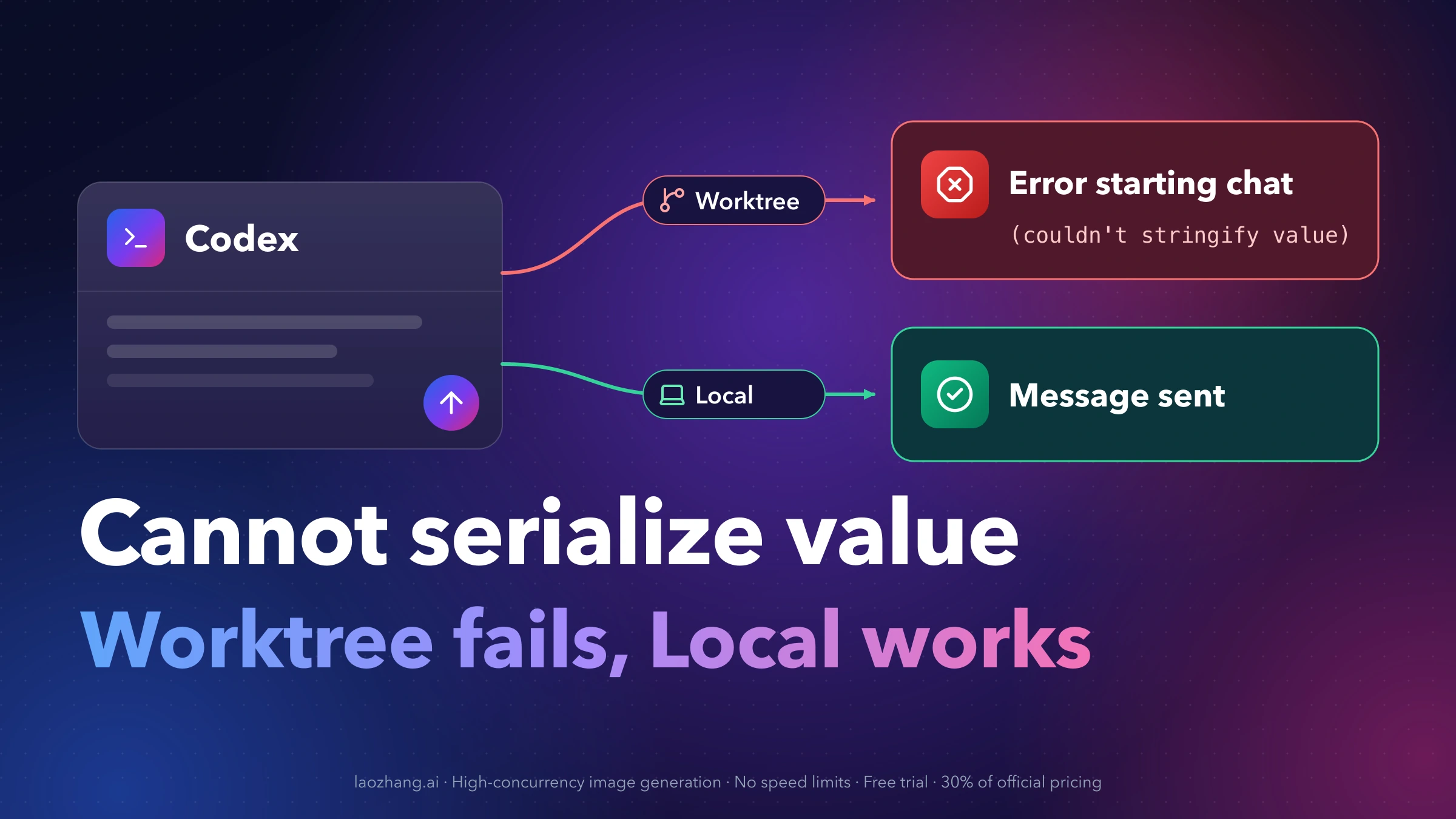
If Codex shows Error starting chat with Cannot serialize value: (couldn't stringify value) the moment you send the first message of a new chat, look at one setting before anything else: is Worktree (labeled New worktree in some builds) turned on? If it is, you are hitting a known bug in desktop build 26.1016.51333. Switch the new chat to Local and send the same message again. Users on macOS, Windows and Linux confirm that it goes through, with no restart needed.
Your repository, prompt, network and install are not the problem. The failure happens inside the app before any worktree is created, so restarting, reinstalling or choosing a different branch gives the same result. The price of Local mode is isolation: the agent edits your working folder directly. If you need a separate checkout, you can still get one several ways while the bug is open. They differ in how much isolation they give and in how many people have confirmed them.
As of October 22, 2026, the GitHub issue is open, OpenAI has not replied in it, and the official changelog lists no fix.
Send the message now: switch the new chat from Worktree to Local
- Copy your draft so you don't have to retype it.
- In the new chat view, find the Worktree option under the composer, where the official worktree docs place it. One user found the New worktree toggle through the gear icon in the new-chat settings instead.
- Turn it off, or select Local.
- Send the message again.
Multiple reporters confirm this in the issue, for example this macOS report and this one across three projects. The chat then starts in the project's own checkout, which the docs call the local checkout. Commit or stash anything you care about before the agent starts editing. If you want tighter limits on what it may write while it works directly in your folder, see Codex Sandbox and config.toml: Permissions Without Full Access.
Is it this bug? Check the mode, the version and the banner
Codex has been part of the ChatGPT desktop app since July 9, 2026, so reports call the same build "Codex desktop 26.1016.51333" or "ChatGPT desktop 26.1016.51333". It is the same app.
| Check | Matches this bug | Points to a different problem |
|---|---|---|
| Chat mode | Fails only with Worktree on; the same message sends in Local | Also fails in Local |
| Version | About shows 26.1016.51333 (build 21161). On Windows the installed package may read OpenAI.Codex_26.1016.6573.0_x64 instead | A different desktop version |
| Banner | Error starting chat with Cannot serialize value: (couldn't stringify value), right after the first message (not when you click New chat) | Error submitting message, or a different second line |
| Where | Desktop app on macOS, Windows or Linux, including Git projects on SSH or remote hosts | The VS Code extension |
| Message | Anything fails, even a plain hello with no attachments | Only certain prompts or files fail |
The Windows number mismatch catches people out. One Windows reporter's About dialog showed 26.1016.51333 while the package name read 26.1016.6573.0, and both refer to the same affected build.
If you read the desktop app's logs, the matching entry is [Composer] submit failed with errorName=TypeError and mode=worktree.
The VS Code extension had its own "Error creating chat" serialization reports in September 2026. That is a separate issue, and as of October 22 nobody in the desktop issue has reported this bug in the extension. If the whole app won't open on Windows, Failed to Start Codex App-Server on Windows: Fixes by Error Text is the better guide. If chats start but keep dropping, see Codex Keeps Reconnecting? Find the Cause Without Losing Your Task.
Why the error says "couldn't stringify value"
To start a Worktree chat, the app packs the request into a format it can pass between its own components. That packing step is called serialization. Part of the request is a copy of your first message as the editor's formatted document, and that copy is where it breaks.
Two users in the GitHub issue attached a debugger and caught the rejected value live, one on Windows and one on macOS. Both found it at openingPromptForHistory.document.attrs, a small attributes object (keys start and end) that the message editor creates without the usual JavaScript object prototype. The app's serializer accepts only plain objects, so it rejects it. It then tries to turn the bad value into text for the error message, and that fails too. That second failure is why the message says (couldn't stringify value) instead of naming the field.
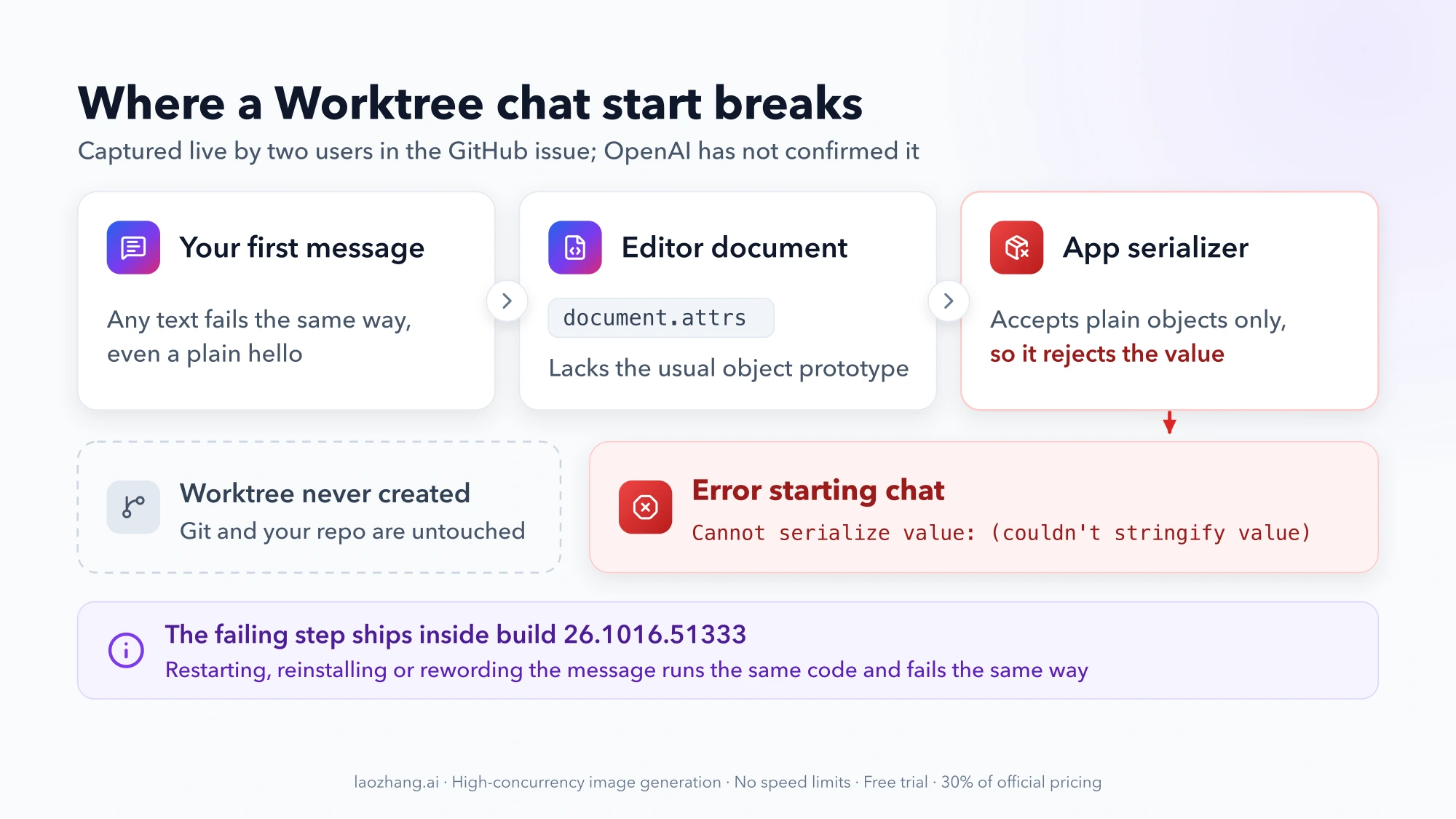
Two practical points follow from this:
- Every message triggers it. The editor produces that object for any first message, which is why rewording never helps.
- Restarts can't reach it. The faulty code ships inside the app, so it behaves the same after a restart or a reinstall.
Logs from other users show the failure happens while the app is sending the "create pending worktree" request, before anything touches Git. git worktree list still works and the repository is fine.
This diagnosis comes from the community, and OpenAI has not confirmed it. It is well supported, though: the two live captures came from different machines and operating systems, and one user who normalized that single field in memory got Worktree chats starting again until the next restart. That kind of patch means modifying a signed app while it runs. It is unsupported and disappears on restart, so it is not something to copy.
Restarts, reinstalls and other fixes that won't clear the error
Users in the issue have already tried these on 26.1016.51333, and none of them made a Worktree chat start:
- Restarting the app, including a full Cmd+Q and reopening several times.
- Reinstalling the macOS app. One user who reinstalled also checked the code signature, which passed, so this is not a corrupted install.
- Re-selecting the starting branch, for example picking
masteragain before sending. - Repairing saved project configuration (reported on Windows).
- Changing the message. Plain text with no attachments fails the same way.
- Granting Full Disk Access on macOS, per one report.
Two more ideas circulate in the thread but are not fixes. One user planned to roll back to 26.1013.40934 but had not done it or confirmed it worked, and no official download of older builds has turned up. Patching the app bundle or injecting code through a debugger only lasts until the next restart and modifies signed software. Stick with the options below.
Getting worktree isolation back while the bug is open
The bug sits on one path: starting a new chat with Worktree on. Creating a worktree through other paths still works on affected machines. Here are the options, with how far each had been confirmed as of October 22, 2026:
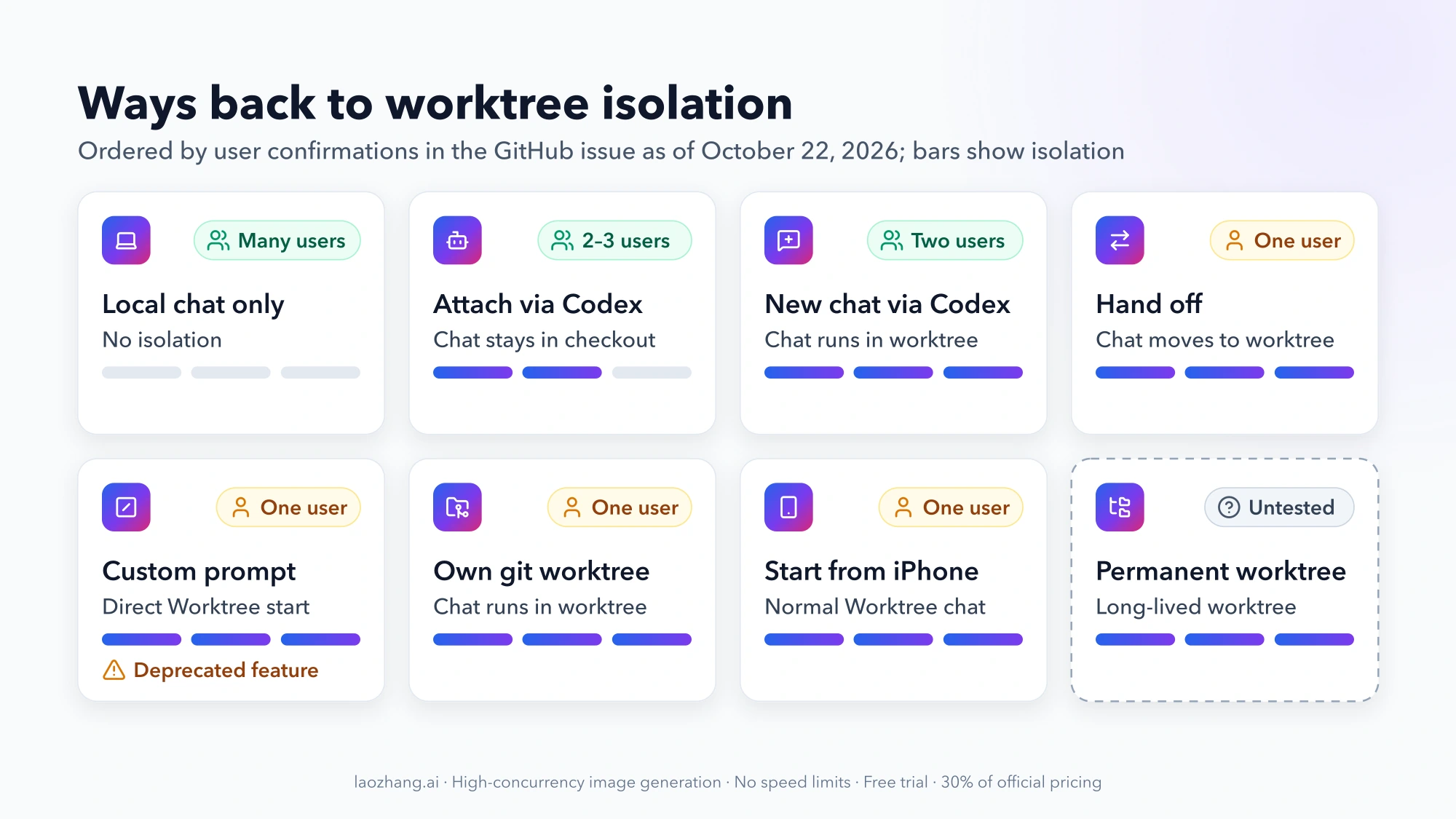
| Option | Isolation you get | Confirmed by | Platforms reported | Catch |
|---|---|---|---|---|
| Local chat only | None | Many users | macOS, Windows, Linux | Agent edits your checkout |
| Ask Codex, from any working chat, to start a new chat in a worktree | Managed worktree; the new chat runs in it | Two users, end to end | macOS (local project), macOS to a remote Linux project | You need a working chat to ask from |
| Start in Local, then Hand off to Worktree | Managed worktree; the chat moves into it | One user, end to end | macOS | First message runs in Local |
| Ask Codex in a Local chat to create and attach a managed worktree | Managed worktree attached to the chat | Two users end to end, a third reports the tool works | macOS, Windows | The chat itself stays in your checkout |
| Custom prompt command with Worktree still selected | Normal Worktree chat | One user | macOS app, remote Mac project | Custom prompts are deprecated and may stop working |
| Start the Worktree chat from ChatGPT on iPhone | Normal Worktree chat | One user | iOS controlling a Mac | Needs the mobile app connected to that computer |
| Permanent worktree from the sidebar menu | Long-lived worktree project | Nobody yet | — | Untested against this bug |
Your own git worktree add, then a Local chat there | Plain Git worktree | Manual creation worked for one user on an SSH host | Any OS with Git | Ignored files like .env don't come along |
To choose: if you want a chat that really runs in a fresh worktree, ask Codex to start a new chat in one, or use Hand off. Both have been confirmed on macOS. If you are on Windows and want something another Windows user has confirmed, ask Codex to create and attach the worktree. If you want a checkout that lasts for days and hosts several chats, create your own with Git, which takes the app's worktree logic out of the picture.
Ask Codex to start a new chat in a worktree
From any chat that works, such as a Local chat in the same project, ask Codex in plain words to start a new chat for this project in a worktree. Include what the new chat should do, for example:
Start a new chat for this project in a new worktree, and have it check that it is running inside that worktree before doing anything else.Two users verified this end to end. One did it on a local Mac project: the new chat started, answered, and confirmed it ran in a separate, clean worktree on a detached HEAD. The other did it from a Mac against a remote Linux project: a fresh managed worktree was created and the new chat finished its first turn inside it. Both reporters say Codex used its built-in tool for creating chats, and one notes that this path leaves out the editor history the serializer rejects.
Unlike the create-and-attach approach below, the new chat itself works in the worktree, so you don't have to keep pointing it at a path. Once it starts, ask it to run pwd and git status to confirm where it is.
Start in Local, then Hand off to Worktree
- Start the new chat in Local.
- Send a first message that doesn't change files, such as asking Codex to read the task and wait. This step is a precaution, since the first turn runs in your checkout.
- Select Hand off in the chat header and move the chat to Worktree.
- Confirm that the chat now works in the new worktree before giving it real tasks.
One macOS user verified this: the worktree was created, changes moved, the chat switched and its history was kept. No one had reported trying it on Windows or Linux as of October 22.
Per the official docs, Hand off moves both the chat and its code. Start from a clean checkout so you know exactly what traveled. Files covered by .gitignore don't move unless they are listed in a .worktreeinclude file at the repository root, which tells Codex to copy them into managed worktrees. That matters for .env and similar setup files.
Ask Codex to create and attach a managed worktree
From a working Local chat in the same project, send something like the prompt one macOS user used:
Create and attach a managed worktree for this task, then do all work in that checkout.Codex calls its built-in worktree tool, and the new worktree shows up attached to the chat. A Windows user tested the same approach end to end with a clean result. The catch is that the chat itself stays in your original checkout. Every later instruction has to point at the worktree path Codex returned. Check git status in your own folder now and then to confirm nothing landed there. Dependencies and running services are not set up in the new worktree.
Managed worktrees live in $CODEX_HOME/worktrees by default, which you can change under Settings > Worktrees > Worktree root. They start on a detached HEAD, and the app keeps the 15 most recent by default, saving a snapshot before it deletes older ones. Commit work you want to keep to a branch.
Use a custom prompt command (stopgap)
This keeps the normal Worktree composer, so the chat starts in Worktree mode as usual. One user confirmed it with the Mac app working on a remote Mac project:
- On the computer running the app, create
~/.codex/prompts/worktree-start.mdcontaining a single line such asWork in the isolated worktree created for this chat. Follow the request below. - Reload the app window so it picks up the file.
- Keep Worktree selected and send
/prompts:worktree-startfollowed by your request, for example/prompts:worktree-start Reply OK; do not change any files.
The reporter's reading of the app's code explains why it works. When a custom prompt expands, the app leaves the original editor document out of the request, so the rejected object never reaches the serializer. Treat this as a stopgap: OpenAI deprecated custom prompts on January 22, 2026 in favor of skills. They still worked for this user on 26.1016.51333, but they could disappear in any update.
Start the Worktree chat from ChatGPT on iPhone
The ChatGPT mobile app can start, guide and review Codex worktree chats on a connected computer. One user reports that a Worktree chat started from the iOS app on the same affected Mac worked. It's a single report, but if your phone is already connected it costs one try.
Permanent worktree: official feature, untested against this bug
The docs describe creating a permanent worktree from the three-dot menu on a project in the sidebar. It appears as its own project, is never deleted automatically and can host several chats. As of October 22, nobody had reported whether it avoids this bug. If you try it, start chats inside that new project with Local selected. The failing step is starting a chat with Worktree on, and a Local chat in the permanent worktree's project shouldn't need it. That reasoning hasn't been confirmed, so post your result in the issue either way.
Create your own worktree with git worktree add
This is the most predictable option because Git does the work and the app only sees an ordinary folder:
# from your main checkout
git worktree add ../myapp-fix -b fix/my-task
# ignored setup files don't come along; copy what you need
cp .env ../myapp-fix/
Add ../myapp-fix as a project in Codex and chat there in Local mode. On an affected Windows setup working against an SSH-connected Linux host, one user created a worktree this way (with --detach) without problems.
Two rules from Git and the Codex docs apply. First, .worktreeinclude only works for worktrees the app creates, not ones you make on the command line, so copy .env and similar files yourself. Second, a branch can be checked out in only one worktree at a time, so pick a branch that isn't open in your main checkout. When you are done:
git worktree remove ../myapp-fix
git branch -d fix/my-task
Has OpenAI fixed "Cannot serialize value"? Status as of October 22, 2026
Not yet, as far as public information shows:
- Issue #55744 is open with the labels bug, app and session, 63 comments and 145 reactions. No OpenAI team member has replied in the thread.
- Separate reports for Linux (#55823) and Windows (#55827) are also open.
- The official changelog ends at Codex app 26.1007 from October 8. It has no entry for 26.1016 and no fix.
The timing points to the October 21 update. One Windows user's logs show Worktree chats starting normally on October 20 under the previous package (26.1013), then the first matching error on October 21 under the new one. That makes a regression in 26.1016 likely, but nobody has tested an older build side by side to prove it.
To know when the fix has reached you:
- Check whether About shows a version newer than 26.1016.51333, or whether the changelog has a new Codex app entry.
- In a scratch repository, start one Worktree chat with a throwaway message like
hello. - If it starts, go back to your usual workflow. If you see the same banner, stay with the workaround and post the new version number in the issue.
Reporting it in a way that helps
Use Feedback in the app or type /feedback in a chat. You get a feedback ID. In #55744, post that ID along with your app version, OS and chat mode (Worktree or Local), as several reporters did. A comment with those four details gives engineers more to work with than another "+1".
Questions about the Codex Worktree serialization error
Does "Cannot serialize value" affect the Codex CLI or the VS Code extension?
For the CLI, one user reports that codex-cli still works. The CLI has no desktop composer, so it doesn't go through the failing step. For the VS Code extension, nobody in the issue had reported this bug as of October 22. The extension's September "Error creating chat" serialization problem is a different issue.
Is my Git repository or worktree setup broken?
No. The error happens before the app asks Git for anything. Affected users report that git worktree list works and that creating worktrees by hand or through Codex's built-in tool succeeds.
Can I roll back to 26.1013 to get Worktree mode back?
There is no supported way to do that. One user planned to downgrade to 26.1013.40934 but hadn't done it or confirmed it worked, and no official download for older builds turned up. The workarounds above are safer than an unverified downgrade.
Do SSH and remote projects hit the same error?
Yes. Reports include a Windows app working on an SSH-connected Linux host and a Mac working on a remote host. Local mode works there too. On remote projects, one user created a worktree with git worktree add on the host, and another got a new worktree chat running by asking Codex to start it.