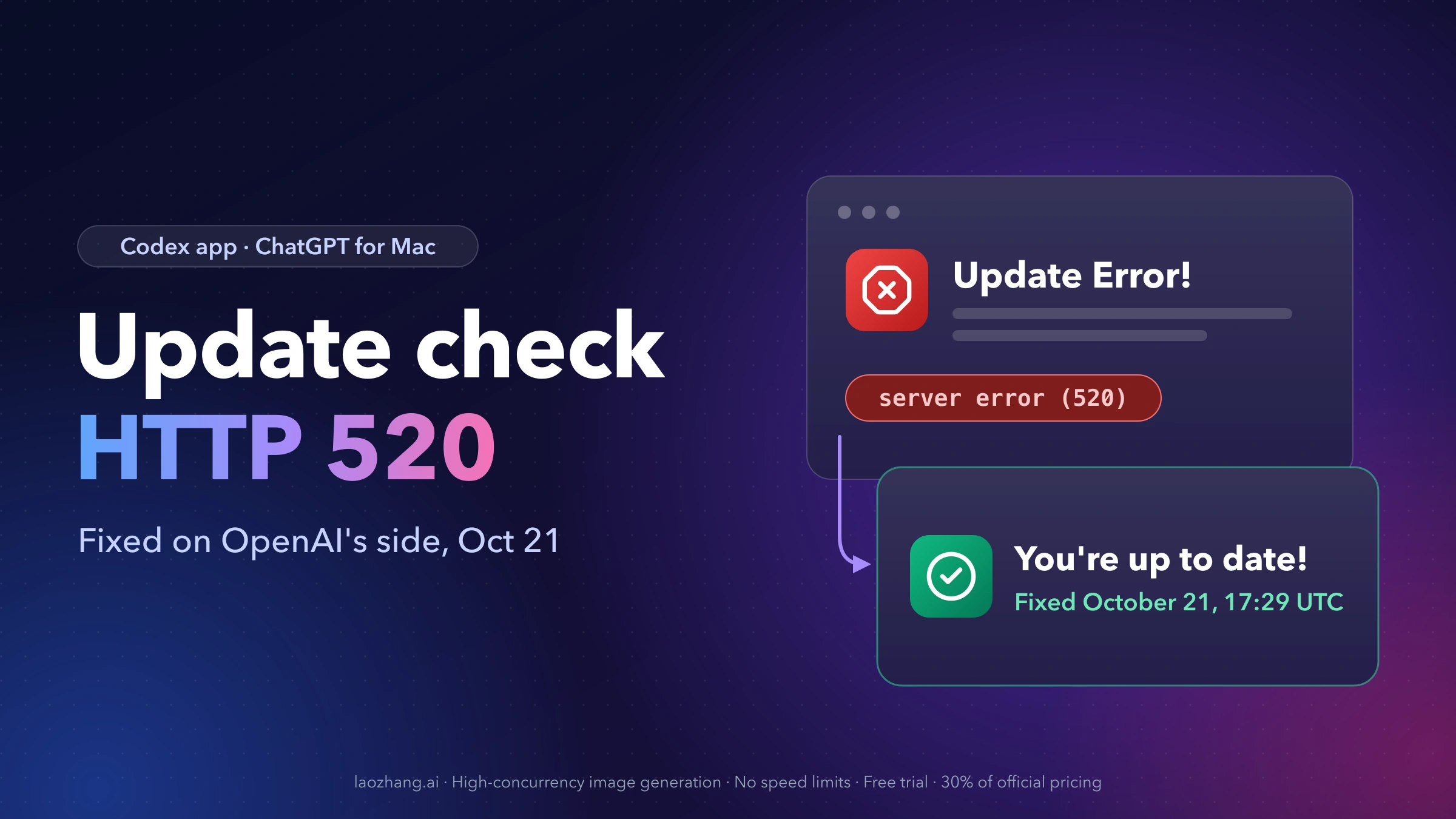
If ChatGPT → Check for Updates on your Mac answers with "Update Error! An error occurred in retrieving update information. Please try again later.", and you found SUSparkleErrorDomain Code=2001 with server error (520) for an appcast URL in a log or on GitHub, the fault was on OpenAI's side, not your Mac. The app's update feed at updates.oaistatic.com returned HTTP 520 to many Macs from the night of October 13, 2026 until an OpenAI engineer marked it fixed on October 21, 2026, at 17:29 UTC in openai/codex issue #53891. The fix was made on the server, so no new app build is needed to get it.
What to do now:
- Quit the app completely (ChatGPT → Quit ChatGPT or ⌘Q, not just closing the window), reopen it and run Check for Updates again.
- If the same error comes back, open Settings → General and look for "In-app updates: Managed". If it is there, your organization has turned updates off and only your admin can change that.
- If there is no Managed row, install the official build over your current copy and compare your version with OpenAI's release feed (steps below).
The app is the one many people still call the Codex app: since July 2026 Codex lives inside the ChatGPT desktop app, so the menu bar says ChatGPT while macOS still identifies it as com.openai.codex.
Is the Codex HTTP 520 update error fixed? Yes, on October 21, 2026
OpenAI's Robbie Ostrow wrote on issue #53891 at 16:04 UTC on October 21, 2026: "We've tracked down the issue and will have a fix out shortly." At 17:29 UTC he followed with "This is fixed!" and closed the issue as completed. One reporter had already confirmed "The update issue was fixed for me" at 17:22 UTC, hours before the next app release (26.1016.61520) appeared in the feed at 01:16 UTC on October 22. That order is why the fix counts as server-side: checks started working on builds that were already installed.
How the incident unfolded:
| Date (2026, UTC) | What happened |
|---|---|
| Night of October 13 | First failed checks noticed by users |
| October 14, 06:42 | Issue #53891 opened; duplicates #54144, #54296, #54364 and #54392 were later folded into it |
| October 14–21 | Reports on app builds 26.1007.30912 through 26.1016.51333, on macOS 15.2 up to 27.0.1, all on Apple Silicon Macs |
| October 21, 16:04 | OpenAI: "We've tracked down the issue" |
| October 21, 17:29 | OpenAI: "This is fixed!"; issue closed |
As of 01:45 UTC on October 22, 2026, nobody had commented on the closed issue and no new openai/codex issue mentioning 520 had been opened. OpenAI has not said what broke, and nobody has confirmed whether every affected Mac recovered without doing anything. If your check still fails, work through the steps further down instead of waiting.
Is it your Mac? Match the dialog to the cause
The October failure has a specific fingerprint. The dialog alone is generic: Sparkle, the updater framework the Mac app uses, shows the same "error occurred in retrieving update information" text for several fetch problems, and the dialog never shows an HTTP code. Use the dialog, the Settings screen and, if you have it, the log line together:
| What you see | Most likely cause | What to do |
|---|---|---|
"An error occurred in retrieving update information", with Code=2001 and server error (520) for updates.oaistatic.com/codex/app/appcast in the log | The October 13–21, 2026 update-feed outage | Fixed on the server. Quit fully and check again |
| The same dialog, and Settings → General shows "In-app updates: Managed" and "Your organization has turned off in-app updates." | Your workspace admin disabled the built-in updater | Ask your admin; new versions come through your company's device management |
| "The update is improperly signed and could not be validated" | A signature check on the downloaded update failed (open issue #28369) | A different problem. Install the official build; never switch off signature checks |
| Your Mac runs macOS 12 or older and never gets a new version | Current builds list macOS 13.0 as the minimum (see #38022) | Update macOS first; the feed marks these builds as requiring 13.0 |
| A large update download keeps starting over on a weak connection | The update archive restarts from zero on each retry (open issue #51903) | Retry on a stable connection or install the official build directly |
| The update problem is on Windows | Windows apps update through separate channels such as Microsoft Store or Intune; every 520 appcast report came from Macs | Not this outage. If the Windows app won't start at all, see Failed to Start Codex App-Server on Windows |
One detail trips people up: a managed workspace can block updates while Check for Updates stays in the menu. OpenAI's Manage app updates page says to trust the Managed indicator in Settings, not the presence of the menu item.
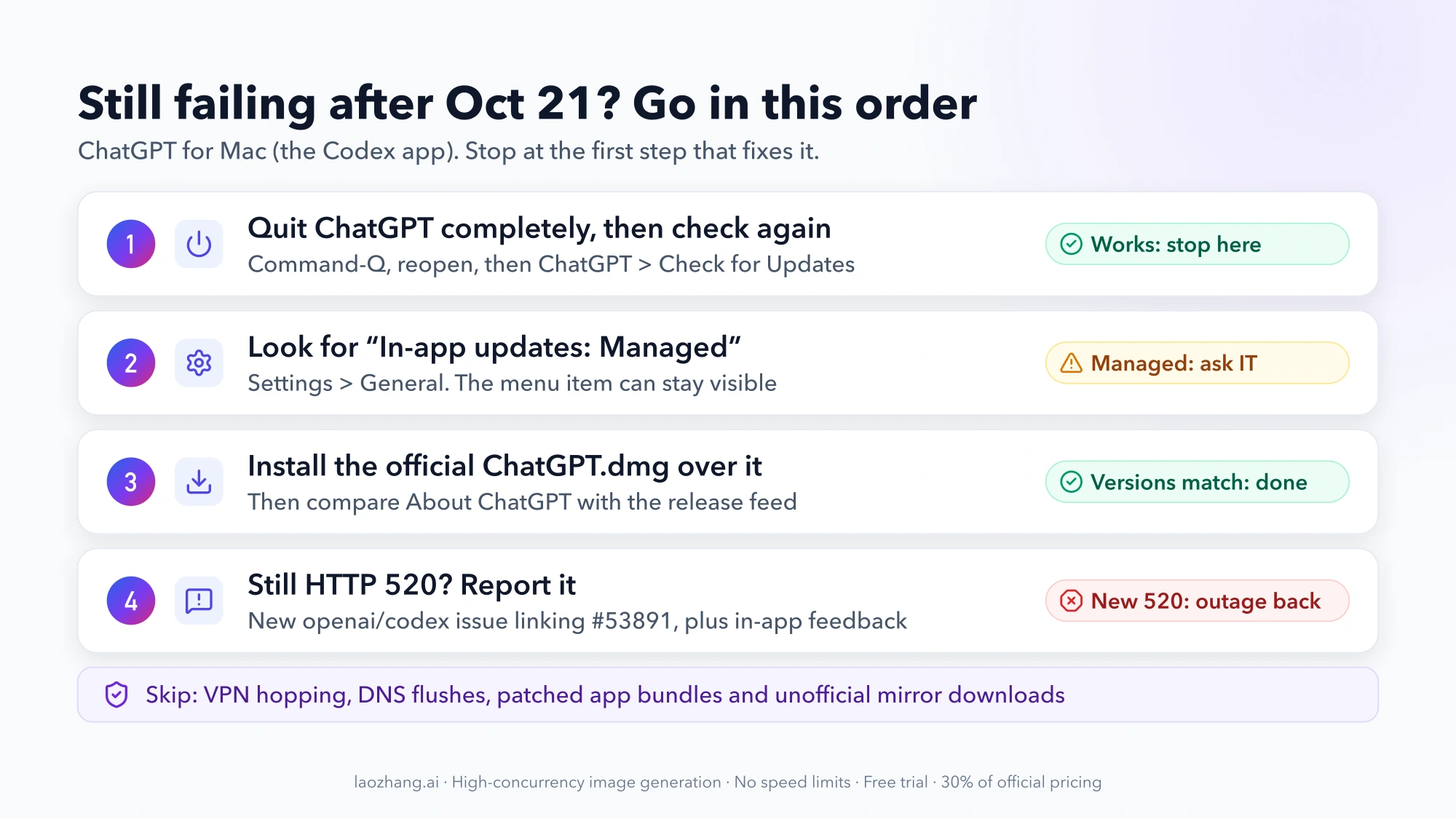
Check for Updates still fails after October 21: what to try, in order
Go through these in sequence and stop at the first one that works.
1. Quit the ChatGPT app completely and check again
Choose ChatGPT → Quit ChatGPT (or press ⌘Q), wait a few seconds, reopen the app and choose ChatGPT → Check for Updates. Closing the window is not the same as quitting; OpenAI's update documentation warns that closing the window isn't always enough to restart the app. A working check either offers a new version or says "You're up to date!"
Whether a full Mac restart is ever required after the server fix is not documented. During the outage, restarting and flushing DNS did nothing for reporters, so a restart is a last resort rather than a first step.
2. Look for "In-app updates: Managed" in Settings
Open Settings → General. If you see In-app updates: Managed with "Your organization has turned off in-app updates.", the updater is off by policy and no amount of retrying will change it. Admins set this with in_app_updates = false under [features] in the workspace's requirements.toml. Ask your IT team for the approved version.
3. Install the official build over your current copy
Download the macOS installer that OpenAI links from its docs, ChatGPT.dmg. Quit the app, open the DMG and drag ChatGPT into Applications, replacing the existing copy. Several users did exactly this during the outage, and the app updated normally.
On October 22, 2026, this installer already carried the newest release, while the older Codex.dmg link that circulated on GitHub was still one release behind. Use the docs link.
During the outage, reinstalling updated the app but did not restore Check for Updates, because the broken part was the server. Now that the server is fixed, the reinstall gets you current and the next check should work.
Keep the install clean:
- Download only from OpenAI's own links, not from mirrors or re-uploads.
- Don't patch or re-sign the app bundle, and don't turn off TLS or update-signature checks.
4. Undo outage workarounds you no longer need
Some people tried workarounds while the feed was down. With the server fixed, they are no longer needed:
- VPN or phone hotspot: if you turned one on only to get an update through, you can switch back to your normal connection.
- The
backendAppcastEnabledguard script: a user posted a script in issue #53891 that keeps a flag in~/Library/Application Support/com.openai.codex/production-appcast-bootstrap.jsonset tofalseso the app uses a different feed. It was never an OpenAI-supported fix. If you installed it, run the removal script from the same comment, which unloads the background job and sets the flag back totrue. Then quit and reopen the app.
5. If you still get HTTP 520, report it
A fresh 520 after October 21 would be news, since the original issue is closed. Open a new issue on openai/codex that links #53891, and send in-app feedback, which attaches the app's diagnostic logs. Include your app version, macOS version, whether your Mac is Apple Silicon or Intel, and the UTC time of the failed check. Don't post your installation ID publicly; the update requests and the bootstrap file both contain it.
How to check your ChatGPT app version without the updater
You can confirm you're on the current release even when the updater misbehaves:
-
Your installed version: choose ChatGPT → About ChatGPT. In Terminal you can also run:
bash/usr/libexec/PlistBuddy -c 'Print :CFBundleShortVersionString' /Applications/ChatGPT.app/Contents/Info.plistAn older install may still be named
Codex.app; change the path if so. -
The newest release: open OpenAI's static release feed in a browser. It is a plain XML file and does not depend on the endpoint that failed.
- Apple Silicon:
https://persistent.oaistatic.com/codex-app-prod/appcast.xml - Intel:
https://persistent.oaistatic.com/codex-app-prod/appcast-x64.xml
The first
<title>is the feed name ("Codex"); the second is the newest version. From Terminal:bashcurl -s https://persistent.oaistatic.com/codex-app-prod/appcast.xml | grep -m2 '<title>' - Apple Silicon:
-
Compare the two. If they match, you're current. If yours is older and Check for Updates still fails, install the official build as in step 3 above.
As of October 22, 2026, both feeds listed 26.1016.61520 (build 21421) as the newest release, published at 01:16 UTC that day, with macOS 13.0 as the minimum. New builds ship several times a week, so treat that number as a snapshot and read the feed when you check. Apple menu → About This Mac shows whether your Mac has an Apple chip or an Intel processor.
What SUSparkleErrorDomain Code=2001, HTTP 520 and HTTP 400 mean
Each code tells you which layer failed. They matter mostly if you read logs or test the feed yourself.
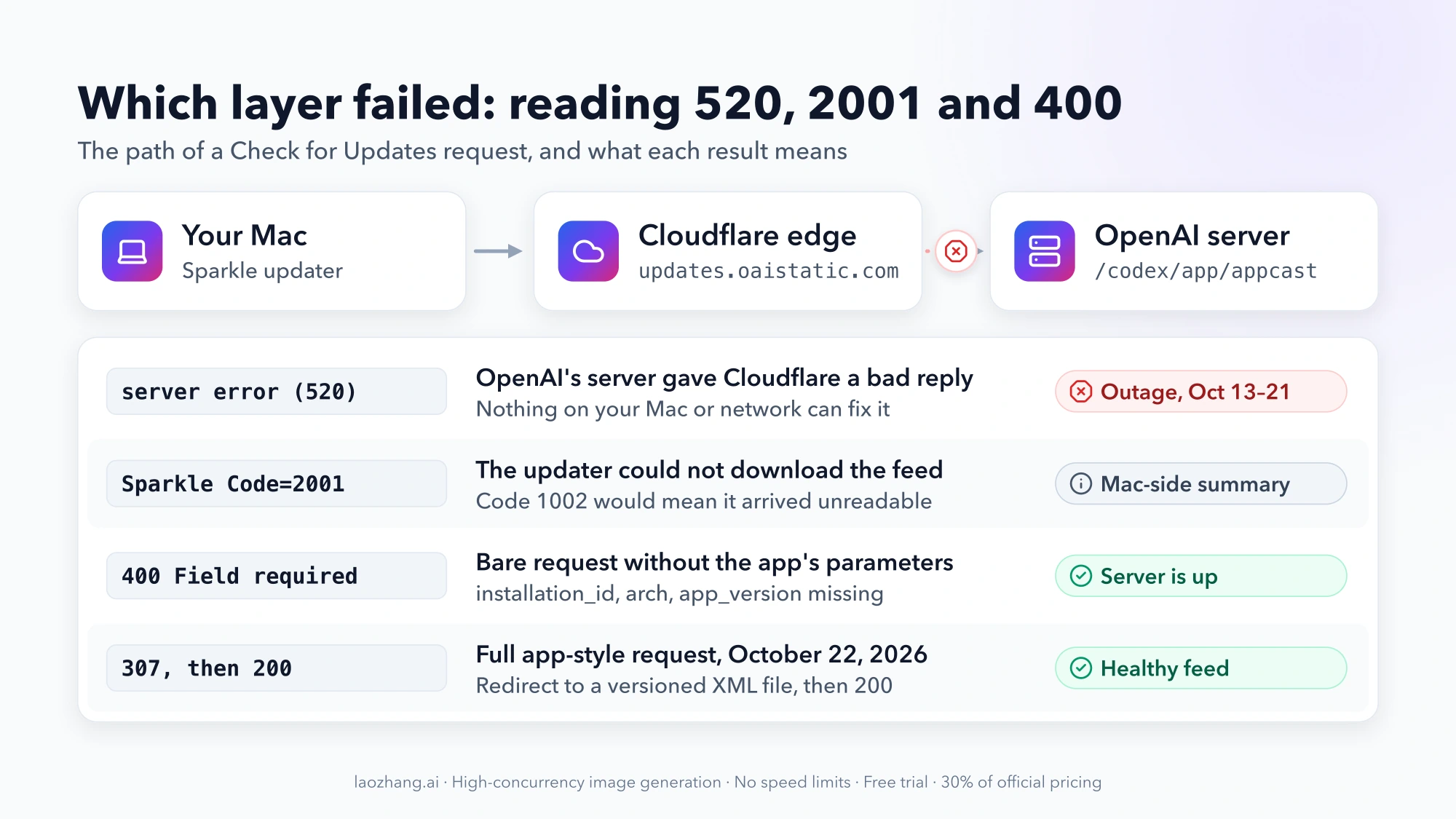
SUSparkleErrorDomain Code=2001 is Sparkle's SUDownloadError: the updater could not download the feed at all. It is different from Code 1002 (SUAppcastError), which means the feed arrived but could not be read. Code 2001 with an underlying server error (520) means the request reached OpenAI's Cloudflare edge and came back with a server error. The code list is in Sparkle's SUErrors.h.
HTTP 520 is a Cloudflare status. Cloudflare's documentation says it "occurs when the origin server returns an empty, unknown, or unexpected response to Cloudflare", and every fix it lists is for the site owner. Nothing on your Mac, router or browser can repair a 520 from someone else's server, which is why local fixes did not work.
HTTP 400 with "Field required" is what you get today if you open the feed address yourself:
curl -s -o /dev/null -w '%{http_code}\n' https://updates.oaistatic.com/codex/app/appcastOn October 22, 2026 this printed 400, and the response body listed installation_id, arch and app_version as missing fields. That's expected. The app always sends those parameters, a bare request doesn't, and a 400 shows the server is up and answering. A test request with all the parameters filled in got a 307 redirect to a version-specific XML file, which then loaded with HTTP 200. Only a 520 from this address means the outage is back.
OpenAI does not document where the Mac app keeps its updater log. Reporters quoted the 2001 and 520 lines from the app's own logs and from the diagnostics attached to in-app feedback. If you can't find a log, the table above (dialog, Settings row, timing) is enough to decide.
Why reinstalling and VPN tricks gave mixed results during the outage
If you read the GitHub threads, you saw a lot of fixes that worked for one person and not the next. The reasons are partly known:
- Reinstalling didn't help because the app always asked the same failing address. One user who inspected the app bundle reported that production builds use only the dynamic
updates.oaistatic.comfeed, with no fallback to the static feed that was still working. OpenAI has not confirmed that analysis, but it matches what everyone saw: new builds installed fine and their update checks failed anyway. - Network changes were hit and miss. One Mac got 520 over IPv6 and a normal answer over IPv4. Others failed on IPv4 too. A phone hotspot worked for some users and failed for others. One user's VPN exit in New York got the update through on October 21 while an exit in Canada failed minutes earlier, and checks kept working after the VPN was off. These were individual results that pointed to the network path mattering, never a reliable fix.
- Restarts and DNS flushes did nothing, consistent with the error coming from the server.
None of these are needed now that the server is fixed. If a check fails today, go back to the steps above instead of rotating VPN locations.
Quick answers about ChatGPT Mac app updates
How do I update the ChatGPT app on macOS?
Choose ChatGPT → Check for Updates in the menu bar; the app also checks on its own. If that fails or your organization manages updates, install the official ChatGPT.dmg over your current copy. In a managed workspace, use the version your IT team deploys.
Do I need to update the app to get the HTTP 520 fix?
No. The fix was made on OpenAI's servers on October 21, 2026, and a reporter confirmed checks working before any new build was published. Updating is still worthwhile, because a Mac that could not check for a week may be several releases behind.
Did the appcast HTTP 520 error affect Windows?
Every report in the GitHub issues came from Macs. The Windows app updates through different mechanisms, so a Windows update failure is a separate problem with its own causes.
Is "An error occurred in retrieving update information" always this outage?
No. Sparkle uses that sentence whenever it can't fetch update information. After October 21, 2026, check two things first: a Managed update policy in Settings → General, and whether the app has been fully quit and reopened since the fix. A fresh server error (520) in your logs would mean the outage is back.