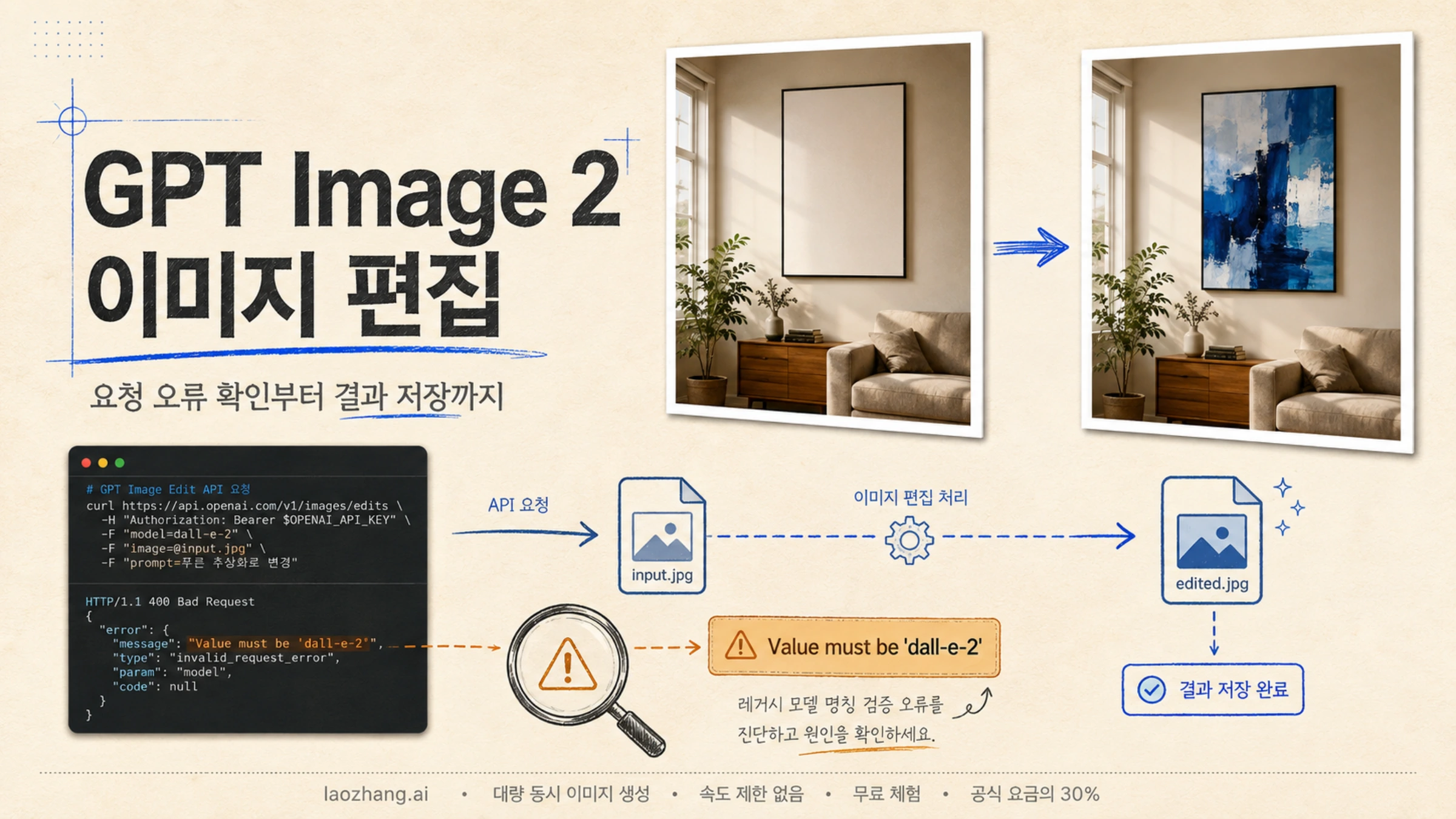
gpt-image-2로 이미지 편집을 요청했는데 Value must be 'dall-e-2'라는 오류가 나왔다면, 모델을 dall-e-2로 바꾸는 것으로 해결하려 하지 마세요. 2026년 9월 8일 확인한 공식 문서에서 GPT Image 2는 이미지 생성과 편집을 지원하며, DALL·E 2는 API에서 제거된 모델입니다. 오류 문구만으로 GPT Image 2가 편집을 지원하지 않는다고 결론 내릴 수 없습니다. GPT Image 2 모델 설명, DALL·E 2 지원 종료 안내
한 장을 받아 편집하고 저장하는 기능은 client.images.edit()로 구현할 수 있습니다. 먼저 model="gpt-image-2"와 원본 이미지, 편집 지시만 갖춘 요청을 기준으로 삼으세요. 오래된 예제의 response_format과 input_fidelity는 빼고, 응답의 b64_json을 디코딩해 이미지 파일로 저장합니다. 이후에도 같은 오류가 발생하면 실제 호스트와 경로, SDK 또는 래퍼가 전송한 필드를 비교해야 합니다.
기존 /v1/images/variations 코드에서 넘어왔다면 호출 방식도 바꿔야 합니다. GPT Image 2는 variations를 지원하지 않으며, edits에는 비어 있지 않은 prompt가 필요합니다. 이미지와 모델명만 보내던 요청에 어떤 요소를 바꾸고 유지할지 설명하는 지시를 추가하세요. variations 지원 범위, edits 요청 형식
dall-e-2 오류에서 알 수 있는 것과 없는 것
이 문구가 나온 사례는 실제로 있습니다. OpenAI Node SDK 저장소의 이슈 #1844는 2026년 4월 27일 gpt-image-2 편집 요청에서 발생한 오류를 보고했습니다. 보고에는 Node SDK 6.34.0뿐 아니라 response_format이 없는 최소 cURL 요청도 포함됐습니다. 따라서 이 사례를 모두 “예전 응답 형식을 넣어서 생긴 오류”나 “Node SDK만의 문제”로 설명할 수는 없습니다.
같은 이슈의 8월 답변에는 이미지 편집 검증 문제가 서버 측에서 수정됐다는 설명이 있고, 이슈는 완료 상태로 닫혔습니다. 이는 당시 보고의 처리 결과입니다. 지금 사용하는 중계 서버, 계정, 요청까지 확인해 주는 기록은 아니며, 이 기록만으로 수정된 최소 SDK 버전을 특정할 수도 없습니다.
한편 3월의 별도 커뮤니티 글에는 서로 다른 해결 경험이 있습니다. 한 답변은 response_format 제거를, 원 작성자는 메모리 파일에 이름을 지정하는 방법을 보고했습니다. 과거 GPT Image 1/1.5 사례를 지금의 모든 GPT Image 2 오류에 적용하지 말고, 자신의 오류 본문과 실제 요청을 분리해서 확인하는 근거로 사용하세요.
| 지금 확인된 현상 | 먼저 살필 대상 | 다음 조치 |
|---|---|---|
| variations 호출에서 지원되지 않는 모델이라고 표시됨 | /images/variations, create_variation() 또는 createVariation() 사용 여부 | edits 호출로 옮기고 원본과 편집 지시 전달 |
param이 model이고 dall-e-2만 허용한다고 표시됨 | 실제 호스트·경로, 전송된 모델명과 추가 필드 | 같은 제공업체에 보내는 최소 요청과 비교 |
image 또는 mask 관련 오류가 있음 | 파일 형식, 파일명·MIME, 크기, 알파 채널 | 파일 조건을 확인한 뒤 해당 입력만 수정 |
moderation_blocked 등 차단 사유가 있음 | 오류 본문에 명시된 콘텐츠 관련 사유 | 모델 열거값 오류와 별도로 처리 |
| 성공 응답인데 이미지 파일이 생기지 않음 | data와 b64_json, 디코딩·저장 코드 | 실제 이미지 데이터가 있는지 확인 |
| 파일은 열리지만 원하지 않는 부분도 바뀜 | 편집 지시, 마스크의 역할, 보존 요구 | 시각적 결과를 평가하고 변경 범위를 좁힘 |
HTTP 400이라는 상태 코드만으로는 이 구분이 되지 않습니다. message, type, code, param을 함께 읽어야 합니다. 모델 검증에서 거절된 요청을 프롬프트 개선이나 브라우저 캐시 삭제로 해결하려 하면 원인과 무관한 곳을 수정하게 됩니다.
variations에서 edits로 옮겨 다른 버전 만들기
공식 variations 레퍼런스는 이 작업을 DALL·E 2 전용으로 명시합니다. 문서의 공통 ImageModel 타입에 GPT Image 2가 보이거나 SDK에 기존 메서드가 남아 있어도, 해당 작업이 GPT Image 2를 지원한다는 뜻은 아닙니다. Python의 client.images.create_variation()과 Node.js의 client.images.createVariation()을 사용했다면 둘 다 client.images.edit()로 바꾸고, 직접 HTTP 호출은 POST /v1/images/edits로 옮깁니다. 모델 이름만 교체해서는 호출 작업이 바뀌지 않습니다. variations 레퍼런스, Python SDK, Node SDK
edits의 prompt에는 의미 있는 편집 요구를 적으세요. 원본을 참고한 새 광고 컷이라면 “상품의 모양과 로고는 유지하고, 배경과 조명만 따뜻한 봄 분위기의 스튜디오로 바꿔 주세요”처럼 바꿔도 되는 것과 유지해야 하는 것을 함께 지정할 수 있습니다. 그림 한 부분을 교체하는 작업뿐 아니라 원본을 바탕으로 다른 시안을 만드는 작업에도 같은 방식으로 접근합니다.
이때 n은 요청에서 만들 이미지의 개수입니다. 값을 늘려도 프롬프트 없이 원본의 변형을 만들던 예전 variations의 동작이나 결과 분포를 재현하는 설정이 되지는 않습니다. 여러 결과를 요청했다면 data 배열의 각 b64_json을 서로 다른 파일명으로 저장해 비교하세요. 아래 예제는 한 결과를 저장하므로 data[0]을 사용합니다. 현재 편집 요청 매개변수
현재 요청으로 편집하고 결과 파일 저장하기
아래 예제는 공식 문서에 따른 요청 구성 예시이며, 유료 API를 호출해 성공 결과를 확인한 실측 코드는 아닙니다. OpenAI API 키와 작업할 원본 room.png가 필요합니다. 먼저 마스크 없이 벽의 액자만 바꾸는 요청을 구성합니다.
Python
pythonimport base64
from pathlib import Path
from openai import OpenAI

client = OpenAI()

with Path("room.png").open("rb") as source:
    result = client.images.edit(
        model="gpt-image-2",
        image=source,
        prompt=(
            "벽에 걸린 액자를 기하학적 추상화로 바꿔 주세요. "
            "결과는 같은 방을 촬영한 실내 사진이어야 합니다. "
            "가구 배치, 벽 색상, 조명, 그림자와 카메라 각도는 유지하세요."
        ),
        output_format="png",
    )

if not result.data or not result.data[0].b64_json:
    raise RuntimeError("응답에 저장할 이미지 데이터가 없습니다.")

image_bytes = base64.b64decode(result.data[0].b64_json, validate=True)
Path("room-edited.png").write_bytes(image_bytes)
Node.js
프로젝트를 ES 모듈로 설정했거나 .mjs 파일을 사용한다는 전제입니다.
javascriptimport fs from "node:fs";
import { writeFile } from "node:fs/promises";
import OpenAI from "openai";

const client = new OpenAI();

const result = await client.images.edit({
  model: "gpt-image-2",
  image: fs.createReadStream("room.png"),
  prompt:
    "벽에 걸린 액자를 기하학적 추상화로 바꿔 주세요. " +
    "결과는 같은 방의 실내 사진이어야 합니다. " +
    "가구 배치, 벽 색상, 조명, 그림자와 카메라 각도는 유지하세요.",
  output_format: "png",
});

const imageBase64 = result.data?.[0]?.b64_json;
if (!imageBase64) {
  throw new Error("응답에 저장할 이미지 데이터가 없습니다.");
}

await writeFile("room-edited.png", Buffer.from(imageBase64, "base64"));
두 예제에서 output_format="png"는 저장할 이미지의 인코딩을 정합니다. response_format="b64_json"으로 응답 방식을 지정하는 것과는 다릅니다. GPT Image 응답에는 base64 이미지 데이터가 반환되므로, 예전 DALL·E 예제의 response_format을 추가하지 않습니다. JPEG나 WebP를 선택한다면 저장 파일의 확장자도 그 형식에 맞추세요. 이미지 편집 API 매개변수
또한 GPT Image 2에는 input_fidelity를 보내지 않습니다. 현재 가이드는 고충실도 입력 처리가 자동으로 적용되고 변경할 수 없다고 설명합니다. 이전 모델용 예제에서 input_fidelity="high"를 복사할 이유가 없습니다. 입력 충실도 가이드
SDK를 제외하고 같은 파일 업로드 요청 비교하기
다음 cURL은 로컬 파일을 multipart로 업로드하는 예제입니다. -F가 파일과 폼 필드를 함께 보내므로 Content-Type을 직접 지정하지 않습니다.
bashcurl --silent --show-error \
  https://api.openai.com/v1/images/edits \
  -H "Authorization: Bearer $OPENAI_API_KEY" \
  -F "model=gpt-image-2" \
  -F "image[]=@room.png;type=image/png" \
  -F 'prompt=벽의 액자만 기하학적 추상화로 교체하고 방의 가구, 조명, 카메라 각도는 유지하세요.' \
  -F "output_format=png" \
  --dump-header edit-headers.txt \
  --output edit-response.json \
  --write-out '%{http_code}\n'
여기서 edit-response.json은 이미지 파일이 아니라 응답 본문입니다. 상태 코드가 성공인지, 본문에 error가 없는지 먼저 확인한 뒤 data[0].b64_json을 디코딩해야 합니다. 오류 JSON을 .png로 저장해도 이미지가 되지는 않습니다.
JSON으로 이미지 URL이나 파일 ID를 전달할 때
이 예제의 multipart 방식은 로컬 파일 업로드를 비교하기 위한 선택입니다. 현재 직접 edits 레퍼런스에는 images 배열을 사용하는 JSON 요청도 정의되어 있습니다. 각 이미지 항목에 image_url로 전체 URL 또는 base64 데이터 URL을 전달하거나, file_id로 업로드된 파일을 참조할 수 있습니다. 파일 ID를 사용하기 위해 반드시 Responses API로 옮겨야 하는 것은 아닙니다. edits의 JSON 요청 형식
다만 JSON 문자열에 "room.png"나 컴퓨터의 절대 경로를 쓰는 것만으로 파일이 업로드되지는 않습니다. 로컬 파일은 앞 예제처럼 실제 바이트를 업로드하거나, 지원되는 이미지 참조로 준비해서 보내야 합니다. JSON의 images 배열과 파일 업로드 예제의 image 인수를 혼동하지 마세요. 설치한 SDK가 JSON 입력 형태를 지원하는지도 확인해야 하며, 구버전 SDK의 인수에 그대로 대입하면 같은 요청이 된다고 가정할 수 없습니다.
최소 요청도 실패한다면 실제 전송 내용을 비교한다
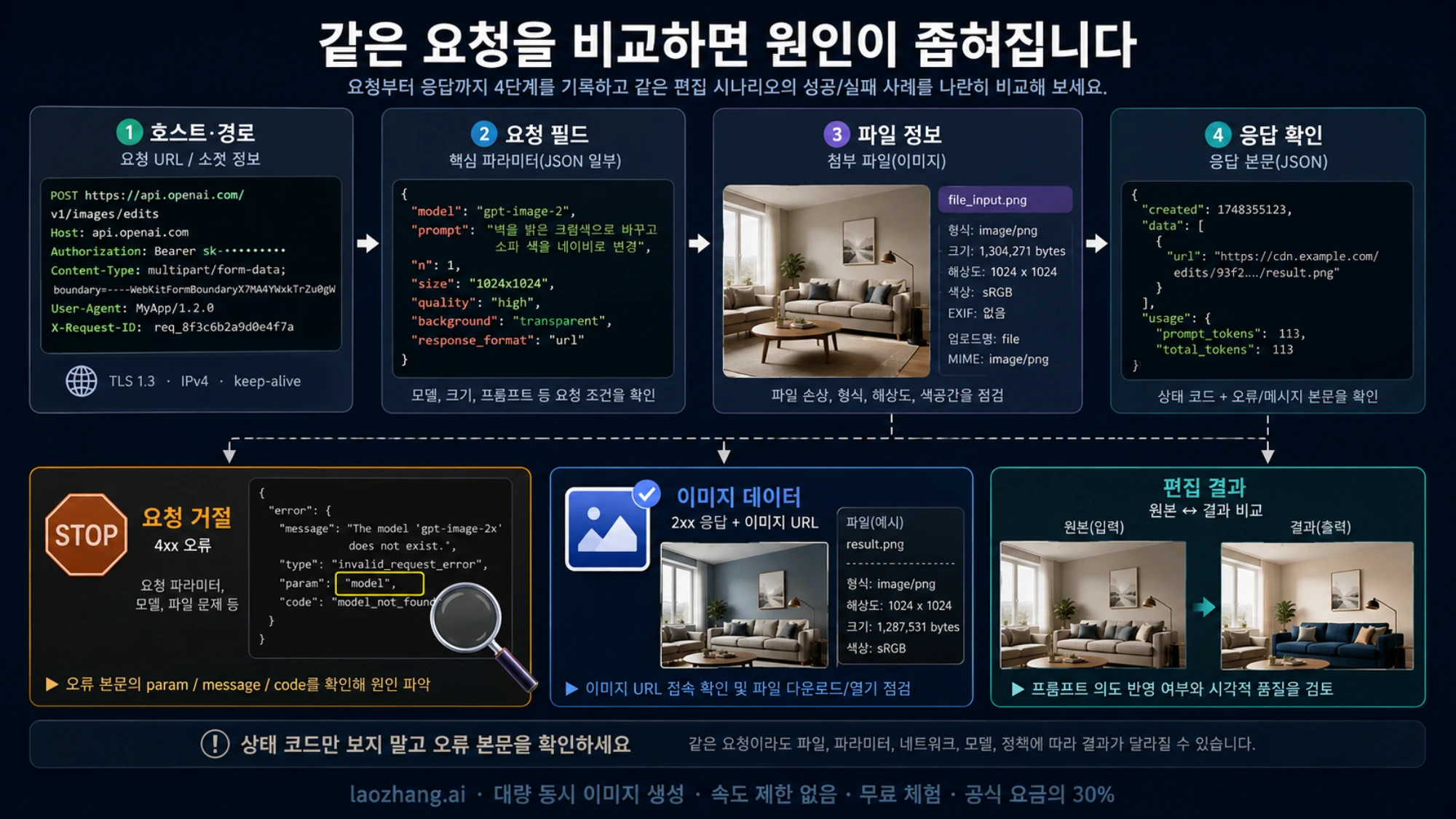
비교의 기준은 “비슷한 코드”가 아니라 같은 제공업체, 같은 파일, 같은 모델, 같은 편집 작업입니다. OpenAI 직접 호출 코드와 중계 서버용 SDK 코드를 서로 다른 호스트에 보내면, 결과 차이가 SDK 때문인지 서버 때문인지 구별할 수 없습니다. 제공업체가 바뀌는 비교에 다른 업체용 키를 그대로 사용하지 마세요.
- 실제 URL을 확인합니다. SDK 생성 시
base_url또는baseURL을 설정했는지, 환경 설정이나 사내 래퍼가 이를 덮어쓰는지 봅니다. 직접 OpenAI를 호출하려는 경우 기준 URL은https://api.openai.com/v1/images/edits입니다. - 전송 직전 필드를 확인합니다. 호출 코드에서 지웠더라도 공통 래퍼가
response_format,input_fidelity, 기본 모델명을 다시 넣을 수 있습니다. 로그에는 필드 이름과 민감하지 않은 설정만 남깁니다. - 최소 파일 요청과 대조합니다. 불필요한 옵션을 뺀 요청도 같은
model오류로 거절되는지 확인합니다. cURL만 성공한다면 SDK나 래퍼가 만드는 요청의 차이를 먼저 조사합니다. 양쪽 모두 실패한다고 해서 SDK만 업데이트하면 해결된다고 단정할 수는 없습니다. - 파일 정보를 명시합니다. 파일 관련 오류가 있거나 메모리 입력에서만 문제가 생기면 파일명, MIME 유형, 실제 이미지 형식이 서로 맞는지 확인합니다.
현재 Python SDK는 bytes, PathLike, (filename, contents, media type) 형태의 업로드를 지원합니다. 메모리 파일 자체를 사용할 수 없는 것은 아닙니다. 다음처럼 파일명과 MIME을 명시하면 래퍼를 포함한 업로드 문제를 좁히는 데 도움이 됩니다. Python SDK 파일 업로드
pythonimage_bytes = Path("room.png").read_bytes()
result = client.images.edit(
    model="gpt-image-2",
    image=("room.png", image_bytes, "image/png"),
    prompt="벽의 액자만 추상화로 바꾸고 나머지 방은 유지하세요.",
)
Node SDK도 파일 스트림 외에 File, Response, toFile을 지원합니다. 메모리의 PNG 바이트에는 await toFile(buffer, "room.png", { type: "image/png" })처럼 이름을 붙일 수 있습니다. 이는 진단 방법이지 모든 원시 바이트 입력이 실패한다는 규칙은 아닙니다. Node SDK 파일 업로드
문의가 필요하다면 발생 시각과 시간대, SDK 버전, 호스트·경로, HTTP 상태, 오류의 code·param·message, 응답 요청 ID를 함께 남기세요. 이미지의 파일명·형식·크기와 최소 요청의 성공 여부도 유용합니다. API 키, 인증 헤더, 개인 이미지 원본이나 전체 base64 데이터는 공개 로그에 넣지 않습니다.
마스크 편집: 파일 조건과 보존 범위는 다르다
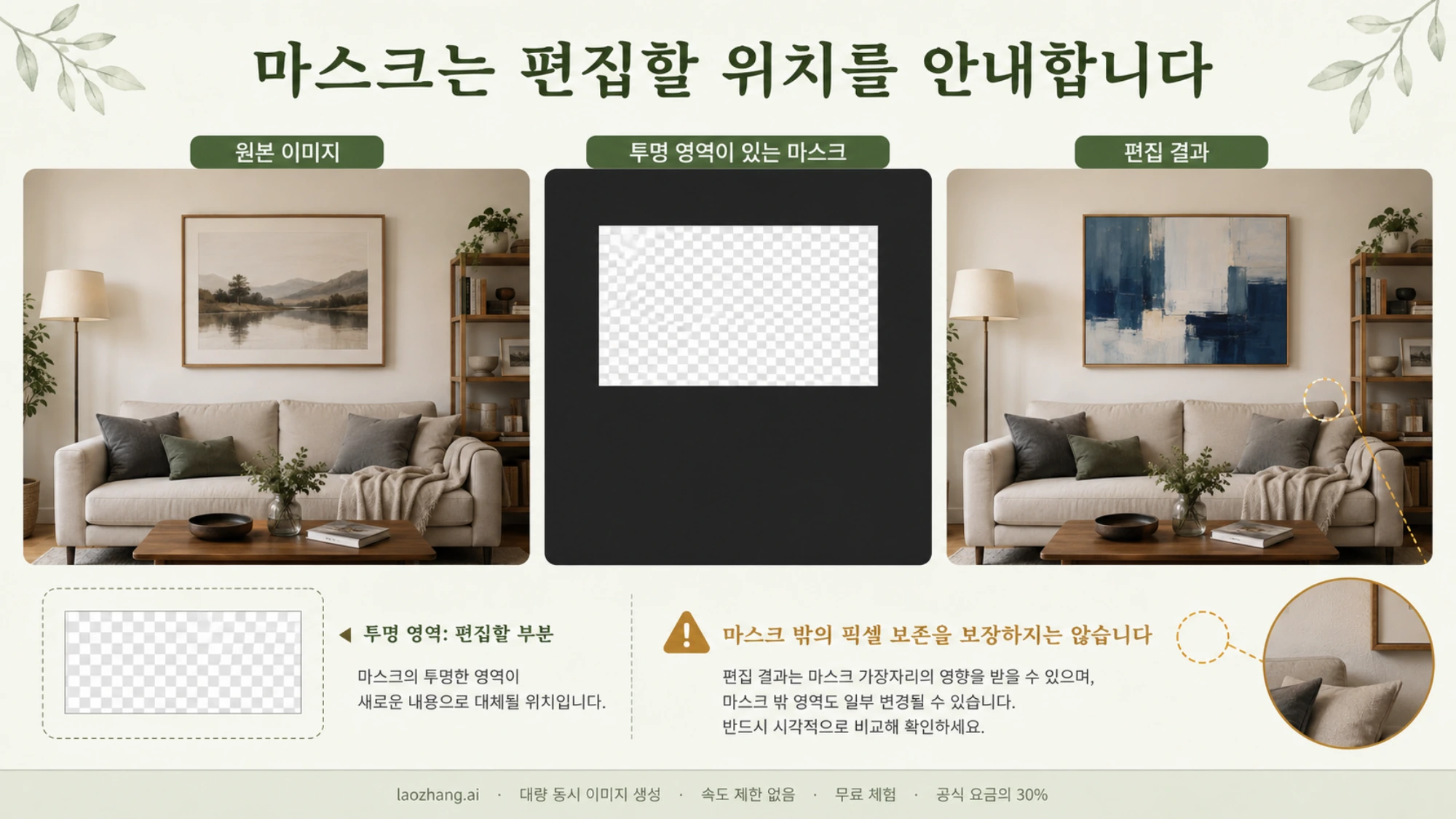
일반 편집 요청이 구성됐다면 위치를 지정할 때 마스크를 추가할 수 있습니다. 예를 들어 방 전체에서 벽의 액자에 집중하도록 안내하는 용도입니다. 마스크의 알파 값이 0인 투명 영역이 편집할 부분을 나타냅니다. 흰색으로 칠했더라도 알파 값이 불투명하면 같은 의미가 아닙니다.
다음 예제는 원본과 마스크를 같은 가로·세로 크기의 PNG로 준비합니다. 마스크에는 알파 채널이 있어야 하며 4MB 미만으로 만드세요. 현재 편집 API 레퍼런스는 일반 입력 이미지에 PNG·WebP·JPG, 각 50MB 미만과 최대 16장을 명시하지만, mask 항목에는 별도로 PNG와 4MB 미만 조건을 둡니다. 가이드에 있는 50MB 설명을 마스크에도 그대로 적용하지 않는 편이 좋습니다. 편집 API 입력 조건
pythonimport base64
from pathlib import Path
from openai import OpenAI

client = OpenAI()

with open("room.png", "rb") as source, open("mask.png", "rb") as mask:
    result = client.images.edit(
        model="gpt-image-2",
        image=source,
        mask=mask,
        prompt=(
            "자연광이 들어오는 같은 방의 사진을 만드세요. "
            "마스크로 지정한 벽의 액자 그림을 파란색 추상화로 교체하세요. "
            "기존 액자 위치와 크기, 가구, 벽, 조명과 촬영 각도는 유지하세요."
        ),
        output_format="png",
    )

if not result.data or not result.data[0].b64_json:
    raise RuntimeError("응답에 저장할 이미지 데이터가 없습니다.")

Path("room-masked-edit.png").write_bytes(
    base64.b64decode(result.data[0].b64_json, validate=True)
)
마스크를 받았다는 사실은 마스크 밖의 픽셀을 그대로 보존했다는 뜻이 아닙니다. 공식 가이드는 마스크를 모델이 참고하는 지침으로 설명하며, 정확히 그 형태만 따르는 결과를 보장하지 않습니다. 따라서 파일 오류가 사라진 뒤에도 로고, 얼굴, 제품 형태, 구도 등 유지해야 할 요소를 결과 이미지에서 확인해야 합니다. 마스크를 이용한 이미지 편집
프롬프트에는 교체할 대상뿐 아니라 완성된 장면도 설명하세요. “액자를 바꿔 줘”보다 “같은 방의 사진에서 액자 그림만 교체하고 가구·조명·카메라 각도를 유지”가 요구를 더 분명히 전달합니다. 한 번에 색상, 구도, 가구와 스타일을 모두 바꾸면 어떤 지시가 결과에 영향을 줬는지 판단하기 어려워집니다. 변경을 하나씩 나눠 비교하는 편이 실무에서 원인을 찾기 쉽습니다.
마스크 밖의 픽셀이 반드시 원본과 같아야 하는 작업이라면, 생성 결과만으로 그 조건을 충족한다고 가정하지 마세요. 원본을 유지한 채 필요한 영역을 합성하는 별도 후처리도 검토해야 합니다. 이는 API 요청의 유효성 문제와 별개의 제품 요구사항입니다.
참조 이미지가 여러 장이거나 대화로 이어서 수정할 때
여러 이미지를 참고하는 작업도 직접 편집 요청으로 시작할 수 있습니다. 예를 들어 첫 번째 이미지의 가방에 두 번째 이미지의 로고를 넣는다면 image에 두 파일을 순서대로 전달하고, 어느 이미지에서 무엇을 가져올지 프롬프트에 명시합니다. “두 이미지를 합쳐 줘”보다 “첫 번째 이미지의 가방 앞면에 두 번째 이미지의 로고를 배치하고 가방 소재와 조명을 유지”가 목적을 명확히 전달합니다. 여러 이미지를 보내면서 마스크를 사용하면 마스크는 첫 번째 이미지에 적용됩니다. 이미지 편집 가이드
한 결과를 다시 수정할 때도 직접 edits를 사용할 수 있습니다. 예를 들어 room-edited.png의 구도는 마음에 들지만 액자 그림을 조금 더 크게 만들고 싶다면, 채택한 결과를 보관하고 그 파일을 다음 image로 전달합니다. 다음 지시는 크기 조정 하나에 집중하고 새 출력은 room-edited-v2.png처럼 별도 이름으로 저장하세요. 애플리케이션이 각 요청에 넣을 이미지와 지시를 관리하는 방식이며, 이전 요청을 보냈다는 이유만으로 다음 독립 호출에 그 결과가 자동으로 전달되지는 않습니다. 원하는 변경이 반영됐는지 비교한 뒤 다음 단계에 사용할 버전을 선택하면 됩니다.
| 구현하려는 기능 | 먼저 고려할 API | 선택 이유 |
|---|---|---|
| 이미지를 업로드하고 한 번 편집해 파일로 반환 | Images API의 images.edit() | 입력·편집 지시·출력 저장을 직접 관리 |
| 마스크로 편집할 위치를 안내 | Images API의 images.edit() | 원본과 마스크를 함께 전달 가능 |
| 여러 참조 이미지에서 요소를 가져와 합성 | Images API의 images.edit() | 참조 순서와 각 이미지의 역할을 직접 지정 |
| 채택한 결과 한 장을 다시 수정 | Images API의 images.edit() | 저장한 결과를 다음 입력으로 전달하고 앱에서 버전 관리 |
| 앞선 결과를 대화 속에서 이어서 수정 | Responses API | 대화 문맥을 활용한 후속 작업에 적합 |
| 이미지 편집을 다른 도구와 함께 쓰는 서비스 | Responses API | 이미지 생성 도구를 더 큰 작업에 통합 |
Responses API에서는 일반 대화·추론 모델을 상위 model로 두고 image_generation 도구를 사용합니다. gpt-image-2를 Responses 요청의 상위 model에 그대로 넣는 방식이 아닙니다. 파일 ID와 대화를 활용하는 편집 기능이 필요할 때 해당 방식의 입력·출력 처리를 구현하세요. 과거 dall-e-2 검증 오류가 있었다는 이유만으로 단일 편집 기능을 Responses로 옮길 필요는 없습니다. Responses를 포함한 공식 가이드
GPT Image 2의 생성 기능과 일반 API 사용법까지 살펴보려면 한국어 GPT Image 2 API 안내를 이어서 참고하세요.