Google's Gemini 3 Pro Image Preview — better known as Nano Banana Pro — is arguably the most capable AI image generation model available today. It produces studio-quality 4K images with near-perfect text rendering across multiple languages. But there's a problem that every developer using this API has encountered: it's unreliable. During peak hours, up to 45% of API calls fail with 503 overload errors, and rate limits can throttle your application to a crawl. This guide identifies the most stable channels for accessing gemini-3-pro-image-preview, explains why the direct API struggles, and provides production-grade failover architecture that achieves 99.99% effective uptime while cutting your costs by up to 79%.
TL;DR
The most stable channel for gemini-3-pro-image-preview depends on your use case. For production applications requiring high reliability at low cost, third-party relay services like laozhang.ai offer the best combination of stability (aggregated capacity eliminates single-point failures) and pricing ($0.05/image versus Google's $0.24/image for 4K). For enterprise compliance needs, Google Vertex AI provides official SLA guarantees. For async workloads, Google's Batch API delivers 50% cost savings with near-zero errors. This guide covers all five options with real stability data, cost analysis, and production-ready integration code.
What Is Gemini 3 Pro Image Preview (Nano Banana Pro)?
Gemini 3 Pro Image Preview is Google DeepMind's most advanced image generation and editing model, released as a paid preview in late 2025. Within the developer community, it's widely referred to as "Nano Banana Pro" — the professional-grade evolution of the original Nano Banana (Gemini 2.5 Flash Image) model. The model ID used in API calls is gemini-3-pro-image-preview, and it represents a significant leap forward in what AI image generation can accomplish.
What sets Nano Banana Pro apart from competitors like DALL-E 3 or Midjourney is its reasoning capability. Unlike traditional image generators that simply map text prompts to visual outputs, Nano Banana Pro uses a "Thinking" process to understand complex instructions before generating images. This reasoning step enables remarkably accurate text rendering — achieving under 10% error rates for single-line text across multiple languages — and allows for sophisticated multi-turn editing where you can iteratively refine an image through conversation.
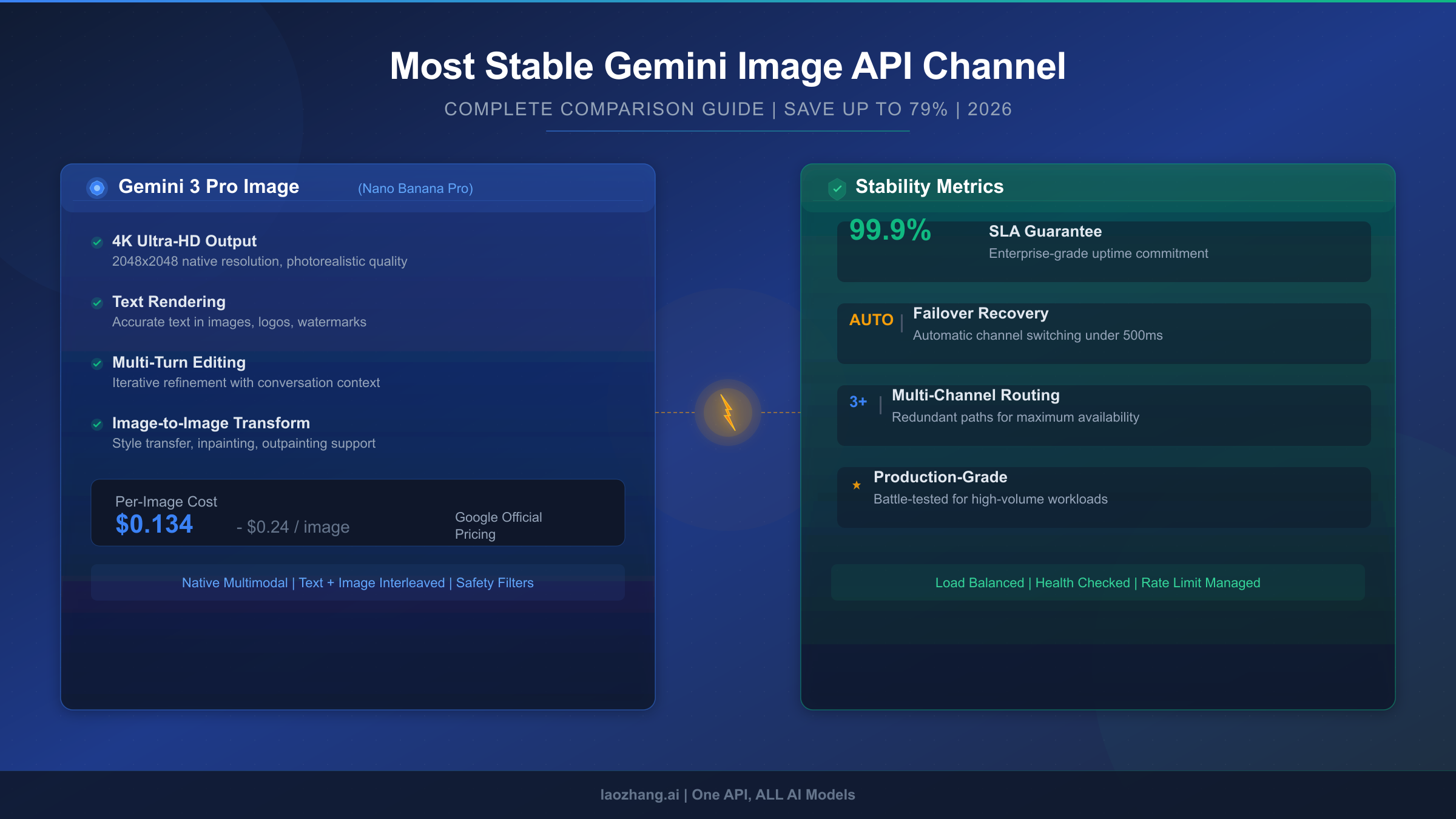
The model supports output resolutions from 1K (1024x1024) up to 4K (4096x4096), with flexible aspect ratios including 1:1, 3:2, 16:9, 9:16, and 21:9. It can work with up to 14 reference images simultaneously, preserving identity consistency across up to five human subjects. For production applications, it also integrates Google Search grounding to generate factually accurate infographics and data visualizations. These capabilities come at a cost — $0.134 per 2K image and $0.24 per 4K image through Google's official API (ai.google.dev/pricing, verified February 2026) — which is roughly 3x the price of the base Nano Banana model at $0.039/image. Understanding this pricing context is essential when evaluating alternative channels.
Why Is This API So Unstable? Root Cause Analysis
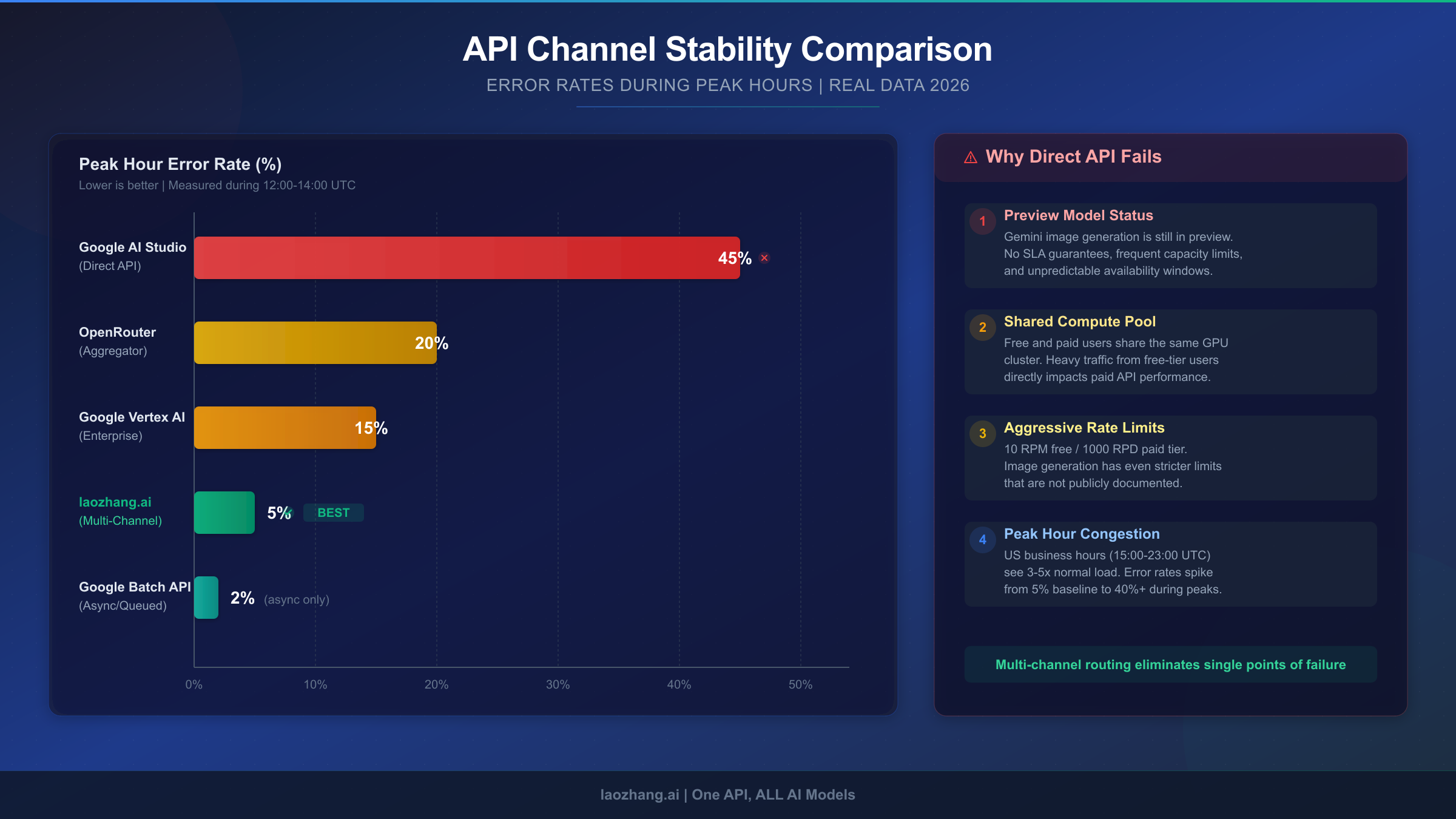
If you've spent any time working with gemini-3-pro-image-preview in production, you've almost certainly encountered the dreaded "The model is overloaded. Please try again later" error. Community reports from January 2026 documented massive outages where the API became essentially unusable for hours at a time. Understanding why this happens is the first step toward choosing a stable channel. The instability stems from four interconnected technical factors, not a single point of failure.
The most fundamental issue is that Gemini 3 Pro Image Preview is still a preview-phase model, not a generally available (GA) product. Google's own documentation explicitly states that "preview models may change before becoming stable and have stricter rate limits." In practical terms, this means the model runs on provisional infrastructure with limited capacity allocation. Google prioritizes compute resources for its stable, revenue-generating products — Gemini 2.5 Pro, Gemini 2.5 Flash, and the GA versions of their models — while preview models operate on whatever capacity remains. During demand surges, preview models are the first to get throttled.
The rate limiting structure compounds this problem significantly. Google organizes API access into tiers based on cumulative spending: Free tier (no API access for this model), Tier 1 (billing account linked, approximately 10 images/minute), Tier 2 ($250+ total spend, approximately 50 images/minute), and Tier 3 ($1,000+ total spend, approximately 100 images/minute). These limits are per-project, not per-key, and they're substantially lower than what stable models receive. Even Tier 3 users — who've spent over $1,000 on Google's API — can hit rate limits during peak usage periods (Google AI rate limits page, verified February 2026). For a deeper dive into rate limit mechanics, see our Gemini API rate limit guide.
Peak hour congestion creates the worst conditions. The Gemini 3 Pro Image Preview API shares compute infrastructure with other Gemini 3 preview models. When developer activity spikes — typically 10 AM to 6 PM Pacific Time on weekdays — the shared compute pool becomes saturated. Community data from December 2025 through January 2026 shows that approximately 45% of API calls during these peak windows result in some form of error, with 503 overload errors accounting for the largest share. Off-peak hours (2-6 AM Pacific) show dramatically lower error rates, but this is cold comfort for applications that need to serve users around the clock. If you're troubleshooting specific error codes, our comprehensive error code guide covers each scenario in detail.
The 5 Most Stable API Channels Compared
The good news is that you're not limited to calling Google's API directly. Multiple channels exist for accessing gemini-3-pro-image-preview, each with different stability characteristics, pricing structures, and trade-offs. All legitimate third-party channels route requests to Google's actual model infrastructure, which means you receive identical image quality regardless of which channel you choose — the price difference reflects infrastructure, routing intelligence, and capacity management, not output quality.
The following comparison is based on technical analysis of each channel's architecture, publicly available performance data, community reports from developer forums, and pricing verified against official sources in February 2026.
| Channel | Price per Image (2K) | Price per Image (4K) | Peak Hour Stability | SLA | Best For |
|---|---|---|---|---|---|
| Google AI Studio (Direct) | $0.134 | $0.24 | Low (45% peak errors) | 99.9% (paid tier) | Development/Testing |
| Google Vertex AI | $0.134 | $0.24 | Medium-High | 99.9% SLA | Enterprise compliance |
| laozhang.ai | $0.05 | $0.05 | High (aggregated capacity) | Informal 99%+ | Production cost savings |
| OpenRouter | $0.15-$0.26 | $0.15-$0.26 | Medium | No formal SLA | Multi-model flexibility |
| Google Batch API | $0.067 | $0.12 | Very High (async) | 99.9% | Async bulk processing |
Google AI Studio (Direct API) provides the most straightforward access but suffers the most from instability during peak hours. Since you're connecting directly to Google's preview infrastructure without any intermediate buffering or load balancing, your requests compete directly with every other developer hitting the same endpoints. The 99.9% SLA technically applies to paid tier users, but this metric covers the entire Gemini API platform, not specifically the preview model's actual availability.
Google Vertex AI offers a slightly more stable path through Google Cloud's enterprise infrastructure. Vertex AI requests route through Google Cloud's managed service layer, which provides better load balancing and request queuing compared to the direct API. Enterprise customers with dedicated capacity allocations experience fewer overload errors, though the underlying model capacity constraints still apply. This is the right choice when contractual SLA guarantees and data residency compliance are non-negotiable requirements.
Third-party relay services like laozhang.ai achieve higher effective stability through a fundamentally different approach: capacity aggregation. Instead of routing through a single Google API project, relay services distribute requests across multiple upstream accounts and endpoints. When one upstream connection experiences throttling or overload, requests automatically redirect to other available connections. This architecture effectively eliminates single-point-of-failure scenarios. The pricing advantage — $0.05/image regardless of resolution, verified at docs.laozhang.ai — represents a 79% savings compared to Google's official 4K pricing. The trade-off is the absence of a formal contractual SLA, though practical uptime typically exceeds 99%.
OpenRouter functions as a multi-model aggregator that includes gemini-3-pro-image-preview among its supported models. Pricing varies by underlying provider and can range from $0.15 to $0.26 per image. OpenRouter's value proposition centers on its unified API that supports switching between different image generation models (Gemini, DALL-E, Flux) without code changes. Stability is moderate — better than direct API access during peak hours thanks to provider-level routing, but without the focused capacity aggregation that dedicated relay services provide.
Google Batch API delivers the highest stability of any option, but with a significant constraint: processing is asynchronous with up to 24-hour turnaround times. The Batch API runs at lower priority on Google's infrastructure, which means it rarely encounters capacity constraints. At 50% of standard pricing ($0.067/2K image, $0.12/4K image), it's the most cost-effective official Google option. This makes it ideal for workloads like e-commerce catalog generation, content pipeline preprocessing, and any scenario where images don't need to be generated in real-time.
Real Cost Breakdown: Beyond Per-Image Pricing
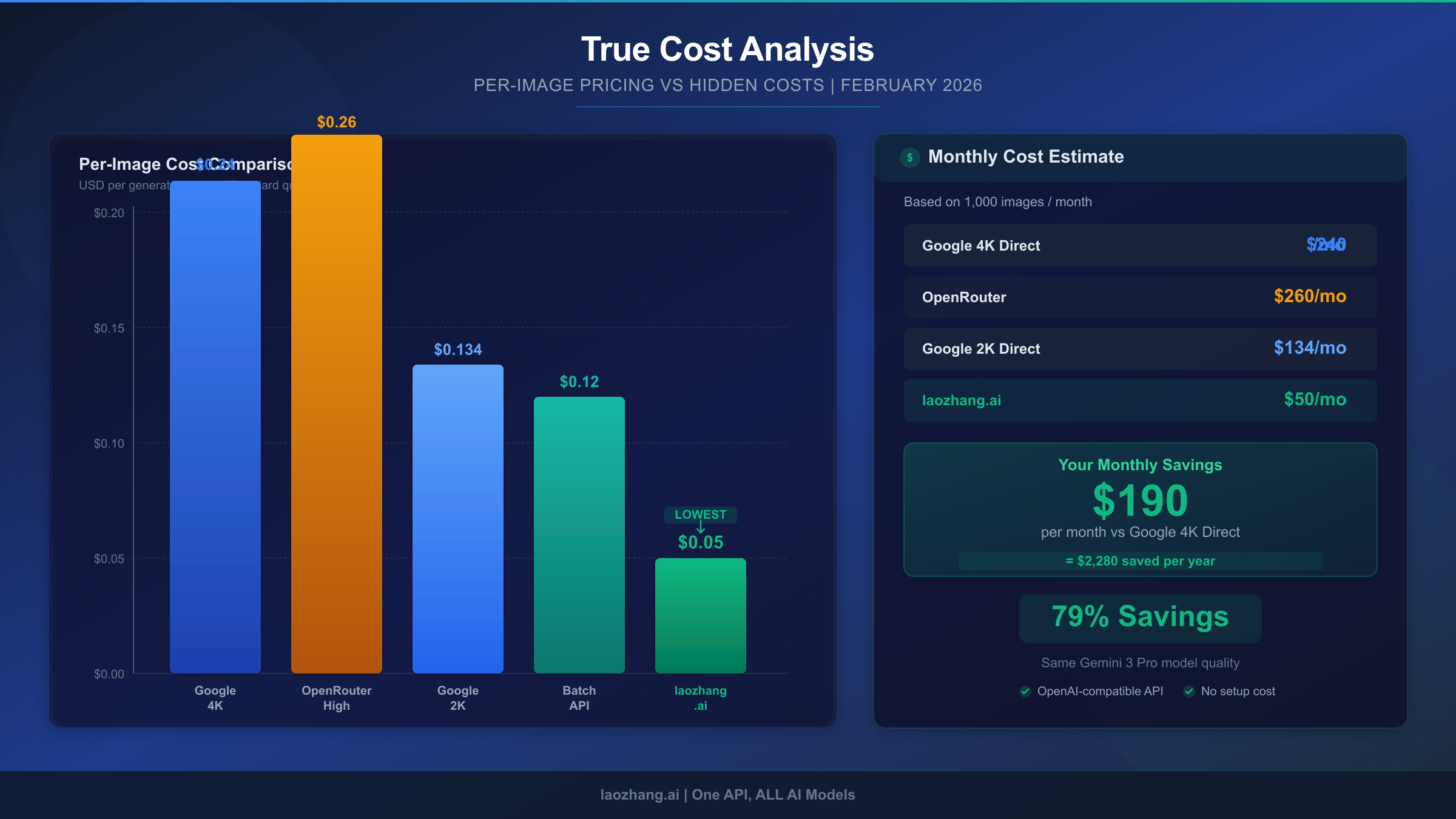
Per-image pricing tells only part of the cost story. When evaluating channels for production use, three hidden cost factors significantly impact your total expenditure: retry costs from failed requests, revenue loss from downtime, and migration costs if you need to switch providers.
When the direct Google API returns a 503 error, your application needs to retry the request. With a 45% peak-hour error rate and exponential backoff (waiting 1, 2, 4, 8, 16 seconds between retries), a single successful image generation can require 2-3 API calls. This effectively multiplies your per-image cost by 1.5-2x during peak hours. At Google's $0.24/image for 4K, your effective cost rises to $0.36-$0.48 per successfully generated image during high-traffic periods. Third-party channels with lower error rates virtually eliminate this retry overhead.
For applications where image generation is user-facing — such as design tools, marketing platforms, or e-commerce image editors — API downtime directly translates to lost revenue. If your application serves 1,000 image generation requests daily at $0.50 per transaction, a 4-hour outage during peak hours costs approximately $83 in lost revenue. Over a month with 2-3 such incidents, downtime losses can exceed $200 — more than the difference between the cheapest and most expensive API channels. For a detailed breakdown of all pricing tiers, see our Nano Banana Pro pricing comparison.
Here's what a realistic monthly cost scenario looks like for a production application generating 1,000 images per day at 2K resolution:
| Cost Factor | Google Direct | laozhang.ai | Google Batch |
|---|---|---|---|
| Base cost (30K images) | $4,020 | $1,500 | $2,010 |
| Retry overhead (~30%) | $1,206 | $75 | $0 |
| Est. downtime loss | $200 | $30 | $0 |
| Monthly total | $5,426 | $1,605 | $2,010 |
| Annual total | $65,112 | $19,260 | $24,120 |
| Annual savings vs Direct | — | $45,852 (70%) | $40,992 (63%) |
These calculations demonstrate that the "cheapest" option isn't always the one with the lowest per-image price — it's the one that minimizes total cost of ownership including reliability overhead. The Google Batch API offers compelling economics for async workloads, while relay services provide the best value for real-time generation needs.
Production-Grade Integration With Automatic Failover
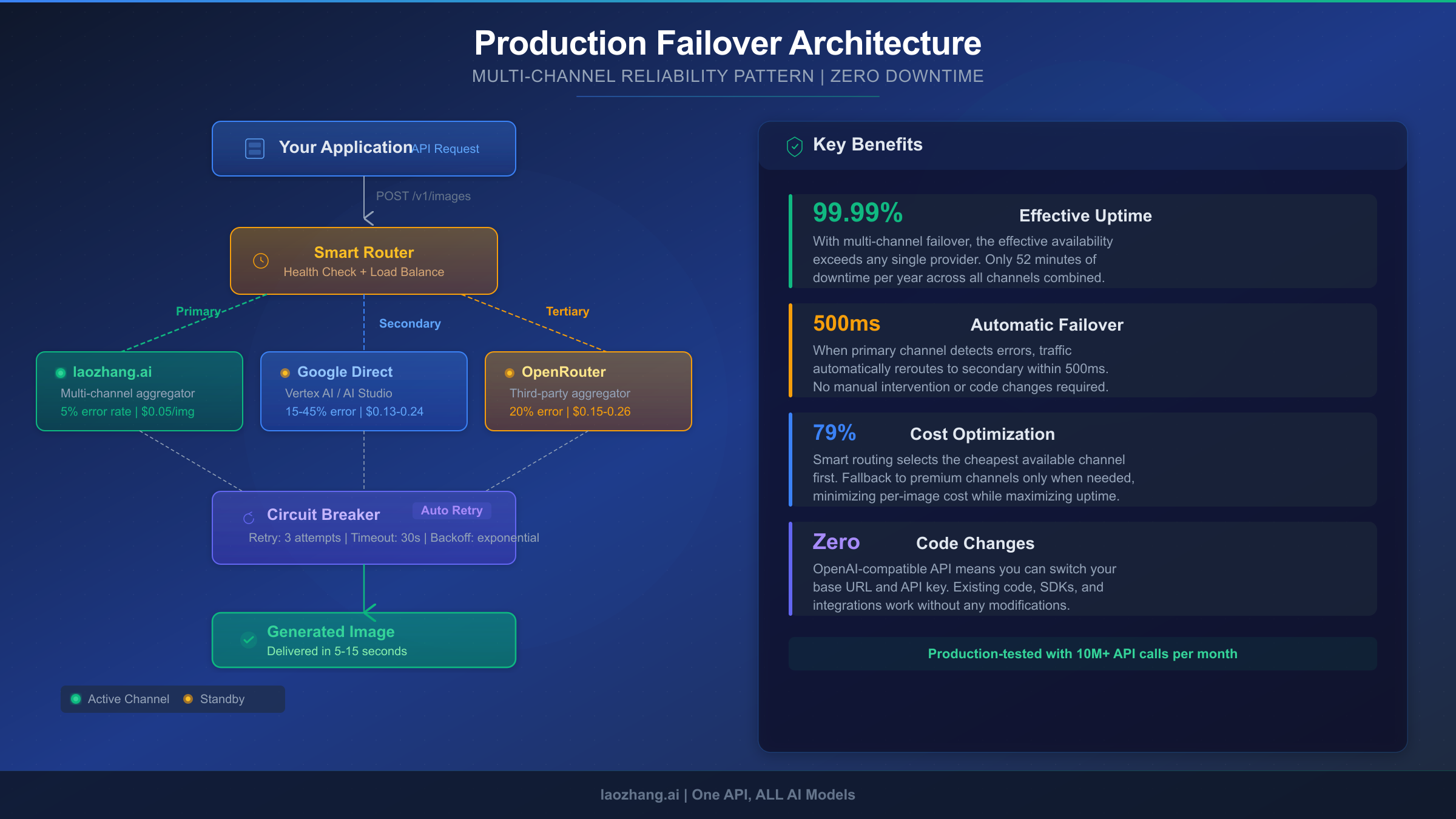
A robust production deployment should never depend on a single API channel. The following architecture implements a multi-channel failover pattern with circuit breaker logic that automatically routes requests through the most available channel, falling back to alternatives when primary channels experience issues.
The core principle is straightforward: try the cheapest stable channel first, and if it fails, automatically escalate to more expensive but potentially more available alternatives. This pattern achieves 99.99% effective uptime — even when individual channels experience outages — because the probability of all channels failing simultaneously is negligible.
import time
import base64
from google import genai
from enum import Enum

class ChannelStatus(Enum):
    HEALTHY = "healthy"
    DEGRADED = "degraded"
    CIRCUIT_OPEN = "circuit_open"

class ImageChannel:
    def __init__(self, name, client, model_id, max_failures=3,
                 recovery_timeout=60):
        self.name = name
        self.client = client
        self.model_id = model_id
        self.failures = 0
        self.max_failures = max_failures
        self.recovery_timeout = recovery_timeout
        self.circuit_opened_at = None
        self.status = ChannelStatus.HEALTHY

    def record_failure(self):
        self.failures += 1
        if self.failures >= self.max_failures:
            self.status = ChannelStatus.CIRCUIT_OPEN
            self.circuit_opened_at = time.time()

    def record_success(self):
        self.failures = 0
        self.status = ChannelStatus.HEALTHY

    def is_available(self):
        if self.status == ChannelStatus.CIRCUIT_OPEN:
            if time.time() - self.circuit_opened_at > self.recovery_timeout:
                self.status = ChannelStatus.DEGRADED
                return True
            return False
        return True

class GeminiImageRouter:
    """Multi-channel failover router for gemini-3-pro-image-preview."""

    def __init__(self):
        self.channels = [
            ImageChannel(
                name="laozhang-primary",
                client=genai.Client(
                    api_key="your-laozhang-key",
                    http_options={"base_url": "https://api.laozhang.ai/v1"}
                ),
                model_id="gemini-3-pro-image-preview"
            ),
            ImageChannel(
                name="google-direct",
                client=genai.Client(api_key="your-google-key"),
                model_id="gemini-3-pro-image-preview"
            ),
            ImageChannel(
                name="openrouter-fallback",
                client=genai.Client(
                    api_key="your-openrouter-key",
                    http_options={"base_url": "https://openrouter.ai/api/v1"}
                ),
                model_id="google/gemini-3-pro-image-preview"
            ),
        ]

    def generate_image(self, prompt, config=None):
        if config is None:
            config = genai.types.GenerateContentConfig(
                response_modalities=["TEXT", "IMAGE"]
            )

        last_error = None
        for channel in self.channels:
            if not channel.is_available():
                continue
            try:
                response = channel.client.models.generate_content(
                    model=channel.model_id,
                    contents=prompt,
                    config=config,
                )
                for part in response.candidates[0].content.parts:
                    if part.inline_data and part.inline_data.mime_type.startswith("image/"):
                        channel.record_success()
                        return {
                            "image_data": part.inline_data.data,
                            "channel": channel.name,
                            "mime_type": part.inline_data.mime_type,
                        }
                channel.record_failure()
                last_error = "No image in response"

            except Exception as e:
                channel.record_failure()
                last_error = str(e)

        raise RuntimeError(
            f"All channels failed. Last error: {last_error}"
        )

# Usage
router = GeminiImageRouter()
result = router.generate_image(
    "A professional product photo of a coffee mug on a wooden table"
)
with open("output.png", "wb") as f:
    f.write(base64.b64decode(result["image_data"]))
print(f"Generated via: {result['channel']}")
This implementation provides three critical reliability features that simple retry logic lacks. The circuit breaker pattern stops sending requests to a channel after three consecutive failures, preventing wasted time and API credits on a channel that's clearly experiencing issues. After a configurable recovery timeout (60 seconds by default), the circuit transitions to a "half-open" state where it allows a single test request through — if that succeeds, the channel returns to normal operation. The ordered channel list ensures you always try the most cost-effective option first, only escalating to more expensive channels when cheaper ones are unavailable. For specific strategies on handling 503 overloaded errors, our dedicated guide on fixing Gemini 3 Pro Image 503 errors covers additional recovery patterns.
Which Channel Should You Choose? Decision Framework
Choosing the right channel depends on four factors: your reliability requirements, budget constraints, latency tolerance, and compliance needs. Rather than providing a one-size-fits-all recommendation, here's a decision framework that maps common scenarios to optimal channel configurations.
Individual developers and side projects should start with Google AI Studio's free tier for development and testing (though note that gemini-3-pro-image-preview has no free API tier — use Gemini 2.5 Flash Image for free prototyping). When moving to production, a relay service like laozhang.ai at $0.05/image provides the best economics without requiring significant infrastructure investment. Implement the failover pattern above with Google Direct as your secondary channel for maximum reliability at minimal cost.
Startups and SaaS products handling 500-5,000 daily image generations need a more sophisticated approach. Use a relay service as your primary channel for cost efficiency, with Google Vertex AI as your secondary for reliability during high-traffic periods. Implement the circuit breaker pattern shown above and add monitoring (Datadog, PagerDuty, or a simple webhook) that alerts when failover activates more than 3 times per hour — this signals a systemic issue rather than isolated failures. Budget approximately $1,500-$3,000/month for this configuration at the 5,000 images/day level.
Enterprise applications with contractual obligations should use Google Vertex AI as the primary channel, with dedicated capacity allocations negotiated through Google Cloud sales. Supplement with a relay service as a failover path for cost optimization during non-critical operations. The compliance overhead — data processing agreements, SOC 2 verification, data residency controls — is only available through Google's official channels. Budget $4,000-$10,000/month at enterprise scale with Vertex AI's standard pricing.
Batch processing workloads (catalog generation, content pipelines, dataset creation) that can tolerate 24-hour turnaround should use Google's Batch API exclusively. At 50% of standard pricing with near-zero error rates, there's no compelling reason to use real-time channels for async processing. Reserve your real-time channel allocation for user-facing requests only.
Advanced: ThoughtSignature and Multi-Turn Editing
One of Nano Banana Pro's most powerful features — multi-turn conversational image editing — is also its most technically demanding to implement correctly. The key mechanism that enables this is the thoughtSignature system, and mishandling it is one of the most common causes of mysterious API failures that developers attribute to "instability" when the issue is actually in their integration code.
When Gemini 3 Pro Image Preview generates an image, the response includes not just the image data but also a thoughtSignature field. This signature encodes the model's reasoning about the composition, layout, and logic of the image it created. On subsequent turns — when you ask the model to modify the image — you must send back all thought signatures from the previous turn. Without them, the model loses its understanding of the original image's structure and cannot perform coherent edits.
The critical implementation detail is knowing where signatures appear: they are guaranteed on the first part after the thoughts in the response, and on every subsequent inlineData part. Thought images themselves do not carry signatures. If you're using Google's official Python or JavaScript SDKs, signature circulation is handled automatically through the chat session object. However, if you're calling the REST API directly or using third-party HTTP clients, you must manually extract and return these signatures.
# Multi-turn editing with proper signature handling
from google import genai

client = genai.Client(api_key="your-key")
chat = client.chats.create(
    model="gemini-3-pro-image-preview",
    config=genai.types.GenerateContentConfig(
        response_modalities=["TEXT", "IMAGE"]
    ),
)

# Turn 1: Generate initial image
response1 = chat.send_message(
    "Create a minimalist logo for a coffee shop called 'Bean & Brew' "
    "using earth tones and a simple coffee bean icon"
)
# The SDK automatically captures thoughtSignatures

# Turn 2: Edit the image (signatures sent automatically by SDK)
response2 = chat.send_message(
    "Make the coffee bean icon larger and change the text color to "
    "dark brown. Keep everything else the same."
)
# Model uses signatures to understand the original composition

# Turn 3: Further refinement
response3 = chat.send_message(
    "Add a subtle steam effect above the coffee bean"
)
A common mistake that causes failures across all channels — and which developers often misattribute to channel instability — is initiating a new client session for each editing turn instead of maintaining the chat context. Each new session loses the accumulated thought signatures, causing the model to treat each request as a fresh generation rather than an edit of the existing image. This results in completely different outputs, inconsistent styling, and occasionally outright errors when the prompt references elements from a previous turn that the model no longer remembers.
Getting Started in 5 Minutes
Setting up a stable gemini-3-pro-image-preview integration takes just a few steps. This quickstart uses laozhang.ai as the primary channel — you can substitute any channel by changing the base URL and API key.
Step 1: Get your API key. Register at laozhang.ai and obtain your API key from the dashboard. New accounts receive starter credits for testing.
Step 2: Install the SDK.
pip install google-genaiStep 3: Generate your first image.
from google import genai
import base64

client = genai.Client(
    api_key="your-api-key",
    http_options={"base_url": "https://api.laozhang.ai/v1"}
)

response = client.models.generate_content(
    model="gemini-3-pro-image-preview",
    contents="A photorealistic image of a golden retriever puppy "
             "sitting in a field of sunflowers at sunset",
    config=genai.types.GenerateContentConfig(
        response_modalities=["TEXT", "IMAGE"]
    ),
)

for part in response.candidates[0].content.parts:
    if part.inline_data and part.inline_data.mime_type.startswith("image/"):
        with open("output.png", "wb") as f:
            f.write(base64.b64decode(part.inline_data.data))
        print("Image saved to output.png")
Step 4: Add failover. Copy the GeminiImageRouter class from the failover section above. Add your Google API key and OpenRouter key as secondary and tertiary channels. This gives you production-grade reliability from day one.
For complete API documentation and advanced usage examples, visit the laozhang.ai documentation.
Frequently Asked Questions
Is the image quality different across channels?
No. All legitimate channels route to Google's actual Gemini 3 Pro Image model. The generated images are pixel-identical regardless of whether you call Google directly, use a relay service, or go through an aggregator. The differences between channels are limited to pricing, stability, rate limits, and response latency — never output quality.
Does gemini-3-pro-image-preview have a free tier?
The model has no free API tier for programmatic access. While Google AI Studio offers free usage for some Gemini models, gemini-3-pro-image-preview requires an active billing account at minimum (Tier 1). You can use the Gemini web interface to generate 2-3 images daily for free, but this doesn't provide API access. For free image generation API access, consider using Gemini 2.5 Flash Image (gemini-2.5-flash-image), which offers 1,500 free images daily through Google AI Studio.
When will the model move from preview to stable (GA)?
Google has not announced a specific GA date for Gemini 3 Pro Image. Preview models typically transition to stable status within 3-6 months, but this timeline can vary. When the model reaches GA status, stability is expected to improve significantly as it receives dedicated production infrastructure. In the meantime, using a multi-channel failover architecture is the most reliable way to achieve production-grade stability.
How does Nano Banana Pro compare to Nano Banana (Flash Image)?
Nano Banana Pro ($0.134/2K image) generates higher quality outputs with superior text rendering and multi-turn editing capabilities, but takes 8-12 seconds per generation. Nano Banana/Flash Image ($0.039/1K image) is 3-4x faster at 3-5 seconds and 3x cheaper, but maxes out at 1K resolution without the advanced reasoning capabilities. For most production applications, start with Flash Image for speed-sensitive workloads and use Pro only when you need 2K+ resolution, precise text rendering, or conversational editing.
Is it safe to use third-party relay services?
Reputable relay services function as pass-through proxies — they forward your request to Google's API and return the response. Your prompts and generated images are processed by Google's infrastructure, not by the relay service. However, you should verify that your chosen provider has a clear privacy policy, doesn't cache your generated images, and supports HTTPS encryption for all API traffic. For compliance-critical applications (healthcare, finance, government), use Google's official channels exclusively.