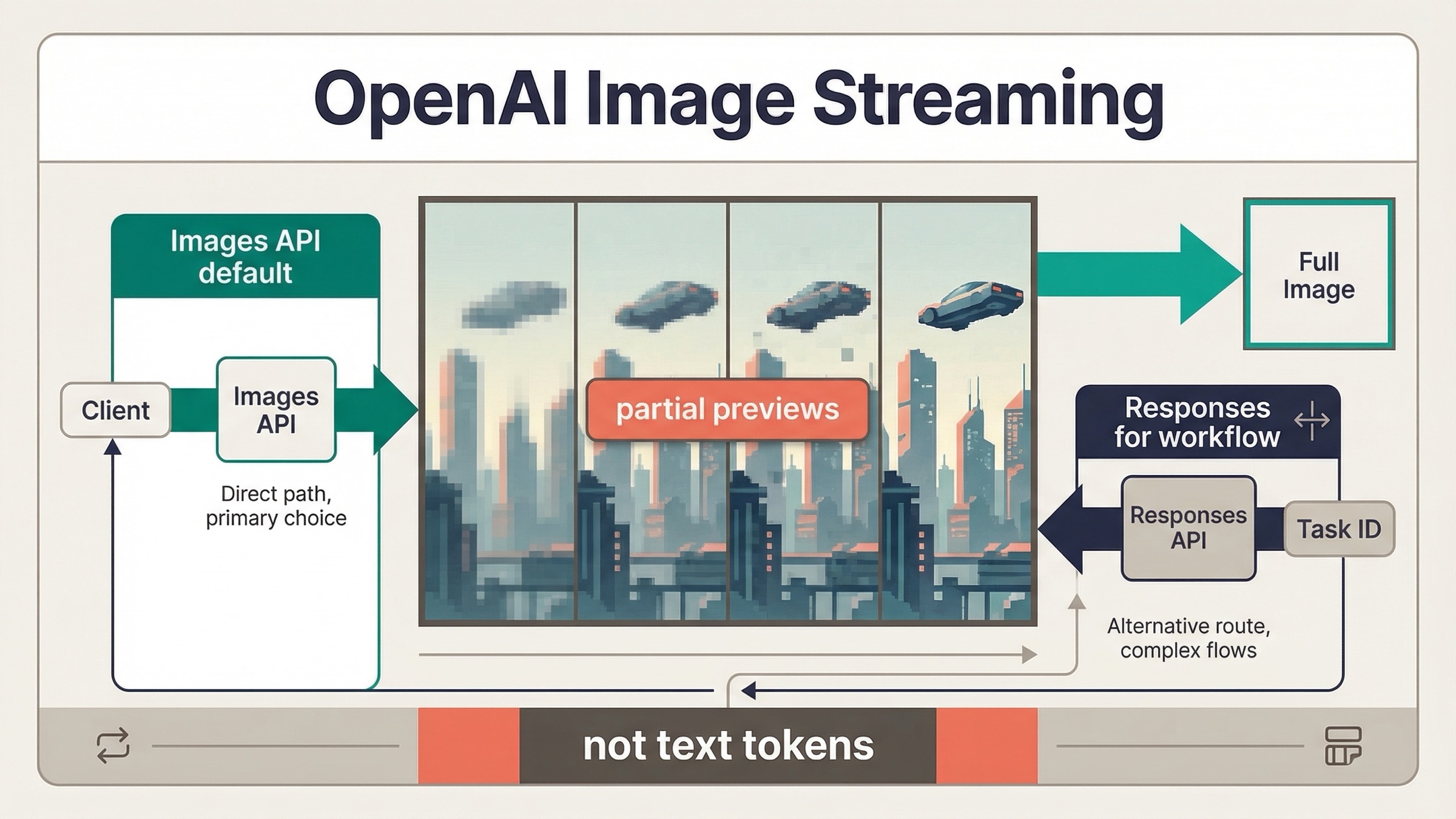
As of March 23, 2026, OpenAI image generation does support streaming, but the current behavior is not text-style token streaming from the image model. What OpenAI documents today is streamed partial-image previews while the image is still being generated. That distinction matters because it changes what your UI can promise and which API surface you should wire up first.
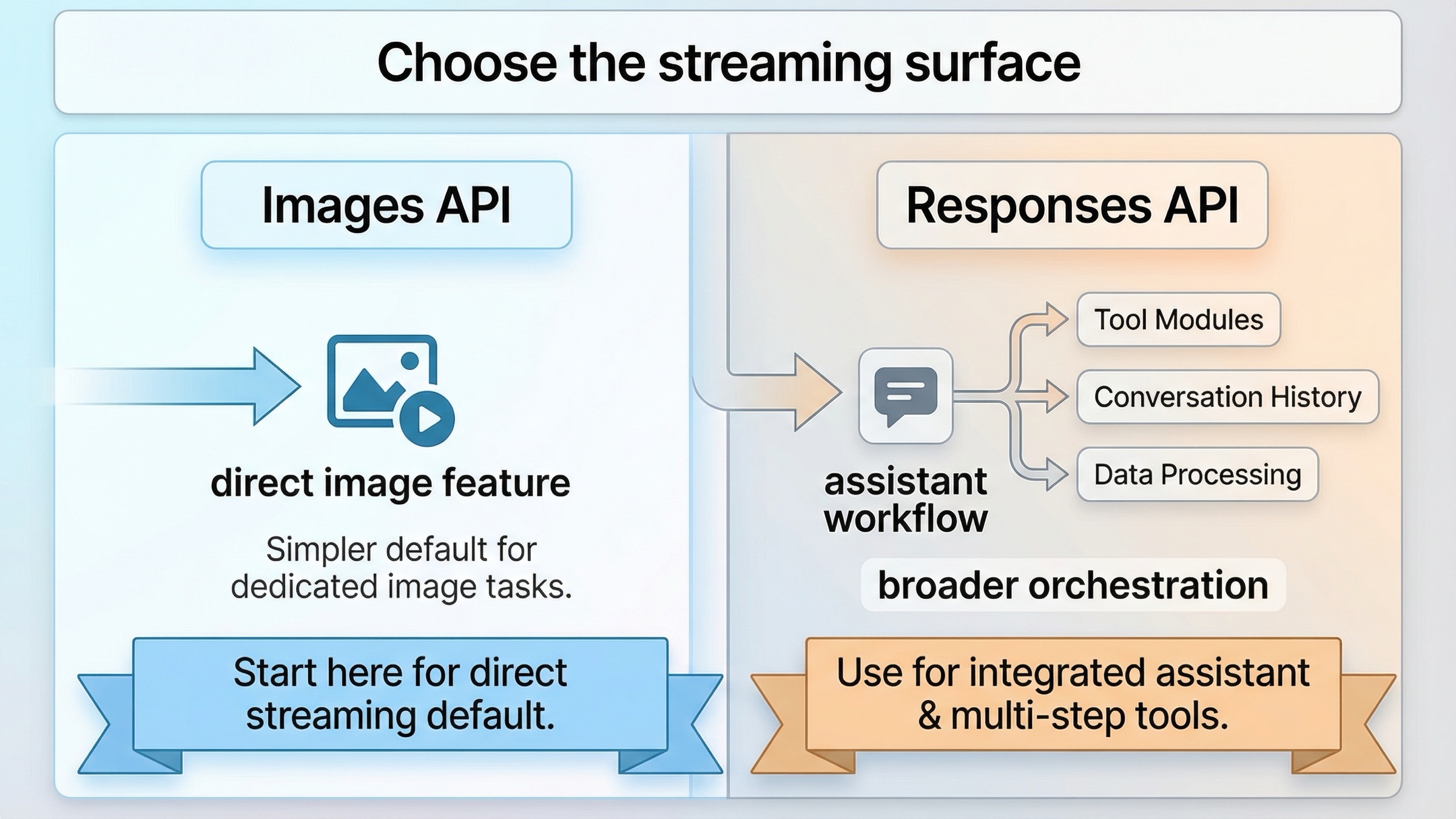
If you are building a direct image feature, the safest current default is simple: start with the Images API and stream partial previews from client.images.generate(). If image generation is only one tool inside a broader assistant or multimodal workflow, use the Responses API with the hosted image_generation tool instead. Most weak pages still blur those two routes together, and that is why this keyword keeps feeling more confusing than it should.
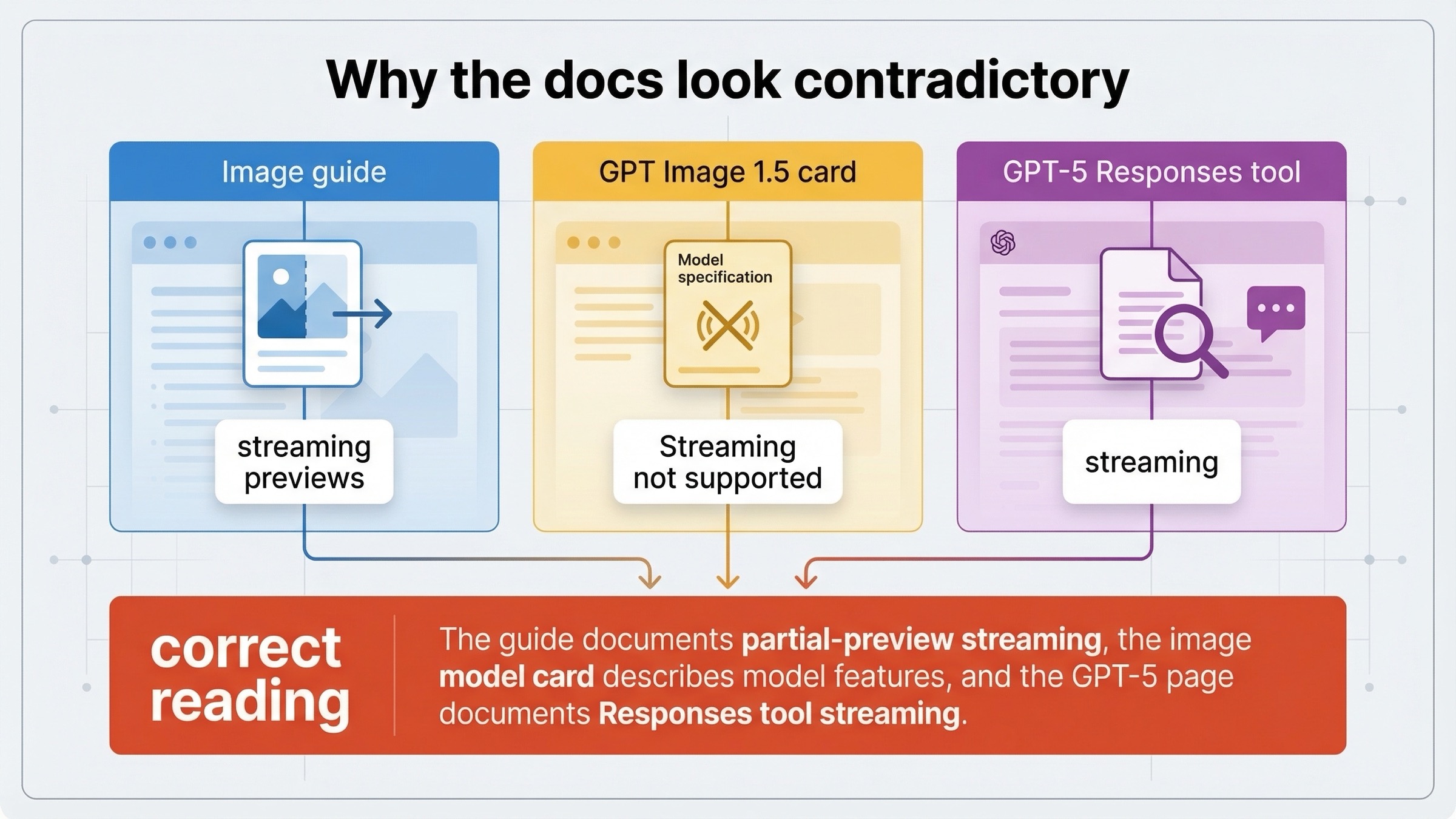
The other reason this topic stays messy is that OpenAI's official pages do not all describe streaming the same way. The current image generation guide explicitly documents streaming on both the Responses API and the Images API. At the same time, the current GPT Image 1.5 model page still shows Streaming: Not supported in the model-card feature table. If you open those pages in the wrong order, it looks like the docs disagree. This article is here to resolve that mismatch before you waste time debugging the wrong thing.
TL;DR
- Yes, OpenAI image generation currently streams, but it streams partial-image previews, not text tokens.
- Use the Images API first if image generation itself is the product feature.
- Use the Responses API only when image generation is one tool inside a larger assistant or multimodal flow.
- Expect different event names on each surface:
image_generation.partial_imageon the Images API andresponse.image_generation_call.partial_imageon the Responses API. - Do not assume you will always receive every preview you asked for. OpenAI's current guide says
partial_imagescan be0to3, and that faster generations may produce fewer previews than you requested.
Start here: what OpenAI image streaming actually means today
The easiest way to misunderstand this keyword is to import the wrong mental model from text generation. When developers ask whether OpenAI image generation "streams," they usually mean one of two things:
- can I show the user progressive visual feedback before the final image finishes
- does the image model behave like a text model that emits token-sized chunks until the response is complete
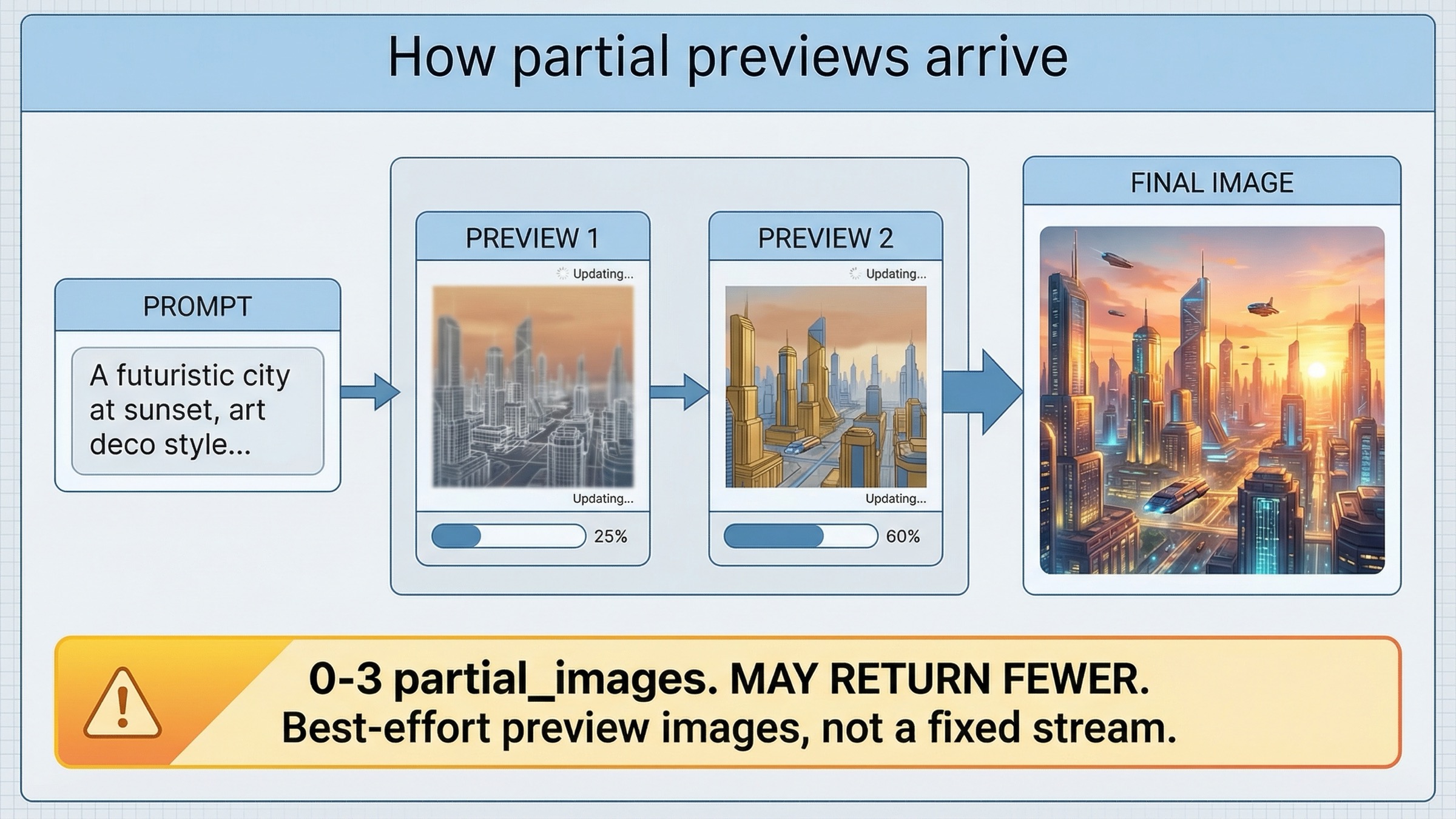
OpenAI's current answer is yes to the first question and no to the second. The current image generation guide says both the Responses API and the Image API support streaming image generation, and then defines that support around partial images rather than text-like tokens. The guide also says partial_images can be set from 0 to 3, and warns that you may receive fewer previews than requested if the final image finishes quickly.
That means the right product expectation is not "I will get a stable stream of tiny render increments until the last pixel lands." The right expectation is "I can request a small number of preview images while generation is still running, and then hand off to my normal final-image path once the generation completes." That is still extremely useful for user experience, especially if you are trying to make image generation feel less opaque, but it is a narrower contract than many developers assume when they hear the word streaming.
This is also why the first implementation choice matters. If your product just needs a prompt, a few preview frames, and a final image, the direct Images API keeps the mental model clean. If your product needs conversation state, tool orchestration, or image generation as one step in a broader agent workflow, then the Responses API makes more sense. The current docs support both. The mistake is treating them as equally good starting points for every project.
Images API vs Responses API: choose the right streaming surface
This keyword gets much easier once you stop asking "which OpenAI image endpoint is newer" and start asking "which surface matches the product I am shipping today."
| Situation | Better default | Why |
|---|---|---|
| You are building a direct image feature and want partial previews plus the final image | Images API | Cleaner request shape, explicit image model choice, and the simplest event loop for image-only work |
| You need image generation inside a broader assistant or multimodal flow | Responses API | Image generation becomes one tool inside a larger reasoning or conversation workflow |
| You want the fastest proof that streaming works on your account | Images API | Fewer moving parts, fewer route decisions, and no need to think about top-level tool orchestration yet |
| You need the mainline model to revise prompts or coordinate other tools around image output | Responses API | The hosted image_generation tool fits better when the image is not the only output |
| You are debugging docs confusion for the first time | Images API first, then Responses if needed | It removes one whole layer of uncertainty before you debug event handling or orchestration behavior |
The practical rule is straightforward. If image generation itself is the feature, start direct. Use the Images API, confirm that partial previews arrive, and only add the Responses layer later if the product really needs it. If image generation is one tool among several, then start with Responses because the surrounding workflow is already the point.
The current images and vision guide supports that split. It says developers can generate or edit images using the Image API or the Responses API, and its Responses example uses a mainline model such as gpt-4.1-mini with the hosted image_generation tool. That is a strong clue about how OpenAI expects the Responses path to work: the mainline model orchestrates, and image generation is one tool inside that broader flow.
Fastest working stream with the Images API
If your goal is to prove the streaming path quickly, the Images API is still the best starting point. The current guide shows the direct pattern with gpt-image-1.5, stream: true, and partial_images: 2. That is the route I would give a developer who wants the fastest honest success path.
In JavaScript:
jsimport fs from "fs";
import OpenAI from "openai";

const client = new OpenAI({
  apiKey: process.env.OPENAI_API_KEY,
});

const stream = await client.images.generate({
  model: "gpt-image-1.5",
  prompt:
    "Create a clean editorial illustration of a camera drone hovering over a bright city skyline at sunrise",
  stream: true,
  partial_images: 2,
});

for await (const event of stream) {
  if (event.type === "image_generation.partial_image") {
    const index = event.partial_image_index;
    const imageBytes = Buffer.from(event.b64_json, "base64");
    fs.writeFileSync(`preview-${index}.png`, imageBytes);
  }
}
In Python:
pythonfrom openai import OpenAI
import base64

client = OpenAI()

stream = client.images.generate(
    model="gpt-image-1.5",
    prompt="Create a clean editorial illustration of a camera drone hovering over a bright city skyline at sunrise",
    stream=True,
    partial_images=2,
)

for event in stream:
    if event.type == "image_generation.partial_image":
        index = event.partial_image_index
        image_bytes = base64.b64decode(event.b64_json)
        with open(f"preview-{index}.png", "wb") as f:
            f.write(image_bytes)
This is the right first test for three reasons.
First, it proves the simplest possible route. You are choosing the current image model explicitly, you are asking for a small number of previews, and you are listening for one image-specific event type. That is exactly what you want when the question is "does streaming work for my image feature" rather than "how do I orchestrate an agent."
Second, it gives you a cleaner debugging tree. If no preview arrives, you can check account access, model choice, or event handling without wondering whether the problem actually lives in a larger Responses workflow. OpenAI's current GPT Image 1.5 model page still says Free not supported, and the page lists image rate limits starting at Tier 1 with 100,000 TPM and 5 IPM, so it is worth clearing access assumptions before you blame the SDK sample.
Third, it sets the right expectation for the UI. The guide says you can request 0 to 3 partial images, but it also says you might not receive the full count you asked for if the image finishes quickly. That is a preview signal, not a guaranteed frame contract. If your product can handle that honestly, the direct Images API route is usually enough.
One more operational note: if you already have a solid direct-generation guide to hand teammates, point them first to our OpenAI image API tutorial. It is still the better starting page for direct generation or edits when the question is not specifically about streamed previews.
When the Responses API is the better streaming route
The Responses path is not wrong. It is just usually the wrong first default for this keyword unless your workflow genuinely needs it.
OpenAI's current image generation guide shows streamed Responses image generation like this:
jsimport fs from "fs";
import OpenAI from "openai";

const client = new OpenAI({
  apiKey: process.env.OPENAI_API_KEY,
});

const stream = await client.responses.create({
  model: "gpt-5",
  input:
    "Create a transparent sticker-style icon of a paper airplane for a travel app",
  stream: true,
  tools: [{ type: "image_generation", partial_images: 2 }],
});

for await (const event of stream) {
  if (event.type === "response.image_generation_call.partial_image") {
    const index = event.partial_image_index;
    const imageBytes = Buffer.from(event.partial_image_b64, "base64");
    fs.writeFileSync(`preview-${index}.png`, imageBytes);
  }
}
That path is worth using when the image is not the only thing you care about. Good examples include:
- a multimodal assistant that sometimes returns text and sometimes returns images
- a workflow that needs the mainline model to decide when image generation should happen
- a system that benefits from the mainline model revising or shaping the prompt before the image tool runs
The current guide even exposes that extra layer directly. In the Responses API, the mainline model can revise the prompt used by the image generation call, and the guide says you can inspect that revised_prompt field on the completed image-generation call. That is useful when the surrounding workflow matters more than raw route simplicity.
But there is one rule that still traps people: do not treat the Responses path like a place to put gpt-image-1.5 in the top-level model field just because the final output is an image. The current docs frame Responses image generation around a mainline model such as gpt-4.1 or gpt-5 plus the hosted image_generation tool. If you force the wrong mental model onto that API surface, you will end up debugging a route problem as if it were a streaming problem.
So the right recommendation is not "Responses is more modern, so use it everywhere." The right recommendation is "Responses is better when orchestration is the feature. Images API is better when image generation itself is the feature."
Why the docs look contradictory
This is the part most ranking pages still dodge, and it is the main reason the keyword exists at all.
OpenAI's current image generation guide says the Responses API and the Image API both support streaming image generation. It then shows concrete event loops for both surfaces and explicitly defines that support around partial-image previews.
The current GPT Image 1.5 model page, however, still says Streaming: Not supported in the feature table.
Then the current GPT-5 model page says streaming is supported and that the image_generation tool is supported in the Responses API.
The clean way to reconcile those pages is this:
- the image guide is documenting API-surface behavior for streamed partial-image delivery
- the GPT-5 page is documenting mainline model behavior plus tool support inside Responses
- the GPT Image model card is not promising generic text-like streaming from the image model itself
That interpretation matches the examples OpenAI actually publishes. If your question is "can my application receive preview images while generation is still running," the answer is yes. If your question is "does the image model behave like a text model that streams token chunks," the answer is no, that is not what the current image guide describes.
This also explains why older tutorials still sound different. OpenAI's launch post for the API image model, dated April 23, 2025, introduced gpt-image-1 on the Images API and said that Responses support was "coming soon." If you learned the stack from that launch era, you probably still carry an Images-first mental model and a narrower idea of what streaming support could mean. The current docs have moved beyond that, but they have not erased the older wording from every surface.
The common implementation mistakes that waste time
The most common mistakes on this topic are not deep algorithm problems. They are route mistakes, naming mistakes, and expectation mistakes.
1. Using the wrong event name for the surface you chose
On the direct Images API, the current guide listens for image_generation.partial_image. On the Responses API, the guide listens for response.image_generation_call.partial_image. Those are not interchangeable. If you copy the right idea but the wrong event name, the route can look broken when the event handler is the real problem.
2. Starting with Responses when the product is just a direct image feature
This is the most common architectural mistake. If all you need is a prompt, a few preview images, and a final asset, the Images API gives you a cleaner first success. Starting with Responses adds an extra abstraction layer before you have proved the simplest possible stream.
3. Assuming partial_images is a frame guarantee
OpenAI's current guide says partial_images can be 0 to 3, and it also says you may not receive every preview you requested if the final image is generated more quickly. Treat previews as a best-effort progress UX, not as a contract to deliver a fixed number of progressive frames.
4. Reading the model card and the guide as if they describe the same layer
They do not. The guide is describing current streamed partial-image delivery on the API surface. The model card is describing image-model features in a broader catalog table. If you flatten those into one meaning, you will either understate current support or overstate what that support guarantees.
5. Debugging code before you verify access assumptions
The current GPT Image 1.5 model page still says Free is unsupported for image use, and the launch post still warns that some developers may need organization verification before they can use the model. If your very first streamed test does nothing, do not assume the event loop is the only suspect. Check whether the account and organization can actually access the image model you chose.
6. Letting old gpt-image-1 assumptions drive a 2026 implementation
The current model anchor for new work is gpt-image-1.5, not the original gpt-image-1 launch mental model. If you are also comparing broader image routes, our guide to current OpenAI image models is the better place to resolve that lineup before you keep tuning the stream itself.
FAQ
Can I force exactly two preview frames?
No. OpenAI's current image generation guide says partial_images can be set from 0 to 3, but it also says you may receive fewer previews than requested if the final image finishes quickly. Treat partial images as best-effort preview signals, not as a guaranteed frame count.
Should I use the Realtime API for this?
Not as the default answer to this keyword. The current image generation guide documents streamed partial-image previews on the Images API and the Responses API. That is the documented path to follow unless OpenAI publishes a more explicit image-preview Realtime pattern later.
Which model should I put in the request?
For the direct Images API path, start with gpt-image-1.5. For the Responses path, follow the current docs pattern and use a mainline model such as gpt-4.1 or gpt-5 in the top-level model field, then attach the hosted image_generation tool.
Final recommendation
If you only keep one rule from this page, keep this one: OpenAI image generation streaming currently means partial-image preview streaming, and the Images API is the safest default unless image generation is only one tool inside a broader Responses workflow.
That answer is more useful than a blanket "yes" because it tells you what to build next. Start with one direct streamed Images API request on gpt-image-1.5. Make sure your UI can handle preview images arriving on a best-effort basis. Only after that works should you move up to the Responses API, where the extra orchestration is actually worth the extra complexity.
If you want the broader route map after this streaming question is settled, continue with our OpenAI image API tutorial for direct generation and edits, or our OpenAI image editing API guide if the next problem is preservation-heavy edits rather than progressive previews.