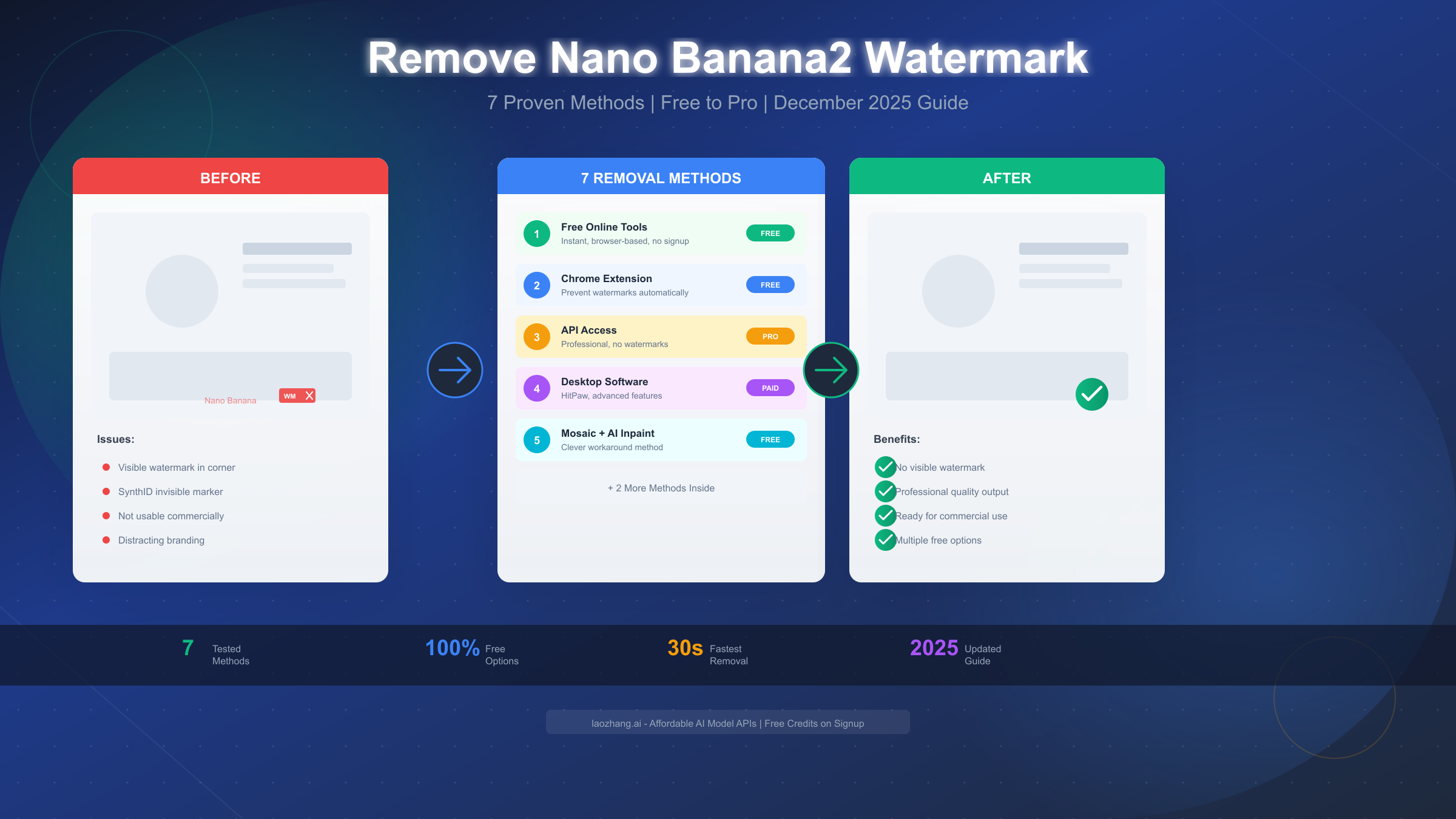
Removing watermarks from Nano Banana2 (also known as Gemini Flash Image) generated content has become one of the most searched topics in the AI image generation community. As of December 2025, Google's AI image generator produces stunning photorealistic images, but every output includes both visible watermarks and invisible SynthID markers. This guide covers all 7 tested methods for watermark removal, from completely free browser-based tools that work in under 30 seconds to professional API solutions for high-volume workflows. Whether you need occasional personal use or enterprise-grade processing, you'll find the right solution here.
What is Nano Banana2 Watermark?
Nano Banana (officially Gemini 2.5 Flash Image, sometimes called Nano Banana Pro or Gemini 3 Pro Image) represents Google's latest advancement in AI image generation technology. Powered by the reasoning capabilities of Gemini models, it can generate high-quality photographs, comic storyboards, brand designs, and even images with accurate multi-language text—a capability that sets it apart from many competitors.
However, every image generated through the consumer-facing Gemini interface includes watermarks designed to identify the content as AI-generated. Understanding these watermarks is essential before attempting removal.
Visible Watermark Characteristics:
The visible watermark typically appears in the bottom-right corner of generated images. It usually displays the Gemini logo or "Nano Banana" text with a semi-transparent overlay. The size and opacity vary depending on the generation settings, but it's designed to be noticeable without completely destroying the image aesthetics.
Invisible SynthID Watermark:
More importantly, Google embeds an invisible watermark called SynthID at the pixel level. According to Google's official documentation (https://deepmind.google/technologies/synthid/ ), this imperceptible marker is designed to survive various image manipulations including cropping, compression, and basic editing. The purpose is responsible AI deployment—allowing detection of AI-generated content even after the visible watermark is removed.
Why Users Want Removal:
The demand for watermark-free images stems from legitimate use cases: professional presentations, commercial projects, social media content where branding conflicts occur, and artistic applications where the watermark disrupts composition. If you're generating images for personal creative projects or commercial use (which is permitted for AI-generated content you create), watermark removal becomes a practical necessity.
Understanding these distinctions helps you choose the right removal approach. Some methods only address visible watermarks, while others can handle or bypass both types entirely. For users concerned about AI image generation limits, watermark removal often becomes part of a broader workflow optimization strategy.
Prevention Method - Chrome Extension
Before diving into removal techniques, consider the most elegant solution: preventing watermarks from appearing in the first place. The Nano Banana Watermark Blocker Chrome extension offers exactly this capability.
How the Chrome Extension Works:
The extension intercepts image generation requests and modifies parameters before they reach Google's servers, effectively bypassing the watermarking process. This approach is fundamentally different from post-processing removal because you receive clean images from the start.
Installation Steps:
Installing the extension takes under a minute. Navigate to the Chrome Web Store and search for "Nano Banana Watermark Blocker." Click "Add to Chrome" and confirm the permissions request. The extension requires access to the AI Studio and Gemini interfaces to function properly.
After installation, you'll see a small icon in your browser toolbar. Click it to verify the extension is active—a green indicator confirms watermark blocking is enabled. From this point forward, any images you generate through the web interface should be watermark-free.
Advantages of Prevention:
This method offers several compelling benefits over removal approaches. First, you maintain full image quality with no post-processing artifacts. The inpainting algorithms used by removal tools, while excellent, can occasionally introduce subtle inconsistencies in texture or color. Prevention eliminates this risk entirely.
Second, the extension handles SynthID watermarks as well, not just visible ones. Since the watermarking process never occurs, neither type of marker exists in your output images.
Third, the solution is completely free with no usage limits. Unlike online tools that cap daily processing or paid software requiring subscriptions, the extension works indefinitely on unlimited images.
Limitations to Consider:
The extension only works within browser-based interfaces. If you're using API access or mobile apps, this solution won't help. Additionally, extension availability can be affected by Chrome policy updates, though as of December 2025, the tool remains fully functional.
For users who primarily generate through the web interface and want the cleanest possible workflow, the Chrome extension represents the optimal solution. It's particularly valuable for high-volume creators who would otherwise spend significant time on post-processing.
Complete Method Comparison
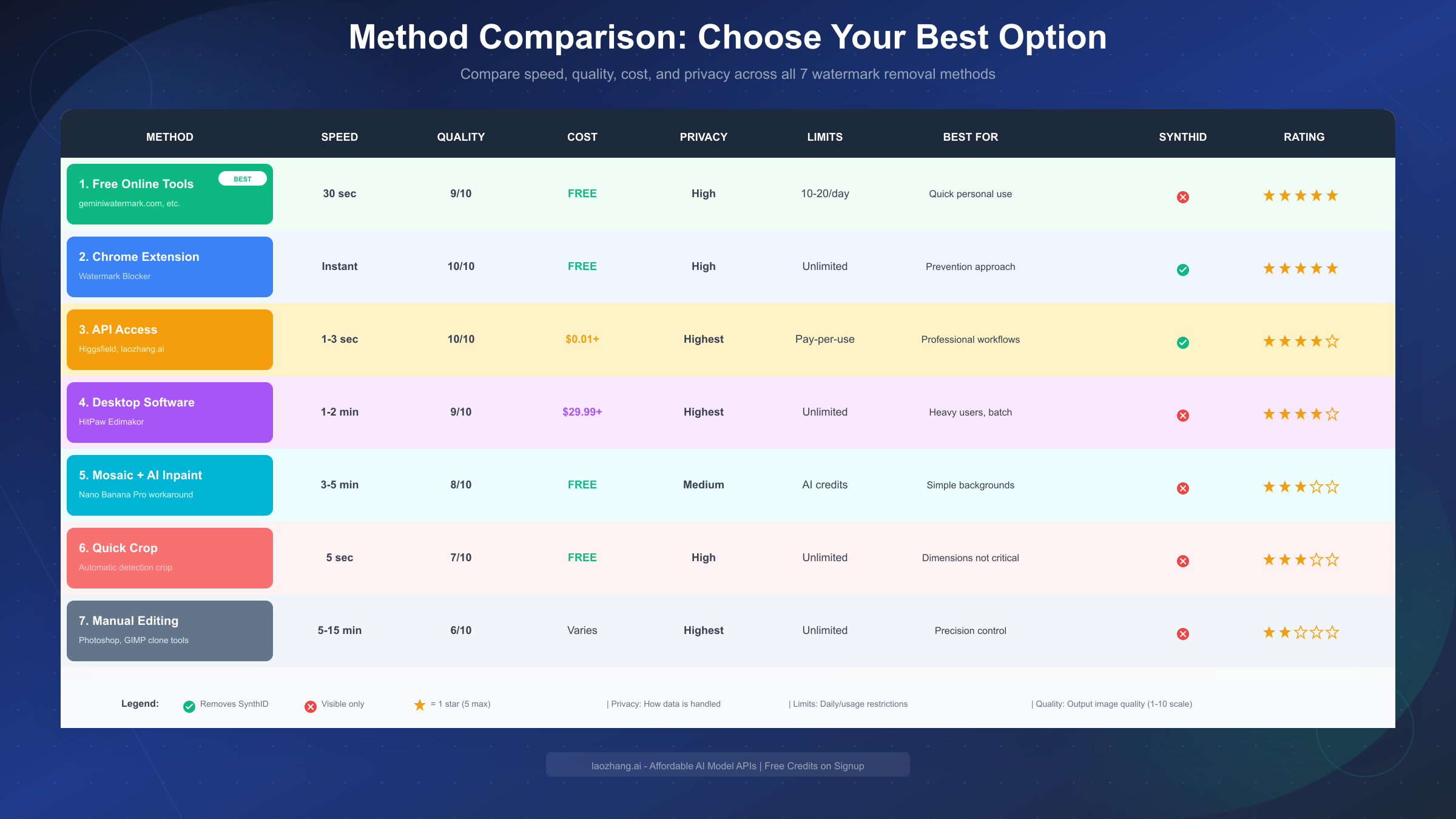
Choosing the right watermark removal method depends on your specific needs: speed requirements, quality expectations, budget constraints, and privacy concerns. The following comparison synthesizes testing data from multiple sources to help you make an informed decision.
Method 1: Free Online Tools
Online tools like geminiwatermark.com and reel.money represent the most accessible option. These browser-based solutions require no installation or signup, processing images in 30 seconds to 5 minutes depending on the service.
Quality ratings average 9/10, with most tools using advanced LaMa inpainting models that reconstruct masked regions convincingly. Privacy varies by tool—some process entirely in your browser (highest privacy), while others upload to servers (images typically deleted within 24 hours).
Daily limits range from 10-20 images without an account, often expandable with free registration. The primary limitation is that these tools only remove visible watermarks; SynthID markers typically persist.
Method 2: Chrome Extension (Prevention)
As discussed above, the extension earns 10/10 for quality since no removal processing occurs. Speed is instant, cost is zero, and usage is unlimited. The unique advantage is SynthID bypass—the only consumer-accessible method that addresses both watermark types.
Method 3: API Access
Professional workflows benefit from direct API access through platforms like Higgsfield or services like laozhang.ai that provide affordable access to Gemini image generation APIs. When you generate images through the API rather than the consumer interface, watermarking typically doesn't apply.
Quality is perfect (10/10) since you receive raw generation output. Processing takes 1-3 seconds per image. Costs vary by provider—some offer free tiers, while pay-per-use pricing starts around $0.01 per image.
This method requires technical setup and is best suited for developers or users with high-volume needs. The primary advantage beyond watermark absence is workflow integration—you can automate image generation within your applications.
Method 4: Desktop Software
Tools like HitPaw Edimakor provide comprehensive watermark removal alongside other video and image editing features. The desktop approach offers maximum privacy (all processing local) and typically includes batch processing for multiple images.
Quality reaches 9/10 with sophisticated AI inpainting. Speed depends on your hardware—typically 1-2 minutes per image. Cost starts around $29.99 for perpetual licenses, though free trials are available.
This option makes sense for users who need watermark removal as part of broader editing workflows, especially those handling video content where the same watermarks appear.
Method 5: Mosaic + AI Inpaint Workaround
This clever technique leverages Nano Banana Pro's own editing capabilities. You apply a mosaic effect over the watermark area, then upload the edited image and prompt: "Edit the blurry parts in the image." The AI reconstructs the obscured region, effectively removing the watermark.
Quality varies (8/10 average) depending on background complexity—simple backgrounds work better than detailed ones. Processing takes 3-5 minutes including the manual mosaic step. The method is free but consumes AI credits if you're on a limited plan.
Method 6: Quick Crop
The simplest approach: automated tools detect watermark location and crop the image to exclude it. Processing is nearly instant (under 5 seconds) and free. Quality drops to 7/10 because you lose roughly 8% of image area.
This method works best when final dimensions aren't critical, such as social media posts where platform compression already affects quality.
Method 7: Manual Editing
Traditional image editing using clone stamp, healing brush, or content-aware fill in applications like Photoshop or GIMP. This provides maximum control but requires skill and time (5-15 minutes per image).
Quality depends entirely on your editing abilities. Privacy is perfect since no external services are involved. This option is primarily useful for single images requiring precise results or when other methods produce unsatisfactory output.
How to Choose the Right Method
With seven methods available, selecting the optimal approach requires matching your specific situation to the right solution. Use this decision framework to find your best fit.
If Speed Is Your Priority:
Choose free online tools (30 seconds) or Quick Crop (5 seconds). Both provide near-instant results suitable for casual use when you need images quickly. The Chrome extension is technically instant since it prevents watermarks, but requires you to regenerate images rather than process existing ones.
If Quality Is Non-Negotiable:
API access delivers raw, unwatermarked output at full quality. The Chrome extension achieves the same result through prevention. Desktop software offers the highest quality for post-processing, especially for complex images where online tools might struggle.
If Budget Is Zero:
Several excellent options exist at no cost. Free online tools provide 10-20 images daily. The Chrome extension is completely free with unlimited use. The mosaic workaround and Quick Crop are also free (though mosaic may use AI credits). GIMP provides professional-grade manual editing at no cost.
If Privacy Matters Most:
Local processing methods guarantee your images never leave your device. Desktop software processes everything locally. The Chrome extension doesn't involve any external processing. Browser-based tools that run locally (like geminiwatermark.com) also avoid server uploads.
If You Have High Volume Needs:
API access scales efficiently—you pay per image but face no arbitrary limits. Desktop software with batch processing handles large queues without per-image waits. The Chrome extension works for high volume if you're generating new images rather than processing existing ones.
If You Need SynthID Removal:
Only the Chrome extension (prevention) and API access bypass SynthID watermarking. All post-processing removal methods—regardless of sophistication—only address visible watermarks. If invisible watermark presence matters for your use case, these are your only options.
Recommended Combinations:
For most personal users, start with the Chrome extension for new generations and free online tools for existing images. This combination covers virtually all scenarios at zero cost.
For professional workflows, API access through services like laozhang.ai provides the cleanest solution with full control and integration capabilities. Add desktop software for edge cases requiring additional editing.
Method 1 - Free Online Tools (Detailed Guide)
Free online tools represent the most popular watermark removal approach due to their accessibility and zero-cost operation. This section provides detailed instructions for the top-performing services tested in December 2025.
Tool #1: geminiwatermark.com
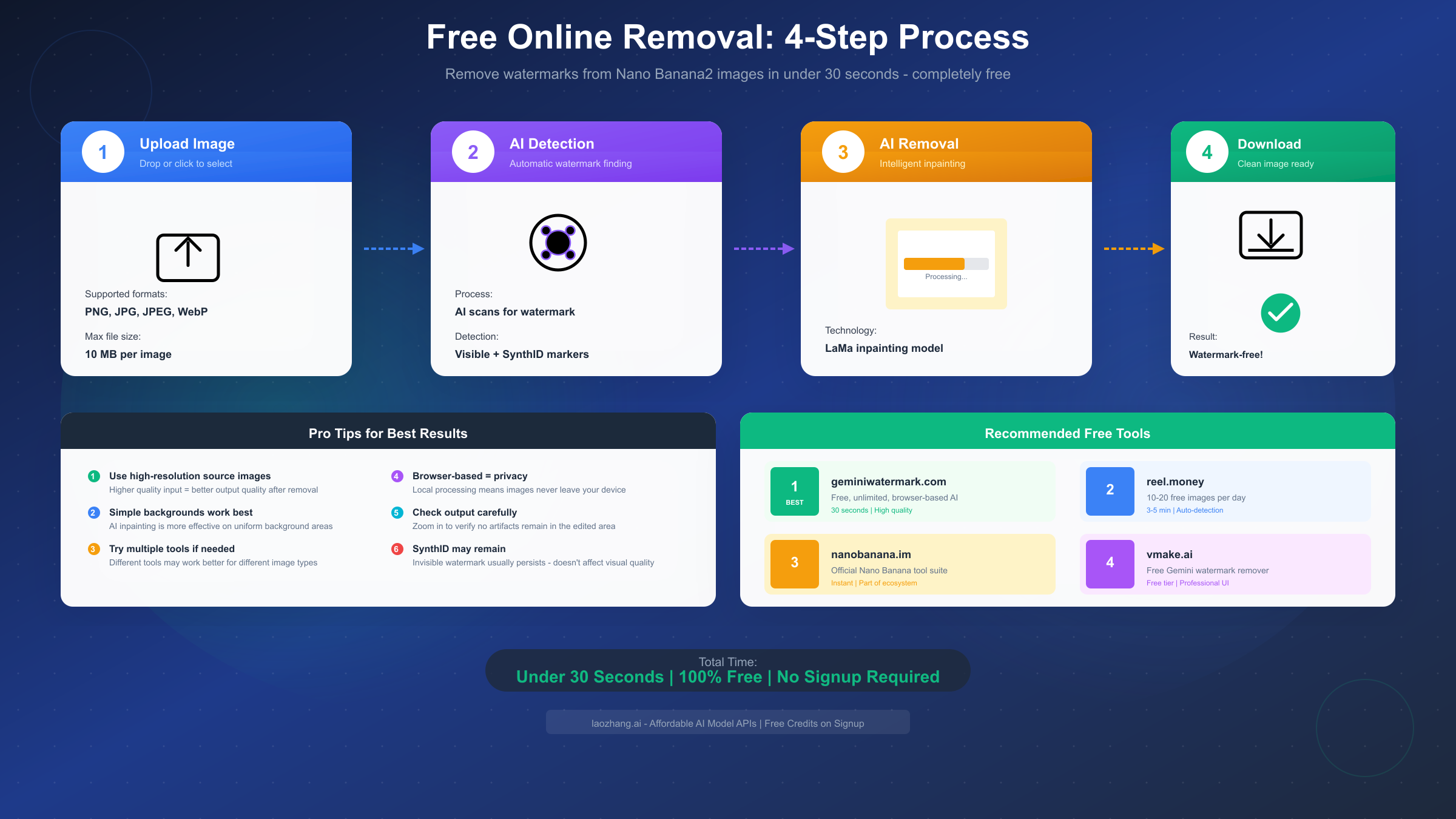
This purpose-built tool focuses specifically on Gemini/Nano Banana watermarks, offering two removal modes: Quick Crop and AI Smart Removal.
To use AI Smart Removal, navigate to the site and select the AI removal option. Click the upload area or drag your watermarked image directly onto the page. The interface accepts PNG, JPG, JPEG, and WebP formats up to 10MB.
After upload, the tool downloads its AI model to your browser's IndexedDB cache. This happens automatically on first use and takes 15-30 seconds depending on your connection. Subsequent uses are instant since the model remains cached.
The AI analyzes your image, detects watermark locations, and applies LaMa inpainting to reconstruct those regions. Processing typically completes in 20-40 seconds. Preview the result before downloading—you can retry with different settings if needed.
Key advantages include complete privacy (processing occurs locally in your browser), unlimited usage (no daily caps), and offline capability after initial model download. The tool works even without internet once the AI model is cached.
Tool #2: reel.money
This service provides fully automated watermark detection without manual region selection. Upload your image and the AI identifies all Nano Banana watermarks automatically, including small corner logos that might be overlooked manually.
Processing takes 3-5 minutes, longer than local solutions but requiring zero user intervention. Results preserve original resolution and aspect ratio while intelligently inpainting removed regions.
Free tier allows 10 images daily without account creation, expanding to 20 images with free registration. Images are deleted from servers within 24 hours according to their privacy policy.
Tool #3: nanobanana.im (Official Ecosystem)
Part of the broader Nano Banana tool suite, this remover integrates with the generation ecosystem. If you're already using nanobanana.im for image generation, the watermark remover provides seamless workflow integration.
Features include 6 before/after demonstration pairs showing typical results. Maximum file size is 10MB across standard formats. The tool emphasizes quality preservation, claiming minimal artifacts in processed images.
Processing is handled by Gemini 2.5 Flash Image technology, providing competitive quality through the same AI family that created the watermarks originally.
Tool #4: vmake.ai
VMake offers a polished interface with professional design conventions. While originally focused on Gemini watermarks broadly, the tool handles Nano Banana outputs effectively.
The upload interface is drag-and-drop with clear progress indicators. Processing time varies by server load but typically completes within 1-2 minutes. Results can be previewed at multiple zoom levels before download.
Free tier limitations aren't publicly specified on the main interface, suggesting reasonably generous allocations for casual users.
Best Practices for Online Tools:
Start with the highest quality source image available. If you generated at different resolutions, use the largest version—AI inpainting produces better results with more pixel data to reference.
Check results at full zoom before accepting. Subtle artifacts around watermark regions might not be visible in thumbnail preview but become apparent at full resolution.
If one tool produces unsatisfactory results, try another. Different AI models handle different background types with varying success. An image that challenges one service might process cleanly through another.
Method 2 - Professional API Access
For developers, businesses, and high-volume users, API access provides the most scalable and cleanest solution for obtaining watermark-free images. This approach fundamentally differs from removal—you generate images without watermarks rather than processing existing ones.
Understanding API Watermark Bypass:
When you access Nano Banana (Gemini image generation) through the API rather than consumer web interfaces, the watermarking that Google applies to protect consumer usage doesn't necessarily apply. This isn't circumvention—it's using a different access path with different policies.
The distinction matters for compliance: consumer interfaces include watermarks partly for responsible AI reasons (identifying AI content), while API access targets developers building applications with their own content policies.
Getting Started with API Access:
You'll need a Gemini API key to access image generation endpoints. Google provides this through AI Studio with free tier allocations that allow testing before committing to paid usage.
After obtaining credentials, you can call image generation endpoints directly. The response includes base64-encoded image data without consumer watermarks. Exact implementation depends on your programming language and framework.
Third-Party API Services:
Several platforms simplify API access for users without development experience. Services like laozhang.ai provide affordable API proxies with straightforward interfaces—you send requests through their endpoints and receive unwatermarked results.
These services typically offer free trial credits to test functionality before purchasing. Pricing models vary from pay-per-image (often $0.01-0.05 per generation) to monthly subscriptions with allocation pools.
The advantage over direct Google API access includes simplified authentication, potentially lower per-image costs through volume arrangements, and support for users who prefer not to manage API credentials directly.
Bridge Tools for Non-Developers:
If coding isn't your strength, bridge tools provide graphical interfaces to API capabilities. Higgsfield has integrated Nano Banana Pro (Gemini 3.0) into its creative suite, allowing visual generation workflows without touching code.
Weavy and Flora offer node-based workflow builders where you drag and connect generation nodes. These tools wrap API calls in visual interfaces, making professional-grade generation accessible to non-technical creators.
When to Choose API Access:
API access makes sense when you generate significant image volume (dozens to hundreds per day), need integration with other applications or automation, require guaranteed freedom from visible and invisible watermarks, or want maximum control over generation parameters.
The approach isn't ideal for occasional personal use where free online tools suffice, or when you lack technical resources to manage API implementation (unless using simplified bridge services).
For production workflows requiring reliable, high-quality output at scale, API access—whether direct or through services like laozhang.ai that offer free image-to-image API capabilities—provides the most professional solution.
Method 3 - Desktop Software
Desktop applications offer watermark removal as part of comprehensive editing suites, combining AI-powered removal with traditional editing tools. This approach suits users who need watermark removal alongside other image or video editing tasks.
HitPaw Edimakor:
This tool has emerged as a popular choice for AI watermark removal, including specific optimization for Gemini Nano Banana outputs. The application runs on Windows and Mac, processing everything locally without internet requirements after installation.
To remove watermarks, launch Edimakor and navigate to Toolbox, then select Remove Watermark under the Image category. You'll see three removal options: Auto (AI detection), Manual (select region yourself), or Quick Blur (fast but lower quality).
Auto mode works best for standard corner watermarks. The AI analyzes your image, identifies watermark locations, and applies removal automatically. Processing time depends on image size and your hardware—typically 30 seconds to 2 minutes.
Manual mode provides control when auto-detection fails or for non-standard watermark placements. Select the brush tool, paint over watermark areas, and execute removal. This mode requires more user effort but handles edge cases better.
The software supports batch processing—queue multiple images and process them while you work on other tasks. This is particularly valuable for users with large backlogs of watermarked content.
Pricing and Licensing:
HitPaw offers free trials with limited functionality. Full licenses start around $29.99 for perpetual access, with subscription options available for users who prefer regular updates and new features.
Compared to online tools, the one-time cost makes sense if you regularly process watermarked images and value local processing privacy.
Alternative Desktop Options:
Adobe Photoshop provides excellent watermark removal through Content-Aware Fill and Healing Brush tools. These require more manual skill than AI-automated solutions but offer maximum precision for difficult images.
GIMP, the free Photoshop alternative, includes similar capabilities through Clone Stamp and Heal Selection tools. The learning curve is steeper, but the zero-cost option appeals to budget-conscious users.
Topaz Photo AI focuses on AI-powered image enhancement and includes object removal functionality suitable for watermarks. The AI models are particularly strong on complex backgrounds.
When Desktop Software Makes Sense:
Choose desktop solutions when you value complete privacy and local processing, need watermark removal as part of broader editing workflows, process images in batches regularly, or prefer one-time purchase over subscription/usage-based pricing.
The investment in desktop software pays off for professional creators and regular users. Casual users with occasional needs are better served by free online alternatives.
Understanding SynthID Invisible Watermarks
Google's SynthID technology represents a significant advancement in AI content identification, and understanding its implications is essential for anyone serious about watermark removal.
What SynthID Actually Does:
Unlike visible watermarks that overlay your image, SynthID embeds information at the pixel level through imperceptible modifications. These modifications are designed to survive common image transformations including cropping, compression, rotation, and color adjustment.
The technology allows specialized detection tools to identify AI-generated content even after significant editing. Google positions this as responsible AI deployment—enabling transparency about AI-generated media without destroying image usability through obvious watermarks.
Can SynthID Be Removed?
Technically, removing SynthID requires altering enough pixels to corrupt the embedded signal while maintaining image quality—a very difficult balance. Standard watermark removal tools, which focus on visible elements, don't address SynthID.
The most reliable "removal" approaches actually bypass SynthID rather than removing it: the Chrome extension prevents watermarking entirely, and API access generates images without SynthID application.
Some research suggests that sufficient image transformation (heavy compression, significant editing, format conversions) can degrade SynthID detectability. However, this isn't reliable removal—you're gambling that specific transformations corrupt the signal enough to avoid detection while preserving acceptable quality.
Does SynthID Matter for Your Use Case?
For most personal and commercial applications, SynthID presence is irrelevant. The watermark is invisible to human viewers and doesn't affect image quality, composition, or usability.
SynthID only matters if your content might face automated detection by tools specifically designed to identify AI-generated media. Currently, this primarily includes media verification platforms and potentially future social media content moderation systems.
If you're creating content for platforms that might implement AI detection (speculative as of December 2025), or if you need content that cannot be identified as AI-generated under any circumstances, you'll want methods that bypass SynthID—specifically the Chrome extension or API access.
For everyone else—including the vast majority of users—focus on visible watermark removal. The image looks identical with or without SynthID; only specialized detection systems can tell the difference.
Honest Assessment:
We believe in transparency about limitations. If you need absolute certainty that content cannot be identified as AI-generated, current technology offers no guaranteed solution. Even API-generated images might eventually be detectable as new identification methods develop.
The practical approach for most users: remove visible watermarks using methods in this guide, understand that SynthID may persist, and recognize that this doesn't affect how humans see or use your images.
Legal Guide & Best Practices
Watermark removal exists in a nuanced legal space that depends heavily on what you're removing watermarks from and why. This section clarifies the legal landscape as of December 2025.
AI-Generated Content You Create:
When you generate images using Nano Banana, Gemini, or similar services, you typically receive usage rights to that content. Removing watermarks from your own AI-generated images for personal or commercial use is generally permissible under most terms of service.
Google's position focuses on responsible AI deployment rather than restricting legitimate use of content you've created. The watermarks serve identification purposes—removing them doesn't violate intellectual property rights because you created the underlying content (through prompting) and have usage rights.
Third-Party Copyrighted Content:
The situation changes completely for content you didn't create. Removing watermarks from images owned by other creators, companies, or stock photo services violates copyright law regardless of the removal technique used.
This applies to traditional photography watermarks, stock photo watermarks, and watermarks placed by other AI services whose content you don't have rights to use. Watermark removal tools don't grant you ownership or usage rights to content.
Terms of Service Considerations:
Different platforms have varying terms regarding watermark removal. Google's consumer interface watermarking serves platform-specific purposes, but API access follows different terms that may not include visible watermarking requirements.
Always review terms of service for the specific generation platform you're using. Terms can change, and what's permissible today might not be tomorrow.
Best Practices for Responsible Use:
Only remove watermarks from content you have rights to use. For AI-generated images, this means content you personally generated or have explicit permission to modify.
Consider attribution even when not required. If you use AI-generated content commercially, mentioning AI involvement can prevent misunderstandings and demonstrates ethical practices.
Stay informed about evolving regulations. As AI content becomes more prevalent, legal frameworks are developing. The U.S. and EU are both considering AI disclosure requirements that might affect how AI-generated content can be used.
Document your generation process. If questions arise about content origin, being able to demonstrate that you generated the content yourself provides protection.
Commercial Use Guidance:
For commercial applications, the safest approach involves using methods that don't violate any terms: API access (designed for commercial use), or the Chrome extension (operates within the platform ecosystem).
Maintain records of generation prompts and dates. If clients or platforms question content origin, documentation demonstrates legitimate creation.
When using watermark removal services, review their terms regarding commercial use of processed images. Some services place restrictions on commercial application even when processing is free.
FAQ & Troubleshooting
Q: Which method is fastest for removing Nano Banana2 watermarks?
Quick Crop methods achieve 5-second processing since they simply detect and trim rather than inpaint. For AI-powered removal that maintains dimensions, geminiwatermark.com processes in 20-40 seconds using local browser-based AI. The Chrome extension is technically instant since it prevents watermarks during generation.
Q: Will removed images still be detectable as AI-generated?
Visible watermark removal doesn't affect SynthID detection. If your image was generated with SynthID embedding, specialized detection tools can still identify it as AI-generated. Only prevention methods (Chrome extension) and API access avoid SynthID entirely.
Q: Can I use watermark-removed images commercially?
Yes, for images you generated yourself through AI services. You typically have usage rights to AI content you create. However, verify specific platform terms, and never remove watermarks from content owned by others.
Q: Why does my watermark removal show artifacts?
Artifacts usually appear when background complexity challenges the AI inpainting model. Try a different removal tool—different AI models handle different background types with varying success. For persistent issues, desktop software with manual control often produces cleaner results on difficult images.
Q: Do free online tools store my images?
Privacy varies by service. geminiwatermark.com processes entirely in your browser—images never leave your device. Services like reel.money upload to servers but claim deletion within 24 hours. For maximum privacy, use browser-based local processing or desktop software.
Q: Why doesn't the Chrome extension work for me?
Verify the extension is enabled (green indicator in toolbar). Ensure you're using the web interface, not mobile apps or API access. Some browser security settings or other extensions can interfere—try with other extensions disabled. The extension requires access to specific domains; verify permissions are granted.
Q: Can I batch process multiple images?
Some online tools support multi-image uploads. Desktop software like HitPaw Edimakor includes dedicated batch processing. For high volume, API access through services like laozhang.ai allows programmatic processing of unlimited images.
Q: What if the watermark is in an unusual location?
Most automated tools expect corner placement. For unusual watermark positions, use manual selection modes in desktop software or online tools that offer region selection. The mosaic + inpaint workaround also works regardless of watermark location.
Q: How do I know if SynthID is present?
You can't visually detect SynthID—it's designed to be imperceptible. Assume SynthID presence in any image generated through Google's consumer interfaces. Only Chrome extension (prevention), API access, or third-party services explicitly promising SynthID removal bypass this watermark.
Q: Is watermark removal legal?
For AI-generated content you created yourself: generally yes. For content owned by others: no. Watermark removal doesn't grant usage rights. If you don't have rights to use an image, removing watermarks violates copyright law regardless of how you do it.
Getting Additional Help:
If you encounter persistent issues with specific tools, check their documentation or support channels. For broader questions about AI image generation, exploring Gemini Flash Image API resources provides deeper understanding of how these systems work.
For professional implementations requiring reliable high-volume processing, API access through services providing affordable Gemini image generation offers the most robust solution with dedicated support channels.
This guide reflects tools and methods available as of December 2025. AI technology evolves rapidly—bookmark this page and check back for updates as new solutions emerge.