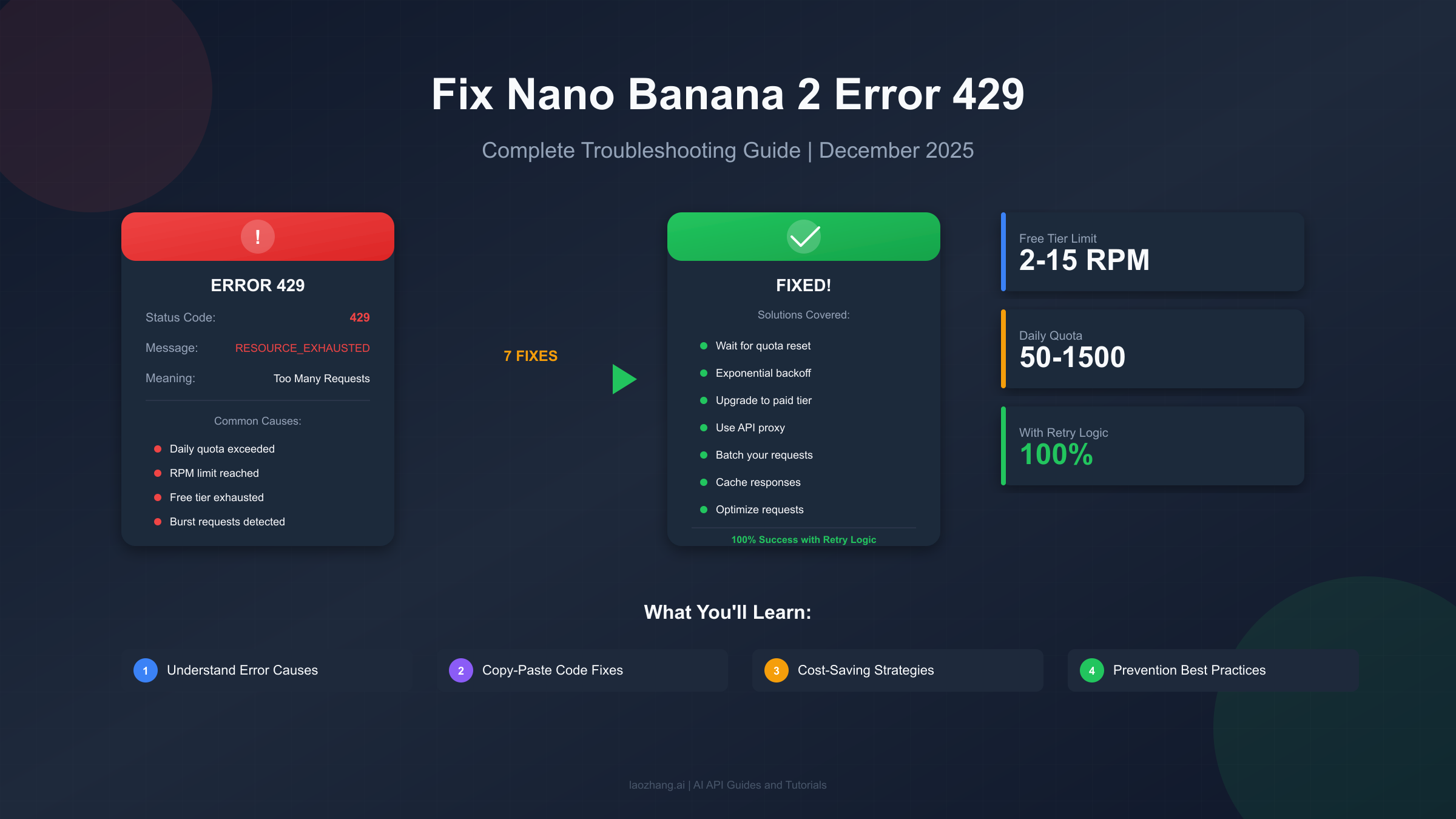
Nothing ruins a creative flow quite like hitting an error 429 while using Nano Banana 2. You've crafted the perfect prompt, you're excited to see the AI-generated image, and then—RESOURCE_EXHAUSTED. The frustrating "Too Many Requests" error stops you cold. This comprehensive troubleshooting guide will help you understand exactly why this happens with Nano Banana 2 (Google's Gemini 2.5 Flash Image model) and provide you with seven proven solutions to get back to generating images immediately. Whether you're a hobbyist hitting free tier limits, a developer building production applications, or a content creator who needs reliable image generation, you'll find the right fix for your situation. By the end of this guide, you'll not only solve your current error but also learn prevention strategies that can improve your success rate from 20% to 100% with proper implementation.
Understanding Nano Banana 2 Error 429
Before diving into fixes, it's essential to understand what error 429 actually means in the context of Nano Banana 2. The HTTP status code 429 is officially titled "Too Many Requests" and indicates that the user has sent too many requests in a given amount of time, commonly known as "rate limiting." When you see this error with Nano Banana 2, the Gemini API is telling you that your request volume has exceeded the allowed threshold for your current tier.
The Technical Breakdown. When you make a request to Nano Banana 2 (Gemini 2.5 Flash Image), Google's servers check your usage against multiple dimensions simultaneously. These include RPM (requests per minute), RPD (requests per day), and TPM (tokens per minute). If any single metric exceeds your limit, you receive a 429 error with the message "RESOURCE_EXHAUSTED." The error typically looks like this in your console:
json{
  "error": {
    "code": 429,
    "message": "Resource has been exhausted (e.g. check quota).",
    "status": "RESOURCE_EXHAUSTED"
  }
}
Why Nano Banana 2 Is Particularly Prone to 429 Errors. Image generation models consume significantly more resources than text-based models. Each Nano Banana 2 request processes visual data, applies complex transformations, and generates high-resolution outputs. This resource intensity means Google applies stricter rate limits to image generation compared to standard text completion. The free tier is especially restrictive, allowing only 2-15 requests per minute depending on the specific model variant and current server load. Many users report hitting limits within their first few requests, particularly during peak usage hours when Google may further reduce available capacity.
Rate Limits by Tier. Understanding your specific limits helps diagnose which threshold you've crossed. Here's the complete breakdown for Nano Banana 2 and related Gemini image models:
| Tier | RPM (Requests/Min) | RPD (Requests/Day) | TPM (Tokens/Min) | Cost |
|---|---|---|---|---|
| Free | 2-15 | 50-1,500 | 32,000-1M | $0 |
| Tier 1 (Pay-as-you-go) | 1,000 | 10,000 | 4M | Based on usage |
| Tier 2 (>$250 spent) | 2,000 | 50,000 | 4M | Based on usage |
| Tier 3 (>$1,000 spent) | 4,000 | 100,000 | 4M | Based on usage |
| Provisioned Throughput | Custom | Custom | Custom | Reserved |
The dramatic difference between free and paid tiers explains why upgrading is often the most straightforward solution, though not always the most cost-effective one.
Instant Diagnosis: What Caused Your 429 Error
Identifying the specific cause of your error determines which fix will work best. Different causes require different solutions, and misdiagnosing can waste valuable time. This section provides a systematic approach to pinpoint exactly what triggered your error so you can apply the right remedy.
Check Your Google Cloud Console. The most reliable way to understand your error is checking the actual quota usage. Navigate to the Google Cloud Console, select your project, and go to APIs & Services then Quotas. Filter for "Generative Language API" to see your current consumption. This dashboard shows real-time usage against your limits across all three dimensions (RPM, RPD, TPM). If you see any metric at or near 100%, you've found your culprit.
Common Cause Patterns. Through analyzing community reports and official documentation, several patterns emerge consistently. First, the burst request pattern occurs when developers send multiple concurrent requests, quickly exhausting RPM limits even with low total daily usage. Second, the accumulated daily usage pattern affects users who work throughout the day and hit RPD limits in late afternoon or evening. Third, the token-heavy prompt pattern impacts users with complex, detailed prompts that consume TPM allocation faster than expected. Fourth, the regional restriction pattern affects users in certain geographic locations where Google has implemented lower limits.
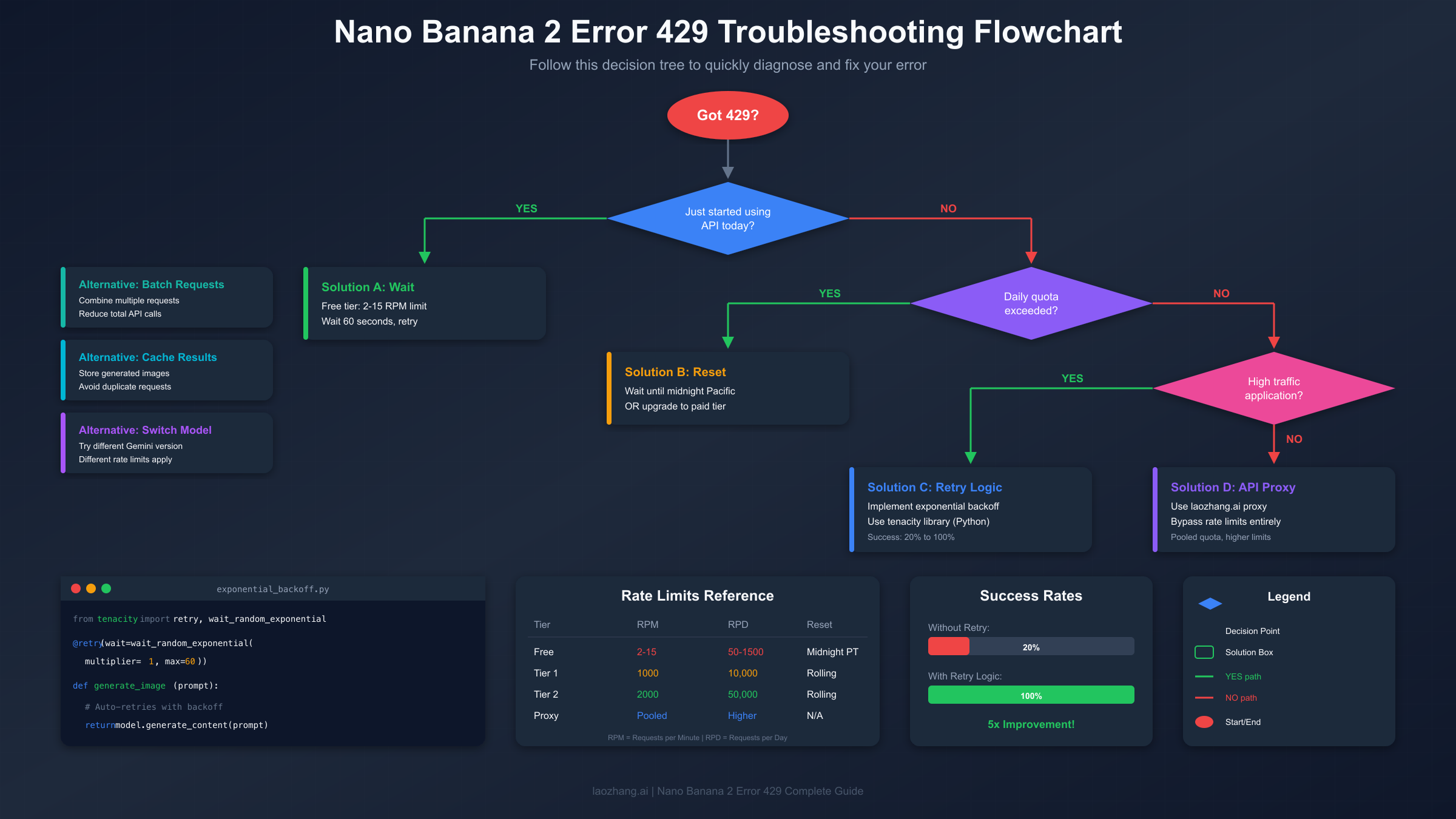
The Decision Tree. To quickly identify your issue, answer these questions in order. Did this happen on your first request today? If yes, you've likely hit RPM limits—wait 60 seconds and retry. Have you been using the API steadily throughout the day? If yes, check your RPD consumption in the console. Are you using particularly long prompts with detailed specifications? If yes, TPM might be your bottleneck. Did this work yesterday but not today? Server-side changes or account transitions may be involved.
Hidden Cause: Account Transitions. One frequently overlooked cause involves account status changes. Users who transition from a workspace trial to paid status, or who recently set up billing, sometimes experience unexpected 429 errors. In one documented case from the Google AI Developer Forum, a user making only 1 request per 10-20 minutes still received 429 errors after their account status changed. The issue resolved itself after two days, suggesting server-side propagation delays. If you've recently modified your Google Cloud billing or account settings, patience may be required alongside technical fixes.
7 Quick Fixes for Nano Banana 2 Error 429
Now for the solutions. These seven fixes are ordered from quickest to implement to most comprehensive. Try them in sequence until your error resolves, or jump directly to the solution that matches your diagnosed cause.
Fix 1: Wait for Quota Reset. The simplest fix requires no code changes. Free tier quotas reset at midnight Pacific Time (PST/PDT). If you've exhausted your daily allocation, note the current Pacific time and calculate your wait. For RPM limits, simply waiting 60 seconds often clears the issue. This fix costs nothing but time, making it ideal for hobbyists and testers who can afford to wait.
Fix 2: Clear Cache and Re-authenticate. Corrupted session data occasionally causes false 429 errors. Clear your browser cache and cookies, then re-authenticate with your Google account. For programmatic access, refresh your API credentials and ensure your authentication token hasn't expired. This resolves authentication-related blocks that masquerade as rate limit errors.
Fix 3: Switch to a Different Model Variant. Nano Banana 2 encompasses several model versions, each with potentially different rate limits. If you're using gemini-2.5-flash-preview-04-17, try switching to a different variant. Google's documentation recommends "switching temporarily to another model (example: Pro to Flash) during overload events." Different model versions access different capacity pools, and one may have availability when another is congested.
Fix 4: Implement Request Spacing. Add delays between sequential requests to stay under RPM limits. A simple sleep of 4-5 seconds between requests keeps you safely under the 15 RPM free tier limit. For batch operations, this single change often eliminates 429 errors entirely:
pythonimport time

def generate_with_spacing(prompts):
    results = []
    for prompt in prompts:
        result = model.generate_content(prompt)
        results.append(result)
        time.sleep(5)  # 5-second delay between requests
    return results
Fix 5: Batch Your Requests Intelligently. Instead of making many small requests, combine operations where possible. If you're generating multiple variations of similar images, use a single prompt that requests alternatives rather than separate API calls for each. This reduces your total request count while maintaining output quality. For applications requiring multiple images, consider whether they truly need to be generated simultaneously or can be queued and processed over time.
Fix 6: Implement Caching. Store successfully generated results to avoid regenerating identical content. A simple file-based cache or Redis store can eliminate redundant API calls. Hash your prompts to create cache keys, and check the cache before making any API request. This particularly benefits applications where users might request similar or identical content repeatedly.
Fix 7: Use an API Proxy Service. When all else fails, API proxy services like laozhang.ai provide an alternative path to Gemini capabilities without direct rate limit restrictions. These services pool quotas across many accounts, offering effectively higher limits for individual users. The trade-off involves slightly higher latency and dependence on a third-party service, but for production applications requiring reliability, this option often proves most practical. Additionally, API proxies typically offer cost savings of 80% or more compared to direct Google pricing.
Copy-Paste Code Solutions
For developers experiencing 429 errors, implementing proper retry logic is the most robust long-term solution. Google's official documentation and testing show that implementing exponential backoff with jitter transforms a 20% success rate into 100% success during high-load scenarios. The following code examples are production-ready and cover the most common implementation languages.
Python with Tenacity Library. Tenacity is Google's recommended library for implementing retry logic in Python. This implementation automatically retries failed requests with exponentially increasing delays plus random jitter to prevent thundering herd problems:
pythonfrom tenacity import retry, wait_random_exponential, stop_after_attempt
import google.generativeai as genai

genai.configure(api_key="YOUR_API_KEY")
model = genai.GenerativeModel('gemini-2.5-flash-preview-04-17')

@retry(
    wait=wait_random_exponential(multiplier=1, max=60),
    stop=stop_after_attempt(5)
)
def generate_image_with_retry(prompt):
    """
    Generate image with automatic retry on rate limits.
    Waits up to 2^x * 1 seconds between retries (max 60 seconds).
    """
    response = model.generate_content(prompt)
    return response

# Usage
try:
    result = generate_image_with_retry("A serene mountain landscape at sunset")
    print(result.text)
except Exception as e:
    print(f"Failed after all retries: {e}")
Python with Built-in google.api_core.retry. If you prefer using Google's native retry mechanism without additional dependencies, the google-api-core package provides built-in retry functionality:
pythonfrom google.api_core import retry
from google.ai.generativelanguage import GenerativeServiceClient
from google.ai.generativelanguage import GenerateContentRequest

# Configure retry with specific parameters
custom_retry = retry.Retry(
    initial=10,      # Initial delay in seconds
    multiplier=2,    # Multiply delay by this factor each retry
    maximum=60,      # Maximum delay between retries
    timeout=300      # Total timeout for all attempts
)

def generate_with_native_retry(prompt):
    """Uses Google's native retry mechanism."""
    request = GenerateContentRequest(
        model="models/gemini-2.5-flash-preview-04-17",
        contents=[{"parts": [{"text": prompt}]}]
    )
    # Apply retry to the API call
    response = custom_retry(client.generate_content)(request)
    return response
JavaScript/Node.js Implementation. For JavaScript developers, the axios-retry package provides similar functionality:
javascriptconst axios = require('axios');
const axiosRetry = require('axios-retry');

const client = axios.create({
  baseURL: 'https://generativelanguage.googleapis.com/v1beta',
  headers: { 'x-goog-api-key': 'YOUR_API_KEY' }
});

// Configure exponential backoff retry
axiosRetry(client, {
  retries: 5,
  retryDelay: (retryCount) => {
    const delay = Math.pow(2, retryCount) * 1000;
    const jitter = Math.random() * 1000;
    return Math.min(delay + jitter, 60000);
  },
  retryCondition: (error) => {
    return error.response?.status === 429;
  }
});

async function generateImage(prompt) {
  const response = await client.post('/models/gemini-2.5-flash-preview:generateContent', {
    contents: [{ parts: [{ text: prompt }] }]
  });
  return response.data;
}
cURL with Shell Script Retry. For quick testing or shell-based automation, this bash function implements basic retry logic:
bash#!/bin/bash
generate_with_retry() {
    local prompt="$1"
    local max_retries=5
    local retry=0
    local delay=1

    while [ $retry -lt $max_retries ]; do
        response=$(curl -s -w "%{http_code}" -o /tmp/response.json \
            -X POST "https://generativelanguage.googleapis.com/v1beta/models/gemini-2.5-flash-preview:generateContent?key=$GEMINI_API_KEY" \
            -H "Content-Type: application/json" \
            -d "{\"contents\":[{\"parts\":[{\"text\":\"$prompt\"}]}]}")

        if [ "$response" = "200" ]; then
            cat /tmp/response.json
            return 0
        elif [ "$response" = "429" ]; then
            echo "Rate limited, waiting ${delay}s..." >&2
            sleep $delay
            delay=$((delay * 2))
            retry=$((retry + 1))
        else
            echo "Error: HTTP $response" >&2
            return 1
        fi
    done
    echo "Max retries exceeded" >&2
    return 1
}

# Usage
generate_with_retry "A beautiful sunset over mountains"
Success Rate Improvement. Google Cloud's official testing demonstrates the effectiveness of retry logic. Without backoff and retry configured, four out of five attempts failed (20% success rate). With backoff and retry configured, all five attempts succeeded (100% success rate). This five-fold improvement justifies the small additional complexity and latency that retry logic introduces.
Free vs Paid: Complete Cost Comparison
Understanding the true cost of each solution helps you make an informed decision. The cheapest option depends on your usage volume, reliability requirements, and willingness to implement technical solutions. This section breaks down all options with actual numbers so you can calculate the best fit for your situation.
Free Tier True Costs. While the free tier costs $0 in direct fees, it carries hidden costs in terms of reliability and development time. If you're building an application, handling 429 errors requires implementing retry logic, which takes development time. User experience suffers when requests fail. The 50-1,500 daily request limit constrains what you can build. For personal projects and learning, free tier works well. For anything user-facing, the "free" tier often proves expensive in indirect costs.
Pay-as-You-Go Pricing. Google's pay-as-you-go pricing for Gemini models varies by capability tier. For Nano Banana 2 (Gemini 2.5 Flash Image), expect approximately $0.01-0.05 per 1K tokens depending on the specific operation. Image generation typically costs more than text completion. A typical image generation request might use 1,000-5,000 tokens total, putting per-image costs around $0.01-0.25 depending on prompt complexity and output size. Monthly costs for moderate usage (1,000 images) range from $10-50.
API Proxy Pricing. Services like laozhang.ai offer Gemini API access at significantly reduced rates. Typical pricing runs 80% lower than direct Google pricing, meaning the same 1,000 images might cost $2-10 instead of $10-50. Additionally, these services often provide free trial credits for evaluation. For our comprehensive guide on Gemini API access, see the Gemini API key guide.
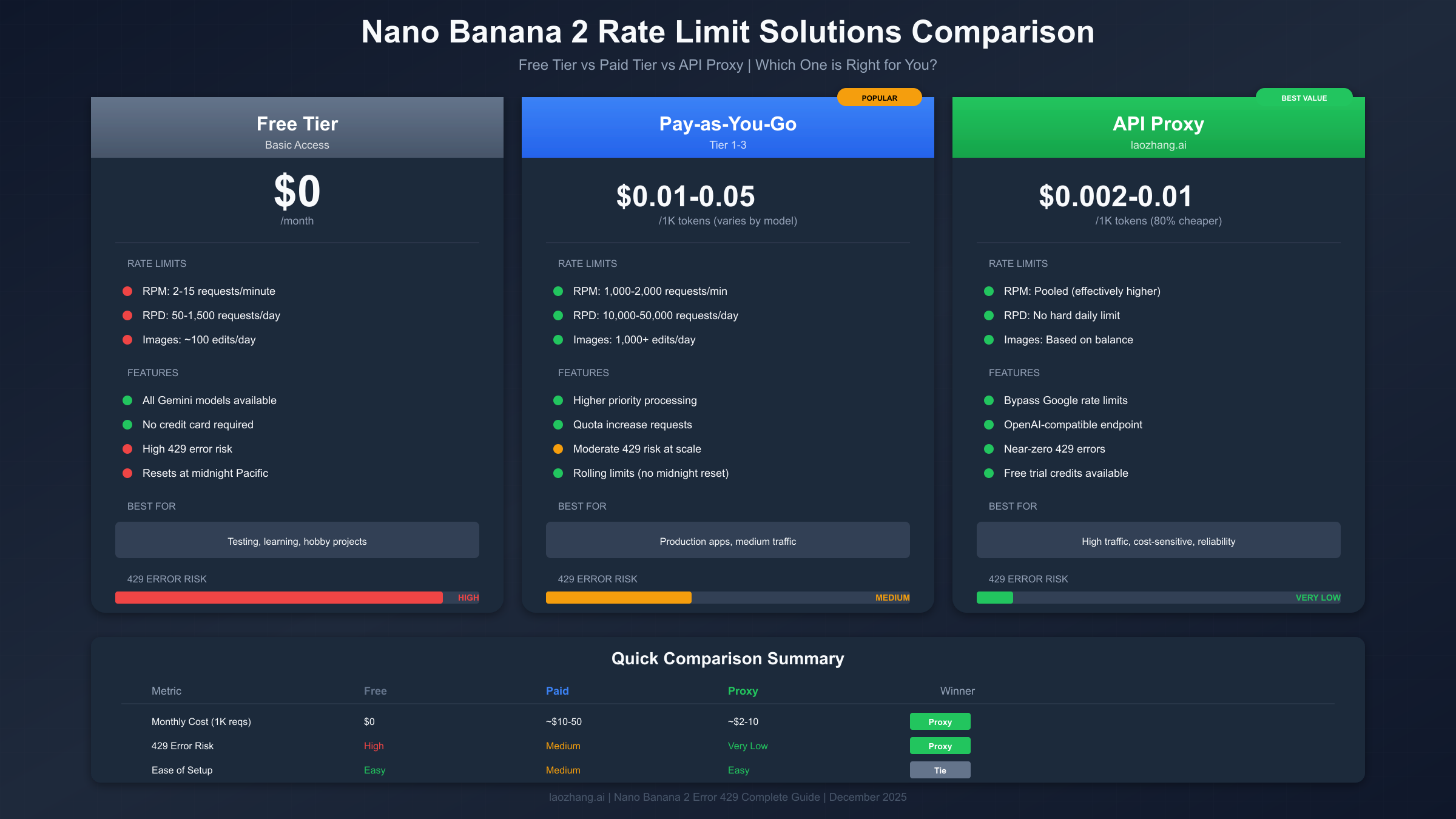
Break-Even Analysis. The optimal solution depends on your monthly request volume. Below 500 requests per month, the free tier works if you implement proper retry logic and can tolerate occasional failures. Between 500-5,000 requests, API proxies offer the best value, combining reliability with low costs. Above 5,000 requests, direct pay-as-you-go becomes competitive, especially at Tier 2 and Tier 3 where you receive better rates and higher limits.
Total Cost of Ownership Table. This comparison assumes 1,000 monthly image generation requests:
| Solution | Direct Cost | Dev Time | Reliability | Total Value |
|---|---|---|---|---|
| Free Tier | $0 | High (retry logic) | Low (80% with retry) | Testing only |
| Pay-as-you-go | $10-50/mo | Low | High | Production ready |
| API Proxy | $2-10/mo | Very Low | High | Best value |
| Provisioned | $100+/mo | Low | Guaranteed | Enterprise |
For complete pricing details across all Gemini models, see our Gemini API pricing guide.
API Proxy Alternative: Bypass Rate Limits Entirely
When rate limits fundamentally conflict with your use case, API proxies offer an architectural alternative to fighting Google's restrictions. This approach trades direct Google access for consistently available capacity through a third-party intermediary. Understanding how these services work helps you evaluate whether this trade-off makes sense for your situation.
How API Proxies Work. Services like laozhang.ai maintain pools of authenticated accounts across multiple Google Cloud projects. When you make a request through their proxy, it routes to whichever account currently has available capacity. This pooling effectively multiplies your available quota while abstracting away rate limit management entirely. From your application's perspective, you simply make requests to a different endpoint with the same API format.
Setup Process. Implementing an API proxy typically requires minimal code changes. Most proxy services offer OpenAI-compatible endpoints, meaning you can often switch by changing only the base URL and API key:
pythonimport openai

# Configure to use API proxy instead of direct Google
client = openai.OpenAI(
    api_key="YOUR_PROXY_API_KEY",
    base_url="https://api.laozhang.ai/v1"
)

# Use exactly as you would OpenAI or Gemini
response = client.chat.completions.create(
    model="gemini-2.5-flash-preview-04-17",
    messages=[{"role": "user", "content": "Generate a serene landscape"}]
)
Advantages of API Proxies. The primary benefit is eliminating 429 errors almost entirely. Proxy services typically report sub-1% error rates compared to 80%+ failure rates on free tier without retry logic. Secondary benefits include cost savings (often 80% or more), simplified authentication (single API key instead of Google Cloud setup), and unified access to multiple AI providers through one interface.
Considerations and Trade-offs. Using a proxy introduces dependencies and considerations worth evaluating. Latency increases slightly (typically 50-200ms) due to the additional network hop. You're trusting a third party with your API traffic, though reputable services don't log prompt content. Service availability depends on the proxy provider's uptime rather than Google's directly. For production applications, ensure your chosen proxy has appropriate SLAs and redundancy.
When to Choose API Proxy. This solution particularly fits scenarios where you need consistent availability without implementing complex retry logic, your budget is constrained but you can't accept free tier limitations, you want unified access to multiple AI providers (OpenAI, Anthropic, Google) through one interface, or development speed matters more than having direct Google relationships.
Maximize Your Free Tier
Not everyone needs paid solutions. With proper optimization, the free tier can stretch further than many users realize. These strategies help you extract maximum value from your free allocation while minimizing 429 encounters. For additional free tier options, see our guide on free Gemini Flash image API access.
Optimize Request Timing. The free tier resets at midnight Pacific Time. Structure your usage to spread evenly across the day rather than bursting. If you're on the US West Coast, your reset happens at midnight local time. East Coast users reset at 3 AM. International users should convert to their local time and plan accordingly. Heavy users can get effectively double capacity by making final requests before midnight, then resuming immediately after reset.
Reduce Token Usage Per Request. Shorter prompts consume less of your TPM allocation. Instead of elaborate multi-paragraph descriptions, use concise, keyword-focused prompts. The difference between a 500-token prompt and a 50-token prompt is significant at scale. Test whether shorter prompts achieve comparable results—often they do, since Gemini's image models are trained to handle terse instructions effectively.
Implement Local Caching. Store every successful generation locally with its prompt as the key. Before making any API call, check your cache. A simple dictionary or SQLite database works for most use cases:
pythonimport hashlib
import json
import os

CACHE_DIR = "./image_cache"

def get_cached_or_generate(prompt, model):
    prompt_hash = hashlib.md5(prompt.encode()).hexdigest()
    cache_path = f"{CACHE_DIR}/{prompt_hash}.json"

    if os.path.exists(cache_path):
        with open(cache_path, 'r') as f:
            return json.load(f)

    result = model.generate_content(prompt)
    with open(cache_path, 'w') as f:
        json.dump(result.to_dict(), f)

    return result
Use Prompt Templates. Create reusable prompt templates with variable substitution rather than crafting unique prompts each time. This enables caching of base prompts while allowing customization. Templates also tend to be shorter and more efficient than ad-hoc descriptions.
Consider Multiple Accounts (Carefully). While Google's terms of service require honest representation, individuals legitimately have multiple Google accounts (personal, work, legacy). Each account has its own free tier allocation. Be mindful of Google's policies and avoid creating accounts solely to circumvent limits, but utilizing existing legitimate accounts is generally acceptable.
Long-Term Prevention Strategies
Beyond immediate fixes, implementing proactive strategies prevents 429 errors from occurring in the first place. These architectural and operational practices apply whether you're using free tier, paid tier, or proxy services.
Implement Circuit Breakers. Circuit breaker patterns prevent cascade failures when the API becomes unavailable. After a configurable number of failures, the circuit "opens" and fails fast without attempting API calls. This protects your application from hanging on retries and provides graceful degradation:
pythonfrom datetime import datetime, timedelta

class CircuitBreaker:
    def __init__(self, failure_threshold=5, reset_timeout=60):
        self.failures = 0
        self.threshold = failure_threshold
        self.reset_timeout = reset_timeout
        self.last_failure = None
        self.state = "closed"  # closed = working, open = failing

    def call(self, func, *args, **kwargs):
        if self.state == "open":
            if datetime.now() - self.last_failure > timedelta(seconds=self.reset_timeout):
                self.state = "half-open"
            else:
                raise Exception("Circuit breaker is open")

        try:
            result = func(*args, **kwargs)
            self.failures = 0
            self.state = "closed"
            return result
        except Exception as e:
            self.failures += 1
            self.last_failure = datetime.now()
            if self.failures >= self.threshold:
                self.state = "open"
            raise
Set Up Monitoring and Alerting. Track your API usage proactively rather than discovering limits through errors. Google Cloud provides built-in monitoring through Cloud Monitoring. Set alerts at 80% of your limits to receive warnings before hitting hard caps. Third-party tools like Datadog or custom Prometheus metrics can provide additional visibility.
Plan for Capacity Growth. If your application's user base is growing, project your future API needs. Plan tier upgrades or proxy service expansions before you need them. Reactive capacity planning leads to outages; proactive planning maintains smooth user experiences.
Document Your Rate Limit Strategy. Create internal documentation explaining your approach to rate limits. Include which tier you're on, what retry parameters you use, and escalation procedures when limits are hit. This documentation helps team members troubleshoot issues and ensures consistent handling across your codebase.
Use Model Fallbacks. Configure your application to fall back to alternative models when your primary choice is rate-limited. LangChain and similar frameworks support fallback chains that automatically switch models on failure:
pythonfrom langchain.llms import GooglePalm
from langchain.callbacks import get_openai_callback

# Configure primary and fallback models
primary = GooglePalm(model="gemini-2.5-flash-preview-04-17")
fallback = GooglePalm(model="gemini-1.5-flash")

# LangChain automatically tries fallback on failure
with get_openai_callback() as cb:
    result = primary.with_fallbacks([fallback]).invoke("Generate image prompt")
FAQ: Common Questions About Nano Banana 2 Error 429
How long does error 429 last? For RPM (per-minute) limits, the block typically lasts 60 seconds. For RPD (daily) limits, you must wait until midnight Pacific Time for reset. Pay-as-you-go tiers use rolling windows that reset continuously rather than at fixed times.
Why am I getting 429 errors when I'm under the documented limits? Several factors cause this discrepancy. Limits are per-project, not per-API-key, so other applications sharing your Google Cloud project consume shared quota. Server-side congestion may temporarily reduce available capacity. Recent account changes may not have propagated fully. The documentation shows maximum limits—actual limits may be lower during high-demand periods.
Can I request a quota increase for free tier? No, quota increase requests are only available for paid tier accounts. To increase your limits, you must enable billing on your Google Cloud project and use pay-as-you-go or provisioned throughput.
Will using exponential backoff guarantee my requests succeed? Exponential backoff dramatically improves success rates (from 20% to 100% in Google's testing) but doesn't guarantee success. If you've genuinely exhausted your daily quota, no amount of retrying will help until the quota resets. Backoff helps with transient RPM limits and server congestion, not hard daily caps.
Is there any way to check my remaining quota before making a request? Yes, the Google Cloud Console shows real-time quota usage under APIs & Services then Quotas. However, there's no API endpoint to check remaining quota programmatically—you must handle 429 errors reactively rather than proactively checking availability.
Do API proxies violate Google's terms of service? Reputable API proxy services maintain their own legitimate Google Cloud accounts and don't violate ToS. They're essentially reselling capacity they've legitimately acquired. However, verify that your chosen proxy service operates legitimately and doesn't engage in credential sharing or other prohibited practices.
What's the difference between error 429 and error 503? Error 429 specifically indicates rate limiting—you've exceeded your allowed usage. Error 503 indicates the service is temporarily overloaded or unavailable regardless of your individual usage. Both are retry-eligible, but 503 suggests waiting longer as the issue is server-side rather than account-specific.
Should I use provisioned throughput for production applications? Provisioned throughput guarantees capacity and is recommended for applications requiring predictable performance. However, it requires significant upfront commitment. For most applications, pay-as-you-go with proper retry logic provides sufficient reliability at lower cost. Consider provisioned throughput when you need SLA guarantees or have very high volume requirements.
For more prompt ideas once you've resolved your 429 errors, check out our Nano Banana 2 prompt generator guide with 80+ ready-to-use prompts.
Conclusion
Error 429 with Nano Banana 2 is frustrating but entirely solvable. The right solution depends on your specific situation: quick waits for occasional users, retry logic for developers, tier upgrades for growing applications, or API proxies like laozhang.ai for those seeking the best value combination of reliability and cost. The key insight from this guide is that implementing proper retry logic improves success rates from 20% to 100%—a transformation well worth the implementation effort.
Start with the quick fixes if you need immediate relief: wait for reset, clear cache, or add simple delays between requests. For long-term reliability, implement exponential backoff using the code examples provided. If you're building production applications, evaluate whether pay-as-you-go Google pricing or API proxy services better fit your budget and reliability requirements. Whatever path you choose, you now have the knowledge to diagnose, fix, and prevent Nano Banana 2 error 429. Happy generating!