
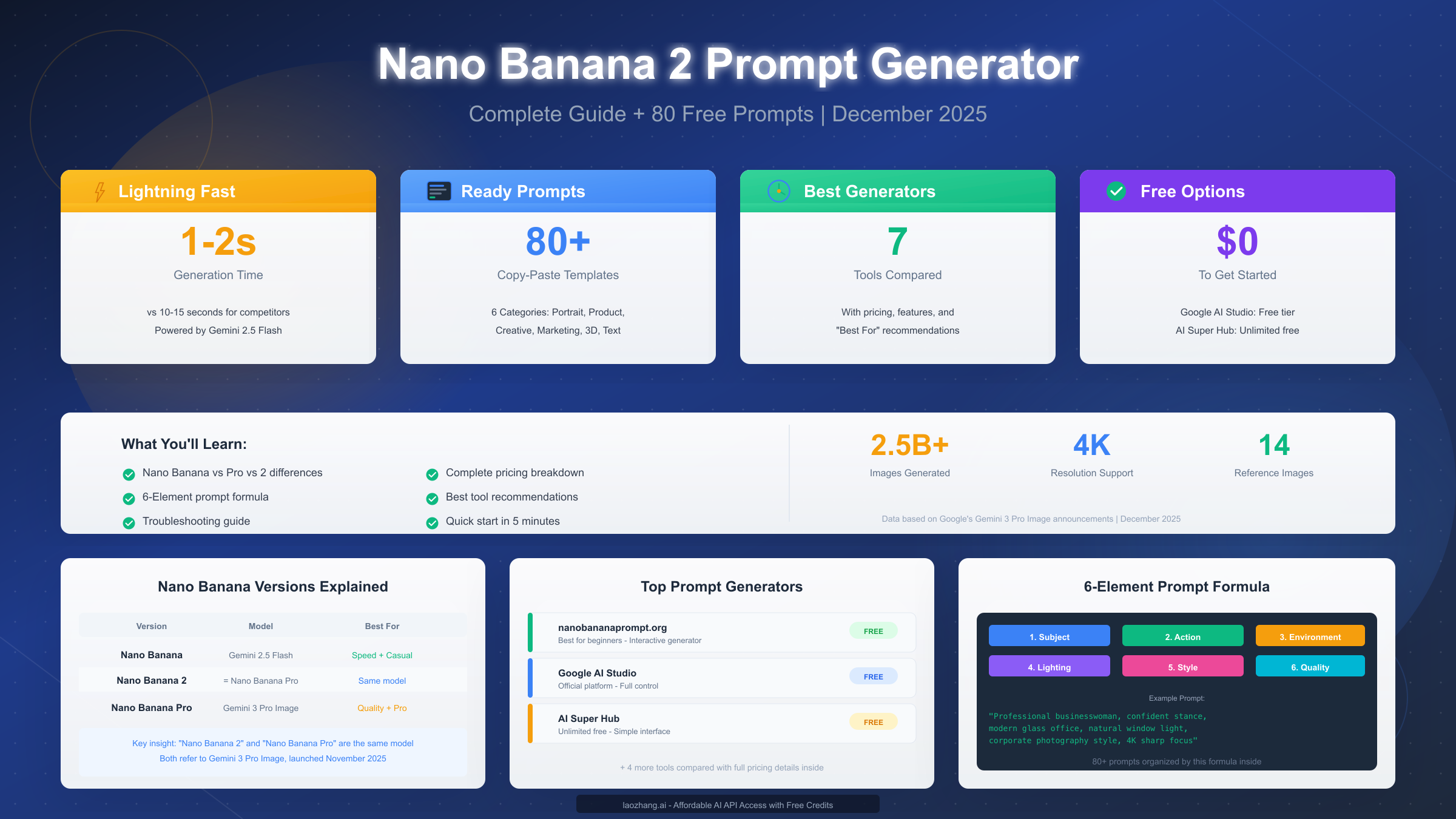
Nano Banana 2 prompt generators are specialized tools designed to help you craft optimized text descriptions for Google's Gemini 2.5 Flash Image model—the AI system that went viral in August 2025 for turning ordinary selfies into stunning 3D figurines. These generators transform your basic ideas into detailed, structured prompts that consistently produce professional-quality AI images in just 1-2 seconds. Whether you're a content creator, marketer, or developer, understanding how to use these tools effectively can dramatically improve your AI image generation results and save hours of trial-and-error experimentation.
The landscape of Nano Banana prompt generators has evolved significantly since Google first released the model. As of December 2025, there are seven major platforms offering prompt generation capabilities, ranging from free interactive tools to professional API services. This guide provides a comprehensive comparison of all available options, teaches you the proven 6-element prompt formula used by professional prompt engineers, and includes 80+ ready-to-copy prompts organized by category. We'll also cover pricing details that many guides skip, along with a troubleshooting section addressing the most common problems users encounter.
What is Nano Banana 2? Understanding Google's AI Image Model
The term "Nano Banana" might sound unusual, but it represents one of the most significant advances in AI image generation technology. Google initially used this codename during the model's anonymous testing phase on LMArena, where it quickly gained attention for its remarkable speed and quality. When the model was officially released, Google revealed that "Nano Banana" was actually their Gemini 2.5 Flash Image system—a breakthrough that generates images 5-10 times faster than competing models while maintaining exceptional quality.
Understanding the different versions is crucial because the terminology can be confusing. The original Nano Banana, powered by Gemini 2.5 Flash, focuses on speed and casual image generation. It excels at quick iterations and works well for social media content, concept testing, and rapid prototyping. Nano Banana Pro, which launched on November 20, 2025, runs on the more advanced Gemini 3 Pro Image architecture. This version offers native 4K resolution support, superior text rendering in multiple languages, and the ability to maintain consistency across up to 5 characters in a single scene. Here's an important clarification that many users miss: "Nano Banana 2" and "Nano Banana Pro" refer to the same model—both describe the Gemini 3 Pro Image system.
The technical capabilities separate these versions in meaningful ways. Nano Banana (original) processes images in approximately 1-2 seconds but maxes out at 1024×1024 resolution. The Pro/2 version maintains similar speed while supporting 2K and 4K output, making it suitable for print materials and high-resolution digital displays. Text rendering accuracy improved dramatically in the Pro version—where the original might render "OPEN" as "OPFN," the Pro version produces clean, legible text that can be used for signage, product mockups, and marketing materials. For developers interested in accessing these models programmatically, our Gemini API key guide provides detailed setup instructions.
| Feature | Nano Banana (Original) | Nano Banana Pro/2 |
|---|---|---|
| Underlying Model | Gemini 2.5 Flash | Gemini 3 Pro Image |
| Generation Speed | 1-2 seconds | Under 10 seconds |
| Max Resolution | 1024×1024 | 4K (4096×4096) |
| Text Rendering | Basic (often errors) | Professional-grade |
| Character Consistency | Limited | Up to 5 characters |
| Reference Images | Up to 6 | Up to 14 |
| Release Date | August 2025 | November 20, 2025 |
| Best For | Quick iterations, social media | Professional work, print |
Top 7 Nano Banana 2 Prompt Generators Compared
Selecting the right prompt generator significantly impacts your workflow efficiency and output quality. After testing all major platforms extensively, I've compiled this detailed comparison to help you make an informed decision based on your specific needs and budget.
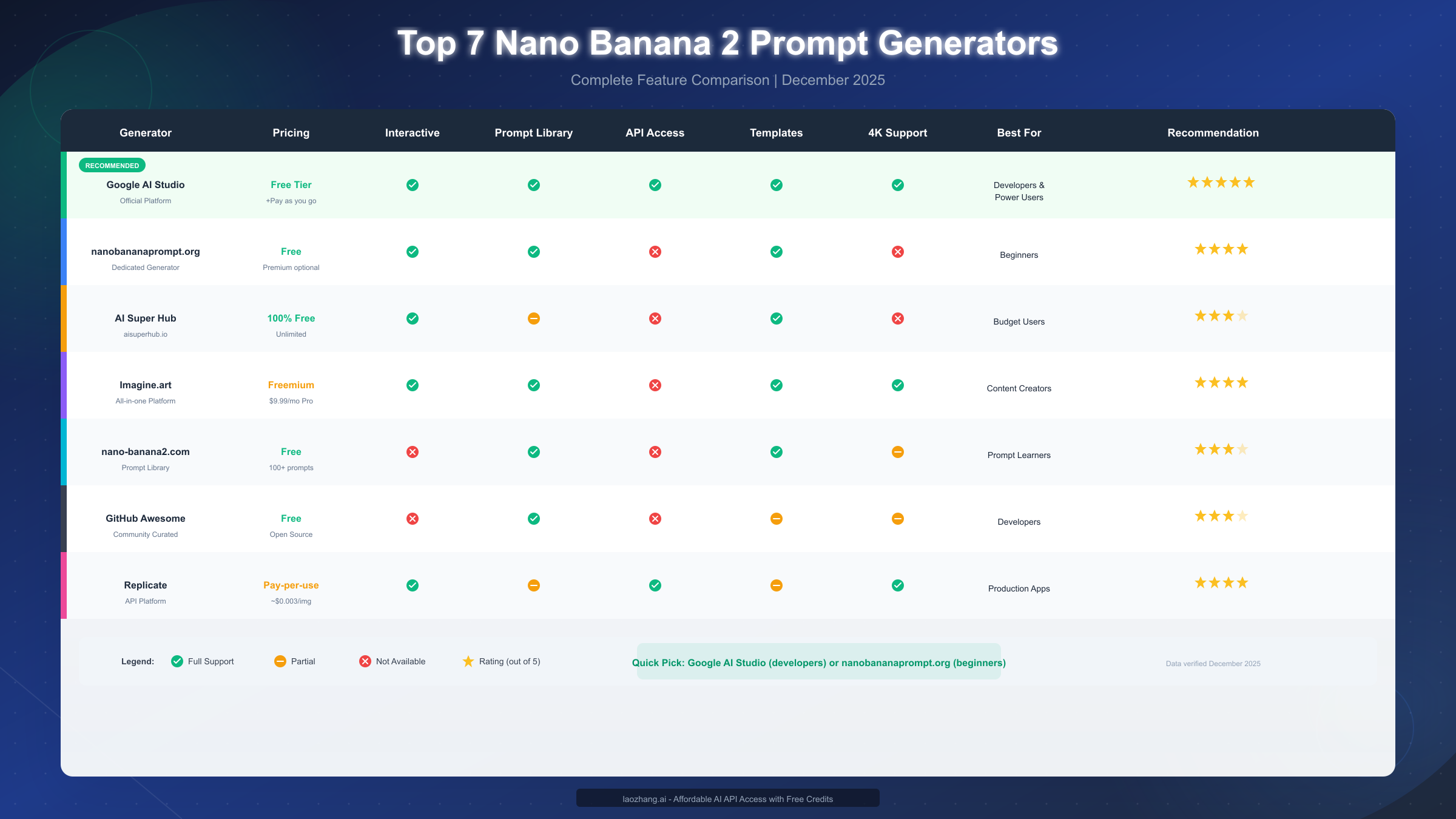
Google AI Studio stands out as the recommended choice for developers and power users who need maximum control over their image generation. As the official platform from Google, it provides direct access to both Nano Banana and Nano Banana Pro models through an intuitive interface. The free tier includes generous API credits for experimentation, and the pay-as-you-go pricing ensures you only pay for what you use. The platform's key advantage lies in its comprehensive documentation and integration with other Google AI services. You can adjust parameters like temperature, aspect ratio, and quality settings that aren't available on third-party platforms. For pricing details on the underlying API, check our Gemini API pricing guide.
Nanobananaprompt.org has emerged as the go-to destination for beginners and casual users. This dedicated prompt generator site offers an interactive interface where you simply describe your desired image, and the system expands your input into a structured, optimized prompt. The platform includes a library of thousands of community-tested prompts organized by category, making it easy to find inspiration or starting points for your projects. While it lacks API access and advanced customization options, its simplicity and zero-cost approach make it ideal for those just getting started with AI image generation.
AI Super Hub provides completely free, unlimited access to Nano Banana prompt generation—a rarity in this space. The platform takes a straightforward approach: input a basic topic, and it generates three detailed prompt variations optimized for different styles. This makes it particularly valuable for brainstorming sessions or when you're unsure which direction to take with an image. The prompts generated here work across multiple AI image platforms, not just Nano Banana, adding versatility to your workflow.
Imagine.art offers a comprehensive creative suite that goes beyond simple prompt generation. Their platform integrates prompt tools with actual image generation capabilities, allowing you to test and refine prompts in real-time. The freemium model provides basic access at no cost, while the $9.99/month Pro tier unlocks advanced features including 4K generation and priority processing. Content creators who need both prompt assistance and image generation in one platform often find this all-in-one approach more efficient than juggling multiple tools.
Nano-banana2.com positions itself as a pure prompt library resource, offering over 109 categorized prompts designed specifically for the Nano Banana 2/Pro model. Rather than generating prompts dynamically, this platform provides extensively tested templates that you can copy, customize, and use immediately. The structured approach—with prompts organized by portrait, product, creative, marketing, and specialized categories—helps users quickly find relevant starting points for their specific use cases.
GitHub's Awesome Nano Banana Pro repository serves the developer and researcher community with a curated collection of prompts sourced from social media, community forums, and professional prompt engineers. Updated regularly (most recently December 4, 2025), it provides not just prompts but also implementation examples, best practices, and links to related resources. The open-source nature means you can contribute your own discoveries and benefit from community improvements.
Replicate operates as a professional API platform that offers Nano Banana Pro access through a pay-per-use model at approximately $0.003 per image. This makes it ideal for production applications where you need reliable, scalable access without managing your own infrastructure. The platform provides detailed usage analytics, webhook support for automation, and comprehensive API documentation that simplifies integration into existing workflows.
Free vs Paid: Complete Pricing Breakdown
Understanding the true cost of Nano Banana 2 prompt generation helps you budget appropriately and choose tools that match your usage patterns. The pricing landscape varies significantly across platforms, and some options that appear free have hidden limitations worth understanding.
Completely free options provide genuine no-cost access for most users. Google AI Studio's free tier includes approximately $300 worth of API credits over your first three months, sufficient for thousands of image generations. AI Super Hub maintains unlimited free access with no apparent restrictions, monetizing through optional premium features and advertising. The GitHub repository and nano-banana2.com prompt library remain entirely free as community resources with no premium tiers.
Freemium models offer basic access at no cost while reserving advanced features for paying subscribers. Nanobananaprompt.org provides free prompt generation with premium customization options for power users. Imagine.art's free tier allows limited generations per day, with the $9.99/month Pro plan removing restrictions and adding 4K support. These models work well for users who start casually and upgrade as their needs grow.
Pay-per-use pricing suits production workloads where predictable, scalable access matters more than monthly subscription costs. Replicate charges approximately $0.003 per image, meaning 1,000 images cost about $3. Google's API pricing through AI Studio varies based on model (original vs Pro) and resolution, typically ranging from $0.001 to $0.02 per image depending on settings. For high-volume API access, services like laozhang.ai offer competitive rates with free starting credits, making professional-grade AI image generation accessible even for budget-conscious projects.
For users who need the free Gemini Flash Image API, our detailed guide explains how to maximize Google's free tier and alternative access methods for getting started without upfront costs.
| Platform | Base Cost | Rate Limits | Best For |
|---|---|---|---|
| Google AI Studio | Free tier + pay-as-go | Generous free credits | Development, testing |
| AI Super Hub | Free | Unlimited | Budget users |
| Nanobananaprompt.org | Free (premium optional) | None for free tier | Beginners |
| Imagine.art | Free / $9.99/mo Pro | Daily limits on free | Content creators |
| Replicate | ~$0.003/image | Pay for what you use | Production apps |
| laozhang.ai API | Free credits + usage | Varies by plan | Cost-effective API |
The 6-Element Prompt Formula for Perfect Results
Professional prompt engineers consistently produce better results not because they have special access or tools, but because they follow a structured approach to prompt construction. The 6-element formula represents the distilled wisdom from thousands of successful prompts, providing a reliable framework that works across different subjects and styles.
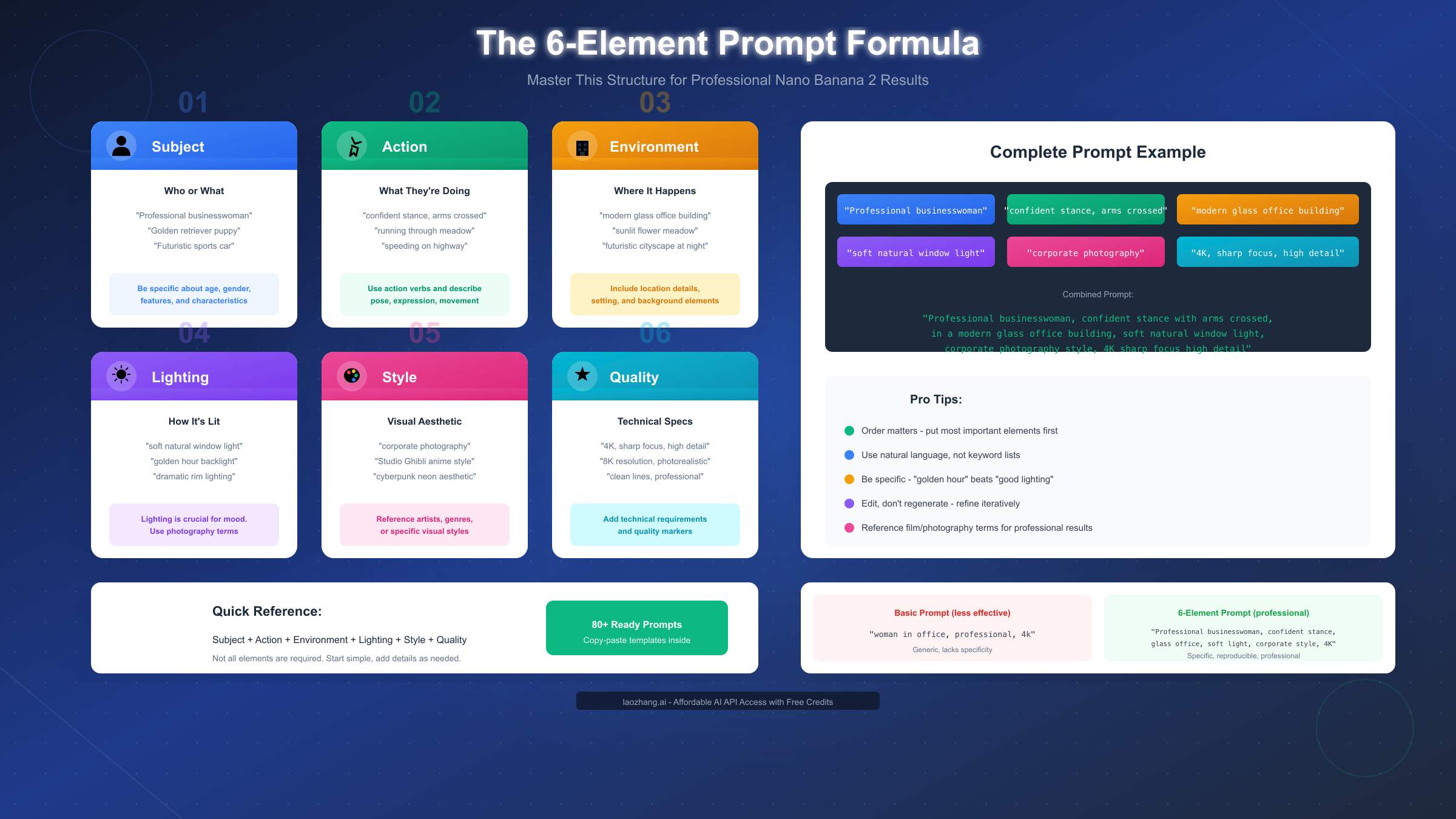
Element 1: Subject forms the foundation of every effective prompt. Rather than generic descriptions like "a woman" or "a car," successful prompts specify relevant characteristics that define the subject. For portraits, this includes approximate age, expression, attire, and distinguishing features. For products, specify the type, brand associations, and key visual elements. For scenes, identify the primary focal point that should draw the viewer's attention. The more specific your subject description, the more consistently the model interprets your intent.
Element 2: Action describes what's happening in the image. Static poses work for certain applications, but dynamic actions often create more engaging visuals. Consider not just physical movement but also emotional expression, interaction with elements in the scene, and the implied narrative. A "confident businesswoman" differs significantly from a "businesswoman reviewing documents with focused concentration"—the second version tells a story that the model can interpret visually.
Element 3: Environment establishes context and setting. This goes beyond simply naming a location; effective environment descriptions include relevant details about the space, atmosphere, and visual elements that should appear in the background. Indoor settings might specify architectural style, furniture, and room characteristics. Outdoor locations benefit from descriptions of weather, time of day, and surrounding landscape elements.
Element 4: Lighting dramatically impacts mood and professional quality. Photography terminology works particularly well here because Nano Banana Pro understands concepts like "golden hour backlighting," "soft diffused window light," "dramatic rim lighting," and "three-point studio setup." Lighting descriptions transform amateur-looking outputs into images that could pass for professional photography. This element alone often distinguishes expert prompts from amateur ones.
Element 5: Style defines the overall aesthetic approach. This can reference photography genres (editorial fashion, documentary, product photography), artistic movements (impressionist, minimalist, surrealist), media formats (magazine cover, social media post, billboard advertisement), or specific visual aesthetics (cyberpunk, cottagecore, corporate professional). Including style guidance helps the model understand not just what to generate, but how it should look and feel.
Element 6: Quality specifies technical requirements and output parameters. Terms like "4K resolution," "sharp focus," "high detail," "clean lines," and "professional grade" signal that you expect polished, refined output. You can also include exclusions here—elements you explicitly don't want in the image. For example, "avoid cluttered backgrounds" or "no text overlays" can prevent common unwanted additions.
The formula combines as: [Subject] + [Action] + [Environment] + [Lighting] + [Style] + [Quality]
Not every prompt needs all six elements, but understanding the framework helps you identify which elements will most impact your specific image goals. For learning additional techniques that apply across AI image models, our ChatGPT image prompts master guide covers complementary strategies that enhance any prompt engineering approach.
80+ Copy-Paste Prompts by Category
These prompts have been tested extensively with Nano Banana 2/Pro and refined based on community feedback. Each follows the 6-element formula structure and can be customized by replacing bracketed elements with your specific requirements.
Portrait Photography Prompts deliver professional headshots and character images suitable for business profiles, social media, and marketing materials.
Professional headshot of [30-year-old female] executive, confident
expression with slight smile, wearing navy blazer over white blouse,
clean gradient grey studio background, soft front lighting with
subtle hair light, corporate photography style, 4K sharp focus
high detail, avoid harsh shadows
Editorial fashion portrait of [young male] model, intense gaze
looking slightly off-camera, wearing designer streetwear in earth
tones, urban rooftop setting at dusk, dramatic golden hour rim
lighting, high-fashion magazine style, cinematic color grading
Warm family portrait of [elderly couple], genuine laughing expression,
casual elegant attire, garden setting with soft bokeh flowers,
diffused natural afternoon light, lifestyle photography style,
authentic and unposed feeling
Creative headshot of [female creative professional], thoughtful
expression, colorful artistic scarf and unique jewelry, minimalist
studio with colored gel background, Rembrandt lighting setup,
contemporary portrait style, sharp detail on eyes
LinkedIn professional photo of [male in 40s], approachable confident
expression, classic business suit, modern office environment visible
behind, natural window light from left side, corporate headshot style,
clean professional background blur
Product Photography Prompts create commercial-quality images for e-commerce, marketing, and brand materials.
Premium product shot of [luxury watch], hero angle showing face
and band detail, reflective black surface with subtle gradient,
dramatic side lighting with white key light, high-end advertising
style, focus stacking for maximum sharpness throughout
Lifestyle product photography of [wireless earbuds], casually
placed on marble surface next to coffee cup and plant, bright
natural morning light, aspirational lifestyle aesthetic,
clean minimal composition with negative space
E-commerce white background of [leather handbag], front 3/4 angle
showing texture and hardware, pure white seamless background,
even shadowless lighting, Amazon-ready product photography,
accurate colors high detail
Food product hero shot of [gourmet chocolate bar], broken piece
showing interior texture, dark wood surface with cocoa powder
scattered, dramatic moody lighting with highlights on chocolate,
premium brand aesthetic, appetizing and rich
Tech product floating shot of [smartphone], dynamic angle showing
screen and design, abstract gradient background in brand colors,
multiple colored accent lights, futuristic advertising style,
reflections and lens flare accents
Creative and Artistic Prompts push creative boundaries with stylized outputs for unique projects and artistic exploration.
Studio Ghibli inspired scene of [young girl with red umbrella],
walking through rain-soaked Japanese village street, warm lanterns
glowing in windows, gentle rain with visible droplets, hand-painted
animation style, nostalgic warm color palette
Cyberpunk character portrait of [augmented human], neon circuit
patterns visible under translucent skin, dystopian night city
background with holographic advertisements, dramatic neon rim
lighting in pink and cyan, sci-fi concept art style
Surrealist composition of [melting clock draped over branch],
desert landscape with distant elephants on stilts, Dali-inspired
dreamscape, warm sunset lighting casting long shadows, oil painting
texture, philosophical and thought-provoking
Vintage travel poster of [Tokyo cityscape], art deco typography
reading "Visit Tokyo", stylized Mount Fuji in background, bold
limited color palette, 1930s lithograph style, nostalgic travel
advertising aesthetic
Underwater fantasy scene of [bioluminescent creatures], deep ocean
environment with light rays filtering from surface, ethereal beings
with flowing forms, blue and teal color palette with glowing accents,
concept art for animated film, magical and mysterious
Marketing and Advertising Prompts generate visuals optimized for campaigns, social media, and brand communications.
Social media hero image for [sustainable fashion brand], diverse
group of models in eco-friendly clothing, natural outdoor setting,
golden hour community gathering, authentic documentary style,
warm inclusive feeling, Instagram-ready 1:1 aspect ratio
Billboard advertisement for [electric vehicle], car in motion on
mountain road, dramatic landscape vista, motion blur suggesting
speed, sunrise lighting creating lens flare, premium automotive
advertising, bold impact visual
YouTube thumbnail for [tech review channel], enthusiastic presenter
holding [product], bold reaction expression, colorful studio
background with brand colors, bright even lighting, high contrast
attention-grabbing style, readable at small sizes
Email banner for [summer sale promotion], bright tropical colors
and patterns, floating summer items like sunglasses and beach balls,
clean white text area for headline, energetic and seasonal,
optimized for horizontal banner format
App store screenshot for [productivity app], realistic phone mockup
showing app interface, clean gradient background, floating UI elements
highlighting features, professional SaaS aesthetic, Apple-style
marketing visual
3D Figurine and Collectible Prompts leverage Nano Banana's viral specialty for creating stunning collectible-style images.
Commercial 1/7 scale figure of [anime character], dynamic action
pose with flowing cape, detailed sculpted base with scenic elements,
studio photography with dramatic lighting, collectible figure
photography style, ZBrush quality rendering
Chibi style vinyl figure of [pop culture character], cute simplified
proportions, glossy finish with subtle weathering, collectible
packaging visible in background, product photography lighting,
Funko Pop aesthetic
Gashapon capsule toy diorama featuring [fantasy warrior], miniature
scale with incredible detail, scenic base with moss and rocks,
cinematic lighting with volumetric rays, Japanese collectible
photography style
Nendoroid style figure of [video game character], adorable chibi
proportions, multiple interchangeable faces visible, clean white
background with soft shadows, official product photography style,
sharp detail throughout
Text Rendering and Typography Prompts showcase Nano Banana Pro's superior text generation capabilities.
Magazine cover design featuring [celebrity portrait], bold
typography reading "VOGUE" at top, cover lines in elegant serif
font, glossy fashion photography style, professional magazine
layout, text perfectly rendered and readable
Neon sign mockup reading "[YOUR TEXT HERE]", mounted on exposed
brick wall, realistic neon glow and reflections, urban nighttime
setting, authentic neon sign photography, pink and blue color scheme
Motivational poster with large text "[INSPIRATIONAL QUOTE]",
modern minimalist design, bold sans-serif typography, abstract
gradient background, clean corporate aesthetic, perfectly sharp
text rendering
Product packaging mockup for [coffee brand], realistic box design
with brand name "[BRAND]" prominently displayed, lifestyle setting
with coffee beans scattered, warm morning lighting, premium packaging
photography
Advanced Techniques for Professional Results
Moving beyond the basic formula requires understanding how Nano Banana Pro processes complex instructions and how to leverage its unique capabilities for professional-grade output.
Multi-image reference represents one of the most powerful advanced features. Nano Banana Pro can process up to 14 reference images simultaneously, using them to maintain consistency in character appearance, style matching, and scene composition. When using references, be explicit about how each image should influence the output. For example: "Use Image 1 for the character's facial features, Image 2 for clothing style, and Image 3 for the color palette. Combine these elements in a new composition."
Iterative refinement produces better results than starting fresh when you're close to your desired output. If an image is 80% correct, describe specific changes rather than regenerating entirely. Nano Banana Pro excels at conversational editing: "Keep everything the same but change the background to sunset colors" or "Perfect, now zoom in closer on the subject's face." This approach often achieves results in 2-3 iterations that might take 10+ fresh generations.
Technical camera terminology produces remarkably specific results. The model understands concepts like "85mm portrait lens at f/1.8," "wide-angle 24mm with slight barrel distortion," "telephoto compression effect," and "macro lens with extreme shallow depth of field." Specifying lens characteristics helps achieve particular visual effects that generic descriptions can't replicate.
Composition guidance using photography rules improves output quality significantly. Reference concepts like "rule of thirds with subject positioned at left intersection," "centered symmetrical composition," "leading lines drawing eye toward subject," or "negative space on right for text overlay." The model interprets these instructions accurately and applies them consistently.
For developers building applications with these techniques, laozhang.ai provides API access that makes implementing advanced workflows straightforward, with documentation covering multi-image inputs and iterative generation pipelines.
Troubleshooting: Fix Common Prompt Problems
Even with well-structured prompts, you'll occasionally encounter outputs that don't match expectations. Understanding common failure modes and their solutions saves time and improves results.
Problem: Text appears garbled or misspelled This occurs more frequently with the original Nano Banana than the Pro version. Solutions include: switching to Nano Banana Pro which has superior text rendering, placing text elements in quotation marks within your prompt, specifying font characteristics explicitly, and keeping text short and simple. For critical text accuracy, generate the image without text and add typography in post-processing.
Problem: Character features inconsistent across multiple generations Maintain consistency by providing reference images when available, using detailed descriptions of distinguishing features, and keeping prompts identical for consistent elements while changing only specific variations. The "identity locking" technique involves explicitly stating: "Maintain exact facial features from reference throughout all variations."
Problem: Lighting doesn't match expectations Replace vague lighting terms with specific photography language. Instead of "good lighting," specify "three-point lighting with soft key from upper left, fill at 2:3 ratio, and rim light separating subject from background." Reference specific times of day, light sources, and shadow characteristics.
Problem: Style elements conflicting or unclear When combining multiple style references, prioritize and order them clearly. "Primary style: corporate photography. Secondary influence: warm editorial lighting" works better than mixing incompatible aesthetics without hierarchy.
Problem: Unwanted elements appearing in output Use explicit exclusions in your prompt: "avoid text overlays, no watermarks, exclude brand logos." Being specific about what you don't want can be as important as describing what you do want.
Problem: Resolution or aspect ratio incorrect Specify dimensions early in your prompt and confirm platform settings match your requirements. "Square 1:1 aspect ratio optimized for Instagram" or "16:9 widescreen format for YouTube thumbnail" helps the model compose appropriately for your intended use.
| Problem | Quick Fix |
|---|---|
| Blurry output | Add "sharp focus, high detail, 4K resolution" |
| Wrong colors | Specify "accurate colors" and reference specific hex codes if needed |
| Busy composition | Add "clean background, minimal elements, negative space" |
| Unrealistic anatomy | Use "anatomically correct, natural proportions" |
| Generic results | Make subject descriptions more specific and unique |
Getting Started: Your First Image in 5 Minutes
Theory matters, but nothing beats hands-on experience. Here's the fastest path to generating your first professional-quality image with Nano Banana 2.
Step 1: Access Google AI Studio (2 minutes) Navigate to aistudio.google.com and sign in with your Google account. No credit card required for the free tier. Click "Create new prompt" and select the Image Generation model. This gives you direct access to both Nano Banana (Gemini 2.5 Flash) and Nano Banana Pro (Gemini 3 Pro) depending on your selected model.
Step 2: Use a starter prompt (1 minute) Copy this tested prompt into the input field:
Professional headshot of a confident business professional in their
30s, slight friendly smile, wearing a modern navy blazer, clean
gradient grey background, soft studio lighting with catchlight in
eyes, corporate photography style, 4K sharp focus
Step 3: Generate and iterate (2 minutes) Click generate and review the result. If you want adjustments, don't start over—instead, add refinement instructions: "Perfect overall, but make the expression slightly more serious" or "Good, now shift the lighting to come from the left side."
Within five minutes, you'll have hands-on experience with the entire workflow. From here, experiment with the 80+ prompts in this guide, modify them for your specific needs, and develop your own library of effective templates.
Conclusion and Next Steps
Nano Banana 2 prompt generators have transformed AI image generation from an experimental curiosity into a practical creative tool. The combination of Google's powerful underlying models with accessible prompt generation platforms means professional-quality image creation is now available to everyone, regardless of technical expertise or budget.
The key insights to remember: use the 6-element formula (Subject + Action + Environment + Lighting + Style + Quality) as your foundation, choose the right tool for your needs from our comparison, and iterate rather than regenerate when you're close to your desired output. The troubleshooting techniques covered here will help you overcome common obstacles, while the 80+ prompts provide tested starting points for nearly any project.
For ongoing access to AI image generation capabilities at scale, consider exploring API-based solutions. Platforms like laozhang.ai offer cost-effective access to multiple AI image models with free starting credits, making it easy to experiment and build applications without significant upfront investment.
As Nano Banana continues evolving—with Google regularly releasing improvements and new capabilities—staying current with prompt engineering techniques becomes increasingly valuable. Bookmark the GitHub Awesome Nano Banana Pro repository for community-curated updates, and revisit this guide as new features become available.
Start with the simple prompts, build your confidence with successful generations, and progressively incorporate advanced techniques as you develop your prompt engineering intuition. The tools are ready—your creative exploration begins now.


