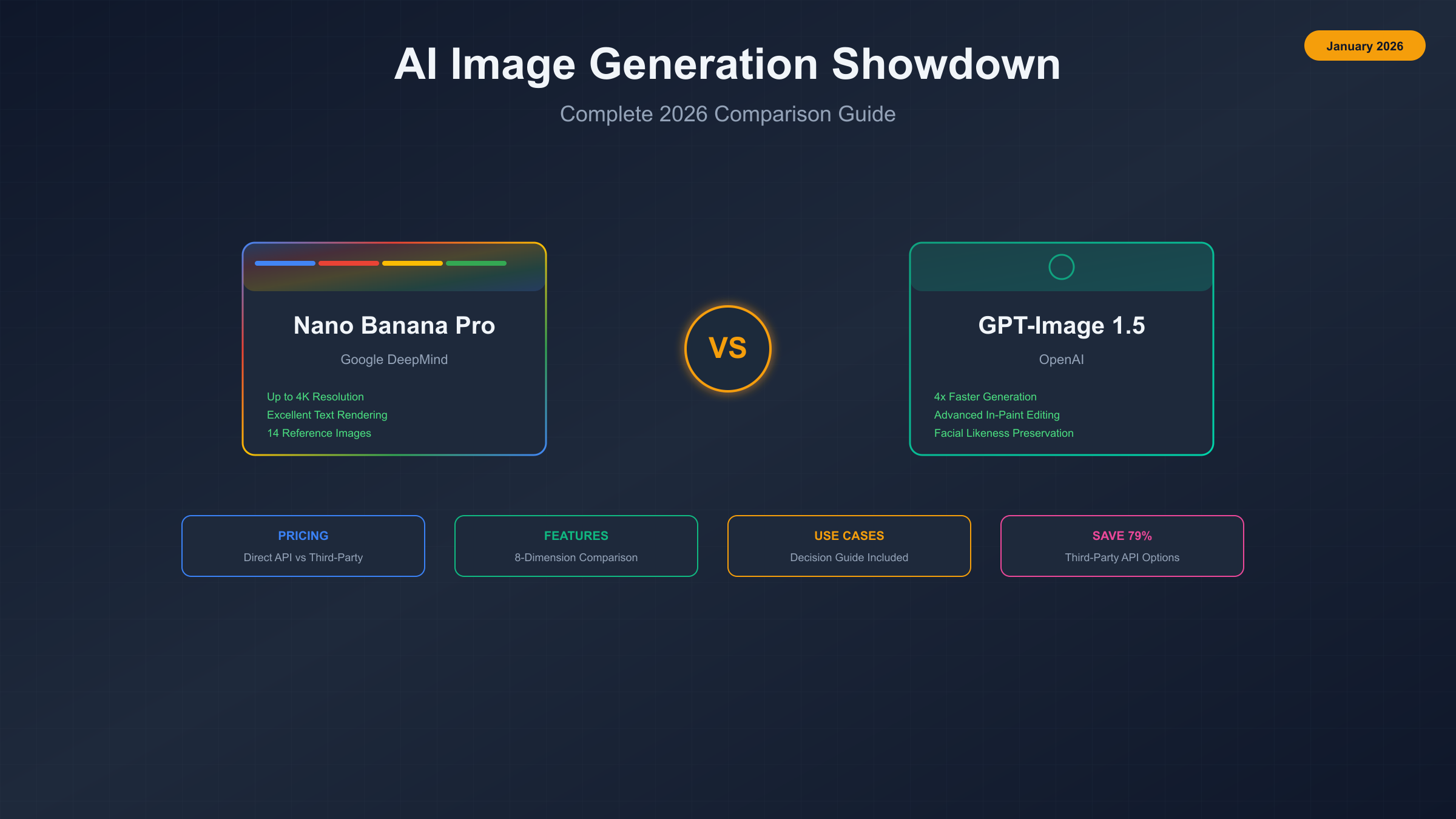
The AI image generation landscape experienced a seismic shift in late 2025 when Google DeepMind launched Nano Banana Pro on November 20, followed by OpenAI's rushed release of GPT-Image 1.5 on December 16. Both models represent significant advancements in AI-powered image creation, but they take fundamentally different approaches. This comprehensive guide will help you understand exactly which tool fits your workflow, budget, and quality requirements.
The two leading AI image generators take different approaches to quality, speed, and pricing
Whether you're a creative professional creating marketing materials, a developer building image-powered applications, or an enterprise team scaling visual content production, this comparison provides the data-driven insights you need to make the right choice.
Quick Decision: Which AI Image Generator Should You Choose?
Before diving into the details, here's a quick decision framework based on your primary needs:
| Your Priority | Best Choice | Why |
|---|---|---|
| Text rendering (infographics, documents) | Nano Banana Pro | Handles 200+ words, multilingual support |
| Fast iterations (concept exploration) | GPT-Image 1.5 | 4x faster than predecessor, quick refinements |
| High resolution (print, posters) | Nano Banana Pro | Native 4K output (4096x4096) |
| Image editing (in-paint, modifications) | GPT-Image 1.5 | Advanced in-paint capabilities |
| Budget-conscious (high volume) | Third-party API | 79% savings via providers like laozhang.ai |
| Portrait consistency | GPT-Image 1.5 | Enhanced facial likeness preservation |
| Reference-based generation | Nano Banana Pro | Up to 14 reference images |
| ChatGPT integration | GPT-Image 1.5 | Native ChatGPT Plus support |
TL;DR: Choose Nano Banana Pro for text-heavy content, high resolution, and production quality. Choose GPT-Image 1.5 for rapid iterations, editing workflows, and portrait consistency. Consider third-party APIs for cost optimization at scale.
Understanding the Two Giants: Architecture and Approach
The fundamental difference between Nano Banana Pro and GPT-Image 1.5 lies in their architectural approaches to image generation.
Nano Banana Pro: Reasoning-Guided Synthesis
Google's Nano Banana Pro builds on the Gemini 3 Pro cognitive backbone combined with the new GemPix 2 rendering engine. This architecture enables what Google calls "thinking mode" - the model can reason about the image before generating it, leading to more accurate prompt interpretation.
Key architectural features:
- Gemini 3 Pro Foundation: Leverages Google's most advanced reasoning capabilities
- GemPix 2 Rendering: Purpose-built image synthesis engine
- SynthID Watermarking: Built-in invisible watermarks for AI-generated content identification
- Google Search Grounding: Can incorporate real-world knowledge for infographics
The reasoning-guided approach means Nano Banana Pro excels at complex prompts that require understanding relationships, layouts, and especially text placement.
GPT-Image 1.5: Iterative Diffusion Excellence
OpenAI's GPT-Image 1.5 represents an evolution of their diffusion-based approach, optimized for speed and editing capabilities. Released December 16, 2025, it was notably rushed to market in response to Nano Banana Pro's launch (originally planned for January 2026).
Key architectural features:
- Optimized Diffusion Pipeline: 4x faster generation than GPT-Image 1
- In-Paint Architecture: Native support for region-specific editing
- Facial Consistency Module: Improved preservation of facial features across generations
- ChatGPT Integration: Seamless access through ChatGPT Plus subscription
The speed optimization makes GPT-Image 1.5 ideal for iterative workflows where you need to explore multiple variations quickly.
Market Context
The competitive dynamics between Google and OpenAI have intensified significantly. OpenAI reportedly declared "code red" internally after Google's Nano Banana Pro announcement, rushing GPT-Image 1.5 to market weeks ahead of schedule. This competition benefits users through rapid innovation, but also means both products continue to evolve rapidly.
Complete Pricing Breakdown (January 2026)
Understanding the true cost of AI image generation requires looking beyond headline prices. Both models have complex pricing structures with significant opportunities for optimization.
Direct API Pricing
Nano Banana Pro API Pricing:
| Resolution | Standard Price | Batch Price (50% off) |
|---|---|---|
| 1K (1024x1024) | $0.08 | $0.04 |
| 2K (2048x2048) | $0.134 | $0.067 |
| 4K (4096x4096) | $0.24 | $0.12 |
Note: Batch pricing requires minimum 10 images per request, processed within 24 hours
GPT-Image 1.5 API Pricing:
| Quality | Resolution | Price per Image |
|---|---|---|
| Standard | 1024x1024 | $0.04 |
| Standard | 1024x1792 | $0.08 |
| HD | 1024x1024 | $0.08 |
| HD | 1536x1536 | $0.12 |
| HD | 1024x1792 | $0.17 |
Note: Token-based pricing for API; ChatGPT Plus users get included generations
Volume Cost Calculator
Real-world costs depend heavily on your usage patterns. Here's what monthly costs look like at different volumes:
| Monthly Images | Nano Banana Pro (2K) | GPT-Image 1.5 (HD 1K) | Third-Party |
|---|---|---|---|
| 100 | $13.40 | $8.00 | ~$5.00 |
| 500 | $67.00 | $40.00 | ~$25.00 |
| 1,000 | $134.00 | $80.00 | ~$50.00 |
| 5,000 | $335.00 (batch) | $400.00 | ~$250.00 |
Third-Party Alternatives
For significant cost savings, third-party providers offer access to both models at substantially reduced rates. Services like laozhang.ai provide unified API access to both Nano Banana Pro and GPT-Image 1.5 at approximately $0.05 per image—a 79% reduction compared to direct API costs for Nano Banana Pro and 37% savings versus GPT-Image 1.5.
Benefits of third-party APIs:
- Unified access to multiple models through single integration
- Significant cost savings for high-volume production
- No separate accounts or billing management
- Often include additional features like automatic retry and rate limit handling
For detailed API documentation and integration guides, visit docs.laozhang.ai.
ChatGPT Plus Consideration
GPT-Image 1.5 is available through ChatGPT Plus ($20/month) with included image generation. For users who already subscribe to ChatGPT Plus for other features, this provides good value for moderate image generation needs. However, for high-volume or API-based workflows, direct API access or third-party providers remain more cost-effective.
Feature-by-Feature Comparison
Understanding the specific capabilities of each model helps you match features to your requirements.

Resolution and Output Quality
Nano Banana Pro leads significantly in resolution capabilities:
- Maximum output: 4096x4096 (4K)
- Excellent detail preservation at high resolution
- Best for print, posters, and large-format displays
GPT-Image 1.5 offers moderate resolution:
- Maximum output: 1536x1536 native
- Good quality for web and digital use
- Sufficient for most social media applications
Winner: Nano Banana Pro - Clear advantage for high-resolution needs
Text Rendering Capabilities
This represents the most significant differentiator between the two models.
Nano Banana Pro excels at text:
- Handles paragraphs of 200+ words
- Multilingual support (Latin, CJK, Arabic, Hebrew, Cyrillic)
- Accurate font rendering and layout
- Perfect for infographics, presentations, and document images
GPT-Image 1.5 shows improvement but limitations:
- Better than previous versions at short text
- Still struggles with longer passages
- English-primary, limited multilingual accuracy
- Best for simple labels and short titles
Winner: Nano Banana Pro - Dramatically better for any text-heavy content
Generation Speed
GPT-Image 1.5 wins on speed:
- 30-45 seconds for standard generation
- 4x faster than GPT-Image 1
- Optimized for rapid iteration workflows
Nano Banana Pro is slower but more deliberate:
- 10-15 seconds for 1K resolution
- 30-60 seconds for 2K resolution
- 60-90 seconds for 4K resolution
- "Thinking mode" adds processing time for complex prompts
Winner: GPT-Image 1.5 - Significantly faster for iteration-heavy workflows
Reference Image Support
Nano Banana Pro offers extensive reference capabilities:
- Up to 14 reference images per generation
- Excellent style transfer
- Strong consistency across image series
- Ideal for brand asset creation
GPT-Image 1.5 provides basic reference support:
- Up to 5 reference images
- Good for simple reference tasks
- Less consistent for style transfer
Winner: Nano Banana Pro - More flexibility and better results with references
Editing Capabilities
GPT-Image 1.5 leads in editing:
- Advanced in-paint functionality
- Region-specific modifications
- Background replacement
- Object addition/removal
Nano Banana Pro has limited editing:
- Basic image modification
- No native in-paint support
- Requires regeneration for major changes
Winner: GPT-Image 1.5 - Purpose-built editing features
Facial Consistency
GPT-Image 1.5 improved facial handling:
- Enhanced likeness preservation across variations
- Better consistency in portrait series
- Improved for character-based content
Nano Banana Pro offers standard performance:
- Adequate facial generation
- Less consistency across series
- May require more attempts for portraits
Winner: GPT-Image 1.5 - Better for portrait-focused work
API Documentation and Developer Experience
Both models offer comprehensive documentation:
Nano Banana Pro (Google style):
- Detailed API reference
- Multiple SDK options (Python, Node.js, Go)
- Extensive examples and tutorials
- Strong Google Cloud integration
GPT-Image 1.5 (OpenAI standard):
- Clear, well-organized documentation
- Excellent Python SDK
- Large community and third-party resources
- Familiar to developers using other OpenAI APIs
Winner: Tie - Both offer professional-grade documentation
Unique Features
Nano Banana Pro unique capabilities:
- Google Search grounding for factual infographics
- SynthID watermarking
- Thinking mode for complex prompts
- Deep integration with Google Workspace
GPT-Image 1.5 unique capabilities:
- ChatGPT conversational interface
- Native in-paint editing
- DALL-E compatibility mode
- Seamless GPT-4 integration
Winner: Tie - Different strengths for different use cases
Text Rendering: The Critical Differentiator
Given the importance of text in many image generation use cases, this capability deserves deeper exploration.
Nano Banana Pro Text Capabilities
Nano Banana Pro represents a breakthrough in AI text rendering within images. The model can accurately render:
- Long-form text: Paragraphs up to 200+ words with correct spelling and layout
- Multiple languages: Latin alphabets, Chinese, Japanese, Korean, Arabic, Hebrew, Cyrillic
- Typography control: Font style suggestions are respected with high accuracy
- Layout intelligence: Understanding of text placement, margins, and alignment
- Chart and graph text: Accurate labeling for data visualizations
This makes Nano Banana Pro the clear choice for:
- Marketing infographics
- Social media quote graphics
- Presentation slides
- Document images
- Educational materials
- Product labels and packaging concepts
GPT-Image 1.5 Text Limitations
While GPT-Image 1.5 shows improvement over its predecessor, text rendering remains a weakness:
- Short text only: Best results with 5-10 words
- English primary: Significant accuracy drop for non-English text
- Style inconsistency: Font rendering varies
- Layout challenges: Text placement often requires multiple attempts
GPT-Image 1.5 can handle:
- Simple titles and headlines
- Short labels
- Logo-style text
- Single words or short phrases
For any serious text requirements, Nano Banana Pro is the recommended choice.
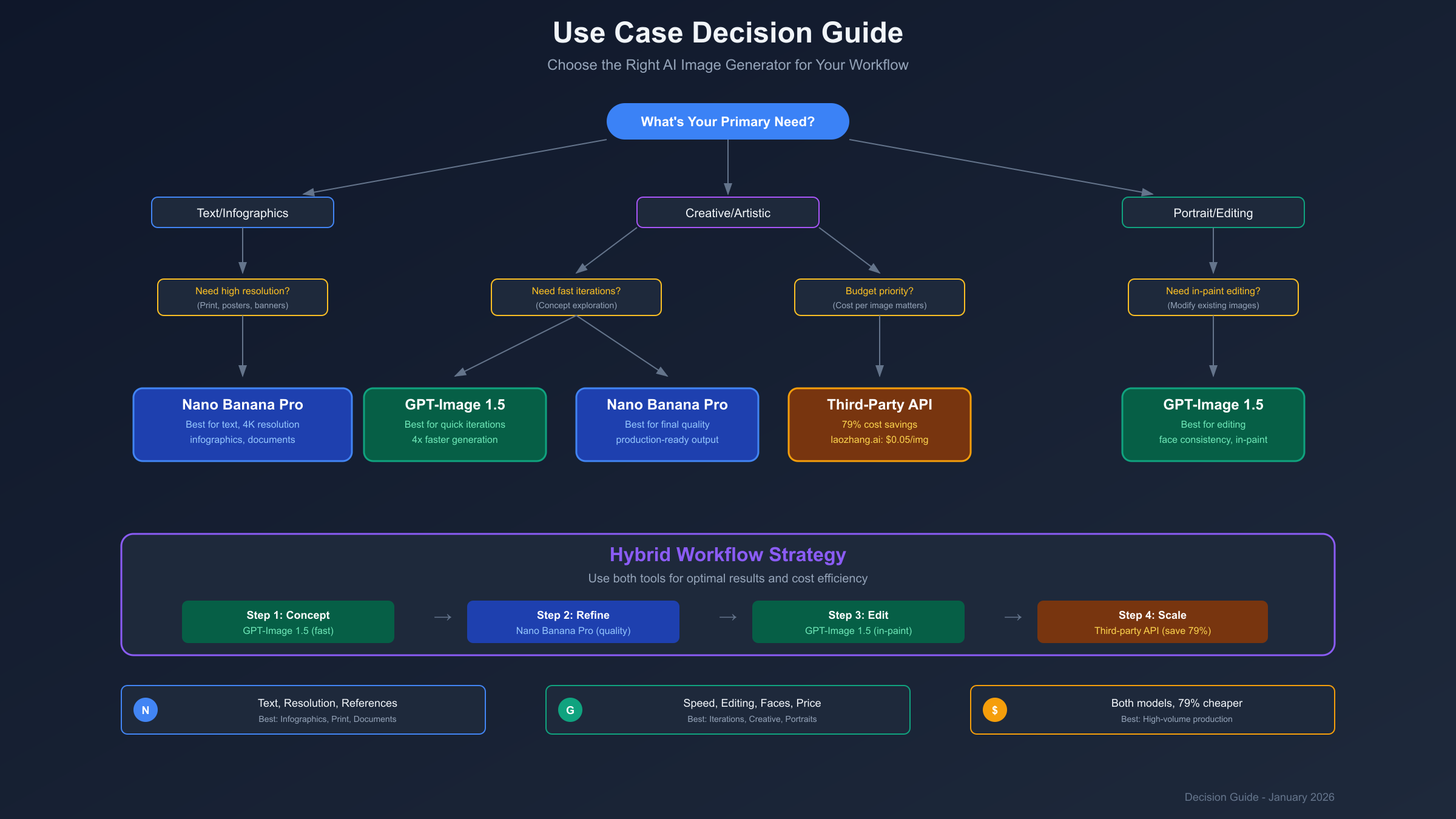
Use Case Decision Guide
Choosing the right tool depends on your specific workflow and requirements.
Creative Professionals
Graphic Designers:
- Primary choice: Nano Banana Pro for production assets
- Secondary: GPT-Image 1.5 for rapid concept exploration
- Consider: Hybrid workflow using both
Illustrators and Artists:
- Primary choice: GPT-Image 1.5 for speed and iteration
- Secondary: Nano Banana Pro for final high-resolution output
- Consider: Reference image workflow with Nano Banana Pro
Photographers and Retouchers:
- Primary choice: GPT-Image 1.5 for editing and in-paint
- Secondary: Nano Banana Pro for composite backgrounds
- Consider: Face consistency needs favor GPT-Image 1.5
Marketing Teams
Social Media Content:
- High-volume: Third-party API for cost efficiency
- Text-heavy posts: Nano Banana Pro
- Quick iterations: GPT-Image 1.5
Email Marketing:
- Hero images: GPT-Image 1.5 (speed)
- Infographics: Nano Banana Pro (text)
- A/B testing: Third-party API (cost)
Print Collateral:
- Recommended: Nano Banana Pro for 4K output
- Budget option: Third-party API with Nano Banana Pro access
Developers and Startups
MVP Development:
- Recommended: Third-party API for cost control
- Flexibility: Access both models through single integration
- Scaling: Easy transition as needs grow
Production Applications:
- Image editing features: GPT-Image 1.5 API
- High-quality generation: Nano Banana Pro API
- Cost optimization: Third-party aggregator
Chatbot Integration:
- ChatGPT ecosystem: GPT-Image 1.5
- Custom applications: Either, based on features needed
Enterprise Requirements
Compliance Considerations:
- SynthID watermarking: Nano Banana Pro advantage
- Data residency: Check both providers' options
- Enterprise agreements: Both offer enterprise tiers
Support and SLA:
- Google Cloud support: Available for Nano Banana Pro
- OpenAI enterprise: Available for GPT-Image 1.5
- Third-party: Varies by provider
Integration Complexity:
- Existing Google Cloud: Nano Banana Pro easier
- Existing OpenAI: GPT-Image 1.5 easier
- Neither: Evaluate based on other criteria
Hybrid Workflow: Best of Both Worlds
Rather than choosing one tool exclusively, many professionals achieve optimal results by using both strategically.
Recommended Hybrid Workflow
Step 1: Concept Phase (GPT-Image 1.5)
- Use GPT-Image 1.5's speed for rapid concept exploration
- Generate 5-10 variations quickly
- Identify promising directions
- Cost: Low (fast iteration means fewer total generations)
Step 2: Refinement Phase (Nano Banana Pro)
- Take selected concepts to Nano Banana Pro
- Generate high-resolution versions
- Add text elements and fine details
- Cost: Moderate (fewer images, higher quality)
Step 3: Editing Phase (GPT-Image 1.5)
- Use GPT-Image 1.5 for any necessary edits
- In-paint modifications
- Final adjustments
- Cost: Low (targeted edits only)
Step 4: Production Scaling (Third-Party API)
- For high-volume production, use cost-optimized third-party access
- Using a unified API gateway like laozhang.ai simplifies this workflow
- Single integration provides access to both models
- Significant cost reduction for volume production
Cost Optimization Strategy
Implementing a hybrid workflow with third-party API access can reduce costs by 60-79% compared to using direct APIs exclusively:
| Workflow Stage | Recommended API | Cost Factor |
|---|---|---|
| Concept exploration | GPT-Image 1.5 (direct) | 1x |
| Quality refinement | Nano Banana Pro (third-party) | 0.4x |
| Editing | GPT-Image 1.5 (direct) | 1x |
| Volume production | Both (third-party) | 0.2-0.4x |
Getting Started: API Access and Setup
Direct API Access
Nano Banana Pro Setup:
- Create or access Google Cloud account
- Enable Vertex AI API
- Generate API credentials
- Install SDK:
pip install google-cloud-aiplatform
pythonfrom google.cloud import aiplatform

# Initialize client
aiplatform.init(project="your-project", location="us-central1")

# Generate image
response = aiplatform.gapic.PredictionServiceClient().predict(
    endpoint="nano-banana-pro-endpoint",
    instances=[{"prompt": "Your prompt here"}]
)
GPT-Image 1.5 Setup:
- Create OpenAI account
- Generate API key from dashboard
- Install SDK:
pip install openai
pythonfrom openai import OpenAI

client = OpenAI(api_key="your-api-key")

response = client.images.generate(
    model="gpt-image-1.5",
    prompt="Your prompt here",
    size="1024x1024",
    quality="hd"
)
Third-Party API Access
For unified access to both models with cost optimization:
- Register at your chosen provider (e.g., laozhang.ai)
- Obtain API key
- Use their SDK or REST API
pythonimport requests

response = requests.post(
    "https://api.laozhang.ai/v1/images/generate",
    headers={"Authorization": "Bearer your-api-key"},
    json={
        "model": "nano-banana-pro",  # or "gpt-image-1.5"
        "prompt": "Your prompt here",
        "size": "2048x2048"
    }
)
For comprehensive documentation and code examples, visit docs.laozhang.ai.
Frequently Asked Questions
Which model is better for beginners?
GPT-Image 1.5 through ChatGPT Plus offers the most accessible entry point. The conversational interface makes prompt refinement intuitive, and the included generations eliminate upfront API costs. For API-based development, both models have comparable learning curves.
Can I use both models in the same project?
Yes, and this is often the optimal approach. Use GPT-Image 1.5 for rapid iteration and editing, Nano Banana Pro for final production quality and text-heavy content. Third-party APIs simplify this by providing unified access.
How much faster is GPT-Image 1.5 than Nano Banana Pro?
GPT-Image 1.5 generates images in 30-45 seconds versus 30-90 seconds for Nano Banana Pro (depending on resolution). For iteration-heavy workflows, this 2-3x speed advantage is significant.
Which one handles text better?
Nano Banana Pro is dramatically better at text rendering. It can accurately generate paragraphs of 200+ words in multiple languages, while GPT-Image 1.5 struggles with anything beyond short titles or labels.
What are the resolution limits of each model?
Nano Banana Pro: Up to 4K (4096x4096) GPT-Image 1.5: Up to 1536x1536 native
Which is cheaper for high-volume production?
Third-party API providers offer the best value at scale, with costs around $0.05 per image versus $0.08-0.24 for direct APIs. For moderate volume without third-party access, GPT-Image 1.5 is generally more cost-effective.
Are there free tiers available?
Nano Banana Pro: Limited free tier (~3 images/day at 1K with watermark) GPT-Image 1.5: Included with ChatGPT Plus ($20/month) Third-party: Varies by provider
Which model is better for commercial use?
Both are suitable for commercial applications. Nano Banana Pro includes SynthID watermarking for transparency. Check each provider's terms for your specific use case.
Conclusion: Making Your Decision
The choice between Nano Banana Pro and GPT-Image 1.5 ultimately depends on your specific requirements:
Choose Nano Banana Pro when:
- Text rendering is important
- You need 4K resolution output
- Working with multiple reference images
- Creating infographics or document images
- Quality is prioritized over speed
Choose GPT-Image 1.5 when:
- Rapid iteration is essential
- You need in-paint editing capabilities
- Portrait consistency matters
- Using ChatGPT ecosystem
- Speed is prioritized over maximum resolution
Choose a hybrid approach when:
- You have diverse requirements
- Cost optimization is important
- You want the best of both worlds
- Building production workflows at scale
The AI image generation field continues to evolve rapidly. Both Google and OpenAI are actively developing their models, so capabilities and pricing may shift. For the most current information, always check official documentation and consider third-party providers that aggregate access to multiple models.
Whatever your choice, 2026 offers unprecedented capabilities for AI-powered image creation. The tools available today enable creative possibilities that were impossible just a year ago—and the competition between these platforms ensures continued innovation ahead.