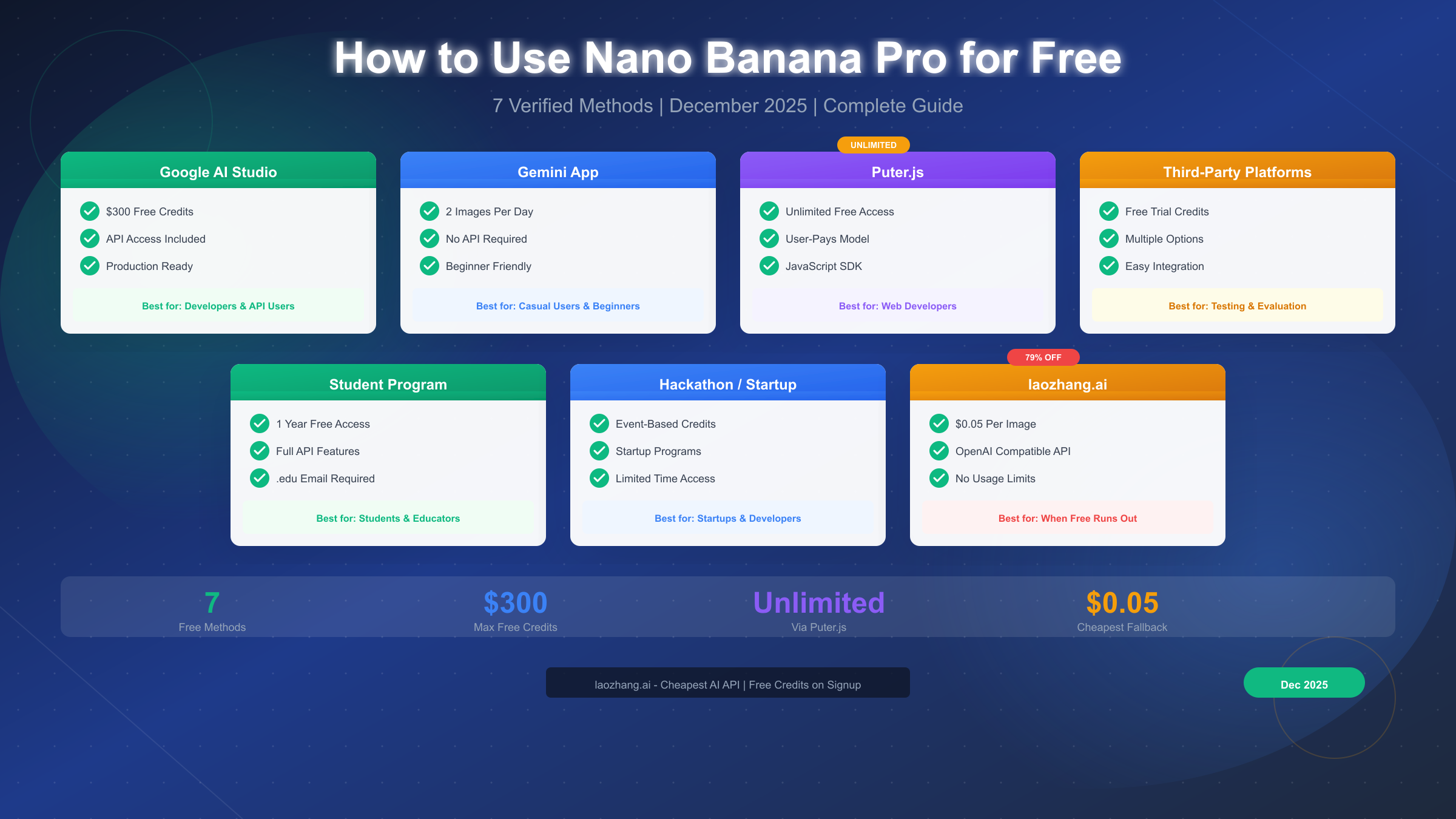
Nano Banana Pro, Google's flagship image generation model also known as Gemini 3 Pro Image, offers photorealistic 4K outputs with exceptional text rendering and character consistency that rivals Midjourney and DALL-E 3. As of December 2025, seven verified methods provide free access to this powerful model: Google AI Studio with $300 in free credits, the Gemini App offering 2 images daily, Puter.js enabling unlimited free generation through its User-Pays model, third-party platforms with trial credits, the Google Student Program granting one year of free access, hackathon and startup credits, and research grant programs. When these free options reach their limits, laozhang.ai provides the most affordable alternative at just $0.05 per image—representing a 79% discount from Google's official 4K pricing.
Understanding Nano Banana Pro Free Access
Google's Nano Banana Pro represents a significant leap forward in AI image generation technology. Released in November 2025 as part of the Gemini 3 family, this model carries the technical identifier gemini-3-pro-image-preview and delivers capabilities that have quickly made it the go-to choice for professional image generation. Understanding what makes this model special helps explain why securing free access matters so much to developers and creators alike.
The core technology behind Nano Banana Pro builds upon Google DeepMind's diffusion transformer architecture, the same foundation that powers their most advanced language models. This architectural choice enables the model to understand complex prompts with remarkable precision, generating images that accurately reflect nuanced descriptions including specific lighting conditions, artistic styles, and even readable text—a capability where many competitors still struggle. The model outputs images at true 4K resolution (4096×4096 pixels) with a level of detail that supports professional print production and high-quality digital displays.
What sets Nano Banana Pro apart from competitors is its exceptional handling of several challenging generation tasks. Text rendering within images works reliably across multiple languages and fonts, a capability that opens doors for marketing materials, social media graphics, and educational content. Character consistency across multiple generations allows creators to build visual narratives with recurring subjects—something that previously required extensive post-processing or multiple regeneration attempts. The model also includes SynthID watermarking by default, providing transparent AI content identification without visible artifacts.
Why free access matters for the development community comes down to the economics of experimentation and integration. Professional API access through Google's official channels costs $0.20 per standard image and $0.24 for 4K output—prices that accumulate quickly during the development phase when engineers might generate hundreds or thousands of test images while building and refining their applications. Free access methods allow developers to thoroughly test integrations, experiment with prompt engineering, and validate their use cases before committing to production spending.
The landscape of free access options has evolved significantly since the model's release. Initially, Google offered generous free tiers as part of their launch strategy to encourage adoption and gather usage data. As the model gained popularity and infrastructure costs became apparent, these free allocations have tightened. The Gemini App, for instance, reduced its free generation limit from 3 images per day to 2 in late November 2025. Understanding which methods remain viable and their specific limitations helps you make informed decisions about how to proceed.
The distinction between free methods becomes clearer when you consider your specific use case. Casual users exploring AI image generation for personal projects have different needs than developers building production applications or researchers conducting systematic studies. Some methods require technical expertise while others offer simple web interfaces. Some impose strict daily limits while others provide more generous monthly allocations. The following sections break down each option in detail, helping you identify which approach—or combination of approaches—best serves your requirements.
Quick Comparison: All Free Methods
Before diving into detailed tutorials for each method, this comparison table provides an at-a-glance view of all seven verified approaches to accessing Nano Banana Pro without payment. The table below represents current data verified as of December 26, 2025, though Google occasionally adjusts quotas and requirements.
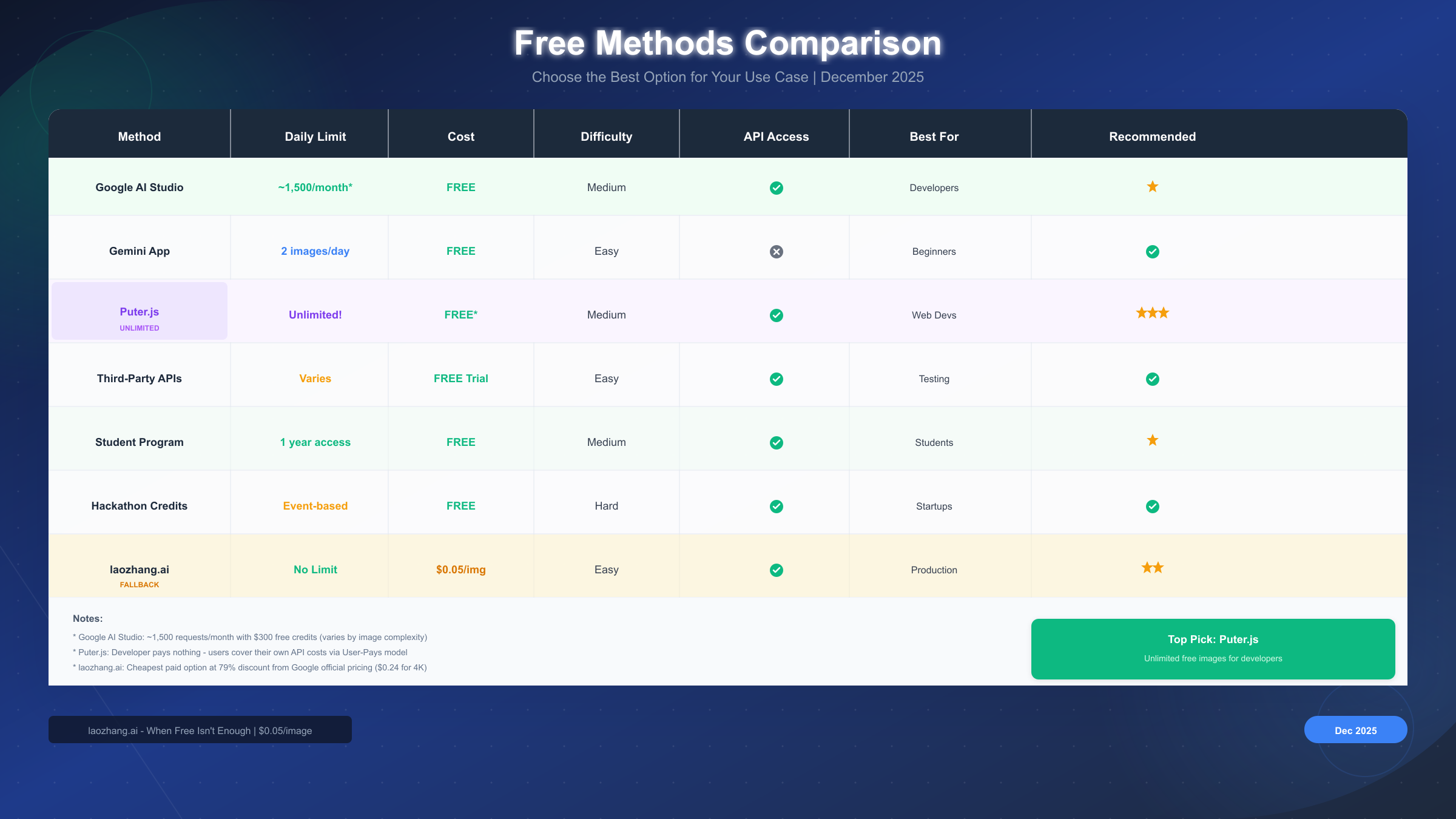
| Method | Daily Limit | Monthly Equivalent | Difficulty | API Access | Best For |
|---|---|---|---|---|---|
| Google AI Studio | ~50/day* | ~1,500 images | Medium | Yes | Developers needing API |
| Gemini App | 2 images | 60 images | Easy | No | Casual users |
| Puter.js | Unlimited | Unlimited | Medium | Yes (JS) | Web developers |
| Third-Party Platforms | Varies | 50-200 images | Easy | Yes | Testing & evaluation |
| Student Program | Full access | Full access | Medium | Yes | Students & educators |
| Hackathon Credits | Event-based | Varies | Hard | Yes | Startups & developers |
| Research Grants | Full access | Full access | Hard | Yes | Academic researchers |
*Google AI Studio limit depends on your $300 free credit balance and image complexity settings.
The standout option for most developers is Puter.js, which provides genuinely unlimited access through an innovative User-Pays model where your end users cover the API costs rather than you as the developer. This approach eliminates the traditional constraint of free tier limits while maintaining zero cost to the application builder. However, this model requires your application to run within the Puter.js ecosystem, which may not suit all use cases.
For beginners and casual exploration, the Gemini App offers the gentlest entry point. While its 2 images per day limit restricts serious development work, it provides an excellent way to understand the model's capabilities before committing time to more complex integration methods. The web interface requires no technical setup—just a Google account and a few minutes of experimentation.
Google AI Studio represents the most versatile choice for developers who need standard API access. The $300 in free credits translates to approximately 1,500 standard-quality images or 1,250 4K images, enough for thorough testing and initial development. The API follows standard REST conventions and integrates cleanly with existing application architectures.
Understanding these tradeoffs helps you select the right starting point. Many developers begin with the Gemini App for initial exploration, graduate to Google AI Studio for serious development, and ultimately consider Puter.js or paid alternatives for production deployment. The following sections provide step-by-step instructions for each method.
Method 1-2: Official Google Options
The most reliable free access methods come directly from Google, offering official support and stable availability. These options provide the foundation for most developers' exploration of Nano Banana Pro capabilities.
Google AI Studio: $300 Free Credits
Google AI Studio serves as the primary developer portal for accessing Gemini models, including Nano Banana Pro. When you create a new Google Cloud project and enable the Generative AI API, Google automatically provisions $300 in free credits that remain valid for 90 days. This credit pool supports all Gemini API usage, with Nano Banana Pro image generation consuming approximately $0.20 per standard image.
Setting up your Google AI Studio access begins at aistudio.google.com. Sign in with your Google account, accept the terms of service, and create a new project if you haven't already. The platform automatically generates an API key that you'll use in your applications. For a detailed walkthrough of API key management and best practices, see our complete Gemini API key setup guide which covers security considerations and team sharing configurations.
The actual API calls use Google's standard REST interface. Here's a minimal Python example that generates an image with Nano Banana Pro:
import google.generativeai as genai

genai.configure(api_key="YOUR_API_KEY")

model = genai.GenerativeModel("gemini-3-pro-image-preview")
response = model.generate_content(
    "A photorealistic image of a golden retriever
    playing in autumn leaves, afternoon sunlight"
)

# Save the generated image
image_data = response.images[0]
with open("output.png", "wb") as f:
    f.write(image_data.data)
Maximizing your free credit usage requires understanding how Google calculates costs. Standard 1024×1024 images cost $0.20 each, while 4K (4096×4096) outputs cost $0.24. By defaulting to standard resolution during development and reserving 4K for final production outputs, you can stretch your $300 credit to cover more than 1,500 test generations. The Google AI Studio dashboard provides real-time credit balance monitoring so you can track consumption.
Gemini App: 2 Free Images Daily
For users who want to experience Nano Banana Pro without any technical setup, the Gemini App provides direct access through a conversational interface. Available at gemini.google.com and through mobile apps on iOS and Android, this method requires only a Google account to begin generating images.
Using Nano Banana Pro through the Gemini App involves natural language interaction rather than API calls. Simply describe the image you want in conversational terms, and the system interprets your request and generates the output. The interface automatically uses Nano Banana Pro when your prompt requests image generation, though you can explicitly specify the model by including phrases like "using Nano Banana Pro" or "with Gemini 3 Pro Image quality."
The daily limit of 2 images per free account applies per 24-hour period based on UTC time. While this restriction makes the Gemini App unsuitable for development work, it provides an excellent sandbox for understanding prompt engineering before you invest time in API integration. Paying for Gemini Advanced ($19.99/month) increases this limit significantly, though for development purposes the API route typically offers better value.
For developers interested in the broader Gemini Flash ecosystem which includes a more generous free tier, our guide to free Gemini Flash image API access covers the differences between model tiers and their respective free allocations.
Method 3-4: Third-Party Free Platforms
Beyond Google's official channels, several third-party platforms provide free access to Nano Banana Pro through creative licensing arrangements and developer-focused business models.
Puter.js: Unlimited Free Access
Puter.js has emerged as the most exciting option for web developers seeking unlimited free image generation. This JavaScript framework implements a User-Pays model that fundamentally changes the economics of AI API integration. Rather than developers paying for each API call during testing and production, end users authenticate with their own accounts and cover their personal usage costs—while developers pay nothing.
Understanding the User-Pays model requires a shift in thinking about API economics. Traditional approaches charge developers for every request their application makes, creating pressure to minimize usage during development and implement careful rate limiting in production. Puter.js inverts this model: your application makes requests on behalf of authenticated users, and those users' personal quotas absorb the costs. For applications where users are willing to authenticate, this approach provides unlimited free usage from the developer's perspective.
Setting up Puter.js in your web application involves including the client library and implementing the authentication flow:
// Include Puter.js library
<script src="https://js.puter.com/v2/"></script>

// Initialize and authenticate user
await puter.auth.login();

// Generate image with Nano Banana Pro
const result = await puter.ai.generateImage({
    prompt: "A futuristic cityscape at sunset with flying vehicles",
    model: "nano-banana-pro",
    size: "1024x1024"
});

// Display the generated image
document.getElementById('output').src = result.image.url;
The practical implications for development mean you can iterate without watching a credit balance. Build prototypes, refine prompts, test edge cases—all without accumulating charges. Your users experience seamless image generation within their personal quotas, and you focus on building great applications rather than managing API costs.
The technical architecture of Puter.js deserves additional explanation for developers evaluating this approach. When your application calls puter.ai.generateImage(), the request flows through Puter's authentication layer, which identifies the currently logged-in user. That user's Puter account absorbs the API costs based on their personal subscription tier. Free Puter accounts include a monthly generation quota that refreshes on billing cycles. Paid Puter subscribers receive higher quotas and priority processing. Your application code remains identical regardless of which user tier makes the request—the billing abstraction happens entirely on Puter's infrastructure.
Handling user quota exhaustion requires thoughtful UX design. When a user's personal quota runs out, your application receives an error response. Rather than displaying a cryptic error, implement graceful degradation: inform users that their personal quota has been reached and offer options to upgrade their Puter subscription or wait for the monthly refresh. Some developers implement local caching of previously generated images to reduce repeated requests for identical prompts, stretching user quotas further.
The Puter ecosystem includes additional capabilities beyond image generation. Users who authenticate for your image-generation feature can also access cloud storage, AI chat capabilities, and other Puter services through your application. This creates opportunities for building more comprehensive applications that leverage multiple AI services without managing separate provider relationships.
Third-Party API Platforms
Several API aggregation platforms offer free trial credits that include Nano Banana Pro access. These platforms typically provide unified interfaces across multiple AI models, allowing you to experiment with different providers through a single integration.
NanoBananaArt.ai and similar platforms emerged specifically around Nano Banana Pro's release, offering web interfaces and API access with trial credits. While specific allocations vary—typically ranging from 50 to 200 free images—these platforms serve as useful testing grounds before committing to a specific integration approach. The key advantage lies in their simplified interfaces that abstract away some of the complexity of direct Google API integration.
Evaluating third-party platform reliability involves checking several factors. Look for platforms that clearly document their pricing after trial credits expire, maintain transparent privacy policies regarding your prompts and generated images, and offer reasonable uptime guarantees. Some platforms add their own rate limiting on top of underlying API constraints, which can affect application performance.
For production use, direct API integration typically provides better control and transparency, but third-party platforms offer value during the exploration and evaluation phase.
Method 5-6: Special Programs
Google maintains several programs that provide extended free access to developers and organizations meeting specific criteria. While these require more effort to access than the general-availability methods, they offer substantially more generous allocations.
Google Student Program
Students and educators with valid .edu email addresses qualify for Google's academic program, which provides one full year of free API access to Gemini models including Nano Banana Pro. This program recognizes that educational institutions drive significant AI innovation and research, and it removes financial barriers that might otherwise limit student experimentation.
Enrolling in the Student Program begins at Google Cloud for Education. You'll need to verify your educational status through your institution's email domain, after which Google provisions a dedicated academic project with elevated quotas. The program includes not just image generation but access to the full Gemini model family, making it valuable for comprehensive AI education.
The academic free tier differs from consumer free tiers in several important ways. Rate limits are higher to accommodate classroom demonstrations and research workloads. Usage doesn't expire after a brief trial period. And technical support includes educational resources specifically designed for academic contexts.
Hackathon and Startup Credits
Google regularly sponsors hackathons and startup programs that include Gemini API credits as part of their prize packages. Events like Google Cloud Next, DevFest, and regional Google Developer Group hackathons frequently offer credit allocations ranging from $1,000 to $10,000, enough for extensive Nano Banana Pro experimentation.
Finding relevant hackathons and programs requires monitoring Google's developer channels. The Google for Startups program provides credits to early-stage companies building on Google Cloud, including Generative AI products. Y Combinator, Techstars, and other accelerator programs often secure Google Cloud credit packages for their cohorts.
For startups specifically, Google Cloud for Startups offers up to $200,000 in credits over two years for qualifying companies. While this program requires application and acceptance, the credit allocation dwarfs what individual developers can access through standard channels.
Research Grant Programs
Academic researchers conducting AI-related studies can apply for dedicated research grants that include Gemini API access. Google's AI Research program accepts proposals from university faculty and research institutions, providing not just API credits but also access to preview features and direct technical support from Google's research teams.
The application process for research grants is more formal than consumer programs. You'll need to submit a research proposal explaining your project's objectives, methodology, and expected outcomes. Google prioritizes proposals that advance the field of AI safety, fairness, or capability understanding. Successful applicants receive credits ranging from $5,000 to $50,000 depending on project scope and institutional affiliation.
Beyond Google's internal programs, several external organizations fund AI research with cloud credit components. The National Science Foundation's ACCESS program provides computing resources that can include Generative AI API access. Private foundations like the Allen Institute and OpenPhilanthropy occasionally fund projects that include Nano Banana Pro experimentation.
Maximizing research program benefits requires clear documentation of your research activities. Keep detailed logs of your experiments, generated outputs, and analytical findings. This documentation serves dual purposes: it strengthens renewal applications and contributes to publishable research outcomes that further establish your standing in the academic AI community.
Beyond Free: Affordable Alternatives
Eventually, free tier limits become insufficient for production applications. Whether you've exhausted your Google AI Studio credits, your user base exceeds what Puter.js can handle, or you need consistent availability without quota anxiety, paid alternatives become necessary. Understanding the pricing landscape helps you make cost-effective transitions.
Google's official pricing sets the baseline at $0.20 per standard image and $0.24 per 4K output. For applications generating thousands of images monthly, these costs accumulate into substantial infrastructure expenses. A moderately popular application generating 50,000 images per month faces monthly bills of $10,000 or more at official rates.
laozhang.ai offers the most significant cost reduction in the current market, providing Nano Banana Pro access at $0.05 per image—representing a 79% discount from Google's official pricing. This pricing makes previously cost-prohibitive applications viable and dramatically improves unit economics for image-generation products. The platform maintains OpenAI-compatible API endpoints, which means transitioning existing code requires minimal changes: typically just updating the base URL and API key.
For teams evaluating production options, our comprehensive analysis of cheapest stable Gemini image API options compares various providers on pricing, reliability, and feature support. The article includes performance benchmarks and availability statistics that inform infrastructure decisions.
The transition from free to paid often follows a predictable pattern. Developers begin with Google AI Studio credits during prototyping, push their applications to production while free credits remain, then face a decision point when credits exhaust. At this stage, the choice between Google's official API and cost-optimized alternatives primarily depends on volume. Low-volume applications might stick with official pricing for simplicity, while higher-volume products find significant savings through alternative providers.
If you're exploring alternatives to Nano Banana Pro entirely, FLUX models offer competitive quality at different price points. Our FLUX image generation API guide explores this alternative ecosystem.
Understanding the cost-per-output economics becomes essential as you scale. At Google's official $0.24 per 4K image, generating 10,000 images monthly costs $2,400—a substantial expense that affects product viability. Cost-optimized providers reduce this to around $500 for the same output, saving $1,900 monthly. For startups operating on tight budgets, this difference determines whether an image-generation feature can launch at all. The savings compound over time: a year of production at 10,000 monthly images costs $28,800 through Google versus $6,000 through alternatives.
The quality question often arises when considering alternatives: do lower-cost providers deliver the same output quality? Since these providers access the same underlying Nano Banana Pro model through API aggregation, the actual generation quality remains identical. The cost reduction comes from infrastructure optimization and volume purchasing, not from using inferior models. You receive genuine Nano Banana Pro outputs at a fraction of official pricing.
Hybrid strategies often provide the best balance during transition periods. Many teams maintain their Google AI Studio integration for development and testing where the $300 credit provides sufficient runway, then switch production traffic to cost-optimized providers. This approach preserves the simplicity of official SDKs during development while capturing savings at scale. Some teams even implement dynamic routing that sends requests to different providers based on current quotas and pricing.
Production Code Examples
Moving from experimentation to production requires more robust code than simple API calls. Production applications need error handling, retry logic, rate limit management, and proper resource cleanup. The following examples demonstrate production-ready patterns for both Python and JavaScript environments.
Python Production Implementation
import os
import time
import logging
from typing import Optional
import google.generativeai as genai
from google.api_core import exceptions, retry

logging.basicConfig(level=logging.INFO)
logger = logging.getLogger(__name__)

class NanoBananaProClient:
    """Production-ready Nano Banana Pro client with retry logic."""

    def __init__(self, api_key: Optional[str] = None):
        self.api_key = api_key or os.environ.get("GEMINI_API_KEY")
        if not self.api_key:
            raise ValueError("API key required")

        genai.configure(api_key=self.api_key)
        self.model = genai.GenerativeModel("gemini-3-pro-image-preview")
        self.retry_config = retry.Retry(
            initial=1.0,
            maximum=60.0,
            multiplier=2.0,
            deadline=300.0
        )

    def generate_image(
        self,
        prompt: str,
        size: str = "1024x1024",
        max_retries: int = 3
    ) -> bytes:
        """Generate image with automatic retry on transient failures."""

        for attempt in range(max_retries):
            try:
                response = self.model.generate_content(
                    prompt,
                    generation_config={
                        "response_mime_type": "image/png",
                        "image_size": size
                    }
                )

                if response.images:
                    logger.info(f"Image generated successfully on attempt {attempt + 1}")
                    return response.images[0].data
                else:
                    raise ValueError("No image in response")

            except exceptions.ResourceExhausted as e:
                wait_time = 2 ** attempt * 10  # Exponential backoff
                logger.warning(f"Rate limited. Waiting {wait_time}s before retry...")
                time.sleep(wait_time)

            except exceptions.ServiceUnavailable as e:
                if attempt < max_retries - 1:
                    time.sleep(5)
                    continue
                raise

        raise RuntimeError(f"Failed after {max_retries} attempts")

# Usage example
if __name__ == "__main__":
    client = NanoBananaProClient()

    image_data = client.generate_image(
        prompt="Professional product photography of a sleek smartphone",
        size="4096x4096"
    )

    with open("product_photo.png", "wb") as f:
        f.write(image_data)
JavaScript/Node.js Implementation
For Node.js environments or applications using OpenAI-compatible endpoints (including cost-optimized providers), this pattern provides production-ready generation:
const axios = require('axios');

class NanoBananaProClient {
    constructor(options = {}) {
        this.apiKey = options.apiKey || process.env.LAOZHANG_API_KEY;
        this.baseUrl = options.baseUrl || 'https://api.laozhang.ai/v1';
        this.maxRetries = options.maxRetries || 3;

        if (!this.apiKey) {
            throw new Error('API key required');
        }
    }

    async generateImage(prompt, options = {}) {
        const {
            size = '1024x1024',
            quality = 'standard',
            model = 'nano-banana-pro'
        } = options;

        let lastError;

        for (let attempt = 0; attempt < this.maxRetries; attempt++) {
            try {
                const response = await axios.post(
                    `${this.baseUrl}/images/generations`,
                    {
                        prompt,
                        model,
                        size,
                        quality,
                        n: 1
                    },
                    {
                        headers: {
                            'Authorization': `Bearer ${this.apiKey}`,
                            'Content-Type': 'application/json'
                        },
                        timeout: 120000  // 2 minute timeout for image generation
                    }
                );

                return response.data.data[0];

            } catch (error) {
                lastError = error;

                if (error.response?.status === 429) {
                    // Rate limited - exponential backoff
                    const waitTime = Math.pow(2, attempt) * 1000;
                    console.log(`Rate limited. Waiting ${waitTime}ms...`);
                    await new Promise(r => setTimeout(r, waitTime));
                    continue;
                }

                if (error.response?.status >= 500) {
                    // Server error - retry with delay
                    await new Promise(r => setTimeout(r, 5000));
                    continue;
                }

                // Client error - don't retry
                throw error;
            }
        }

        throw lastError;
    }
}

// Usage example
async function main() {
    const client = new NanoBananaProClient();

    const result = await client.generateImage(
        'A minimalist logo design for a tech startup called "NovaTech"',
        { size: '1024x1024', quality: 'hd' }
    );

    console.log('Image URL:', result.url);
}

main().catch(console.error);
Key production considerations reflected in these examples include exponential backoff for rate limits (preventing request storms that could trigger extended throttling), proper timeout configuration (image generation can take 30-90 seconds for complex prompts), and comprehensive error handling that distinguishes between retryable and non-retryable failures. Applications serving end users should also implement request queuing and progress indication, as generation latency can frustrate users expecting instant results.
Recommendations by Use Case
Different users arrive at Nano Banana Pro with distinct requirements, constraints, and technical backgrounds. These targeted recommendations help you identify the most suitable starting point based on your specific situation.
For hobbyists and personal projects, the Gemini App provides the ideal entry point. Its 2 daily images suffice for casual experimentation, and the conversational interface removes technical barriers entirely. As you become more sophisticated in your prompting and begin to hit the daily limit regularly, transitioning to Google AI Studio's free credits makes natural sense. This progression lets you develop your skills gradually while deferring more complex setup until you actually need it.
For professional developers building applications, the calculation differs significantly. Begin with Google AI Studio to validate your integration architecture using free credits. Once your application design stabilizes, evaluate whether Puter.js fits your authentication model—if users will authenticate anyway, the User-Pays approach eliminates ongoing API costs entirely. For applications where user authentication isn't feasible or where you need predictable infrastructure costs, laozhang.ai at $0.05 per image provides the most economical production option. New users receive free credits upon registration at docs.laozhang.ai, allowing you to validate the integration before committing to paid usage.
For students and academic researchers, the Google Student Program offers the most generous allocation. Take advantage of the full year of free access to conduct thorough experiments, build portfolio projects, and explore the model's capabilities without financial constraints. The academic quota significantly exceeds what's available through consumer channels.
For startups and companies, the decision framework depends on scale. Early-stage startups should explore Google Cloud for Startups credits while keeping cost-optimized providers as the production fallback once credits expire. Companies with established products generating significant volume should prioritize cost optimization from the start—the 79% savings through alternative providers translates to substantial amounts at scale.
For production workloads requiring consistency, avoid relying solely on free tiers. Free quotas can change without notice, rate limits vary by time of day, and support options are limited. Production applications should budget for paid API access, using free tiers only for development and testing. This approach ensures your application remains available to users regardless of changes to promotional programs or free tier policies.
The landscape of Nano Banana Pro access continues to evolve as Google refines its Gemini platform strategy. Bookmark this guide and check back periodically—we update these recommendations as new methods emerge and existing ones change their terms.
A practical roadmap for scaling might proceed as follows: Month one, explore the Gemini App to understand prompt engineering and model capabilities without technical investment. Month two, set up Google AI Studio and build your initial integration using the $300 credit. Month three, if your application shows traction and you're consuming credits rapidly, evaluate Puter.js for web applications or cost-optimized providers for production deployment. This phased approach minimizes upfront investment while providing clear decision points based on actual usage data.
Cost projection exercises help inform these decisions. Estimate your monthly image generation volume under realistic growth scenarios. At 1,000 images monthly, even Google's official pricing ($200-240/month) remains manageable. At 10,000 images monthly, the $2,000+ cost pushes most teams toward alternatives. At 100,000 images monthly, cost optimization becomes a critical business decision affecting viability. Running these projections early helps you choose the right integration approach from the start, avoiding painful migrations later.
Troubleshooting Common Issues
Even with proper setup, you may encounter issues when accessing Nano Banana Pro through any of these free methods. Understanding common problems and their solutions saves time and frustration during development.
Rate Limiting and Quota Errors
The most frequent issue developers encounter involves rate limits. Google imposes both per-minute and per-day request limits that vary by method and account type. When you hit these limits, the API returns a 429 error code. The solution involves implementing exponential backoff in your code—start with a 1-second delay, then double it on each subsequent retry up to a maximum of 60 seconds. Most rate limits reset within minutes, so patient retrying usually succeeds without requiring code changes.
For Google AI Studio specifically, quota errors manifest differently than rate limits. While rate limits affect request frequency, quota errors indicate you've exhausted your $300 credit allocation. The dashboard at aistudio.google.com shows your remaining balance, and once depleted, you'll need to add a payment method or switch to an alternative provider. There's no mechanism to request additional free credits beyond the initial allocation.
Image Generation Failures
Sometimes generation requests complete without producing usable output. Common causes include prompts that violate content policies (even unintentionally), overly complex descriptions that exceed the model's interpretation capabilities, or temporary service degradation. Google's content filters are fairly aggressive—descriptions involving violence, explicit content, or certain copyrighted characters will fail silently or return error messages.
When prompts fail, try simplifying your description. Start with basic elements and gradually add complexity until you identify which component triggers the failure. The model handles concrete, visual descriptions better than abstract concepts. "A red apple on a wooden table" generates reliably, while "the essence of autumn captured in a still life" may produce inconsistent results or fail entirely.
Authentication and API Key Issues
API key problems typically stem from misconfiguration rather than the keys themselves. Ensure your key has the Generative AI API enabled in the Google Cloud Console. Keys created before enabling the API won't work until you activate the service. Additionally, verify you're using the correct project—developers often create multiple projects and accidentally use keys from inactive ones.
For Puter.js authentication failures, the issue usually involves browser security settings or popup blockers. The OAuth flow requires popups, and blocking them prevents successful authentication. Instruct users to allow popups from your domain or implement a manual authentication flow that doesn't rely on popup windows.
Regional Availability Concerns
Some Nano Banana Pro features have geographic restrictions. While the model itself is broadly available, certain advanced features or API versions may be limited to specific regions. If you encounter "service unavailable in your region" errors, try connecting through a VPN to a supported region. For production deployments, ensure your server infrastructure operates in a supported geography.
Frequently Asked Questions
Is Nano Banana Pro the same as Gemini 3 Pro Image?
Yes, they refer to the same model. "Nano Banana Pro" is a community nickname that gained popularity, while "Gemini 3 Pro Image" is Google's official product name. The model identifier in API calls is gemini-3-pro-image-preview. Both terms appear in documentation and discussions interchangeably.
How long do Google AI Studio free credits last?
Google AI Studio provides $300 in free credits that expire 90 days after account creation. The credits apply to all Gemini API usage, not just image generation. If you primarily use the image generation endpoints, $300 covers approximately 1,500 standard images or 1,250 4K outputs.
Can I use free methods for commercial projects?
Terms vary by method. Google AI Studio and Gemini App allow commercial use of generated images. Puter.js permits commercial applications built on its platform. Third-party platforms have their own terms you should review. Student Program credits typically prohibit commercial use during the educational period.
What happens when I exceed free tier limits?
Behavior depends on the method. Google AI Studio continues working but charges your linked payment method. Gemini App blocks further generation until the next UTC day. Puter.js continues working as users cover their own costs. Third-party platforms typically block generation and prompt for payment.
Why does Puter.js offer unlimited free access?
Puter.js implements a User-Pays model where end users authenticate with their own accounts and cover API costs through their personal quotas. Developers pay nothing because they're not making API calls on their own behalf. This approach works for applications where user authentication is acceptable.
Is laozhang.ai reliable for production use?
laozhang.ai maintains high availability for production workloads, offering OpenAI-compatible endpoints that simplify migration from other providers. The platform handles rate limiting gracefully and provides monitoring dashboards. For production deployment, test thoroughly during the free credit period before committing to full migration.
How do I choose between methods?
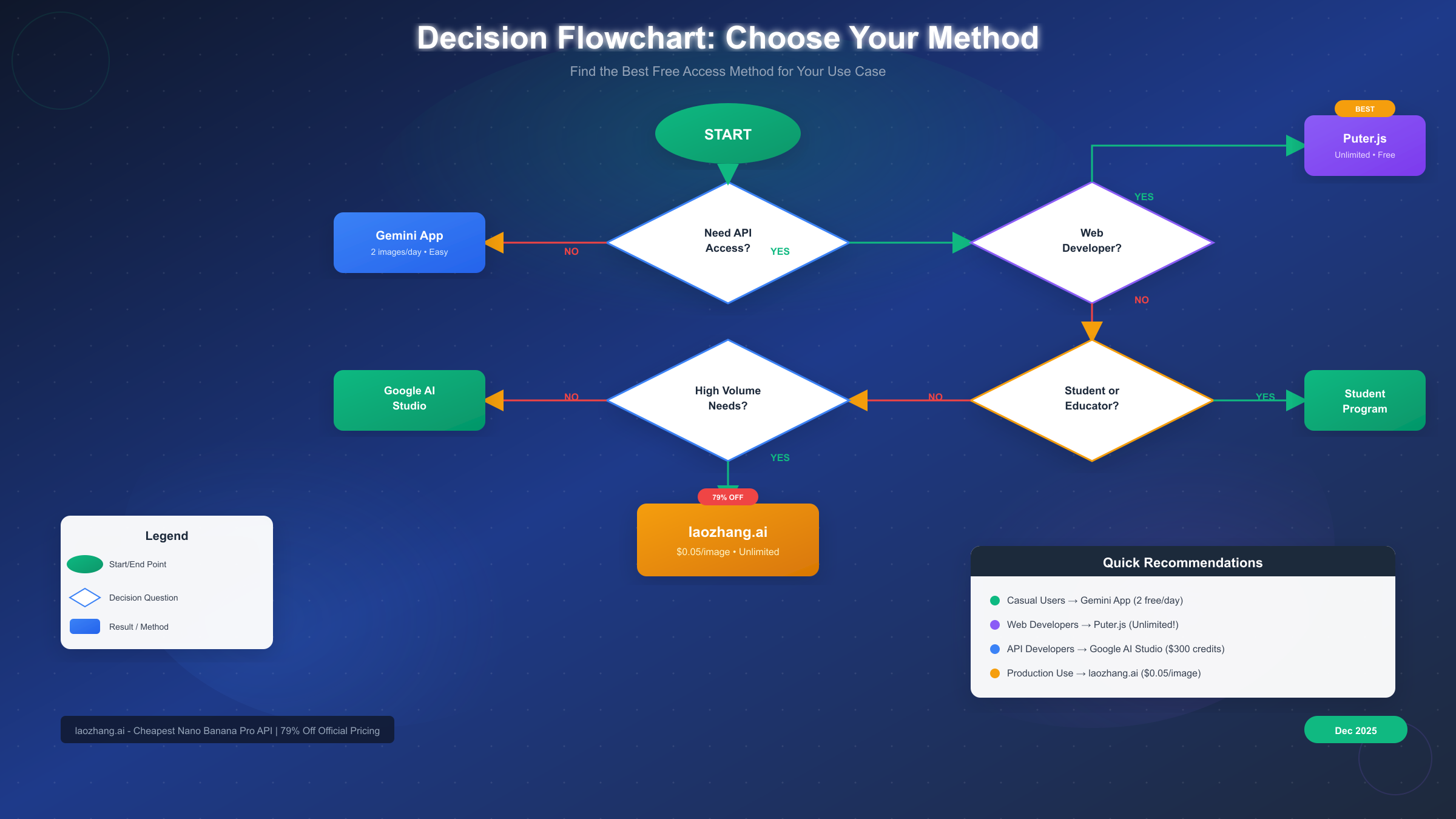
Consider your volume needs, technical capabilities, and timeline. Casual exploration: Gemini App. Development work: Google AI Studio. Web applications: Puter.js. Production at scale: cost-optimized API providers. Students: Google Student Program. The flowchart earlier in this article provides visual decision support.
Last verified: December 26, 2025. Methods and quotas may change as Google updates its Gemini platform policies.


