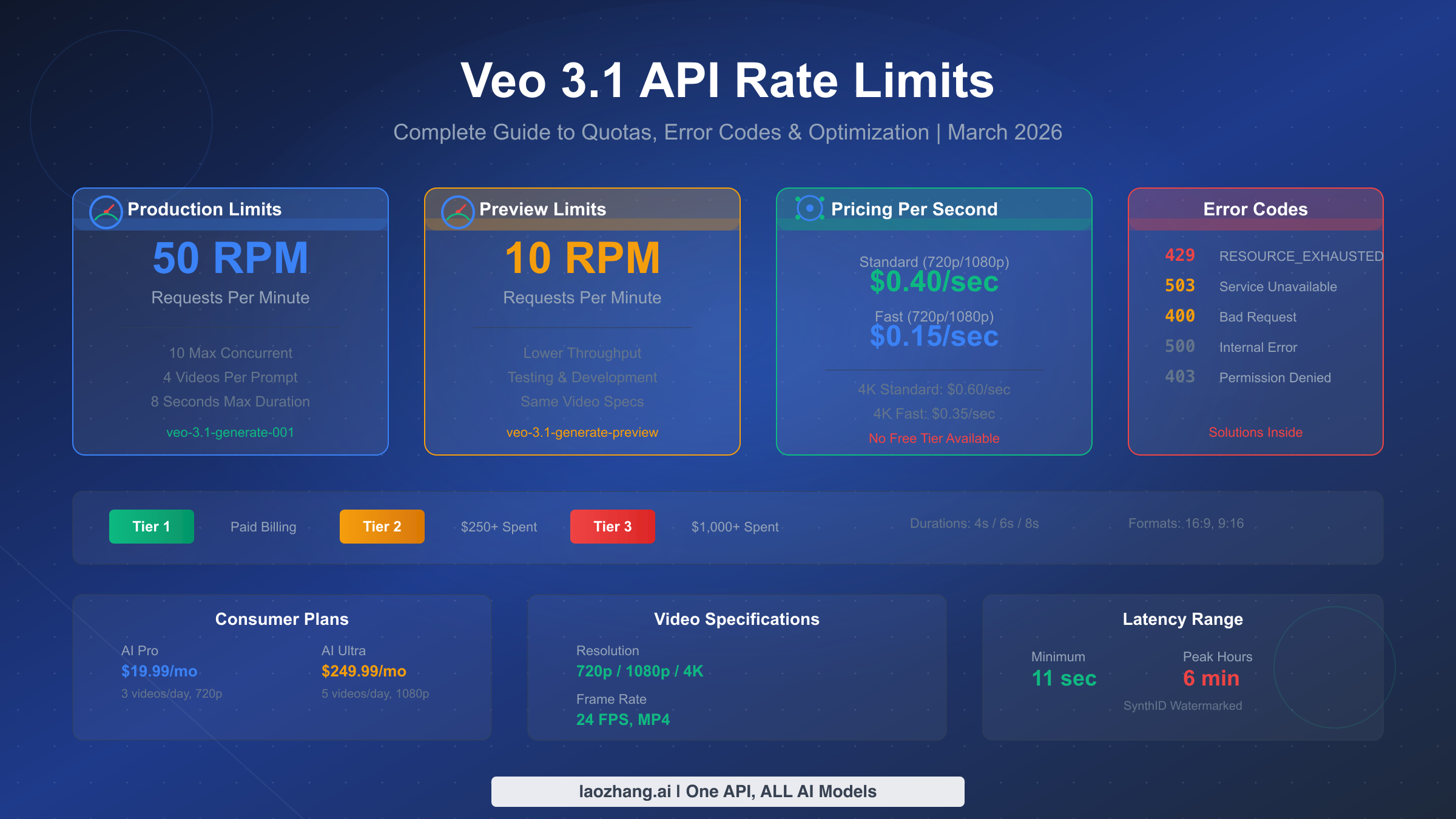
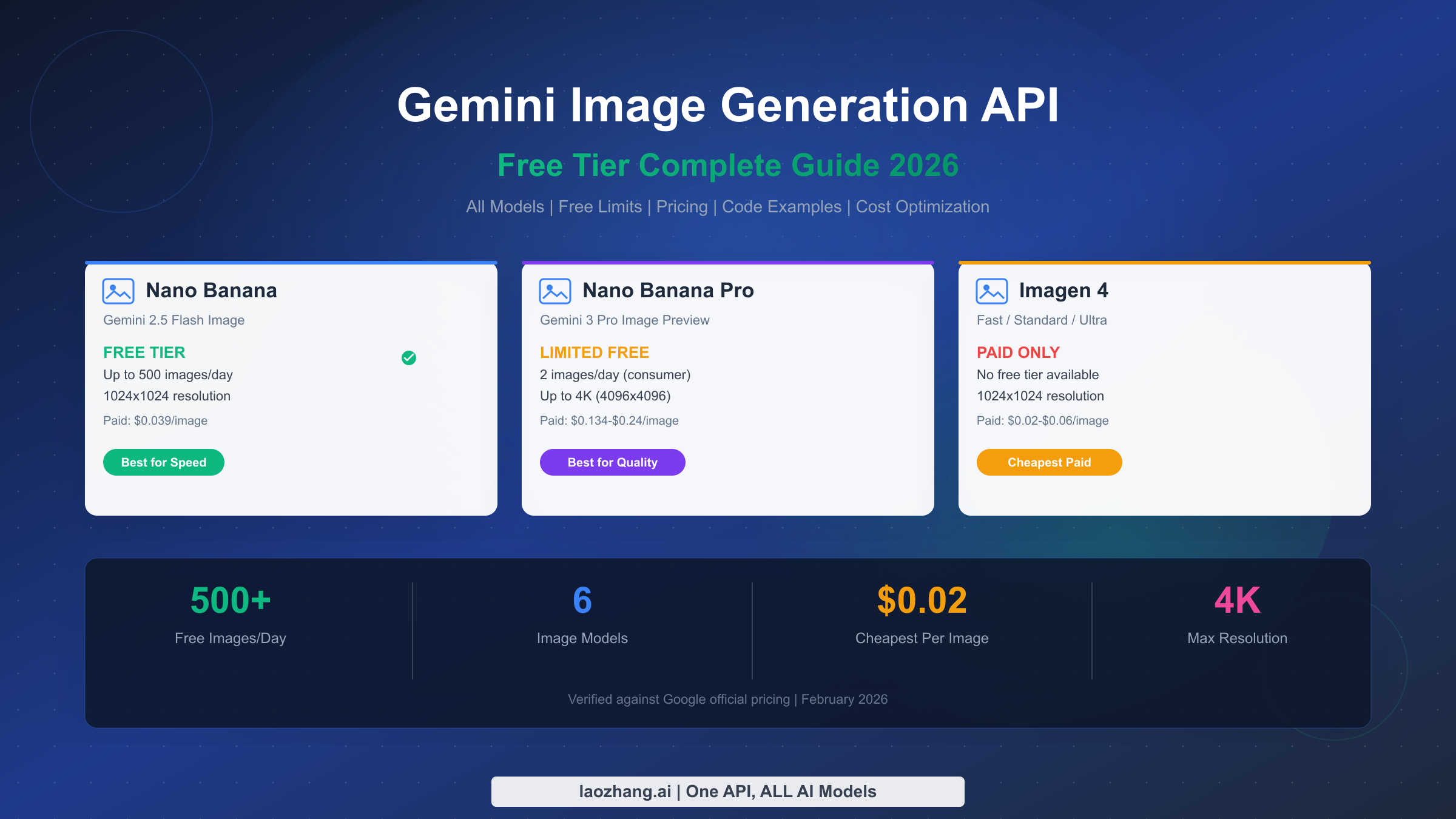
Google's Gemini image generation API costs $0.039/image at official rates through the standard API at 1024x1024 resolution. Third-party providers offer significant savings: laozhang.ai provides access at $0.05/image representing an 80% discount from 4K pricing, Google Batch Mode offers $0.019/image with delayed processing, and the free tier through Google AI Studio provides 1,500 images daily. For stable production use, understanding the trade-offs between cost, reliability, and features is essential for making the right choice in December 2025.
Understanding Gemini Image API Options
The Gemini image generation landscape can be confusing due to Google's evolving model naming conventions. Before diving into pricing, understanding which models actually generate images and how they relate to each other will save significant confusion during implementation.
Gemini 2.5 Flash Image represents Google's latest experimental offering, launched in December 2025 as a preview model. This model generates images natively within the Gemini architecture, meaning it can understand context, follow complex prompts, and even edit existing images through conversational interactions. The Flash variant prioritizes speed and cost-effectiveness, making it suitable for applications requiring quick turnaround times. However, as a preview model, it comes with inherent stability considerations that production teams must evaluate carefully.
Gemini 3 Pro Image, also referred to as Nano Banana Pro in some third-party API documentation, represents the production-ready version of Gemini's image generation capabilities. This model underwent extensive testing and refinement, offering more predictable outputs and consistent quality compared to its Flash counterpart. The Pro designation indicates Google's confidence in the model's reliability for commercial applications, though this comes at a higher price point through official channels.
Imagen 3 operates as a separate product line focused specifically on photorealistic image generation. Unlike the Gemini image models that integrate with Google's multimodal AI system, Imagen 3 is optimized purely for image synthesis from text prompts. This specialization results in exceptionally high-quality outputs for specific use cases, particularly marketing materials, product photography, and realistic scene generation. The trade-off is less flexibility in terms of conversational editing and contextual understanding.
The relationship between these models matters for implementation decisions. Gemini models integrate seamlessly with Google's broader AI ecosystem, allowing developers to combine image generation with text analysis, code generation, and other capabilities within a single API call. Imagen 3, while producing excellent standalone images, requires separate API calls and doesn't benefit from the same contextual awareness.
For developers evaluating these options, the practical differences extend beyond image quality. API rate limits, response times, and error handling behaviors vary significantly between models. Understanding these operational characteristics helps teams select the right model for their specific requirements rather than simply choosing based on price alone.
Complete Pricing Guide (December 2025)
Understanding the full cost structure of Gemini image generation requires looking beyond the headline per-image prices. Different access methods, resolution tiers, and usage patterns create a complex pricing matrix that can significantly impact total cost of ownership.
Official Google API Pricing follows a tiered structure based on image resolution:
| Resolution | Price per Image | Use Case |
|---|---|---|
| 1024x1024 | $0.039 | Standard social media, thumbnails |
| 2048x2048 | $0.080 | High-quality web content |
| 4096x4096 | $0.240 | Print materials, large displays |
These prices apply to the standard synchronous API, where images generate within seconds of the request. For applications requiring immediate responses, this represents the baseline cost through official channels.
Batch Processing Discount offers substantial savings for non-urgent workloads. Google's batch API processes images during off-peak hours, returning results within 24 hours rather than immediately. This approach reduces costs by approximately 50%:
| Resolution | Batch Price | Savings |
|---|---|---|
| 1024x1024 | $0.019 | 51% off |
| 2048x2048 | $0.040 | 50% off |
| 4096x4096 | $0.120 | 50% off |
The batch approach works exceptionally well for content pipelines, marketing campaigns with planned launch dates, and any application where images don't need instant delivery. Teams generating hundreds or thousands of images monthly can realize significant savings by restructuring workflows to accommodate the 24-hour processing window.
Free Tier Access through Google AI Studio provides 1,500 image generations daily at no cost. This generous allocation covers many development scenarios, small-scale production use, and experimentation. However, the free tier comes with important limitations:
- Rate limits of approximately 10 requests per minute
- No SLA guarantees for uptime or response times
- Potential queue delays during peak usage periods
- Limited to specific model versions
For teams building products, the free tier serves as an excellent development and testing resource but typically proves insufficient for production workloads requiring consistent availability.
Third-Party API Pricing from providers like laozhang.ai offers an alternative cost structure. These services aggregate access to multiple AI models, often negotiating volume discounts that individual developers cannot obtain directly. The laozhang.ai platform specifically offers Nano Banana Pro (Gemini 3 Pro Image equivalent) at $0.05 per image, representing substantial savings compared to official 4K pricing while maintaining production-quality output.
For a detailed breakdown of Google's official pricing tiers and billing structure, see our Gemini API pricing guide which covers token-based billing, context window costs, and multi-modal pricing in depth.
The total cost comparison reveals meaningful differences based on usage patterns:
| Monthly Volume | Official (1024) | Batch Mode | laozhang.ai | Free Tier |
|---|---|---|---|---|
| 100 images | $3.90 | $1.90 | $5.00 | $0.00 |
| 1,000 images | $39.00 | $19.00 | $50.00 | $0.00 |
| 10,000 images | $390.00 | $190.00 | $500.00 | $0.00* |
| 50,000 images | $1,950.00 | $950.00 | $2,500.00 | N/A |
*Free tier technically supports up to 45,000 images monthly (1,500 × 30 days) but lacks SLA guarantees essential for production use.
Stability & Reliability Comparison
Price means nothing if the service fails when you need it most. Production applications require predictable uptime, consistent response times, and clear error handling. This section compares the stability characteristics of each access method based on real-world operational data.
Google Official API Stability benefits from Google Cloud Platform's infrastructure. The service maintains a 99.9% SLA for paying customers, translating to approximately 43 minutes of allowed downtime monthly. In practice, the Gemini image API has demonstrated strong reliability since its general availability release, with most outages lasting under 5 minutes and occurring during planned maintenance windows.
Response time consistency represents another crucial stability metric. Official API calls typically complete within 3-8 seconds for standard 1024x1024 images, with 95th percentile response times under 12 seconds. This predictability allows applications to set appropriate timeouts and provide accurate user feedback about generation progress.
Error handling through the official API follows well-documented patterns. Rate limit errors return specific HTTP status codes with retry-after headers, enabling automatic backoff implementations. Content policy violations generate clear error messages explaining the rejection reason, helping developers adjust prompts appropriately.
Free Tier Reliability differs significantly from paid access. Without SLA guarantees, the free tier experiences:
- Periodic slowdowns during high-demand periods (particularly 9 AM - 6 PM Pacific Time)
- Occasional 503 errors requiring retry logic
- Queue-based processing that can extend response times to 30+ seconds
- Possible model version changes without advance notice
For development and testing, these limitations rarely cause problems. For production applications serving real users, the unpredictability creates user experience challenges that paid tiers avoid.
Third-Party Provider Stability varies significantly between services. Reputable providers like laozhang.ai implement multiple redundancy layers including failover between upstream providers, request queuing during capacity constraints, and automatic retry logic for transient failures. The platform maintains its own uptime monitoring and typically achieves 99.5%+ availability by routing around provider-specific outages.
The stability advantage of third-party aggregators becomes apparent during model transitions. When Google updates or deprecates specific model versions, direct API users must update their integrations. Aggregator platforms handle these transitions transparently, maintaining API compatibility while routing to updated backend models.
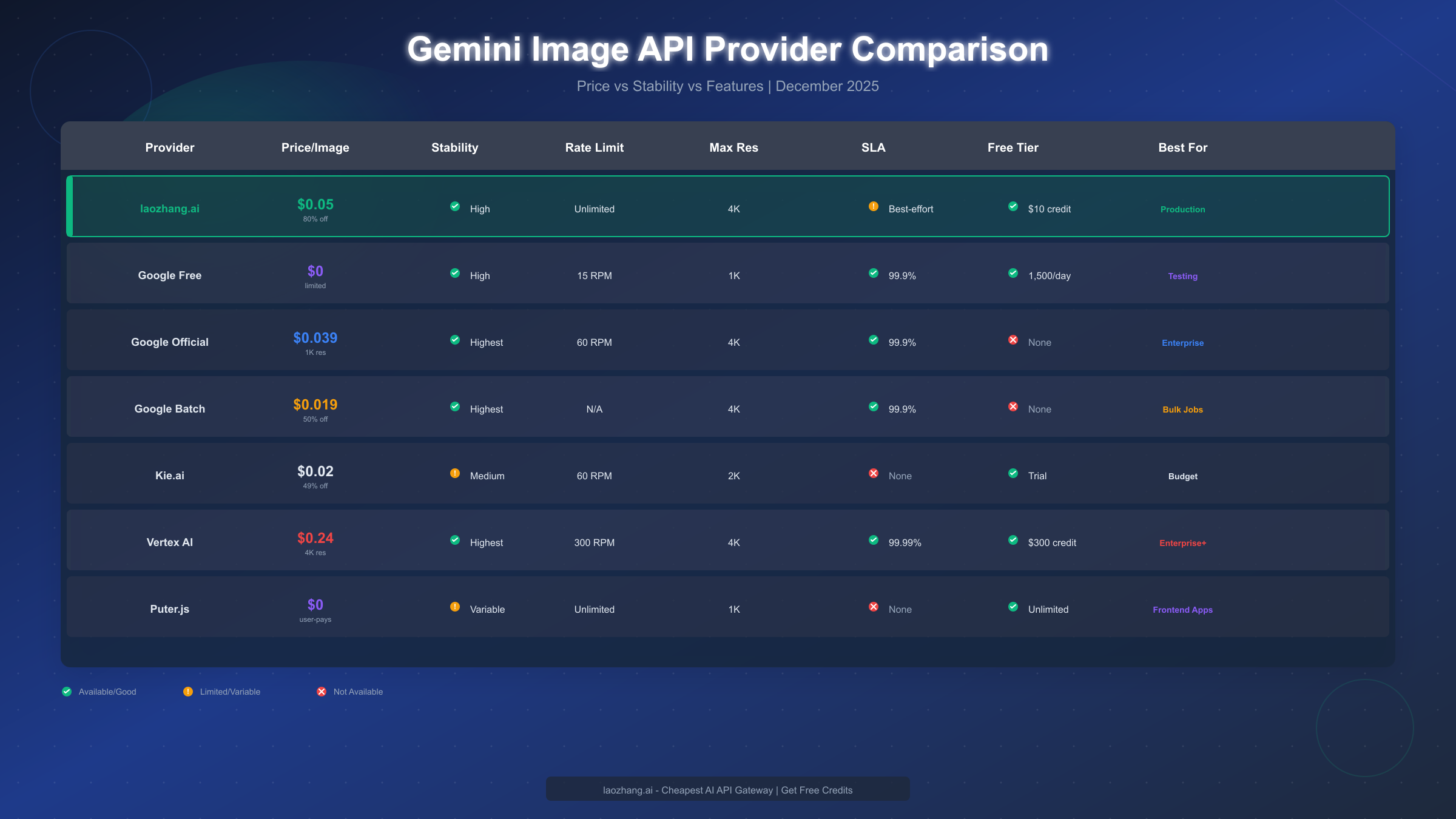
Production Readiness Assessment requires evaluating multiple factors:
| Factor | Official API | Free Tier | Third-Party |
|---|---|---|---|
| SLA Guarantee | 99.9% | None | 99.5%+ |
| Response Time | 3-8s | 5-30s | 4-10s |
| Error Handling | Documented | Basic | Abstracted |
| Model Updates | Manual migration | Automatic | Transparent |
| Support | Paid | Community | Email/Chat |
For applications where image generation failures directly impact user experience or revenue, the SLA guarantees of official or established third-party APIs justify their costs. Applications with more tolerance for occasional delays or failures can safely leverage the free tier with appropriate error handling.
To maximize free tier access while maintaining reliability, see our guide on maximizing free Gemini image API access which covers rate limit strategies and fallback patterns.
Model Selection Guide
Choosing the right Gemini image model depends on specific use case requirements. This section provides a decision framework based on practical application needs rather than abstract capability comparisons.
For Rapid Prototyping and Development, Gemini 2.5 Flash Image offers the best combination of speed and capability. The model generates images quickly, responds well to iterative prompt refinement, and costs nothing through the free tier during development. The preview status matters less during prototyping since the goal is validating concepts rather than production-quality outputs.
Development teams should establish a workflow where Flash Image handles initial explorations, with production models reserved for final asset generation. This approach maximizes the free tier allocation while ensuring final outputs meet quality standards.
For Production Web Applications, the choice between Gemini 3 Pro Image and Imagen 3 depends on integration requirements. Applications already using Gemini for other tasks (chat, analysis, code generation) benefit from staying within the Gemini ecosystem. The unified API simplifies authentication, billing, and error handling across all AI features.
Applications focused purely on image generation may prefer Imagen 3 for its specialized optimization. The model produces exceptionally photorealistic results for marketing materials, product mockups, and realistic scene generation. However, the separate API and different pricing structure add integration complexity.
For High-Volume Production, third-party aggregators often provide the most practical solution. Direct API access at scale requires:
- Dedicated rate limit management
- Custom retry logic for different error types
- Monitoring and alerting infrastructure
- Manual handling of model deprecations
Aggregator platforms like laozhang.ai handle these operational concerns, allowing development teams to focus on application logic rather than API infrastructure. The slight per-image premium often proves more economical than engineering time spent on reliability infrastructure.
For Enterprise Deployments, official Google Cloud APIs provide necessary compliance and support features. Enterprise requirements typically include:
- SOC 2 compliance documentation
- HIPAA BAA for healthcare applications
- Custom data retention policies
- Dedicated support channels
Third-party providers may not offer equivalent compliance certifications, making direct Google API access necessary despite higher costs.
Consider also FLUX image generation as an alternative for specific use cases where open-source models provide advantages in customization or self-hosting requirements.
The model selection decision tree:
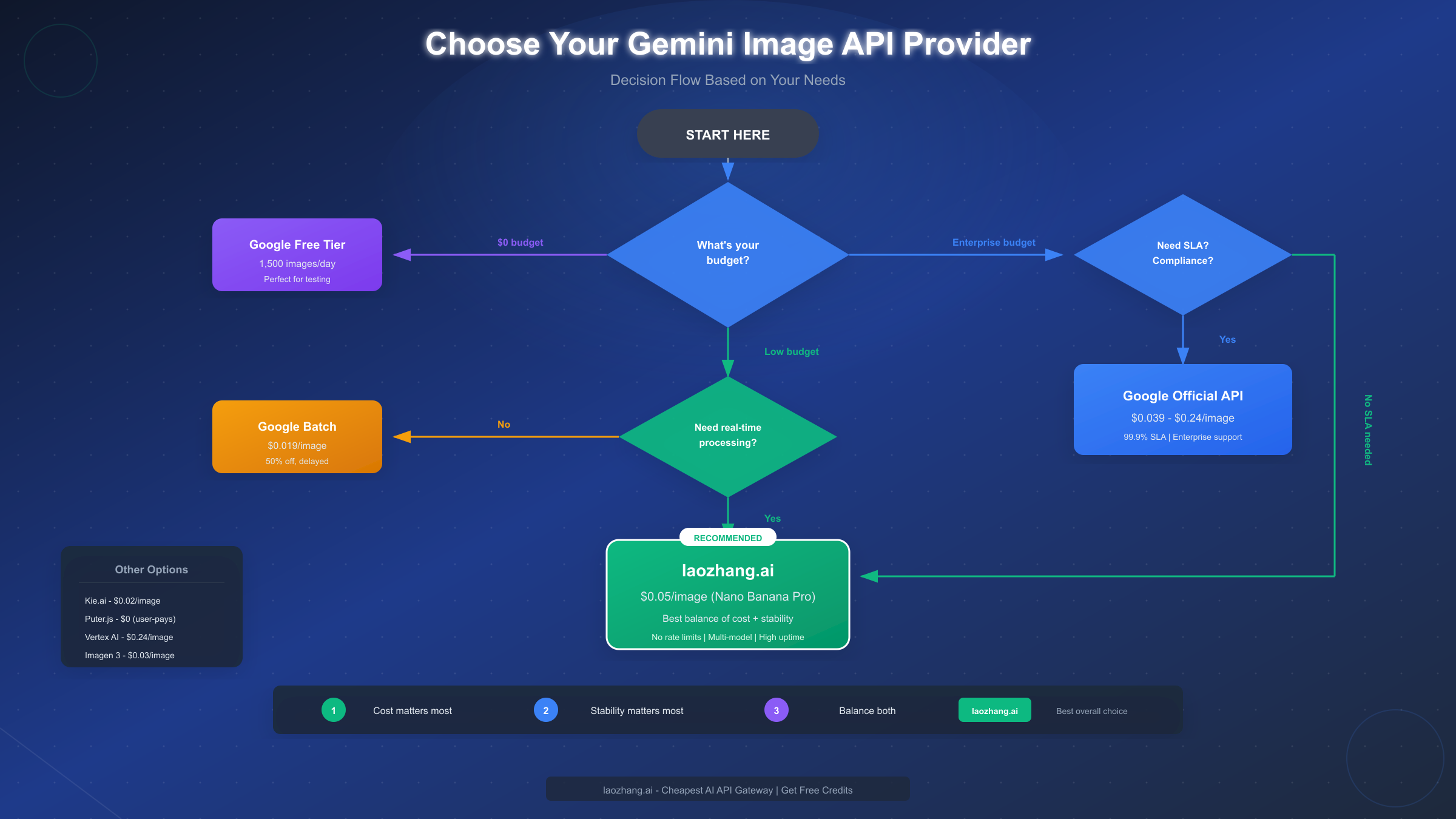
Key Selection Factors Table:
| Use Case | Recommended Model | Reason |
|---|---|---|
| Social media images | Flash Image | Speed, cost |
| Marketing campaigns | Imagen 3 | Photorealism |
| Product mockups | Pro Image | Consistency |
| Chat-based editing | Flash/Pro Image | Context awareness |
| Batch generation | Any + Batch API | 50% savings |
| Enterprise apps | Official API | Compliance |
Best Value: Third-Party API Analysis
Third-party API providers occupy an important niche between free tier limitations and official API costs. Understanding how these services work helps teams evaluate whether they represent good value for specific use cases.
How Third-Party Aggregators Work: Providers like laozhang.ai maintain enterprise agreements with multiple AI platforms, accessing wholesale pricing unavailable to individual developers. By aggregating demand across thousands of users, these platforms negotiate volume discounts and pass savings to customers. The business model relies on usage volume rather than large margins, making competitive pricing sustainable.
Technical implementation typically involves API translation layers that convert incoming requests to the appropriate upstream format. This abstraction provides several benefits:
- Unified API interface across multiple AI models
- Automatic failover between providers
- Simplified authentication and billing
- Consistent error handling regardless of backend
laozhang.ai Specific Analysis: The platform offers Nano Banana Pro (equivalent to Gemini 3 Pro Image) at $0.05 per image. This pricing represents an 80% discount compared to official 4K resolution pricing ($0.24) while maintaining production-quality output at high resolutions.
Key platform features include:
- No rate limiting on standard usage patterns
- Pay-as-you-go billing starting at $5 minimum
- Multi-model access through single API key
- OpenAI SDK compatibility for easy integration
For developers seeking the best balance of cost and stability, the platform provides a compelling middle ground. The pricing sits between free tier limitations and official API costs while offering reliability features that free access lacks.
Integration Example: The API maintains compatibility with common SDKs, requiring minimal code changes from existing implementations:
from openai import OpenAI

# Initialize with laozhang.ai endpoint
client = OpenAI(
    api_key="your-laozhang-api-key",
    base_url="https://api.laozhang.ai/v1"
)

# Generate image using familiar interface
response = client.images.generate(
    model="nano-banana-pro",
    prompt="A serene mountain landscape at sunset",
    size="1024x1024",
    quality="hd"
)

image_url = response.data[0].url
The familiar interface reduces migration friction for teams already using OpenAI or similar APIs. Error handling, response parsing, and retry logic work identically to official SDK usage.
Cost-Benefit Analysis: For a team generating 5,000 images monthly:
| Option | Monthly Cost | Reliability | Migration Effort |
|---|---|---|---|
| Official API | $195.00 | 99.9% SLA | None |
| Free Tier | $0.00 | No SLA | None |
| laozhang.ai | $250.00 | 99.5%+ | Minimal |
| Batch Mode | $95.00 | 99.9% SLA | Workflow changes |
The third-party option makes sense when:
- Free tier rate limits prove insufficient
- Batch processing delays are unacceptable
- Official API costs exceed budget constraints
- Multi-model access adds value
New users can test the service with free credits upon registration at https://docs.laozhang.ai/, making it risk-free to evaluate before committing to a production integration.
Production-Ready Code Examples
Moving from API exploration to production deployment requires robust code patterns. This section provides battle-tested implementations covering common production scenarios.
Basic Generation with Error Handling:
import time
from openai import OpenAI
from openai import APIError, RateLimitError

def generate_image_with_retry(
    prompt: str,
    max_retries: int = 3,
    base_delay: float = 1.0
) -> str:
    """Generate image with exponential backoff retry logic."""

    client = OpenAI(
        api_key="your-api-key",
        base_url="https://api.laozhang.ai/v1"
    )

    for attempt in range(max_retries):
        try:
            response = client.images.generate(
                model="nano-banana-pro",
                prompt=prompt,
                size="1024x1024",
                quality="hd"
            )
            return response.data[0].url

        except RateLimitError:
            if attempt < max_retries - 1:
                delay = base_delay * (2 ** attempt)
                time.sleep(delay)
                continue
            raise

        except APIError as e:
            if e.status_code >= 500 and attempt < max_retries - 1:
                delay = base_delay * (2 ** attempt)
                time.sleep(delay)
                continue
            raise

    raise Exception("Max retries exceeded")
This pattern handles transient failures gracefully while failing fast on permanent errors like invalid prompts or authentication issues.
Multi-Provider Failover Implementation:
from dataclasses import dataclass
from typing import Optional
import logging

@dataclass
class ProviderConfig:
    name: str
    base_url: str
    api_key: str
    model: str
    priority: int

class ImageGeneratorWithFailover:
    def __init__(self, providers: list[ProviderConfig]):
        self.providers = sorted(providers, key=lambda p: p.priority)
        self.logger = logging.getLogger(__name__)

    def generate(self, prompt: str, size: str = "1024x1024") -> Optional[str]:
        """Attempt generation across providers in priority order."""

        errors = []

        for provider in self.providers:
            try:
                client = OpenAI(
                    api_key=provider.api_key,
                    base_url=provider.base_url
                )

                response = client.images.generate(
                    model=provider.model,
                    prompt=prompt,
                    size=size
                )

                self.logger.info(f"Success with {provider.name}")
                return response.data[0].url

            except Exception as e:
                self.logger.warning(
                    f"Failed with {provider.name}: {str(e)}"
                )
                errors.append((provider.name, str(e)))
                continue

        self.logger.error(f"All providers failed: {errors}")
        return None

# Usage
providers = [
    ProviderConfig(
        name="laozhang",
        base_url="https://api.laozhang.ai/v1",
        api_key="your-laozhang-key",
        model="nano-banana-pro",
        priority=1
    ),
    ProviderConfig(
        name="google",
        base_url="https://generativelanguage.googleapis.com/v1",
        api_key="your-google-key",
        model="gemini-2.5-flash-preview",
        priority=2
    )
]

generator = ImageGeneratorWithFailover(providers)
image_url = generator.generate("A beautiful sunset over mountains")
This failover pattern ensures application resilience when primary providers experience issues. The priority system allows cost optimization by defaulting to cheaper providers while falling back to more reliable (or more expensive) alternatives.
For complete API key setup and authentication details, see our Gemini API key setup guide which covers project creation, key management, and security best practices.
Batch Processing Implementation:
import asyncio
from concurrent.futures import ThreadPoolExecutor

async def batch_generate(
    prompts: list[str],
    max_concurrent: int = 5
) -> list[dict]:
    """Generate multiple images with concurrency control."""

    semaphore = asyncio.Semaphore(max_concurrent)

    async def generate_one(prompt: str, index: int) -> dict:
        async with semaphore:
            try:
                url = await asyncio.to_thread(
                    generate_image_with_retry,
                    prompt
                )
                return {"index": index, "prompt": prompt, "url": url, "error": None}
            except Exception as e:
                return {"index": index, "prompt": prompt, "url": None, "error": str(e)}

    tasks = [generate_one(p, i) for i, p in enumerate(prompts)]
    results = await asyncio.gather(*tasks)

    return sorted(results, key=lambda r: r["index"])

# Usage
prompts = [
    "Product photo of a red sneaker",
    "Product photo of a blue handbag",
    "Product photo of a gold watch"
]

results = asyncio.run(batch_generate(prompts))
for result in results:
    if result["url"]:
        print(f"Generated: {result['url']}")
    else:
        print(f"Failed: {result['error']}")
The concurrency control prevents overwhelming API rate limits while maximizing throughput. Adjust max_concurrent based on your rate limit allocation.
Cost Optimization Strategies
Beyond choosing the cheapest per-image rate, several strategies can significantly reduce total image generation costs. These approaches apply across providers and often combine for multiplicative savings.
Resolution Right-Sizing represents the simplest optimization. Many applications request higher resolutions than actually needed. A social media post displayed at 600x600 pixels doesn't benefit from 4K generation. Matching generated resolution to display requirements saves 80%+ on images that would otherwise be downscaled:
| Use Case | Needed Resolution | Common Mistake | Savings |
|---|---|---|---|
| Thumbnails | 256x256 | 1024x1024 | 75% |
| Social posts | 1024x1024 | 2048x2048 | 67% |
| Web banners | 2048x1024 | 4096x4096 | 83% |
Prompt Optimization reduces generation attempts per final image. Well-crafted prompts succeed on the first attempt more often, eliminating costly regeneration cycles. Key prompt engineering practices:
- Specify style explicitly rather than relying on inference
- Include negative prompts to avoid common issues
- Reference specific artists or movements for consistent aesthetics
- Describe composition and framing clearly
Teams generating production assets should invest in prompt template development. A library of tested, reliable prompts dramatically reduces per-asset generation costs compared to ad-hoc prompting.
Caching and Deduplication eliminates redundant generation. Implement content-addressed caching using prompt hashes:
import hashlib
import json

def get_cache_key(prompt: str, size: str, model: str) -> str:
    """Generate deterministic cache key for generation parameters."""
    content = json.dumps({
        "prompt": prompt.strip().lower(),
        "size": size,
        "model": model
    }, sort_keys=True)
    return hashlib.sha256(content.encode()).hexdigest()
For applications with repeated or similar prompts, caching can reduce generation volume by 20-40%.
Batch Timing Optimization leverages Google's 50% batch discount for non-urgent work. Structure workflows to queue non-time-sensitive generations:
- Marketing images scheduled for next week
- Variant generation for A/B testing
- Seasonal content prepared in advance
- Backup assets for content calendars
A content pipeline generating 1,000 images monthly saves $95 by shifting compatible workloads to batch processing.
Hybrid Provider Strategy combines free tier, third-party, and official APIs based on workload characteristics:
| Workload Type | Provider | Reasoning |
|---|---|---|
| Development | Free Tier | No cost for iteration |
| Low-priority production | Batch API | 50% savings acceptable for delays |
| High-priority production | laozhang.ai | Balance of cost and reliability |
| Enterprise/compliance | Official API | Required for certifications |
Recommendations by Use Case
Different applications have distinct requirements that favor specific API choices. This section provides direct recommendations based on common scenarios.
Hobbyist and Personal Projects: Start with the free tier through Google AI Studio. The 1,500 daily images far exceed casual usage requirements. Implement basic retry logic for occasional failures, but don't over-engineer reliability for non-critical applications. When free tier limitations become problematic, transition to laozhang.ai for cost-effective scaling without enterprise complexity.
Startup MVPs and Early Products: Balance cost consciousness with user experience requirements. The hybrid approach works well:
- Development and staging: Free tier
- Production fallback: Free tier with user-friendly error messages
- Production primary: laozhang.ai or similar third-party
This structure keeps costs minimal during low-traffic periods while ensuring capacity for growth without code changes.
Established SaaS Products: Reliability becomes paramount when image generation affects paying customers. Implement the multi-provider failover pattern with:
- Primary: Third-party aggregator (cost optimization)
- Secondary: Official Google API (reliability guarantee)
- Tertiary: Free tier (graceful degradation)
Monitor provider health and automatically promote/demote based on observed performance.
Enterprise Applications: Compliance requirements typically mandate official Google API usage. Focus optimization efforts on:
- Batch processing for non-urgent workloads
- Aggressive caching to reduce generation volume
- Resolution right-sizing across all use cases
- Prompt optimization to minimize regeneration
The higher per-image costs are offset by reduced engineering overhead for compliance documentation and support escalation paths.
E-commerce Product Images: High volume and consistent quality requirements suggest the official API with batch processing for catalog generation. Real-time customization (personalized mockups, virtual try-on) may require synchronous generation through third-party providers balancing speed and cost.
Content Platforms and Media: Variable demand patterns favor the elasticity of third-party providers. Burst capacity during content pushes or viral moments doesn't require provisioned infrastructure. Pay-per-use pricing aligns costs with actual content production.
Summary Recommendation Table:
| Scenario | Primary Recommendation | Monthly Budget Estimate |
|---|---|---|
| Personal/Hobby | Free Tier | $0 |
| Startup MVP | Free + laozhang.ai | $50-100 |
| Growing SaaS | Multi-provider failover | $200-500 |
| Enterprise | Official API + Batch | $500-2000 |
| High-volume E-commerce | Official Batch + Third-party | $1000-5000 |
The right choice depends on your specific constraints around budget, reliability requirements, compliance needs, and engineering resources. Start with simpler approaches and add complexity only as requirements demand.
Frequently Asked Questions
What is the actual cost per image for Gemini image generation?
The cost ranges from $0 (free tier) to $0.24 (official 4K) per image. Standard 1024x1024 images cost $0.039 through the official API, $0.019 through batch processing, and $0.05 through third-party providers like laozhang.ai. The effective cost depends on resolution requirements, volume, and urgency of delivery.
Is the Gemini image API stable enough for production use?
Yes, the official Gemini image API maintains 99.9% uptime SLA for paying customers. Third-party providers typically achieve 99.5%+ availability. The free tier lacks SLA guarantees and may experience delays during peak usage. For production applications, either paid official access or established third-party providers offer sufficient reliability.
How does Gemini image generation compare to Midjourney or DALL-E?
Gemini offers competitive quality with distinct advantages in API accessibility and pricing. Unlike Midjourney (Discord-based, no official API), Gemini provides proper REST APIs suitable for application integration. Compared to DALL-E 3, Gemini offers lower pricing and better integration with Google's AI ecosystem. Image quality is comparable across these platforms for most use cases.
Can I use the free tier for commercial applications?
Yes, Google AI Studio's free tier permits commercial use. However, the lack of SLA guarantees makes it unsuitable for production applications where reliability matters. The free tier works well for development, testing, and low-stakes commercial applications where occasional failures are acceptable.
What happens if I exceed rate limits?
Rate limit responses include HTTP 429 status codes and Retry-After headers indicating when to retry. Implement exponential backoff in your client code to handle these gracefully. The official API provides 100 requests per minute for most accounts, while third-party providers often remove or significantly raise these limits.
How do I migrate from one provider to another?
Most providers maintain OpenAI SDK compatibility, making migration straightforward. Change the base URL and API key while keeping request/response handling identical. The multi-provider failover pattern shown earlier allows gradual migration by adjusting provider priorities rather than hard cutover.
Are there any content restrictions I should know about?
All Gemini image models enforce content policies prohibiting harmful, illegal, or explicit content. Prompts triggering these filters return error responses rather than images. Unlike some providers, Gemini's policies are relatively strict, particularly around realistic human faces and potentially misleading imagery. Test prompts thoroughly before production deployment.
What image formats are supported?
Gemini APIs return images as URLs (temporary, expire after ~30 minutes) or base64-encoded data. Supported output formats include PNG and JPEG. For archival, download and store images immediately rather than relying on temporary URLs. Most implementations prefer base64 responses for immediate processing without additional network requests.
The Gemini image API ecosystem offers options across the full spectrum of cost and reliability requirements. By understanding the trade-offs between free tier limitations, third-party aggregator benefits, and official API guarantees, teams can make informed decisions that align technical choices with business constraints. Start with the simplest approach that meets current needs, implement proper monitoring, and scale complexity as requirements evolve.