AIFreeAPI Logo

Nano Banana Pro Free Credits Guide: 7 Working Methods to Save 80% in 2025

A
22 min readAI Image Generation

Discover 7 proven methods to access Nano Banana Pro free credits in 2025. From Google Cloud's $300 free credits to third-party APIs at $0.05 per image, this guide covers every option to save up to 80% on AI image generation.

Nano Banana Pro

4K Image80% OFF

Google Gemini 3 Pro Image · AI Image Generation

Served 100K+ developers
$0.24/img
$0.05/img
Limited Offer·Enterprise Stable·Alipay/WeChat
Gemini 3
Native model
Direct Access
20ms latency
4K Ultra HD
2048px
30s Generate
Ultra fast
|@laozhang_cn|Get $0.05
Nano Banana Pro Free Credits Guide: 7 Working Methods to Save 80% in 2025

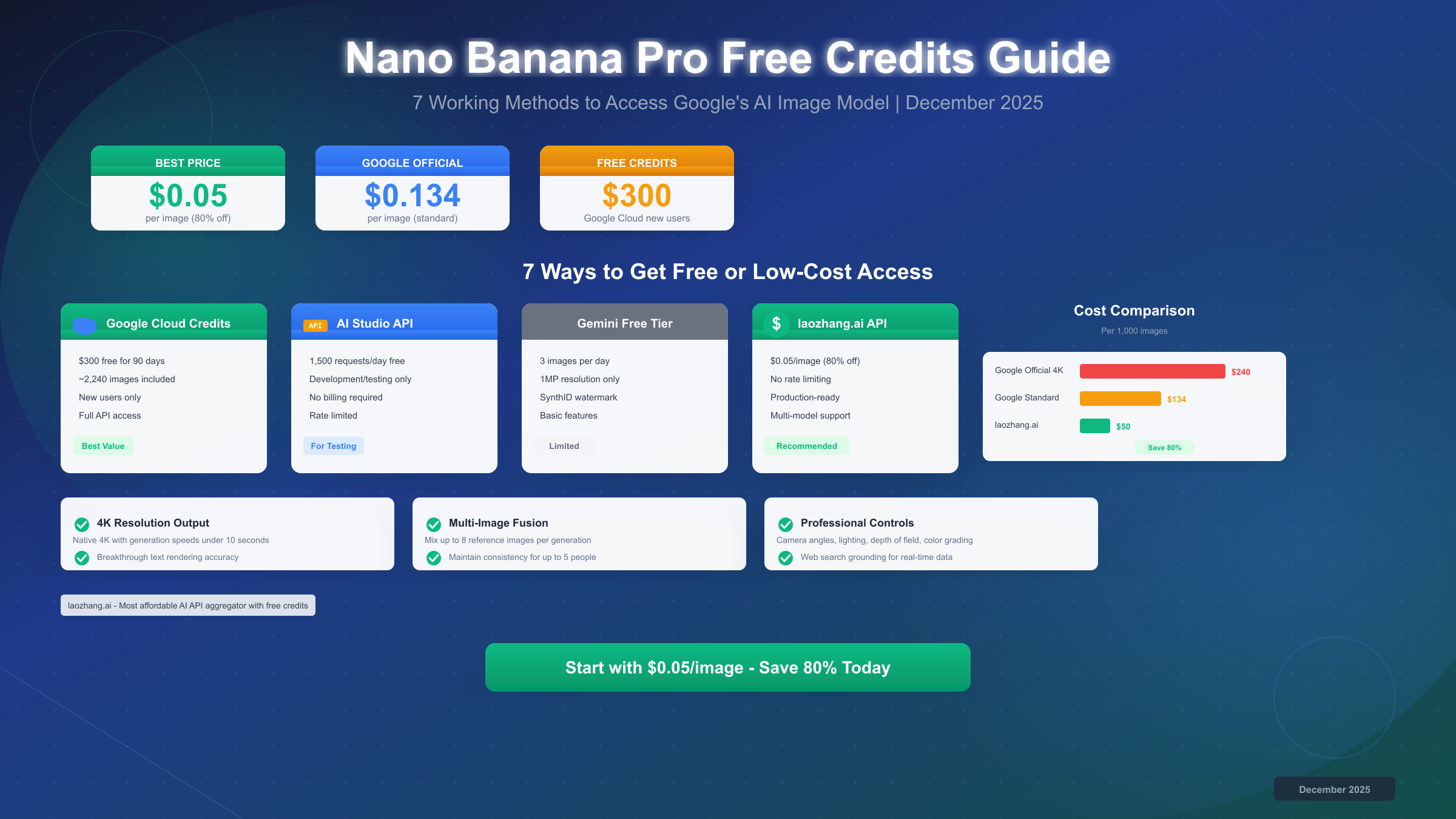
Nano Banana Pro offers several free and low-cost access options in December 2025. Google Cloud provides $300 in free credits for new users—enough for approximately 2,240 standard-resolution images—while Google AI Studio allows 1,500 daily API requests for development and testing at no cost. The Gemini app free tier includes 3 images daily at reduced resolution. For production use, third-party API providers offer Nano Banana Pro access at $0.05 per image, representing approximately 80% savings compared to Google's official $0.134-$0.24 per image pricing.

What is Nano Banana Pro and Why Does Everyone Want Free Credits?

Google DeepMind released Nano Banana Pro in late 2025 as part of the Gemini 3 Pro family, and it immediately became the most sought-after AI image generation model on the market. Unlike its predecessor—the original Nano Banana built on Gemini 2.5 Flash—this new model delivers native 4K resolution output with generation speeds under 10 seconds, a combination that previously seemed impossible without significant quality trade-offs.

The model's core architecture, called GemPix 2, represents a fundamental shift in how AI image generators work. Rather than simply matching pixels to keywords like traditional diffusion models, GemPix 2 functions more like a digital art director. It analyzes prompts for semantic logic, physical causality, and emotional intent before beginning the rendering process. This means you can describe a scene in natural language and receive results that understand context, lighting physics, and compositional principles without requiring technical prompt engineering.

Text rendering accuracy stands out as perhaps the most impressive technical achievement. Previous AI image generators struggled with legible text, often producing garbled or distorted characters. Nano Banana Pro achieves approximately 94% text accuracy according to independent testing, making it the first model suitable for generating marketing materials, social media graphics, and infographics with embedded text. The model supports multiple languages including Latin alphabets, Chinese characters, Japanese, Korean, and Arabic scripts.

Multi-image fusion allows creators to upload up to 8 reference images and combine elements from each into a single coherent output. This capability proves particularly valuable for product photography, where you might want to place an item in different environments while maintaining consistent lighting and perspective. The model can also maintain consistency for up to 5 people across multiple generations, solving the persistent "same character, different face" problem that plagued earlier tools.

Professional editing controls rival dedicated photo editing software. Users can adjust camera angles, lighting direction and intensity, depth of field, and color grading through natural language instructions. Want to shift the lighting from harsh midday sun to golden hour? Simply describe it. Need to blur the background more while keeping the subject sharp? The model understands these requests without requiring sliders or technical parameters.

The demand for free credits stems from these capabilities combined with pricing that places Nano Banana Pro firmly in the premium tier. At $0.134 per standard image and up to $0.24 for 4K resolution, costs accumulate quickly for anyone generating more than a handful of images. A marketing team creating 100 social media graphics per month would face bills exceeding $24 before even considering revisions or variations. This pricing reality has driven users to search extensively for free and discounted access methods.

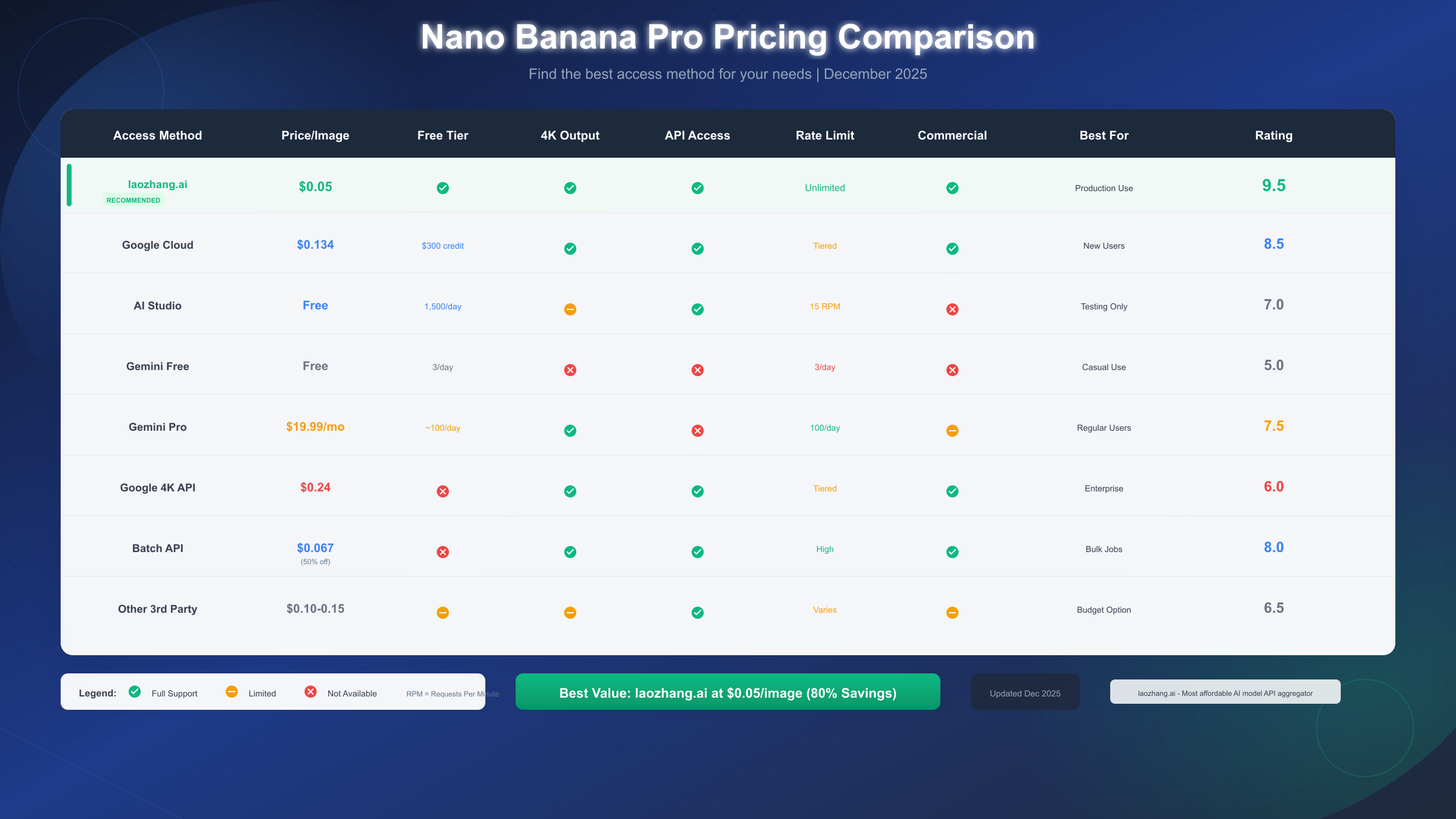
Nano Banana Pro Pricing Comparison

4 Official Free Access Methods from Google

Google provides several legitimate pathways to access Nano Banana Pro without immediate payment, though each comes with specific limitations and ideal use cases. Understanding these options helps you choose the right starting point before committing to paid tiers.

Google Cloud Platform $300 Free Credits

The most generous official option remains Google Cloud Platform's new user promotion, which provides $300 in free credits valid for 90 days after signup. These credits apply to all Google Cloud services including the Gemini API that powers Nano Banana Pro. At the standard rate of $0.134 per image, this translates to approximately 2,240 image generations—enough for extensive experimentation, prototype development, or several months of moderate production use.

Setting up access requires creating a Google Cloud account, enabling billing (though you won't be charged until credits expire or deplete), and generating an API key through the Google AI Studio interface. The process typically takes 10-15 minutes for users already familiar with cloud platforms, or up to 30 minutes for complete beginners. One important consideration: the 90-day expiration clock starts immediately upon account creation, not upon first API call. If you're planning a project that won't begin for several weeks, time your signup accordingly.

The credits provide full API access with no feature restrictions. You receive the same capabilities as paying customers, including 4K resolution output, batch processing, and all professional editing controls. Rate limits for new accounts start at 15 requests per minute, increasing automatically as your usage history builds trust with Google's systems.

Google AI Studio Free Tier

Developers and researchers gain access to 1,500 free API requests daily through Google AI Studio without requiring billing setup. This tier serves primarily as a development and testing environment rather than a production solution, but the generous daily allocation supports substantial prototyping work.

The free tier operates with certain constraints. Image resolution maxes out at 2K rather than 4K, and rate limiting keeps requests to 15 per minute maximum. These limitations rarely impact development workflows but would create bottlenecks for production applications serving multiple users. Additionally, Google explicitly states that free tier usage shouldn't power commercial products or services, though enforcement specifics remain unclear.

Accessing AI Studio requires only a Google account and agreement to the API terms of service. No credit card or billing information is needed, making this the lowest-friction entry point for exploring Nano Banana Pro's capabilities. The interface provides both a visual playground for testing prompts and code generation tools that export working examples in Python, Node.js, and cURL.

Gemini App Free Tier

The Gemini app (available at gemini.google.com) offers the most accessible free access, requiring only a Google account with no developer setup. Users receive 3 free image generations per day at 1MP resolution—enough to test the model's capabilities but insufficient for meaningful production work.

Free tier outputs include visible SynthID watermarks, which digitally encode metadata confirming the image was AI-generated. While technically invisible to the human eye, these watermarks can be detected by specialized tools and may affect commercial usage rights. Paid tiers remove the visible watermark while maintaining the invisible SynthID layer for provenance tracking.

The app interface provides a conversational approach to image generation, allowing you to refine results through follow-up messages rather than rewriting prompts from scratch. This makes it valuable for learning how Nano Banana Pro interprets instructions and developing prompt strategies before moving to API-based workflows.

Student and Educational Access

Educational institutions and verified students may qualify for extended free access through Google's Cloud for Education program. Participants receive varying credit amounts—typically $50-$300 depending on institution tier—along with reduced or waived fees for certain API calls. Student verification requires a valid .edu email address and may involve institutional confirmation for larger credit allocations.

Researchers at accredited institutions can apply for Google's AI Research Credits program, which provides substantial allocations for academic work. Approval typically requires a faculty sponsor and research proposal demonstrating legitimate educational or scientific objectives. These programs target genuine academic use rather than commercial development disguised as research.

Complete Pricing Breakdown: What You'll Actually Pay

Understanding Nano Banana Pro's pricing structure requires looking beyond the headline per-image rates to consider resolution tiers, batch processing discounts, and the practical economics at different usage volumes. The difference between the cheapest and most expensive access methods spans nearly 5x—a significant gap that compounds with every additional image.

Standard API pricing from Google follows a straightforward per-image model with resolution-based tiers. Standard resolution (1024x1024 or 2K) costs $0.134 per image. High resolution (2048x2048) runs $0.20 per image. Full 4K output (4096x4096) reaches $0.24 per image. These rates apply to individual, on-demand API calls processed within seconds.

Batch API processing offers 50% savings for workloads that don't require immediate results. By submitting jobs to the batch endpoint, users accept 24-hour turnaround in exchange for per-image rates dropping to $0.067 for standard resolution and $0.12 for 4K. This approach suits bulk content creation, catalog generation, and other workflows where real-time response isn't critical.

The table below summarizes official Google pricing versus major third-party alternatives:

Access MethodPrice per Image4K SupportRate LimitBest For
Google Standard API$0.134Yes ($0.24)15-60 RPMReal-time apps
Google Batch API$0.067Yes ($0.12)HighBulk processing
Google AI StudioFreeLimited15 RPMDevelopment
Gemini Pro Sub$0.20 effectiveYes100/dayRegular users
laozhang.ai$0.05YesUnlimitedProduction
Other 3rd Party$0.10-0.15VariesVariesBudget option

Subscription plans through Gemini Pro ($19.99/month) and Gemini Ultra ($124.99/month) include daily image quotas—approximately 100 and 1,000 images respectively—but economics only favor subscriptions for very specific usage patterns. At 100 images per month, the Pro subscription costs effectively $0.20 per image, actually higher than standard API rates. Subscriptions make sense primarily for users who also value other Gemini features like extended context windows and priority access.

If you're exploring different AI model pricing structures, the Gemini API pricing guide provides detailed comparisons across the entire Gemini family including text, vision, and multimodal capabilities.

The 80% Savings Secret: Third-Party API Alternatives

Third-party API providers have emerged to address the cost barriers that prevent many developers and businesses from adopting Nano Banana Pro for production workloads. These services typically operate by aggregating demand across many customers, negotiating volume pricing with Google, and passing savings to end users. While they require trusting an intermediary with your API traffic, the cost reductions often prove compelling enough to justify the trade-off.

laozhang.ai stands out as the most cost-effective option currently available, offering Nano Banana Pro access at $0.05 per image—approximately 80% below Google's official 4K pricing. The platform operates as an API aggregator supporting multiple AI models through a unified interface, meaning you can access GPT-4, Claude, Gemini, and various image generators through a single API key and billing account. For teams already using multiple AI services, this consolidation simplifies vendor management and accounting.

The technical implementation mirrors standard REST API patterns. You configure your client with the provider's base URL and your API key, then make requests using the same format as Google's official API. This compatibility means existing code requires minimal modification—often just changing the endpoint URL. The platform handles routing, authentication with upstream providers, and usage tracking transparently.

Unlike some budget providers that compromise on features, established third-party services support full 4K resolution output, batch processing, and all standard Nano Banana Pro capabilities. Rate limiting is effectively unlimited for reasonable usage patterns, making them suitable for production applications that might hit Google's tiered limits. These services also provide guarantees against account bans—a concern some developers have encountered when making large numbers of API calls through Google's direct endpoints.

New users typically receive free credits upon registration, allowing you to test before committing funds. Minimum top-up often starts at $5 (approximately 100 images at standard resolution), making the barrier to entry considerably lower than Google Cloud's credit card requirement. Provider documentation covers setup, authentication, and example implementations across major programming languages.

Risk considerations with third-party providers include dependency on a service that could theoretically shut down, potential latency added by the additional routing hop, and less direct recourse if issues arise. In practice, established providers have operated reliably for years with strong uptime records. The latency impact typically measures in single-digit milliseconds—negligible for most applications. For mission-critical production systems, maintaining a fallback to Google's direct API provides insurance against provider-specific issues.

For developers interested in exploring other image generation options beyond Nano Banana Pro, the free Gemini Flash image API guide covers Google's faster, lower-cost alternative that suits many use cases.

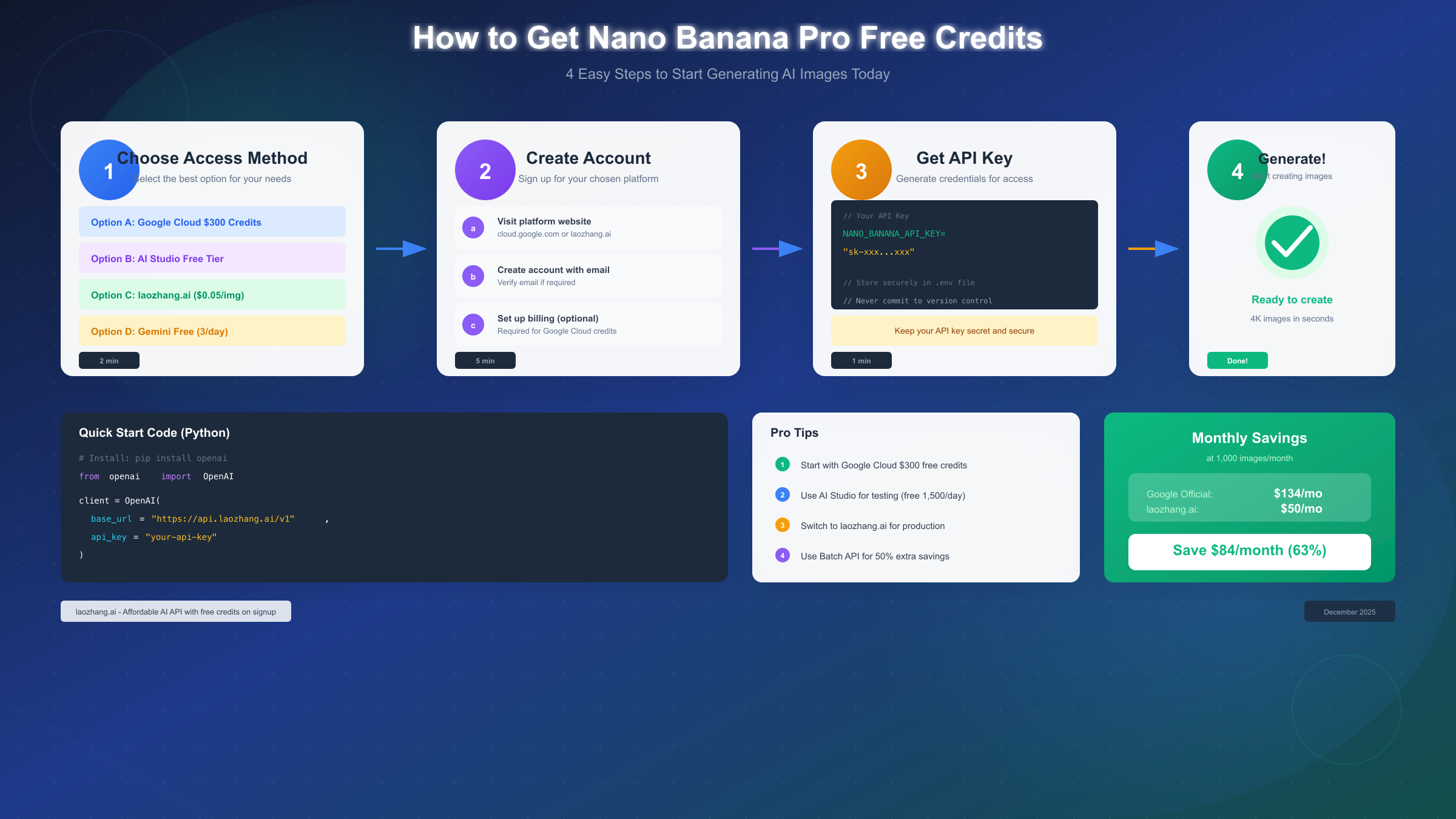
How to Get Nano Banana Pro Access

Developer's Guide: API Integration with Code Examples

Implementing Nano Banana Pro in your applications requires understanding the API structure, authentication flow, and best practices for handling responses. The examples below use Python with the OpenAI client library—a common pattern since many AI APIs, including Google's Gemini, support OpenAI-compatible endpoints.

Setting Up Your Environment

Before writing code, install the required dependencies and configure authentication. The Python OpenAI library works with Nano Banana Pro when pointed at the appropriate endpoint:

bash
pip install openai python-dotenv

Create a .env file to store your credentials securely:

bash
NANO_BANANA_API_KEY=your-api-key-here NANO_BANANA_BASE_URL=https://api.laozhang.ai/v1

Never commit API keys to version control. The dotenv library loads these variables at runtime without exposing them in your codebase.

Basic Image Generation

The fundamental generation pattern follows a request-response model. You provide a text prompt, optional parameters for resolution and style, and receive an image URL in return:

python
from openai import OpenAI from dotenv import load_dotenv import os load_dotenv() client = OpenAI( base_url=os.getenv("NANO_BANANA_BASE_URL"), api_key=os.getenv("NANO_BANANA_API_KEY") ) response = client.images.generate( model="nano-banana-pro", prompt="A professional product photograph of a ceramic coffee mug on a wooden table, morning sunlight streaming through a window, shallow depth of field, warm color grading", size="1024x1024", quality="hd", n=1 ) image_url = response.data[0].url print(f"Generated image: {image_url}")

The quality parameter accepts standard for faster, cheaper generations or hd for maximum detail. Resolution options include 1024x1024, 2048x2048, and 4096x4096 for the full 4K experience.

Batch Processing for Cost Savings

When generating multiple images without real-time requirements, batch processing halves your costs. The approach involves submitting jobs to a queue and polling for results:

python
import time def generate_batch(prompts: list, resolution: str = "1024x1024"): """Generate multiple images using batch API for 50% cost savings.""" batch_id = client.batches.create( input_file=prompts, endpoint="/v1/images/generations", completion_window="24h" ) # Poll for completion while True: status = client.batches.retrieve(batch_id) if status.status == "completed": return status.output_file elif status.status == "failed": raise Exception(f"Batch failed: {status.errors}") time.sleep(60) # Check every minute product_prompts = [ "Product shot: red sneakers on white background, studio lighting", "Product shot: red sneakers outdoors on grass, natural lighting", "Product shot: red sneakers lifestyle image, urban street setting" ] results = generate_batch(product_prompts)

Batch jobs typically complete within 4-6 hours despite the 24-hour window, but plan for the maximum when scheduling dependent workflows.

Error Handling and Retry Logic

Production implementations need robust error handling to manage rate limits, temporary failures, and content policy rejections:

python
import time from openai import RateLimitError, APIError def generate_with_retry(prompt: str, max_retries: int = 3): """Generate image with exponential backoff retry logic.""" for attempt in range(max_retries): try: response = client.images.generate( model="nano-banana-pro", prompt=prompt, size="1024x1024" ) return response.data[0].url except RateLimitError: wait_time = 2 ** attempt # Exponential backoff print(f"Rate limited. Waiting {wait_time}s...") time.sleep(wait_time) except APIError as e: if "content_policy" in str(e): print(f"Content policy violation. Prompt rejected.") return None raise raise Exception("Max retries exceeded")

Content policy errors occur when prompts request inappropriate content. These failures are permanent—retrying the same prompt will produce the same result. Implement prompt validation or user education to prevent repeated policy violations.

For developers seeking to understand API key management and authentication patterns across different AI services, the OpenAI API key guide provides foundational concepts that apply to most modern AI APIs.

Community Methods: Additional Free Credit Sources

Beyond Google's official channels, the developer and creator community has identified several supplementary methods for accessing Nano Banana Pro at reduced or zero cost. These approaches carry varying degrees of reliability and longevity, but many users report success with strategic combinations.

Partner Integration Programs

Several major platforms have integrated Nano Banana Pro access as part of their service offerings. Canva Pro subscribers, for example, receive a monthly allocation of AI image generations that includes Nano Banana Pro alongside other models. While Canva's subscription costs $12.99/month, users primarily interested in the design tools gain image generation as a bonus feature rather than a separate expense. Similar arrangements exist with Adobe Creative Cloud (limited beta access), Figma (through third-party plugins), and certain enterprise productivity suites.

The economics of these integrations often favor users already subscribed to the partner services. A Canva Pro subscriber generating 50 Nano Banana Pro images monthly effectively pays $0.26 per image when attributing the entire subscription cost to AI features—still more expensive than dedicated third-party APIs, but with substantial design tool value included.

Developer Preview Programs

Google periodically opens developer preview programs for upcoming Nano Banana Pro features, offering extended free access in exchange for feedback and bug reporting. These programs typically recruit through Google Developer Communities, AI-focused Discord servers, and direct outreach to active API users. Participants receive elevated rate limits (often 100+ images daily) and early access to features months before general availability.

Qualifying for preview programs requires demonstrating technical capability and genuine interest in providing feedback. Successful applicants typically have active Google Cloud accounts, public GitHub profiles showing relevant projects, or verifiable professional experience in AI application development. The commitment involves testing specific features, documenting issues, and participating in periodic surveys—roughly 2-4 hours monthly for most programs.

Promotional Credit Events

Google and third-party providers occasionally offer promotional credits tied to events, product launches, or partnership announcements. Google Cloud Summit attendees frequently receive $50-$200 in additional credits. Hackathon participants using Google technologies often gain access to temporary elevated limits. Technology conferences focused on AI and machine learning may include sponsor-provided access as part of registration benefits.

Tracking these opportunities requires following Google Cloud's blog and social media channels, subscribing to developer newsletters, and participating in relevant online communities. The r/GoogleCloud and r/MachineLearning subreddits often surface promotional opportunities shortly after they launch.

Referral and Affiliate Programs

Third-party API providers operate referral programs that reward users for bringing new customers. Typical structures provide credit matching—if your referral deposits $20, you might receive $5-10 in matching credits. Active users who refer even a handful of colleagues or community members can accumulate sufficient credits to offset most or all of their own usage.

Building referral networks proves most effective when combined with genuine value provision. Developers who create tutorials, write comparison guides, or actively help newcomers in community forums naturally generate referral traffic without aggressive marketing. The approach aligns incentives—users who provide value receive value in return.

Troubleshooting Common Free Credit Issues

Navigating free credit programs occasionally presents challenges. Understanding common issues and their solutions helps maximize the value extracted from available options.

Google Cloud Credit Not Appearing

New users sometimes report that $300 credits don't appear immediately after account creation. The credit typically becomes visible within 1-2 hours after completing identity verification and billing setup. If credits haven't appeared after 24 hours, check the billing account's "Credits" section in the Cloud Console. Some users need to enable the Gemini API specifically before credits become applicable to image generation charges.

AI Studio Daily Limit Reached Prematurely

The 1,500 daily request limit applies per Google account, not per project or API key. Users running multiple applications from separate API keys but the same account share this allocation. To maximize available requests, consider creating separate Google accounts for distinct projects (compliant with Google's terms for legitimate separate uses) or consolidating experimental work during lower-priority hours.

Rate Limiting Despite Available Credits

Rate limits operate independently from credit balances. Even with substantial credits remaining, new accounts face 15 RPM (requests per minute) limits that increase over time based on usage history. If hitting rate limits disrupts your workflow, implement request queuing with exponential backoff, spread generations across multiple accounts where appropriate, or use third-party APIs that impose no rate restrictions.

Free Tier Watermarks Affecting Commercial Use

Images generated through Gemini app's free tier include visible watermarks unsuitable for commercial projects. No method exists to remove these watermarks while remaining on the free tier—upgrading to paid access or using API methods is required for commercial output. Some users mistakenly believe batch downloading or format conversion removes watermarks, but the marks are embedded in the actual image data.

Expired Credits Recovery

Google Cloud's 90-day credit window cannot be extended once expired. However, users who consumed a portion of credits before expiration sometimes receive promotional offers for additional credits when re-engaging with the platform after a gap. These offers aren't guaranteed but appear frequently enough that maintaining account activity through occasional logins may increase eligibility.

Cost Calculator: Find Your Optimal Plan

Different usage patterns demand different access strategies. The calculations below model three common scenarios to help you identify the most cost-effective approach for your specific needs.

Light User: 50 Images Per Month

Casual creators generating 50 images monthly for social media, blog illustrations, or personal projects find the Gemini free tier combined with occasional paid generation provides the most economical path.

Free tier allocation: The Gemini app provides 3 images daily, totaling approximately 90 per month—more than sufficient for this usage level. However, free tier limitations (1MP resolution, visible watermarks) may prove inadequate for professional outputs.

Paid approach: At standard API rates, 50 images cost $6.70 monthly through Google. Through third-party providers, the same volume costs $2.50. The $4.20 monthly savings accumulates to $50 annually.

Recommendation: Start with Gemini free tier to learn the model. When output quality becomes critical, switch to third-party APIs for 4K access at minimal cost.

Medium User: 300 Images Per Month

Marketing teams, content agencies, and e-commerce operations typically fall into this category. At this volume, cost differences become meaningful.

Subscription analysis: Gemini Pro's $19.99 monthly fee includes approximately 100 images, meaning you'd need to supplement with API calls for the remaining 200. Total cost: $19.99 + (200 × $0.134) = $46.79 monthly.

Pure API approach: 300 images at standard Google API rates: $40.20 monthly. Through third-party providers: $15.00 monthly.

Batch API optimization: If your workflow tolerates 24-hour turnaround, Google's batch API reduces costs to $20.10 monthly—still higher than third-party real-time rates.

Recommendation: Third-party providers offer the best value at $15 monthly, delivering 4K resolution without rate limits. The subscription model only makes sense if you heavily use other Gemini features.

Heavy User: 1,000+ Images Per Month

Production applications, large marketing operations, and AI-powered services generate at this scale. Cost optimization becomes critical as monthly bills can easily exceed $100.

Volume comparison at 1,000 images:

  • Google Standard API: $134.00
  • Google Batch API: $67.00
  • Gemini Ultra Subscription: $124.99 (limited to ~1,000/month)
  • Third-party providers: $50.00

The differential at scale is substantial. Choosing third-party providers over Google's standard API saves $84 monthly ($1,008 annually). Even compared to batch processing, you save $17 monthly with faster turnaround.

Hybrid strategy for maximum savings: Route urgent, customer-facing generations through third-party real-time APIs ($0.05). Queue batch-tolerant internal work through Google's batch endpoint ($0.067). This combination optimizes both cost and response time.

Recommendation: Third-party providers handle production volumes cost-effectively. Consider maintaining Google Cloud credits as a backup endpoint for redundancy, drawing from them only if primary access experiences issues.

Frequently Asked Questions

Does Nano Banana Pro offer a free trial specifically?

Google doesn't provide a standalone Nano Banana Pro free trial separate from other Gemini offerings. However, the Google Cloud $300 credit promotion effectively serves this purpose, giving new users approximately 2,240 free generations to evaluate the model thoroughly. The Gemini app's daily free tier (3 images) provides ongoing access without billing, though at reduced quality.

Can I use Nano Banana Pro outputs for commercial projects?

Yes, with conditions. Images generated through paid tiers (API with billing, subscriptions) include full commercial usage rights. Free tier outputs from the Gemini app carry visible watermarks and less clear licensing—Google's terms suggest these should be for personal use. Third-party API access typically grants the same commercial rights as official access, but verify with your specific provider.

What's the difference between Nano Banana and Nano Banana Pro?

The original Nano Banana uses the Gemini 2.5 Flash architecture, optimizing for speed over quality. It excels at quick iterations and simple generations but lacks advanced features. Nano Banana Pro, built on Gemini 3 Pro, delivers significantly higher quality, native 4K resolution, superior text rendering, and professional editing controls. The Pro model costs more per image but produces results suitable for professional use without post-processing.

How does pricing compare to Midjourney and DALL-E?

Midjourney operates on subscription tiers starting at $10/month for limited generations. DALL-E 3 through OpenAI's API costs $0.04-$0.08 per image depending on resolution. Nano Banana Pro's standard rate ($0.134) exceeds both competitors, but its 4K native resolution and superior text handling justify the premium for specific use cases. Third-party access at $0.05 makes Nano Banana Pro cost-competitive with DALL-E while maintaining quality advantages.

Are third-party APIs safe to use?

Established third-party providers have operated reliably with minimal reported issues. Risks include service discontinuation, potential latency, and dependency on an intermediary. Mitigate these by maintaining backup credentials for Google's direct API, avoiding storing sensitive information in prompts, and choosing providers with track records of stable operation. The cost savings often justify the minimal additional risk for non-critical applications.

How do I maximize my free Google Cloud credits?

Use batch API processing whenever possible to reduce per-image costs by 50%. Generate at the minimum resolution needed—don't use 4K for content that will display at 1024x1024. Test prompts using the AI Studio free tier before running production generations that consume credits. Monitor usage through the Cloud Console to avoid unexpected depletion.

What happens when my free credits expire?

After the 90-day Google Cloud credit period ends, any unused portion disappears permanently. Your account transitions to standard pay-as-you-go billing. If you've enabled billing with a payment method, charges begin accruing immediately for any API usage. To avoid unexpected bills, set up billing alerts in the Cloud Console before credits expire, or switch to third-party providers where you control exactly how much you deposit.

Can I create multiple Google accounts for more free credits?

Technically possible but explicitly against Google's terms of service. Each person is entitled to one $300 credit allocation. Google's fraud detection systems flag accounts created from the same device, IP address, or payment method. Accounts identified as duplicates face suspension and credit revocation. The legitimate approach involves using AI Studio's free tier (which has no account limit enforcement) or switching to paid options after exhausting initial credits.

How does Nano Banana Pro compare to free alternatives like Stable Diffusion?

Stable Diffusion runs locally on your hardware for truly unlimited free generations, but requires significant technical setup and hardware investment. A capable GPU costs $500-$1500, and achieving Nano Banana Pro quality levels requires fine-tuning and prompt engineering expertise. For users valuing convenience over ownership, Nano Banana Pro's managed service eliminates hardware maintenance, software updates, and the technical learning curve. The comparison favors local solutions for high-volume users willing to invest time, while cloud APIs serve users prioritizing simplicity.

Are there seasonal promotions for Nano Banana Pro?

Google typically increases promotional activity during major events—Google I/O (spring), Cloud Next (typically fall), and year-end holiday periods. Black Friday and Cyber Monday sometimes bring special credit offers from third-party providers. Google Cloud occasionally offers extended credit periods or bonus allocations for existing users who haven't engaged recently. Subscribe to Google Cloud's newsletter and follow their social channels to catch announcements promptly.

Can enterprise users get special free credit allocations?

Enterprise customers negotiating annual contracts often receive substantial free credits as part of the agreement. Typical structures include first-month credits matching expected annual spend, free pilot periods for evaluation, and elevated support tiers at no additional cost. These benefits require engaging Google Cloud sales directly and committing to minimum annual spending thresholds—usually $10,000 or more. Smaller organizations rarely qualify but can access similar benefits through Google Cloud partner programs.

What's the best strategy for a startup with limited budget?

New startups should begin with Google Cloud's $300 credits for initial product development and MVP testing. Simultaneously, register with a third-party provider for production use once credits deplete—the $0.05 per image rate remains sustainable even for boot-strapped operations. Apply to Google for Startups Cloud Program if eligible; accepted startups receive $2,000-$100,000 in credits depending on stage and funding status. The combination of strategic free credit consumption and cost-effective paid alternatives enables professional-quality image generation without unsustainable expenses.

How do I track my free credit usage effectively?

Google Cloud Console's billing section provides real-time credit balance and usage breakdowns. Enable budget alerts at 50%, 75%, and 90% of your credit allocation to receive email notifications before depletion. The Cost Breakdown report shows per-service spending, helping identify if image generation consumes disproportionate resources. For granular tracking, implement request logging in your application code to correlate specific features or users with API costs.

Conclusion: Your Best Path to Nano Banana Pro

The optimal access strategy depends on your usage volume, quality requirements, and tolerance for trade-offs. For most developers and businesses, the path forward involves combining multiple access methods strategically rather than committing to a single source.

Getting started immediately: Create a Google Cloud account to claim the $300 free credits. This provides 90 days and over 2,000 images to explore Nano Banana Pro's capabilities without financial commitment. Simultaneously, register with a third-party provider to secure backup access at $0.05 per image for when credits expire. This dual-registration approach costs nothing upfront while establishing both options for future use.

For ongoing production use: Third-party providers offer the best price-performance ratio for most workloads. The 80% cost savings compared to Google's standard rates compound significantly at scale—a team generating 500 images monthly saves over $500 annually. These platforms' unlimited rate limits and multi-model support provide operational flexibility that Google's direct API lacks. For developers already using GPT-4 or Claude, consolidating all AI API access through a single provider simplifies billing and credential management.

For maximum reliability: Maintain active credentials for both third-party providers and Google Cloud. Route primary traffic through the cost-effective third-party option while keeping Google credentials warm for failover scenarios. This dual-vendor approach provides resilience without substantially increasing costs. Some organizations implement automatic failover logic that redirects requests to Google's API when the primary provider experiences issues—a configuration that takes minimal code but provides substantial peace of mind for production applications.

For educational and experimental use: Take full advantage of Google AI Studio's 1,500 daily free requests for learning and prototyping. This tier provides sufficient capacity for coursework, personal projects, and proof-of-concept development without any financial commitment. When projects transition to production requiring commercial-grade output, the code migrates seamlessly to paid tiers with minimal modification.

The AI image generation landscape continues evolving rapidly. Nano Banana Pro represents the current peak of quality and capability, but pricing pressure from competitors and new entrants will likely drive costs downward over time. Google has historically reduced prices on mature AI services as efficiency improves and competition intensifies. By establishing efficient access patterns now and building familiarity with the model's capabilities, you position yourself to leverage improvements as they emerge while avoiding overpayment in the present.

Looking ahead to 2026, expect several developments that may reshape the free credit landscape. Google's continued investment in AI capabilities suggests additional free tier options may emerge, particularly as competition from Meta's Llama Image and OpenAI's expanding DALL-E ecosystem intensifies. Third-party providers will likely continue optimizing their pricing, with rates potentially dropping below the current $0.05 threshold. The key strategy remains flexibility—avoiding lock-in to any single provider while maintaining production-ready access across multiple channels.

For developers building applications that require multiple AI capabilities beyond image generation, the comprehensive documentation at https://docs.laozhang.ai/ covers integration patterns for text models, vision APIs, and the broader ecosystem of AI services available through unified access. Start with free credits today, transition to cost-effective paid options when ready, and maintain the flexibility to adapt as the market evolves.

Experience 200+ Latest AI Models

One API for 200+ Models, No VPN, 16% Cheaper, $0.1 Free

Limited 16% OFF - Best Price
99.9% Uptime
5-Min Setup
Unified API
Tech Support
Chat:GPT-5, Claude 4.1, Gemini 2.5, Grok 4+195
Images:GPT-Image-1, Flux, Gemini 2.5 Flash Image
Video:Veo3, Sora(Coming Soon)

"One API for all AI models"

Get 3M free tokens on signup

Alipay/WeChat Pay · 5-Min Integration