Get your Nano Banana Pro API key in 3 steps: sign up at Google AI Studio for official access, or use third-party providers like laozhang.ai for 79% savings at just $0.05 per image. As of February 2026, Nano Banana Pro (Gemini 3 Pro Image Preview) delivers the most advanced AI image generation with 4K output, accurate text rendering, and under 10-second generation times. This guide covers everything from free access methods to production deployment, with complete code examples ready to copy and run.
TL;DR
The fastest way to get started with Nano Banana Pro depends on your needs. For learning and experimentation, use Puter.js for completely free access with no API key required. For development and production, laozhang.ai offers the best value at $0.05 per image, representing 79% savings compared to Google's official $0.134 pricing. The model identifier you need is gemini-3-pro-image-preview, and all third-party providers use the same underlying Gemini 3 Pro Image model, meaning identical output quality regardless of which provider you choose.
Understanding Nano Banana Pro
Nano Banana Pro represents Google DeepMind's most advanced image generation technology, built on the Gemini 3 Pro architecture. Unlike its predecessor Nano Banana (based on Gemini 2.5 Flash), the Pro version prioritizes quality over speed, offering breakthrough capabilities that set it apart from other AI image generators on the market.
The core technology behind Nano Banana Pro centers on in-context image generation, which means the model can process both text and images as input while understanding visual concepts at a deep semantic level. This approach differs fundamentally from traditional text-to-image models that rely primarily on keyword matching. When you describe a scene to Nano Banana Pro, it understands the relationships, context, and nuances you're communicating rather than simply matching words to visual patterns.
One question users frequently ask is whether third-party API providers deliver the same quality as Google's official API. The answer is definitively yes. All providers, whether Google AI Studio, laozhang.ai, Kie.ai, or any other service, access the identical gemini-3-pro-image-preview model running on Google's infrastructure. The difference lies purely in pricing, rate limits, and additional features each provider offers, not in the quality of generated images. This is because third-party providers function as API proxies, forwarding your requests to Google's servers and returning the results. For a deeper technical comparison, see our Nano Banana vs Pro comparison guide.
The key capabilities that make Nano Banana Pro worth the investment include native 4K resolution output with exceptional detail clarity, industry-leading text rendering accuracy across multiple languages (94-96% accuracy for embedded text), and consistent character preservation for up to five subjects across multiple generations. These features make it particularly valuable for commercial applications like marketing materials, product mockups, and content that requires legible text within images.
Complete Pricing Comparison
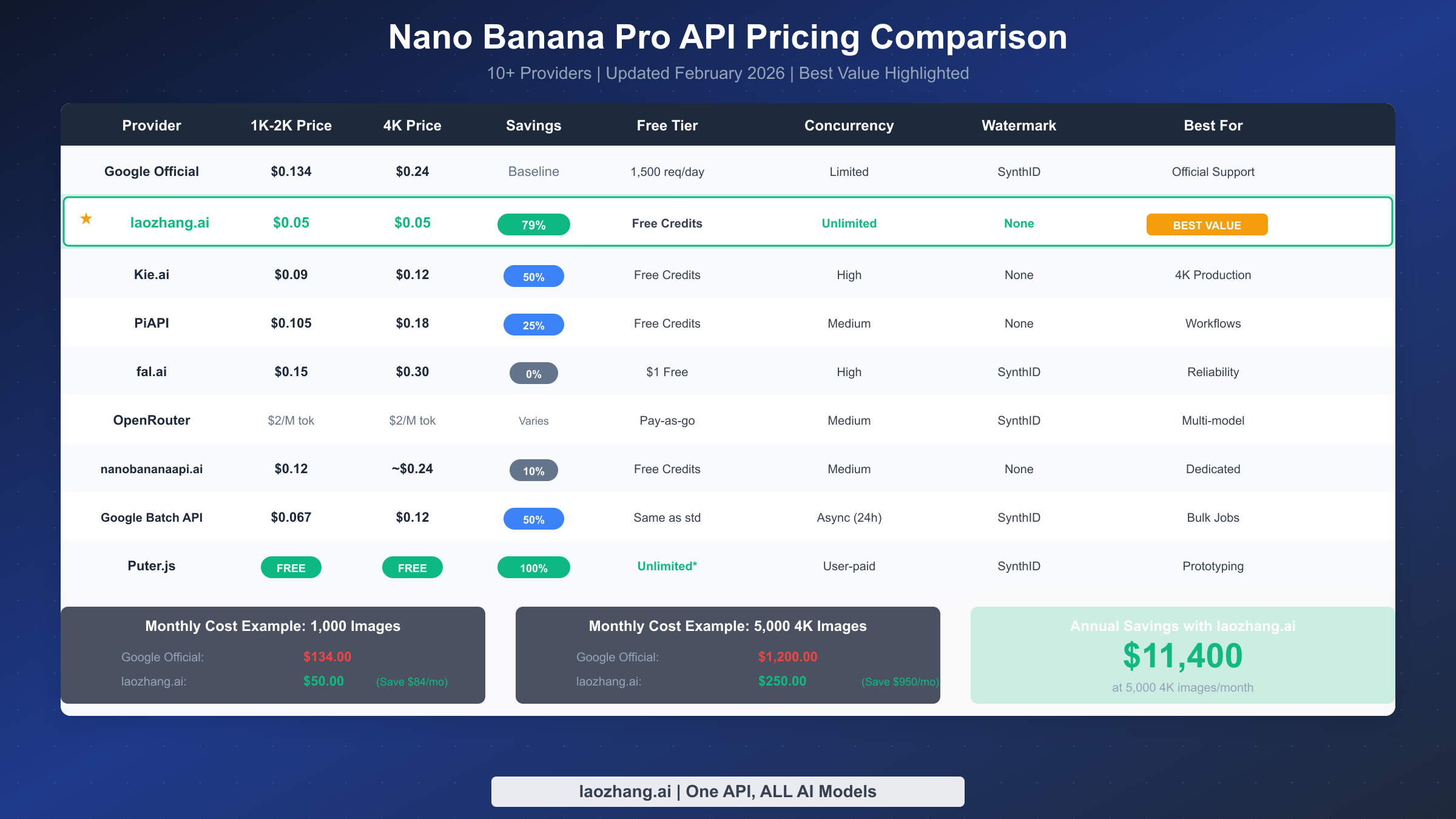
Understanding the pricing landscape for Nano Banana Pro helps you make informed decisions about which provider best fits your needs and budget. The market offers significant price variation, from Google's official rates to third-party providers offering up to 79% savings.
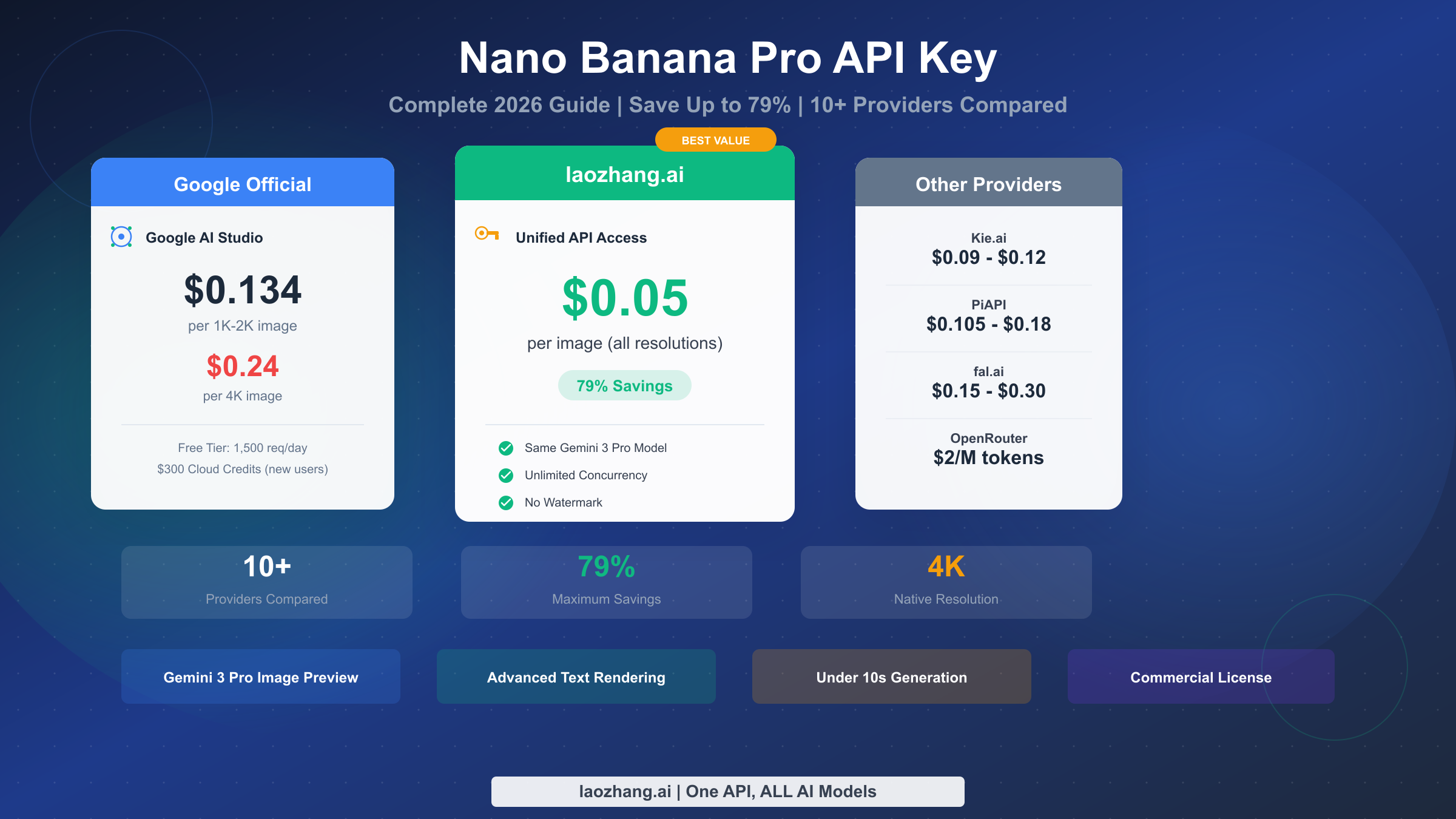
Google's official pricing through AI Studio and Vertex AI starts at $0.134 per image for 1K and 2K resolutions, scaling up to $0.24 for 4K output. While this represents the baseline cost, Google does offer a Batch API option with 50% discounts for users who can tolerate asynchronous processing with up to 24-hour delivery times, bringing effective costs down to $0.067-$0.12 per image.
Third-party providers have emerged to offer substantial cost savings by aggregating demand and optimizing infrastructure. The most cost-effective option currently available is laozhang.ai at $0.05 per image for all resolutions, representing 79% savings compared to Google's standard rates. This provider offers unlimited concurrency, no watermarks, and maintains the same model quality since all requests ultimately process through Google's infrastructure.
Other notable providers include Kie.ai at $0.09 for standard resolutions and $0.12 for 4K, PiAPI at $0.105 to $0.18 depending on resolution, and fal.ai at $0.15 per image with commercial licensing included. OpenRouter takes a different approach with token-based pricing at $2 per million tokens, which can work out favorably or unfavorably depending on your prompt complexity.
To put these numbers in practical perspective, consider a content creator generating 1,000 images monthly. With Google's official pricing, this costs $134 per month. Using laozhang.ai at $0.05 per image, the same volume costs just $50, saving $84 monthly or over $1,000 annually. For high-volume users generating 5,000 4K images monthly, the savings become even more dramatic: $1,200 with Google versus $250 with laozhang.ai, representing $950 in monthly savings.
For a more detailed breakdown including input token costs and thinking tokens, check our detailed pricing breakdown article.
Free Access Methods
Several legitimate ways exist to access Nano Banana Pro without paying, though each comes with specific limitations you should understand before relying on them for ongoing projects.
Google provides the most straightforward free access through its consumer-facing Gemini app, which allows 2-3 image generations daily at 1MP resolution with visible watermarks. This option works well for occasional personal use but lacks API access, making it unsuitable for integration into applications or automated workflows.
Google AI Studio offers more substantial free access with 1,500 API requests per day, providing genuine programmatic access without watermarks. This quota resets daily and can support significant development and testing work. New Google Cloud users also receive $300 in free credits applicable to Gemini API usage, which translates to approximately 2,240 image generations at standard pricing. This credit makes Google Cloud worth considering even if you ultimately plan to use a third-party provider for production.
The most interesting free option comes from Puter.js, which implements a "user-pays" model where your application's end users bear the generation costs rather than you as the developer. This approach allows genuinely unlimited image generation at zero cost to developers, making it ideal for prototyping, learning, and building applications where users authenticate with their own accounts. The implementation requires only adding a script tag to your HTML and calling the appropriate functions.
Most third-party providers also offer free trial credits upon registration. For example, laozhang.ai provides free credits for new users to test both standard and Pro API access before committing to paid usage. These trial credits help you verify that the service meets your needs without any upfront investment. For comprehensive coverage of free access options, see our free API access guide.
Quick Integration Guide
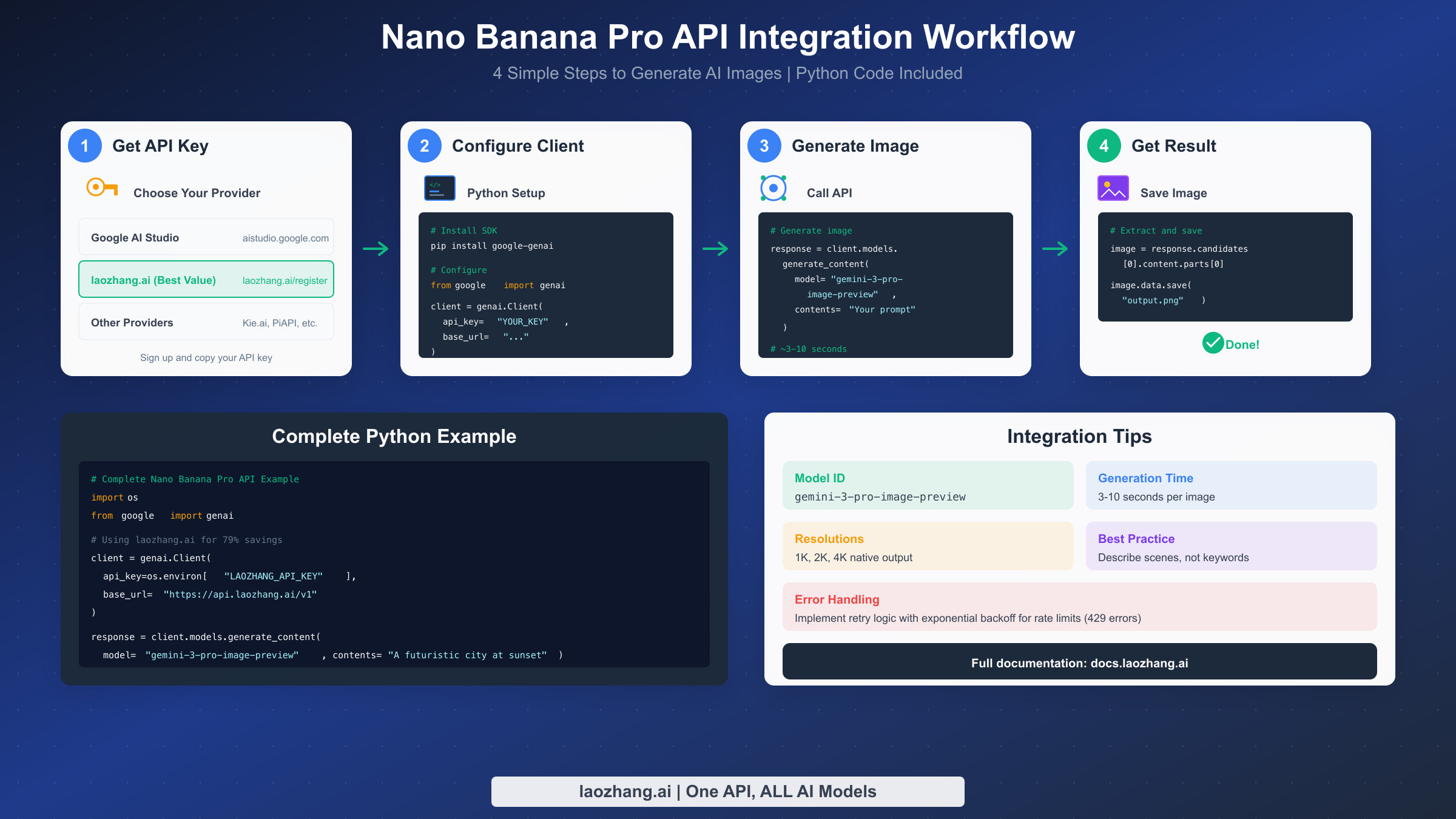
Integrating Nano Banana Pro into your application requires just four steps: obtaining an API key, configuring your client, calling the generation endpoint, and handling the response. The entire process takes about 5 minutes for developers familiar with REST APIs or Python.
First, obtain your API key from your chosen provider. For Google AI Studio, visit aistudio.google.com, sign in with your Google account, and click "Get API key" in the left sidebar. For laozhang.ai, register at laozhang.ai/register to receive your unified API key with immediate free credits for testing.
Next, configure your Python client. Install the Google GenAI SDK with pip install google-genai, then set up the client with your credentials. The key difference between providers is the base URL: Google uses the default endpoint, while third-party providers like laozhang.ai require specifying their endpoint:
pythonimport os
from google import genai

# For laozhang.ai (79% savings)
client = genai.Client(
    api_key=os.environ["LAOZHANG_API_KEY"],
    base_url="https://api.laozhang.ai/v1"
)

# For Google Official
# client = genai.Client(api_key=os.environ["GOOGLE_API_KEY"])
Now you can generate images by calling the model with your prompt. The model identifier gemini-3-pro-image-preview remains consistent across all providers:
pythonresponse = client.models.generate_content(
    model="gemini-3-pro-image-preview",
    contents="A futuristic cityscape at sunset with flying vehicles and neon signs in Japanese"
)

# Extract and save the image
image = response.candidates[0].content.parts[0]
image.data.save("output.png")
For detailed API usage patterns including error handling and multi-image generation, see our complete API integration guide.
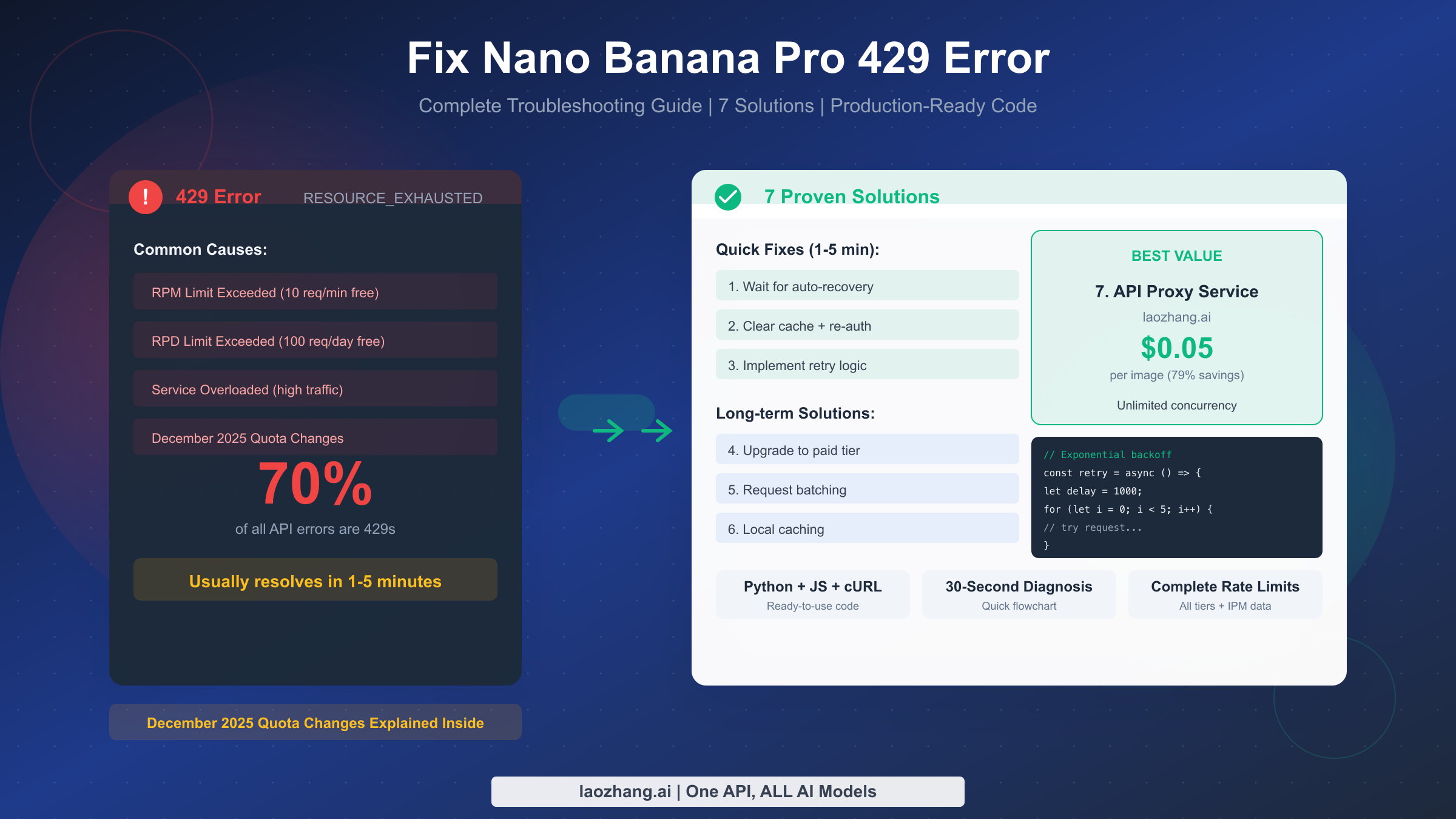
The generation typically completes in 3-10 seconds depending on prompt complexity and current server load. Best practice recommends implementing exponential backoff retry logic to handle occasional rate limit errors (HTTP 429) gracefully.
Production Considerations
Moving from development to production requires attention to several factors that don't matter during initial testing but become critical at scale. These considerations ensure your image generation pipeline remains reliable, cost-effective, and maintainable.
Rate limiting and concurrency management become important as your usage grows. Google's official API imposes rate limits that vary by tier, while third-party providers like laozhang.ai offer unlimited concurrency, allowing you to scale request volume without hitting throttling limits. However, unlimited concurrency means you need to implement your own rate limiting if you want to control costs or prevent runaway spending.
Error handling deserves particular attention in production. Beyond standard HTTP error codes, Nano Banana Pro can return content safety errors when prompts trigger policy filters. Your application should gracefully handle these cases, potentially by rephrasing prompts automatically or notifying users that certain content cannot be generated. Implementing structured logging for all API calls helps diagnose issues and track usage patterns.
Cost monitoring and budget controls protect against unexpected expenses. Set up alerts when spending approaches thresholds, implement daily or monthly caps if your provider supports them, and regularly review generation logs to identify optimization opportunities. Some applications can reduce costs by caching generated images, using lower resolutions when 4K isn't necessary, or batching non-urgent requests through Google's Batch API.
Security best practices require never hardcoding API keys in source code. Use environment variables or secret management services, rotate keys periodically, and implement key scoping if your provider supports it. For applications with multiple environments, use separate API keys for development, staging, and production to maintain clear usage attribution and limit blast radius if a key is compromised.
How to Choose
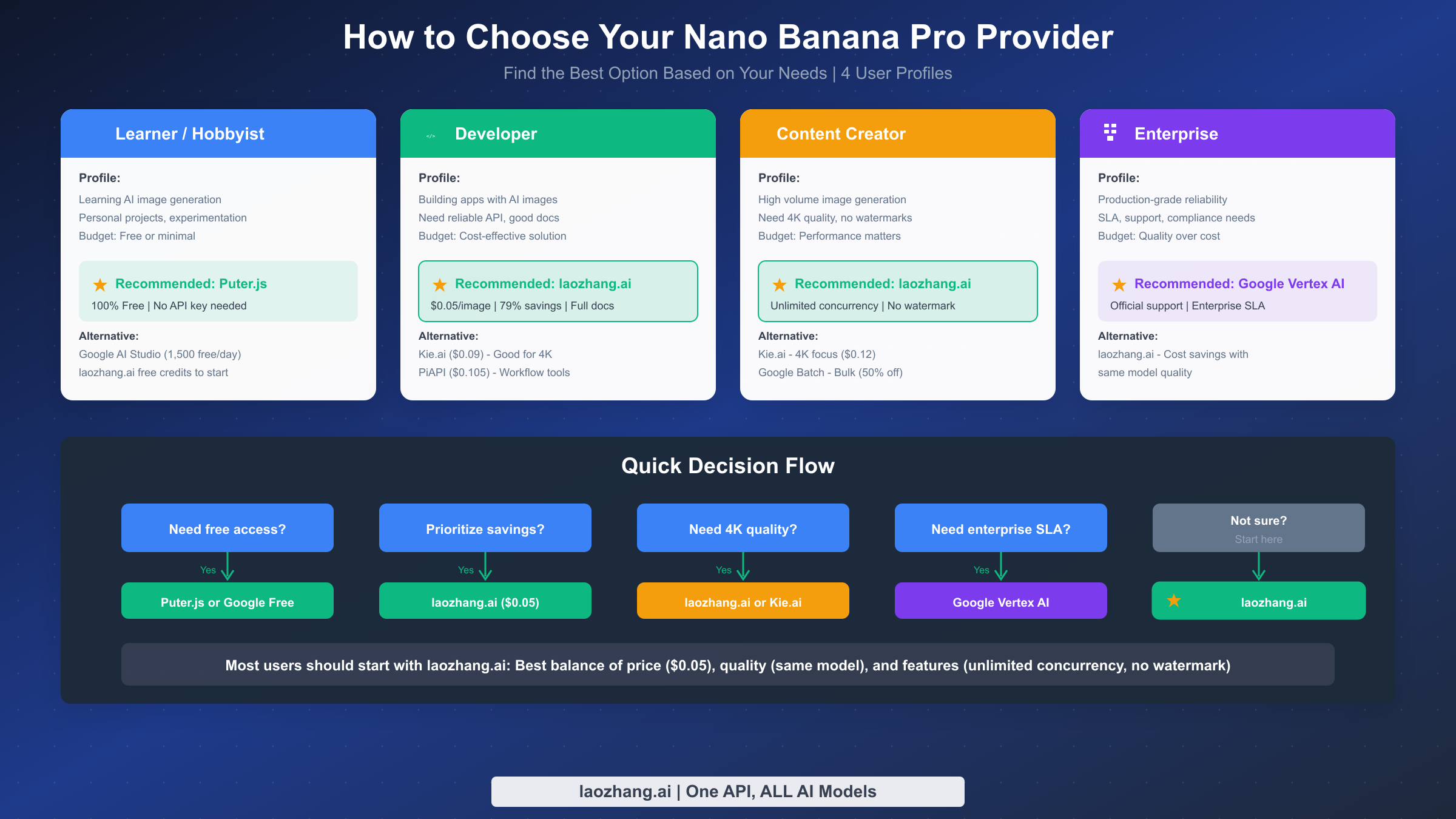
Selecting the right provider depends on your specific situation, including budget constraints, technical requirements, and organizational policies. Different user profiles naturally align with different providers.
For learners and hobbyists exploring AI image generation, start with Puter.js for completely free access without requiring any API key. This option removes all barriers to experimentation and provides a genuine way to learn the technology without spending money. Alternatively, Google AI Studio's 1,500 free daily requests support substantial learning and personal project work.
Developers building applications should consider laozhang.ai as the default choice. At $0.05 per image with unlimited concurrency and comprehensive documentation, it offers the best balance of cost, reliability, and features for most development scenarios. The unified API key simplifies credential management, and free trial credits let you verify integration before committing financially.
Content creators generating high volumes of images benefit most from laozhang.ai's combination of low per-image cost and no watermarks. For creators prioritizing 4K quality specifically, Kie.ai offers competitive 4K pricing at $0.12. Those who can tolerate asynchronous delivery should also consider Google's Batch API for 50% savings on large batch jobs.
Enterprise users with strict compliance requirements, SLA expectations, and need for official vendor support should use Google Vertex AI despite higher costs. The official relationship provides accountability, enterprise-grade SLAs, and direct access to Google's support channels. However, for cost-sensitive enterprise workloads where official support isn't critical, laozhang.ai delivers identical output quality at dramatically lower cost.
When uncertain, start with laozhang.ai. Its $0.05 pricing, identical model quality, unlimited concurrency, and no-watermark policy make it the optimal default for most users. You can always switch providers later if your needs change, since all providers use the same underlying model and similar API patterns.
FAQ
How much does Nano Banana Pro API cost?
Google's official pricing is $0.134 per 1K-2K image and $0.24 per 4K image. Third-party providers offer significant savings, with laozhang.ai charging $0.05 per image regardless of resolution, representing 79% savings compared to Google's standard rates.
Is Nano Banana Pro API free?
Partially. Google AI Studio offers 1,500 free API requests daily. Puter.js provides unlimited free access through a user-pays model. Most third-party providers offer free trial credits. However, sustained production usage requires paid access through either Google or a third-party provider.
What is the difference between Nano Banana and Nano Banana Pro?
Nano Banana uses Gemini 2.5 Flash Image, optimized for speed with lower cost. Nano Banana Pro uses Gemini 3 Pro Image Preview, prioritizing quality with better text rendering, higher resolution support (up to 4K), and more sophisticated prompt understanding. Pro costs more but delivers superior results for professional applications.
Do third-party APIs provide the same quality as Google?
Yes, absolutely. All providers access the identical gemini-3-pro-image-preview model on Google's infrastructure. Third-party providers act as API proxies, forwarding requests to Google and returning results. The generated images are indistinguishable regardless of which provider you use.
How long does image generation take?
Typical generation times range from 3-10 seconds, depending on prompt complexity, requested resolution, and current server load. 4K images generally take longer than lower resolutions.
Can I use Nano Banana Pro images commercially?
Yes, images generated through the API are cleared for commercial use. However, all images include SynthID watermarks (invisible digital watermarks) for AI content identification. Some providers like laozhang.ai do not add visible watermarks beyond Google's SynthID.
Conclusion
Getting your Nano Banana Pro API key takes just minutes, whether you choose Google's official channels or a cost-effective third-party provider. For most users, laozhang.ai offers the optimal balance of price ($0.05/image), quality (same Gemini 3 Pro model), and features (unlimited concurrency, no watermarks). Start with free trial credits to verify the integration meets your needs, then scale confidently knowing you're getting 79% savings compared to official pricing.
The model identifier you need is gemini-3-pro-image-preview, consistent across all providers. With the code examples in this guide, you can generate your first AI image within 5 minutes and build production-ready applications with confidence.
For ongoing API documentation and updates, visit docs.laozhang.ai.