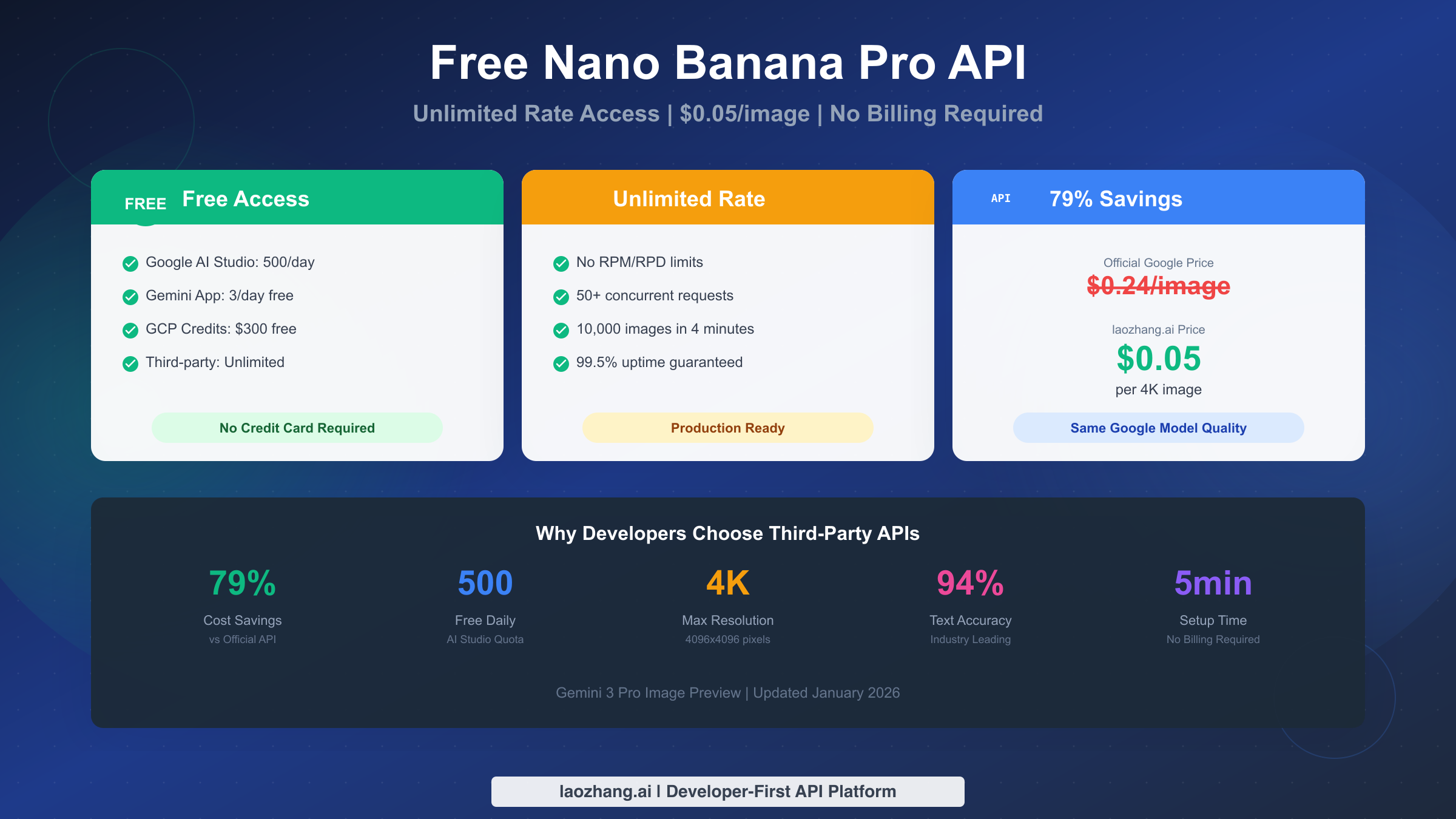
Nano Banana Pro API offers multiple free access paths that most developers overlook. Google AI Studio provides 500 free images daily for developers, while the Gemini app gives 3 images per day for casual users. For unlimited rate access without restrictions, third-party providers like laozhang.ai offer the same Google model at $0.05 per image—79% cheaper than official $0.24 pricing. No Google Cloud billing required for AI Studio access, and the entire setup takes under 5 minutes.
This guide covers every method to access Nano Banana Pro (Gemini 3 Pro Image Preview), from completely free options to cost-optimized production solutions. Whether you need 10 images for a side project or 100,000 images monthly for enterprise use, you will find the right approach here.
TL;DR - Quick Recommendations by Use Case
Before diving into details, here is the quick reference for choosing your access method based on your specific situation:
| Your Profile | Best Option | Cost | Rate Limit | Why |
|---|---|---|---|---|
| Content Creator | Gemini App | Free | 3/day | No setup, instant access |
| Hobbyist Developer | Google AI Studio | Free | 500/day | Full API, no billing |
| Startup Building MVP | laozhang.ai | $0.05/img | Unlimited | Reliable, affordable |
| Enterprise Production | laozhang.ai | $0.05/img | Unlimited | SLA support, scale |
| One-time Testing | GCP Free Credits | Free | Standard | $300 free credit |
The key insight that saves most developers time: all third-party providers route to the same Google Gemini 3 Pro Image model. You get identical output quality regardless of which provider you choose—the price difference reflects infrastructure costs, not quality differences.
For most developers, the decision tree is simple. If you need fewer than 500 images daily and can tolerate 5 requests per minute rate limiting, use Google AI Studio for free. If you need more volume or faster processing, use laozhang.ai at $0.05 per image with no rate limits.
Which Access Method Is Right for You?
Choosing the right access method depends on three factors: your technical requirements, your volume needs, and your budget. Rather than listing all options and leaving you confused, let us work through this decision based on your actual situation.
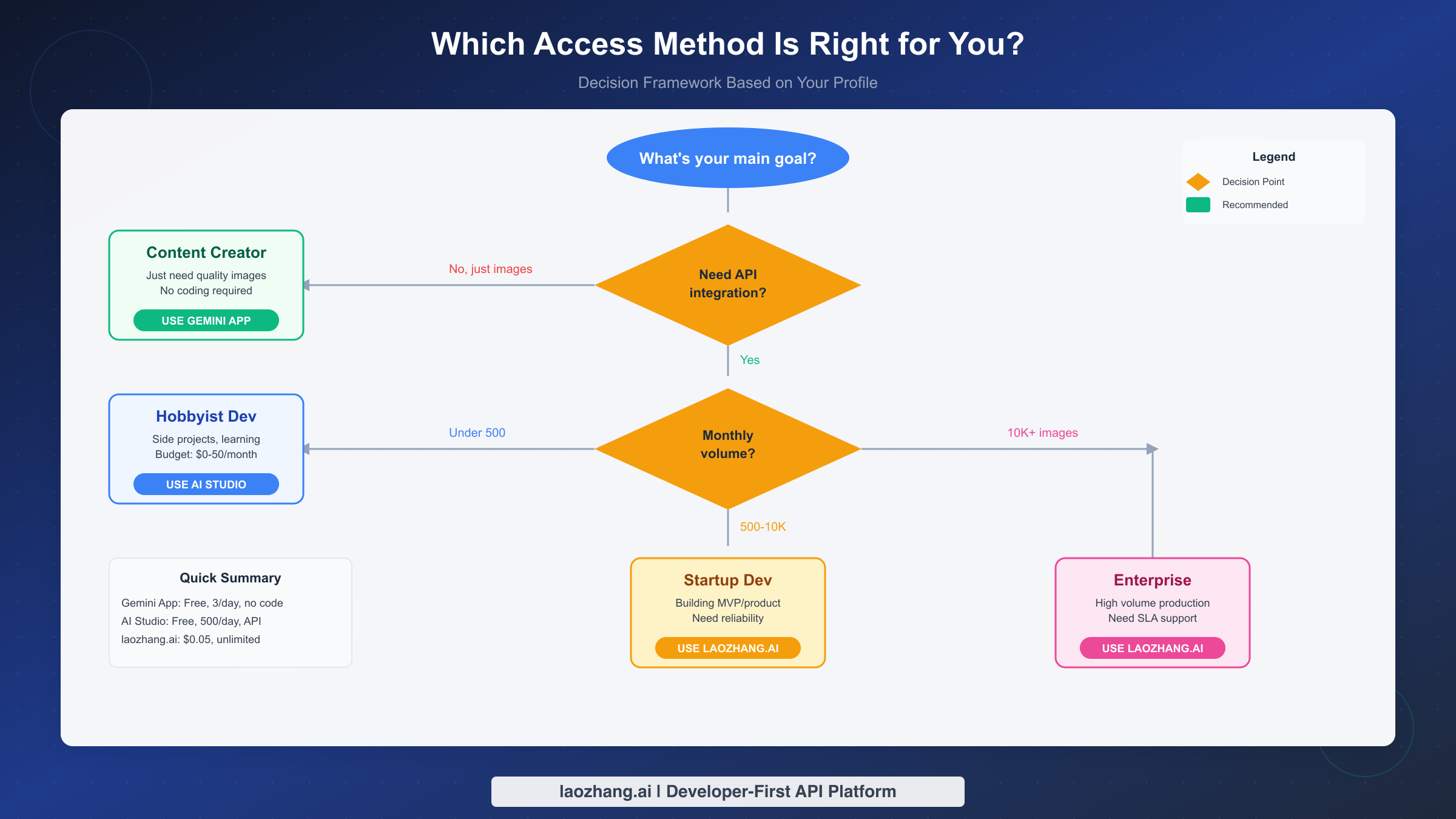
If you just need images without coding, the Gemini app at gemini.google.com is your answer. You get 3 free Nano Banana Pro generations daily at 1 megapixel resolution. No API keys, no billing setup, no technical knowledge required. The quality matches API output exactly. When you exhaust your quota, the app automatically falls back to the older Nano Banana model (non-Pro variant), so you can continue generating but at slightly lower quality.
If you are a developer building a side project, Google AI Studio offers the sweet spot. You get 500 images per day through the API completely free. The catch is rate limiting: 5 requests per minute in the free tier. For most hobby projects, this is more than sufficient. Setup takes about 10 minutes, and you do not need to configure Google Cloud billing at all.
If you are building a production application, third-party relay services like laozhang.ai become the practical choice. The official API rate limits (60 RPM at Tier 1, requiring billing setup and usage history) create friction for serious development. Third-party services remove these barriers entirely. At $0.05 per image with unlimited concurrency, you can generate 10,000 images in under 4 minutes—the same volume would take 24 hours through official channels.
If you are an enterprise with compliance requirements, you have two paths. For maximum control, use Google's official API through Vertex AI with proper billing and SLA agreements. For cost optimization with reliability, use an established third-party like laozhang.ai that maintains consistent uptime and offers business support.
The pattern here is clear: as your volume and reliability requirements increase, moving from free tiers to paid third-party services becomes economically rational, often saving 79% compared to official pricing.
Complete Free Access Methods
Let us examine every legitimate way to access Nano Banana Pro without paying, ranked by practical usefulness for developers.
Google AI Studio stands out as the most useful free option for developers. Unlike the consumer-facing Gemini app, AI Studio provides full API access with generous quotas. The free tier offers 500 requests per day with 5-10 requests per minute rate limiting—250 times more generous than the consumer 2-image limit. This discrepancy reflects Google's strategy of encouraging developer adoption while limiting casual consumer usage.
Getting started with AI Studio requires only an email signup at aistudio.google.com. No payment method, no Google Cloud project, no billing configuration. Within 5 minutes, you can generate an API key and start making requests. The free tier outputs are capped at approximately 1 megapixel (roughly 1024x1024 pixels), preventing access to the 2K and 4K capabilities available in paid tiers.
The Gemini mobile and web applications provide the simplest access path, though with significant limitations. Free-tier users receive approximately three image generations daily at 1 megapixel resolution. Some users report getting 50-100 generations initially before the system throttles them to lower quotas. A useful workaround: switching between web and mobile apps sometimes provides additional quota, as the systems may not share rate limiting in real-time.
Google Cloud Platform's $300 free credit offers a one-time boost for serious testing. New GCP accounts receive credits valid for 90 days that apply to Nano Banana Pro API usage at standard rates. At $0.134 per generation (1K/2K resolution), this yields roughly 2,240 free images—enough for comprehensive testing and initial development. However, this requires full billing setup and understanding of GCP's pricing model.
Third-party platforms with free tiers represent a mixed bag. Services like felo.ai reportedly offer unlimited free access without rate limits during testing, with over 50 images generated in single sessions without hitting restrictions. However, these services rely on various mechanisms to subsidize usage, and their long-term reliability remains uncertain. For hobby exploration, they provide excellent value; for any production dependency, exercise caution.
The practical recommendation: start with Google AI Studio for development and testing. The 500 daily images with full API access cover most development needs. When you outgrow these limits, evaluate whether paying $0.05 per image through laozhang.ai makes more economic sense than managing multiple free tier accounts or dealing with rate limiting.
Understanding Rate Limits and Reliability
Rate limits represent the hidden cost of Nano Banana Pro access that pricing tables do not show. Understanding these limits helps you choose the right provider and architect your applications appropriately.
Google's official rate limit structure operates on a tiered system based on your account history and spending. The free tier restricts you to 5 requests per minute and 100 requests per day—functional for learning but impractical for any real application. Tier 1, which requires billing setup, offers 60 requests per minute and 10,000 requests per day. Reaching higher tiers requires consistent usage over 30+ days.
The practical impact becomes clear with simple math. At the free tier's 100 requests per day limit, generating 10,000 images takes 100 days. At Tier 1's limits, the same volume requires roughly 24 hours of continuous operation. Neither scenario works for production applications that need images on demand.
Third-party relay services eliminate rate limiting entirely through infrastructure investment. Services like laozhang.ai maintain pools of API credentials and routing logic that distribute your requests across their capacity. The result is effectively unlimited concurrent requests—the same 10,000 images that take 24 hours through official channels complete in under 4 minutes.
Reliability differs significantly between access methods. Google's official API guarantees availability through their standard service level agreements—typically 99.9% uptime for production tiers. Third-party services vary widely in reliability. Established providers like laozhang.ai advertise 99.5% uptime with business support. Community wrappers and newer services offer no guarantees and frequently break when Google updates authentication or rate limiting.
For production applications, I recommend a tiered reliability approach:
The first tier includes official Google services through AI Studio or Vertex AI. These provide maximum reliability but with rate limiting constraints. Use these for critical paths where you can accept the queue times.
The second tier includes established third-party providers with track records like laozhang.ai or Kie.ai. These offer the best balance of reliability and performance for most production use cases. The $0.05-0.12 per image pricing reflects their infrastructure investment.
The third tier includes experimental services, community wrappers, and new entrants. These work well for development and testing but should not be dependencies for user-facing features. When Google updates their systems, these services break first.
For detailed information about Google's rate limit structure and how to work within it, see our comprehensive guide on Gemini API rate limits.
Unlimited Rate Solutions for Production
When your application needs exceed free tier limits, the economics favor third-party relay services overwhelmingly. Let us examine why and how to implement them.
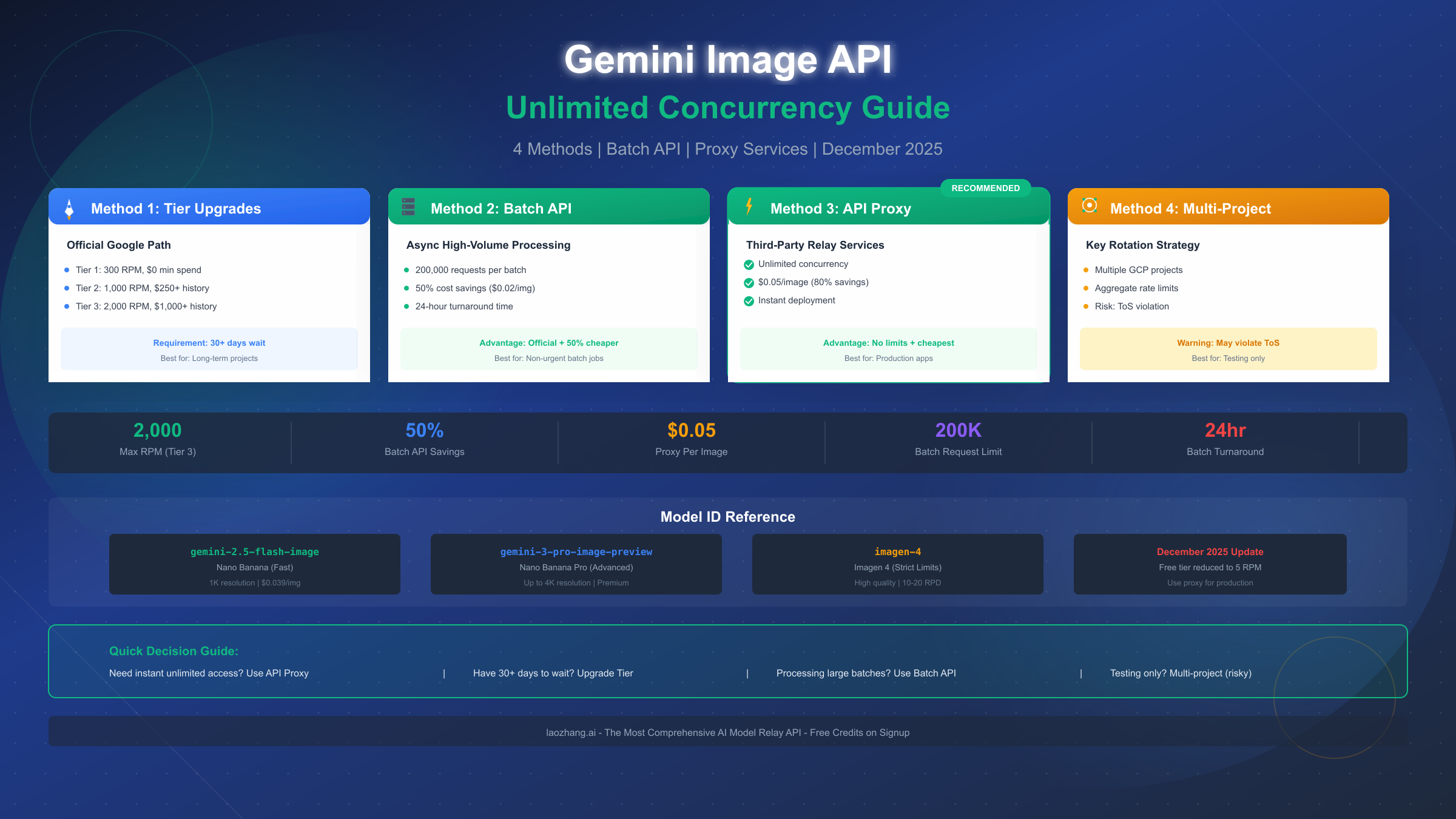
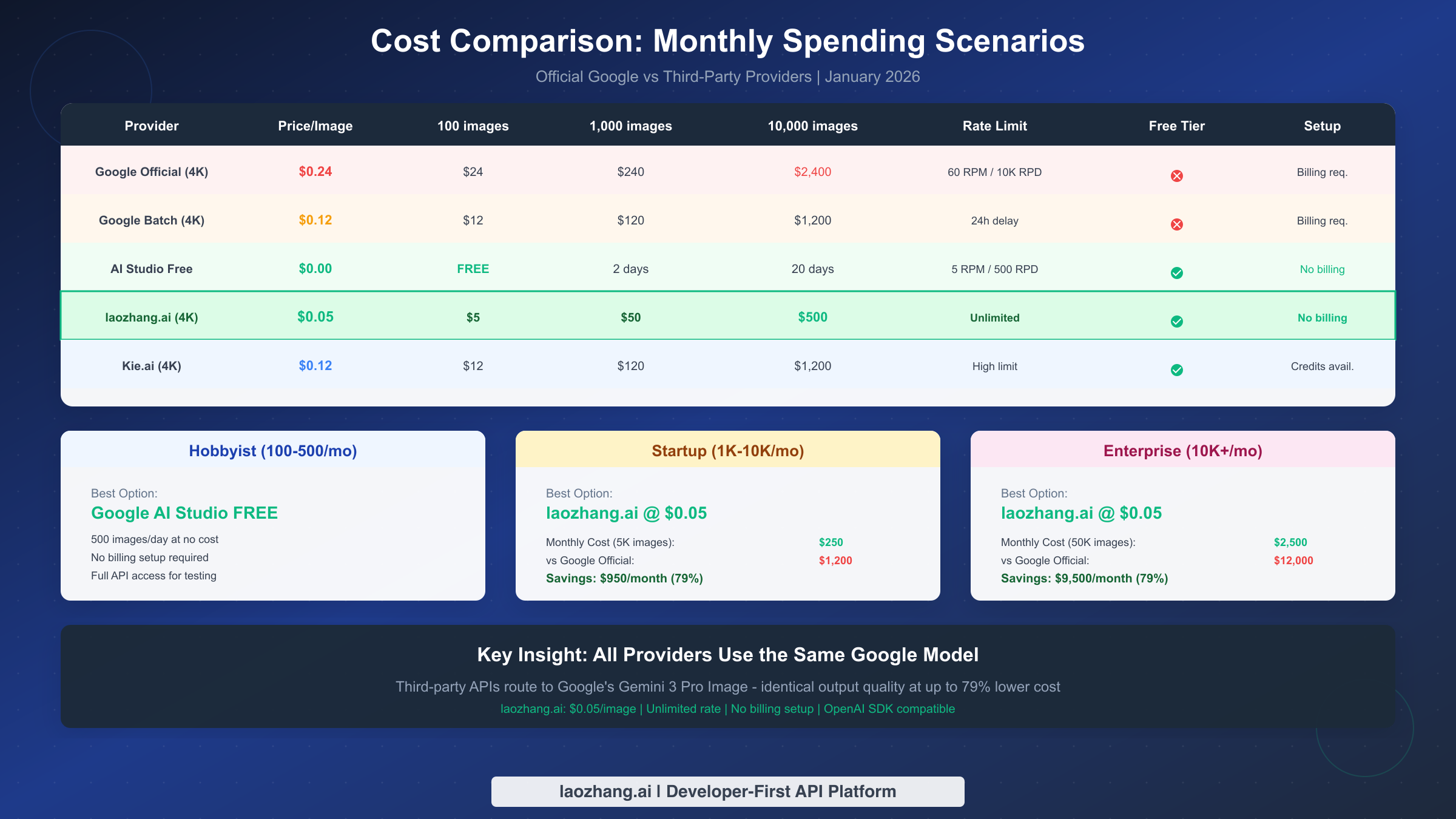
The cost structure creates clear winners. Google's official 4K pricing sits at $0.24 per image. Their Batch API offers 50% savings at $0.12 per image but requires tolerating 24-hour processing delays. Third-party services like laozhang.ai provide the same Google model at $0.05 per image with instant processing and unlimited concurrency—a 79% savings with better performance.
laozhang.ai has emerged as the leading third-party option for several reasons beyond pricing. Their OpenAI-compatible API format eliminates learning curves—if you have used OpenAI's SDK, you simply change the base URL and API key. They maintain documentation at docs.laozhang.ai and provide a testing interface at images.laozhang.ai.
The setup process takes approximately 5 minutes:
First, create an account at laozhang.ai using email signup. The minimum deposit starts at $5 (approximately 35 CNY), yielding 100 image generations at 4K resolution.
Second, generate an API key from your dashboard. The key format follows standard patterns and integrates with existing OpenAI SDK code.
Third, configure your development environment. The base URL change is the only modification needed in most existing codebases.
Technical integration demonstrates the simplicity. Because laozhang.ai maintains OpenAI SDK compatibility, your existing code requires minimal changes. The following Python example shows a production-ready implementation with error handling:
pythonimport openai
import time

client = openai.OpenAI(
    api_key="your-laozhang-api-key",
    base_url="https://api.laozhang.ai/v1"
)

def generate_image(prompt, retries=3):
    for attempt in range(retries):
        try:
            response = client.images.generate(
                model="gemini-3-pro-image-preview",
                prompt=prompt,
                size="4096x4096",  # 4K resolution
                n=1
            )
            return response.data[0].url
        except openai.RateLimitError:
            time.sleep(2 ** attempt)  # Exponential backoff
        except openai.APIError as e:
            print(f"API error: {e}")
            if attempt == retries - 1:
                raise
    return None
Comparison with other third-party providers helps contextualize laozhang.ai's position. Kie.ai offers competitive pricing at $0.09-0.12 per image with emphasis on 4K output reliability. Their service suits users who prioritize maximum resolution consistency. For developers who want deeper technical information about high-volume implementations, our guide on unlimited concurrency for Nano Banana Pro covers advanced patterns.
The recommendation for most production use cases: start with laozhang.ai at $0.05 per image. The combination of pricing, reliability, and ease of integration makes it the practical default. Evaluate alternatives only if you have specific requirements around geographic location, payment methods, or support arrangements.
Cost Analysis: Monthly Spending Scenarios
Understanding real-world costs requires looking beyond per-image pricing to monthly totals across different usage volumes. The following analysis uses January 2026 pricing data to provide actionable guidance.
For hobbyist usage (100-500 images monthly), the free tier satisfies most needs entirely. Google AI Studio's 500 daily limit means you could generate 15,000 images monthly at no cost if you used your full quota. The practical constraint is rate limiting—5 requests per minute means full quota utilization requires leaving requests running for extended periods. For casual use, free access works perfectly.
For startup usage (1,000-10,000 images monthly), the economics shift dramatically toward third-party services. Consider a scenario where you need 5,000 images monthly:
Through Google's official API at 4K resolution ($0.24/image), monthly cost reaches $1,200. The Batch API reduces this to $600 but introduces 24-hour delays that most applications cannot tolerate. Through laozhang.ai at $0.05/image, the same volume costs $250—a savings of $950 monthly or $11,400 annually.
The break-even analysis reveals the math clearly. At any volume above approximately 100 images monthly, paying $0.05 per image beats managing free tier limitations. Your time has value, and the friction of rate limits, quota management, and multiple account juggling quickly exceeds the cost of simply paying for production-ready access.
For enterprise usage (10,000+ images monthly), third-party services become essential for both cost and performance reasons. A 50,000 image monthly workload costs:
Google Official 4K: $12,000/month Google Batch API: $6,000/month (with delays) laozhang.ai: $2,500/month (instant)
Annual savings of $114,000 justify serious evaluation of third-party options. At this scale, you should also negotiate volume pricing—most providers offer discounts for committed monthly minimums.
For detailed pricing breakdowns including resolution-specific costs and token calculations, see our complete Nano Banana Pro API pricing guide.
Implementation Guide: Production-Ready Code
Moving from understanding pricing to actual implementation requires code that handles real-world concerns: error recovery, rate limit management, and efficient batch processing. The following examples provide production-ready starting points.
Basic image generation with proper error handling forms the foundation. This Python implementation includes retry logic with exponential backoff, appropriate for most use cases:
pythonimport openai
import time
import logging

logging.basicConfig(level=logging.INFO)
logger = logging.getLogger(__name__)

class NanoBananaClient:
    def __init__(self, api_key, base_url="https://api.laozhang.ai/v1" ):
        self.client = openai.OpenAI(api_key=api_key, base_url=base_url)

    def generate(self, prompt, size="2048x2048", max_retries=3):
        """Generate image with automatic retry on transient failures."""
        for attempt in range(max_retries):
            try:
                response = self.client.images.generate(
                    model="gemini-3-pro-image-preview",
                    prompt=prompt,
                    size=size,
                    n=1
                )
                logger.info(f"Generated image successfully on attempt {attempt + 1}")
                return response.data[0].url

            except openai.RateLimitError:
                wait_time = 2 ** attempt
                logger.warning(f"Rate limited, waiting {wait_time}s")
                time.sleep(wait_time)

            except openai.APIError as e:
                logger.error(f"API error on attempt {attempt + 1}: {e}")
                if attempt == max_retries - 1:
                    raise

        return None

# Usage
client = NanoBananaClient(api_key="your-api-key")
url = client.generate("A serene mountain landscape at sunset, 4K quality")
print(f"Image URL: {url}")
Batch processing with concurrency control handles high-volume requirements efficiently. This implementation uses asyncio for concurrent requests while respecting reasonable concurrency limits:
pythonimport asyncio
import aiohttp
from typing import List

class AsyncNanoBananaClient:
    def __init__(self, api_key, base_url="https://api.laozhang.ai/v1",
                 max_concurrent=10):
        self.api_key = api_key
        self.base_url = base_url
        self.semaphore = asyncio.Semaphore(max_concurrent)

    async def generate_single(self, session, prompt, size="2048x2048"):
        """Generate single image with semaphore control."""
        async with self.semaphore:
            headers = {
                "Authorization": f"Bearer {self.api_key}",
                "Content-Type": "application/json"
            }
            payload = {
                "model": "gemini-3-pro-image-preview",
                "prompt": prompt,
                "size": size,
                "n": 1
            }

            async with session.post(
                f"{self.base_url}/images/generations",
                json=payload,
                headers=headers
            ) as response:
                data = await response.json()
                return data["data"][0]["url"]

    async def generate_batch(self, prompts: List[str], size="2048x2048"):
        """Generate multiple images concurrently."""
        async with aiohttp.ClientSession() as session:
            tasks = [
                self.generate_single(session, prompt, size)
                for prompt in prompts
            ]
            return await asyncio.gather(*tasks, return_exceptions=True)

# Usage
async def main():
    client = AsyncNanoBananaClient(api_key="your-api-key")
    prompts = [
        "A red sports car on a mountain road",
        "A cozy coffee shop interior",
        "A futuristic city skyline at night"
    ]
    urls = await client.generate_batch(prompts)
    for prompt, url in zip(prompts, urls):
        print(f"{prompt[:30]}... -> {url}")

asyncio.run(main())
JavaScript implementation for Node.js environments follows similar patterns:
javascriptconst OpenAI = require('openai');

const client = new OpenAI({
  apiKey: process.env.LAOZHANG_API_KEY,
  baseURL: 'https://api.laozhang.ai/v1'
});

async function generateImage(prompt, size = '2048x2048') {
  const maxRetries = 3;

  for (let attempt = 0; attempt < maxRetries; attempt++) {
    try {
      const response = await client.images.generate({
        model: 'gemini-3-pro-image-preview',
        prompt: prompt,
        size: size,
        n: 1
      });

      return response.data[0].url;
    } catch (error) {
      if (error.status === 429) {
        const waitTime = Math.pow(2, attempt) * 1000;
        console.log(`Rate limited, waiting ${waitTime}ms`);
        await new Promise(r => setTimeout(r, waitTime));
      } else if (attempt === maxRetries - 1) {
        throw error;
      }
    }
  }
}

// Usage
generateImage('A beautiful sunset over the ocean')
  .then(url => console.log('Generated:', url))
  .catch(err => console.error('Failed:', err));
These implementations handle the common production concerns: transient failures, rate limiting, and batch efficiency. Adapt them to your specific framework and requirements.
FAQ and Summary
How do I get free Nano Banana Pro API access right now?
The fastest path is Google AI Studio. Visit aistudio.google.com, sign up with your email, and generate an API key within 5 minutes. No billing setup required. You get 500 images per day at no cost, limited to 5 requests per minute and approximately 1 megapixel resolution.
What is the difference between Nano Banana Pro and regular Nano Banana?
Nano Banana Pro uses Google's Gemini 3 Pro Image architecture (model ID: gemini-3-pro-image-preview), while regular Nano Banana uses Gemini 2.5 Flash Image. Pro offers superior text rendering accuracy (94% vs competitors' 71-78%), native 4K resolution support, and better multi-image consistency. The Pro model costs more but delivers noticeably higher quality for professional use cases.
Is using third-party API providers safe and legitimate?
Established third-party providers like laozhang.ai operate legitimate relay services that route requests to Google's actual API. You receive identical output quality because the generation happens on Google's infrastructure. The providers handle billing aggregation and infrastructure costs, passing savings to users. For production use, choose providers with established track records and clear terms of service.
What happens when I exceed free tier limits?
In the Gemini app, exceeding your daily quota automatically downgrades you to the older Nano Banana model (non-Pro). In Google AI Studio, requests return rate limit errors that your code should handle with retry logic. The free tier resets daily at midnight Pacific time.
Can I use Nano Banana Pro images commercially?
Yes, images generated through Google's API (directly or via third-party services) can be used commercially according to Google's terms of service. All outputs include SynthID digital watermarks for provenance tracking, which are invisible in normal viewing but detectable by automated systems. Free tier outputs through the Gemini app include visible watermarks that paid tiers remove.
Summary of key takeaways:
Free access through Google AI Studio provides 500 images daily for development—sufficient for most projects without any cost. For production applications requiring unlimited rate access, third-party services like laozhang.ai offer 79% cost savings ($0.05 vs $0.24 per image) with superior performance. All providers route to the same Google model, so quality remains identical regardless of price paid.
The practical recommendation for most developers: start with AI Studio's free tier for development and testing, then transition to laozhang.ai when you need production reliability and unlimited throughput. This path minimizes both cost and friction while maximizing the quality of your AI image generation capabilities.