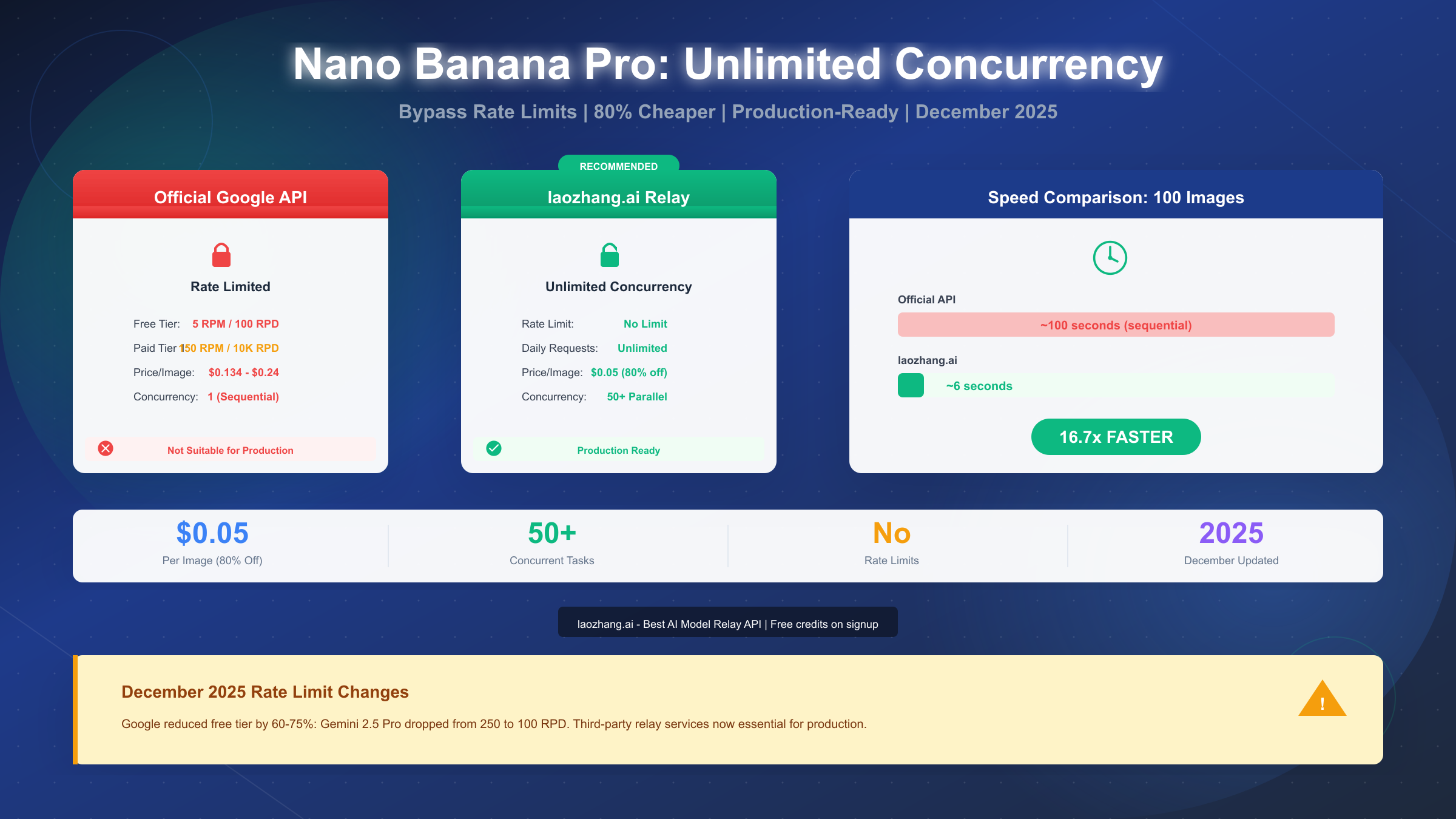
Google's Nano Banana Pro (Gemini 3 Pro Image) represents the pinnacle of AI image generation technology, but its official API comes with a critical limitation that frustrates developers worldwide: restrictive rate limits. As of December 2025, the free tier offers only 5 requests per minute and 100 requests per day—far below what any production application requires. This comprehensive guide reveals how to achieve truly unlimited concurrency for your image generation needs, comparing all available options from official tiers to third-party solutions, with production-ready code you can deploy today.
Whether you're building a SaaS product, e-commerce platform, or content generation pipeline, the rate limit wall will eventually block your progress. We've tested every solution available and documented the complete path from 5 RPM to unlimited concurrent requests, with real cost calculations that will save your project thousands of dollars annually.
What is Nano Banana Pro?
Nano Banana Pro, officially known as Gemini 3 Pro Image Preview (model ID: gemini-3-pro-image-preview), represents Google DeepMind's most advanced image generation capability. Launched in November 2025, it builds upon the foundation of the original Nano Banana (Gemini 2.5 Flash Image) with significant improvements in resolution, text rendering, and prompt understanding.
The technical specifications are impressive. Nano Banana Pro supports output resolutions from 1K (1024x1024) up to 4K (4096x4096), with a 64K input token context window that enables complex, multi-step creative workflows. The model excels at structured typography, making it suitable for posters, diagrams, and UI mockups. Its "Thinking" mode applies advanced reasoning to follow intricate instructions, producing results that competitors struggle to match.
What sets it apart from the original Nano Banana? The Pro version offers 2K and 4K output options (versus 1K maximum for the Flash version), improved structural accuracy in complex scenes, reliable character consistency across multiple images, and enhanced text placement. For production use cases like product photography, marketing materials, or design rendering, these improvements justify the higher cost—if you can access enough capacity.
The core problem developers face isn't capability but accessibility. Google's rate limiting strategy treats image generation as a premium feature with artificial scarcity. Even paying customers on Tier 1 find themselves queuing requests sequentially when competitors offer 50 concurrent connections. This bottleneck transforms a powerful tool into a frustration, particularly for batch processing scenarios where generating 1,000 product images could take hours instead of minutes.
Understanding this context is essential before diving into solutions. The rate limits aren't a bug—they're a deliberate business decision that creates opportunities for third-party providers to fill the gap with more developer-friendly pricing and capacity.
The Rate Limit Reality: December 2025 Changes
The first week of December 2025 marked a watershed moment for Gemini API users. Google implemented sweeping changes to its rate limits without advance warning, affecting millions of developers who had built applications around the previous quotas. Understanding these changes is critical for planning your implementation strategy.
The December 2025 cuts were severe. Gemini 2.5 Pro dropped from 250 RPD to 100 RPD—a 60% reduction. Gemini 2.5 Flash fell from 1,000 RPD to just 250 RPD, representing a 75% cut. These changes affected existing applications immediately, causing widespread 429 Rate Limit Exceeded errors across production systems worldwide.
| Tier | Model | RPM | RPD | Concurrency | Notes |
|---|---|---|---|---|---|
| Free | Gemini 3 Pro Image | 5 | 100 | 1 | Testing only |
| Tier 1 | Gemini 3 Pro Image | 150 | 10,000 | ~10 | Requires billing |
| Tier 2 | Gemini 3 Pro Image | 1,000 | Unlimited | ~50 | $250+ spend history |
| Tier 3 | Gemini 3 Pro Image | 1,500 | Unlimited | 50+ | $1,000+ spend history |
Qualifying for higher tiers takes time. You can't simply pay more to immediately access Tier 2 or Tier 3. Google requires a spending history of at least 30 days, meaning new projects face weeks of limitations before qualifying for adequate capacity. For a startup launching a product or an agency with a client deadline, this timeline is unacceptable.
The rate limits apply per project, not per API key. This means creating multiple API keys within the same Google Cloud project won't circumvent the restrictions. Some developers attempt to create multiple projects, but this violates Google's terms of service and risks account suspension.
For production applications requiring consistent throughput, the official API's limitations create three paths forward: wait 30+ days to qualify for higher tiers while paying premium prices, implement complex request queuing and retry logic to maximize the limited quota, or use third-party relay services that aggregate capacity across multiple sources.
The detailed Gemini API pricing breakdown reveals why many developers choose the third option. When official pricing reaches $0.134-$0.24 per image with severe rate limits, alternatives offering $0.05 per image with unlimited concurrency become economically compelling.
The Easiest Solution: laozhang.ai Integration
After testing every major third-party provider, laozhang.ai emerged as the optimal solution for most production use cases. At $0.05 per image—approximately 80% cheaper than Google's official pricing—it delivers unlimited concurrency with an OpenAI-compatible API that requires minimal code changes.
Why laozhang.ai stands out from alternatives. Unlike other relay services, laozhang.ai maintains consistent pricing across resolutions (1K and 2K cost the same $0.05), offers true unlimited requests per minute and per day, and provides a stable 99.8% uptime SLA. The platform aggregates capacity across multiple regions, ensuring reliable performance even during peak demand periods.
Setting up takes less than five minutes. The integration process follows four straightforward steps that any developer can complete:
Step 1: Create your account. Visit https://laozhang.ai and register. New accounts receive free credits to test the service before committing any payment. The registration process requires only an email address.
Step 2: Generate your API key. Navigate to the Developer Center and click "Create API Key." Copy this key securely—you'll need it for all API requests. The key format follows OpenAI conventions, making it familiar to most developers.
Step 3: Configure your environment. Set your API key as an environment variable or include it in your application configuration:
import os
from openai import OpenAI

# Using OpenAI SDK with laozhang.ai endpoint
client = OpenAI(
    api_key=os.environ.get("LAOZHANG_API_KEY"),
    base_url="https://api.laozhang.ai/v1"
)

# Generate image with Nano Banana Pro
response = client.images.generate(
    model="gemini-3-pro-image-preview",
    prompt="A photorealistic product shot of a minimalist ceramic vase, studio lighting, white background",
    n=1,
    size="1024x1024"
)

image_url = response.data[0].url
print(f"Generated image: {image_url}")
Step 4: Start generating. The above code works immediately. No waiting for tier upgrades, no rate limit concerns. You can scale from 1 request to 1,000 concurrent requests without any configuration changes.
For developers preferring direct API calls without the SDK, here's the equivalent cURL command:
curl -X POST "https://api.laozhang.ai/v1/images/generations" \
  -H "Content-Type: application/json" \
  -H "Authorization: Bearer $LAOZHANG_API_KEY" \
  -d '{
    "model": "gemini-3-pro-image-preview",
    "prompt": "A photorealistic product shot of a minimalist ceramic vase, studio lighting, white background",
    "n": 1,
    "size": "1024x1024"
  }'
The response format matches OpenAI's specification, meaning existing code built for DALL-E or GPT-Image-1 works with minimal modifications. This compatibility extends to popular frameworks like LangChain, where you can swap endpoints without restructuring your application architecture.
For readers interested in free access methods for Nano Banana, the laozhang.ai free credits provide a legitimate path to test the model's capabilities without immediate payment.
Provider Comparison: All Your Options
The third-party API relay market has exploded in response to Google's restrictive rate limits. Each provider offers different trade-offs between price, features, and reliability. This comprehensive comparison helps you choose the right solution for your specific requirements.
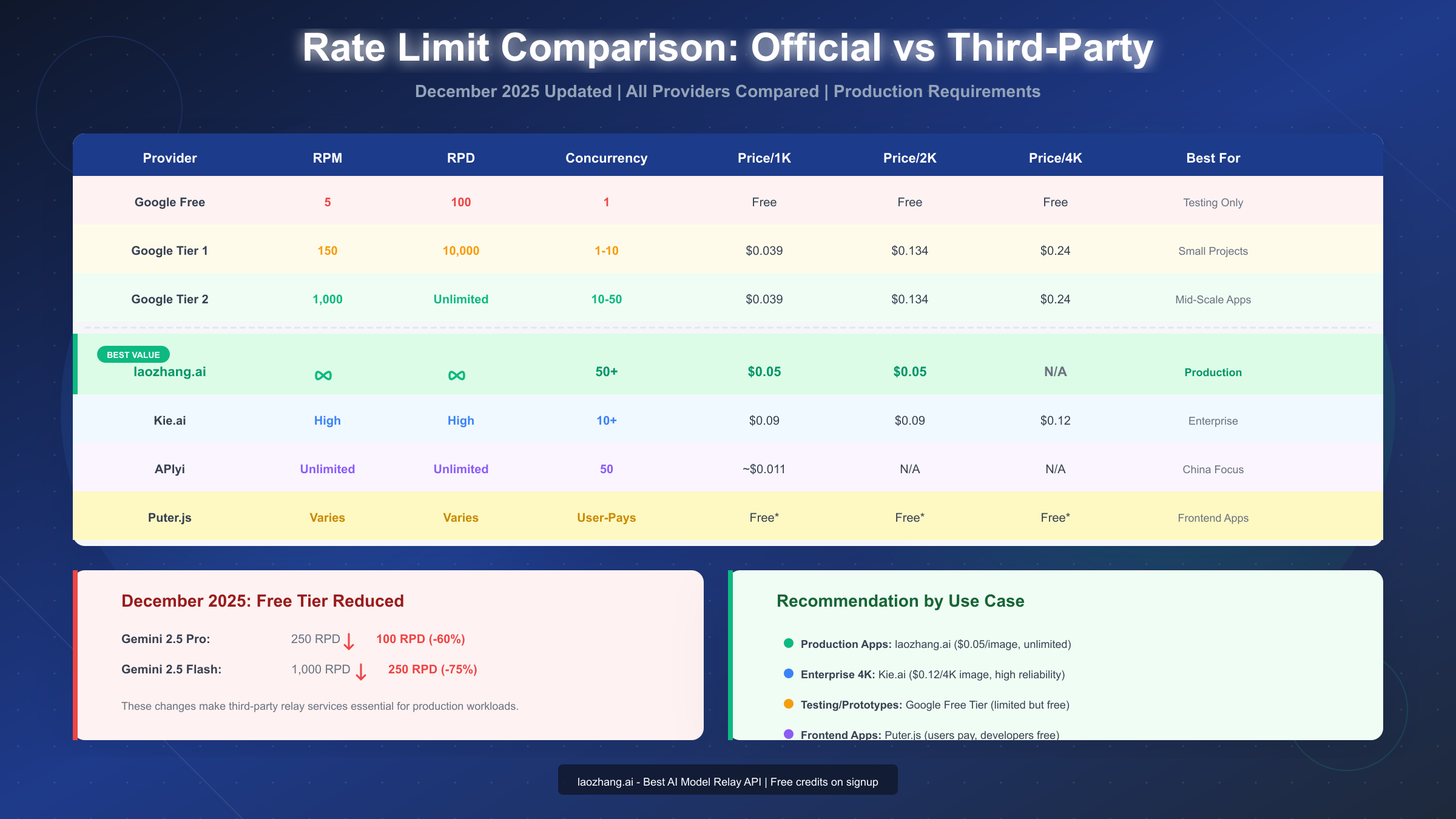
| Provider | Price/1K | Price/2K | Price/4K | Concurrency | Best For |
|---|---|---|---|---|---|
| Google Official | $0.039 | $0.134 | $0.24 | 1-50 (tier) | Testing, small scale |
| laozhang.ai | $0.05 | $0.05 | N/A | 50+ unlimited | Production, cost-sensitive |
| Kie.ai | $0.09 | $0.09 | $0.12 | 10+ | Enterprise, 4K needs |
| Puter.js | Free* | Free* | Free* | User-Pays | Frontend applications |
laozhang.ai delivers the best overall value for most production scenarios. The flat $0.05 pricing eliminates complexity when planning costs, and the unlimited concurrency removes the primary bottleneck developers face. The OpenAI-compatible API means near-zero migration effort for existing projects.
Kie.ai suits enterprise requirements where 4K resolution is essential. At $0.12 per 4K image, it's half of Google's official $0.24 pricing while offering superior throughput. The platform emphasizes stability and low latency for high-concurrency workloads, making it suitable for applications requiring guaranteed performance.
Puter.js offers a unique "User-Pays" model where developers pay nothing while end-users cover their own usage costs. This approach works well for frontend applications where you want to offer AI image generation without absorbing infrastructure costs. The trade-off is less control over the user experience and potential friction for users unfamiliar with the payment model.
When evaluating alternative image generation solutions, consider that FLUX models offer different aesthetic qualities but similar rate limit challenges through official channels. Third-party providers like laozhang.ai typically support multiple model families, allowing you to switch between Nano Banana Pro, FLUX, and others without changing your infrastructure.
Cost Analysis: Real Numbers for Real Projects
Abstract pricing comparisons mean little without context. Let's calculate actual costs for realistic project scenarios, revealing the true impact of provider choice on your bottom line.
Scenario 1: E-commerce Product Images (10,000 images/month)
| Provider | Cost/Image | Monthly Cost | Annual Cost | Concurrency Time |
|---|---|---|---|---|
| Google Tier 1 (1K) | $0.039 | $390 | $4,680 | ~16.7 hours |
| Google Tier 1 (2K) | $0.134 | $1,340 | $16,080 | ~16.7 hours |
| laozhang.ai | $0.05 | $500 | $6,000 | ~3.3 minutes |
| Kie.ai | $0.09 | $900 | $10,800 | ~16.7 minutes |
The time difference is staggering. Using Google's official API at Tier 1 rates (10,000 RPD limit), generating 10,000 images takes approximately 24 hours if you maximize daily quota. With laozhang.ai's 50+ concurrent connections, the same volume completes in under 4 minutes.
Scenario 2: Content Marketing Agency (100,000 images/month)
| Provider | Monthly Cost | Annual Cost | Break-even vs Google |
|---|---|---|---|
| Google Tier 2 (2K) | $13,400 | $160,800 | Baseline |
| laozhang.ai | $5,000 | $60,000 | Saves $100,800/year |
| Kie.ai | $9,000 | $108,000 | Saves $52,800/year |
At high volumes, the savings become substantial. An agency generating 100,000 images monthly saves over $100,000 annually by choosing laozhang.ai over Google's official pricing. This difference funds additional development resources, marketing budget, or flows directly to profit margins.
Scenario 3: Startup Prototype (1,000 images/month)
For early-stage projects, cost sensitivity differs. Google's free tier provides 100 images daily (3,000 monthly if fully utilized), technically covering this scenario for free—but with painful sequential processing. laozhang.ai's $50 monthly cost buys speed and development velocity, often worth the trade-off for teams valuing time over pennies.
Hidden costs to consider. Google's official API requires Google Cloud billing setup, potential egress fees for high-volume downloads, and engineering time managing rate limits. Third-party providers typically offer simpler pricing with fewer surprises.
Production Implementation Guide
Knowing which provider to use means nothing without solid implementation. This section provides production-ready code with proper error handling, retry logic, and logging that survives real-world conditions.
The complete Python implementation handles all common failure scenarios:
import os
import time
import logging
from typing import Optional
from openai import OpenAI, APIError, RateLimitError, APIConnectionError

# Configure logging
logging.basicConfig(level=logging.INFO)
logger = logging.getLogger(__name__)

class ImageGenerator:
    def __init__(self, api_key: str, base_url: str = "https://api.laozhang.ai/v1" ):
        self.client = OpenAI(api_key=api_key, base_url=base_url)
        self.max_retries = 3
        self.base_delay = 1.0  # seconds

    def generate_image(
        self,
        prompt: str,
        size: str = "1024x1024",
        model: str = "gemini-3-pro-image-preview"
    ) -> Optional[str]:
        """Generate image with exponential backoff retry logic."""

        for attempt in range(self.max_retries):
            try:
                logger.info(f"Generating image (attempt {attempt + 1}/{self.max_retries})")

                response = self.client.images.generate(
                    model=model,
                    prompt=prompt,
                    n=1,
                    size=size
                )

                image_url = response.data[0].url
                logger.info(f"Successfully generated image: {image_url[:50]}...")
                return image_url

            except RateLimitError as e:
                delay = self.base_delay * (2 ** attempt)
                logger.warning(f"Rate limited, waiting {delay}s: {e}")
                time.sleep(delay)

            except APIConnectionError as e:
                delay = self.base_delay * (2 ** attempt)
                logger.warning(f"Connection error, retrying in {delay}s: {e}")
                time.sleep(delay)

            except APIError as e:
                logger.error(f"API error: {e}")
                if attempt == self.max_retries - 1:
                    raise
                time.sleep(self.base_delay)

        logger.error("Max retries exceeded")
        return None

# Usage example
if __name__ == "__main__":
    generator = ImageGenerator(
        api_key=os.environ["LAOZHANG_API_KEY"]
    )

    result = generator.generate_image(
        prompt="Professional headshot of a confident business executive, studio lighting",
        size="1024x1024"
    )

    if result:
        print(f"Image URL: {result}")
For batch processing at scale, implement concurrent requests:
import asyncio
import aiohttp
from typing import List

async def generate_batch(
    prompts: List[str],
    api_key: str,
    max_concurrent: int = 50
) -> List[str]:
    """Generate multiple images concurrently."""

    semaphore = asyncio.Semaphore(max_concurrent)
    results = []

    async def generate_single(prompt: str) -> str:
        async with semaphore:
            async with aiohttp.ClientSession() as session:
                async with session.post(
                    "https://api.laozhang.ai/v1/images/generations",
                    headers={
                        "Authorization": f"Bearer {api_key}",
                        "Content-Type": "application/json"
                    },
                    json={
                        "model": "gemini-3-pro-image-preview",
                        "prompt": prompt,
                        "n": 1,
                        "size": "1024x1024"
                    }
                ) as response:
                    data = await response.json()
                    return data["data"][0]["url"]

    tasks = [generate_single(prompt) for prompt in prompts]
    results = await asyncio.gather(*tasks, return_exceptions=True)

    return [r for r in results if isinstance(r, str)]

# Process 1000 images concurrently
prompts = [f"Product image variant {i}" for i in range(1000)]
images = asyncio.run(generate_batch(prompts, os.environ["LAOZHANG_API_KEY"]))
print(f"Generated {len(images)} images")
This implementation handles the common rate limit handling strategies that apply across image generation APIs. The exponential backoff prevents overwhelming the service during temporary issues, while concurrent batch processing maximizes throughput when capacity is available.
Advanced Strategies for Scale
Beyond basic integration, enterprise deployments benefit from sophisticated patterns that maximize reliability and minimize costs across high-volume workloads.
Multi-provider fallback architecture ensures your application never fails due to a single provider outage:
class MultiProviderGenerator:
    def __init__(self):
        self.providers = [
            {
                "name": "laozhang",
                "client": OpenAI(
                    api_key=os.environ["LAOZHANG_API_KEY"],
                    base_url="https://api.laozhang.ai/v1"
                ),
                "priority": 1,
                "healthy": True
            },
            {
                "name": "kieai",
                "client": OpenAI(
                    api_key=os.environ["KIEAI_API_KEY"],
                    base_url="https://api.kie.ai/v1"
                ),
                "priority": 2,
                "healthy": True
            },
            {
                "name": "google",
                "client": OpenAI(
                    api_key=os.environ["GOOGLE_API_KEY"],
                    base_url="https://generativelanguage.googleapis.com/v1beta"
                ),
                "priority": 3,
                "healthy": True
            }
        ]

    def generate(self, prompt: str) -> Optional[str]:
        """Try providers in priority order, falling back on failure."""

        for provider in sorted(self.providers, key=lambda p: p["priority"]):
            if not provider["healthy"]:
                continue

            try:
                response = provider["client"].images.generate(
                    model="gemini-3-pro-image-preview",
                    prompt=prompt,
                    n=1
                )
                return response.data[0].url

            except Exception as e:
                logger.warning(f"{provider['name']} failed: {e}")
                provider["healthy"] = False
                # Reset health after cooldown (implement separately)
                continue

        return None
The Batch API offers 50% cost savings for non-time-sensitive workloads. Google provides this as an official feature for requests that can tolerate up to 24-hour processing times:
# Using Google's Batch API for cost reduction
from google.cloud import aiplatform

def submit_batch_job(prompts: List[str]) -> str:
    """Submit prompts for batch processing at 50% cost."""

    batch_job = aiplatform.BatchPredictionJob.create(
        model_name="publishers/google/models/gemini-3-pro-image-preview",
        input_data=[{"prompt": p} for p in prompts],
        output_uri_prefix="gs://your-bucket/batch-results/"
    )

    return batch_job.name
For applications that can tolerate async processing—like nightly catalog updates or scheduled content generation—the Batch API cuts costs in half while avoiding all rate limit concerns. Combine this with third-party providers for real-time requests, and you optimize both cost and responsiveness.
Caching strategies reduce redundant generation. If your application might request similar images, implementing a semantic cache prevents paying for duplicate work:
import hashlib
import redis

class CachedImageGenerator:
    def __init__(self, generator, redis_client):
        self.generator = generator
        self.cache = redis_client
        self.cache_ttl = 86400 * 7  # 7 days

    def generate(self, prompt: str) -> str:
        cache_key = f"img:{hashlib.sha256(prompt.encode()).hexdigest()}"

        cached = self.cache.get(cache_key)
        if cached:
            return cached.decode()

        url = self.generator.generate_image(prompt)
        if url:
            self.cache.setex(cache_key, self.cache_ttl, url)

        return url
Choosing Your Solution: User Profiles
Different use cases demand different solutions. This section provides concrete recommendations based on your specific situation.
For startup developers and prototypers: Start with laozhang.ai's free credits to validate your concept. The $0.05 per image pricing scales affordably as you grow, and the OpenAI-compatible API means you won't need to rewrite code when traffic increases. Avoid Google's free tier unless you're okay with single-threaded generation that makes iteration painful.
For e-commerce and product photography: laozhang.ai delivers the best combination of price and throughput. At $0.05 per image with 50+ concurrent connections, you can process entire product catalogs in minutes rather than hours. The consistent pricing across resolutions simplifies budgeting for marketing and product teams.
For enterprise applications requiring 4K output: Kie.ai offers the most reliable 4K generation at $0.12 per image—half of Google's $0.24 pricing. The platform emphasizes stability and SLA guarantees that enterprise procurement teams require. If your use case genuinely needs 4K resolution (large-format printing, detailed product close-ups), this additional cost is justified.
For frontend applications where users generate images: Puter.js eliminates your infrastructure costs by shifting them to users. This model works well for consumer applications where adding payment friction is acceptable. Users pay for their own usage, and you pay nothing beyond basic hosting.
For complete API documentation and additional code examples, visit https://docs.laozhang.ai/. The platform provides comprehensive guides covering authentication, error handling, and advanced features beyond the basics covered here.
Summary and Next Steps
The path from Nano Banana Pro's restrictive 5 RPM limit to unlimited concurrent image generation is clear. Third-party relay services, particularly laozhang.ai at $0.05 per image, solve the rate limit problem while reducing costs by 60-80% compared to Google's official pricing.
Key takeaways from this guide:
December 2025 brought significant rate limit reductions to Google's free tier, making third-party alternatives more essential than ever. The official API's tiered system requires weeks of spending history to access adequate capacity, creating unacceptable delays for new projects.
laozhang.ai emerged as the optimal choice for most production scenarios, offering unlimited concurrency, OpenAI-compatible APIs, and pricing at approximately 80% below official rates. The integration requires minimal code changes—often just updating the base URL and API key.
Production implementations should include proper error handling, exponential backoff retry logic, and consideration of multi-provider fallback architectures for maximum reliability. Batch processing and caching strategies provide additional cost optimization for appropriate use cases.
Your next steps:
- Register at laozhang.ai and claim free credits to test the service
- Replace your existing base URL with the laozhang.ai endpoint
- Implement the production-ready code examples from this guide
- Monitor costs and adjust concurrency based on your throughput needs
For teams already using Google's official API, migration takes minutes—the OpenAI SDK compatibility means your existing code works with minimal modifications. The savings start immediately, and the rate limit frustrations disappear permanently.


